
1
‫ر‬َ‫ـد‬ْ‫ق‬‫ِـ‬‫ن‬،،،‫لما‬‫اننا‬ ‫نصدق‬ْْ‫ق‬ِ‫ن‬‫ر‬َ‫د‬
2
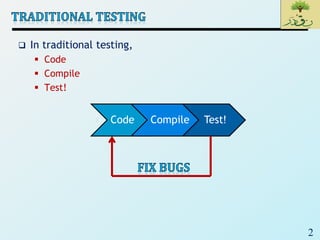
 In traditional testing,
 Code
 Compile
 Test!
Code Compile Test!
3
 Test-Driven Development (TDD) is a software
development process that relies on the repetition of a
very short development cycle:
 first the developer writes an (initially failing test) automated
test case that defines a desired improvement or new function,
 then produces the minimum amount of code to pass that test,
and
 finally refactors the new code to acceptable standards.
 A test is not something you “do”, it is something you
“write” and
 run once, twice, three times, etc.
 It is a piece of code
 Testing is therefore “automated”
 Repeatedly executed, even after small changes
4
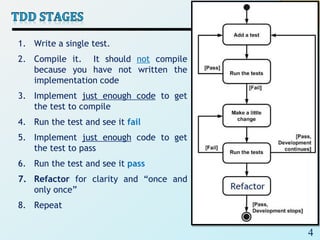
1. Write a single test.
2. Compile it. It should not compile
because you have not written the
implementation code
3. Implement just enough code to get
the test to compile
4. Run the test and see it fail
5. Implement just enough code to get
the test to pass
6. Run the test and see it pass
7. Refactor for clarity and “once and
only once”
8. Repeat
5
 Context of Testing:
 Valid inputs
 Invalid inputs
 Errors, exceptions, and events
 Boundary conditions
 Everything that might break
 Testing Framework (Xunit)
 A testing framework is used so that automated testing can
be done after every small change to the code
• This may be as often as every 5 or 10 minutes
6
 Programmers dislike testing
 They will test reasonably thoroughly the first time
 The second time however, testing is usually less thorough
 The third time, well..
 Testing is considered a “boring” task
 Testing might be the job of another department/person
 TDD encourages programmers to maintain an exhaustive
set of repeatable tests
 Tests live alongside the Class/Code Under Test (CUT)
 With tool support, tests can be run selectively
 The tests can be run after every single change
7
 Writing clear requirements.
 Code proven to meet requirements
 Development in small steps (Shorter development cycles).
 The debugging will easier since we will have small code chunks to debug.
 Minimalistic code and enforce the YAGNI “You Aren’t Gonna Need It”
principle
 It is a principle of extreme programming (XP) that states
a programmer should not add functionality until deemed necessary.
 Catch bugs before they are shipped to your customer
 No code without tests
 Tests determine the code
 TDD negates fear
 Fear makes developers communicate less
 Fear makes developers avoid repeatedly testing code
• Afraid of negative feedback
 TDD allows us to refactor, or change the implementation of a class,
without the fear of breaking it
 TDD and refactoring go hand-in-hand
8
 JUnit is a unit testing framework for Java programming
language. It plays a crucial role test-driven
development.
 JUnit is a framework for writing tests
 Written by Erich Gamma (of Design Patterns fame) and
Kent Beck (creator of XP methodology)
 Uses Java features such as annotations and static imports
 JUnit helps the programmer:
• define and execute tests and test suites
• formalize requirements
• write and debug code
• integrate code and always be ready to release a working
version
9
 A test fixture sets up the data (both objects and
primitives) that are needed for every test
 Example: If you are testing code that updates an employee
record, you need an employee record to test it on
 A unit test is a test of a single class
 A test case tests the response of a single method to a
particular set of inputs
 A test suite is a collection of test cases
 A test runner is software that runs tests and reports
results
10
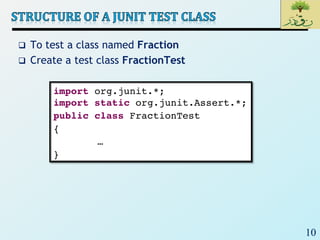
 To test a class named Fraction
 Create a test class FractionTest
11
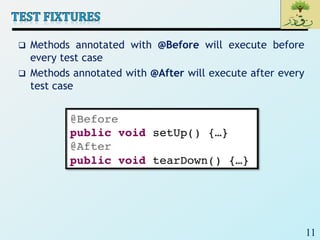
 Methods annotated with @Before will execute before
every test case
 Methods annotated with @After will execute after every
test case
12
 Methods annotated with @BeforeClass will execute once
before all test cases
 Methods annotated with @AfterClass will execute once
after all test cases
 These are useful if you need to allocate and release
expensive resources once
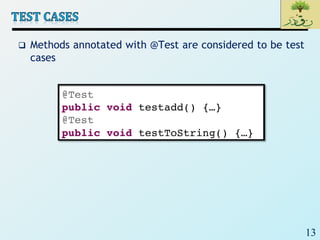
13
 Methods annotated with @Test are considered to be test
cases
14
 For each test case t:
 JUnit executes all @Before methods
• Their order of execution is not specified
 JUnit executes t
• Any exceptions during its execution are logged
 JUnit executes all @After methods
• Their order of execution is not specified
 A report for all test cases is presented
15
 Call the methods of the class being tested
 Assert what the correct result should be with one of the
provided assert methods
 These steps can be repeated as many times as necessary
 An assert method is a JUnit method that performs a
test, and throws an AssertionError if the test fails
 JUnit catches these exceptions and shows you the results
16
 assertTrue(boolean b)
assertTrue(String s, boolean b)
 Throws an AssertionError if b is False
 The optional message s is included in the Error
 assertFalse(boolean b)
assertFalse(String s, boolean b)
 Throws an AssertionError if b is True
 All assert methods have an optional message
17
 assertEquals(Object expected, Object actual)
 Uses the equals method to compare the two objects
 Primitives can be passed as arguments.
 Casting may be required for primitives.
 There is also a version to compare arrays.
18
 assertSame(Object expected, Object actual)
 Asserts that two references are attached to the same
object (using ==)
 assertNotSame(Object expected, Object actual)
 Asserts that two references are not attached to the same
object
19
 assertNull(Object object)
 Asserts that a reference is null
 assertNotNull(Object object)
 Asserts that a reference is not null
 fail()
 Causes the test to fail and throw an AssertionError
• Useful as a result of a complex test, or when testing for
exceptions
20
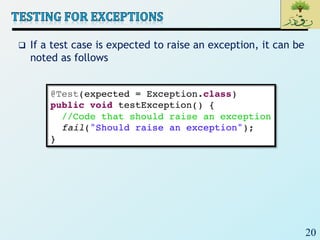
 If a test case is expected to raise an exception, it can be
noted as follows
21
 A statement such as
assert boolean_condition;
 will also throw an AssertionError if the boolean_condition
is false
 Can be used instead of the Junit assertTrue method
22
 Test cases that are not finished yet can be annotated
with @Ignore
 JUnit will not execute the test case but will report how
many test cases are being ignored
23
 To demonstrate the power of JUnit let us create the
simple Java class and write several test cases for it.
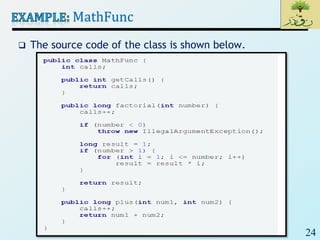
 The class named MathFunc has two methods: factorial
of non-negative number and sum of two integer
numbers. Also, there is a counter of method calls just to
make the class more complex.
24
MathFunc
 The source code of the class is shown below.
25
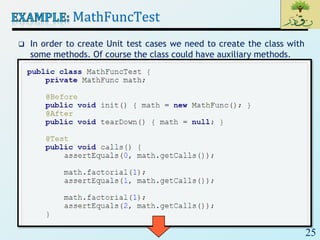
MathFuncTest
 In order to create Unit test cases we need to create the class with
some methods. Of course the class could have auxiliary methods.
26
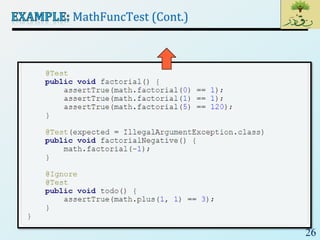
MathFuncTest (Cont.)
27
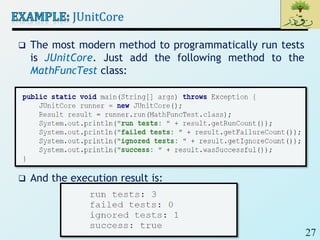
JUnitCore
 The most modern method to programmatically run tests
is JUnitCore. Just add the following method to the
MathFuncTest class:
 And the execution result is:
28

SE2_Lec 21_ TDD and Junit

  • 1.
  • 2.
    2  In traditionaltesting,  Code  Compile  Test! Code Compile Test!
  • 3.
    3  Test-Driven Development(TDD) is a software development process that relies on the repetition of a very short development cycle:  first the developer writes an (initially failing test) automated test case that defines a desired improvement or new function,  then produces the minimum amount of code to pass that test, and  finally refactors the new code to acceptable standards.  A test is not something you “do”, it is something you “write” and  run once, twice, three times, etc.  It is a piece of code  Testing is therefore “automated”  Repeatedly executed, even after small changes
  • 4.
    4 1. Write asingle test. 2. Compile it. It should not compile because you have not written the implementation code 3. Implement just enough code to get the test to compile 4. Run the test and see it fail 5. Implement just enough code to get the test to pass 6. Run the test and see it pass 7. Refactor for clarity and “once and only once” 8. Repeat
  • 5.
    5  Context ofTesting:  Valid inputs  Invalid inputs  Errors, exceptions, and events  Boundary conditions  Everything that might break  Testing Framework (Xunit)  A testing framework is used so that automated testing can be done after every small change to the code • This may be as often as every 5 or 10 minutes
  • 6.
    6  Programmers disliketesting  They will test reasonably thoroughly the first time  The second time however, testing is usually less thorough  The third time, well..  Testing is considered a “boring” task  Testing might be the job of another department/person  TDD encourages programmers to maintain an exhaustive set of repeatable tests  Tests live alongside the Class/Code Under Test (CUT)  With tool support, tests can be run selectively  The tests can be run after every single change
  • 7.
    7  Writing clearrequirements.  Code proven to meet requirements  Development in small steps (Shorter development cycles).  The debugging will easier since we will have small code chunks to debug.  Minimalistic code and enforce the YAGNI “You Aren’t Gonna Need It” principle  It is a principle of extreme programming (XP) that states a programmer should not add functionality until deemed necessary.  Catch bugs before they are shipped to your customer  No code without tests  Tests determine the code  TDD negates fear  Fear makes developers communicate less  Fear makes developers avoid repeatedly testing code • Afraid of negative feedback  TDD allows us to refactor, or change the implementation of a class, without the fear of breaking it  TDD and refactoring go hand-in-hand
  • 8.
    8  JUnit isa unit testing framework for Java programming language. It plays a crucial role test-driven development.  JUnit is a framework for writing tests  Written by Erich Gamma (of Design Patterns fame) and Kent Beck (creator of XP methodology)  Uses Java features such as annotations and static imports  JUnit helps the programmer: • define and execute tests and test suites • formalize requirements • write and debug code • integrate code and always be ready to release a working version
  • 9.
    9  A testfixture sets up the data (both objects and primitives) that are needed for every test  Example: If you are testing code that updates an employee record, you need an employee record to test it on  A unit test is a test of a single class  A test case tests the response of a single method to a particular set of inputs  A test suite is a collection of test cases  A test runner is software that runs tests and reports results
  • 10.
    10  To testa class named Fraction  Create a test class FractionTest
  • 11.
    11  Methods annotatedwith @Before will execute before every test case  Methods annotated with @After will execute after every test case
  • 12.
    12  Methods annotatedwith @BeforeClass will execute once before all test cases  Methods annotated with @AfterClass will execute once after all test cases  These are useful if you need to allocate and release expensive resources once
  • 13.
    13  Methods annotatedwith @Test are considered to be test cases
  • 14.
    14  For eachtest case t:  JUnit executes all @Before methods • Their order of execution is not specified  JUnit executes t • Any exceptions during its execution are logged  JUnit executes all @After methods • Their order of execution is not specified  A report for all test cases is presented
  • 15.
    15  Call themethods of the class being tested  Assert what the correct result should be with one of the provided assert methods  These steps can be repeated as many times as necessary  An assert method is a JUnit method that performs a test, and throws an AssertionError if the test fails  JUnit catches these exceptions and shows you the results
  • 16.
    16  assertTrue(boolean b) assertTrue(Strings, boolean b)  Throws an AssertionError if b is False  The optional message s is included in the Error  assertFalse(boolean b) assertFalse(String s, boolean b)  Throws an AssertionError if b is True  All assert methods have an optional message
  • 17.
    17  assertEquals(Object expected,Object actual)  Uses the equals method to compare the two objects  Primitives can be passed as arguments.  Casting may be required for primitives.  There is also a version to compare arrays.
  • 18.
    18  assertSame(Object expected,Object actual)  Asserts that two references are attached to the same object (using ==)  assertNotSame(Object expected, Object actual)  Asserts that two references are not attached to the same object
  • 19.
    19  assertNull(Object object) Asserts that a reference is null  assertNotNull(Object object)  Asserts that a reference is not null  fail()  Causes the test to fail and throw an AssertionError • Useful as a result of a complex test, or when testing for exceptions
  • 20.
    20  If atest case is expected to raise an exception, it can be noted as follows
  • 21.
    21  A statementsuch as assert boolean_condition;  will also throw an AssertionError if the boolean_condition is false  Can be used instead of the Junit assertTrue method
  • 22.
    22  Test casesthat are not finished yet can be annotated with @Ignore  JUnit will not execute the test case but will report how many test cases are being ignored
  • 23.
    23  To demonstratethe power of JUnit let us create the simple Java class and write several test cases for it.  The class named MathFunc has two methods: factorial of non-negative number and sum of two integer numbers. Also, there is a counter of method calls just to make the class more complex.
  • 24.
    24 MathFunc  The sourcecode of the class is shown below.
  • 25.
    25 MathFuncTest  In orderto create Unit test cases we need to create the class with some methods. Of course the class could have auxiliary methods.
  • 26.
  • 27.
    27 JUnitCore  The mostmodern method to programmatically run tests is JUnitCore. Just add the following method to the MathFuncTest class:  And the execution result is:
  • 28.