JUnit: A ComprehensiveGuide
A Beginner-Friendly Overview for Effective Unit
Testing
What is JUnit?
JUnit is a popular unit testing framework designed for the Java programming language. It
simplifies the process of writing and running tests for individual units of code (like methods or
classes). JUnit is widely used in Test-Driven Development (TDD), a software development
methodology where tests are written before the code itself. It ensures code reliability, stability,
and correct functionality, making it an essential tool for developers.
1. Introduction
JUnit is a widely-used framework for unit testing in Java. It helps developers verify that
individual components (methods or classes) of their code work as intended. By automating tests
and providing robust features, JUnit ensures high code quality and supports modern
development practices like Test-Driven Development (TDD).
2. History and Evolution of JUnit
JUnit was first introduced in 1997 by Erich Gamma and Kent Beck as an open-source project. It
was inspired by the Smalltalk testing framework SUnit. Over the years, JUnit has evolved
significantly, introducing new features and support for modern development practices. The
current version, JUnit 5, also known as JUnit Jupiter, was released in 2017 and offers enhanced
functionality and modularity.
3. Key Features of JUnit
JUnit offers several features to streamline the testing process:
Annotations: Simplify the definition and management of tests.
Assertions: Provide methods to compare expected and actual results.
Parameterized Tests: Allow running the same test with different inputs.
Integration: Works seamlessly with build tools like Maven and Gradle.
Extensibility: Supports custom test runners and extensions.
4. Core Annotations in JUnit
@Test: Marks a method as a test case.
@BeforeEach: Runs before each test method.
@AfterEach: Runs after each test method.
2.
@BeforeAll: Executesonce before all tests in the class.
@AfterAll: Executes once after all tests in the class.
@Disabled: Temporarily disables a test.
@Ignore: Skips the test or test class from execution.
@RunWith: Specifies a custom test runner for advanced scenarios like parameterized tests.
5. Assertions are used to compare the actual result of a test with the
expected result. Some common methods include:
assertTrue(condition): Validates that a condition is true.
assertFalse(condition): Validates that a condition is false.
assertEquals(expected, actual): Validates that two values are equal.
assertNotEquals(expected, actual): Validates that two values are not equal.
assertNull(object): Validates that an object is null.
assertNotNull(object): Validates that an object is not null.
assertArrayEquals(expectedArray, actualArray): Validates that two arrays are
equal.
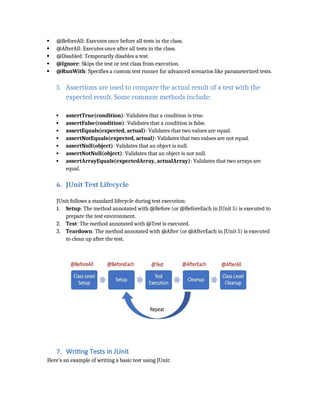
6. JUnit Test Lifecycle
JUnit follows a standard lifecycle during test execution:
1. Setup: The method annotated with @Before (or @BeforeEach in JUnit 5) is executed to
prepare the test environment.
2. Test: The method annotated with @Test is executed.
3. Teardown: The method annotated with @After (or @AfterEach in JUnit 5) is executed
to clean up after the test.
7. Writing Tests in JUnit
Here’s an example of writing a basic test using JUnit:
3.
import org.junit.jupiter.api.Test;
import staticorg.junit.jupiter.api.Assertions.assertEquals;
public class CalculatorTest {
@Test
public void testAddition() {
Calculator calculator = new Calculator();
int result = calculator.add(2, 3);
assertEquals(5, result, "2 + 3 should equal 5");
}
}
In this example, the `testAddition` method tests the `add` method of the Calculator class. The
`assertEquals` assertion checks if the method returns the expected result.
8. Advanced Features of JUnit
JUnit includes advanced features to cater to diverse testing needs:
Parameterized Tests: Allows the same test to run with multiple data sets using
`@ParameterizedTest` and sources like `@ValueSource` or `@CsvSource`.
Exception Testing: Verifies if a specific exception is thrown using `assertThrows`.
Dynamic Tests: Generates tests programmatically at runtime using
`@TestFactory`.
Assertions with Lambda Expressions: Provides greater flexibility for complex test
scenarios.
9. Benefits of Using JUnit
1. Improved Code Quality: Ensures code meets functional and design expectations.
2. Reduced Debugging Time: Identifies issues early in the development cycle.
3. Faster Development: Encourages quick identification and resolution of bugs.
4. Better Code Design: Writing test cases promotes modular and loosely coupled code.
10. Best Practices for Writing JUnit Tests
Keep Tests Independent: Ensure tests don’t depend on each other to avoid
cascading failures.
Use Descriptive Test Names: Clearly indicate the purpose of each test.
Use Assertions Effectively: Ensure all edge cases and scenarios are tested.
Test for Exceptions: Validate that the system behaves correctly under error
conditions.
4.
Leverage MockingFrameworks: Use tools like Mockito to isolate
dependencies in unit tests.
Keep Tests Independent: Ensure tests don’t depend on each other to avoid
cascading failures
11.Integration with Build Tools
JUnit integrates seamlessly with popular build tools like Maven and Gradle. These tools allow
tests to be executed automatically during the build process, ensuring that code changes are
tested continuously.
For Maven, add the following dependency in the `pom.xml` file:
<dependency>
<groupId>org.junit.jupiter</groupId>
<artifactId>junit-jupiter</artifactId>
<version>5.10.0</version>
<scope>test</scope>
</dependency>
12. Comparison with Other Testing Frameworks
JUnit is one of many testing frameworks available for Java. Here's a comparison with a few
popular ones:
TestNG: Offers more flexible annotations and test configuration options compared to JUnit.
Mockito: Focuses on mocking dependencies rather than direct testing like JUnit.
Spock: A Groovy-based testing framework known for its expressive syntax.
13. Conclusion
JUnit is an indispensable tool for Java developers. Its features promote better code quality,
reduce bugs, and support modern development practices like TDD. By making testing an
integral part of the development process, JUnit ensures robust and reliable software. JUnit is a
powerful unit testing framework for Java that helps developers ensure their code is reliable,
stable, and functions as expected. By following best practices and using JUnit effectively,
developers can improve code quality, reduce debugging time, and speed up development.


![DA-_MID-II-Quiz_Bank[1] - Cop.............................y.docx](https://cdn.slidesharecdn.com/ss_thumbnails/da-mid-ii-quizbank1-copy-250613140452-dc99fb83-thumbnail.jpg?width=640&height=640&fit=bounds)

![JUnit_Guide_Expanded_Presentation[1].docx](https://cdn.slidesharecdn.com/ss_thumbnails/junitguideexpandedpresentation1-250613140244-8aa65372-thumbnail.jpg?width=640&height=640&fit=bounds)
![JUnit_Guide_Expanded_Presentation[1].docx............................](https://cdn.slidesharecdn.com/ss_thumbnails/junitguideexpandedpresentation1-250613140128-a608bde9-thumbnail.jpg?width=640&height=640&fit=bounds)


