Introduction to Azure
Infrastructure as a Service (IaaS)
January 2018
@directorcia
http://about.me/ciaops
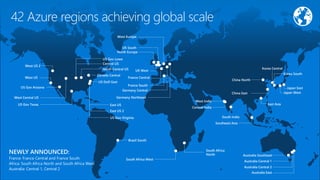
42 Azure regions achieving global scale
West US 2
West US
US Gov Arizona
West Central US
US Gov Texas East US
Brazil South
US DoD East
Canada Central
Central US
North Central US
UK South
North Europe
UK West
France Central
France South
Germany Central
Germany Northeast
South Africa West
South Africa
North
Australia Central 1
Australia Southeast
Southeast Asia
South India
West India
Central India
East Asia
Korea South
Japan West
Japan East
China North
Korea Central
East US 2
US Gov Virginia
West Europe
US Gov Lowa
China East
Australia East
Australia Central 2
NEWLY ANNOUNCED:
France: France Central and France South
Africa: South Africa North and South Africa West
Australia: Central 1, Central 2
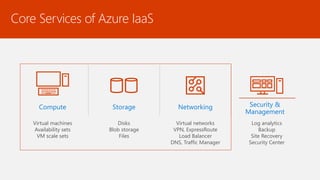
Core Services of Azure IaaS
Compute
Virtual machines
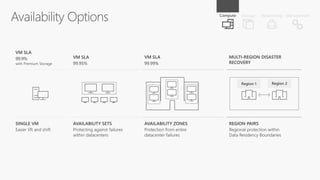
Availability sets
VM scale sets
Storage
Disks
Blob storage
Files
Networking
Virtual networks
VPN, ExpressRoute
Load Balancer
DNS, Traffic Manager
Security &
Management
Log analytics
Backup
Site Recovery
Security Center
Azure
On Prem
VMs
Backup SQL
VPN
Office 365
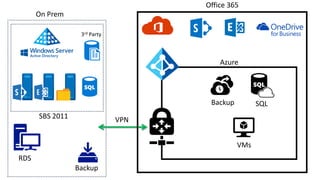
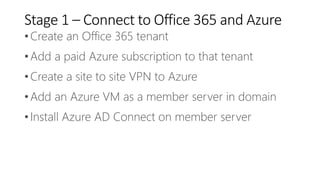
Stage 1 – Connect to Office 365 and Azure
•Create an Office 365 tenant
•Add a paid Azure subscription to that tenant
•Create a site to site VPN to Azure
•Add an Azure VM as a member server in domain
•Install Azure AD Connect on member server
Set up Azure Virtual
Network
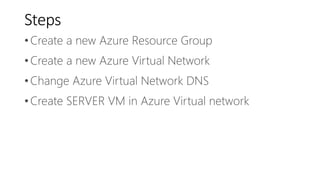
Steps
•Create a new Azure Resource Group
•Create a new Azure Virtual Network
•Change Azure Virtual Network DNS
•Create SERVER VM in Azure Virtual network
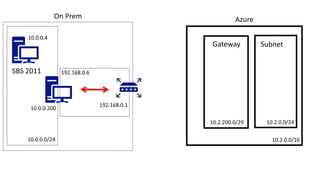
Azure
10.2.0.0/16
10.2.0.0/2410.2.200.0/29
Gateway Subnet
On Prem
Azure
ServerA
VPN
Subnet
On Prem
NewDC
Sync
Gateway
Select a Virtual
Machine
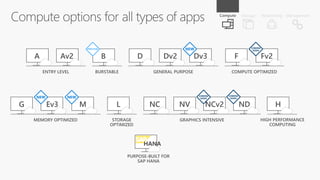
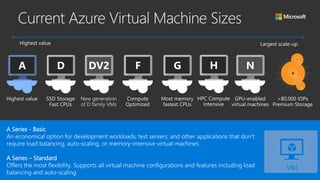
A Series - Basic
An economical option for development workloads, test servers, and other applications that don't
require load balancing, auto-scaling, or memory-intensive virtual machines
A Series – Standard
Offers the most flexibility. Supports all virtual machine configurations and features including load
balancing and auto-scaling
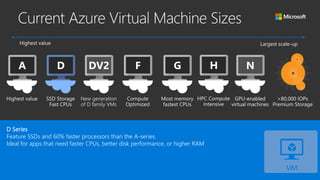
D Series
Feature SSDs and 60% faster processors than the A-series.
Ideal for apps that need faster CPUs, better disk performance, or higher RAM
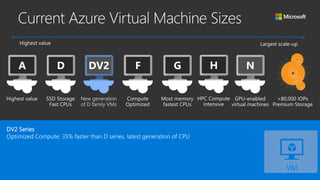
DV2 Series
Optimized Compute: 35% faster than D series, latest generation of CPU
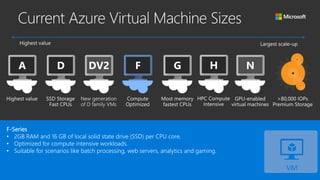
F-Series
• 2GB RAM and 16 GB of local solid state drive (SSD) per CPU core.
• Optimized for compute intensive workloads.
• Suitable for scenarios like batch processing, web servers, analytics and gaming.
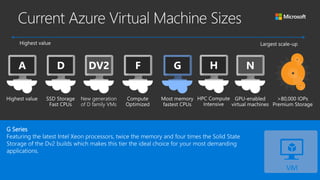
G Series
Featuring the latest Intel Xeon processors, twice the memory and four times the Solid State
Storage of the Dv2 builds which makes this tier the ideal choice for your most demanding
applications.
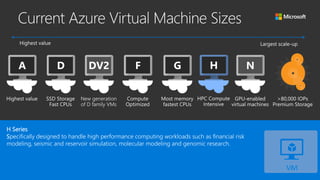
H Series
Specifically designed to handle high performance computing workloads such as financial risk
modeling, seismic and reservoir simulation, molecular modeling and genomic research.
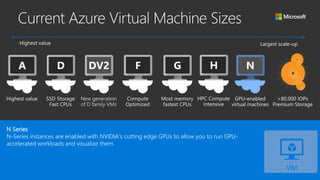
N Series
N-Series instances are enabled with NVIDIA’s cutting edge GPUs to allow you to run GPU-
accelerated workloads and visualize them.
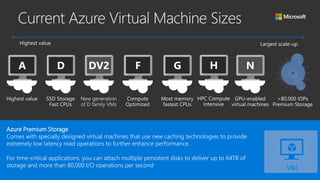
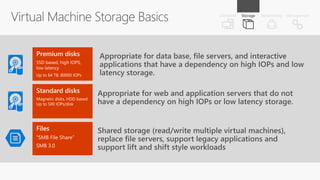
Azure Premium Storage
Comes with specially designed virtual machines that use new caching technologies to provide
extremely low latency read operations to further enhance performance.
For time-critical applications, you can attach multiple persistent disks to deliver up to 64TB of
storage and more than 80,000 I/O operations per second
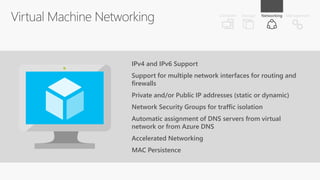
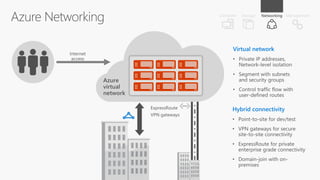
Azure Virtual
Networking
IPv4 and IPv6 Support
Support for multiple network interfaces for routing and
firewalls
Private and/or Public IP addresses (static or dynamic)
Network Security Groups for traffic isolation
Automatic assignment of DNS servers from virtual
network or from Azure DNS
Accelerated Networking
MAC Persistence
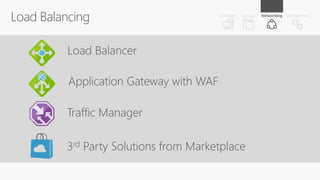
Load Balancer
Application Gateway with WAF
Traffic Manager
3rd Party Solutions from Marketplace
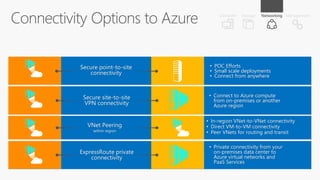
Secure site-to-site
VPN connectivity
• Connect to Azure compute
from on-premises or another
Azure region
Secure point-to-site
connectivity
• POC Efforts
• Small scale deployments
• Connect from anywhere
ExpressRoute private
connectivity
• Private connectivity from your
on-premises data center to
Azure virtual networks and
PaaS Services
VNet Peering
within region
• In-region VNet-to-VNet connectivity
• Direct VM-to-VM connectivity
• Peer VNets for routing and transit
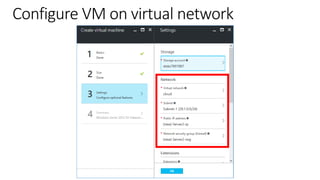
Configure VM on virtual network
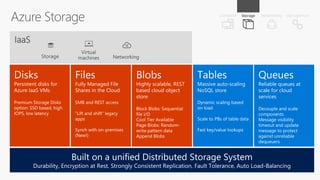
Azure Storage
Queues
Reliable queues at
scale for cloud
services
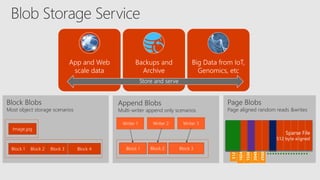
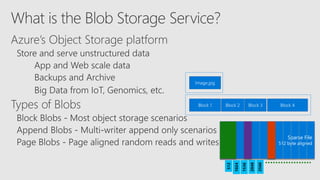
Block 1 Block 4Block 3Block 2
Image.jpg
Sparse File
512 byte aligned
512
1024
1536
2048
2560
App and Web
scale data
Backups and
Archive
Big Data from IoT,
Genomics, etc
Append Blobs
Multi-writer append only scenarios
Block Blobs
Most object storage scenarios
Page Blobs
Page aligned random reads &writes
Block 1 Block 3Block 2
Writer 1 Writer 2 Writer 3
Store and serve
Block 1 Block 4Block 3Block 2
Image.jpg
Sparse File
512 byte aligned
512
1024
1536
2048
2560
Blob REST API
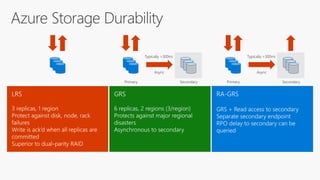
GRS
6 replicas, 2 regions (3/region)
Protects against major regional
disasters
Asynchronous to secondary
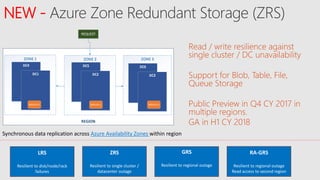
NEW -
Read / write resilience against
single cluster / DC unavailability
Support for Blob, Table, File,
Queue Storage
Public Preview in Q4 CY 2017 in
multiple regions.
GA in H1 CY 2018REGION
ZONE 2 ZONE 3ZONE 1
DC4
DC1
DC5
DC2
DC6
DC3
REPLICA 2 REPLICA 1 REPLICA 3
REQUEST
Synchronous data replication across Azure Availability Zones within region
LRS
Resilient to disk/node/rack
failures
ZRS
Resilient to single cluster /
datacenter outage
GRS
Resilient to regional outage
RA-GRS
Resilient to regional outage
Read access to second region
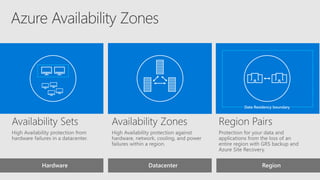
Hardware Datacenter Region
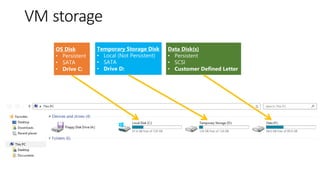
VM storage
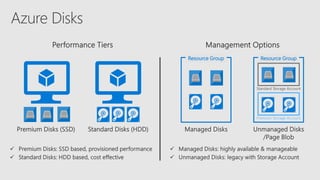
Resource Group Resource Group
Premium Storage Account
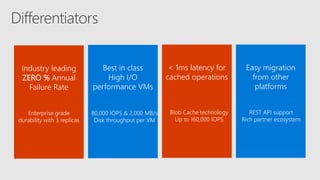
< 1ms latency for
cached operations
Blob Cache technology
Up to 160,000 IOPS
Industry leading
ZERO % Annual
Failure Rate
Enterprise grade
durability with 3 replicas
Best in class
High I/O
performance VMs
80,000 IOPS & 2,000 MB/s
Disk throughput per VM
Easy migration
from other
platforms
REST API support
Rich partner ecosystem
New
New
New
New -
New -
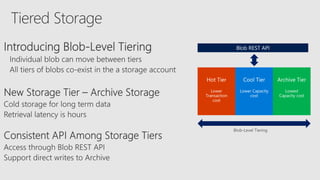
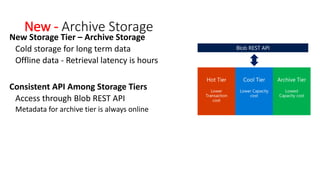
New - Archive Storage
New Storage Tier – Archive Storage
Cold storage for long term data
Offline data - Retrieval latency is hours
Consistent API Among Storage Tiers
Access through Blob REST API
Metadata for archive tier is always online
Blob REST API
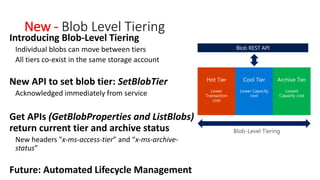
New - Blob Level Tiering
Introducing Blob-Level Tiering
Individual blobs can move between tiers
All tiers co-exist in the same storage account
New API to set blob tier: SetBlobTier
Acknowledged immediately from service
Get APIs (GetBlobProperties and ListBlobs)
return current tier and archive status
New headers "x-ms-access-tier” and “x-ms-archive-
status”
Future: Automated Lifecycle Management
Blob REST API
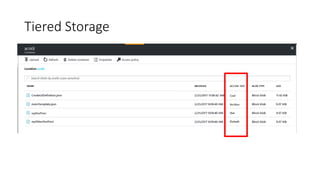
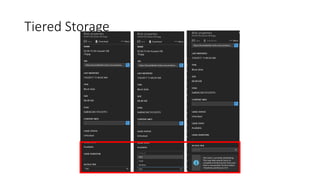
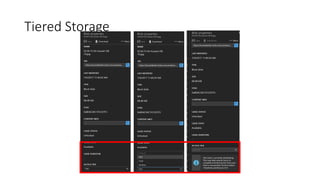
Tiered Storage
Tiered Storage
Tiered Storage
Azure Management
and Security
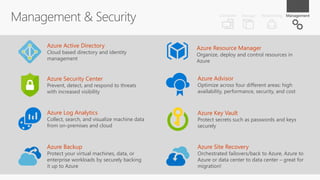
Azure Security Center
Prevent, detect, and respond to threats
with increased visibility
Azure Log Analytics
Collect, search, and visualize machine data
from on-premises and cloud
Azure Resource Manager
Organize, deploy and control resources in
Azure
Azure Active Directory
Cloud based directory and identity
management
Azure Key Vault
Protect secrets such as passwords and keys
securely
Azure Advisor
Optimize across four different areas: high
availability, performance, security, and cost
Azure Backup
Protect your virtual machines, data, or
enterprise workloads by securely backing
it up to Azure
Azure Site Recovery
Orchestrated failovers/back to Azure, Azure to
Azure or data center to data center – great for
migration!

Introduction to Azure IaaS

  • 1.
    Introduction to Azure Infrastructureas a Service (IaaS) January 2018 @directorcia http://about.me/ciaops
  • 2.
    42 Azure regionsachieving global scale West US 2 West US US Gov Arizona West Central US US Gov Texas East US Brazil South US DoD East Canada Central Central US North Central US UK South North Europe UK West France Central France South Germany Central Germany Northeast South Africa West South Africa North Australia Central 1 Australia Southeast Southeast Asia South India West India Central India East Asia Korea South Japan West Japan East China North Korea Central East US 2 US Gov Virginia West Europe US Gov Lowa China East Australia East Australia Central 2 NEWLY ANNOUNCED: France: France Central and France South Africa: South Africa North and South Africa West Australia: Central 1, Central 2
  • 3.
    Core Services ofAzure IaaS Compute Virtual machines Availability sets VM scale sets Storage Disks Blob storage Files Networking Virtual networks VPN, ExpressRoute Load Balancer DNS, Traffic Manager Security & Management Log analytics Backup Site Recovery Security Center
  • 4.
  • 5.
    Stage 1 –Connect to Office 365 and Azure •Create an Office 365 tenant •Add a paid Azure subscription to that tenant •Create a site to site VPN to Azure •Add an Azure VM as a member server in domain •Install Azure AD Connect on member server
  • 6.
    Set up AzureVirtual Network
  • 7.
    Steps •Create a newAzure Resource Group •Create a new Azure Virtual Network •Change Azure Virtual Network DNS •Create SERVER VM in Azure Virtual network
  • 8.
  • 9.
  • 10.
  • 13.
    A Series -Basic An economical option for development workloads, test servers, and other applications that don't require load balancing, auto-scaling, or memory-intensive virtual machines A Series – Standard Offers the most flexibility. Supports all virtual machine configurations and features including load balancing and auto-scaling
  • 14.
    D Series Feature SSDsand 60% faster processors than the A-series. Ideal for apps that need faster CPUs, better disk performance, or higher RAM
  • 15.
    DV2 Series Optimized Compute:35% faster than D series, latest generation of CPU
  • 16.
    F-Series • 2GB RAMand 16 GB of local solid state drive (SSD) per CPU core. • Optimized for compute intensive workloads. • Suitable for scenarios like batch processing, web servers, analytics and gaming.
  • 17.
    G Series Featuring thelatest Intel Xeon processors, twice the memory and four times the Solid State Storage of the Dv2 builds which makes this tier the ideal choice for your most demanding applications.
  • 18.
    H Series Specifically designedto handle high performance computing workloads such as financial risk modeling, seismic and reservoir simulation, molecular modeling and genomic research.
  • 19.
    N Series N-Series instancesare enabled with NVIDIA’s cutting edge GPUs to allow you to run GPU- accelerated workloads and visualize them.
  • 20.
    Azure Premium Storage Comeswith specially designed virtual machines that use new caching technologies to provide extremely low latency read operations to further enhance performance. For time-critical applications, you can attach multiple persistent disks to deliver up to 64TB of storage and more than 80,000 I/O operations per second
  • 21.
  • 22.
    IPv4 and IPv6Support Support for multiple network interfaces for routing and firewalls Private and/or Public IP addresses (static or dynamic) Network Security Groups for traffic isolation Automatic assignment of DNS servers from virtual network or from Azure DNS Accelerated Networking MAC Persistence
  • 23.
    Load Balancer Application Gatewaywith WAF Traffic Manager 3rd Party Solutions from Marketplace
  • 24.
    Secure site-to-site VPN connectivity •Connect to Azure compute from on-premises or another Azure region Secure point-to-site connectivity • POC Efforts • Small scale deployments • Connect from anywhere ExpressRoute private connectivity • Private connectivity from your on-premises data center to Azure virtual networks and PaaS Services VNet Peering within region • In-region VNet-to-VNet connectivity • Direct VM-to-VM connectivity • Peer VNets for routing and transit
  • 26.
    Configure VM onvirtual network
  • 27.
  • 29.
  • 31.
    Block 1 Block4Block 3Block 2 Image.jpg Sparse File 512 byte aligned 512 1024 1536 2048 2560 App and Web scale data Backups and Archive Big Data from IoT, Genomics, etc Append Blobs Multi-writer append only scenarios Block Blobs Most object storage scenarios Page Blobs Page aligned random reads &writes Block 1 Block 3Block 2 Writer 1 Writer 2 Writer 3 Store and serve
  • 32.
    Block 1 Block4Block 3Block 2 Image.jpg Sparse File 512 byte aligned 512 1024 1536 2048 2560
  • 33.
  • 34.
    GRS 6 replicas, 2regions (3/region) Protects against major regional disasters Asynchronous to secondary
  • 35.
    NEW - Read /write resilience against single cluster / DC unavailability Support for Blob, Table, File, Queue Storage Public Preview in Q4 CY 2017 in multiple regions. GA in H1 CY 2018REGION ZONE 2 ZONE 3ZONE 1 DC4 DC1 DC5 DC2 DC6 DC3 REPLICA 2 REPLICA 1 REPLICA 3 REQUEST Synchronous data replication across Azure Availability Zones within region LRS Resilient to disk/node/rack failures ZRS Resilient to single cluster / datacenter outage GRS Resilient to regional outage RA-GRS Resilient to regional outage Read access to second region
  • 36.
  • 38.
  • 39.
    Resource Group ResourceGroup Premium Storage Account
  • 40.
    < 1ms latencyfor cached operations Blob Cache technology Up to 160,000 IOPS Industry leading ZERO % Annual Failure Rate Enterprise grade durability with 3 replicas Best in class High I/O performance VMs 80,000 IOPS & 2,000 MB/s Disk throughput per VM Easy migration from other platforms REST API support Rich partner ecosystem
  • 41.
  • 42.
  • 43.
  • 44.
  • 45.
    New - ArchiveStorage New Storage Tier – Archive Storage Cold storage for long term data Offline data - Retrieval latency is hours Consistent API Among Storage Tiers Access through Blob REST API Metadata for archive tier is always online Blob REST API
  • 46.
    New - BlobLevel Tiering Introducing Blob-Level Tiering Individual blobs can move between tiers All tiers co-exist in the same storage account New API to set blob tier: SetBlobTier Acknowledged immediately from service Get APIs (GetBlobProperties and ListBlobs) return current tier and archive status New headers "x-ms-access-tier” and “x-ms-archive- status” Future: Automated Lifecycle Management Blob REST API
  • 47.
  • 48.
  • 49.
  • 50.
  • 51.
    Azure Security Center Prevent,detect, and respond to threats with increased visibility Azure Log Analytics Collect, search, and visualize machine data from on-premises and cloud Azure Resource Manager Organize, deploy and control resources in Azure Azure Active Directory Cloud based directory and identity management Azure Key Vault Protect secrets such as passwords and keys securely Azure Advisor Optimize across four different areas: high availability, performance, security, and cost Azure Backup Protect your virtual machines, data, or enterprise workloads by securely backing it up to Azure Azure Site Recovery Orchestrated failovers/back to Azure, Azure to Azure or data center to data center – great for migration!