









Migrate an Existing Application
to Microsoft Azure
Chris Dufour, ASP .NET MVP
Software Architect, Changepoint
Follow me@chrduf
http://www.linkedin.com/in/cdufour
Agenda
• Our scenario
• Microsoft Azure Overview
• Microsoft Azure SQL Database
• Microsoft Azure Web Sites
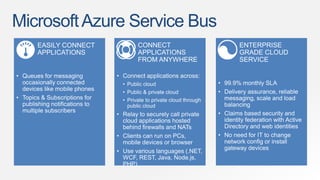
• Microsoft Azure Service Bus
Our Scenario
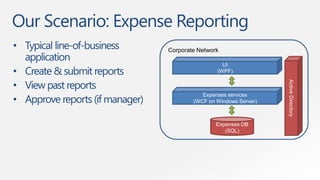
Our Scenario: Expense Reporting
• Typical line-of-business
application
• Create & submit reports
• View past reports
• Approve reports (if manager)
Corporate Network
Expenses DB
(SQL)
Expenses services
(WCF on Windows Server)
UI
(WPF)
ActiveDirectory
demo
Existing Application
MicrosoftAzure Overview
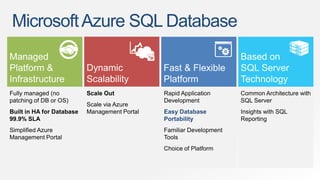
MicrosoftAzure SQL Database
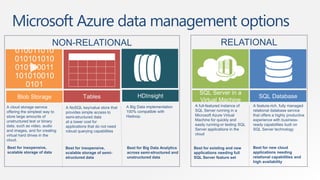
Microsoft Azure data management options
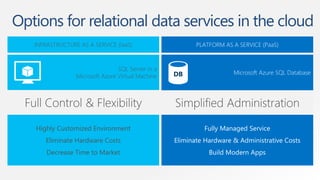
Options for relational data services in the cloud
MicrosoftAzure SQL Database
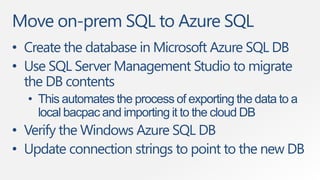
Move on-prem SQL to Azure SQL
• Create the database in Microsoft Azure SQL DB
• Use SQL Server Management Studio to migrate
the DB contents
• This automates the process of exporting the data to a
local bacpac and importing it to the cloud DB
• Verify the Windows Azure SQL DB
• Update connection strings to point to the new DB
demo
Deploy Database to
Microsoft Azure SQL Database
MicrosoftAzure Web Sites
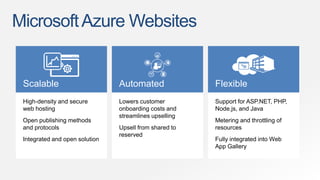
MicrosoftAzure Websites
Scalable Automated Flexible
High-density and secure
web hosting
Open publishing methods
and protocols
Integrated and open solution
Lowers customer
onboarding costs and
streamlines upselling
Upsell from shared to
reserved
Support for ASP.NET, PHP,
Node.js, and Java
Metering and throttling of
resources
Fully integrated into Web
App Gallery
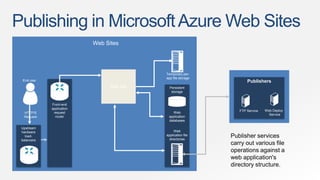
Publishing in MicrosoftAzure Web Sites
Upstream
hardware
load-
balancers
Front-end
application
request
router
Persistent
storage
Temporary per-
app file storage
Web
application
databases
Web
application file
directories
Web Sites
Web Site
End user
HTTP/S
Request
Publisher services
carry out various file
operations against a
web application's
directory structure.
Publishers
FTP Service Web Deploy
Service
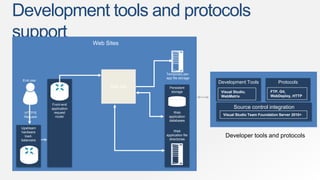
Development tools and protocols
support
Developer tools and protocols
ProtocolsDevelopment Tools
Visual Studio,
WebMatrix
Source control integration
Visual Studio Team Foundation Server 2010+
FTP, Git,
WebDeploy, HTTP
Upstream
hardware
load-
balancers
Front-end
application
request
router
Persistent
storage
Temporary per-
app file storage
Web
application
databases
Web
application file
directories
Web Sites
Web Site
End user
HTTP/S
Request
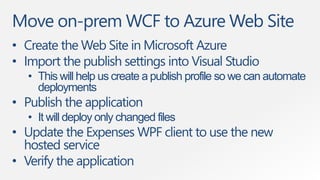
Move on-prem WCF to Azure Web Site
• Create the Web Site in Microsoft Azure
• Import the publish settings into Visual Studio
• This will help us create a publish profile so we can automate
deployments
• Publish the application
• It will deploy only changed files
• Update the Expenses WPF client to use the new
hosted service
• Verify the application
demo
Deploy Public WCF Service to
Microsoft Azure Web Sites
MicrosoftAzure Service Bus
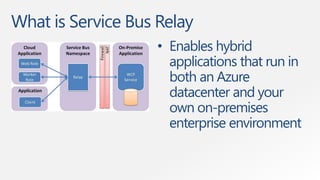
What is Service Bus Relay
• Enables hybrid
applications that run in
both an Azure
datacenter and your
own on-premises
enterprise environment
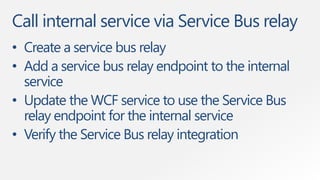
Call internal service via Service Bus relay
• Create a service bus relay
• Add a service bus relay endpoint to the internal
service
• Update the WCF service to use the Service Bus
relay endpoint for the internal service
• Verify the Service Bus relay integration
demo
Expose Private WCF Service Through
Microsoft Azure Service Bus
Summary
• Our scenario
• Microsoft Azure Overview
• Microsoft Azure SQL Database
• Microsoft Azure Web Sites
• Microsoft Azure Service Bus
Resources
• Microsoft Azure Free Trial
azure.microsoft.com/en-us/pricing/free-trial
• Microsoft Virtual Academy:
www.microsoftvirtualacademy.com
• Microsoft Azure SQL Database:
azure.microsoft.com/en-us/documentation/services/sql-database
• Microsoft Azure Web Sites:
azure.microsoft.com/en-us/documentation/services/web-sites
• Microsoft Azure Service Bus:
azure.microsoft.com/en-us/documentation/services/service-bus
Thank You

Migrate an Existing Application to Microsoft Azure

  • 1.
    Migrate an ExistingApplication to Microsoft Azure Chris Dufour, ASP .NET MVP Software Architect, Changepoint Follow me@chrduf http://www.linkedin.com/in/cdufour
  • 2.
    Agenda • Our scenario •Microsoft Azure Overview • Microsoft Azure SQL Database • Microsoft Azure Web Sites • Microsoft Azure Service Bus
  • 3.
  • 4.
    Our Scenario: ExpenseReporting • Typical line-of-business application • Create & submit reports • View past reports • Approve reports (if manager) Corporate Network Expenses DB (SQL) Expenses services (WCF on Windows Server) UI (WPF) ActiveDirectory
  • 5.
  • 6.
  • 8.
  • 9.
    Microsoft Azure datamanagement options
  • 10.
    Options for relationaldata services in the cloud
  • 11.
  • 12.
    Move on-prem SQLto Azure SQL • Create the database in Microsoft Azure SQL DB • Use SQL Server Management Studio to migrate the DB contents • This automates the process of exporting the data to a local bacpac and importing it to the cloud DB • Verify the Windows Azure SQL DB • Update connection strings to point to the new DB
  • 13.
  • 14.
  • 15.
    MicrosoftAzure Websites Scalable AutomatedFlexible High-density and secure web hosting Open publishing methods and protocols Integrated and open solution Lowers customer onboarding costs and streamlines upselling Upsell from shared to reserved Support for ASP.NET, PHP, Node.js, and Java Metering and throttling of resources Fully integrated into Web App Gallery
  • 16.
    Publishing in MicrosoftAzureWeb Sites Upstream hardware load- balancers Front-end application request router Persistent storage Temporary per- app file storage Web application databases Web application file directories Web Sites Web Site End user HTTP/S Request Publisher services carry out various file operations against a web application's directory structure. Publishers FTP Service Web Deploy Service
  • 17.
    Development tools andprotocols support Developer tools and protocols ProtocolsDevelopment Tools Visual Studio, WebMatrix Source control integration Visual Studio Team Foundation Server 2010+ FTP, Git, WebDeploy, HTTP Upstream hardware load- balancers Front-end application request router Persistent storage Temporary per- app file storage Web application databases Web application file directories Web Sites Web Site End user HTTP/S Request
  • 18.
    Move on-prem WCFto Azure Web Site • Create the Web Site in Microsoft Azure • Import the publish settings into Visual Studio • This will help us create a publish profile so we can automate deployments • Publish the application • It will deploy only changed files • Update the Expenses WPF client to use the new hosted service • Verify the application
  • 19.
    demo Deploy Public WCFService to Microsoft Azure Web Sites
  • 20.
  • 21.
  • 22.
    What is ServiceBus Relay • Enables hybrid applications that run in both an Azure datacenter and your own on-premises enterprise environment
  • 23.
    Call internal servicevia Service Bus relay • Create a service bus relay • Add a service bus relay endpoint to the internal service • Update the WCF service to use the Service Bus relay endpoint for the internal service • Verify the Service Bus relay integration
  • 24.
    demo Expose Private WCFService Through Microsoft Azure Service Bus
  • 25.
    Summary • Our scenario •Microsoft Azure Overview • Microsoft Azure SQL Database • Microsoft Azure Web Sites • Microsoft Azure Service Bus
  • 26.
    Resources • Microsoft AzureFree Trial azure.microsoft.com/en-us/pricing/free-trial • Microsoft Virtual Academy: www.microsoftvirtualacademy.com • Microsoft Azure SQL Database: azure.microsoft.com/en-us/documentation/services/sql-database • Microsoft Azure Web Sites: azure.microsoft.com/en-us/documentation/services/web-sites • Microsoft Azure Service Bus: azure.microsoft.com/en-us/documentation/services/service-bus
  • 27.