Windows Azure Pack - Authentication for
your Clouds
Alexandre Verkinderen
Inovativ BE
SCCDM MVP
@AlexVerkinderen
Christopher Keyaert
Inovativ BE
SCCDM MVP
@KeyaertC
What is this all about?
 Introduction
 Out of the box Authentication process
 Microsoft Azure Active Directory
 Introduction to MAAD
 Azure Active Directory Synchronization Services
 Multi-factor authentication
 Active Directory Federation Service
 ADFS with external identity providers
 Conclusion
Introduction
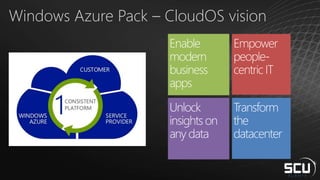
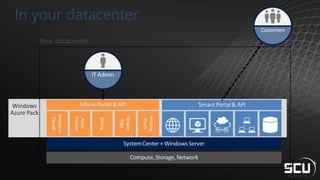
Windows Azure Pack – CloudOS vision
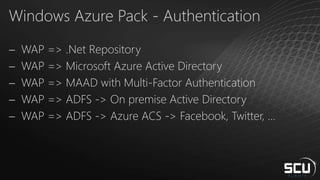
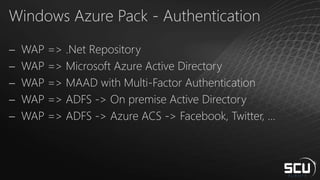
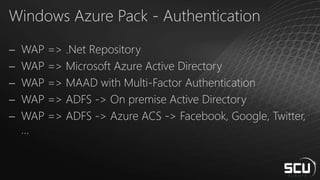
Windows Azure Pack - Authentication
 WAP => .Net Repository
 WAP => Microsoft Azure Active Directory
 WAP => MAAD with Multi-Factor Authentication
 WAP => ADFS -> On premise Active Directory
 WAP => ADFS -> Azure ACS -> Facebook, Twitter, …
Out of the box Authentication Process
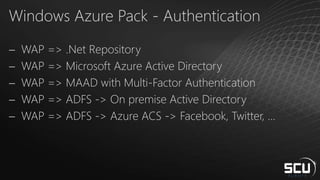
Windows Azure Pack - Authentication
 WAP => .Net Repository
 WAP => Microsoft Azure Active Directory
 WAP => MAAD with Multi-Factor Authentication
 WAP => ADFS -> On premise Active Directory
 WAP => ADFS -> Azure ACS -> Facebook, Twitter, …
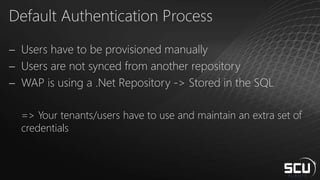
Default Authentication Process
 Users have to be provisioned manually
 Users are not synced from another repository
 WAP is using a .Net Repository -> Stored in the SQL
=> Your tenants/users have to use and maintain an extra set of
credentials
Out of the box Authentication Process
Demo
Microsoft Azure Active Diretory
Introduction to MAAD
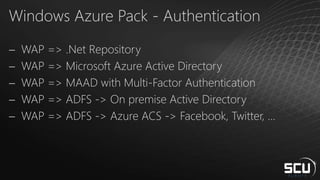
Windows Azure Pack - Authentication
 WAP => .Net Repository
 WAP => Microsoft Azure Active Directory
 WAP => MAAD with Multi-Factor Authentication
 WAP => ADFS -> On premise Active Directory
 WAP => ADFS -> Azure ACS -> Facebook, Twitter, …
Microsoft Azure Active Directory
 Identity and access management in the cloud
 Your organization’s cloud directory
 Used by
o Windows Azure
o Office 365
o Windows Intune
 Can be integrated with on-premises AD
 Integration with cloud applications
o Single sign-on experience
 App hosted in cloud
 Users authenticate with corporate credentials
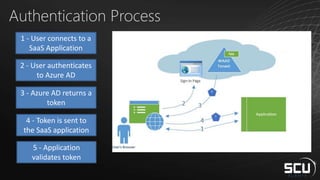
Authentication Process
1 - User connects to a
SaaS Application
2 - User authenticates
to Azure AD
3 - Azure AD returns a
token
4 - Token is sent to
the SaaS application
5 - Application
validates token
Microsoft Azure Active Diretory
Synchronization
Synchronization
 Synchronize users from On-Premise to Online
 User Management is done on-prem
 Password Synchronization
o A digest of the Windows Active Directory password hash is used for the transmission
between the on-premises AD and Azure Active Directory.
o The digest of the password hash cannot be used to access resources in the customer's on-
premises environment.
 Users have 1 set of credentials across on-prem and online
o But 2 accounts
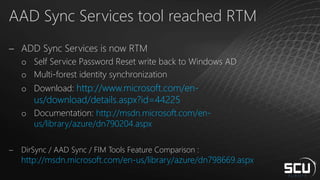
AAD Sync Services tool reached RTM
 ADD Sync Services is now RTM
o Self Service Password Reset write back to Windows AD
o Multi-forest identity synchronization
o Download: http://www.microsoft.com/en-
us/download/details.aspx?id=44225
o Documentation: http://msdn.microsoft.com/en-
us/library/azure/dn790204.aspx
 DirSync / AAD Sync / FIM Tools Feature Comparison :
http://msdn.microsoft.com/en-us/library/azure/dn798669.aspx
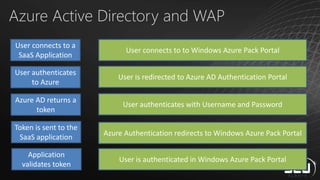
Azure Active Directory and WAP
User connects to a
SaaS Application
User authenticates
to Azure
Azure AD returns a
token
Token is sent to the
SaaS application
Application
validates token
User connects to to Windows Azure Pack Portal
User is redirected to Azure AD Authentication Portal
User authenticates with Username and Password
Azure Authentication redirects to Windows Azure Pack Portal
User is authenticated in Windows Azure Pack Portal
Azure Active Directory and WAP
Demo
Microsoft Azure Active Diretory
Multi-Factor Authentication
Windows Azure Pack - Authentication
 WAP => .Net Repository
 WAP => Microsoft Azure Active Directory
 WAP => MAAD with Multi-Factor Authentication
 WAP => ADFS -> On premise Active Directory
 WAP => ADFS -> Azure ACS -> Facebook, Twitter, …
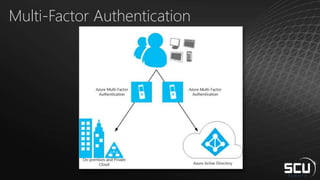
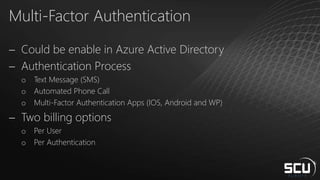
Multi-Factor Authentication
 Could be enable in Azure Active Directory
 Authentication Process
o Text Message (SMS)
o Automated Phone Call
o Multi-Factor Authentication Apps (IOS, Android and WP)
 Two billing options
o Per User
o Per Authentication
Multi-Factor Authentication
Demo
Active Directory Federation Service
Windows Azure Pack - Authentication
 WAP => .Net Repository
 WAP => Microsoft Azure Active Directory
 WAP => MAAD with Multi-Factor Authentication
 WAP => ADFS -> On premise Active Directory
 WAP => ADFS -> Azure ACS -> Facebook, Twitter, …
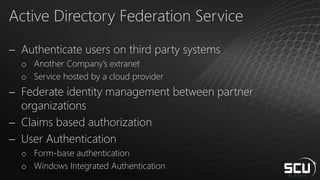
Active Directory Federation Service
 Authenticate users on third party systems
o Another Company’s extranet
o Service hosted by a cloud provider
 Federate identity management between partner
organizations
 Claims based authorization
 User Authentication
o Form-base authentication
o Windows Integrated Authentication
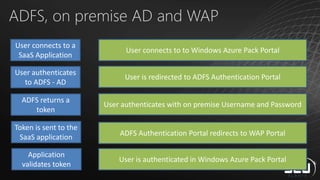
ADFS, on premise AD and WAP
User connects to a
SaaS Application
User authenticates
to ADFS - AD
ADFS returns a
token
Token is sent to the
SaaS application
Application
validates token
User connects to to Windows Azure Pack Portal
User is redirected to ADFS Authentication Portal
User authenticates with on premise Username and Password
ADFS Authentication Portal redirects to WAP Portal
User is authenticated in Windows Azure Pack Portal
Active Directory Federation Service
Demo
ADFS Authentication with external Identity
Providers
Windows Azure Pack - Authentication
 WAP => .Net Repository
 WAP => Microsoft Azure Active Directory
 WAP => MAAD with Multi-Factor Authentication
 WAP => ADFS -> On premise Active Directory
 WAP => ADFS -> Azure ACS -> Facebook, Google, Twitter,
…
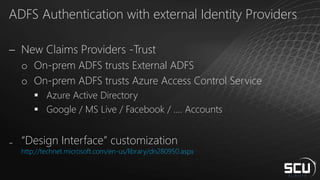
ADFS Authentication with external Identity Providers
 New Claims Providers -Trust
o On-prem ADFS trusts External ADFS
o On-prem ADFS trusts Azure Access Control Service
 Azure Active Directory
 Google / MS Live / Facebook / …. Accounts
₋ “Design Interface” customization
http://technet.microsoft.com/en-us/library/dn280950.aspx
ADFS Authentication with external Identity
Providers - Demo
Conclusion
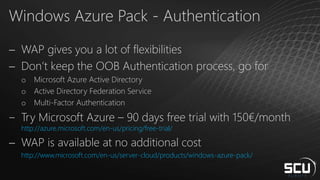
Windows Azure Pack - Authentication
 WAP gives you a lot of flexibilities
 Don’t keep the OOB Authentication process, go for
o Microsoft Azure Active Directory
o Active Directory Federation Service
o Multi-Factor Authentication
‒ Try Microsoft Azure – 90 days free trial with 150€/month
http://azure.microsoft.com/en-us/pricing/free-trial/
 WAP is available at no additional cost
http://www.microsoft.com/en-us/server-cloud/products/windows-azure-pack/
Feedback
 Session feedback
 SCU session planner  http://planning.systemcenteruniverse.ch
 SCU WP app
 Overall Conference feedback
 Link sent by email after the conference
 Remember: we will donate for every feedback we receive!
Our Other Sessions
 PowerBI for System Center ( Kurt Van Hoecke & Alexandre Verkinderen)
 18/09 09h15, Room: Sidney
 Speedlab: Deploy a System Center 2012 Environment (Alexandre Verkinderen & Christopher Keyaert)
 19/09 09h15, Room: Singapore
 Savision BSM in the private Cloud (Alexandre Verkinderen)
 19/09 12h00, Room: Miami
Windows Azure Pack - Authentication for
your Clouds
Christopher Keyaert
Inovativ BE
http://www.vnext.be
@KeyaertC
Alexandre Verkinderen
Inovativ BE
http://scug.be/scom
@AlexVerkinderen

Multi-Factor Authentication for your clouds

  • 1.
    Windows Azure Pack- Authentication for your Clouds Alexandre Verkinderen Inovativ BE SCCDM MVP @AlexVerkinderen Christopher Keyaert Inovativ BE SCCDM MVP @KeyaertC
  • 2.
    What is thisall about?  Introduction  Out of the box Authentication process  Microsoft Azure Active Directory  Introduction to MAAD  Azure Active Directory Synchronization Services  Multi-factor authentication  Active Directory Federation Service  ADFS with external identity providers  Conclusion
  • 3.
  • 4.
    Windows Azure Pack– CloudOS vision
  • 6.
    Windows Azure Pack- Authentication  WAP => .Net Repository  WAP => Microsoft Azure Active Directory  WAP => MAAD with Multi-Factor Authentication  WAP => ADFS -> On premise Active Directory  WAP => ADFS -> Azure ACS -> Facebook, Twitter, …
  • 7.
    Out of thebox Authentication Process
  • 8.
    Windows Azure Pack- Authentication  WAP => .Net Repository  WAP => Microsoft Azure Active Directory  WAP => MAAD with Multi-Factor Authentication  WAP => ADFS -> On premise Active Directory  WAP => ADFS -> Azure ACS -> Facebook, Twitter, …
  • 9.
    Default Authentication Process Users have to be provisioned manually  Users are not synced from another repository  WAP is using a .Net Repository -> Stored in the SQL => Your tenants/users have to use and maintain an extra set of credentials
  • 10.
    Out of thebox Authentication Process Demo
  • 11.
    Microsoft Azure ActiveDiretory Introduction to MAAD
  • 12.
    Windows Azure Pack- Authentication  WAP => .Net Repository  WAP => Microsoft Azure Active Directory  WAP => MAAD with Multi-Factor Authentication  WAP => ADFS -> On premise Active Directory  WAP => ADFS -> Azure ACS -> Facebook, Twitter, …
  • 13.
    Microsoft Azure ActiveDirectory  Identity and access management in the cloud  Your organization’s cloud directory  Used by o Windows Azure o Office 365 o Windows Intune  Can be integrated with on-premises AD  Integration with cloud applications o Single sign-on experience  App hosted in cloud  Users authenticate with corporate credentials
  • 14.
    Authentication Process 1 -User connects to a SaaS Application 2 - User authenticates to Azure AD 3 - Azure AD returns a token 4 - Token is sent to the SaaS application 5 - Application validates token
  • 15.
    Microsoft Azure ActiveDiretory Synchronization
  • 16.
    Synchronization  Synchronize usersfrom On-Premise to Online  User Management is done on-prem  Password Synchronization o A digest of the Windows Active Directory password hash is used for the transmission between the on-premises AD and Azure Active Directory. o The digest of the password hash cannot be used to access resources in the customer's on- premises environment.  Users have 1 set of credentials across on-prem and online o But 2 accounts
  • 17.
    AAD Sync Servicestool reached RTM  ADD Sync Services is now RTM o Self Service Password Reset write back to Windows AD o Multi-forest identity synchronization o Download: http://www.microsoft.com/en- us/download/details.aspx?id=44225 o Documentation: http://msdn.microsoft.com/en- us/library/azure/dn790204.aspx  DirSync / AAD Sync / FIM Tools Feature Comparison : http://msdn.microsoft.com/en-us/library/azure/dn798669.aspx
  • 18.
    Azure Active Directoryand WAP User connects to a SaaS Application User authenticates to Azure Azure AD returns a token Token is sent to the SaaS application Application validates token User connects to to Windows Azure Pack Portal User is redirected to Azure AD Authentication Portal User authenticates with Username and Password Azure Authentication redirects to Windows Azure Pack Portal User is authenticated in Windows Azure Pack Portal
  • 19.
  • 20.
    Microsoft Azure ActiveDiretory Multi-Factor Authentication
  • 21.
    Windows Azure Pack- Authentication  WAP => .Net Repository  WAP => Microsoft Azure Active Directory  WAP => MAAD with Multi-Factor Authentication  WAP => ADFS -> On premise Active Directory  WAP => ADFS -> Azure ACS -> Facebook, Twitter, …
  • 22.
  • 23.
    Multi-Factor Authentication  Couldbe enable in Azure Active Directory  Authentication Process o Text Message (SMS) o Automated Phone Call o Multi-Factor Authentication Apps (IOS, Android and WP)  Two billing options o Per User o Per Authentication
  • 24.
  • 25.
  • 26.
    Windows Azure Pack- Authentication  WAP => .Net Repository  WAP => Microsoft Azure Active Directory  WAP => MAAD with Multi-Factor Authentication  WAP => ADFS -> On premise Active Directory  WAP => ADFS -> Azure ACS -> Facebook, Twitter, …
  • 27.
    Active Directory FederationService  Authenticate users on third party systems o Another Company’s extranet o Service hosted by a cloud provider  Federate identity management between partner organizations  Claims based authorization  User Authentication o Form-base authentication o Windows Integrated Authentication
  • 28.
    ADFS, on premiseAD and WAP User connects to a SaaS Application User authenticates to ADFS - AD ADFS returns a token Token is sent to the SaaS application Application validates token User connects to to Windows Azure Pack Portal User is redirected to ADFS Authentication Portal User authenticates with on premise Username and Password ADFS Authentication Portal redirects to WAP Portal User is authenticated in Windows Azure Pack Portal
  • 29.
  • 30.
    ADFS Authentication withexternal Identity Providers
  • 31.
    Windows Azure Pack- Authentication  WAP => .Net Repository  WAP => Microsoft Azure Active Directory  WAP => MAAD with Multi-Factor Authentication  WAP => ADFS -> On premise Active Directory  WAP => ADFS -> Azure ACS -> Facebook, Google, Twitter, …
  • 32.
    ADFS Authentication withexternal Identity Providers  New Claims Providers -Trust o On-prem ADFS trusts External ADFS o On-prem ADFS trusts Azure Access Control Service  Azure Active Directory  Google / MS Live / Facebook / …. Accounts ₋ “Design Interface” customization http://technet.microsoft.com/en-us/library/dn280950.aspx
  • 33.
    ADFS Authentication withexternal Identity Providers - Demo
  • 34.
  • 35.
    Windows Azure Pack- Authentication  WAP gives you a lot of flexibilities  Don’t keep the OOB Authentication process, go for o Microsoft Azure Active Directory o Active Directory Federation Service o Multi-Factor Authentication ‒ Try Microsoft Azure – 90 days free trial with 150€/month http://azure.microsoft.com/en-us/pricing/free-trial/  WAP is available at no additional cost http://www.microsoft.com/en-us/server-cloud/products/windows-azure-pack/
  • 36.
    Feedback  Session feedback SCU session planner  http://planning.systemcenteruniverse.ch  SCU WP app  Overall Conference feedback  Link sent by email after the conference  Remember: we will donate for every feedback we receive!
  • 37.
    Our Other Sessions PowerBI for System Center ( Kurt Van Hoecke & Alexandre Verkinderen)  18/09 09h15, Room: Sidney  Speedlab: Deploy a System Center 2012 Environment (Alexandre Verkinderen & Christopher Keyaert)  19/09 09h15, Room: Singapore  Savision BSM in the private Cloud (Alexandre Verkinderen)  19/09 12h00, Room: Miami
  • 38.
    Windows Azure Pack- Authentication for your Clouds Christopher Keyaert Inovativ BE http://www.vnext.be @KeyaertC Alexandre Verkinderen Inovativ BE http://scug.be/scom @AlexVerkinderen

Editor's Notes