The cloud in your
own datacenter
Alexandre Verkinderen
Inovativ
http://mscloud.be
@AlexVerkinderen
Agenda
The Cloud OS vision
Microsoft Azure technology in your datacenter
Capability drill-down
Why choose the Microsoft Azure Pack?
Next steps
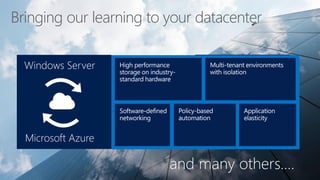
Windows Server
Microsoft Azure
Bringing our learning to your datacenter
Windows Server
Microsoft Azure
and many others….
Flexible cloud choice, familiar technology, no lock-in.
Their own multi-tenant cloud, that’s as easy as Azure.
Chargeback.
Simple, automated operations.
More effective utilization of existing hardware assets.
Tenant choice and dynamic control.
Integration with LOB systems.
Commodity and custom cloud offerings.
Enterprises want….
To win more enterprise customers’ business.
Multi-tenant, self-service IaaS and PaaS offerings.
Usage billing.
Extreme automation.
Optimized hardware monetization.
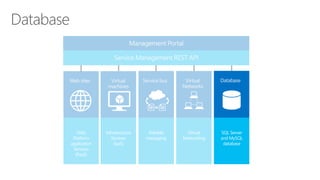
Opportunities to upsell and increase customer usage.
Customized offerings, public cloud differentiation.
Portal integration and branding.
Service providers want….
Microsoft Azure
IT Admin
Customers
Customers
IT Admin
In your datacenter
Customers
IT Admin
Microsoft
Azure
Pack
In your datacenter
Customers
IT Admin
Management Portal
Web
Platform
application
Services
(PaaS)
Infrastructure
Services
(IaaS)
Reliable
messaging
Virtual
Networking
SQL Server
and MySQL
database
Customers
Tenant experience
Homepage
Tenant experience
Customer
Service
ProviderMicrosoft
Consistent
Platform
ONE
Dashboard
IT Admin
Management Portal
Web
Platform
application
Services
(PaaS)
Infrastructure
Services
(IaaS)
Reliable
messaging
Virtual
Networking
SQL Server
and MySQL
database
Customers
Subscribes to
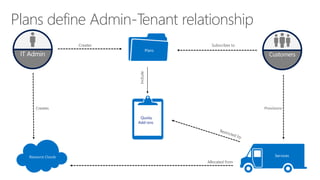
Plans define Admin-Tenant relationship
Creates
Provisions
Allocated from
Quota,
Add-ons
Include
Creates
Resource Clouds
CustomersIT Admin
Portal Demo
SQL Server
and MySQL
database
Management Portal
Infrastructure
Services
(IaaS)
Reliable
messaging
Virtual
Networking
Web
Platform
application
Services
(PaaS)
Web Sites
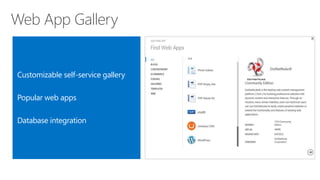
Web App Gallery
Customizable self-service gallery
Popular web apps
Database integration
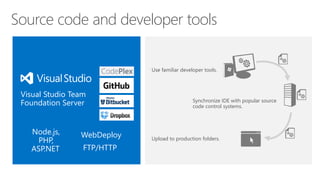
Source code and developer tools
Use familiar developer tools.
Upload to production folders.
Synchronize IDE with popular source
code control systems.
Visual Studio Team
Foundation Server
FTP/HTTP
WebDeployNode.js,
PHP,
ASP.NET
PaaS Demo
Web
Platform
application
Services
(PaaS)
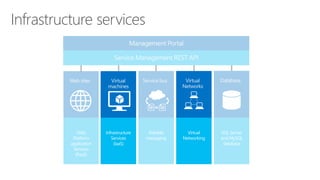
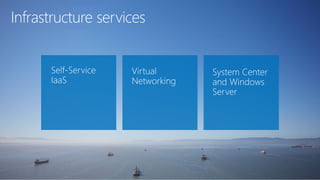
Infrastructure services
Reliable
messaging
SQL Server
and MySQL
database
Infrastructure
Services
(IaaS)
Virtual
Networking
Infrastructure services
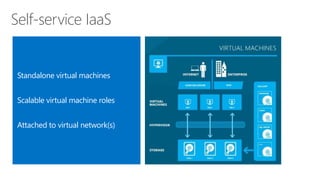
Self-service IaaS
Standalone virtual machines
Scalable virtual machine roles
Attached to virtual network(s)
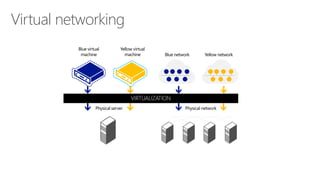
Virtual networking
Physical server Physical network
Blue virtual
machine
Yellow virtual
machine Blue network Yellow network
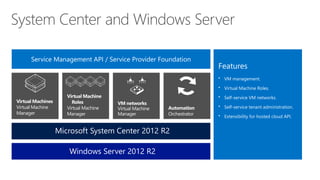
System Center and Windows Server
Virtual Machines
Virtual Machine
Manager
Features
• VM management.
• Virtual Machine Roles.
• Self-service VM networks.
• Self-service tenant administration.
• Extensibility for hosted cloud API.
Service Management API / Service Provider Foundation
Microsoft System Center 2012 R2
Windows Server 2012 R2
IaaS Demo
Infrastructure
Services
(IaaS)
Web
Platform
application
Services
(PaaS)
Service Bus
Virtual
Networking
SQL Server
and MySQL
database
Reliable
messaging
Service Bus
Reliable message delivery
Service Bus
Application Application
Asynchronous
Synchronous
Reliable
messaging
Infrastructure
Services
(IaaS)
Web
Platform
application
Services
(PaaS)
Database
Virtual
Networking
SQL Server
and MySQL
database
Reliable
messaging
Infrastructure
Services
(IaaS)
Web
Platform
application
Services
(PaaS)
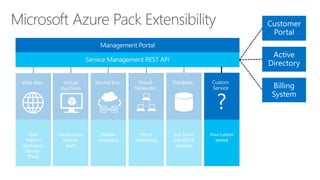
Microsoft Azure Pack Extensibility
Virtual
Networking
SQL Server
and MySQL
database
Your custom
service
?
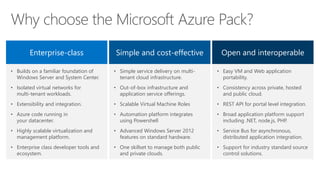
Why choose the Microsoft Azure Pack?
Enterprise-class Simple and cost-effective Open and interoperable
• Builds on a familiar foundation of
Windows Server and System Center.
• Isolated virtual networks for
multi-tenant workloads.
• Extensibility and integration.
• Azure code running in
your datacenter.
• Highly scalable virtualization and
management platform.
• Enterprise class developer tools and
ecosystem.
• Simple service delivery on multi-
tenant cloud infrastructure.
• Out-of-box infrastructure and
application service offerings.
• Scalable Virtual Machine Roles
• Automation platform integrates
using Powershell
• Advanced Windows Server 2012
features on standard hardware.
• One skillset to manage both public
and private clouds.
• Easy VM and Web application
portability.
• Consistency across private, hosted
and public cloud.
• REST API for portal level integration.
• Broad application platform support
including .NET, node.js, PHP.
• Service Bus for asynchronous,
distributed application integration.
• Support for industry standard source
control solutions.
Next steps
Learn more and download Microsoft Azure Pack.
http://www.microsoft.com/en-us/server-
cloud/products/windows-azure-pack
Read about Microsoft Azure on TechNet.
http://www.microsoft.com/technet
See additional Microsoft Azure resources.
http://www.windowsazure.com/en-us/
Microsoft azure pack overview

Microsoft azure pack overview

Editor's Notes

  • #4 The session will begin with an introduction outlining Microsoft’s Cloud OS vision. We’ll also take a look at service provider and enterprise needs most common in the marketplace today. We’ll use these challenges to show some new opportunities for Microsoft Azure Pack and it’s feature set. We’ll then drill down into Microsoft Azure Pack features and benefits, which we have listed here as a capability overview. Finally, we’ll look at the most compelling reasons for choosing Microsoft Azure Pack , before ending with some next steps to begin using Microsoft Azure Pack today. So let’s start with a look at the trends we are seeing in businesses today.
  • #5 These are but illustrative examples (there’s a lot more) of how we’ve implemented our core learnings from operating large scale cloud services as capabilities/features within Windows Server so you can also benefit from the resulting agility and cost benefits. We’re committed to this approach as we continue the journey towards realizing our Cloud OS vision. 1. High performance storage on industry-standard hardware File & storage services – Microsoft’s large scale cloud services implement hot-hot nodes in many cases so the application services can seamlessly failover in case of node failures. Analogously, Active-On technologies in Windows Server 2012 are those capabilities than can survive the failure of a key component without disrupting the service provided - for example, the File and Storage Services server role can be deployed in an active-active cluster which can endure the failure of a server while maintaining connectivity for clients. Even open file handles are maintained. Offloaded data transfer – This feature came about by applying a key design principle that Microsoft Azure uses to Windows Server 2012, which is to push work to hardware as much as possible so CPU cycles can be optimally leveraged for the hosted application. Storage spaces - We routinely provision commodity hardware in our pods thereby making hardware failure a non-event; we wanted to provide enterprise customers with the ability to easily and flexibly provision inexpensive storage. Windows Server 2012 enables you to use file servers for even critical workloads like Hyper-V server and SQL with arguably similar reliability and performance characteristics as more expensive storage (e.g. SAN). 2. Multi-tenant environments with isolation Server core - Small footprint with server core so you do not have to worry about updating or fixing unnecessary code, meaning less churning or required reboots for the host. This is similar to how we designed the Microsoft Azure hypervisor where we’ve only retained (and optimized) critical code paths that are applicable to large scale cloud scenarios. Hyper-V Network Virtualization - Microsoft Azure was designed from the ground up to be multi-tenant environment with isolation given that it hosts apps and infrastructure that belongs to different customers. Over time, it became increasingly evident that this same requirement would be pertinent to enterprises implementing cloud infrastructure (albeit at smaller scale) given the need to distinguish between infrastructure allocated to different departments, integrating infrastructure from acquisitions, assigning costs etc. We then built the ability to isolate networks logically in multi-tenant enterprise environments with Hyper-V using similar architectural considerations. Web-sites & virtual machines - These are great examples of how we’ve bought consistent experiences and cloud-optimized services from Microsoft Azure to Windows Server and System Center environments. 3. Software-defined Networking Hyper-V Network Virtualization - The network virtualization features within Microsoft Azure and Windows Server enable customers to easily extend their on-premises datacenters into third party datacenters (e.g. Microsoft Azure or service providers) by allowing for flexible placement of VMs along with the ability to continue using the same IP address. Cross-premises connectivity- The cross-site connectivity capabilities offered by Windows Server 2012 and Microsoft Azure (Microsoft Azure Virtual Network) complement each other well for VPN-like scenarios. Network QoS – Windows Server 2012 provides the ability to programmatically adhere to a given SLA by guaranteeing minimum bandwidth available to a VM or a port. We’re assessing how to implement this in Microsoft Azure (albeit at a much larger scale) to shift from “best effort” to quality of service guarantees, thus providing an example of this bi-directional virtuous learning between our platforms. 4. Policy based Automation Cluster aware updates (CAU) – Windows Server 2012 lowers downtime by coordinating software updates on all servers in a failover cluster while maintaining continuous availability as appropriate. For example, in case of applications with continuous availability features such as Hyper-V with live migration, or an SMB 3.0 file server with SMB Transparent Failover, CAU can coordinate automated cluster updating with no impact on service availability. This is very similar to Microsoft Azure which offers the ability to maintain high availability for its cloud services (e.g. web role/worker role) and virtual machines through Upgrade Domains (UD) and Availability sets. Dynamic optimization – System Center 2012 - Virtual Machine Manager provides the ability to load balances the resources within a host cluster automatically using a policy based approach (e.g. move workloads VMs between hosts based on defined CPU, memory, or I/O thresholds). Such policy based automation is implemented by the Microsoft Azure Fabric Controller too using various load balancing approaches. 5. Application elasticity Service templates – Similar to how an application owner (or developer) can specify application instance counts and scale thresholds in Microsoft Azure, service templates in System Center enable application owners to specify similar parameters that enable scaling the application once relevant thresholds are reached.
  • #6 Enterprise application and IT workloads are no longer restricted to the four walls of the corporate datacenter. Increasingly, corporations are looking to move development, test and production workloads to hosted and public clouds in order to achieve flexibility, agility and reduce costs as they trade capital expenditure invested in hardware for operational expenditure with service providers or public clouds subscriptions, paying only for what they use. Initially, Infrastructure-as-a-Service (IaaS) is the service most appealing to enterprise customers for it’s straight-forward understandability, ease and speed of deployment and lack of lock-in. Service providers want a free entry-level offering to acquire customers and then a mechanism for easy up-sell to higher margin offerings. And finally customization, integration, and branding are essential.
  • #7 As a result of this change, service providers are seeing a growing opportunity and need to reshape their business and technology platform to be positioned to attract enterprise workloads. Core to this is having a familiar technology stack that enterprises can trust and integrate with their on-premises datacenter. The low-margin high volume nature of service providers’ business mean that automation is essential as is anything that can optimize the revenue generated from every piece of hardware. Usage billing is an essential for service providers.
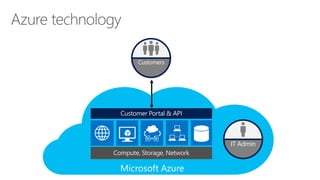
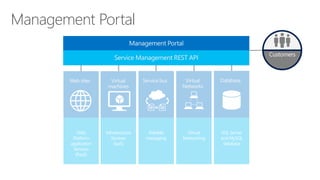
  • #8  We’re going to take a look at how enterprises and service providers can offer a consistent experience in this section—but I want to start with how Microsoft Azure works. Microsoft Azure subscribers--let’s call them customers—access the public cloud through a website, known as the management or customer portal. Basically, this portal is the gateway to a wide range of IT services that are delivered on top of the compute, storage, and network resources found in Microsoft datacenters around the world. Now, at each of these datacenters, there are Microsoft IT administrators that manage resources, allocate those resources to the various services being provided, and manage customer subscriptions. In addition, they bill customers for the services consumed. For the customer, everything is taken care of, so they get the services they need almost instantly. For instance, a developer could provision a test environment in minutes—a far shorter time than many face in their enterprise environments.
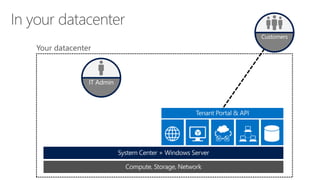
  • #9  Now let’s take a look at how this translates to an enterprise or service provider datacenter. You can see it looks exactly the same. The only difference is that its on-premise, rather than in the cloud. Who are the customers? Well, if you’re a service provider, they’re the customers who pay you to provide IT services. If you’re an enterprise, they’re the employees who consume IT services. Within your datacenter, your administrator performs the exact same functions as in the Microsoft datacenters that Microsoft Azure uses. He or she configures and defines the resources that support your customers and manages access to services. Admins can also monitor services consumed, so that service providers can price and bill, and enterprises can charge users, departments, or divisions.
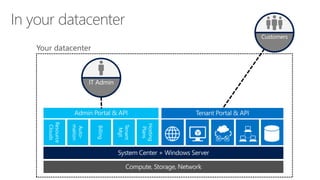
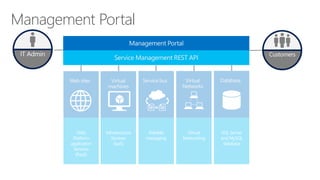
  • #10 Let’s take a look at IT administrator tools—the same tools that Microsoft administrators have for Microsoft Azure. Just as customers get a consistent experience through the Customer Portal, IT administrators get their own dedicated portal too. The admin portal provides a range of management capabilities: Administrators can build resource clouds, which define the compute, storage, network, and other resource clouds that provide the underpinning of each of the customer services. Administrators can automate services by creating powershell ‘runbooks’ that define a range of processes that should execute under specific circumstances. This automation reduces the need for human intervention, which can help drive down the cost of managing the cloud. Administrators can define pricing structures associated with customer services for billing. Administrators get Tenant Management, which are the administrative tasks associated with managing customer user accounts and report against activity. Administrators can establish hosting plans, which are various combinations of services, resource clouds and quotas, which can then be made availabile to specific groups of customers who can subscribe to them. So how do you get from where you are now to this model? After all, it’s a huge shift from traditional provisioning.
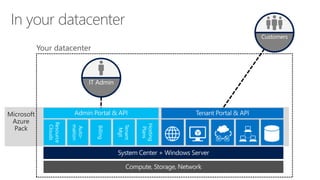
  • #11 Here’s how: The Microsoft Azure Pack. Microsoft Azure Pack for Windows Server is a collection of Microsoft Azure technologies, available to Microsoft customers at no additional cost for installation into your data center. It runs on top of Windows Server 2012 R2 and System Center 2012 R2 and, through the use of the Microsoft Azure technologies, enables you to offer a rich, self-service, multi-tenant cloud, consistent with the public Microsoft Azure experience. That’s the long version. Here’s the short one. MAP is a free download that puts Azure in your datacenter.
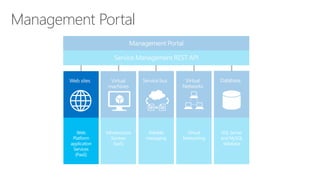
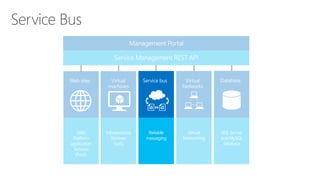
  • #12 Let’s take a look at each element of the Microsoft Azure Pack in more detail. <click> The Management portal replicates the Microsoft Azure Developer portal experience in Microsoft Azure albeit with a subset of the services available in full Microsoft Azure. All the capabilities available in the Management portal can be accessed programmatically through the Service Management API, an Odata/Rest API. This allows the portal to be completely replaced, for example if a service provider has their own portal which they want to integrate the Azure services into. By bringing the Microsoft Azure Service Management Portal experience and API to Windows Server, Microsoft is enabling service providers to administer Web sites and Virtual Machine services on Windows Server while also offering their customers the rich, self-service user experience to provision and manage their Web sites and Virtual Machines. Because this management portal is built on a REST-based Service Management API, these portal experiences are customizable and extensible including possibilities such as partner branding, billing integration and incorporation of incremental solutions and scenarios as well as integrating into existing portals.
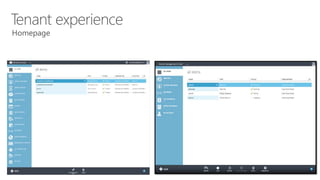
  • #13 This is the Management Portal for Tenants and has a strong consistency with the Microsoft Azure Developer portal. Tenant users can list items, view their status and provision new items. (Compare to Azure with image)
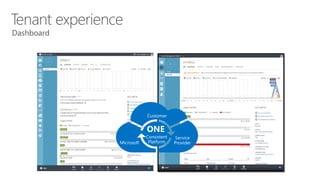
  • #14 Once the VM has been provisioned, the Tenant has a rich set of information to help them manage the environment. They can track usage data as well as do some configuration of the VM based on the permissions of the plan to which they subscribed. And, of course, this dashboard easily provides the ability to stop, start and pause the VM as well as connect remotely to it. (Compare to Azure with image)
  • #15 Let’s take a look at each element of the Microsoft Azure Pack in more detail. <click> The Management portal replicates the Microsoft Azure Developer portal experience in Microsoft Azure albeit with a subset of the services available in full Microsoft Azure. All the capabilities available in the Management portal can be accessed programmatically through the Service Management API, an Odata/Rest API. This allows the portal to be completely replaced, for example if a service provider has their own portal which they want to integrate the Azure services into. By bringing the Microsoft Azure Service Management Portal experience and API to Windows Server, Microsoft is enabling service providers to administer Web sites and Virtual Machine services on Windows Server while also offering their customers the rich, self-service user experience to provision and manage their Web sites and Virtual Machines. Because this management portal is built on a REST-based Service Management API, these portal experiences are customizable and extensible including possibilities such as partner branding, billing integration and incorporation of incremental solutions and scenarios as well as integrating into existing portals. Let’s switch to the Management portal for administrators now. This is a view created solely for the Microsoft Azure Pack.
  • #16 Administrators create the environment in which tenants operate. <click> Administrators own the resource clouds that eventually support tenant services. <click> Administrators also create one or more plans which define which package services for tenants and set quotas and add-ons <click> A tenant subscribes to one or more plans before provisioning services against a specific plan. The plan defines which resource cloud the service provisions resources from and enforces quotas on maximum usage, offering add-on options where configured.
  • #18 Now, let’s take a look at the first Microsoft Azure consistent service – Web sites and Database.
  • #19 High-density, scalable website hosting services. Simple to deploy and administer. Easily move customers to higher revenue offerings Web Sites is a highly scalable web hosting service for public and private clouds that is optimized for cloud hosting economics and integrated with the world’s most popular OSS Web apps, frameworks and tools. Create high-density, scalable website hosting services that are simple to deploy and administer, operating tens of thousands of sites in a single web farm. Out-of-the-box automation lowers customer onboarding costs while resource metering and throttling can help tailor customer offerings. Supports many frameworks including ASP.NET, Classic ASP, PHP, and Node.js with full Git integration for source code control. Integration of the Web App Gallery allows customers access to popular web applications. Web Sites makes it easy to deploy and administer a scalable website hosting services at high density, similar to the experience on Microsoft Azure. Out of the box automation lowers customer onboarding costs and streamlines upselling from shared to reserved infrastructure while metering and throttling of resources can help tailor customer offerings. This solution is fully integrated into the Web App Gallery to allow customers to deploy the most popular web applications in seconds without incremental coding. Out of the box integration with many popular tools and frameworks streamlines customer adoption. It can easily operate tens of thousands of sites in a single web farm and scale an individual customer’s footprint with the click of a mouse. Web Sites is an easy to deploy high-density web farm solution that provides a self-service experience to allow service providers’ customers to be in control. This interface reduces onboarding cost and also drives down the potential need for direct interaction which increases operating margin. Taking advantage of new metering and throttling technologies, service providers deploying Web Sites can confidently offer more customized services based on customer need. The scenario also completely automates the transition of a customer from a low margin shared infrastructure to a high margin reserved instance. A single Web Site farm can easily operate tens of thousands of websites. Web Sites offers end customers broad choice in how they build and manage their websites. The solution supports many frameworks including ASP.NET, Classic ASP, PHP and Node.js and allows customers to easily deploy many of the most popular web apps with the click of a mouse. It also allows you to build on Windows, Mac or Linux and publish using the tools of your choice – Visual Studio, Git, FTP or WebMatrix. Web Sites also allows customers to easily scale their number of instances as well as moving from shared to reserved infrastructure with a single mouse click. The Technology The primary design point of Web Sites was that of a cloud service meant to operate at large scale. Now deployable on Windows Server and working in conjunction with IIS, this high density solution is primarily enabled by the Dynamic Windows Process Activation Service which centralizes web farm configuration into a SQL Server database and allows for dynamic site binding and configuration. The solution also incorporates resource metering to allow for incorporation in billing services. Web Sites can also take advantage of enhancements in Windows Server 2012 such as resource throttling which can allow for more fine grain customer offers guaranteeing capacity availability.
  • #20 When creating a new Web site, tenants can choose from a gallery of popular, pre-configured web applications. Where needed, the application can automatically provision and configure database (SQL or MySQL) Administrators can tailor the list of web applications available in the gallery
  • #21 For a custom website where the gallery doesn’t provide a suitable application, tenants can provision a blank website and upload their web application to the empty folder. Developer tools, including Visual Studio and WebMatrix, are deeply integrated into the Web Sites on Windows Server user experience, decreasing onboarding costs and increasing customer satisfaction. Integration with source control allows developers to rapidly iterate and deploy changes. Built in rollback functionality allows customers to revert web site changes with a few clicks of the mouse. Source control repositories such as GitHub, Team Foundation Server and others can be configured to automatically push updates to the running web site which will pick up the latest changes and deploy them to the live website.
  • #23 Now, let’s take a look at the second Microsoft Azure consistent service – Infrastructure Services including Virtual Machines and Virtual Networking.
  • #24 Use the power of System Center and Windows Server to create an Infrastructure as a Service solution for your customers to provision and manage virtual machines. This slide is a good overview of the Virtual Machines service we’re enabling on top of Windows Server and System Center. It really does allow you to deploy an IaaS solution for VM provisioning and management that is completely self-service in nature. In the following slides, we’ll walk through the architecture in more detail and you’ll better understand, from the administrator side, how easy it is to deploy the service and how much flexibility you have in defining and controlling the customer experience. From the customer side, I’ll also show you how easy it is to create and manage these VMs without ever needing to physically contact the service provider. Virtual Machines uses the power of System Center and Windows Server to easily create an Infrastructure as a Service solution for customers to provision and manage Windows Server and Linux VMs, similar to the experience already provided in Microsoft Azure. This flexible multi-tenant solution puts your customer in control of how they grow their datacenter resources while lowering your support costs. This solution also leverages the new IaaS Gallery to provision server workloads on virtual machines such as SQL Server and SharePoint. It also allows customers to provision self-service networks with their own IP addresses. Virtual Machines is an easy to deploy Infrastructure as a Service solution that puts customers in control of how they extend their datacenter. This self service solution provides a fully automated customer experience to provision and manage virtual machines and server workloads (such as SQL and SharePoint) that can drive down costs associated with on-boarding and servicing of customer accounts. This solution can easily integrate with your current infrastructure such as billing, portals and other services. Virtual Machines offers tenants a very simple self-service experience for requesting, receiving and managing virtual machines and server workloads from their service provider – truly Infrastructure as a Service. This flexible solution provides customers the ability to specify their needs for Windows and Linux virtual machines and networks and truly take control of how they extend their datacenter. The Technology Virtual Machines takes advantage of the new REST oDATA API in System Center 2012 called ‘Service Provider Foundation’. This exposes IaaS in terms of the Virtual Machine Manager component, VM networks, multi-tenancy and quotas, monitoring data from the Operations Manager component and runbooks from the Orchestrator component. This solution also takes advantage of the new VM network technology in Windows Server 2012 which allows customers to create their own private virtual network. Virtual Machines also leverages the service template functionality in System Center 2012 to define and publish fully configured server workloads (such as SQL Server and SharePoint) to the customer portal for purchase and deployment. The solution also utilizes other enhancements in Windows Server 2012 and System Center 2012 such as multi-tenancy and quotas to create custom offerings at higher margins and support billing scenarios. Virtual networks enable the creation of tenant specific IP-address schemes independent of the actual IP infrastructure on which it depends. This means that tenant VMs can be migrated to the cloud without the need to reconfigure IP address schemes or the risk of colliding with other tenants’ IP addresses and security concerns therein. (self service IaaS) (virtual networking), (SC and WS)
  • #25 The Microsoft Azure Pack Virtual Machines Service offers two types of Virtual Machine services to Tenants: Standalone VMs The traditional view of Infrastructure as a Service where a single VM is provisioned against a template selected from a gallery of available images VM Roles Here a template is selected from a gallery of VM role templates configured by the administrator. However, unlike standalone VMs, VM role templates are designed and configured to be able to scale dynamically. Both types of VMs can be attached to pre-configured virtual networks.
  • #26 Virtual networks enable the creation of tenant specific IP-address schemes independent of the actual IP infrastructure on which it depends. This means that tenant VMs can be migrated to the cloud without the need to reconfigure IP address schemes or the risk of colliding with other tenants’ IP addresses and security concerns therein. Customers remain protected from other tenants and the underlying network infrastructure IP configuration.
  • #27 Microsoft Azure Pack delivers IaaS powered by System Center 2012 R2 and Windows Server 2012 R2. The Service Management API integrates with the System Center 2012 R2 Service Provider Foundation API. Service Provider Foundation is provided with Microsoft System Center 2012 Orchestrator, a component of Microsoft System Center 2012 Service Pack 1 (SP1). Service Provider Foundation exposes an extensible Open Data Protocol (OData) API over a Representational State Transfer (REST) web service that interacts with components of System Center. This enables service providers and large enterprise organizations to design and implement multi-tenant self-service portals that integrate IaaS capabilities available through Microsoft System Center 2012 SP1. Feature Description:- VM Management Create, update, and operate VM’s Virtual Machine Roles Deploy, update, and operate VMM services. Scale-out within VM tiers Self-service VM networks Create, update, and use self-service VM networks. Self-service Tenant Administration Tenant admin manages access to hosted IaaS cloud. Tenant admin configures and manages self-service user roles. Enterprise identity for SPF Tenants can authenticate and authorize using corporate identity Extensibility for hosted cloud API Extensible REST OData API surface. Use runbooks to customize processes driven through SPF API.
  • #29 Now, let’s take a look at the final Microsoft Azure consistent service – Service Bus.
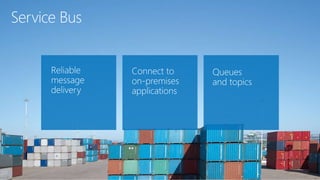
  • #30 Reliable messaging services to enable asynchronous messaging for distributed applications Reliable Message Delivery The Service Bus service is a messaging infrastructure that sits between applications allowing them to exchange messages in a loosely coupled way for improved scale and resiliency. Connect on-premises applications Service Bus Relay solves the challenges of communicating between traditional applications and the outside world by allowing traditional web services to project public endpoints. Systems can then access these web services, which continue to run on-premises from anywhere on the planet. Queues and Topics Service Bus Queues offer simple first in, first out guaranteed message delivery and supports a range of standard protocols (REST, AMQP, WS*) and API’s to put/pull messages on/off a queue. Service Bus Topics deliver messages to multiple subscriptions and easily fan out message delivery at scale to downstream systems.
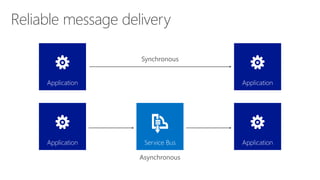
  • #31 Service Bus Queues support a brokered messaging communication model. When using queues, components of a distributed application do not communicate directly with each other, they instead exchange messages via a queue, which acts as an intermediary. A message producer (sender) hands off a message to the queue and then continues its processing. Asynchronously, a message consumer (receiver) pulls the message from the queue and processes it. The producer does not have to wait for a reply from the consumer in order to continue to process and send further messages.
  • #32 The Microsoft Azure Pack also enables you to offer your customers multi-tenant access to your existing SQL and MySQL databases for use with their applications.
  • #33 Whether you’re an enterprise or a service provider, Microsoft Azure Pack has built-in extensibility to ensure that you can integrate it into your existing systems for maximum convenience. Active Directory Federated Services (ADFS) integration ensures that existing enterprise users can authenticate in the Management Portal without the creation of a new user database. The OData Rest API that supports the Management Portal enables replacement of some or all of the capabilities of the supplied portal by an existing customer portal. Administrative functions are also exposed through the same API for automation or integration into a custom admin portal. For billing or chargeback, usage data is also available through the Management Portal API for integration into in-house or third-party billing vendors’ solutions, some of which have already built Microsoft Azure Pack integration.
  • #34 Enterprise-class The Microsoft Azure Pack is built on the foundation of Windows Server and System Center —trusted by enterprises the world over, responsible for delivering computing power, virtualization, and management to support critical application workloads. Microsoft Azure consistency in both end user experience and services ensures that IT administrators can reuse their skills and automation across the Cloud OS destinations and move workloads that utilize the common set of services offered across the Cloud OS. The Web Sites service provides a consistent, scalable, reliable application platform for running websites and web applications. Builds on a familiar foundation of Windows Server and System Center. Isolated virtual networks for multi-tenant workloads. Extensibility and integration. Microsoft Azure code running in your datacenter. Highly scalable virtualization and management platform. Simple and cost-effective The multi-tenant infrastructure of the Microsoft Azure Pack enables efficient, shared usage of commodity computing, storage, and network resources. Load balancing for web applications and virtual machine roles enables you to directly control the scale-out resources required by their application workload. Out-of-box capabilities enable the Microsoft Azure Pack to help provide a ready-built Web PaaS and IaaS solution for enterprises and service providers to offer self-service provisioning and management of IT services. Utilizing the advanced features in Windows Server and System Center, you can build the solution on inexpensive, industry-standard hardware. Open and interoperable The Microsoft Azure Pack provides a wide range of customization and integration possibilities. The Management portal can be branded or completely replaced utilizing the Service Management API. Billing can be integrated through the supplied API. The Web Sites service supports popular web application platforms including ASP.NET, Node.js, and PHP. In addition, the Web Sites service supports popular development tools and integrates directly with source control systems including GitHub, Bitbucket, DropBox, and Team Foundation Server. Easy VM and Web application portability. Private, hosted and public cloud. Broad application platform support including .NET, node.js, PHP. OData REST API for portal level integration. Service Bus for asynchronous distributed application integration.