Business Continuity
Azure Site Recovery
Alexandre Verkinderen – Christopher Keyaert
Christopher Keyaert
Consultant @ Inovativ Be | SCCDM MVP
christopher.keyaert@inovativ.be
@Keyaertc
Alexandre Verkinderen
Managing Consultant @ Inovativ Be | SCCDM MVP
Alex.verkinderen@inovativ.be
@AlexVerkindere
Agenda
ā– Business Continuity
ā– Azure Site Recovery
ā– ASR with Windows Azure Pack
ā– Inmage
ā– Capabilities summary
Business Continuity Challenges
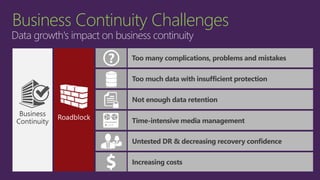
Data growth's impact on business continuity
Increasing costs
Too many complications, problems and mistakes
Business
Continuity
Not enough data retention
Time-intensive media management
Untested DR & decreasing recovery confidence
Too much data with insufficient protection
Business Continuity Challenges
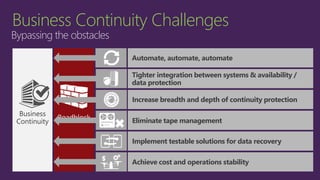
Bypassing the obstacles
Increasing costs
Too many complications, problems and mistakes
Business
Continuity
Not enough data retention
Time-intensive media management
Untested DR & decreasing recovery confidence
Too much data with insufficient protection
Automate, automate, automate
Tighter integration between systems & availability /
data protection
Eliminate tape management
Achieve cost and operations stability
Increase breadth and depth of continuity protection
Implement testable solutions for data recovery
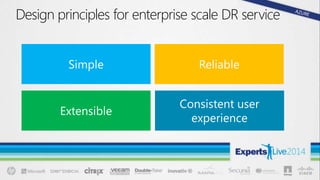
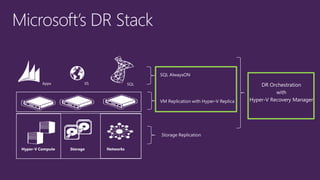
Design principles for enterprise scale DR service
Microsoft Solutions for BC & DR
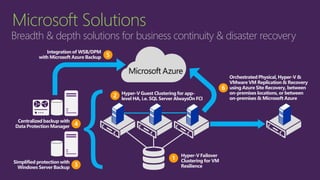
Microsoft Solutions
Breadth & depth solutions for business continuity & disaster recovery
Hyper-V Failover
Clustering for VM
Resilience
1
Hyper-V Guest Clustering for app-
level HA, i.e. SQL Server AlwaysOn FCI
2
}Centralized backup with
Data Protection Manager 4
Simplified protection with
Windows Server Backup 3
Integration of WSB/DPM
with Microsoft Azure Backup 5
Orchestrated Physical, Hyper-V &
VMware VM Replication & Recovery
using Azure Site Recovery, between
on-premises locations, or between
on-premises & Microsoft Azure
6
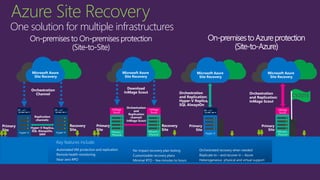
Orchestration
and Replication:
InMage Scout
Microsoft Azure
Site Recovery
Primary
Site
InMage
Scout
Orchestration
and Replication:
Hyper-V Replica,
SQL AlwaysOn
Microsoft Azure
Site Recovery
Primary
Site
Hyper-V
Microsoft Azure
Site Recovery
Orchestration
Channel
Replication
channels:
Hyper-V Replica,
SQL AlwaysOn,
SAN
Primary
Site
Hyper-V
Recovery
Site
Hyper-V
Microsoft Azure
Site Recovery
Orchestration
and
Replication
channel:
InMage Scout
Primary
Site
VMware /
Physical
Recovery
Site
InMage
Scout
InMage
Scout
Key features include:
Automated VM protection and replication
Remote health monitoring
Near zero RPO
No-impact recovery plan testing
Customizable recovery plans
Minimal RTO – few minutes to hours
Orchestrated recovery when needed
Replicate to – and recover in – Azure
Heterogeneous physical and virtual support
On-premisesto Azureprotection
(Site-to-Azure)
VMware /
Physical
VMware /
Physical
Download
InMage Scout
CY2015
Azure Site Recovery
One solution for multiple infrastructures
Site to Site recovery with ASR
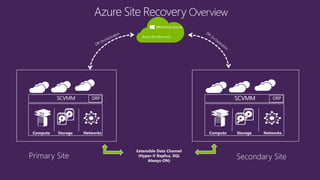
Extensible Data Channel
(Hyper-V Replica, SQL
Always-ON)
Azure Site Recovery
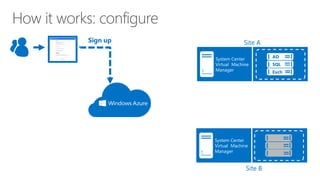
How it works: configure
Sign up
Create a recovery plan
Site A
System Center
Virtual Machine
Manager
AD
SQL
Exch
System Center
Virtual Machine
Manager
Site B
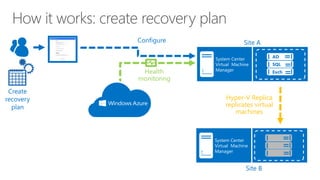
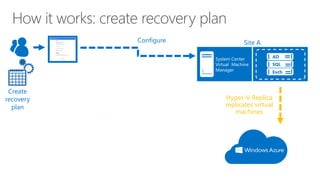
How it works: create recovery plan
Hyper-V Replica
replicates virtual
machines
Health
monitoring
Create a recovery plan
Create
recovery
plan
Site A
System Center
Virtual Machine
Manager
AD
SQL
Exch
Configure
System Center
Virtual Machine
Manager
Site B
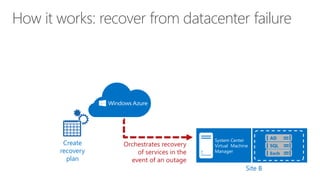
How it works: recover from datacenter failure
Create a recovery plan
System Center
Virtual Machine
Manager
Site B
Create
recovery
plan
Orchestrates recovery
of services in the
event of an outage
AD
SQL
Exch
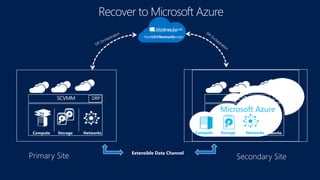
Site to Azure recovery via ASR
Extensible Data Channel
Hyper-V Recovery Manager
Microsoft Azure
Site Recovery
Microsoft Azure
Compute Storage Networks
How it works: create recovery plan
Hyper-V Replica
replicates virtual
machines
Create a recovery plan
Create
recovery
plan
Site A
System Center
Virtual Machine
Manager
AD
SQL
Exch
Configure
Site to Azure setup – Demo
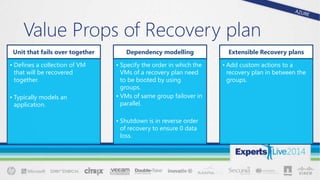
Unit that fails over together
• Defines a collection of VM
that will be recovered
together.
• Typically models an
application.
Dependency modelling
• Specify the order in which the
VMs of a recovery plan need
to be booted by using
groups.
• VMs of same group failover in
parallel.
• Shutdown is in reverse order
of recovery to ensure 0 data
loss.
Extensible Recovery plans
• Add custom actions to a
recovery plan in between the
groups.
Value Props of Recovery plan
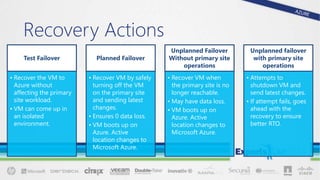
Test Failover
• Recover the VM to
Azure without
affecting the primary
site workload.
• VM can come up in
an isolated
environment.
Planned Failover
• Recover VM by safely
turning off the VM
on the primary site
and sending latest
changes.
• Ensures 0 data loss.
• VM boots up on
Azure. Active
location changes to
Microsoft Azure.
Unplanned Failover
Without primary site
operations
• Recover VM when
the primary site is no
longer reachable.
• May have data loss.
• VM boots up on
Azure. Active
location changes to
Microsoft Azure.
Unplanned failover
with primary site
operations
• Attempts to
shutdown VM and
send latest changes.
• If attempt fails, goes
ahead with the
recovery to ensure
better RTO.
Recovery Actions
Recovery Plan – Demo
ASR - Supported configuration and
Pricing
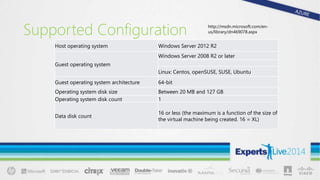
Supported Configuration
Host operating system Windows Server 2012 R2
Guest operating system
Windows Server 2008 R2 or later
Linux: Centos, openSUSE, SUSE, Ubuntu
Guest operating system architecture 64-bit
Operating system disk size Between 20 MB and 127 GB
Operating system disk count 1
Data disk count
16 or less (the maximum is a function of the size of
the virtual machine being created. 16 = XL)
http://msdn.microsoft.com/en-
us/library/dn469078.aspx
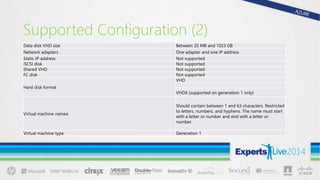
Supported Configuration (2)
Data disk VHD size Between 20 MB and 1023 GB
Network adapters One adapter and one IP address
Static IP address Not supported
iSCSI disk Not supported
Shared VHD Not supported
FC disk Not supported
Hard disk format
VHD
VHDX (supported on generation 1 only)
Virtual machine namea
Should contain between 1 and 63 characters. Restricted
to letters, numbers, and hyphens. The name must start
with a letter or number and end with a letter or
number.
Virtual machine type Generation 1
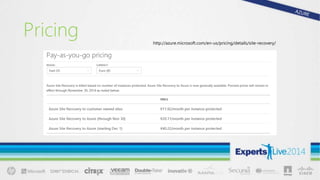
Pricing http://azure.microsoft.com/en-us/pricing/details/site-recovery/
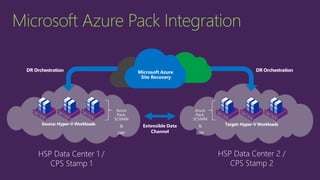
ASR with Windows Azure Pack
Source: Hyper-V Workloads Target: Hyper-V Workloads
Microsoft Azure
Site Recovery
HSP Data Center 1 /
CPS Stamp 1
HSP Data Center 2 /
CPS Stamp 2
DR OrchestrationDR Orchestration
Microsoft Azure Pack Integration
Extensible Data
Channel
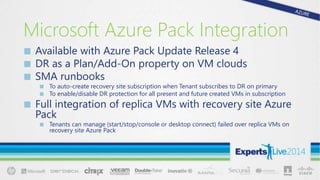
Microsoft Azure Pack Integration
ā–  Available with Azure Pack Update Release 4
ā–  DR as a Plan/Add-On property on VM clouds
ā–  SMA runbooks
ā–  To auto-create recovery site subscription when Tenant subscribes to DR on primary
ā–  To enable/disable DR protection for all present and future created VMs in subscription
ā–  Full integration of replica VMs with recovery site Azure
Pack
ā–  Tenants can manage (start/stop/console or desktop connect) failed over replica VMs on
recovery site Azure Pack
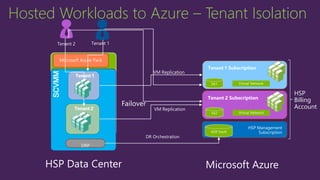
Tenant Isolation for HSP to Azure
SCVMMMicrosoft Azure Pack
Tenant 1 Subscription
HSP Management
Subscription
HSP
Billing
Account
VM Replication
DRP
DR Orchestration
HSP Data Center Microsoft Azure
Failover
Hosted Workloads to Azure – Tenant Isolation
Tenant 2 Subscription
Tenant 1
Tenant 2
Tenant 2 Tenant 1
VM Replication
Hosted Workloads to Azure – Tenant Isolation
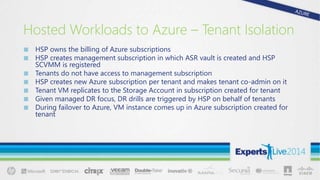
ā–  HSP owns the billing of Azure subscriptions
ā–  HSP creates management subscription in which ASR vault is created and HSP
SCVMM is registered
ā–  Tenants do not have access to management subscription
ā–  HSP creates new Azure subscription per tenant and makes tenant co-admin on it
ā–  Tenant VM replicates to the Storage Account in subscription created for tenant
ā–  Given managed DR focus, DR drills are triggered by HSP on behalf of tenants
ā–  During failover to Azure, VM instance comes up in Azure subscription created for
tenant
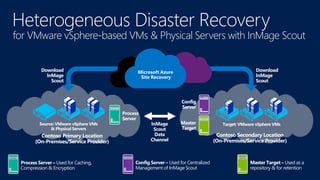
Disaster Recovery with InMage
Contoso Primary Location
(On-Premises/Service Provider)
Source: VMware vSphere VMs
& Physical Servers
Heterogeneous Disaster Recovery
for VMware vSphere-based VMs & Physical Servers with InMage Scout
Process
Server
Contoso Secondary Location
(On-Premises/Service Provider)
Target: VMware vSphere VMs
Config
Server
Master
Target
InMage
Scout
Data
Channel
Download
InMage
Scout
Microsoft Azure
Site Recovery
Download
InMage
Scout
Process Server – Used for Caching,
Compression & Encryption
Config Server – Used for Centralized
Management of InMage Scout
Master Target – Used as a
repository & for retention
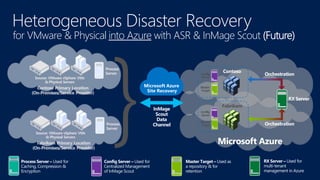
Microsoft Azure
InMage
Scout
Data
Channel
Microsoft Azure
Site Recovery
Process Server – Used for
Caching, Compression &
Encryption
Config Server – Used for
Centralized Management
of InMage Scout
Master Target – Used as
a repository & for
retention
for VMware & Physical into Azure with ASR & InMage Scout (Future)
Contoso
Fabrikam
RX Server – Used for
multi-tenant
management in Azure
RX Server
Orchestration
Orchestration
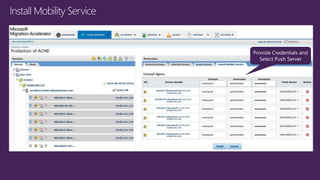
InImage Demo
Summary
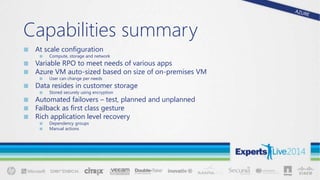
Capabilities summary
ā–  At scale configuration
ā–  Compute, storage and network
ā–  Variable RPO to meet needs of various apps
ā–  Azure VM auto-sized based on size of on-premises VM
ā–  User can change per needs
ā–  Data resides in customer storage
ā–  Stored securely using encryption
ā–  Automated failovers – test, planned and unplanned
ā–  Failback as first class gesture
ā–  Rich application level recovery
ā–  Dependency groups
ā–  Manual actions
Why recover to Azure?
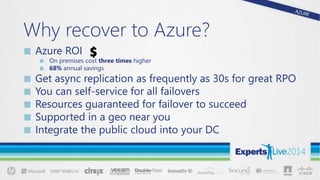
ā–  Azure ROI
ā–  On premises cost three times higher
ā–  68% annual savings
ā–  Get async replication as frequently as 30s for great RPO
ā–  You can self-service for all failovers
ā–  Resources guaranteed for failover to succeed
ā–  Supported in a geo near you
ā–  Integrate the public cloud into your DC
ASR Resources
ā–  Pricing Guide
ā–  Planning Guide
ā–  Capacity Planner Tool
ā–  Deployment Guide
ā–  Configuration Tutorials
ā–  WAN Optimization with Riverbed
ā–  InMage Website
ā–  ASR MSDN Forum
ā–  Azure Feedback Forum – ASR User Voice
ā–  ASR Wiki
Thank you!
  Expertslive   azure site recovery

Expertslive azure site recovery

  • 1.
    Business Continuity Azure SiteRecovery Alexandre Verkinderen – Christopher Keyaert
  • 2.
    Christopher Keyaert Consultant @Inovativ Be | SCCDM MVP christopher.keyaert@inovativ.be @Keyaertc Alexandre Verkinderen Managing Consultant @ Inovativ Be | SCCDM MVP Alex.verkinderen@inovativ.be @AlexVerkindere
  • 3.
    Agenda ā– Business Continuity ā– Azure SiteRecovery ā– ASR with Windows Azure Pack ā– Inmage ā– Capabilities summary
  • 4.
  • 5.
    Business Continuity Challenges Datagrowth's impact on business continuity Increasing costs Too many complications, problems and mistakes Business Continuity Not enough data retention Time-intensive media management Untested DR & decreasing recovery confidence Too much data with insufficient protection
  • 6.
    Business Continuity Challenges Bypassingthe obstacles Increasing costs Too many complications, problems and mistakes Business Continuity Not enough data retention Time-intensive media management Untested DR & decreasing recovery confidence Too much data with insufficient protection Automate, automate, automate Tighter integration between systems & availability / data protection Eliminate tape management Achieve cost and operations stability Increase breadth and depth of continuity protection Implement testable solutions for data recovery
  • 7.
    Design principles forenterprise scale DR service
  • 8.
  • 9.
    Microsoft Solutions Breadth &depth solutions for business continuity & disaster recovery Hyper-V Failover Clustering for VM Resilience 1 Hyper-V Guest Clustering for app- level HA, i.e. SQL Server AlwaysOn FCI 2 }Centralized backup with Data Protection Manager 4 Simplified protection with Windows Server Backup 3 Integration of WSB/DPM with Microsoft Azure Backup 5 Orchestrated Physical, Hyper-V & VMware VM Replication & Recovery using Azure Site Recovery, between on-premises locations, or between on-premises & Microsoft Azure 6
  • 11.
    Orchestration and Replication: InMage Scout MicrosoftAzure Site Recovery Primary Site InMage Scout Orchestration and Replication: Hyper-V Replica, SQL AlwaysOn Microsoft Azure Site Recovery Primary Site Hyper-V Microsoft Azure Site Recovery Orchestration Channel Replication channels: Hyper-V Replica, SQL AlwaysOn, SAN Primary Site Hyper-V Recovery Site Hyper-V Microsoft Azure Site Recovery Orchestration and Replication channel: InMage Scout Primary Site VMware / Physical Recovery Site InMage Scout InMage Scout Key features include: Automated VM protection and replication Remote health monitoring Near zero RPO No-impact recovery plan testing Customizable recovery plans Minimal RTO – few minutes to hours Orchestrated recovery when needed Replicate to – and recover in – Azure Heterogeneous physical and virtual support On-premisesto Azureprotection (Site-to-Azure) VMware / Physical VMware / Physical Download InMage Scout CY2015 Azure Site Recovery One solution for multiple infrastructures
  • 12.
    Site to Siterecovery with ASR
  • 13.
    Extensible Data Channel (Hyper-VReplica, SQL Always-ON) Azure Site Recovery
  • 14.
    How it works:configure Sign up Create a recovery plan Site A System Center Virtual Machine Manager AD SQL Exch System Center Virtual Machine Manager Site B
  • 15.
    How it works:create recovery plan Hyper-V Replica replicates virtual machines Health monitoring Create a recovery plan Create recovery plan Site A System Center Virtual Machine Manager AD SQL Exch Configure System Center Virtual Machine Manager Site B
  • 16.
    How it works:recover from datacenter failure Create a recovery plan System Center Virtual Machine Manager Site B Create recovery plan Orchestrates recovery of services in the event of an outage AD SQL Exch
  • 17.
    Site to Azurerecovery via ASR
  • 18.
    Extensible Data Channel Hyper-VRecovery Manager Microsoft Azure Site Recovery Microsoft Azure Compute Storage Networks
  • 19.
    How it works:create recovery plan Hyper-V Replica replicates virtual machines Create a recovery plan Create recovery plan Site A System Center Virtual Machine Manager AD SQL Exch Configure
  • 20.
    Site to Azuresetup – Demo
  • 21.
    Unit that failsover together • Defines a collection of VM that will be recovered together. • Typically models an application. Dependency modelling • Specify the order in which the VMs of a recovery plan need to be booted by using groups. • VMs of same group failover in parallel. • Shutdown is in reverse order of recovery to ensure 0 data loss. Extensible Recovery plans • Add custom actions to a recovery plan in between the groups. Value Props of Recovery plan
  • 22.
    Test Failover • Recoverthe VM to Azure without affecting the primary site workload. • VM can come up in an isolated environment. Planned Failover • Recover VM by safely turning off the VM on the primary site and sending latest changes. • Ensures 0 data loss. • VM boots up on Azure. Active location changes to Microsoft Azure. Unplanned Failover Without primary site operations • Recover VM when the primary site is no longer reachable. • May have data loss. • VM boots up on Azure. Active location changes to Microsoft Azure. Unplanned failover with primary site operations • Attempts to shutdown VM and send latest changes. • If attempt fails, goes ahead with the recovery to ensure better RTO. Recovery Actions
  • 23.
  • 24.
    ASR - Supportedconfiguration and Pricing
  • 25.
    Supported Configuration Host operatingsystem Windows Server 2012 R2 Guest operating system Windows Server 2008 R2 or later Linux: Centos, openSUSE, SUSE, Ubuntu Guest operating system architecture 64-bit Operating system disk size Between 20 MB and 127 GB Operating system disk count 1 Data disk count 16 or less (the maximum is a function of the size of the virtual machine being created. 16 = XL) http://msdn.microsoft.com/en- us/library/dn469078.aspx
  • 26.
    Supported Configuration (2) Datadisk VHD size Between 20 MB and 1023 GB Network adapters One adapter and one IP address Static IP address Not supported iSCSI disk Not supported Shared VHD Not supported FC disk Not supported Hard disk format VHD VHDX (supported on generation 1 only) Virtual machine namea Should contain between 1 and 63 characters. Restricted to letters, numbers, and hyphens. The name must start with a letter or number and end with a letter or number. Virtual machine type Generation 1
  • 27.
  • 28.
    ASR with WindowsAzure Pack
  • 29.
    Source: Hyper-V WorkloadsTarget: Hyper-V Workloads Microsoft Azure Site Recovery HSP Data Center 1 / CPS Stamp 1 HSP Data Center 2 / CPS Stamp 2 DR OrchestrationDR Orchestration Microsoft Azure Pack Integration Extensible Data Channel
  • 30.
    Microsoft Azure PackIntegration ā–  Available with Azure Pack Update Release 4 ā–  DR as a Plan/Add-On property on VM clouds ā–  SMA runbooks ā–  To auto-create recovery site subscription when Tenant subscribes to DR on primary ā–  To enable/disable DR protection for all present and future created VMs in subscription ā–  Full integration of replica VMs with recovery site Azure Pack ā–  Tenants can manage (start/stop/console or desktop connect) failed over replica VMs on recovery site Azure Pack
  • 31.
  • 32.
    SCVMMMicrosoft Azure Pack Tenant1 Subscription HSP Management Subscription HSP Billing Account VM Replication DRP DR Orchestration HSP Data Center Microsoft Azure Failover Hosted Workloads to Azure – Tenant Isolation Tenant 2 Subscription Tenant 1 Tenant 2 Tenant 2 Tenant 1 VM Replication
  • 33.
    Hosted Workloads toAzure – Tenant Isolation ā–  HSP owns the billing of Azure subscriptions ā–  HSP creates management subscription in which ASR vault is created and HSP SCVMM is registered ā–  Tenants do not have access to management subscription ā–  HSP creates new Azure subscription per tenant and makes tenant co-admin on it ā–  Tenant VM replicates to the Storage Account in subscription created for tenant ā–  Given managed DR focus, DR drills are triggered by HSP on behalf of tenants ā–  During failover to Azure, VM instance comes up in Azure subscription created for tenant
  • 34.
  • 35.
    Contoso Primary Location (On-Premises/ServiceProvider) Source: VMware vSphere VMs & Physical Servers Heterogeneous Disaster Recovery for VMware vSphere-based VMs & Physical Servers with InMage Scout Process Server Contoso Secondary Location (On-Premises/Service Provider) Target: VMware vSphere VMs Config Server Master Target InMage Scout Data Channel Download InMage Scout Microsoft Azure Site Recovery Download InMage Scout Process Server – Used for Caching, Compression & Encryption Config Server – Used for Centralized Management of InMage Scout Master Target – Used as a repository & for retention
  • 36.
    Microsoft Azure InMage Scout Data Channel Microsoft Azure SiteRecovery Process Server – Used for Caching, Compression & Encryption Config Server – Used for Centralized Management of InMage Scout Master Target – Used as a repository & for retention for VMware & Physical into Azure with ASR & InMage Scout (Future) Contoso Fabrikam RX Server – Used for multi-tenant management in Azure RX Server Orchestration Orchestration
  • 37.
  • 46.
  • 47.
    Capabilities summary ā–  Atscale configuration ā–  Compute, storage and network ā–  Variable RPO to meet needs of various apps ā–  Azure VM auto-sized based on size of on-premises VM ā–  User can change per needs ā–  Data resides in customer storage ā–  Stored securely using encryption ā–  Automated failovers – test, planned and unplanned ā–  Failback as first class gesture ā–  Rich application level recovery ā–  Dependency groups ā–  Manual actions
  • 48.
    Why recover toAzure? ā–  Azure ROI ā–  On premises cost three times higher ā–  68% annual savings ā–  Get async replication as frequently as 30s for great RPO ā–  You can self-service for all failovers ā–  Resources guaranteed for failover to succeed ā–  Supported in a geo near you ā–  Integrate the public cloud into your DC
  • 49.
    ASR Resources ā–  PricingGuide ā–  Planning Guide ā–  Capacity Planner Tool ā–  Deployment Guide ā–  Configuration Tutorials ā–  WAN Optimization with Riverbed ā–  InMage Website ā–  ASR MSDN Forum ā–  Azure Feedback Forum – ASR User Voice ā–  ASR Wiki
  • 50.

Editor's Notes

  • #17Ā Let’s step through how Hyper-V Recovery Manager works. To use the service, the first step is to create a Windows Azure account and sign in. Once you have signed in to the management portal, you can enable and then configure the service. There are a number of configuration options. At a high-level view, the management portal configures the System Center Virtual Machine Manager server, which in turn configures individual VMs for replication and monitoring.
  • #18Ā Once you’ve created recovery plans, they’re stored in Windows Azure. The replication and monitoring begins begins.
  • #19Ā With health monitoring in place, you’re protected against primary cloud or data center failure. In the event of a failure, Hyper-V Recovery Manager can orchestrate the recovery of the virtual machines according to the plan. Let’s look more at the flexibility of the Hyper-V Recovery Manager configuration options.
  • #22Ā Once you’ve created recovery plans, they’re stored in Windows Azure. The replication and monitoring begins begins.