© Copyright Microsoft Corporation. All rights reserved.
FOR USE ONLY AS PART OF VIRTUAL TRAINING DAYS PROGRAM. THESE MATERIALS ARE NOT AUTHORIZED FOR
DISTRIBUTION, REPRODUCTION OR OTHER USE BY NON-MICROSOFT PARTIES.
MOD 2: Core Azure Services
Module Outline
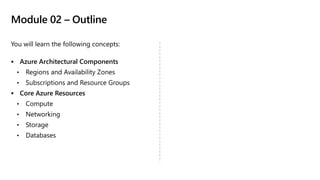
Module 02 – Outline
You will learn the following concepts:
▪ Azure Architectural Components
• Regions and Availability Zones
• Subscriptions and Resource Groups
▪ Core Azure Resources
• Compute
• Networking
• Storage
• Databases
Core Azure architectural components
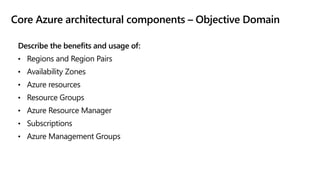
Core Azure architectural components – Objective Domain
Describe the benefits and usage of:
• Regions and Region Pairs
• Availability Zones
• Azure resources
• Resource Groups
• Azure Resource Manager
• Subscriptions
• Azure Management Groups
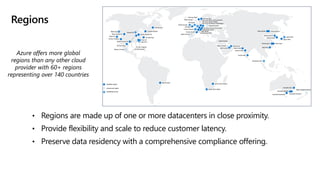
Regions
• Regions are made up of one or more datacenters in close proximity.
• Provide flexibility and scale to reduce customer latency.
• Preserve data residency with a comprehensive compliance offering.
Azure offers more global
regions than any other cloud
provider with 60+ regions
representing over 140 countries
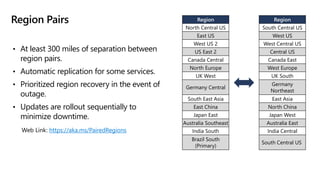
Region Pairs
• At least 300 miles of separation between
region pairs.
• Automatic replication for some services.
• Prioritized region recovery in the event of
outage.
• Updates are rollout sequentially to
minimize downtime.
Region
South Central US​
West US​
West Central US​
Central US​
Canada East​
West Europe​
UK South​
Germany
Northeast​
East Asia​
North China​
Japan West​
Australia East​
India Central​
South Central US
Region
North Central US​
East US​
West US 2​
US East 2​
Canada Central​
North Europe​
UK West​
Germany Central​
South East Asia​
East China​
Japan East​
Australia Southeast​
India South​
Brazil South
(Primary)​
Web Link: https://aka.ms/PairedRegions
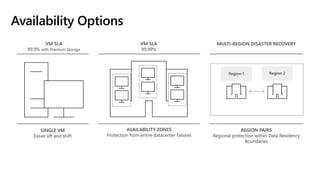
Availability Options
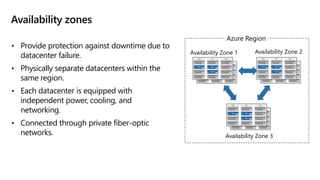
Availability zones
• Provide protection against downtime due to
datacenter failure.
• Physically separate datacenters within the
same region.
• Each datacenter is equipped with
independent power, cooling, and
networking.
• Connected through private fiber-optic
networks.
Availability Zone 1
Availability Zone 3
Availability Zone 2
Azure Region
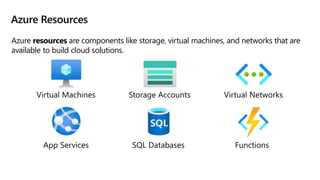
Azure Resources
Azure resources are components like storage, virtual machines, and networks that are
available to build cloud solutions.
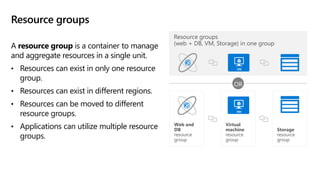
Resource groups
A resource group is a container to manage
and aggregate resources in a single unit.
• Resources can exist in only one resource
group.
• Resources can exist in different regions.
• Resources can be moved to different
resource groups.
• Applications can utilize multiple resource
groups.
OR
Resource groups
(web + DB, VM, Storage) in one group
Storage
resource
group
Virtual
machine
resource
group
Web and
DB
resource
group
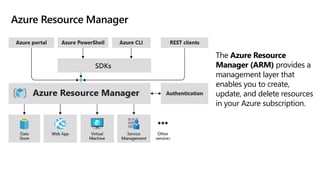
Azure Resource Manager
The Azure Resource
Manager (ARM) provides a
management layer that
enables you to create,
update, and delete resources
in your Azure subscription.
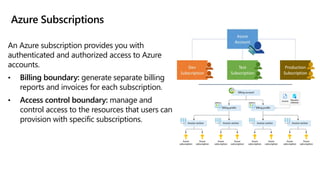
Azure Subscriptions
An Azure subscription provides you with
authenticated and authorized access to Azure
accounts.
• Billing boundary: generate separate billing
reports and invoices for each subscription.
• Access control boundary: manage and
control access to the resources that users can
provision with specific subscriptions.
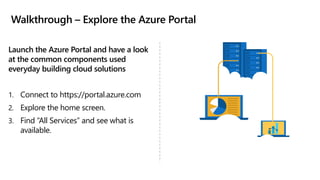
Walkthrough – Explore the Azure Portal
Launch the Azure Portal and have a look
at the common components used
everyday building cloud solutions
1. Connect to https://portal.azure.com
2. Explore the home screen.
3. Find “All Services” and see what is
available.
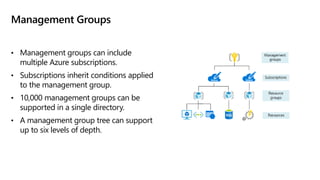
Management Groups
• Management groups can include
multiple Azure subscriptions.
• Subscriptions inherit conditions applied
to the management group.
• 10,000 management groups can be
supported in a single directory.
• A management group tree can support
up to six levels of depth.
Core Azure workload products
Core Azure Workloads - Objective Domain
Describe the benefits and usage of:
• Virtual Machines, Azure App Services, Azure Container Instances (ACI), Azure
Kubernetes Service (AKS), and Windows Virtual Desktop
• Virtual Networks, VPN Gateway, Virtual Network peering, and ExpressRoute
• Container (Blob) Storage, Disk Storage, File Storage, and storage tiers
• Cosmos DB, Azure SQL Database, Azure Database for MySQL, Azure Database for
PostgreSQL, and SQL Managed Instance
• Azure Marketplace
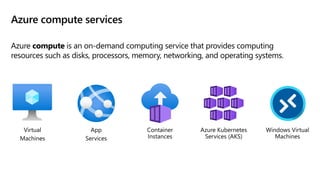
Azure compute services
Azure compute is an on-demand computing service that provides computing
resources such as disks, processors, memory, networking, and operating systems.
Azure virtual machines
Azure Virtual Machines (VM) are software emulations
of physical computers.
• Includes virtual processor, memory, storage, and
networking.
• IaaS offering that provides total control and
customization.
Walkthrough – Create a Virtual Machine
Create a virtual machine in the Azure
Portal, connect to the virtual
machine, install the web server role,
and test.
1. Create the virtual machine.
2. Connect to the virtual machine.
3. Install the web server role and test.
Azure App Services
Azure App Services is a fully managed platform to build,
deploy, and scale web apps and APIs quickly.
• Works with .Net, .NetC Core, Node.js, Java, Phython, or
php.
• PaaS offering with enterprise-grade performance, security,
and compliance requirements.
Walkthrough – Create an App Service
Create a new Web App by using a Docker
image stored in Azure Container
Registry.
1. Create a Web App using a Docker
image.
2. Test the Web App.
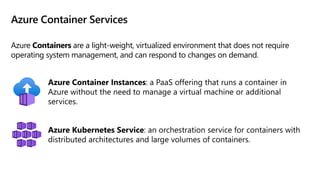
Azure Container Services
Azure Containers are a light-weight, virtualized environment that does not require
operating system management, and can respond to changes on demand.
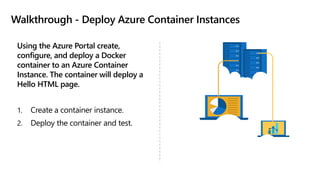
Walkthrough - Deploy Azure Container Instances
Using the Azure Portal create,
configure, and deploy a Docker
container to an Azure Container
Instance. The container will deploy a
Hello HTML page.
1. Create a container instance.
2. Deploy the container and test.
Windows Virtual Desktop
Windows Virtual Desktop is a desktop and app virtualization
that runs in the cloud.
• Create a full desktop virtualization environment without
having to run additional gateway servers.
• Publish unlimited host pools to accommodate diverse
workloads.
• Reduce costs with pooled, multi-session resources.
Azure networking services
Walkthrough - Create a virtual network
Create a virtual network with two
virtual machines and then test
connection between the machines.
1. Create a virtual network.
2. Create two virtual machines.
3. Test the connection.
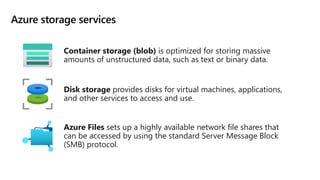
Azure storage services
Container storage (blob) is optimized for storing massive
amounts of unstructured data, such as text or binary data.
Disk storage provides disks for virtual machines, applications,
and other services to access and use.
Azure Files sets up a highly available network file shares that
can be accessed by using the standard Server Message Block
(SMB) protocol.
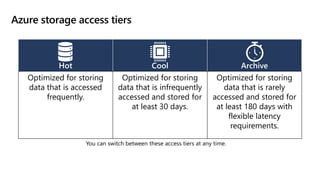
Azure storage access tiers
You can switch between these access tiers at any time.
Hot Cool Archive
Optimized for storing
data that is accessed
frequently.
Optimized for storing
data that is infrequently
accessed and stored for
at least 30 days.
Optimized for storing
data that is rarely
accessed and stored for
at least 180 days with
flexible latency
requirements.
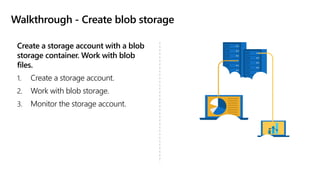
Walkthrough - Create blob storage
Create a storage account with a blob
storage container. Work with blob
files.
1. Create a storage account.
2. Work with blob storage.
3. Monitor the storage account.
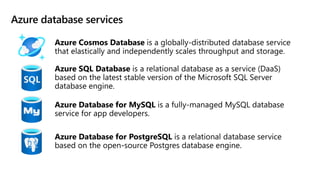
Azure database services
Azure SQL Managed Instance
Azure SQL Managed Instance allows existing SQL Server
customers to lift and shift their on-premises applications to
the cloud with minimal application and database changes.
• Fully managed and evergreen platform as a service.
• Preserves all PaaS capabilities (automatic patching and
version updates, automated backups, and high
availability)
• Exchange existing licenses for discounted rates on SQL
Managed Instance using the Azure Hybrid Benefit
Walkthrough-Create a SQL database
Create a SQL database in Azure and
then query the data in that database.
1. Create the database.
2. Query the database.
Explore Azure Marketplace
Azure Marketplace allows customers to find, try, purchase, and provision
applications and services from hundreds of leading service providers, which are
all certified to run on Azure.
• Open source container platforms.
• Virtual machine and database images.
• Application build and deployment software.
• Developer tools.
• And much more, with 10,000+ listings!
Module 02 Review
• Microsoft provides more global presence than
any other cloud provider with over 60 regions
distributed worldwide
• Azure Management tools
• Azure's multiple services (compute, networking,
storage, and databases)
• Azure Marketplace
Microsoft Learn Modules
(docs.microsoft.com/Learn)

02microsoftazurefundamentalsworkloads1606403971632.pdf

  • 1.
    © Copyright MicrosoftCorporation. All rights reserved. FOR USE ONLY AS PART OF VIRTUAL TRAINING DAYS PROGRAM. THESE MATERIALS ARE NOT AUTHORIZED FOR DISTRIBUTION, REPRODUCTION OR OTHER USE BY NON-MICROSOFT PARTIES.
  • 2.
    MOD 2: CoreAzure Services
  • 3.
  • 4.
    Module 02 –Outline You will learn the following concepts: ▪ Azure Architectural Components • Regions and Availability Zones • Subscriptions and Resource Groups ▪ Core Azure Resources • Compute • Networking • Storage • Databases
  • 5.
  • 6.
    Core Azure architecturalcomponents – Objective Domain Describe the benefits and usage of: • Regions and Region Pairs • Availability Zones • Azure resources • Resource Groups • Azure Resource Manager • Subscriptions • Azure Management Groups
  • 7.
    Regions • Regions aremade up of one or more datacenters in close proximity. • Provide flexibility and scale to reduce customer latency. • Preserve data residency with a comprehensive compliance offering. Azure offers more global regions than any other cloud provider with 60+ regions representing over 140 countries
  • 8.
    Region Pairs • Atleast 300 miles of separation between region pairs. • Automatic replication for some services. • Prioritized region recovery in the event of outage. • Updates are rollout sequentially to minimize downtime. Region South Central US​ West US​ West Central US​ Central US​ Canada East​ West Europe​ UK South​ Germany Northeast​ East Asia​ North China​ Japan West​ Australia East​ India Central​ South Central US Region North Central US​ East US​ West US 2​ US East 2​ Canada Central​ North Europe​ UK West​ Germany Central​ South East Asia​ East China​ Japan East​ Australia Southeast​ India South​ Brazil South (Primary)​ Web Link: https://aka.ms/PairedRegions
  • 9.
  • 10.
    Availability zones • Provideprotection against downtime due to datacenter failure. • Physically separate datacenters within the same region. • Each datacenter is equipped with independent power, cooling, and networking. • Connected through private fiber-optic networks. Availability Zone 1 Availability Zone 3 Availability Zone 2 Azure Region
  • 11.
    Azure Resources Azure resourcesare components like storage, virtual machines, and networks that are available to build cloud solutions.
  • 12.
    Resource groups A resourcegroup is a container to manage and aggregate resources in a single unit. • Resources can exist in only one resource group. • Resources can exist in different regions. • Resources can be moved to different resource groups. • Applications can utilize multiple resource groups. OR Resource groups (web + DB, VM, Storage) in one group Storage resource group Virtual machine resource group Web and DB resource group
  • 13.
    Azure Resource Manager TheAzure Resource Manager (ARM) provides a management layer that enables you to create, update, and delete resources in your Azure subscription.
  • 14.
    Azure Subscriptions An Azuresubscription provides you with authenticated and authorized access to Azure accounts. • Billing boundary: generate separate billing reports and invoices for each subscription. • Access control boundary: manage and control access to the resources that users can provision with specific subscriptions.
  • 15.
    Walkthrough – Explorethe Azure Portal Launch the Azure Portal and have a look at the common components used everyday building cloud solutions 1. Connect to https://portal.azure.com 2. Explore the home screen. 3. Find “All Services” and see what is available.
  • 16.
    Management Groups • Managementgroups can include multiple Azure subscriptions. • Subscriptions inherit conditions applied to the management group. • 10,000 management groups can be supported in a single directory. • A management group tree can support up to six levels of depth.
  • 17.
  • 18.
    Core Azure Workloads- Objective Domain Describe the benefits and usage of: • Virtual Machines, Azure App Services, Azure Container Instances (ACI), Azure Kubernetes Service (AKS), and Windows Virtual Desktop • Virtual Networks, VPN Gateway, Virtual Network peering, and ExpressRoute • Container (Blob) Storage, Disk Storage, File Storage, and storage tiers • Cosmos DB, Azure SQL Database, Azure Database for MySQL, Azure Database for PostgreSQL, and SQL Managed Instance • Azure Marketplace
  • 19.
    Azure compute services Azurecompute is an on-demand computing service that provides computing resources such as disks, processors, memory, networking, and operating systems.
  • 20.
    Azure virtual machines AzureVirtual Machines (VM) are software emulations of physical computers. • Includes virtual processor, memory, storage, and networking. • IaaS offering that provides total control and customization.
  • 21.
    Walkthrough – Createa Virtual Machine Create a virtual machine in the Azure Portal, connect to the virtual machine, install the web server role, and test. 1. Create the virtual machine. 2. Connect to the virtual machine. 3. Install the web server role and test.
  • 22.
    Azure App Services AzureApp Services is a fully managed platform to build, deploy, and scale web apps and APIs quickly. • Works with .Net, .NetC Core, Node.js, Java, Phython, or php. • PaaS offering with enterprise-grade performance, security, and compliance requirements.
  • 23.
    Walkthrough – Createan App Service Create a new Web App by using a Docker image stored in Azure Container Registry. 1. Create a Web App using a Docker image. 2. Test the Web App.
  • 24.
    Azure Container Services AzureContainers are a light-weight, virtualized environment that does not require operating system management, and can respond to changes on demand.
  • 25.
    Walkthrough - DeployAzure Container Instances Using the Azure Portal create, configure, and deploy a Docker container to an Azure Container Instance. The container will deploy a Hello HTML page. 1. Create a container instance. 2. Deploy the container and test.
  • 26.
    Windows Virtual Desktop WindowsVirtual Desktop is a desktop and app virtualization that runs in the cloud. • Create a full desktop virtualization environment without having to run additional gateway servers. • Publish unlimited host pools to accommodate diverse workloads. • Reduce costs with pooled, multi-session resources.
  • 27.
  • 28.
    Walkthrough - Createa virtual network Create a virtual network with two virtual machines and then test connection between the machines. 1. Create a virtual network. 2. Create two virtual machines. 3. Test the connection.
  • 29.
    Azure storage services Containerstorage (blob) is optimized for storing massive amounts of unstructured data, such as text or binary data. Disk storage provides disks for virtual machines, applications, and other services to access and use. Azure Files sets up a highly available network file shares that can be accessed by using the standard Server Message Block (SMB) protocol.
  • 30.
    Azure storage accesstiers You can switch between these access tiers at any time. Hot Cool Archive Optimized for storing data that is accessed frequently. Optimized for storing data that is infrequently accessed and stored for at least 30 days. Optimized for storing data that is rarely accessed and stored for at least 180 days with flexible latency requirements.
  • 31.
    Walkthrough - Createblob storage Create a storage account with a blob storage container. Work with blob files. 1. Create a storage account. 2. Work with blob storage. 3. Monitor the storage account.
  • 32.
  • 33.
    Azure SQL ManagedInstance Azure SQL Managed Instance allows existing SQL Server customers to lift and shift their on-premises applications to the cloud with minimal application and database changes. • Fully managed and evergreen platform as a service. • Preserves all PaaS capabilities (automatic patching and version updates, automated backups, and high availability) • Exchange existing licenses for discounted rates on SQL Managed Instance using the Azure Hybrid Benefit
  • 34.
    Walkthrough-Create a SQLdatabase Create a SQL database in Azure and then query the data in that database. 1. Create the database. 2. Query the database.
  • 35.
    Explore Azure Marketplace AzureMarketplace allows customers to find, try, purchase, and provision applications and services from hundreds of leading service providers, which are all certified to run on Azure. • Open source container platforms. • Virtual machine and database images. • Application build and deployment software. • Developer tools. • And much more, with 10,000+ listings!
  • 36.
    Module 02 Review •Microsoft provides more global presence than any other cloud provider with over 60 regions distributed worldwide • Azure Management tools • Azure's multiple services (compute, networking, storage, and databases) • Azure Marketplace Microsoft Learn Modules (docs.microsoft.com/Learn)