Angela Gisi
                                     Annie Powell
                                     Amy West


http://www.screencast-o-matic.com/
Why Web 2.0 in the classroom?

“Web 2.0 tools can promote user participation and
knowledge production and thus fit well with social
constructivist pedagogical theories. These tools have the
potential to transform classes from teacher-centric,
transmission instruction to social constructivist, student-
participatory approaches, from individual-focused
pedagogies to learning community approaches.”
quoted from:
Rosen, D., & Nelson, C. (2008). Web 2.0: a new generation
. of learners and education. Computers in the Schools, .
. 25(3-4), 211-225.
Audience
        School Administrators

        Teachers

        School Staff

        Students

        Parents/Stakeholders

        Tech Support & How-to-ers

        Businesses
Synopsis of Tool’s Features
                                      Basic Features:

 Java-based applet allows users to create recordings of their
  screen activity and audio
 Screencast can contain a portion of the screen or a full
  screen view
 Screencasts can be converted to QuikTime format and
  downloaded to the user’s hard drive
 Registered users can keep track of their screencasts in My
  Screencasts
 Users can add favorite screencasts to user-created Channels
 Users can place a request for someone to do a screencast
  on a particular topic
Information retrieved from http://www.appappeal.com/app/screencast-o-matic/
Synopsis of Tool’s Features
                                            Recently Added Features:
 Save to Animated Image
  Save very short recordings to an animated image. This is useful for posting a short video to forums, wikis, etc
  where you can't embed a video

 New Overlay
  You can overlay a colored box to highlight a part of the screen

 YouTube Side Bar Style
  If you record a video that isn't HD size you'll see black bars when uploading to YouTube. Now you can choose a
  different color for these bars and add a drop shadow

 YouTube "Unlisted" Uploading
  You can choose to upload to YouTube as "Unlisted" so your videos don't show up in search results or your public
  feed which is great for sharing with just a few people

 QuickScreenShare.com was created to provide a super easy way to share screens with anyone

 SOM Upload to Channel
   When you publish to your Screencast-O-Matic account you can choose a channel to add the screencast to if you've created channels
   in your account.

 Download Screencast-O-Matic
   On windows you can now choose to run the recorder from your browser or by installing an application to run from the Start menu

   Information retrieved from http://www.screencast-o-matic.com/update-10-2011
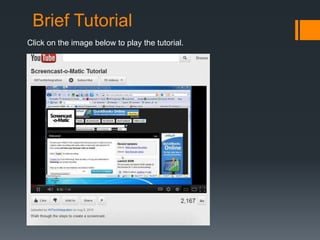
Brief Tutorial
Click on the image below to play the tutorial.
Appropriate context for Screencast-o-matic?

      Demonstration of software use and computer functions
      Presentation of short lectures/lessons
      Provide feedback for students’ work
      Display visual/audio advice for tech support
      Show users how to solve problems
      Present orientation to online classes
      Tell digital stories
      Create assignments for student production of screencasts
Sample Screencasts

 Student generated:
http://www.screencast-o-matic.com/watch/c61XbyiU8

 Teacher generated:
http://www.screencast-o-matic.com/watch/c6XvY8Xc9

 “How to” & Tech Support
http://www.screencast-o-matic.com/watch/c6Vi3ah4Y

 You Tube:
http://www.youtube.com/watch?v=0Qt0EEh7JYc
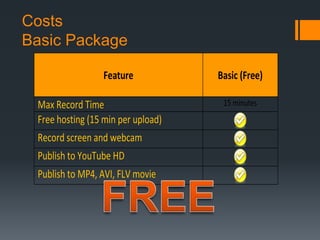
Costs
Basic Package

                 Feature            Basic (Free)

 Max Record Time                     15 minutes
 Free hosting (15 min per upload)
 Record screen and webcam
 Publish to YouTube HD
 Publish to MP4, AVI, FLV movie
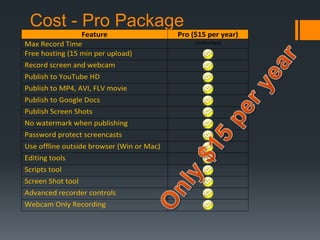
Cost - Pro Package
                 Feature                   Pro ($15 per year)
Max Record Time                                 Unlimited
Free hosting (15 min per upload)
Record screen and webcam
Publish to YouTube HD
Publish to MP4, AVI, FLV movie
Publish to Google Docs
Publish Screen Shots
No watermark when publishing
Password protect screencasts
Use offline outside browser (Win or Mac)
Editing tools
Scripts tool
Screen Shot tool
Advanced recorder controls
Webcam Only Recording

Group presentation final1

  • 1.
    Angela Gisi Annie Powell Amy West http://www.screencast-o-matic.com/
  • 2.
    Why Web 2.0in the classroom? “Web 2.0 tools can promote user participation and knowledge production and thus fit well with social constructivist pedagogical theories. These tools have the potential to transform classes from teacher-centric, transmission instruction to social constructivist, student- participatory approaches, from individual-focused pedagogies to learning community approaches.” quoted from: Rosen, D., & Nelson, C. (2008). Web 2.0: a new generation . of learners and education. Computers in the Schools, . . 25(3-4), 211-225.
  • 3.
    Audience  School Administrators  Teachers  School Staff  Students  Parents/Stakeholders  Tech Support & How-to-ers  Businesses
  • 4.
    Synopsis of Tool’sFeatures Basic Features:  Java-based applet allows users to create recordings of their screen activity and audio  Screencast can contain a portion of the screen or a full screen view  Screencasts can be converted to QuikTime format and downloaded to the user’s hard drive  Registered users can keep track of their screencasts in My Screencasts  Users can add favorite screencasts to user-created Channels  Users can place a request for someone to do a screencast on a particular topic Information retrieved from http://www.appappeal.com/app/screencast-o-matic/
  • 5.
    Synopsis of Tool’sFeatures Recently Added Features:  Save to Animated Image Save very short recordings to an animated image. This is useful for posting a short video to forums, wikis, etc where you can't embed a video  New Overlay You can overlay a colored box to highlight a part of the screen  YouTube Side Bar Style If you record a video that isn't HD size you'll see black bars when uploading to YouTube. Now you can choose a different color for these bars and add a drop shadow  YouTube "Unlisted" Uploading You can choose to upload to YouTube as "Unlisted" so your videos don't show up in search results or your public feed which is great for sharing with just a few people  QuickScreenShare.com was created to provide a super easy way to share screens with anyone  SOM Upload to Channel When you publish to your Screencast-O-Matic account you can choose a channel to add the screencast to if you've created channels in your account.  Download Screencast-O-Matic On windows you can now choose to run the recorder from your browser or by installing an application to run from the Start menu Information retrieved from http://www.screencast-o-matic.com/update-10-2011
  • 6.
    Brief Tutorial Click onthe image below to play the tutorial.
  • 7.
    Appropriate context forScreencast-o-matic?  Demonstration of software use and computer functions  Presentation of short lectures/lessons  Provide feedback for students’ work  Display visual/audio advice for tech support  Show users how to solve problems  Present orientation to online classes  Tell digital stories  Create assignments for student production of screencasts
  • 8.
    Sample Screencasts  Studentgenerated: http://www.screencast-o-matic.com/watch/c61XbyiU8  Teacher generated: http://www.screencast-o-matic.com/watch/c6XvY8Xc9  “How to” & Tech Support http://www.screencast-o-matic.com/watch/c6Vi3ah4Y  You Tube: http://www.youtube.com/watch?v=0Qt0EEh7JYc
  • 9.
    Costs Basic Package Feature Basic (Free) Max Record Time 15 minutes Free hosting (15 min per upload) Record screen and webcam Publish to YouTube HD Publish to MP4, AVI, FLV movie
  • 10.
    Cost - ProPackage Feature Pro ($15 per year) Max Record Time Unlimited Free hosting (15 min per upload) Record screen and webcam Publish to YouTube HD Publish to MP4, AVI, FLV movie Publish to Google Docs Publish Screen Shots No watermark when publishing Password protect screencasts Use offline outside browser (Win or Mac) Editing tools Scripts tool Screen Shot tool Advanced recorder controls Webcam Only Recording