VIDEO EDITING:
EXERCISE #1-
STEP #3
C O M M 1 0 6 : M U LT I M E D I A J O U R N A L I S M
LAB WORK STRUCTURE
• LAB TIME is built into the structure of the class in order to work on
projects. Even so, students work at different speeds so there are also
OPEN LAB hours you can use to work on your projects outside of
regular class meetings.
• LAB TIME is provided so you can stay on track with specific project
steps in a teaching environment.
• You can also download the software we use to work on your projects
outside of class.
• We have to stay together as a class so once the class lab time
allotted for a project is completed, we’re moving on. Remember -
NO CREDIT FOR LATE WORK! You will have plenty of time to
complete projects, but in order to do so you must attend class and
use the allotted time wisely
WINDOWS MOVIE MAKER
• WINDOWS MOVIE MAKER is a video editing
program that is “non-linear” which means it is
digital and non-destructive. No matter what you do
in the program, you don’t alter your original files
(unless you specifically delete them)
• It comes bundled with Windows and you can
download it for free for your own use (it is being
phased out)
• All digital video editing programs work on a similar
structure
• ALWAYS PLUG YOUR HEADPHONES IN BEFORE
STARTING PROGRAM!
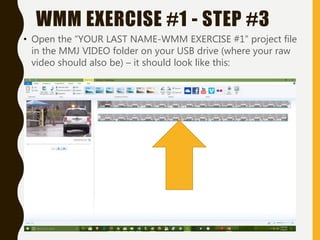
• Open the “YOUR LAST NAME-WMM EXERCISE #1” project file
in the MMJ VIDEO folder on your USB drive (where your raw
video should also be) – it should look like this:
WMM EXERCISE #1 - STEP #3
• Go to WEEK #12/CLASS MATERIALS and save
the NY PRISON BREAK SCRIPT file to your USB
drive in a folder called “MMJ VIDEO”
• To do this right-click on the file(s) and choose
“Save Link/Target As” and navigate to your
USB and save them in the folder “MMJ VIDEO”
• YOU MUST SAVE ALL MATERIAL ONTO YOUR
USB DRIVE!
WMM EXERCISE #1 - STEP #3
• Go to WEEK #12/CLASS MATERIALS and save
the SIX PRISON BREAK photo files to your USB
drive in your “MMJ VIDEO” folder
• To do this right-click on the file(s) and choose
“Save Link/Target As” and navigate to your
USB and save them in your “MMJ VIDEO”
folder
• YOU MUST SAVE ALL MATERIAL ONTO YOUR
USB DRIVE!
WMM EXERCISE #1 - STEP #3
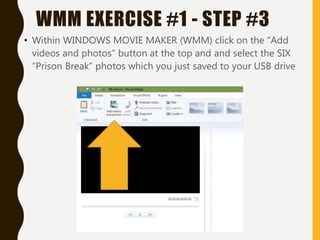
• Within WINDOWS MOVIE MAKER (WMM) click on the “Add
videos and photos” button at the top and and select the SIX
“Prison Break” photos which you just saved to your USB drive
WMM EXERCISE #1 - STEP #3
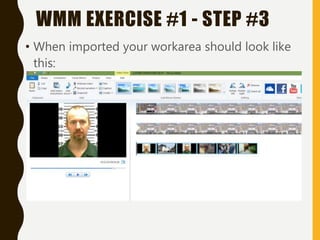
• When imported your workarea should look like
this:
WMM EXERCISE #1 - STEP #3
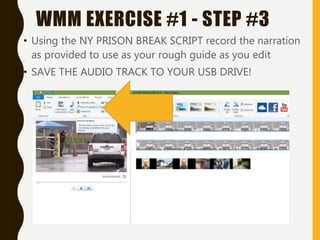
• Using the NY PRISON BREAK SCRIPT record the narration
as provided to use as your rough guide as you edit
• SAVE THE AUDIO TRACK TO YOUR USB DRIVE!
WMM EXERCISE #1 - STEP #3
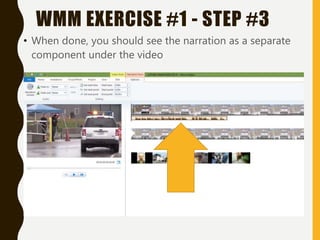
• When done, you should see the narration as a separate
component under the video
WMM EXERCISE #1 - STEP #3
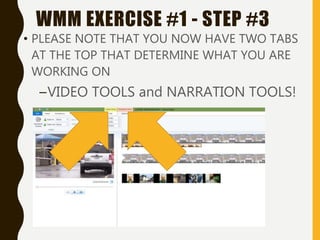
• PLEASE NOTE THAT YOU NOW HAVE TWO TABS
AT THE TOP THAT DETERMINE WHAT YOU ARE
WORKING ON
–VIDEO TOOLS and NARRATION TOOLS!
WMM EXERCISE #1 - STEP #3
• We’ll stop there – when we meet next week
we’ll pick up with basic editing of this
exercise
• YOU MUST START GATHERING VIDEO AND
AUDIO MATERIAL AND BRINGING IT IN TO
WORK ON IN CLASS!
• Your semester project must be completed,
posted, and presented to the class by the
end of our last meeting on 12/21!
• Your semester project is worth 50% of your
final grade!
WMM EXERCISE #1 - STEP #3

COMM 106-WMM EXERCISE-STEP #3

  • 1.
    VIDEO EDITING: EXERCISE #1- STEP#3 C O M M 1 0 6 : M U LT I M E D I A J O U R N A L I S M
  • 2.
    LAB WORK STRUCTURE •LAB TIME is built into the structure of the class in order to work on projects. Even so, students work at different speeds so there are also OPEN LAB hours you can use to work on your projects outside of regular class meetings. • LAB TIME is provided so you can stay on track with specific project steps in a teaching environment. • You can also download the software we use to work on your projects outside of class. • We have to stay together as a class so once the class lab time allotted for a project is completed, we’re moving on. Remember - NO CREDIT FOR LATE WORK! You will have plenty of time to complete projects, but in order to do so you must attend class and use the allotted time wisely
  • 3.
    WINDOWS MOVIE MAKER •WINDOWS MOVIE MAKER is a video editing program that is “non-linear” which means it is digital and non-destructive. No matter what you do in the program, you don’t alter your original files (unless you specifically delete them) • It comes bundled with Windows and you can download it for free for your own use (it is being phased out) • All digital video editing programs work on a similar structure • ALWAYS PLUG YOUR HEADPHONES IN BEFORE STARTING PROGRAM!
  • 4.
    • Open the“YOUR LAST NAME-WMM EXERCISE #1” project file in the MMJ VIDEO folder on your USB drive (where your raw video should also be) – it should look like this: WMM EXERCISE #1 - STEP #3
  • 5.
    • Go toWEEK #12/CLASS MATERIALS and save the NY PRISON BREAK SCRIPT file to your USB drive in a folder called “MMJ VIDEO” • To do this right-click on the file(s) and choose “Save Link/Target As” and navigate to your USB and save them in the folder “MMJ VIDEO” • YOU MUST SAVE ALL MATERIAL ONTO YOUR USB DRIVE! WMM EXERCISE #1 - STEP #3
  • 6.
    • Go toWEEK #12/CLASS MATERIALS and save the SIX PRISON BREAK photo files to your USB drive in your “MMJ VIDEO” folder • To do this right-click on the file(s) and choose “Save Link/Target As” and navigate to your USB and save them in your “MMJ VIDEO” folder • YOU MUST SAVE ALL MATERIAL ONTO YOUR USB DRIVE! WMM EXERCISE #1 - STEP #3
  • 7.
    • Within WINDOWSMOVIE MAKER (WMM) click on the “Add videos and photos” button at the top and and select the SIX “Prison Break” photos which you just saved to your USB drive WMM EXERCISE #1 - STEP #3
  • 8.
    • When importedyour workarea should look like this: WMM EXERCISE #1 - STEP #3
  • 9.
    • Using theNY PRISON BREAK SCRIPT record the narration as provided to use as your rough guide as you edit • SAVE THE AUDIO TRACK TO YOUR USB DRIVE! WMM EXERCISE #1 - STEP #3
  • 10.
    • When done,you should see the narration as a separate component under the video WMM EXERCISE #1 - STEP #3
  • 11.
    • PLEASE NOTETHAT YOU NOW HAVE TWO TABS AT THE TOP THAT DETERMINE WHAT YOU ARE WORKING ON –VIDEO TOOLS and NARRATION TOOLS! WMM EXERCISE #1 - STEP #3
  • 12.
    • We’ll stopthere – when we meet next week we’ll pick up with basic editing of this exercise • YOU MUST START GATHERING VIDEO AND AUDIO MATERIAL AND BRINGING IT IN TO WORK ON IN CLASS! • Your semester project must be completed, posted, and presented to the class by the end of our last meeting on 12/21! • Your semester project is worth 50% of your final grade! WMM EXERCISE #1 - STEP #3