Animation
Introduction

• Multimedia technology has significant
  contribution in our everyday lives.
• When       speaking      about      multimedia
  technology, we cannot avoid talking about
  animation.
• Animation comes from the Latin word which
  means 'turned on'.
• DBP defines animation as an act or process
  of making something that looks alive.
Introduction (Cont.)
• animation is the process of moving on or give to
  something that is static so it looks alive.
• Animation is the display sequence of sketches,
  each is slightly different to produce a continuous
  movement (Simon, 1995).
• Animation technology widely used in advertising,
  archeology, architecture, chemistry, education,
  engineering, film and entertainment, medical and
  flight simulation.
Introduction (Cont.)
• Animation is caused by a biological phenomenon
  known as 'Persistence of vision'.
• An object that is seen by the human eye to be
  mapped onto the retina in a certain period of time
  after it was observed.
• This allows the phenomenon, a series of images in
  succession over a period of rapid and short time
  seemed an illusion of life and move on its own.
• In other words, if we change the position or design
  of an object in a fast, our eyes will assume the
  change as a movement or animation.
Animation Techniques


• There are two types of animation
  techniques:
   1. Traditional animation.
   2. Computer animation.
Traditional Animation

• This animation technique requires at least 20
  frames for a second.
• Painted frames are manually hands drawn by the
  animator.
• There are several techniques used to assist in the
  production process of traditional animation,
  namely:
    • Key frames
    • Cell animation
    • Page flipping
    •
Traditional Animation (Cont.)

1.0 Key Frames
• traditionally done by more than one artist.
• the key frames or the frame of reference is
  required to distribute the workload to some
  animation artist.
• Key frames or frame of reference to be completed
  by the main graphic artist for animation production
  process.
• This key frame will be the key or main reference
  by other animator’s artist to draw subsequent
  frames in-between that main frame.
Traditional Animation (Cont.)

2.0 Cell animation
• This technique is used to save time and expedite
  the production of animation.
• each character or object to be moved will be
  drawn on sheets of transparent.
• Image for the background is drawn on another
  sheet of relatively opaque.
• When the animation is to be made, the various
  characters or objects will be drawn on sheets of
  transparent stack at the top of the sheet that
  contains pictures above background.
Traditional Animation (Cont.)

• This method facilitates artist animator without
  having to draw the background repeatedly.
• On the other hand, only need to draw certain parts
  of the character to be moved only.
Traditional Animation (Cont.)

3.0 Page Flipping
• One technique that presents the image sequence
  by switching to the desired position.
• The screen presents an image seems to move in
  sequence.
• It is the most traditional and well known
  techniques commonly used in the performance of
  cell animation in film of yore.
Traditional Animation (Cont.)

4.0 Onion Skinning
• Used in the process of building an animation.
• It allows a person to see the previous cell’s outline
  for facilitating them in drawing or produce image
  changes in the next cell.
Computer Animation

• The animation techniques which are developed
  and produced by using computer technology.
• This animation technique consist of simple
  animation 2D and continue with 3D animation.
• Here are the terms used in computer animation:
   • Tweening
   • Frame-by-frame
Computer Animation (Cont.)

1.0 Tweening
• Is the process of forming objects between frames
  or frame animation to show that the movement
  was formed.
• Tweening also means an animator just need to
  build the first cell and last cell of an animation.
• While the animation software will make
  calculations or predictions to determine what will
  happen between the first frame to the last frame.
Computer Animation (Cont.)

2.0 Frame-by-frame
• Frame-by-frame means that an animator need to
  put the key frames in each frame.
• The movement animations are drawn in each
  frame to produce a more dynamic movement.
Computer Animation Categories

• animation can be categorized into two, namely
  two-dimensional animation (2D) and three-
  dimensional (3D).
• 2D animation is also known as linear animation.
• It refers to a simple moving object across the
  screen of a monitor.
• 3D animation refers to 3D animated objects that
  usually are formed through modeling or
  mathematical formulas.
• All objects can be displayed from various
  perspectives, giving the illusion as if it were the
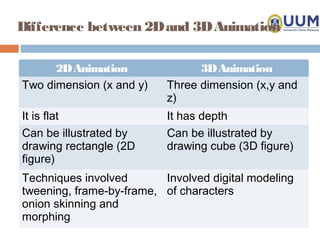
Difference between 2D and 3D Animation

      2D Animation               3D Animation
Two dimension (x and y)    Three dimension (x,y and
                           z)
It is flat                 It has depth
Can be illustrated by      Can be illustrated by
drawing rectangle (2D      drawing cube (3D figure)
figure)
Techniques involved       Involved digital modeling
tweening, frame-by-frame, of characters
onion skinning and
morphing
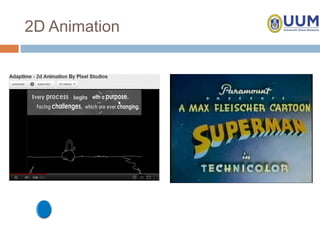
2D Animation
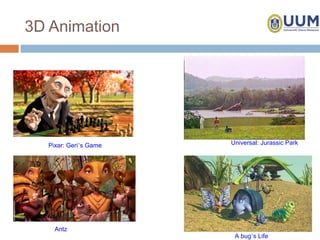
3D Animation


   Pixar: Geri’s Game   Universal: Jurassic Park


     Antz
                         A bug’s Life

Scct2013 topic 4_animation

  • 1.
  • 2.
    Introduction • Multimedia technologyhas significant contribution in our everyday lives. • When speaking about multimedia technology, we cannot avoid talking about animation. • Animation comes from the Latin word which means 'turned on'. • DBP defines animation as an act or process of making something that looks alive.
  • 3.
    Introduction (Cont.) • animationis the process of moving on or give to something that is static so it looks alive. • Animation is the display sequence of sketches, each is slightly different to produce a continuous movement (Simon, 1995). • Animation technology widely used in advertising, archeology, architecture, chemistry, education, engineering, film and entertainment, medical and flight simulation.
  • 4.
    Introduction (Cont.) • Animationis caused by a biological phenomenon known as 'Persistence of vision'. • An object that is seen by the human eye to be mapped onto the retina in a certain period of time after it was observed. • This allows the phenomenon, a series of images in succession over a period of rapid and short time seemed an illusion of life and move on its own. • In other words, if we change the position or design of an object in a fast, our eyes will assume the change as a movement or animation.
  • 5.
    Animation Techniques • Thereare two types of animation techniques: 1. Traditional animation. 2. Computer animation.
  • 6.
    Traditional Animation • Thisanimation technique requires at least 20 frames for a second. • Painted frames are manually hands drawn by the animator. • There are several techniques used to assist in the production process of traditional animation, namely: • Key frames • Cell animation • Page flipping •
  • 7.
    Traditional Animation (Cont.) 1.0Key Frames • traditionally done by more than one artist. • the key frames or the frame of reference is required to distribute the workload to some animation artist. • Key frames or frame of reference to be completed by the main graphic artist for animation production process. • This key frame will be the key or main reference by other animator’s artist to draw subsequent frames in-between that main frame.
  • 8.
    Traditional Animation (Cont.) 2.0Cell animation • This technique is used to save time and expedite the production of animation. • each character or object to be moved will be drawn on sheets of transparent. • Image for the background is drawn on another sheet of relatively opaque. • When the animation is to be made, the various characters or objects will be drawn on sheets of transparent stack at the top of the sheet that contains pictures above background.
  • 9.
    Traditional Animation (Cont.) •This method facilitates artist animator without having to draw the background repeatedly. • On the other hand, only need to draw certain parts of the character to be moved only.
  • 10.
    Traditional Animation (Cont.) 3.0Page Flipping • One technique that presents the image sequence by switching to the desired position. • The screen presents an image seems to move in sequence. • It is the most traditional and well known techniques commonly used in the performance of cell animation in film of yore.
  • 11.
    Traditional Animation (Cont.) 4.0Onion Skinning • Used in the process of building an animation. • It allows a person to see the previous cell’s outline for facilitating them in drawing or produce image changes in the next cell.
  • 12.
    Computer Animation • Theanimation techniques which are developed and produced by using computer technology. • This animation technique consist of simple animation 2D and continue with 3D animation. • Here are the terms used in computer animation: • Tweening • Frame-by-frame
  • 13.
    Computer Animation (Cont.) 1.0Tweening • Is the process of forming objects between frames or frame animation to show that the movement was formed. • Tweening also means an animator just need to build the first cell and last cell of an animation. • While the animation software will make calculations or predictions to determine what will happen between the first frame to the last frame.
  • 14.
    Computer Animation (Cont.) 2.0Frame-by-frame • Frame-by-frame means that an animator need to put the key frames in each frame. • The movement animations are drawn in each frame to produce a more dynamic movement.
  • 15.
    Computer Animation Categories •animation can be categorized into two, namely two-dimensional animation (2D) and three- dimensional (3D). • 2D animation is also known as linear animation. • It refers to a simple moving object across the screen of a monitor. • 3D animation refers to 3D animated objects that usually are formed through modeling or mathematical formulas. • All objects can be displayed from various perspectives, giving the illusion as if it were the
  • 16.
    Difference between 2Dand 3D Animation 2D Animation 3D Animation Two dimension (x and y) Three dimension (x,y and z) It is flat It has depth Can be illustrated by Can be illustrated by drawing rectangle (2D drawing cube (3D figure) figure) Techniques involved Involved digital modeling tweening, frame-by-frame, of characters onion skinning and morphing
  • 17.
  • 18.
    3D Animation Pixar: Geri’s Game Universal: Jurassic Park Antz A bug’s Life