Scaling Your Cache


          Alex Miller
          @puredanger
Mission

• Why does caching work?
• What’s hard about caching?
• How do we make choices as we
  design a caching architecture?
What is caching?
Lots of data
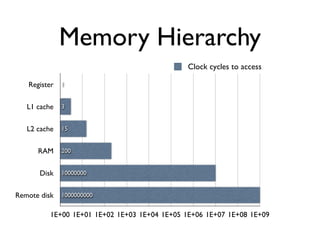
Memory Hierarchy
                                               Clock cycles to access

   Register   1


   L1 cache   3


   L2 cache   15


      RAM     200


       Disk   10000000


Remote disk   1000000000


          1E+00 1E+01 1E+02 1E+03 1E+04 1E+05 1E+06 1E+07 1E+08 1E+09
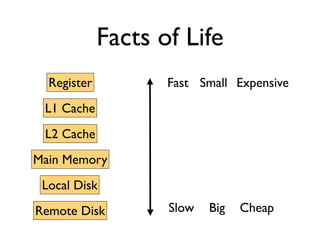
Facts of Life
  Register          Fast Small Expensive
 L1 Cache
 L2 Cache
Main Memory
 Local Disk
Remote Disk         Slow   Big   Cheap
Caching to the rescue!
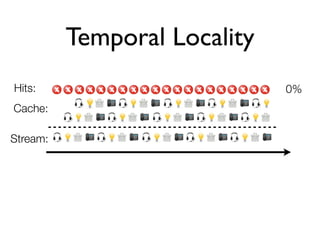
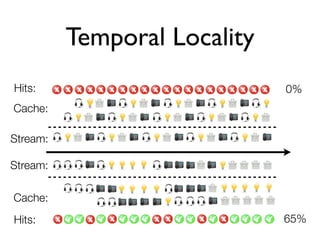
Temporal Locality
Hits:                         0%
Cache:

Stream:
Temporal Locality
Hits:                         0%
Cache:

Stream:

Stream:

Cache:
Hits:                         65%
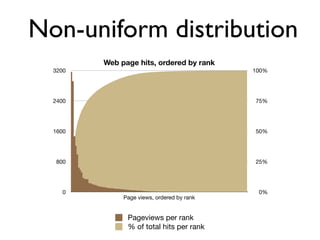
Non-uniform distribution
         Web page hits, ordered by rank
  3200                                      100%


  2400                                      75%


  1600                                      50%


   800                                      25%


    0                                        0%
              Page views, ordered by rank


               Pageviews per rank
               % of total hits per rank
Temporal locality
        +
  Non-uniform
  distribution
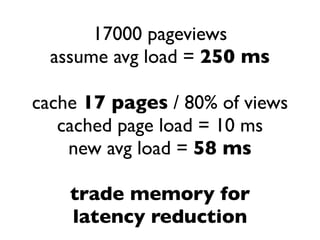
17000 pageviews
  assume avg load = 250 ms

cache 17 pages / 80% of views
   cached page load = 10 ms
    new avg load = 58 ms

    trade memory for
    latency reduction
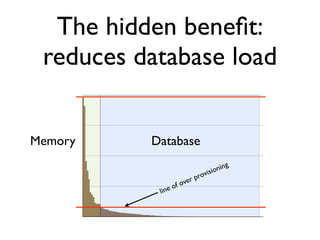
The hidden benefit:
 reduces database load


Memory    Database
                                     ning
                                visio
                         r   pro
                  of ove
           line
A brief aside...


• What is Ehcache?
• What is Terracotta?
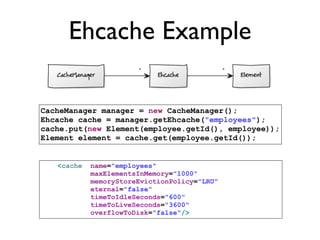
Ehcache Example

CacheManager manager = new CacheManager();
Ehcache cache = manager.getEhcache("employees");
cache.put(new Element(employee.getId(), employee));
Element element = cache.get(employee.getId());


   <cache   name="employees"
            maxElementsInMemory="1000"
            memoryStoreEvictionPolicy="LRU"
            eternal="false"
            timeToIdleSeconds="600"
            timeToLiveSeconds="3600"
            overflowToDisk="false"/>
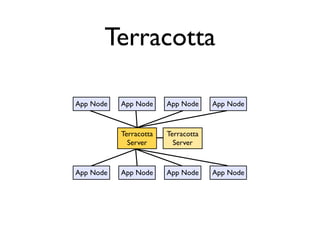
Terracotta

App Node   App Node     App Node     App Node


           Terracotta   Terracotta
             Server       Server


App Node   App Node     App Node     App Node
But things are not
always so simple...
Pain of Large
   Data Sets
• How do I choose which
  elements stay in memory
  and which go to disk?
• How do I choose which
  elements to evict when I
  have too many?
• How do I balance cache size
  against other memory uses?
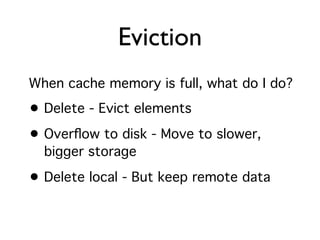
Eviction
When cache memory is full, what do I do?
• Delete - Evict elements
• Overflow to disk - Move to slower,
  bigger storage

• Delete local - But keep remote data
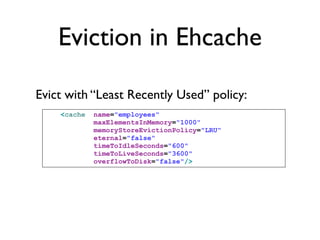
Eviction in Ehcache

Evict with “Least Recently Used” policy:
    <cache   name="employees"
             maxElementsInMemory="1000"
             memoryStoreEvictionPolicy="LRU"
             eternal="false"
             timeToIdleSeconds="600"
             timeToLiveSeconds="3600"
             overflowToDisk="false"/>
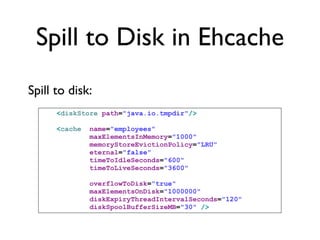
Spill to Disk in Ehcache
Spill to disk:
      <diskStore path="java.io.tmpdir"/>

      <cache   name="employees"
               maxElementsInMemory="1000"
               memoryStoreEvictionPolicy="LRU"
               eternal="false"
               timeToIdleSeconds="600"
               timeToLiveSeconds="3600"

               overflowToDisk="true"
               maxElementsOnDisk="1000000"
               diskExpiryThreadIntervalSeconds="120"
               diskSpoolBufferSizeMB="30" />
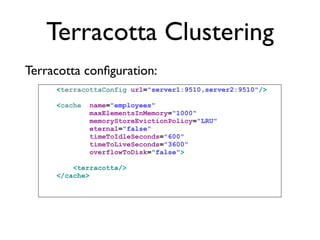
Terracotta Clustering
Terracotta configuration:
     <terracottaConfig url="server1:9510,server2:9510"/>

     <cache   name="employees"
              maxElementsInMemory="1000"
              memoryStoreEvictionPolicy="LRU"
              eternal="false"
              timeToIdleSeconds="600"
              timeToLiveSeconds="3600"
              overflowToDisk="false">

         <terracotta/>
     </cache>
Pain of Stale Data
• How tolerant am I of seeing
  values changed on the
  underlying data source?
• How tolerant am I of seeing
  values changed by another
  node?
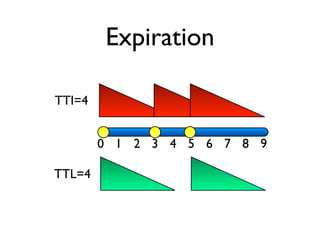
Expiration

TTI=4


        0 1 2 3 4 5 6 7 8 9

TTL=4
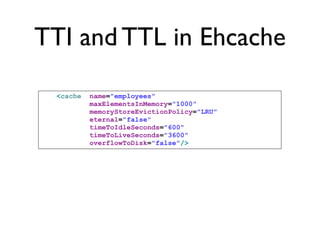
TTI and TTL in Ehcache

 <cache   name="employees"
          maxElementsInMemory="1000"
          memoryStoreEvictionPolicy="LRU"
          eternal="false"
          timeToIdleSeconds="600"
          timeToLiveSeconds="3600"
          overflowToDisk="false"/>
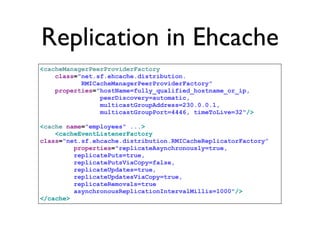
Replication in Ehcache
<cacheManagerPeerProviderFactory
    class="net.sf.ehcache.distribution.
           RMICacheManagerPeerProviderFactory"
    properties="hostName=fully_qualified_hostname_or_ip,
                peerDiscovery=automatic,
                multicastGroupAddress=230.0.0.1,
                multicastGroupPort=4446, timeToLive=32"/>

<cache name="employees" ...>
    <cacheEventListenerFactory
class="net.sf.ehcache.distribution.RMICacheReplicatorFactory”
         properties="replicateAsynchronously=true,
         replicatePuts=true,
         replicatePutsViaCopy=false,
         replicateUpdates=true,
         replicateUpdatesViaCopy=true,
         replicateRemovals=true
         asynchronousReplicationIntervalMillis=1000"/>
</cache>
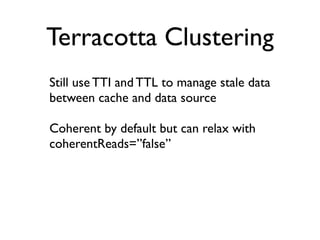
Terracotta Clustering
Still use TTI and TTL to manage stale data
between cache and data source

Coherent by default but can relax with
coherentReads=”false”
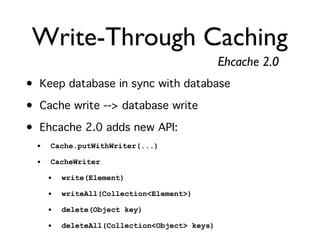
Write-Through Caching
                                               Ehcache 2.0
• Keep database in sync with database
• Cache write --> database write
• Ehcache 2.0 adds new API:
  •   Cache.putWithWriter(...)

  •   CacheWriter

      •   write(Element)

      •   writeAll(Collection<Element>)

      •   delete(Object key)

      •   deleteAll(Collection<Object> keys)
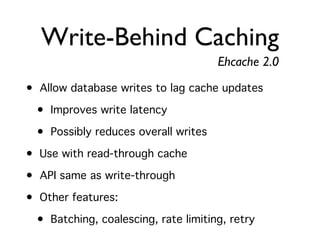
Write-Behind Caching
                                      Ehcache 2.0
• Allow database writes to lag cache updates
  • Improves write latency
  • Possibly reduces overall writes
• Use with read-through cache
• API same as write-through
• Other features:
  • Batching, coalescing, rate limiting, retry
Pain of Loading
• How do I pre-load the cache on startup?
• How do I avoid re-loading the data on every
  node?
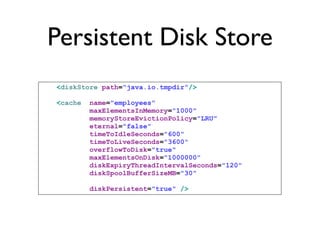
Persistent Disk Store
<diskStore path="java.io.tmpdir"/>

<cache   name="employees"
         maxElementsInMemory="1000"
         memoryStoreEvictionPolicy="LRU"
         eternal="false"
         timeToIdleSeconds="600"
         timeToLiveSeconds="3600"
         overflowToDisk="true"
         maxElementsOnDisk="1000000"
         diskExpiryThreadIntervalSeconds="120"
         diskSpoolBufferSizeMB="30"

         diskPersistent="true" />
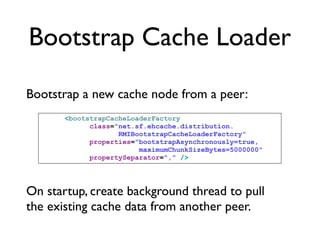
Bootstrap Cache Loader

Bootstrap a new cache node from a peer:
       <bootstrapCacheLoaderFactory
             class="net.sf.ehcache.distribution.
                    RMIBootstrapCacheLoaderFactory"
             properties="bootstrapAsynchronously=true,
                         maximumChunkSizeBytes=5000000"
             propertySeparator=",” />


On startup, create background thread to pull
the existing cache data from another peer.
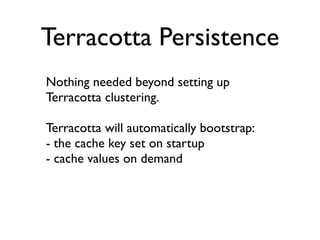
Terracotta Persistence
Nothing needed beyond setting up
Terracotta clustering.

Terracotta will automatically bootstrap:
- the cache key set on startup
- cache values on demand
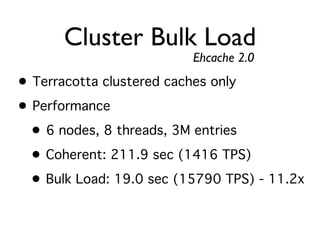
Cluster Bulk Load
                           Ehcache 2.0
• Terracotta clustered caches only
• Performance
  • 6 nodes, 8 threads, 3M entries
  • Coherent: 211.9 sec (1416 TPS)
  • Bulk Load: 19.0 sec (15790 TPS) - 11.2x
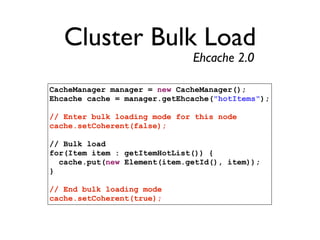
Cluster Bulk Load
                              Ehcache 2.0

CacheManager manager = new CacheManager();
Ehcache cache = manager.getEhcache("hotItems");

// Enter bulk loading mode for this node
cache.setCoherent(false);

// Bulk load
for(Item item : getItemHotList()) {
  cache.put(new Element(item.getId(), item));
}

// End bulk loading mode
cache.setCoherent(true);
Pain of Concurrency
• Locking
• Transactions
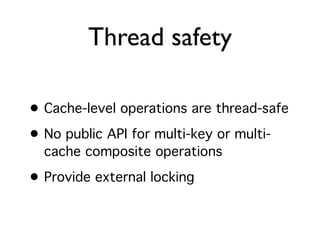
Thread safety

• Cache-level operations are thread-safe
• No public API for multi-key or multi-
  cache composite operations

• Provide external locking
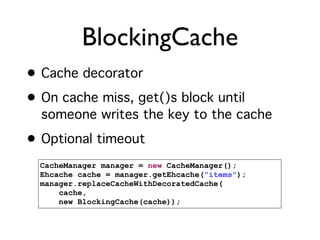
BlockingCache
• Cache decorator
• On cache miss, get()s block until
  someone writes the key to the cache
• Optional timeout
  CacheManager manager = new CacheManager();
  Ehcache cache = manager.getEhcache("items");
  manager.replaceCacheWithDecoratedCache(
      cache,
      new BlockingCache(cache));
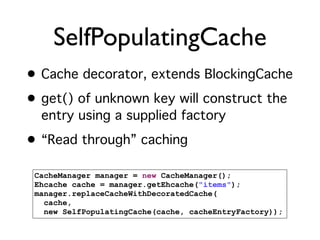
SelfPopulatingCache
• Cache decorator, extends BlockingCache
• get() of unknown key will construct the
  entry using a supplied factory
• “Read through” caching

 CacheManager manager = new CacheManager();
 Ehcache cache = manager.getEhcache("items");
 manager.replaceCacheWithDecoratedCache(
   cache,
   new SelfPopulatingCache(cache, cacheEntryFactory));
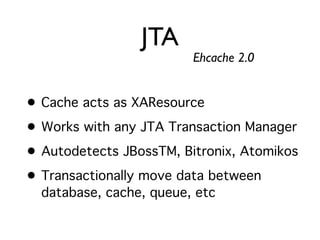
JTA
                         Ehcache 2.0


• Cache acts as XAResource
• Works with any JTA Transaction Manager
• Autodetects JBossTM, Bitronix, Atomikos
• Transactionally move data between
  database, cache, queue, etc
Pain of Duplication
• How do I get failover capability while avoiding
  excessive duplication of data?
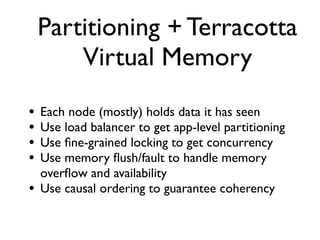
Partitioning + Terracotta
        Virtual Memory
•   Each node (mostly) holds data it has seen
•   Use load balancer to get app-level partitioning
•   Use fine-grained locking to get concurrency
•   Use memory flush/fault to handle memory
    overflow and availability
•   Use causal ordering to guarantee coherency
Pain of Ignorance
• Is my cache being used?   How much?
• Is caching improving latency?
• How much memory is my cache using?
Dev Console
• Ehcache console
  • See caches, configuration, statistics
  • Dynamic configuration changes
• Hibernate console
  • Hibernate-specific view of caches
  • Hibernate stats
Scaling Your Cache
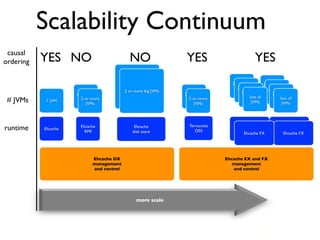
Scalability Continuum
 causal
ordering   YES NO                            NO                  YES                         YES
                                                                                  2 or more       2 or more
                                          2 or more JVMS                             JVMSmore
                                                                                     2 or
                                           2 or more big JVMs                                        2 or more
                                                                                                     JVMs
                     2 or more                                  2 or more              2 or more
                                                                                        JVMs           2 or more
                                                                                                        JVMs
                                                                                          JVMs of
                                                                                            lots
 # JVMs    1 JVM
                       2 or more
                        JVMS
                          JVMs
                                                                  2 or more
                                                                   JVMS
                                                                     JVMs                    JVMs
                                                                                                          JVMs of
                                                                                                            lots
                                                                                                             JVMs


                                                                  Terracotta
runtime    Ehcache
                       Ehcache
                         RMI
                                                Ehcache
                                               disk store            OSS            Terracotta FX         Terracotta FX
                                                                                        Ehcache FX           Ehcache FX


                            Ehcache DX                                         Ehcache EX and FX
                            management                                            management
                            and control                                           and control


                                                 more scale


                                                                                                     21
Thanks!

• Twitter - @puredanger
• Blog - http://tech.puredanger.com
• Terracotta - http://terracotta.org
• Ehcache - http://ehcache.org

Scaling Your Cache

  • 1.
    Scaling Your Cache Alex Miller @puredanger
  • 2.
    Mission • Why doescaching work? • What’s hard about caching? • How do we make choices as we design a caching architecture?
  • 3.
  • 4.
  • 5.
    Memory Hierarchy Clock cycles to access Register 1 L1 cache 3 L2 cache 15 RAM 200 Disk 10000000 Remote disk 1000000000 1E+00 1E+01 1E+02 1E+03 1E+04 1E+05 1E+06 1E+07 1E+08 1E+09
  • 6.
    Facts of Life Register Fast Small Expensive L1 Cache L2 Cache Main Memory Local Disk Remote Disk Slow Big Cheap
  • 7.
  • 8.
    Temporal Locality Hits: 0% Cache: Stream:
  • 9.
    Temporal Locality Hits: 0% Cache: Stream: Stream: Cache: Hits: 65%
  • 10.
    Non-uniform distribution Web page hits, ordered by rank 3200 100% 2400 75% 1600 50% 800 25% 0 0% Page views, ordered by rank Pageviews per rank % of total hits per rank
  • 11.
    Temporal locality + Non-uniform distribution
  • 12.
    17000 pageviews assume avg load = 250 ms cache 17 pages / 80% of views cached page load = 10 ms new avg load = 58 ms trade memory for latency reduction
  • 13.
    The hidden benefit: reduces database load Memory Database ning visio r pro of ove line
  • 14.
    A brief aside... •What is Ehcache? • What is Terracotta?
  • 15.
    Ehcache Example CacheManager manager= new CacheManager(); Ehcache cache = manager.getEhcache("employees"); cache.put(new Element(employee.getId(), employee)); Element element = cache.get(employee.getId()); <cache name="employees" maxElementsInMemory="1000" memoryStoreEvictionPolicy="LRU" eternal="false" timeToIdleSeconds="600" timeToLiveSeconds="3600" overflowToDisk="false"/>
  • 16.
    Terracotta App Node App Node App Node App Node Terracotta Terracotta Server Server App Node App Node App Node App Node
  • 17.
    But things arenot always so simple...
  • 18.
    Pain of Large Data Sets • How do I choose which elements stay in memory and which go to disk? • How do I choose which elements to evict when I have too many? • How do I balance cache size against other memory uses?
  • 19.
    Eviction When cache memoryis full, what do I do? • Delete - Evict elements • Overflow to disk - Move to slower, bigger storage • Delete local - But keep remote data
  • 20.
    Eviction in Ehcache Evictwith “Least Recently Used” policy: <cache name="employees" maxElementsInMemory="1000" memoryStoreEvictionPolicy="LRU" eternal="false" timeToIdleSeconds="600" timeToLiveSeconds="3600" overflowToDisk="false"/>
  • 21.
    Spill to Diskin Ehcache Spill to disk: <diskStore path="java.io.tmpdir"/> <cache name="employees" maxElementsInMemory="1000" memoryStoreEvictionPolicy="LRU" eternal="false" timeToIdleSeconds="600" timeToLiveSeconds="3600" overflowToDisk="true" maxElementsOnDisk="1000000" diskExpiryThreadIntervalSeconds="120" diskSpoolBufferSizeMB="30" />
  • 22.
    Terracotta Clustering Terracotta configuration: <terracottaConfig url="server1:9510,server2:9510"/> <cache name="employees" maxElementsInMemory="1000" memoryStoreEvictionPolicy="LRU" eternal="false" timeToIdleSeconds="600" timeToLiveSeconds="3600" overflowToDisk="false"> <terracotta/> </cache>
  • 23.
    Pain of StaleData • How tolerant am I of seeing values changed on the underlying data source? • How tolerant am I of seeing values changed by another node?
  • 24.
    Expiration TTI=4 0 1 2 3 4 5 6 7 8 9 TTL=4
  • 25.
    TTI and TTLin Ehcache <cache name="employees" maxElementsInMemory="1000" memoryStoreEvictionPolicy="LRU" eternal="false" timeToIdleSeconds="600" timeToLiveSeconds="3600" overflowToDisk="false"/>
  • 26.
    Replication in Ehcache <cacheManagerPeerProviderFactory class="net.sf.ehcache.distribution. RMICacheManagerPeerProviderFactory" properties="hostName=fully_qualified_hostname_or_ip, peerDiscovery=automatic, multicastGroupAddress=230.0.0.1, multicastGroupPort=4446, timeToLive=32"/> <cache name="employees" ...> <cacheEventListenerFactory class="net.sf.ehcache.distribution.RMICacheReplicatorFactory” properties="replicateAsynchronously=true, replicatePuts=true, replicatePutsViaCopy=false, replicateUpdates=true, replicateUpdatesViaCopy=true, replicateRemovals=true asynchronousReplicationIntervalMillis=1000"/> </cache>
  • 27.
    Terracotta Clustering Still useTTI and TTL to manage stale data between cache and data source Coherent by default but can relax with coherentReads=”false”
  • 28.
    Write-Through Caching Ehcache 2.0 • Keep database in sync with database • Cache write --> database write • Ehcache 2.0 adds new API: • Cache.putWithWriter(...) • CacheWriter • write(Element) • writeAll(Collection<Element>) • delete(Object key) • deleteAll(Collection<Object> keys)
  • 29.
    Write-Behind Caching Ehcache 2.0 • Allow database writes to lag cache updates • Improves write latency • Possibly reduces overall writes • Use with read-through cache • API same as write-through • Other features: • Batching, coalescing, rate limiting, retry
  • 30.
    Pain of Loading •How do I pre-load the cache on startup? • How do I avoid re-loading the data on every node?
  • 31.
    Persistent Disk Store <diskStorepath="java.io.tmpdir"/> <cache name="employees" maxElementsInMemory="1000" memoryStoreEvictionPolicy="LRU" eternal="false" timeToIdleSeconds="600" timeToLiveSeconds="3600" overflowToDisk="true" maxElementsOnDisk="1000000" diskExpiryThreadIntervalSeconds="120" diskSpoolBufferSizeMB="30" diskPersistent="true" />
  • 32.
    Bootstrap Cache Loader Bootstrapa new cache node from a peer: <bootstrapCacheLoaderFactory class="net.sf.ehcache.distribution. RMIBootstrapCacheLoaderFactory" properties="bootstrapAsynchronously=true, maximumChunkSizeBytes=5000000" propertySeparator=",” /> On startup, create background thread to pull the existing cache data from another peer.
  • 33.
    Terracotta Persistence Nothing neededbeyond setting up Terracotta clustering. Terracotta will automatically bootstrap: - the cache key set on startup - cache values on demand
  • 34.
    Cluster Bulk Load Ehcache 2.0 • Terracotta clustered caches only • Performance • 6 nodes, 8 threads, 3M entries • Coherent: 211.9 sec (1416 TPS) • Bulk Load: 19.0 sec (15790 TPS) - 11.2x
  • 35.
    Cluster Bulk Load Ehcache 2.0 CacheManager manager = new CacheManager(); Ehcache cache = manager.getEhcache("hotItems"); // Enter bulk loading mode for this node cache.setCoherent(false); // Bulk load for(Item item : getItemHotList()) { cache.put(new Element(item.getId(), item)); } // End bulk loading mode cache.setCoherent(true);
  • 36.
    Pain of Concurrency •Locking • Transactions
  • 37.
    Thread safety • Cache-leveloperations are thread-safe • No public API for multi-key or multi- cache composite operations • Provide external locking
  • 38.
    BlockingCache • Cache decorator •On cache miss, get()s block until someone writes the key to the cache • Optional timeout CacheManager manager = new CacheManager(); Ehcache cache = manager.getEhcache("items"); manager.replaceCacheWithDecoratedCache( cache, new BlockingCache(cache));
  • 39.
    SelfPopulatingCache • Cache decorator,extends BlockingCache • get() of unknown key will construct the entry using a supplied factory • “Read through” caching CacheManager manager = new CacheManager(); Ehcache cache = manager.getEhcache("items"); manager.replaceCacheWithDecoratedCache( cache, new SelfPopulatingCache(cache, cacheEntryFactory));
  • 40.
    JTA Ehcache 2.0 • Cache acts as XAResource • Works with any JTA Transaction Manager • Autodetects JBossTM, Bitronix, Atomikos • Transactionally move data between database, cache, queue, etc
  • 41.
    Pain of Duplication •How do I get failover capability while avoiding excessive duplication of data?
  • 42.
    Partitioning + Terracotta Virtual Memory • Each node (mostly) holds data it has seen • Use load balancer to get app-level partitioning • Use fine-grained locking to get concurrency • Use memory flush/fault to handle memory overflow and availability • Use causal ordering to guarantee coherency
  • 43.
    Pain of Ignorance •Is my cache being used? How much? • Is caching improving latency? • How much memory is my cache using?
  • 44.
    Dev Console • Ehcacheconsole • See caches, configuration, statistics • Dynamic configuration changes • Hibernate console • Hibernate-specific view of caches • Hibernate stats
  • 45.
  • 46.
    Scalability Continuum causal ordering YES NO NO YES YES 2 or more 2 or more 2 or more JVMS JVMSmore 2 or 2 or more big JVMs 2 or more JVMs 2 or more 2 or more 2 or more JVMs 2 or more JVMs JVMs of lots # JVMs 1 JVM 2 or more JVMS JVMs 2 or more JVMS JVMs JVMs JVMs of lots JVMs Terracotta runtime Ehcache Ehcache RMI Ehcache disk store OSS Terracotta FX Terracotta FX Ehcache FX Ehcache FX Ehcache DX Ehcache EX and FX management management and control and control more scale 21
  • 47.
    Thanks! • Twitter -@puredanger • Blog - http://tech.puredanger.com • Terracotta - http://terracotta.org • Ehcache - http://ehcache.org