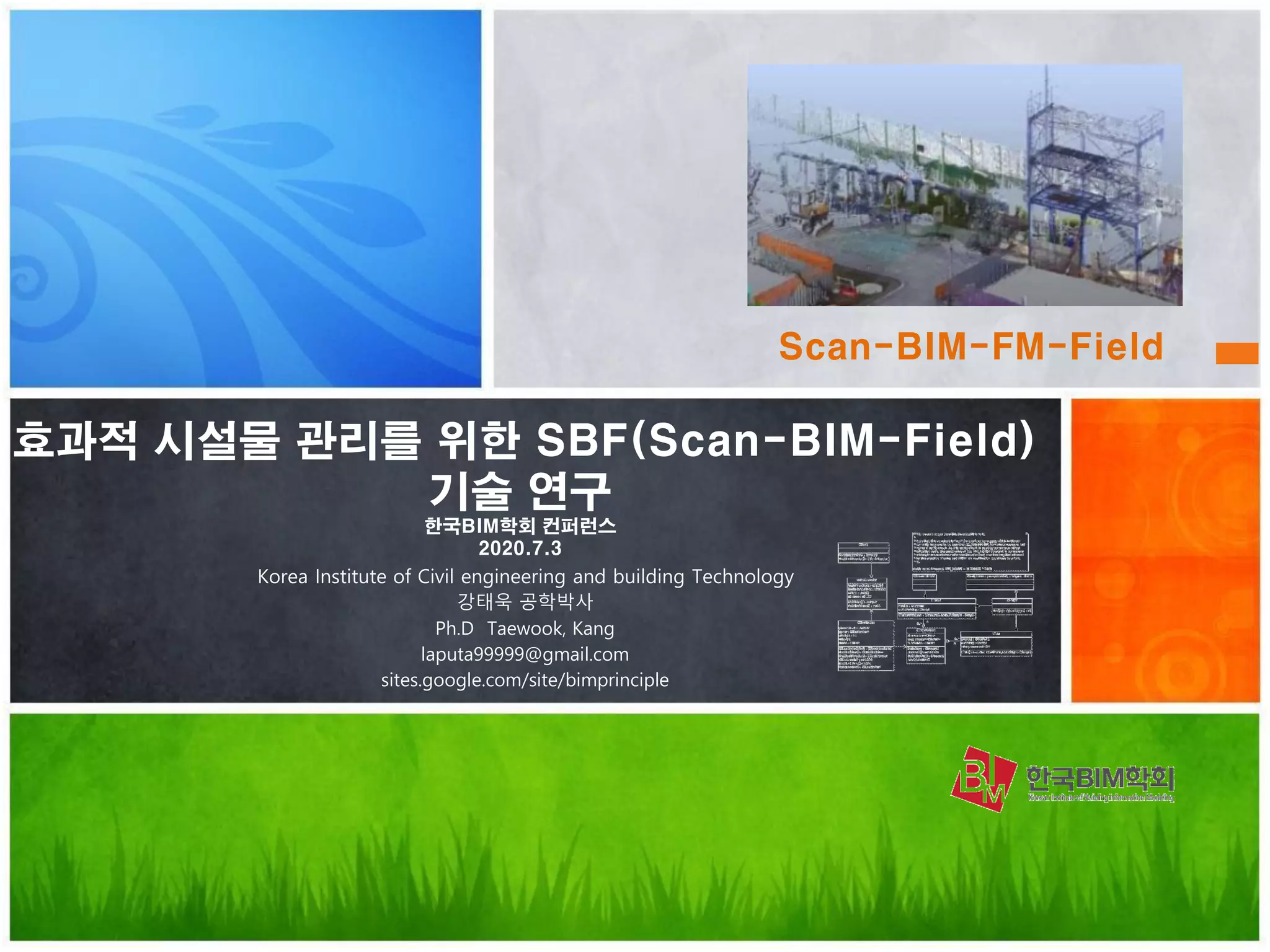
효과적 시설물 관리를 위한 SBF(Scan-BIM-Field)
기술 연구
한국BIM학회 컨퍼런스
2020.7.3
Korea Institute of Civil engineering and building Technology
강태욱 공학박사
Ph.D Taewook, Kang
laputa99999@gmail.com
sites.google.com/site/bimprinciple
Scan-BIM-FM-Field
Ph.D. KICT. 연구위원
ISO/TC211 committee member. 11 books author
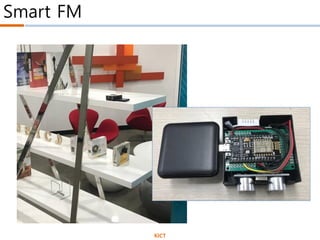
Smart FM
Intelligent
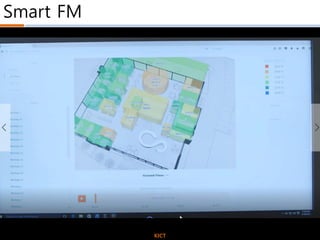
Smart FM
KICT
Smart FM
SBF
Reference Model
Smart FM
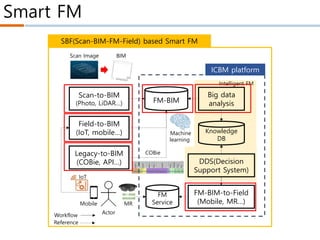
Scan-to-BIM
(Photo, LiDAR…) FM-BIM
Field-to-BIM
(IoT, mobile…)
Big data
analysis
SBF(Scan-BIM-FM-Field) based Smart FM
Legacy-to-BIM
(COBie, API…) DDS(Decision
Support System)
Knowledge
DB
FM-BIM-to-Field
(Mobile, MR…)Mobile
IoT
MR
Scan Image BIM
COBie
ICBM platform
Actor
Workflow
Reference
Machine
learning
Intelligent FM
FM
Service
Smart FM
SmartFMMaturityModel(S-MM)
Timeline
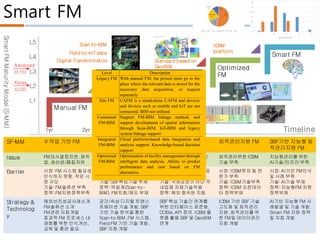
SF-MM 수작업 기반 FM 단독적으로 사용되는
FM 기술 및 시스템
SBF간 상호운용되는
FM시스템
최적관리지원 FM SBF기반 지능형 최
적관리지원 FM
Issue FM의사결정지연.재작
업.생산성/품질저하
FM핵심기술인 역설계,
BIM,IoT,Cloud확보필요
상호운용성 부재으로 인
한 통합적 서비스 부족
최적관리위한 ICBM
기술 부족
지능형관리를 위한
AI기술/인프라 부족
Barrier 시장:FM 시스템 필요성
인식하지 못함.작은 시
장 규모
기술:FM솔류션 부족
정책:FM지원정책부족
시장:국내시장의 해외 솔
류션 독점
기술:SBF핵심기술 부재
정책:역설계(Scan-to-
BIM),FM지침/제도 부재
시장:관련 상호운용성 표
준 부재
기술:국제표준이 아닌 국
내업체 자체기술적용
정책:해외 종속된 지침
시장:ICBM투자 및 전
문가 부족
기술:ICBM기술부족
정책:ICBM 오픈데이
터 정책부재
시장:AI기반 FM인식
및 사례 부족
기술:AI기술 부재
정책:지능형FM 지원
정책부재
Strategy &
Technolog
y
해외선진성공사례소개
FM솔류션 소개
FM관련 지침개발
효과적 FM 프로세스 내
재화를 위한 인식개선,
교육 및 훈련 필요
공간/속성 디지털 트랜스
포메이션 기술 개발.SBF
기반 기술 분석을 통한
Scan-to-BIM,FM 시스템,
Field FM 기반 기술 개발.
SBF 지침 개발
SBF 핵심 기술간 연계를
위한 인터페이스 표준화.
COBie,API 정의.ICBM 플
랫폼 활용 SBF 및 GeoBIM
연계
ICBM 기반 SBF 기술
고도화 및 최적관리
지원.최적관리를 위
한 FM및 데이터관리
지침 개발
AI기반 지능형 FM 사
례발굴 및 기술 개발.
Smart FM 지원 정책
및 지침 개발
L5
L4
L3
L2
L1
Manual FM
Silo FM
Connected
FM
Optimized
FM
Smart FM
1yr 2yr 2~3 yr 3yr 2yr
Scan-to-BIM
Digital Transformation
Field-to-IoT data
ICBM
platform
Standard based on
GeoBIM
Korea
(2.02)
Advanced
(3.15)
SmartFMMaturityModel(S-MM)
Timeline
SF-MM 수작업 기반 FM 단독적으로 사용되는
FM 기술 및 시스템
SBF간 상호운용되는
FM시스템
최적관리지원 FM SBF기반 지능형 최
적관리지원 FM
Issue FM의사결정지연.재작
업.생산성/품질저하
FM핵심기술인 역설계,
BIM,IoT,Cloud확보필요
상호운용성 부재으로 인
한 통합적 서비스 부족
최적관리위한 ICBM
기술 부족
지능형관리를 위한
AI기술/인프라 부족
Barrier 시장:FM 시스템 필요성
인식하지 못함.작은 시
장 규모
기술:FM솔류션 부족
정책:FM지원정책부족
시장:국내시장의 해외 솔
류션 독점
기술:SBF핵심기술 부재
정책:역설계(Scan-to-
BIM),FM지침/제도 부재
시장:관련 상호운용성 표
준 부재
기술:국제표준이 아닌 국
내업체 자체기술적용
정책:해외 종속된 지침
시장:ICBM투자 및 전
문가 부족
기술:ICBM기술부족
정책:ICBM 오픈데이
터 정책부재
시장:AI기반 FM인식
및 사례 부족
기술:AI기술 부재
정책:지능형FM 지원
정책부재
Strategy &
Technolog
y
해외선진성공사례소개
FM솔류션 소개
FM관련 지침개발
효과적 FM 프로세스 내
재화를 위한 인식개선,
교육 및 훈련 필요
공간/속성 디지털 트랜스
포메이션 기술 개발.SBF
기반 기술 분석을 통한
Scan-to-BIM,FM 시스템,
Field FM 기반 기술 개발.
SBF 지침 개발
SBF 핵심 기술간 연계를
위한 인터페이스 표준화.
COBie,API 정의.ICBM 플
랫폼 활용 SBF 및 GeoBIM
연계
ICBM 기반 SBF 기술
고도화 및 최적관리
지원.최적관리를 위
한 FM및 데이터관리
지침 개발
AI기반 지능형 FM 사
례발굴 및 기술 개발.
Smart FM 지원 정책
및 지침 개발
L5
L4
L3
L2
L1
Manual FM
Silo FM
Connected
FM
Optimized
FM
Smart FM
1yr 2yr 2~3 yr 3yr 2yr
Scan-to-BIM
Digital Transformation
Field-to-IoT data
ICBM
platform
Standard based on
GeoBIM
Korea
(2.02)
Advanced
(3.15)
0
5
10
15
20
25
30
1 2 3 4 5
선진국 국내
계획
0%
설계
53%
시공
15%
건설관리/감리
21%
유지관리
11% 운영
0%
계획 설계 시공 건설관리/감리 유지관리 운영
Level Description
Legacy FM With manual FM, the person must go to the
place where the relevant data is stored for the
necessary data acquisition, or request
separately
Silo FM CAFM is a stand-alone CAFM and devices
and devices such as mobile and IoT are not
connected. BIM not utilized
Connected
FM-BIM
Support FM-BIM linkage method, and
support development of spatial information
through Scan-BIM. IoT-BIM and legacy
system linkage support
Integrated
FM-BIM
Cloud platform-based data integration and
analysis support. Knowledge-based decision
support
Optimized
FM-BIM
Optimization of facility management through
intelligent data analysis. Ability to predict
performance and cost based on FM
alternative
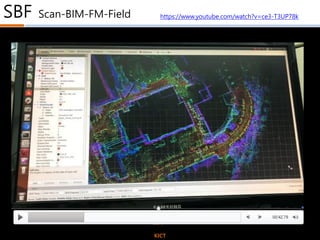
SBF Scan-BIM-FM-Field
KICT
https://www.youtube.com/watch?v=ce3-T3UP78k
Smart FM
Digital Transformation
Scan
Scan-to-BIM
Input PCD Sampling Filtering
Spatial
indexing
Segmentation
Scan To
Geometry
Geometry To BIM
load S-G
rules
Geometry
mapping
load G-B
rules
BIM mapping
BIM
Validation
<?xml version="1.0" encoding="utf-8"?>
<RE3D_objects>
<object type="KS_SP_100_T50" name="KS standard straight pipe 100mm thick 50mm. copper
material">
<parameters>
radius=100, thickness=50, axis_point1=(0,0,0), axis_point2=(10,0,0)
</parameters>
</object>
<object type="KS_LBP_100_T50" name="KS L-bow pipe 100mm thick 50mm. copper material">
<parameters>
radius=100, thickness=50, axis_point1=(0,0,0), axis_intersection=(10,10,0),
axis_point2=(10,0,0), axis_intersection_angle=90.0
</parameters>
</object>
</RE3D_objects>
<?xml version="1.0" encoding="utf-8"?>
<RE3D_shapes>
<shape id="shape.1" type="straight_cylinder">
<parameters>R=1.1, axis_point1=(0,0,0), axis_point2=(10,0,0)</parameters>
</shape>
<shape id="shape.2" type="plane">
<parameters>A=0.5, B=0.2, C=0.3, D=1.0</parameters>
<boundary>(0,0),(20,0),(20,20),(0,20)</boundary>
</shape>
</RE3D_shapes>
Database
#name: string
namespce RE3D
{
};
PointCloud
#name: string
#path: string
+load()
PCL:Point<XYZ>
SegmentationC
Segment
#name: string
#path: string
Command
+name: string
<<virtual>>+event(e: Event*)
Framework *
AddPointCloudCommand
LoadPointCloudCommand
CommandTable
+add(pCommand)
+del(name)
+execute(name, parameters: string)
Ev
+Type{call
Paramte
Parameter
+name: string
+value: string
+type: string
*
*
*
*
Project
+name: string
PCL:PointCloud<XYZ>
PCL:Point<RGB>PCL:PointCloud<RGB>
PCL:PointCloud<Normal> PCL:Point<Normal>
*
*
PCL:PointIndices
#indices
Shape
#<<Unique>> name: string
ShapeList
#name: string
+load()
*
FilteringCommand
ExtractStraightPipeCommand
CylinderShape
#radius: double
LBowCylinderShape
PlaneShape
StrightCylinderShape
ObjectMappingRule
QualityCheckRule
NewProjectCommand
Application
<<singleton>>
SegmentationByNo
SegmentationByPla
Object
+id: string
ObjectTable
<<singleton>>
*
LoadPointCloudCommand(e
{
id = event->GetAt("id");
Object* pObject = Objec
Project* pProject = dyna
pPointCloud = new PointC
pProject->GetDatabase()
}
Rule
-name: string
-path: string
+Rule(name: string)
<<virtual>>+parsing(path: string)
<<virtual>>+execute()
RuleSet
<<enumeration>>
#qualityCheckRules
#objectMappingRules*
SCAN 형상 편차
scan2lod -interval=[number m] input.pcd ouput.pcd
scan2filter -option=[remove_noise] -param=[", , , "]
input*.pcd output
scan2grid -interval=[number m] input.pcd ouput
scan2seg -type=[plane] input.pcd output
seg2geo -gm=[mesh | plane] -debug=[segment_pcd
| log | progress] -out=[pcd | json] input.pcd ouput
merge_geo -in=[json] input output
Input PCD Sampling Filtering
Spatial
indexing
Segmentation
Scan To
Geometry
Geometry To BIM
load S-G
rules
Geometry
mapping
load G-B
rules
BIM mapping
BIM
Validation
<?xml version="1.0" encoding="utf-8"?>
<RE3D_objects>
<object type="KS_SP_100_T50" name="KS standard straight pipe 100mm thick 50mm. copper
material">
<parameters>
radius=100, thickness=50, axis_point1=(0,0,0), axis_point2=(10,0,0)
</parameters>
</object>
<object type="KS_LBP_100_T50" name="KS L-bow pipe 100mm thick 50mm. copper material">
<parameters>
radius=100, thickness=50, axis_point1=(0,0,0), axis_intersection=(10,10,0),
axis_point2=(10,0,0), axis_intersection_angle=90.0
</parameters>
</object>
</RE3D_objects>
<?xml version="1.0" encoding="utf-8"?>
<RE3D_shapes>
<shape id="shape.1" type="straight_cylinder">
<parameters>R=1.1, axis_point1=(0,0,0), axis_point2=(10,0,0)</parameters>
</shape>
<shape id="shape.2" type="plane">
<parameters>A=0.5, B=0.2, C=0.3, D=1.0</parameters>
<boundary>(0,0),(20,0),(20,20),(0,20)</boundary>
</shape>
</RE3D_shapes>
Database
#name: string
namespce RE3D
{
};
PointCloud
#name: string
#path: string
+load()
PCL:Point<XYZ>
SegmentationCo
Segment
#name: string
#path: string
Command
+name: string
<<virtual>>+event(e: Event*)
Framework *
AddPointCloudCommand
LoadPointCloudCommand
CommandTable
+add(pCommand)
+del(name)
+execute(name, parameters: string)
Ev
+Type{call,
Paramter
Parameter
+name: string
+value: string
+type: string
*
*
*
*
Project
+name: string
PCL:PointCloud<XYZ>
PCL:Point<RGB>PCL:PointCloud<RGB>
PCL:PointCloud<Normal> PCL:Point<Normal>
*
*
PCL:PointIndices
#indices
Shape
#<<Unique>> name: string
ShapeList
#name: string
+load()
*
FilteringCommand
ExtractStraightPipeCommand
CylinderShape
#radius: double
LBowCylinderShape
PlaneShape
StrightCylinderShape
ObjectMappingRule
QualityCheckRule
NewProjectCommand
PApplication
<<singleton>>
SegmentationByNor
SegmentationByPlan
Object
+id: string
ObjectTable
<<singleton>>
*
LoadPointCloudCommand(ev
{
id = event->GetAt("id");
Object* pObject = Object
Project* pProject = dynam
pPointCloud = new PointC
pProject->GetDatabase()
}
Rule
-name: string
-path: string
+Rule(name: string)
<<virtual>>+parsing(path: string)
<<virtual>>+execute()
RuleSet
<<enumeration>>
#qualityCheckRules
#objectMappingRules*
SCAN 형상 편차
scan2lod -interval=[number m] input.pcd ouput.pcd
scan2filter -option=[remove_noise] -param=[", , , "]
input*.pcd output
scan2grid -interval=[number m] input.pcd ouput
scan2seg -type=[plane] input.pcd output
seg2geo -gm=[mesh | plane] -debug=[segment_pcd
| log | progress] -out=[pcd | json] input.pcd ouput
merge_geo -in=[json] input output
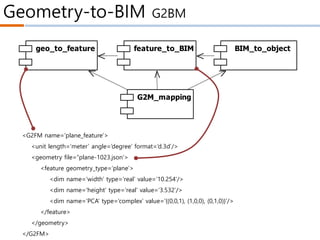
Geometry-to-BIM G2BM
geo_to_feature feature_to_BIM BIM_to_object
G2M_mapping
<G2FM name=‘plane_feature’>
<unit length=‘meter’ angle=‘degree’ format=‘d.3d’/>
<geometry file=“plane-1023.json’>
<feature geometry_type=‘plane’>
<dim name=‘width’ type=‘real’ value=‘10.254’/>
<dim name=‘height’ type=‘real’ value=‘3.532’/>
<dim name=‘PCA’ type=‘complex’ value=‘{(0,0,1), (1,0,0), (0,1,0)}’/>
</feature>
</geometry>
</G2FM>
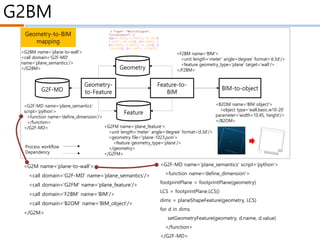
G2BM
<F2BM name=‘BIM’>
<unit length=‘meter’ angle=‘degree’ format=‘d.3d’/>
<feature geometry_type=‘plane’ target=‘wall’/>
</F2BM>
Geometry-
to-Feature
<G2FM name=‘plane_feature’>
<unit length=‘meter’ angle=‘degree’ format=‘d.3d’/>
<geometry file=“plane-1023.json’>
<feature geometry_type=‘plane’/>
</geometry>
</G2FM>
Feature
<G2F-MD name=‘plane_semantics’
script=‘python’>
<function name=‘define_dimension’/>
</function>
</G2F-MD>
Feature-to-
BIM
BIM-to-object
Geometry
G2F-MD
<B2OM name=‘BIM object’>
<object type=‘wall.basic.w10-20’
parameter=‘width=10.45, height’/>
</B2OM>
Geometry-to-BIM
mapping
<G2BM name=‘plane-to-wall’>
<call domain=‘G2F-MD’
name=‘plane_semantics’/>
</G2BM>
Process workflow
Dependency
<G2M name=‘plane-to-wall’>
<call domain=‘G2F-MD’ name=‘plane_semantics’/>
<call domain=‘G2FM’ name=‘plane_feature’/>
<call domain=‘F2BM’ name=‘BIM’/>
<call domain=‘B2OM’ name=‘BIM_object’/>
</G2M>
<G2F-MD name=‘plane_semantics’ script=‘python’>
<function name=‘define_dimension’>
footprintPlane = footprintPlane(geometry)
LCS = footprintPlane.LCS()
dims = planeShapeFeature(geometry, LCS)
for d in dims:
setGeometryFeature(geometry, d.name, d.value)
</function>
</G2F-MD>
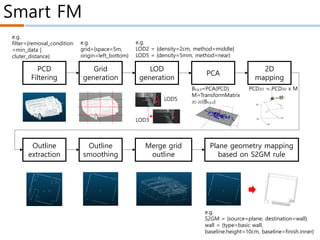
Smart FM
PCD
Filtering
Grid
generation
LOD
generation
PCA
2D
mapping
Outline
extraction
Outline
smoothing
Merge grid
outline
Plane geometry mapping
based on S2GM rule
LOD5
LOD3
e.g.
LOD2 = {density=2cm, method=middle}
LOD5 = {density=5mm, method=near}
Wz
Wo
Wy
Wx
WCS(World Coordinate
System)
LCS(Local Coordinate
System)
SCS(Sensor Coordinate
System)
e.g.
S2GM = {source=plane, destination=wall}
wall = {type=basic wall,
baseline.height=10cm, baseline=finish.inner}
e.g.
filter={removal_condition
=min_data |
cluter_distance}
e.g.
grid={space=5m,
origin=left_bottom}
PCD2D = PCD3D x MBx,y,z=PCA(PCD)
M=TransformMatrix
3D-2D(Bx,y,z)
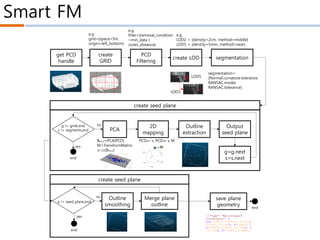
Smart FM
PCD
Filtering
create
GRID
create LOD segmentation
Outline
extraction
Outline
smoothing
Merge plane
outline
LOD5
LOD3
e.g.
LOD2 = {density=2cm, method=middle}
LOD5 = {density=5mm, method=near}
e.g.
filter={removal_condition
=min_data |
cluter_distance}
e.g.
grid={space=5m,
origin=left_bottom}
PCA
2D
mapping
Wz
Wo
Wy
Wx
WCS(World Coordinate
System)
LCS(Local Coordinate
System)
SCS(Sensor Coordinate
System)
PCD2D = PCD3D x MBx,y,z=PCA(PCD)
M=TransformMatrix
3D-2D(Bx,y,z)
segmentation=
{Normal.curvature.tolerance,
RANSAC.model,
RANSAC.tolerance}
g != grids.end
s != segments.end
end
yes
no
g=g.next
s=s.next
Output
seed plane
p != seed_plane.end
yes
no
get PCD
handle
create seed plane
end
save plane
geometry
create seed plane
end
SBF Scan-BIM-FM-Field
KICT
Smart FM
Digital Transformation
Field
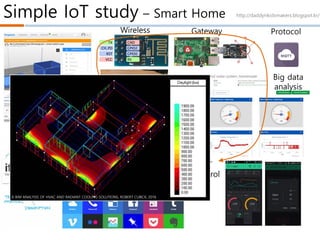
Simple IoT study – Smart Home
Packing
Wireless
Sensor
Gateway
IoT
Control
Big data
analysis
Protocol
IoT
connection
service
http://daddynkidsmakers.blogspot.kr/
A BIM ANALYSIS OF HVAC AND RADIANT COOLING SOLUTIONS, ROBERT CUBICK, 2016
Smart FM
KICT
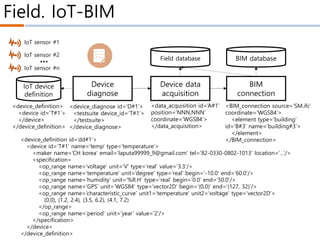
Field. IoT-BIM
BIM
connection
IoT sensor #1
IoT sensor #2
IoT sensor #n
…
IoT device
definition
BIM database
Device
diagnose
Device data
acquisition
<device_definition>
<device id=‘T#1’>
</device>
</device_definition>
<device_diagnose id=‘D#1’>
<testsuite device_id=‘T#1’>
</testsuite>
</device_diagnose>
<data_acquisition id=‘A#1’
position=’NNN,NNN’
coordinate=‘WGS84’>
</data_acquisition>
<BIM_connection source=‘SM.ifc’
coordinate=‘WGS84’>
<element type=‘building’
id=‘B#3’ name=‘building#3’>
</element>
</BIM_connection>
Field database
<device_definition id=‘dd#1’>
<device id=‘T#1’ name=‘temp’ type=‘temperature’>
<maker name=‘CH korea’ email=‘laputa99999_9@gmail.com’ tel=‘82-0330-0802-1013’ location=‘…’/>
<specification>
<op_range name=‘voltage’ unit=‘V’ type=‘real’ value=‘3.3’/>
<op_range name=‘temperature’ unit=‘degree’ type=‘real’ begin=‘-10.0’ end=’60.0’/>
<op_range name=‘humidity’ unit=‘%R.H’ type=‘real’ begin=‘0.0’ end=’50.0’/>
<op_range name=‘GPS’ unit=‘WGS84’ type=‘vector2D’ begin=‘(0,0)’ end=‘(127, 32)’/>
<op_range name=‘characteristic_curve’ unit1=‘temperature’ unit2=‘voltage’ type=‘vector2D’>
(0,0), (1.2, 2.4), (3.5, 6.2), (4.1, 7.2)
</op_range>
<op_range name=‘period’ unit=‘year’ value=‘2’/>
</specification>
</device>
</device_definition>
Smart FM
Validation
&
Next plan
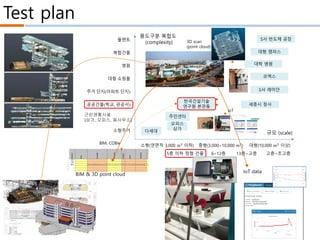
Test plan
용도구분 복합도
(complexity)
규모 (scale)
플랜트
복합건물
병원
대형 쇼핑몰
주거 단지(아파트 단지)
공공건물(학교, 관공서)
근린생활시설(상가, 오피스, 동사무소)
소형주거
5층 이하 정형 건물 6~12층 13층~고층 고층~초고층
소형(연면적 3,000 이하) 중형(3,000~10,000 ) 대형(10,000 이상)
한국건설기술
연구원 본관동
S사 반도체 공장
대형 캠퍼스
대학 병원
코엑스
S사 래미안
세종시 청사
오피스
상가
다세대
주민센터근린생황시설
(상가, 오피스, 동사무소)
BIM
connection
IoT sensor #1
IoT sensor #2
IoT sensor #n
…
IoT device
definition
BIM database
Device
diagnose
Device data
acquisition
<device_definition>
<device id=‘T#1’>
</device>
</device_definition>
<device_diagnose id=‘D#1’>
<testsuite device_id=‘T#1’>
</testsuite>
</device_diagnose>
<data_acquisition id=‘A#1’
position=’NNN,NNN’
coordinate=‘WGS84’>
</data_acquisition>
<BIM_connection source=‘SM.ifc’
coordinate=‘WGS84’>
<element type=‘building’
id=‘B#3’ name=‘building#3’>
</element>
</BIM_connection>
Field database
BIM, COBie
IoT
3D scan
(point cloud)
BIM & 3D point cloud
IoT data
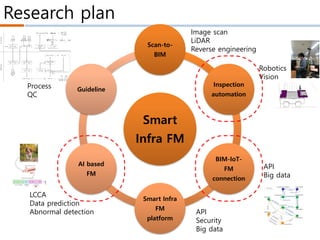
Research plan
Smart
Infra FM
Scan-to-
BIM
Inspection
automation
BIM-IoT-
FM
connection
Smart Infra
FM
platform
AI based
FM
Guideline
LCCA
Data prediction
Abnormal detection API
Security
Big data
Robotics
Vision
API
Big data
Process
QC
Image scan
LiDAR
Reverse engineering
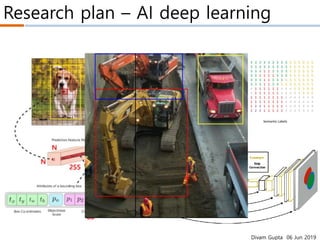
Research plan – AI deep learning
Divam Gupta 06 Jun 2019
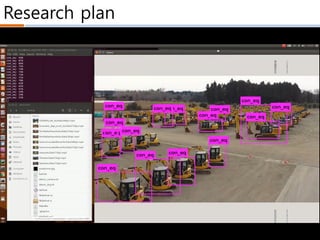
Research plan
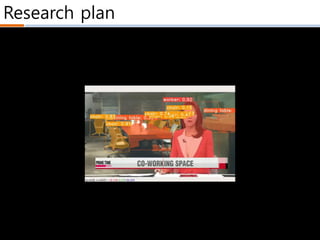
Research plan
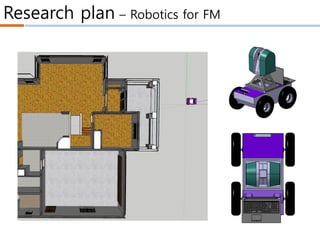
Research plan – Robotics for FM
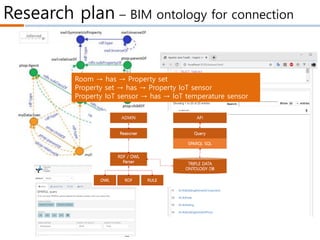
Research plan – BIM ontology for connection
ontotext
Room → has → Property set
Property set → has → Property IoT sensor
Property IoT sensor → has → IoT temperature sensor
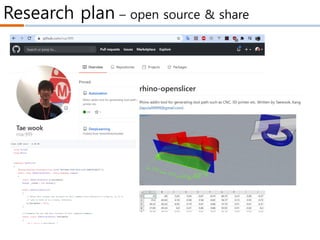
Research plan – open source & share
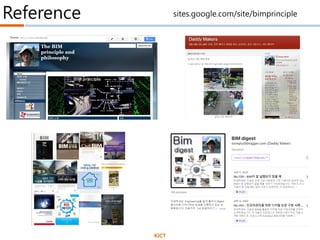
Reference
KICT
sites.google.com/site/bimprinciple
1. 강태욱, 임지순 역, 2015.2, 스마트 홈 오토메이션, 씨아이알
2. 강태욱, 현소영 역, 2014.12, 스마트 빌딩 시스템, 씨아이알
3. 강태욱, 김호중, 2014.1, BIM기반 건축 협업 디자인, SpaceTime
4. 강태욱, 2011.6, BIM의 원리, SpaceTime
5. Alan Safe, 2016.2.12, How the Internet of Things is Impacting the Construction Industry, For Construction Pros.com
6. Rachel Burger, 2015.7.28, Three Ways the Internet of Things Can Benefit Your Construction Project, Construction
Management
7. Jacqi Levy, 2016.4.28, 4 BIG ways the IoT is impacting design and construction, Internet of Things blog, IBM
8. whitelight group, 2014.8.18, How the Internet of Things is transforming the construction industry
9. Rachel Burger, 2016.8.5, How "The Internet of Things" is Affecting the Construction Industry, the balance.com
10. AIG, Human Condition Safety: Using Sensors to Improve Worker Safety
11. Niina Gromov, 2015.11.23, Offering Value through Internet of Things Case: Construction Companies in Finland, School
of Science, Aalto University
12. Wipro Digital, 2016.4.1, CASE STUDY: INCREASING CUSTOMER VALUE THROUGH IOT FOR JCB INDIA
13. Monitor Deloitte, 2015.7, Every. Thing. Connected.
14. Laura Black, 2015.8.12, An Inside Look at Autodesk’s Project Aquila, ConstructionTech
15. Jeff Walsh, 2015.10.1, Human Condition Aims to Transform Construction-Site Safety With Wearables, Line shape
space.com
16. Insights, IoT Logistics Are Transforming the Trucking Industry
17. Chris Topham, 2015.9.10, Case Study: Northumbria Specialist Care Hospital Pushes KNX into the IoT, Abtec Building
Technologies
18. Mike Chino, 2015.11.6, Intel’s Smart Tiny House packs futuristic technology into 264 square feet, inhabitat
19. Wanda Lau, 2016.5.9, KieranTimberlake Offers a New Tool for Architects Wanting an In on IoT
20. CADDIGEST, 2016.7.7, IBM Watson IoT Platform to Add Intelligence to Buildings Worldwide
Reference
KICT

SBF(Scan-BIM-Field) 기반 스마트 시설물 관리 기술 개발

  • 1.
    효과적 시설물 관리를위한 SBF(Scan-BIM-Field) 기술 연구 한국BIM학회 컨퍼런스 2020.7.3 Korea Institute of Civil engineering and building Technology 강태욱 공학박사 Ph.D Taewook, Kang laputa99999@gmail.com sites.google.com/site/bimprinciple Scan-BIM-FM-Field
  • 2.
    Ph.D. KICT. 연구위원 ISO/TC211committee member. 11 books author
  • 3.
  • 4.
  • 5.
  • 6.
    Smart FM Scan-to-BIM (Photo, LiDAR…)FM-BIM Field-to-BIM (IoT, mobile…) Big data analysis SBF(Scan-BIM-FM-Field) based Smart FM Legacy-to-BIM (COBie, API…) DDS(Decision Support System) Knowledge DB FM-BIM-to-Field (Mobile, MR…)Mobile IoT MR Scan Image BIM COBie ICBM platform Actor Workflow Reference Machine learning Intelligent FM FM Service
  • 7.
    Smart FM SmartFMMaturityModel(S-MM) Timeline SF-MM 수작업기반 FM 단독적으로 사용되는 FM 기술 및 시스템 SBF간 상호운용되는 FM시스템 최적관리지원 FM SBF기반 지능형 최 적관리지원 FM Issue FM의사결정지연.재작 업.생산성/품질저하 FM핵심기술인 역설계, BIM,IoT,Cloud확보필요 상호운용성 부재으로 인 한 통합적 서비스 부족 최적관리위한 ICBM 기술 부족 지능형관리를 위한 AI기술/인프라 부족 Barrier 시장:FM 시스템 필요성 인식하지 못함.작은 시 장 규모 기술:FM솔류션 부족 정책:FM지원정책부족 시장:국내시장의 해외 솔 류션 독점 기술:SBF핵심기술 부재 정책:역설계(Scan-to- BIM),FM지침/제도 부재 시장:관련 상호운용성 표 준 부재 기술:국제표준이 아닌 국 내업체 자체기술적용 정책:해외 종속된 지침 시장:ICBM투자 및 전 문가 부족 기술:ICBM기술부족 정책:ICBM 오픈데이 터 정책부재 시장:AI기반 FM인식 및 사례 부족 기술:AI기술 부재 정책:지능형FM 지원 정책부재 Strategy & Technolog y 해외선진성공사례소개 FM솔류션 소개 FM관련 지침개발 효과적 FM 프로세스 내 재화를 위한 인식개선, 교육 및 훈련 필요 공간/속성 디지털 트랜스 포메이션 기술 개발.SBF 기반 기술 분석을 통한 Scan-to-BIM,FM 시스템, Field FM 기반 기술 개발. SBF 지침 개발 SBF 핵심 기술간 연계를 위한 인터페이스 표준화. COBie,API 정의.ICBM 플 랫폼 활용 SBF 및 GeoBIM 연계 ICBM 기반 SBF 기술 고도화 및 최적관리 지원.최적관리를 위 한 FM및 데이터관리 지침 개발 AI기반 지능형 FM 사 례발굴 및 기술 개발. Smart FM 지원 정책 및 지침 개발 L5 L4 L3 L2 L1 Manual FM Silo FM Connected FM Optimized FM Smart FM 1yr 2yr 2~3 yr 3yr 2yr Scan-to-BIM Digital Transformation Field-to-IoT data ICBM platform Standard based on GeoBIM Korea (2.02) Advanced (3.15) SmartFMMaturityModel(S-MM) Timeline SF-MM 수작업 기반 FM 단독적으로 사용되는 FM 기술 및 시스템 SBF간 상호운용되는 FM시스템 최적관리지원 FM SBF기반 지능형 최 적관리지원 FM Issue FM의사결정지연.재작 업.생산성/품질저하 FM핵심기술인 역설계, BIM,IoT,Cloud확보필요 상호운용성 부재으로 인 한 통합적 서비스 부족 최적관리위한 ICBM 기술 부족 지능형관리를 위한 AI기술/인프라 부족 Barrier 시장:FM 시스템 필요성 인식하지 못함.작은 시 장 규모 기술:FM솔류션 부족 정책:FM지원정책부족 시장:국내시장의 해외 솔 류션 독점 기술:SBF핵심기술 부재 정책:역설계(Scan-to- BIM),FM지침/제도 부재 시장:관련 상호운용성 표 준 부재 기술:국제표준이 아닌 국 내업체 자체기술적용 정책:해외 종속된 지침 시장:ICBM투자 및 전 문가 부족 기술:ICBM기술부족 정책:ICBM 오픈데이 터 정책부재 시장:AI기반 FM인식 및 사례 부족 기술:AI기술 부재 정책:지능형FM 지원 정책부재 Strategy & Technolog y 해외선진성공사례소개 FM솔류션 소개 FM관련 지침개발 효과적 FM 프로세스 내 재화를 위한 인식개선, 교육 및 훈련 필요 공간/속성 디지털 트랜스 포메이션 기술 개발.SBF 기반 기술 분석을 통한 Scan-to-BIM,FM 시스템, Field FM 기반 기술 개발. SBF 지침 개발 SBF 핵심 기술간 연계를 위한 인터페이스 표준화. COBie,API 정의.ICBM 플 랫폼 활용 SBF 및 GeoBIM 연계 ICBM 기반 SBF 기술 고도화 및 최적관리 지원.최적관리를 위 한 FM및 데이터관리 지침 개발 AI기반 지능형 FM 사 례발굴 및 기술 개발. Smart FM 지원 정책 및 지침 개발 L5 L4 L3 L2 L1 Manual FM Silo FM Connected FM Optimized FM Smart FM 1yr 2yr 2~3 yr 3yr 2yr Scan-to-BIM Digital Transformation Field-to-IoT data ICBM platform Standard based on GeoBIM Korea (2.02) Advanced (3.15) 0 5 10 15 20 25 30 1 2 3 4 5 선진국 국내 계획 0% 설계 53% 시공 15% 건설관리/감리 21% 유지관리 11% 운영 0% 계획 설계 시공 건설관리/감리 유지관리 운영 Level Description Legacy FM With manual FM, the person must go to the place where the relevant data is stored for the necessary data acquisition, or request separately Silo FM CAFM is a stand-alone CAFM and devices and devices such as mobile and IoT are not connected. BIM not utilized Connected FM-BIM Support FM-BIM linkage method, and support development of spatial information through Scan-BIM. IoT-BIM and legacy system linkage support Integrated FM-BIM Cloud platform-based data integration and analysis support. Knowledge-based decision support Optimized FM-BIM Optimization of facility management through intelligent data analysis. Ability to predict performance and cost based on FM alternative
  • 8.
  • 9.
  • 10.
    Scan-to-BIM Input PCD SamplingFiltering Spatial indexing Segmentation Scan To Geometry Geometry To BIM load S-G rules Geometry mapping load G-B rules BIM mapping BIM Validation <?xml version="1.0" encoding="utf-8"?> <RE3D_objects> <object type="KS_SP_100_T50" name="KS standard straight pipe 100mm thick 50mm. copper material"> <parameters> radius=100, thickness=50, axis_point1=(0,0,0), axis_point2=(10,0,0) </parameters> </object> <object type="KS_LBP_100_T50" name="KS L-bow pipe 100mm thick 50mm. copper material"> <parameters> radius=100, thickness=50, axis_point1=(0,0,0), axis_intersection=(10,10,0), axis_point2=(10,0,0), axis_intersection_angle=90.0 </parameters> </object> </RE3D_objects> <?xml version="1.0" encoding="utf-8"?> <RE3D_shapes> <shape id="shape.1" type="straight_cylinder"> <parameters>R=1.1, axis_point1=(0,0,0), axis_point2=(10,0,0)</parameters> </shape> <shape id="shape.2" type="plane"> <parameters>A=0.5, B=0.2, C=0.3, D=1.0</parameters> <boundary>(0,0),(20,0),(20,20),(0,20)</boundary> </shape> </RE3D_shapes> Database #name: string namespce RE3D { }; PointCloud #name: string #path: string +load() PCL:Point<XYZ> SegmentationC Segment #name: string #path: string Command +name: string <<virtual>>+event(e: Event*) Framework * AddPointCloudCommand LoadPointCloudCommand CommandTable +add(pCommand) +del(name) +execute(name, parameters: string) Ev +Type{call Paramte Parameter +name: string +value: string +type: string * * * * Project +name: string PCL:PointCloud<XYZ> PCL:Point<RGB>PCL:PointCloud<RGB> PCL:PointCloud<Normal> PCL:Point<Normal> * * PCL:PointIndices #indices Shape #<<Unique>> name: string ShapeList #name: string +load() * FilteringCommand ExtractStraightPipeCommand CylinderShape #radius: double LBowCylinderShape PlaneShape StrightCylinderShape ObjectMappingRule QualityCheckRule NewProjectCommand Application <<singleton>> SegmentationByNo SegmentationByPla Object +id: string ObjectTable <<singleton>> * LoadPointCloudCommand(e { id = event->GetAt("id"); Object* pObject = Objec Project* pProject = dyna pPointCloud = new PointC pProject->GetDatabase() } Rule -name: string -path: string +Rule(name: string) <<virtual>>+parsing(path: string) <<virtual>>+execute() RuleSet <<enumeration>> #qualityCheckRules #objectMappingRules* SCAN 형상 편차 scan2lod -interval=[number m] input.pcd ouput.pcd scan2filter -option=[remove_noise] -param=[", , , "] input*.pcd output scan2grid -interval=[number m] input.pcd ouput scan2seg -type=[plane] input.pcd output seg2geo -gm=[mesh | plane] -debug=[segment_pcd | log | progress] -out=[pcd | json] input.pcd ouput merge_geo -in=[json] input output Input PCD Sampling Filtering Spatial indexing Segmentation Scan To Geometry Geometry To BIM load S-G rules Geometry mapping load G-B rules BIM mapping BIM Validation <?xml version="1.0" encoding="utf-8"?> <RE3D_objects> <object type="KS_SP_100_T50" name="KS standard straight pipe 100mm thick 50mm. copper material"> <parameters> radius=100, thickness=50, axis_point1=(0,0,0), axis_point2=(10,0,0) </parameters> </object> <object type="KS_LBP_100_T50" name="KS L-bow pipe 100mm thick 50mm. copper material"> <parameters> radius=100, thickness=50, axis_point1=(0,0,0), axis_intersection=(10,10,0), axis_point2=(10,0,0), axis_intersection_angle=90.0 </parameters> </object> </RE3D_objects> <?xml version="1.0" encoding="utf-8"?> <RE3D_shapes> <shape id="shape.1" type="straight_cylinder"> <parameters>R=1.1, axis_point1=(0,0,0), axis_point2=(10,0,0)</parameters> </shape> <shape id="shape.2" type="plane"> <parameters>A=0.5, B=0.2, C=0.3, D=1.0</parameters> <boundary>(0,0),(20,0),(20,20),(0,20)</boundary> </shape> </RE3D_shapes> Database #name: string namespce RE3D { }; PointCloud #name: string #path: string +load() PCL:Point<XYZ> SegmentationCo Segment #name: string #path: string Command +name: string <<virtual>>+event(e: Event*) Framework * AddPointCloudCommand LoadPointCloudCommand CommandTable +add(pCommand) +del(name) +execute(name, parameters: string) Ev +Type{call, Paramter Parameter +name: string +value: string +type: string * * * * Project +name: string PCL:PointCloud<XYZ> PCL:Point<RGB>PCL:PointCloud<RGB> PCL:PointCloud<Normal> PCL:Point<Normal> * * PCL:PointIndices #indices Shape #<<Unique>> name: string ShapeList #name: string +load() * FilteringCommand ExtractStraightPipeCommand CylinderShape #radius: double LBowCylinderShape PlaneShape StrightCylinderShape ObjectMappingRule QualityCheckRule NewProjectCommand PApplication <<singleton>> SegmentationByNor SegmentationByPlan Object +id: string ObjectTable <<singleton>> * LoadPointCloudCommand(ev { id = event->GetAt("id"); Object* pObject = Object Project* pProject = dynam pPointCloud = new PointC pProject->GetDatabase() } Rule -name: string -path: string +Rule(name: string) <<virtual>>+parsing(path: string) <<virtual>>+execute() RuleSet <<enumeration>> #qualityCheckRules #objectMappingRules* SCAN 형상 편차 scan2lod -interval=[number m] input.pcd ouput.pcd scan2filter -option=[remove_noise] -param=[", , , "] input*.pcd output scan2grid -interval=[number m] input.pcd ouput scan2seg -type=[plane] input.pcd output seg2geo -gm=[mesh | plane] -debug=[segment_pcd | log | progress] -out=[pcd | json] input.pcd ouput merge_geo -in=[json] input output
  • 11.
    Geometry-to-BIM G2BM geo_to_feature feature_to_BIMBIM_to_object G2M_mapping <G2FM name=‘plane_feature’> <unit length=‘meter’ angle=‘degree’ format=‘d.3d’/> <geometry file=“plane-1023.json’> <feature geometry_type=‘plane’> <dim name=‘width’ type=‘real’ value=‘10.254’/> <dim name=‘height’ type=‘real’ value=‘3.532’/> <dim name=‘PCA’ type=‘complex’ value=‘{(0,0,1), (1,0,0), (0,1,0)}’/> </feature> </geometry> </G2FM>
  • 12.
    G2BM <F2BM name=‘BIM’> <unit length=‘meter’angle=‘degree’ format=‘d.3d’/> <feature geometry_type=‘plane’ target=‘wall’/> </F2BM> Geometry- to-Feature <G2FM name=‘plane_feature’> <unit length=‘meter’ angle=‘degree’ format=‘d.3d’/> <geometry file=“plane-1023.json’> <feature geometry_type=‘plane’/> </geometry> </G2FM> Feature <G2F-MD name=‘plane_semantics’ script=‘python’> <function name=‘define_dimension’/> </function> </G2F-MD> Feature-to- BIM BIM-to-object Geometry G2F-MD <B2OM name=‘BIM object’> <object type=‘wall.basic.w10-20’ parameter=‘width=10.45, height’/> </B2OM> Geometry-to-BIM mapping <G2BM name=‘plane-to-wall’> <call domain=‘G2F-MD’ name=‘plane_semantics’/> </G2BM> Process workflow Dependency <G2M name=‘plane-to-wall’> <call domain=‘G2F-MD’ name=‘plane_semantics’/> <call domain=‘G2FM’ name=‘plane_feature’/> <call domain=‘F2BM’ name=‘BIM’/> <call domain=‘B2OM’ name=‘BIM_object’/> </G2M> <G2F-MD name=‘plane_semantics’ script=‘python’> <function name=‘define_dimension’> footprintPlane = footprintPlane(geometry) LCS = footprintPlane.LCS() dims = planeShapeFeature(geometry, LCS) for d in dims: setGeometryFeature(geometry, d.name, d.value) </function> </G2F-MD>
  • 13.
    Smart FM PCD Filtering Grid generation LOD generation PCA 2D mapping Outline extraction Outline smoothing Merge grid outline Planegeometry mapping based on S2GM rule LOD5 LOD3 e.g. LOD2 = {density=2cm, method=middle} LOD5 = {density=5mm, method=near} Wz Wo Wy Wx WCS(World Coordinate System) LCS(Local Coordinate System) SCS(Sensor Coordinate System) e.g. S2GM = {source=plane, destination=wall} wall = {type=basic wall, baseline.height=10cm, baseline=finish.inner} e.g. filter={removal_condition =min_data | cluter_distance} e.g. grid={space=5m, origin=left_bottom} PCD2D = PCD3D x MBx,y,z=PCA(PCD) M=TransformMatrix 3D-2D(Bx,y,z)
  • 14.
    Smart FM PCD Filtering create GRID create LODsegmentation Outline extraction Outline smoothing Merge plane outline LOD5 LOD3 e.g. LOD2 = {density=2cm, method=middle} LOD5 = {density=5mm, method=near} e.g. filter={removal_condition =min_data | cluter_distance} e.g. grid={space=5m, origin=left_bottom} PCA 2D mapping Wz Wo Wy Wx WCS(World Coordinate System) LCS(Local Coordinate System) SCS(Sensor Coordinate System) PCD2D = PCD3D x MBx,y,z=PCA(PCD) M=TransformMatrix 3D-2D(Bx,y,z) segmentation= {Normal.curvature.tolerance, RANSAC.model, RANSAC.tolerance} g != grids.end s != segments.end end yes no g=g.next s=s.next Output seed plane p != seed_plane.end yes no get PCD handle create seed plane end save plane geometry create seed plane end
  • 15.
  • 16.
  • 17.
    Simple IoT study– Smart Home Packing Wireless Sensor Gateway IoT Control Big data analysis Protocol IoT connection service http://daddynkidsmakers.blogspot.kr/ A BIM ANALYSIS OF HVAC AND RADIANT COOLING SOLUTIONS, ROBERT CUBICK, 2016
  • 18.
  • 19.
    Field. IoT-BIM BIM connection IoT sensor#1 IoT sensor #2 IoT sensor #n … IoT device definition BIM database Device diagnose Device data acquisition <device_definition> <device id=‘T#1’> </device> </device_definition> <device_diagnose id=‘D#1’> <testsuite device_id=‘T#1’> </testsuite> </device_diagnose> <data_acquisition id=‘A#1’ position=’NNN,NNN’ coordinate=‘WGS84’> </data_acquisition> <BIM_connection source=‘SM.ifc’ coordinate=‘WGS84’> <element type=‘building’ id=‘B#3’ name=‘building#3’> </element> </BIM_connection> Field database <device_definition id=‘dd#1’> <device id=‘T#1’ name=‘temp’ type=‘temperature’> <maker name=‘CH korea’ email=‘laputa99999_9@gmail.com’ tel=‘82-0330-0802-1013’ location=‘…’/> <specification> <op_range name=‘voltage’ unit=‘V’ type=‘real’ value=‘3.3’/> <op_range name=‘temperature’ unit=‘degree’ type=‘real’ begin=‘-10.0’ end=’60.0’/> <op_range name=‘humidity’ unit=‘%R.H’ type=‘real’ begin=‘0.0’ end=’50.0’/> <op_range name=‘GPS’ unit=‘WGS84’ type=‘vector2D’ begin=‘(0,0)’ end=‘(127, 32)’/> <op_range name=‘characteristic_curve’ unit1=‘temperature’ unit2=‘voltage’ type=‘vector2D’> (0,0), (1.2, 2.4), (3.5, 6.2), (4.1, 7.2) </op_range> <op_range name=‘period’ unit=‘year’ value=‘2’/> </specification> </device> </device_definition>
  • 20.
  • 21.
    Test plan 용도구분 복합도 (complexity) 규모(scale) 플랜트 복합건물 병원 대형 쇼핑몰 주거 단지(아파트 단지) 공공건물(학교, 관공서) 근린생활시설(상가, 오피스, 동사무소) 소형주거 5층 이하 정형 건물 6~12층 13층~고층 고층~초고층 소형(연면적 3,000 이하) 중형(3,000~10,000 ) 대형(10,000 이상) 한국건설기술 연구원 본관동 S사 반도체 공장 대형 캠퍼스 대학 병원 코엑스 S사 래미안 세종시 청사 오피스 상가 다세대 주민센터근린생황시설 (상가, 오피스, 동사무소) BIM connection IoT sensor #1 IoT sensor #2 IoT sensor #n … IoT device definition BIM database Device diagnose Device data acquisition <device_definition> <device id=‘T#1’> </device> </device_definition> <device_diagnose id=‘D#1’> <testsuite device_id=‘T#1’> </testsuite> </device_diagnose> <data_acquisition id=‘A#1’ position=’NNN,NNN’ coordinate=‘WGS84’> </data_acquisition> <BIM_connection source=‘SM.ifc’ coordinate=‘WGS84’> <element type=‘building’ id=‘B#3’ name=‘building#3’> </element> </BIM_connection> Field database BIM, COBie IoT 3D scan (point cloud) BIM & 3D point cloud IoT data
  • 22.
    Research plan Smart Infra FM Scan-to- BIM Inspection automation BIM-IoT- FM connection SmartInfra FM platform AI based FM Guideline LCCA Data prediction Abnormal detection API Security Big data Robotics Vision API Big data Process QC Image scan LiDAR Reverse engineering
  • 23.
    Research plan –AI deep learning Divam Gupta 06 Jun 2019
  • 24.
  • 25.
  • 26.
    Research plan –Robotics for FM
  • 27.
    Research plan –BIM ontology for connection ontotext Room → has → Property set Property set → has → Property IoT sensor Property IoT sensor → has → IoT temperature sensor
  • 28.
    Research plan –open source & share
  • 29.
  • 30.
    1. 강태욱, 임지순역, 2015.2, 스마트 홈 오토메이션, 씨아이알 2. 강태욱, 현소영 역, 2014.12, 스마트 빌딩 시스템, 씨아이알 3. 강태욱, 김호중, 2014.1, BIM기반 건축 협업 디자인, SpaceTime 4. 강태욱, 2011.6, BIM의 원리, SpaceTime 5. Alan Safe, 2016.2.12, How the Internet of Things is Impacting the Construction Industry, For Construction Pros.com 6. Rachel Burger, 2015.7.28, Three Ways the Internet of Things Can Benefit Your Construction Project, Construction Management 7. Jacqi Levy, 2016.4.28, 4 BIG ways the IoT is impacting design and construction, Internet of Things blog, IBM 8. whitelight group, 2014.8.18, How the Internet of Things is transforming the construction industry 9. Rachel Burger, 2016.8.5, How "The Internet of Things" is Affecting the Construction Industry, the balance.com 10. AIG, Human Condition Safety: Using Sensors to Improve Worker Safety 11. Niina Gromov, 2015.11.23, Offering Value through Internet of Things Case: Construction Companies in Finland, School of Science, Aalto University 12. Wipro Digital, 2016.4.1, CASE STUDY: INCREASING CUSTOMER VALUE THROUGH IOT FOR JCB INDIA 13. Monitor Deloitte, 2015.7, Every. Thing. Connected. 14. Laura Black, 2015.8.12, An Inside Look at Autodesk’s Project Aquila, ConstructionTech 15. Jeff Walsh, 2015.10.1, Human Condition Aims to Transform Construction-Site Safety With Wearables, Line shape space.com 16. Insights, IoT Logistics Are Transforming the Trucking Industry 17. Chris Topham, 2015.9.10, Case Study: Northumbria Specialist Care Hospital Pushes KNX into the IoT, Abtec Building Technologies 18. Mike Chino, 2015.11.6, Intel’s Smart Tiny House packs futuristic technology into 264 square feet, inhabitat 19. Wanda Lau, 2016.5.9, KieranTimberlake Offers a New Tool for Architects Wanting an In on IoT 20. CADDIGEST, 2016.7.7, IBM Watson IoT Platform to Add Intelligence to Buildings Worldwide Reference KICT