Savvy HRMS
Complete HR Solutions
Developed By ORASIS Infotech Pvt. Ltd.
Savvy HRMS is a web-based human resource management
software that automates the entire HR processes to improve
productivity.
As a professional services company, ORASIS Infotech Pvt. Ltd. was founded with the
mission of developing trusted business partnerships through mutual trust and
respect. We apply our experience to help resolve complex issues and identify
opportunities by providing solutions that are aligned with your organizational
strategies while maintaining the highest standards of honesty and integrity. ORASIS
Infotech is known for their action oriented approach to delivering HR solutions that
improve business as well as employee effectiveness.
About ORASIS Infotech
Presentation Agenda:
Savvy HRMS Brief Overview
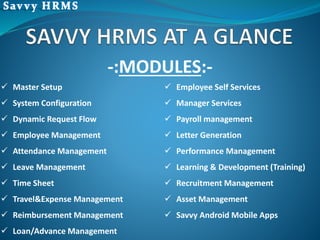
-:MODULES:-
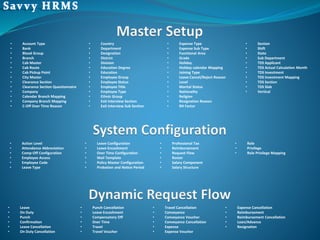
 Master Setup
 System Configuration
 Dynamic Request Flow
 Employee Management
 Attendance Management
 Leave Management
 Time Sheet
 Travel&Expense Management
 Reimbursement Management
 Loan/Advance Management
 Employee Self Services
 Manager Services
 Payroll management
 Letter Generation
 Performance Management
 Learning & Development (Training)
 Recruitment Management
 Asset Management
 Savvy Android Mobile Apps
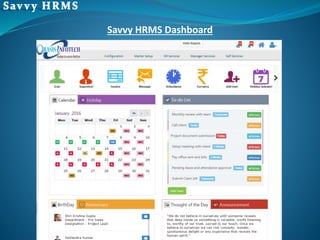
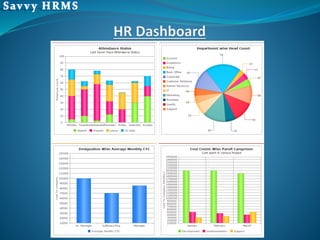
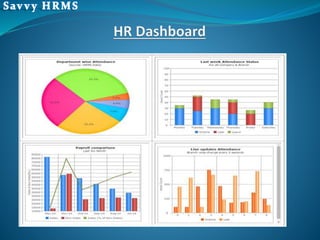
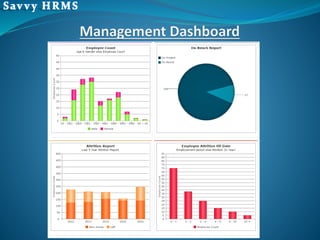
Savvy HRMS Dashboard
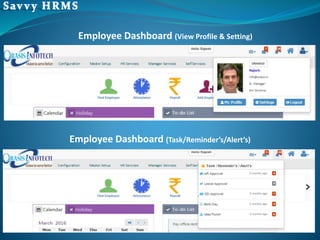
Employee Dashboard (Task/Reminder’s/Alert’s)
Employee Dashboard (View Profile & Setting)
• Account Type
• Bank
• Blood Group
• Branch
• Cab Master
• Cab Route
• Cab Pickup Point
• City Master
• Clearance Section
• Clearance Section Questionnaire
• Company
• Calendar Branch Mapping
• Company Branch Mapping
• C-Off Over Time Reason
• Country
• Department
• Designation
• District
• Division
• Education Degree
• Education
• Employee Group
• Employee Status
• Employee Title
• Employee Type
• Ethnic Group
• Exit Interview Section
• Exit Interview Sub Section
• Expense Type
• Expense Sub Type
• Functional Area
• Grade
• Holiday
• Holiday calendar Mapping
• Joining Type
• Leave Cancel/Reject Reason
• Level
• Marital Status
• Nationality
• Religion
• Resignation Reason
• RH Factor
• Section
• Shift
• State
• Sub Department
• TDS Applicant
• TDS Actual Calculation Month
• TDS Investment
• TDS Investment Mapping
• TDS Section
• TDS Slab
• Vertical
• Action Level
• Attendance Abbreviation
• Comp-Off Configuration
• Employee Access
• Employee Code
• Leave Type
• Leave Configuration
• Leave Encashment
• Over Time Configuration
• Mail Template
• Policy Master Configuration
• Probation and Notice Period
• Professional Tax
• Reimbursement
• Request Flow
• Roster
• Salary Component
• Salary Structure
• Role
• Privilege
• Role Privilege Mapping
• Leave
• On Duty
• Punch
• Confirmation
• Leave Cancellation
• On Duty Cancellation
• Punch Cancellation
• Leave Encashment
• Compensatory Off
• Over Time
• Travel
• Travel Voucher
• Travel Cancellation
• Conveyance
• Conveyance Voucher
• Conveyance Cancellation
• Expense
• Expense Voucher
• Expense Cancellation
• Reimbursement
• Reimbursement Cancellation
• Loan/Advance
• Resignation
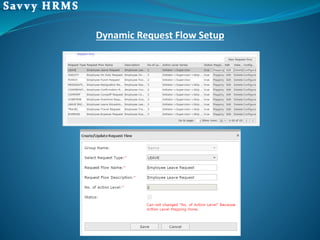
Dynamic Request Flow Setup
• New Employee Creation
• Managing Employee Database
 HR/Administrative
 Employee Salary Structure
 Personal
 Contact
 Education
 Experience
 Others
• Employee Confirmation
• Employee Roster Mapping
• Calendar Mapping
• Short Deduction Mapping
• Weekly Off Mapping
• Separation
 Define Resignation Reason
Template
 Define Resignation Sub
Reason
HR Services
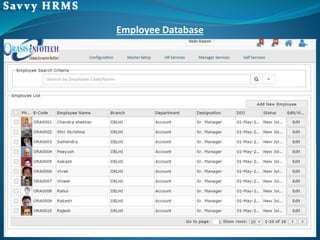
Employee Database
• Employee Attendance Calendar
• Multiple Shift Creation
• Create Roster with Combination of Shift
• Configure Attendance Policy (Shift Late, Early Going, Late Coming)
• Configure Over Time Policy
• Configure Holiday Calendar based on Location
• Configure On Duty (OD) Policy
• Configure Punch Regularization Policy
• Biometric Integration
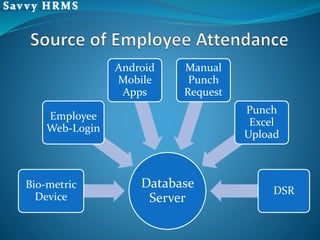
Database
Server
Bio-metric
Device
Employee
Web-Login
Android
Mobile
Apps
Manual
Punch
Request
Punch
Excel
Upload
DSR
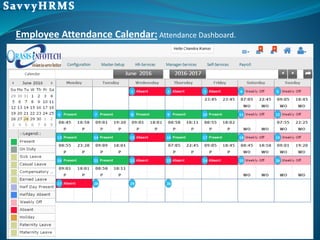
Employee Attendance Calendar: Attendance Dashboard.
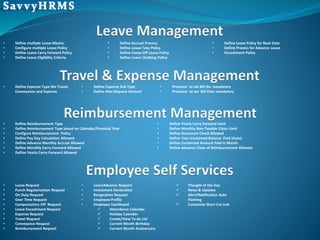
• Define multiple Leave Master
• Configure multiple Leave Policy
• Define Leave Carry Forward Policy
• Define Leave Eligibility Criteria
• Define Accrual Process
• Define Leave Take Policy
• Define Comp-Off Leave Policy
• Define Leave Clubbing Policy
• Define Leave Policy for Back Date
• Define Process for Advance Leave
• Encashment Policy
• Define Expense Type like Travel,
Conveyance and Expense
• Define Expense Sub Type
• Define Max Request Amount
• Provision to set Bill No. mandatory
• Provision to set Bill Date mandatory
• Define Reimbursement Type
• Define Reimbursement Type based on Calendar/Financial Year
• Configure Reimbursement Policy
• Define Pay Day Calculation Allowed
• Define Advance Monthly Accrual Allowed
• Define Monthly Carry-Forward Allowed
• Define Yearly Carry-Forward Allowed
• Define Yearly Carry-Forward Limit
• Define Monthly Non-Taxable Claim Limit
• Define Document Check Allowed
• Define Year Unclaimed Balance Paid (Auto)
• Define Unclaimed Amount Paid in Month
• Define Advance Claim of Reimbursement Allowed
• Leave Request
• Punch Regularization Request
• On Duty Request
• Over Time Request
• Compensatory Off Request
• Leave Encashment Request
• Expense Request
• Travel Request
• Conveyance Request
• Reimbursement Request
• Loan/Advance Request
• Investment Declaration
• Resignation Request
• Employee Profile
• Employee Dashboard
 Attendance Calendar
 Holiday Calendar
 Create/View To do List
 Current Month Birthday
 Current Month Anniversary
 Thought of the Day
 News & Updates
 Alert/Notification Auto
Flashing
 Customize Short Cut Link
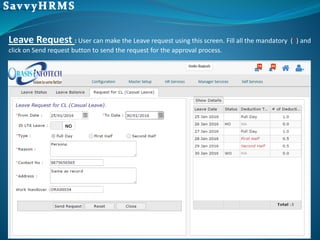
Leave Request : User can make the Leave request using this screen. Fill all the mandatory (*) and
click on Send request button to send the request for the approval process.
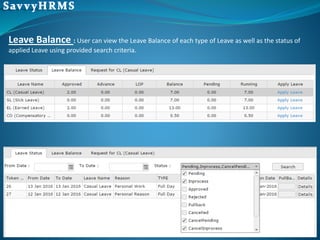
Leave Balance : User can view the Leave Balance of each type of Leave as well as the status of
applied Leave using provided search criteria.
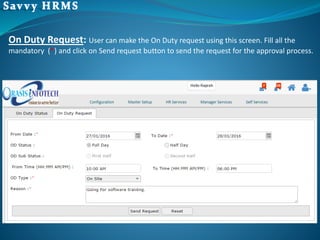
On Duty Request: User can make the On Duty request using this screen. Fill all the
mandatory (*) and click on Send request button to send the request for the approval process.
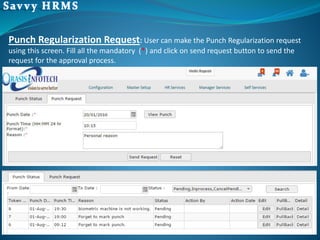
Punch Regularization Request: User can make the Punch Regularization request
using this screen. Fill all the mandatory (*) and click on send request button to send the
request for the approval process.
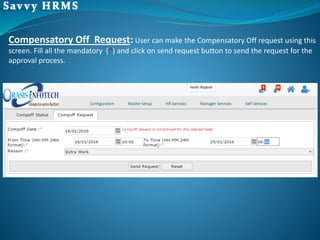
Compensatory Off Request: User can make the Compensatory Off request using this
screen. Fill all the mandatory (*) and click on send request button to send the request for the
approval process.
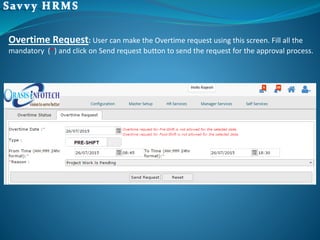
Overtime Request: User can make the Overtime request using this screen. Fill all the
mandatory (*) and click on Send request button to send the request for the approval process.
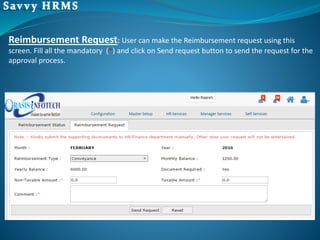
Reimbursement Request: User can make the Reimbursement request using this
screen. Fill all the mandatory (*) and click on Send request button to send the request for the
approval process.
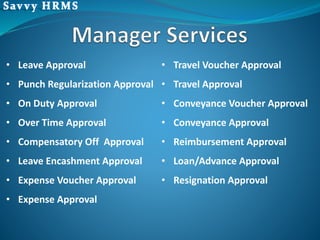
• Leave Approval
• Punch Regularization Approval
• On Duty Approval
• Over Time Approval
• Compensatory Off Approval
• Leave Encashment Approval
• Expense Voucher Approval
• Expense Approval
• Travel Voucher Approval
• Travel Approval
• Conveyance Voucher Approval
• Conveyance Approval
• Reimbursement Approval
• Loan/Advance Approval
• Resignation Approval
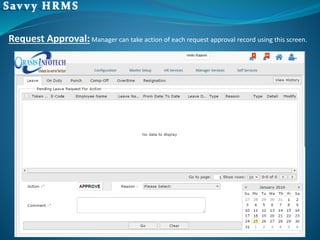
Request Approval:Manager can take action of each request approval record using this screen.
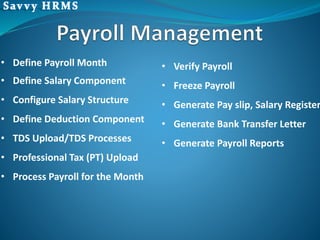
• Define Payroll Month
• Define Salary Component
• Configure Salary Structure
• Define Deduction Component
• TDS Upload/TDS Processes
• Professional Tax (PT) Upload
• Process Payroll for the Month
• Verify Payroll
• Freeze Payroll
• Generate Pay slip, Salary Register
• Generate Bank Transfer Letter
• Generate Payroll Reports
• Letter Configuration
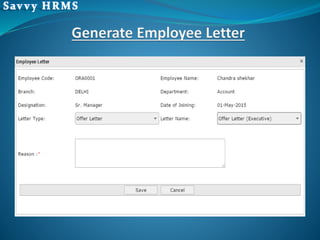
• Generate Employee Letter
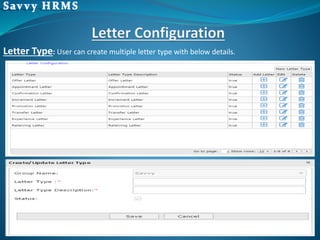
Letter Type: User can create multiple letter type with below details.
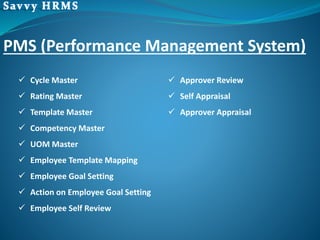
PMS (Performance Management System)
 Cycle Master
 Rating Master
 Template Master
 Competency Master
 UOM Master
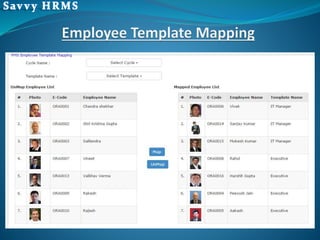
 Employee Template Mapping
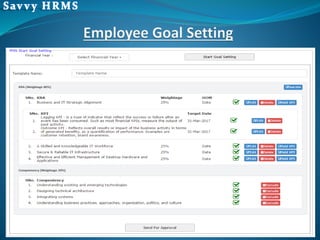
 Employee Goal Setting
 Action on Employee Goal Setting
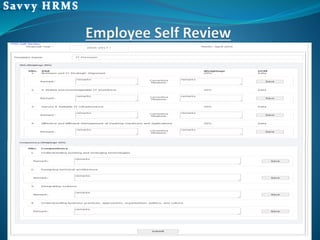
 Employee Self Review
 Approver Review
 Self Appraisal
 Approver Appraisal
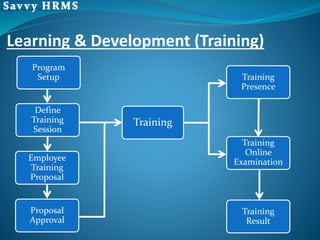
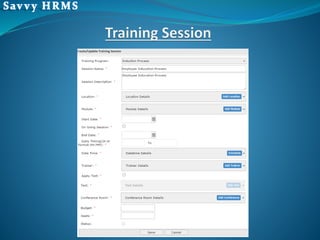
Program
Setup
Define
Training
Session
Employee
Training
Proposal
Proposal
Approval
Training
Training
Presence
Training
Online
Examination
Training
Result
Learning & Development (Training)
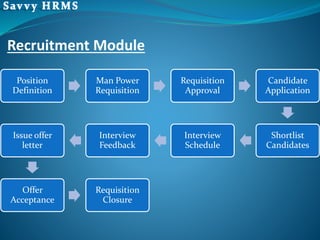
Recruitment Module
Position
Definition
Man Power
Requisition
Requisition
Approval
Candidate
Application
Shortlist
Candidates
Interview
Schedule
Interview
Feedback
Issue offer
letter
Offer
Acceptance
Requisition
Closure
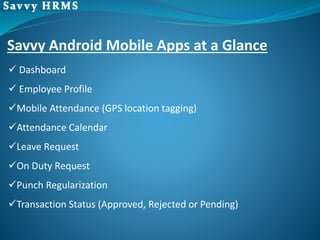
 Dashboard
 Employee Profile
Mobile Attendance (GPS location tagging)
Attendance Calendar
Leave Request
On Duty Request
Punch Regularization
Transaction Status (Approved, Rejected or Pending)
Savvy Android Mobile Apps at a Glance
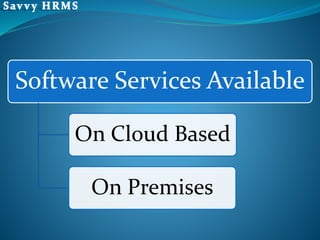
Software Services Available
On Cloud Based
On Premises
Thank You
Contact Us
Orasis Infotech Pvt. Ltd.
C-41, 3rd Floor, Ganesh Nagar,
Pandav Nagar Complex, Delhi-110092 (India)
Sales Contact No. : +91-7065442310, 11, 12
E-mail : salesorasis@orasis.in
Website: www.orasis.in , www.savvyhrms.com

hrms payroll software Delhi ..9999052481

  • 1.
    Savvy HRMS Complete HRSolutions Developed By ORASIS Infotech Pvt. Ltd.
  • 2.
    Savvy HRMS isa web-based human resource management software that automates the entire HR processes to improve productivity. As a professional services company, ORASIS Infotech Pvt. Ltd. was founded with the mission of developing trusted business partnerships through mutual trust and respect. We apply our experience to help resolve complex issues and identify opportunities by providing solutions that are aligned with your organizational strategies while maintaining the highest standards of honesty and integrity. ORASIS Infotech is known for their action oriented approach to delivering HR solutions that improve business as well as employee effectiveness. About ORASIS Infotech
  • 3.
  • 4.
    -:MODULES:-  Master Setup System Configuration  Dynamic Request Flow  Employee Management  Attendance Management  Leave Management  Time Sheet  Travel&Expense Management  Reimbursement Management  Loan/Advance Management  Employee Self Services  Manager Services  Payroll management  Letter Generation  Performance Management  Learning & Development (Training)  Recruitment Management  Asset Management  Savvy Android Mobile Apps
  • 5.
  • 6.
  • 11.
    • Account Type •Bank • Blood Group • Branch • Cab Master • Cab Route • Cab Pickup Point • City Master • Clearance Section • Clearance Section Questionnaire • Company • Calendar Branch Mapping • Company Branch Mapping • C-Off Over Time Reason • Country • Department • Designation • District • Division • Education Degree • Education • Employee Group • Employee Status • Employee Title • Employee Type • Ethnic Group • Exit Interview Section • Exit Interview Sub Section • Expense Type • Expense Sub Type • Functional Area • Grade • Holiday • Holiday calendar Mapping • Joining Type • Leave Cancel/Reject Reason • Level • Marital Status • Nationality • Religion • Resignation Reason • RH Factor • Section • Shift • State • Sub Department • TDS Applicant • TDS Actual Calculation Month • TDS Investment • TDS Investment Mapping • TDS Section • TDS Slab • Vertical • Action Level • Attendance Abbreviation • Comp-Off Configuration • Employee Access • Employee Code • Leave Type • Leave Configuration • Leave Encashment • Over Time Configuration • Mail Template • Policy Master Configuration • Probation and Notice Period • Professional Tax • Reimbursement • Request Flow • Roster • Salary Component • Salary Structure • Role • Privilege • Role Privilege Mapping • Leave • On Duty • Punch • Confirmation • Leave Cancellation • On Duty Cancellation • Punch Cancellation • Leave Encashment • Compensatory Off • Over Time • Travel • Travel Voucher • Travel Cancellation • Conveyance • Conveyance Voucher • Conveyance Cancellation • Expense • Expense Voucher • Expense Cancellation • Reimbursement • Reimbursement Cancellation • Loan/Advance • Resignation
  • 12.
  • 13.
    • New EmployeeCreation • Managing Employee Database  HR/Administrative  Employee Salary Structure  Personal  Contact  Education  Experience  Others • Employee Confirmation • Employee Roster Mapping • Calendar Mapping • Short Deduction Mapping • Weekly Off Mapping • Separation  Define Resignation Reason Template  Define Resignation Sub Reason HR Services
  • 14.
  • 15.
    • Employee AttendanceCalendar • Multiple Shift Creation • Create Roster with Combination of Shift • Configure Attendance Policy (Shift Late, Early Going, Late Coming) • Configure Over Time Policy • Configure Holiday Calendar based on Location • Configure On Duty (OD) Policy • Configure Punch Regularization Policy • Biometric Integration
  • 16.
  • 17.
    Employee Attendance Calendar:Attendance Dashboard.
  • 18.
    • Define multipleLeave Master • Configure multiple Leave Policy • Define Leave Carry Forward Policy • Define Leave Eligibility Criteria • Define Accrual Process • Define Leave Take Policy • Define Comp-Off Leave Policy • Define Leave Clubbing Policy • Define Leave Policy for Back Date • Define Process for Advance Leave • Encashment Policy • Define Expense Type like Travel, Conveyance and Expense • Define Expense Sub Type • Define Max Request Amount • Provision to set Bill No. mandatory • Provision to set Bill Date mandatory • Define Reimbursement Type • Define Reimbursement Type based on Calendar/Financial Year • Configure Reimbursement Policy • Define Pay Day Calculation Allowed • Define Advance Monthly Accrual Allowed • Define Monthly Carry-Forward Allowed • Define Yearly Carry-Forward Allowed • Define Yearly Carry-Forward Limit • Define Monthly Non-Taxable Claim Limit • Define Document Check Allowed • Define Year Unclaimed Balance Paid (Auto) • Define Unclaimed Amount Paid in Month • Define Advance Claim of Reimbursement Allowed • Leave Request • Punch Regularization Request • On Duty Request • Over Time Request • Compensatory Off Request • Leave Encashment Request • Expense Request • Travel Request • Conveyance Request • Reimbursement Request • Loan/Advance Request • Investment Declaration • Resignation Request • Employee Profile • Employee Dashboard  Attendance Calendar  Holiday Calendar  Create/View To do List  Current Month Birthday  Current Month Anniversary  Thought of the Day  News & Updates  Alert/Notification Auto Flashing  Customize Short Cut Link
  • 19.
    Leave Request :User can make the Leave request using this screen. Fill all the mandatory (*) and click on Send request button to send the request for the approval process.
  • 20.
    Leave Balance :User can view the Leave Balance of each type of Leave as well as the status of applied Leave using provided search criteria.
  • 21.
    On Duty Request:User can make the On Duty request using this screen. Fill all the mandatory (*) and click on Send request button to send the request for the approval process.
  • 22.
    Punch Regularization Request:User can make the Punch Regularization request using this screen. Fill all the mandatory (*) and click on send request button to send the request for the approval process.
  • 23.
    Compensatory Off Request:User can make the Compensatory Off request using this screen. Fill all the mandatory (*) and click on send request button to send the request for the approval process.
  • 24.
    Overtime Request: Usercan make the Overtime request using this screen. Fill all the mandatory (*) and click on Send request button to send the request for the approval process.
  • 25.
    Reimbursement Request: Usercan make the Reimbursement request using this screen. Fill all the mandatory (*) and click on Send request button to send the request for the approval process.
  • 26.
    • Leave Approval •Punch Regularization Approval • On Duty Approval • Over Time Approval • Compensatory Off Approval • Leave Encashment Approval • Expense Voucher Approval • Expense Approval • Travel Voucher Approval • Travel Approval • Conveyance Voucher Approval • Conveyance Approval • Reimbursement Approval • Loan/Advance Approval • Resignation Approval
  • 27.
    Request Approval:Manager cantake action of each request approval record using this screen.
  • 28.
    • Define PayrollMonth • Define Salary Component • Configure Salary Structure • Define Deduction Component • TDS Upload/TDS Processes • Professional Tax (PT) Upload • Process Payroll for the Month • Verify Payroll • Freeze Payroll • Generate Pay slip, Salary Register • Generate Bank Transfer Letter • Generate Payroll Reports
  • 29.
    • Letter Configuration •Generate Employee Letter
  • 30.
    Letter Type: Usercan create multiple letter type with below details.
  • 32.
    PMS (Performance ManagementSystem)  Cycle Master  Rating Master  Template Master  Competency Master  UOM Master  Employee Template Mapping  Employee Goal Setting  Action on Employee Goal Setting  Employee Self Review  Approver Review  Self Appraisal  Approver Appraisal
  • 36.
  • 38.
  • 39.
     Dashboard  EmployeeProfile Mobile Attendance (GPS location tagging) Attendance Calendar Leave Request On Duty Request Punch Regularization Transaction Status (Approved, Rejected or Pending) Savvy Android Mobile Apps at a Glance
  • 40.
    Software Services Available OnCloud Based On Premises
  • 41.
    Thank You Contact Us OrasisInfotech Pvt. Ltd. C-41, 3rd Floor, Ganesh Nagar, Pandav Nagar Complex, Delhi-110092 (India) Sales Contact No. : +91-7065442310, 11, 12 E-mail : salesorasis@orasis.in Website: www.orasis.in , www.savvyhrms.com