8/31/2012


     Using Batch Jobs to Improve
         the User Experience


              Safe Harbor
I've always said to anyone that will listen to me
(which is not very many) that software is an art
form. It attracts artists.
Just look at any software company and the
amount of musicians, artists, carpenters, etc…
working there that create code for a living and
create other things in their down time.
 - Steve Lacey


                                                           1
8/31/2012


 A developer can now employ batch Apex to
 build complex, long-running processes on the
 Force.com platform.


              - Force.com Apex Code Developers Guide


Complex, Long Running tasks

• Pre or Post processing tasks
• Account reassignments
• Price book updates
• Custom or Transactional Objects

Governor Limits are Your Friends …


                                                              2
8/31/2012


            Scenario 1

• 324,476 Accounts

• 142,105 Opportunity records

• 1 NEW record type


       Administrative Use

• Nulling out a field

• Arghhhh!!!!!


                                       3
8/31/2012


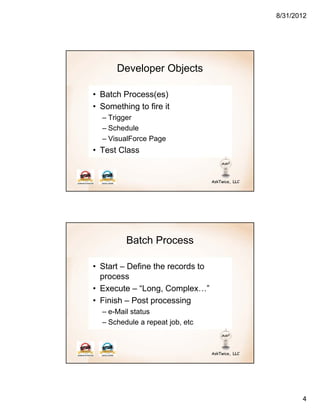
      Developer Objects

• Batch Process(es)
• Something to fire it
  – Trigger
  – Schedule
  – VisualForce Page
• Test Class


         Batch Process

• Start – Define the records to
  process
• Execute – “Long, Complex…”
• Finish – Post processing
  – e-Mail status
  – Schedule a repeat job, etc


                                         4
8/31/2012


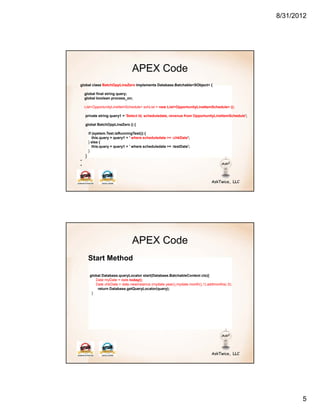
                                 APEX Code
global class BatchOppLineZero implements Database.Batchable<SObject> {

    global final string query;
    global boolean process_on;

    List<OpportunityLineItemSchedule> schList = new List<OpportunityLineItemSchedule> ();

    private string query1 = 'Select Id, scheduledate, revenue from OpportunityLineItemSchedule';

    global BatchOppLineZero () {

        if (system.Test.isRunningTest()) {
           this.query = query1 + ' where scheduledate >= :chkDate';
        } else {
           this.query = query1 + ' where scheduledate >= :testDate';
        }
    }
*
*


                                 APEX Code
        Start Method

        global Database.queryLocator start(Database.BatchableContext ctx){
           Date myDate = date.today();
           Date chkDate = date.newinstance (mydate.year(),mydate.month(),1).addmonths(-3);
            return Database.getQueryLocator(query);
         }


                                                                                                          5
8/31/2012


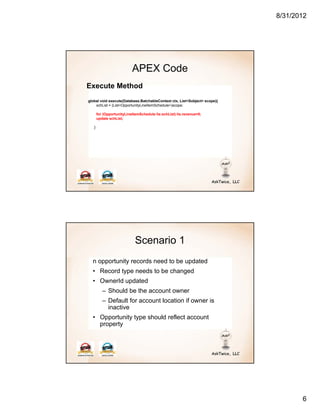
                           APEX Code
Execute Method
global void execute(Database.BatchableContext ctx, List<Sobject> scope){
    schList = (List<OpportunityLineItemSchedule>)scope;

       for (OpportunityLineItemSchedule lis:schList) lis.revenue=0;
       update schList;

   }


                             Scenario 1
  n opportunity records need to be updated
  • Record type needs to be changed
  • OwnerId updated
          – Should be the account owner
          – Default for account location if owner is
            inactive
  • Opportunity type should reflect account
    property


                                                                                  6
8/31/2012


                    Execute Method – scenario 1
global void execute(Database.BatchableContext ctx, List<Sobject> scope){
    oppUpdate = (List<Opportunity>)scope;

       List<Account> accList = new List<Account>();
       Set<Id> accId = new set<id>();

       ID recTypeId;
       List<RecordType> recList = new List<RecordType> ([Select Id, Name from RecordType]);
       for (RecordType rec:recList) if (rec.name=='Ad Revenue') recTypeId=rec.id;

       ID pitOwnerID, denOwnerID, laxOwnerID;
       List<User> repList = [Select ID, name, Property__c, IsActive, Sales_id__c from User];
       MAP<string,User> repMap = new MAP<string,User>();
       MAP<Id,User> repActiveMap = new MAP<Id,User>();

       for (User u:repList) {
          repMap.put(u.UserNumber__c,u);
          repActiveMap.put(u.id,u);
          if (u.name == ‘PIT Owner') pitOwnerID=u.id;
          if (u.name == ‘DEN Owner') denOwnerID=u.id;
          if (u.name == ‘LAX Owner') laxOwnerID=u.id;
        }


       for(Opportunity o:oppUpdate) accId.add(o.accountid);

       Map<Id,Account> accMap = new Map<Id,Account> (
           [Select Id, ownerid, property__c from Account where id in: accId]);

       for (Opportunity o:oppUpdate){
        o.description = 'This opportunity is used to track Ordered Ad Revenue';

        Account acc=accMap.get(o.accountid);
        if (acc !=null) {
           o.Opportunity_Type__c = acc.Property__c;

             User rep = repActiveMap.get(acc.ownerid);
             if (rep.IsActive) {
                acc.ownerid = rep.id;
             } else {
                if (acc.property__c == ‘PIT' && pitOwnerId !=null) o.ownerid = pitownerid;
                if (acc.property__c == ‘DEN' && denOwnerId !=null) o.ownerid = denownerid;
                if (acc.property__c == ‘LAX' && laxOwnerId !=null) o.ownerid = laxownerid;
         }

          if (recTypeId !=null) o.RecordTypeId = recTypeId;
        }
      }
      update oppUpdate;
  }


                                                                                                      7
8/31/2012


                                  APEX Code
Finish Method
global void finish(Database.BatchableContext ctx){
    AsyncApexJob a = [SELECT id, ApexClassId, JobItemsProcessed, TotalJobItems,
              NumberOfErrors, CreatedBy.Email
              FROM AsyncApexJob WHERE id = :ctx.getJobId()];

            string emailMessage = 'We executed ' + a.totalJobItems + ' batches.';

            Messaging.SingleEmailMessage mail = new Messaging.SingleEmailMessage();
            String[] toAddresses = new String[] {a.createdBy.email};
            mail.setToAddresses(toAddresses);
            mail.setReplyTo('noreply@salesforce.com');
            mail.setSenderDisplayName('Batch Job Summary');
            mail.setSubject('Opportunity batch update complete');
            mail.setPlainTextBody(emailMessage);
            mail.setHtmlBody(emailMessage);
            Messaging.sendEmail(new Messaging.SingleEmailMessage[] { mail });
    }
}


                      Testing your Batch

        @ISTest
        public with sharing class TESTBatchOppLineZero {

            static testMethod void TESTBatchOppLineZero()
            {
              List<Account> actList = new List<Account>();
              *
              *
               Test.startTest();
                 Database.executeBatch(new BatchOppLineZero());
               Test.stopTest();

                 system.assertEquals(…..)
             }

        }


                                                                                             8
8/31/2012


 Governor (and other) Limits

• 5 active jobs
• Can’t call a batch from a batch
• 1M lines of code, 250k daily batches, 10k DML
  statements
• “One at a time”
• Subject to available resources
• Check the docs


           Scheduled Jobs

• After hours processing
• Daily / weekly / monthly jobs
• Asynchronous triggers
• Future jobs


                                                         9
8/31/2012


            Why Not Real Time?

• External processing
     – Third party updates
     – Delivery Status
• Just in time
• Balance resources
• Look at the business and its needs


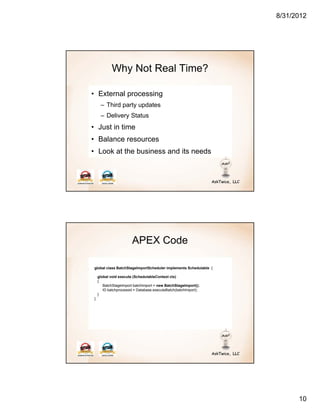
                       APEX Code

global class BatchStageImportScheduler implements Schedulable {

    global void execute (SchedulableContext ctx)
    {
       BatchStageImport batchImport = new BatchStageImport();
       ID batchprocessid = Database.executeBatch(batchImport);
    }
}


                                                                        10
8/31/2012


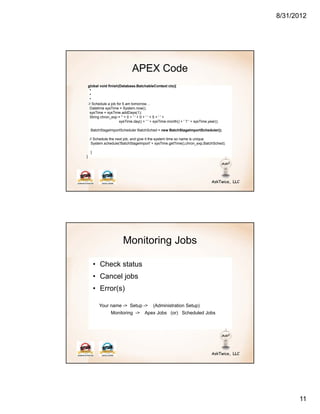
                                APEX Code
    global void finish(Database.BatchableContext ctx){
     *
     *
     *
    // Schedule a job for 5 am tomorrow…
     Datetime sysTime = System.now();
     sysTime = sysTime.addDays(1);
     String chron_exp = '' + 0 + ' ' + 0 + ' ' + 5 + ' ' +
                        sysTime.day() + ' ' + sysTime.month() + ' ? ' + sysTime.year();

     BatchStageImportScheduler BatchSched = new BatchStageImportScheduler();

     // Schedule the next job, and give it the system time so name is unique
      System.schedule('BatchStageImport' + sysTime.getTime(),chron_exp,BatchSched);

     }
}


                          Monitoring Jobs

         • Check status
         • Cancel jobs
         • Error(s)

           Your name -> Setup ->             (Administration Setup)
                  Monitoring ->         Apex Jobs (or) Scheduled Jobs


                                                                                                11
8/31/2012


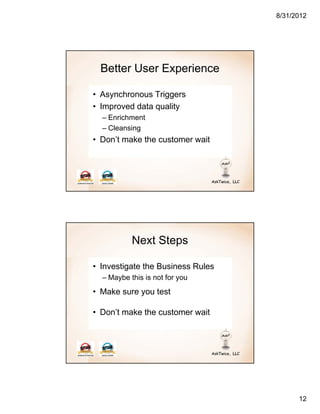
  Better User Experience

• Asynchronous Triggers
• Improved data quality
  – Enrichment
  – Cleansing
• Don’t make the customer wait


           Next Steps

• Investigate the Business Rules
  – Maybe this is not for you
• Make sure you test

• Don’t make the customer wait


                                         12
8/31/2012


  Questions?

   Mike Melnick

mikem@asktwice.com

   770-329-3664


                           13

Salesforce Batch processing - Atlanta SFUG

  • 1.
    8/31/2012 Using Batch Jobs to Improve the User Experience Safe Harbor I've always said to anyone that will listen to me (which is not very many) that software is an art form. It attracts artists. Just look at any software company and the amount of musicians, artists, carpenters, etc… working there that create code for a living and create other things in their down time. - Steve Lacey 1
  • 2.
    8/31/2012 A developercan now employ batch Apex to build complex, long-running processes on the Force.com platform. - Force.com Apex Code Developers Guide Complex, Long Running tasks • Pre or Post processing tasks • Account reassignments • Price book updates • Custom or Transactional Objects Governor Limits are Your Friends … 2
  • 3.
    8/31/2012 Scenario 1 • 324,476 Accounts • 142,105 Opportunity records • 1 NEW record type Administrative Use • Nulling out a field • Arghhhh!!!!! 3
  • 4.
    8/31/2012 Developer Objects • Batch Process(es) • Something to fire it – Trigger – Schedule – VisualForce Page • Test Class Batch Process • Start – Define the records to process • Execute – “Long, Complex…” • Finish – Post processing – e-Mail status – Schedule a repeat job, etc 4
  • 5.
    8/31/2012 APEX Code global class BatchOppLineZero implements Database.Batchable<SObject> { global final string query; global boolean process_on; List<OpportunityLineItemSchedule> schList = new List<OpportunityLineItemSchedule> (); private string query1 = 'Select Id, scheduledate, revenue from OpportunityLineItemSchedule'; global BatchOppLineZero () { if (system.Test.isRunningTest()) { this.query = query1 + ' where scheduledate >= :chkDate'; } else { this.query = query1 + ' where scheduledate >= :testDate'; } } * * APEX Code Start Method global Database.queryLocator start(Database.BatchableContext ctx){ Date myDate = date.today(); Date chkDate = date.newinstance (mydate.year(),mydate.month(),1).addmonths(-3); return Database.getQueryLocator(query); } 5
  • 6.
    8/31/2012 APEX Code Execute Method global void execute(Database.BatchableContext ctx, List<Sobject> scope){ schList = (List<OpportunityLineItemSchedule>)scope; for (OpportunityLineItemSchedule lis:schList) lis.revenue=0; update schList; } Scenario 1 n opportunity records need to be updated • Record type needs to be changed • OwnerId updated – Should be the account owner – Default for account location if owner is inactive • Opportunity type should reflect account property 6
  • 7.
    8/31/2012 Execute Method – scenario 1 global void execute(Database.BatchableContext ctx, List<Sobject> scope){ oppUpdate = (List<Opportunity>)scope; List<Account> accList = new List<Account>(); Set<Id> accId = new set<id>(); ID recTypeId; List<RecordType> recList = new List<RecordType> ([Select Id, Name from RecordType]); for (RecordType rec:recList) if (rec.name=='Ad Revenue') recTypeId=rec.id; ID pitOwnerID, denOwnerID, laxOwnerID; List<User> repList = [Select ID, name, Property__c, IsActive, Sales_id__c from User]; MAP<string,User> repMap = new MAP<string,User>(); MAP<Id,User> repActiveMap = new MAP<Id,User>(); for (User u:repList) { repMap.put(u.UserNumber__c,u); repActiveMap.put(u.id,u); if (u.name == ‘PIT Owner') pitOwnerID=u.id; if (u.name == ‘DEN Owner') denOwnerID=u.id; if (u.name == ‘LAX Owner') laxOwnerID=u.id; } for(Opportunity o:oppUpdate) accId.add(o.accountid); Map<Id,Account> accMap = new Map<Id,Account> ( [Select Id, ownerid, property__c from Account where id in: accId]); for (Opportunity o:oppUpdate){ o.description = 'This opportunity is used to track Ordered Ad Revenue'; Account acc=accMap.get(o.accountid); if (acc !=null) { o.Opportunity_Type__c = acc.Property__c; User rep = repActiveMap.get(acc.ownerid); if (rep.IsActive) { acc.ownerid = rep.id; } else { if (acc.property__c == ‘PIT' && pitOwnerId !=null) o.ownerid = pitownerid; if (acc.property__c == ‘DEN' && denOwnerId !=null) o.ownerid = denownerid; if (acc.property__c == ‘LAX' && laxOwnerId !=null) o.ownerid = laxownerid; } if (recTypeId !=null) o.RecordTypeId = recTypeId; } } update oppUpdate; } 7
  • 8.
    8/31/2012 APEX Code Finish Method global void finish(Database.BatchableContext ctx){ AsyncApexJob a = [SELECT id, ApexClassId, JobItemsProcessed, TotalJobItems, NumberOfErrors, CreatedBy.Email FROM AsyncApexJob WHERE id = :ctx.getJobId()]; string emailMessage = 'We executed ' + a.totalJobItems + ' batches.'; Messaging.SingleEmailMessage mail = new Messaging.SingleEmailMessage(); String[] toAddresses = new String[] {a.createdBy.email}; mail.setToAddresses(toAddresses); mail.setReplyTo('noreply@salesforce.com'); mail.setSenderDisplayName('Batch Job Summary'); mail.setSubject('Opportunity batch update complete'); mail.setPlainTextBody(emailMessage); mail.setHtmlBody(emailMessage); Messaging.sendEmail(new Messaging.SingleEmailMessage[] { mail }); } } Testing your Batch @ISTest public with sharing class TESTBatchOppLineZero { static testMethod void TESTBatchOppLineZero() { List<Account> actList = new List<Account>(); * * Test.startTest(); Database.executeBatch(new BatchOppLineZero()); Test.stopTest(); system.assertEquals(…..) } } 8
  • 9.
    8/31/2012 Governor (andother) Limits • 5 active jobs • Can’t call a batch from a batch • 1M lines of code, 250k daily batches, 10k DML statements • “One at a time” • Subject to available resources • Check the docs Scheduled Jobs • After hours processing • Daily / weekly / monthly jobs • Asynchronous triggers • Future jobs 9
  • 10.
    8/31/2012 Why Not Real Time? • External processing – Third party updates – Delivery Status • Just in time • Balance resources • Look at the business and its needs APEX Code global class BatchStageImportScheduler implements Schedulable { global void execute (SchedulableContext ctx) { BatchStageImport batchImport = new BatchStageImport(); ID batchprocessid = Database.executeBatch(batchImport); } } 10
  • 11.
    8/31/2012 APEX Code global void finish(Database.BatchableContext ctx){ * * * // Schedule a job for 5 am tomorrow… Datetime sysTime = System.now(); sysTime = sysTime.addDays(1); String chron_exp = '' + 0 + ' ' + 0 + ' ' + 5 + ' ' + sysTime.day() + ' ' + sysTime.month() + ' ? ' + sysTime.year(); BatchStageImportScheduler BatchSched = new BatchStageImportScheduler(); // Schedule the next job, and give it the system time so name is unique System.schedule('BatchStageImport' + sysTime.getTime(),chron_exp,BatchSched); } } Monitoring Jobs • Check status • Cancel jobs • Error(s) Your name -> Setup -> (Administration Setup) Monitoring -> Apex Jobs (or) Scheduled Jobs 11
  • 12.
    8/31/2012 BetterUser Experience • Asynchronous Triggers • Improved data quality – Enrichment – Cleansing • Don’t make the customer wait Next Steps • Investigate the Business Rules – Maybe this is not for you • Make sure you test • Don’t make the customer wait 12
  • 13.
    8/31/2012 Questions? Mike Melnick mikem@asktwice.com 770-329-3664 13