Spring Batch in Action
May 2014
Copyright © 2014 Accenture All rights reserved. 2
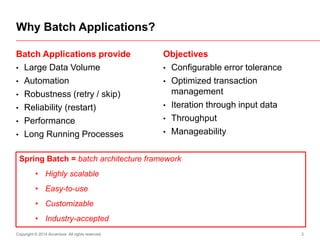
Batch Applications provide
• Large Data Volume
• Automation
• Robustness (retry / skip)
• Reliability (restart)
• Performance
• Long Running Processes
Objectives
• Configurable error tolerance
• Optimized transaction
management
• Iteration through input data
• Throughput
• Manageability
Why Batch Applications?
Spring Batch = batch architecture framework
• Highly scalable
• Easy-to-use
• Customizable
• Industry-accepted
Copyright © 2014 Accenture All rights reserved. 3
Spring Batch Architecture
Job
Launcher
Job Step
Reader
Processor
Writer
Job Repository
Spring Batch Application: DB  DB
Copyright © 2014 Accenture All rights reserved. 5
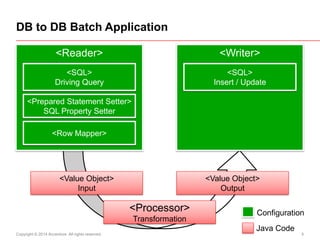
DB to DB Batch Application
<Value Object>
Input
<Value Object>
Output
<Processor>
Transformation
<Writer><Reader>
<SQL>
Driving Query
<Row Mapper>
<Prepared Statement Setter>
SQL Property Setter
<SQL>
Insert / Update
Configuration
Java Code
Skeleton generation and
configuration
Copyright © 2014 Accenture All rights reserved. 7
Install SpringSource Tool Suite (current version is 3.5.1)
• http://spring.io/tools/sts
Install Maven-3 (current version is 3.2.1)
• http://maven.apache.org/download.cgi
Install MySQL in WampServer distribution
• WampServer 2.4 (it needs also MS Visual C++
redistributable binaries - see dialog during download of
WampServer)
• http://www.wampserver.com/en/
Preparing developer workstation
Copyright © 2014 Accenture All rights reserved. 8
Create new project:
• New > Other > Spring > Spring Project
• Batch > Simple Spring Batch Project
• Set the project namespace: com.sample.bratislava.db2db
• Generated application reads from private String field text
"Hello world!", and writes to Log.info.
Fix the namespace
• STS does not generate complete namespace, if deeper
than 3 elements (!)
Run test of skeleton application
• ExampleJobConfigurationTests.java
Creating a new batch program
Copyright © 2014 Accenture All rights reserved. 9
Edit schama in launch-context.xml and module-
context.xml
• in <beans xsi:schemaLocation="..."> remove the version
numbers for all spring and spring-batch XSD schemas
• it takes the version defined in dependencies of pom.xml
Edit pom.xml
Set current version
of Spring Batch and Spring Framework
<properties>
...
<spring.framework.version>4.0.2.RELEASE</spring.framework.version>
<spring.batch.version>2.2.6.RELEASE</spring.batch.version>
</properties>
Copyright © 2014 Accenture All rights reserved. 10
Replace body of the method testLaunchJob
Create unique job parameters
@Test
public void testLaunchJob() throws Exception {
// jobLauncher.run(job, new JobParameters());
final DateFormatter dateFormatter = new DateFormatter("yyyy-MM-dd
HH:mm:ss.SSS");
final Map<String, JobParameter> params = new LinkedHashMap<>();
params.put("test", new JobParameter(this.getClass().getSimpleName()));
params.put("timestamp", new JobParameter(dateFormatter.print(new Date(),
Locale.US)));
final JobExecution run = jobLauncher.run(job, new JobParameters(params));
assertEquals(ExitStatus.COMPLETED, run.getExitStatus());
}
Copyright © 2014 Accenture All rights reserved. 11
Create schema for batch application(s)
• Run DDL to create spring batch tables
– in spring-batch-core JAR
– in org.springframework.batch.core directory
– file schema-mysql.sql
Create Spring Batch tables in database
Copyright © 2014 Accenture All rights reserved. 12
Edit pom.xml - add dependency to JDBC driver
Add dependency to JDBC driver
<dependency>
<groupId>mysql</groupId>
<artifactId>mysql-connector-java</artifactId>
<version>5.1.29</version>
</dependency>
Copyright © 2014 Accenture All rights reserved. 13
Edit src/main/resources/launch-context.xml
• select MySQL properties:
– <context:property-placeholder location="classpath:batch-
mysql.properties" />
• Set isolation level for job repository:
– <batch:job-repository id="jobRepository" isolation-level-for-
create="READ_COMMITTED" />
• Remove database initialization
(creating the Spring Batch tables):
– delete or comment out element jdbc:initialize-database
Copy batch-mysql.properties from batch samples
• Update schema, user name and password, ...
Switch to MySQL
<context:property-placeholder location="classpath:batch-mysql.properties" />
<batch:job-repository id="jobRepository“
isolation-level-for-create="READ_COMMITTED" />
Copyright © 2014 Accenture All rights reserved. 14
Run Junit
• Unit test should run without errors
• In the Spring Batch tables should appear operational data
and statistics
• In the BATCH_JOB_PARAMS should appear 2 new
records for the same job instance ID:
– key_name(test) = ExampleJobConfigurationTest
– key_name(timestamp) = date and time of the JUnit test execution
Test the Persistent State in Database
Debug Reader, Processor, Writer
Copyright © 2014 Accenture All rights reserved. 16
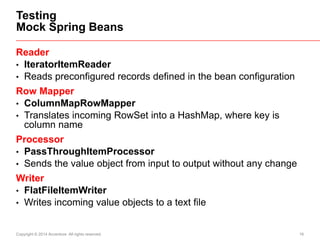
Reader
• IteratorItemReader
• Reads preconfigured records defined in the bean configuration
Row Mapper
• ColumnMapRowMapper
• Translates incoming RowSet into a HashMap, where key is
column name
Processor
• PassThroughItemProcessor
• Sends the value object from input to output without any change
Writer
• FlatFileItemWriter
• Writes incoming value objects to a text file
Testing
Mock Spring Beans
Copyright © 2014 Accenture All rights reserved. 17
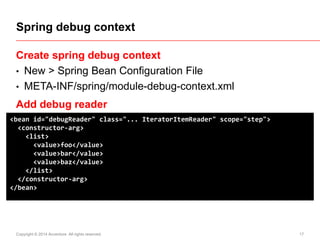
Create spring debug context
• New > Spring Bean Configuration File
• META-INF/spring/module-debug-context.xml
Add debug reader
Spring debug context
<bean id="debugReader" class="... IteratorItemReader" scope="step">
<constructor-arg>
<list>
<value>foo</value>
<value>bar</value>
<value>baz</value>
</list>
</constructor-arg>
</bean>
Copyright © 2014 Accenture All rights reserved. 18
Add debug processor and writer
Debug reader, processor and writer
<bean id="debugProcessor" class="... PassThroughItemProcessor"/>
<bean id="debugWriter" class="... FlatFileItemWriter" scope="step">
<property name="resource">
<bean class="... FileSystemResource">
<constructor-arg value="test-output.txt" />
</bean>
</property>
<property name="lineAggregator">
<bean class="... PassThroughLineAggregator"/>
</property>
</bean>
Copyright © 2014 Accenture All rights reserved. 19
Edit spring context META-INF/spring/module-
context.xml
• Include debug beans
• Redefine the Job configuration with debug components
Include Debug Beans into the Application
<import resource="module-debug-context.xml"/>
<batch:job id="[module-name]">
<batch:step id="processing">
<batch:tasklet transaction-manager="transactionManager" start-limit="100">
<batch:chunk reader="debugReader" processor="debugProcessor"
writer="debugWriter" commit-interval="1" />
</batch:tasklet>
</batch:step>
</batch:job>
Copyright © 2014 Accenture All rights reserved. 20
Delete example reader and writer and example unit tests
• ExampleItemReader, ExampleItemWriter
• ExampleItemReaderTests, ExampleItemWriterTests
Rename
• ExampleConfiguration.java
to [module-name]BatchApp.java
• and its unit test to [module-name]BatchAppTests
Run test [module-name]BatchAppTests
• Check the result in test-output.txt file
Cleanup and Test
Database Reader with Driving Query
Copyright © 2014 Accenture All rights reserved. 22
Add Reader Bean with ColumnMapRowMapper
Wire the new reader into the job, and run test
Create DB Reader in Application Context
<bean id="reader" class="... JdbcCursorItemReader" scope="step">
<property name="dataSource" ref="dataSource"/>
<property name="sql">
<value><![CDATA[
SELECT STATUS, START_TIME, END_TIME FROM BATCH_JOB_EXECUTION
]]></value>
</property>
<property name="rowMapper">
<bean class="... ColumnMapRowMapper"/>
</property>
</bean>
<batch:chunk reader="reader" processor="debugProcessor" writer="debugWriter"
commit-interval="1" />
Copyright © 2014 Accenture All rights reserved. 23
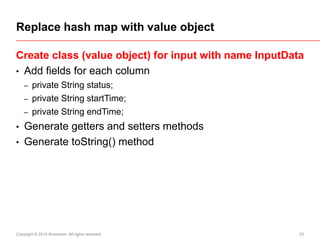
Create class (value object) for input with name InputData
• Add fields for each column
– private String status;
– private String startTime;
– private String endTime;
• Generate getters and setters methods
• Generate toString() method
Replace hash map with value object
Copyright © 2014 Accenture All rights reserved. 24
Add factory bean for the input value object
Replace row mapper in the reader
Add Input Value Object to Application Context
<bean id="inputDataPrototype" class="...InputData"/>
<property name="rowMapper">
<bean class="... BeanPropertyRowMapper">
<property name="mappedClass">
<bean factory-bean="inputDataPrototype" factory-method="getClass"/>
</property>
</bean>
</property>
Copyright © 2014 Accenture All rights reserved. 25
Prepared Statement Setter
Parameterization of Driving Querry
<property name="sql">
<value><![CDATA[
SELECT JOB_EXECUTION_ID, STATUS, START_TIME, END_TIME
FROM BATCH_JOB_EXECUTION
WHERE STATUS LIKE ?
ORDER BY JOB_EXECUTION_ID DESC
]]></value>
</property>
<property name="preparedStatementSetter">
<bean class="... ArgumentPreparedStatementSetter">
<constructor-arg>
<array>
<value>COMPLETED</value>
</array>
</constructor-arg>
</bean>
</property>
Output Value Object
Value Object Transformation
Copyright © 2014 Accenture All rights reserved. 27
Run in database the DDL
Create value object for output - class BatchDuration
• Add fields
– private Date startTime;
– private long duration;
• Generate getters and setters methods
• Generate toString() method
Create a Table for Results and Output Value Object
CREATE TABLE `BATCH_DURATION` (
`START_TIME` datetime DEFAULT NULL,
`DURATION` bigint(20) NOT NULL);
Copyright © 2014 Accenture All rights reserved. 28
Transformer from InputData to BatchDuration
public class InputDataToBatchDuration
implements ItemProcessor<InputData, BatchDuration> {
public BatchDuration process(InputData item) throws Exception {
DateFormat formatter = new SimpleDateFormat("yyyy-MM-dd HH:mm:ss");
Date start = formatter.parse(item.getStartTime());
Date end = formatter.parse(item.getEndTime());
BatchDuration duration = new BatchDuration();
duration.setStartTime(start);
duration.setDuration( (end.getTime() - start.getTime()) / 1000);
return duration;
}
}
Copyright © 2014 Accenture All rights reserved. 29
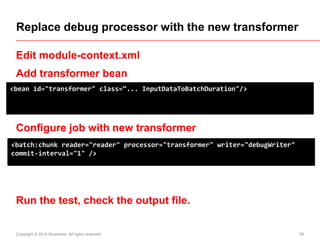
Edit module-context.xml
Add transformer bean
Configure job with new transformer
Run the test, check the output file.
Replace debug processor with the new transformer
<bean id="transformer" class=“... InputDataToBatchDuration"/>
<batch:chunk reader="reader" processor="transformer" writer="debugWriter"
commit-interval="1" />
Create Writer to database
Copyright © 2014 Accenture All rights reserved. 31
Create writer in module context
Connect the new writer into the batch step
Configure Writer to Database
<bean id="writer" class="... JdbcBatchItemWriter" scope="step">
<property name="dataSource" ref="dataSource" />
<property name="sql">
<value><![CDATA[
INSERT INTO BATCH_DURATION ( START_TIME, DURATION )
VALUES ( :startTime, :duration )
]]></value>
</property>
<property name="itemSqlParameterSourceProvider">
<bean class="... BeanPropertyItemSqlParameterSourceProvider"/>
</property>
</bean>
<batch:chunk reader="reader" processor="transformer" writer="writer" commit-
interval="1" />
Create DB cleanup tasklet
Copyright © 2014 Accenture All rights reserved. 33
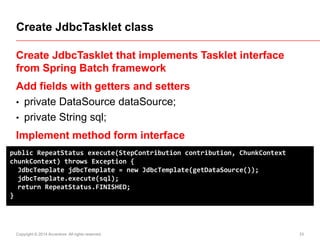
Create JdbcTasklet that implements Tasklet interface
from Spring Batch framework
Add fields with getters and setters
• private DataSource dataSource;
• private String sql;
Implement method form interface
Create JdbcTasklet class
public RepeatStatus execute(StepContribution contribution, ChunkContext
chunkContext) throws Exception {
JdbcTemplate jdbcTemplate = new JdbcTemplate(getDataSource());
jdbcTemplate.execute(sql);
return RepeatStatus.FINISHED;
}
Copyright © 2014 Accenture All rights reserved. 34
Add cleanup step before the processing step
Add Cleanup Step
<batch:step id="cleanup" next="processing">
<batch:tasklet transaction-manager="transactionManager">
<bean class="... JdbcTasklet" scope="step">
<property name="sql"><value><![CDATA[
DELETE FROM BATCH_DURATION ]]></value>
</property>
<property name="dataSource" ref="dataSource" />
</bean>
</batch:tasklet>
</batch:step>
Discussion

Spring Batch in Code - simple DB to DB batch applicaiton

  • 1.
    Spring Batch inAction May 2014
  • 2.
    Copyright © 2014Accenture All rights reserved. 2 Batch Applications provide • Large Data Volume • Automation • Robustness (retry / skip) • Reliability (restart) • Performance • Long Running Processes Objectives • Configurable error tolerance • Optimized transaction management • Iteration through input data • Throughput • Manageability Why Batch Applications? Spring Batch = batch architecture framework • Highly scalable • Easy-to-use • Customizable • Industry-accepted
  • 3.
    Copyright © 2014Accenture All rights reserved. 3 Spring Batch Architecture Job Launcher Job Step Reader Processor Writer Job Repository
  • 4.
  • 5.
    Copyright © 2014Accenture All rights reserved. 5 DB to DB Batch Application <Value Object> Input <Value Object> Output <Processor> Transformation <Writer><Reader> <SQL> Driving Query <Row Mapper> <Prepared Statement Setter> SQL Property Setter <SQL> Insert / Update Configuration Java Code
  • 6.
  • 7.
    Copyright © 2014Accenture All rights reserved. 7 Install SpringSource Tool Suite (current version is 3.5.1) • http://spring.io/tools/sts Install Maven-3 (current version is 3.2.1) • http://maven.apache.org/download.cgi Install MySQL in WampServer distribution • WampServer 2.4 (it needs also MS Visual C++ redistributable binaries - see dialog during download of WampServer) • http://www.wampserver.com/en/ Preparing developer workstation
  • 8.
    Copyright © 2014Accenture All rights reserved. 8 Create new project: • New > Other > Spring > Spring Project • Batch > Simple Spring Batch Project • Set the project namespace: com.sample.bratislava.db2db • Generated application reads from private String field text "Hello world!", and writes to Log.info. Fix the namespace • STS does not generate complete namespace, if deeper than 3 elements (!) Run test of skeleton application • ExampleJobConfigurationTests.java Creating a new batch program
  • 9.
    Copyright © 2014Accenture All rights reserved. 9 Edit schama in launch-context.xml and module- context.xml • in <beans xsi:schemaLocation="..."> remove the version numbers for all spring and spring-batch XSD schemas • it takes the version defined in dependencies of pom.xml Edit pom.xml Set current version of Spring Batch and Spring Framework <properties> ... <spring.framework.version>4.0.2.RELEASE</spring.framework.version> <spring.batch.version>2.2.6.RELEASE</spring.batch.version> </properties>
  • 10.
    Copyright © 2014Accenture All rights reserved. 10 Replace body of the method testLaunchJob Create unique job parameters @Test public void testLaunchJob() throws Exception { // jobLauncher.run(job, new JobParameters()); final DateFormatter dateFormatter = new DateFormatter("yyyy-MM-dd HH:mm:ss.SSS"); final Map<String, JobParameter> params = new LinkedHashMap<>(); params.put("test", new JobParameter(this.getClass().getSimpleName())); params.put("timestamp", new JobParameter(dateFormatter.print(new Date(), Locale.US))); final JobExecution run = jobLauncher.run(job, new JobParameters(params)); assertEquals(ExitStatus.COMPLETED, run.getExitStatus()); }
  • 11.
    Copyright © 2014Accenture All rights reserved. 11 Create schema for batch application(s) • Run DDL to create spring batch tables – in spring-batch-core JAR – in org.springframework.batch.core directory – file schema-mysql.sql Create Spring Batch tables in database
  • 12.
    Copyright © 2014Accenture All rights reserved. 12 Edit pom.xml - add dependency to JDBC driver Add dependency to JDBC driver <dependency> <groupId>mysql</groupId> <artifactId>mysql-connector-java</artifactId> <version>5.1.29</version> </dependency>
  • 13.
    Copyright © 2014Accenture All rights reserved. 13 Edit src/main/resources/launch-context.xml • select MySQL properties: – <context:property-placeholder location="classpath:batch- mysql.properties" /> • Set isolation level for job repository: – <batch:job-repository id="jobRepository" isolation-level-for- create="READ_COMMITTED" /> • Remove database initialization (creating the Spring Batch tables): – delete or comment out element jdbc:initialize-database Copy batch-mysql.properties from batch samples • Update schema, user name and password, ... Switch to MySQL <context:property-placeholder location="classpath:batch-mysql.properties" /> <batch:job-repository id="jobRepository“ isolation-level-for-create="READ_COMMITTED" />
  • 14.
    Copyright © 2014Accenture All rights reserved. 14 Run Junit • Unit test should run without errors • In the Spring Batch tables should appear operational data and statistics • In the BATCH_JOB_PARAMS should appear 2 new records for the same job instance ID: – key_name(test) = ExampleJobConfigurationTest – key_name(timestamp) = date and time of the JUnit test execution Test the Persistent State in Database
  • 15.
  • 16.
    Copyright © 2014Accenture All rights reserved. 16 Reader • IteratorItemReader • Reads preconfigured records defined in the bean configuration Row Mapper • ColumnMapRowMapper • Translates incoming RowSet into a HashMap, where key is column name Processor • PassThroughItemProcessor • Sends the value object from input to output without any change Writer • FlatFileItemWriter • Writes incoming value objects to a text file Testing Mock Spring Beans
  • 17.
    Copyright © 2014Accenture All rights reserved. 17 Create spring debug context • New > Spring Bean Configuration File • META-INF/spring/module-debug-context.xml Add debug reader Spring debug context <bean id="debugReader" class="... IteratorItemReader" scope="step"> <constructor-arg> <list> <value>foo</value> <value>bar</value> <value>baz</value> </list> </constructor-arg> </bean>
  • 18.
    Copyright © 2014Accenture All rights reserved. 18 Add debug processor and writer Debug reader, processor and writer <bean id="debugProcessor" class="... PassThroughItemProcessor"/> <bean id="debugWriter" class="... FlatFileItemWriter" scope="step"> <property name="resource"> <bean class="... FileSystemResource"> <constructor-arg value="test-output.txt" /> </bean> </property> <property name="lineAggregator"> <bean class="... PassThroughLineAggregator"/> </property> </bean>
  • 19.
    Copyright © 2014Accenture All rights reserved. 19 Edit spring context META-INF/spring/module- context.xml • Include debug beans • Redefine the Job configuration with debug components Include Debug Beans into the Application <import resource="module-debug-context.xml"/> <batch:job id="[module-name]"> <batch:step id="processing"> <batch:tasklet transaction-manager="transactionManager" start-limit="100"> <batch:chunk reader="debugReader" processor="debugProcessor" writer="debugWriter" commit-interval="1" /> </batch:tasklet> </batch:step> </batch:job>
  • 20.
    Copyright © 2014Accenture All rights reserved. 20 Delete example reader and writer and example unit tests • ExampleItemReader, ExampleItemWriter • ExampleItemReaderTests, ExampleItemWriterTests Rename • ExampleConfiguration.java to [module-name]BatchApp.java • and its unit test to [module-name]BatchAppTests Run test [module-name]BatchAppTests • Check the result in test-output.txt file Cleanup and Test
  • 21.
    Database Reader withDriving Query
  • 22.
    Copyright © 2014Accenture All rights reserved. 22 Add Reader Bean with ColumnMapRowMapper Wire the new reader into the job, and run test Create DB Reader in Application Context <bean id="reader" class="... JdbcCursorItemReader" scope="step"> <property name="dataSource" ref="dataSource"/> <property name="sql"> <value><![CDATA[ SELECT STATUS, START_TIME, END_TIME FROM BATCH_JOB_EXECUTION ]]></value> </property> <property name="rowMapper"> <bean class="... ColumnMapRowMapper"/> </property> </bean> <batch:chunk reader="reader" processor="debugProcessor" writer="debugWriter" commit-interval="1" />
  • 23.
    Copyright © 2014Accenture All rights reserved. 23 Create class (value object) for input with name InputData • Add fields for each column – private String status; – private String startTime; – private String endTime; • Generate getters and setters methods • Generate toString() method Replace hash map with value object
  • 24.
    Copyright © 2014Accenture All rights reserved. 24 Add factory bean for the input value object Replace row mapper in the reader Add Input Value Object to Application Context <bean id="inputDataPrototype" class="...InputData"/> <property name="rowMapper"> <bean class="... BeanPropertyRowMapper"> <property name="mappedClass"> <bean factory-bean="inputDataPrototype" factory-method="getClass"/> </property> </bean> </property>
  • 25.
    Copyright © 2014Accenture All rights reserved. 25 Prepared Statement Setter Parameterization of Driving Querry <property name="sql"> <value><![CDATA[ SELECT JOB_EXECUTION_ID, STATUS, START_TIME, END_TIME FROM BATCH_JOB_EXECUTION WHERE STATUS LIKE ? ORDER BY JOB_EXECUTION_ID DESC ]]></value> </property> <property name="preparedStatementSetter"> <bean class="... ArgumentPreparedStatementSetter"> <constructor-arg> <array> <value>COMPLETED</value> </array> </constructor-arg> </bean> </property>
  • 26.
    Output Value Object ValueObject Transformation
  • 27.
    Copyright © 2014Accenture All rights reserved. 27 Run in database the DDL Create value object for output - class BatchDuration • Add fields – private Date startTime; – private long duration; • Generate getters and setters methods • Generate toString() method Create a Table for Results and Output Value Object CREATE TABLE `BATCH_DURATION` ( `START_TIME` datetime DEFAULT NULL, `DURATION` bigint(20) NOT NULL);
  • 28.
    Copyright © 2014Accenture All rights reserved. 28 Transformer from InputData to BatchDuration public class InputDataToBatchDuration implements ItemProcessor<InputData, BatchDuration> { public BatchDuration process(InputData item) throws Exception { DateFormat formatter = new SimpleDateFormat("yyyy-MM-dd HH:mm:ss"); Date start = formatter.parse(item.getStartTime()); Date end = formatter.parse(item.getEndTime()); BatchDuration duration = new BatchDuration(); duration.setStartTime(start); duration.setDuration( (end.getTime() - start.getTime()) / 1000); return duration; } }
  • 29.
    Copyright © 2014Accenture All rights reserved. 29 Edit module-context.xml Add transformer bean Configure job with new transformer Run the test, check the output file. Replace debug processor with the new transformer <bean id="transformer" class=“... InputDataToBatchDuration"/> <batch:chunk reader="reader" processor="transformer" writer="debugWriter" commit-interval="1" />
  • 30.
  • 31.
    Copyright © 2014Accenture All rights reserved. 31 Create writer in module context Connect the new writer into the batch step Configure Writer to Database <bean id="writer" class="... JdbcBatchItemWriter" scope="step"> <property name="dataSource" ref="dataSource" /> <property name="sql"> <value><![CDATA[ INSERT INTO BATCH_DURATION ( START_TIME, DURATION ) VALUES ( :startTime, :duration ) ]]></value> </property> <property name="itemSqlParameterSourceProvider"> <bean class="... BeanPropertyItemSqlParameterSourceProvider"/> </property> </bean> <batch:chunk reader="reader" processor="transformer" writer="writer" commit- interval="1" />
  • 32.
  • 33.
    Copyright © 2014Accenture All rights reserved. 33 Create JdbcTasklet that implements Tasklet interface from Spring Batch framework Add fields with getters and setters • private DataSource dataSource; • private String sql; Implement method form interface Create JdbcTasklet class public RepeatStatus execute(StepContribution contribution, ChunkContext chunkContext) throws Exception { JdbcTemplate jdbcTemplate = new JdbcTemplate(getDataSource()); jdbcTemplate.execute(sql); return RepeatStatus.FINISHED; }
  • 34.
    Copyright © 2014Accenture All rights reserved. 34 Add cleanup step before the processing step Add Cleanup Step <batch:step id="cleanup" next="processing"> <batch:tasklet transaction-manager="transactionManager"> <bean class="... JdbcTasklet" scope="step"> <property name="sql"><value><![CDATA[ DELETE FROM BATCH_DURATION ]]></value> </property> <property name="dataSource" ref="dataSource" /> </bean> </batch:tasklet> </batch:step>
  • 35.