Jukka Zitting  |  Senior DeveloperRepository performance tuning
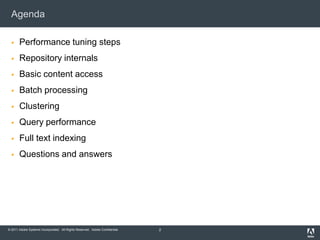
AgendaPerformance tuning stepsRepository internalsBasic content accessBatch processingClusteringQuery performanceFull text indexingQuestions and answers2
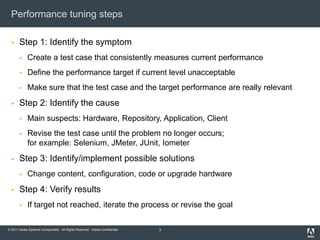
Performance tuning stepsStep 1: Identify the symptomCreate a test case that consistently measures current performanceDefine the performance target if current level unacceptableMake sure that the test case and the target performance are really relevantStep 2: Identify the causeMain suspects: Hardware, Repository, Application, ClientRevise the test case until the problem no longer occurs;for example: Selenium, JMeter, JUnit, IometerStep 3: Identify/implement possible solutionsChange content, configuration, code or upgrade hardwareStep 4: Verify resultsIf target not reached, iterate the process or revise the goal3
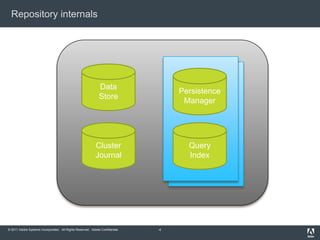
Repository internals4DataStorePersistenceManagerQueryIndexClusterJournal
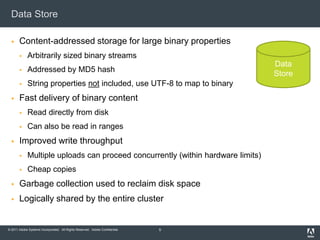
Data StoreContent-addressed storage for large binary propertiesArbitrarily sized binary streamsAddressed by MD5 hashString properties not included, use UTF-8 to map to binaryFast delivery of binary contentRead directly from diskCan also be read in rangesImproved write throughputMultiple uploads can proceed concurrently (within hardware limits)Cheap copiesGarbage collection used to reclaim disk spaceLogically shared by the entire cluster5DataStore
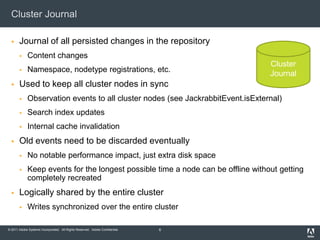
Cluster JournalJournal of all persisted changes in the repositoryContent changesNamespace, nodetype registrations, etc.Used to keep all cluster nodes in syncObservation events to all cluster nodes (see JackrabbitEvent.isExternal)Search index updatesInternal cache invalidationOld events need to be discarded eventuallyNo notable performance impact, just extra disk spaceKeep events for the longest possible time a node can be offline without getting completely recreatedLogically shared by the entire clusterWrites synchronized over the entire cluster6ClusterJournal
Persistence ManagerIdentifier-addressed storage for nodes and propertiesEach node has a UUID, even if not mix:referenceableEssentially a key-value store, even when backed by a RDBMSAlso keeps track of node referencesBundles as units of contentBundle = UUID, type, properties, child node references, etc.Only large binaries stored elsewhere in the data storeDesigned for balanced content hierarchies, avoid too many child nodesAtomic updatesA save() call persists the entire transient space as a single atomic operationOne PM per workspace (and one for the shared version store)Logically (often also physically) shared across a cluster7PersistenceManager
Query IndexInverse index based on Apache LuceneFlexible mapping from terms to node identifiersSpecial handling for the path structureMostly synchronous index updatesLong full text extraction tasks handled in backgroundOther cluster nodes will update their indexes at next cluster sync Everything indexed by defaultIndexing configuration for tweaking functionality, performance and disk usageOne index per workspace (and one for the shared version store)Not shared across a cluster, indexes are local to each cluster nodeSee http://wiki.apache.org/jackrabbit/Search#Search_Configuration8QueryIndex
AgendaPerformance tuning stepsRepository internalsBasic content accessBatch processingClusteringQuery performanceIndexing configurationQuestions and answers9
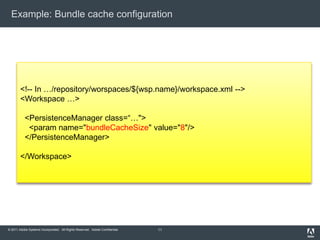
Basic content accessVery fast access by path and IDUnderlying storage addressed by ID, but path traversal is in any case needed for ACL checksRelevant caches:Path to ID map (internal structure, not configurable)Item state caches (automatically balanced, configurable for special cases)Bundle cache (default fairly low, increase for large deployments)Also some PM-specific options (TarPM index, etc.)Caches optimized for a reasonably sized active working settypical web access pattern: handful of key resources and a long tail of less frequently accessed content, few writesPerformance hit especially when updating nodes with lots of child nodesFineGrainedISMLocking for concurrent, non-overlapping writes10
Example: Bundle cache configuration11<!-- In …/repository/worspaces/${wsp.name}/workspace.xml --><Workspace …>  <PersistenceManager class=“…">  <paramname="bundleCacheSize" value="8"/>  </PersistenceManager></Workspace>
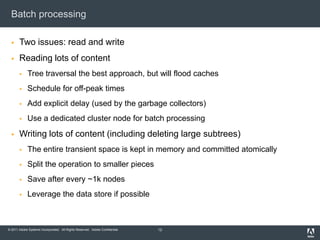
Batch processingTwo issues: read and writeReading lots of contentTree traversal the best approach, but will flood cachesSchedule for off-peak timesAdd explicit delay (used by the garbage collectors)Use a dedicated cluster node for batch processingWriting lots of content (including deleting large subtrees)The entire transient space is kept in memory and committed atomicallySplit the operation to smaller piecesSave after every ~1k nodesLeverage the data store if possible12
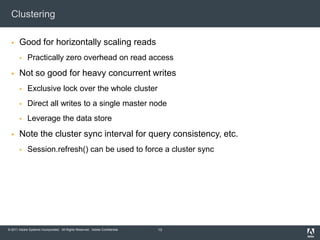
ClusteringGood for horizontally scaling readsPractically zero overhead on read accessNot so good for heavy concurrent writesExclusive lock over the whole clusterDirect all writes to a single master nodeLeverage the data storeNote the cluster sync interval for query consistency, etc.Session.refresh() can be used to force a cluster sync13
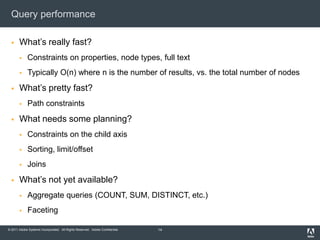
Query performanceWhat’s really fast?Constraints on properties, node types, full textTypically O(n) where n is the number of results, vs. the total number of nodes What’s pretty fast?Path constraintsWhat needs some planning?Constraints on the child axisSorting, limit/offset JoinsWhat’s not yet available?Aggregate queries (COUNT, SUM, DISTINCT, etc.)Faceting14
Join engine15SELECT a.* FROM [nt:unstructured] AS a JOIN [nt:unstructured] AS b  <PersistenceManager class=“…">  <paramname="bundleCacheSize" value="8"/>  </PersistenceManager></Workspace>
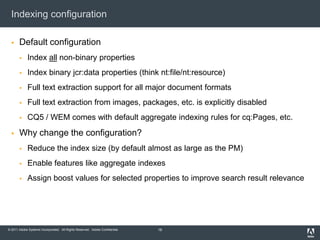
Indexing configurationDefault configurationIndex all non-binary propertiesIndex binary jcr:data properties (think nt:file/nt:resource)Full text extraction support for all major document formatsFull text extraction from images, packages, etc. is explicitly disabledCQ5 / WEM comes with default aggregate indexing rules for cq:Pages, etc.Why change the configuration?Reduce the index size (by default almost as large as the PM)Enable features like aggregate indexesAssign boost values for selected properties to improve search result relevance16
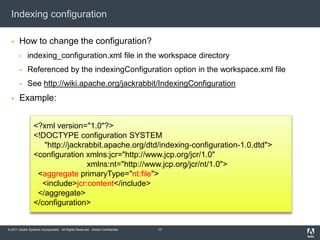
Indexing configurationHow to change the configuration?indexing_configuration.xml file in the workspace directoryReferenced by the indexingConfiguration option in the workspace.xml fileSee http://wiki.apache.org/jackrabbit/IndexingConfigurationExample:17<?xml version="1.0"?><!DOCTYPE configuration SYSTEM"http://jackrabbit.apache.org/dtd/indexing-configuration-1.0.dtd"><configuration xmlns:jcr="http://www.jcp.org/jcr/1.0"xmlns:nt="http://www.jcp.org/jcr/nt/1.0">  <aggregateprimaryType="nt:file">   <include>jcr:content</include> </aggregate></configuration>
Question and Answers18
Repository performance tuning

Repository performance tuning

  • 1.
    Jukka Zitting | Senior DeveloperRepository performance tuning
  • 2.
    AgendaPerformance tuning stepsRepositoryinternalsBasic content accessBatch processingClusteringQuery performanceFull text indexingQuestions and answers2
  • 3.
    Performance tuning stepsStep1: Identify the symptomCreate a test case that consistently measures current performanceDefine the performance target if current level unacceptableMake sure that the test case and the target performance are really relevantStep 2: Identify the causeMain suspects: Hardware, Repository, Application, ClientRevise the test case until the problem no longer occurs;for example: Selenium, JMeter, JUnit, IometerStep 3: Identify/implement possible solutionsChange content, configuration, code or upgrade hardwareStep 4: Verify resultsIf target not reached, iterate the process or revise the goal3
  • 4.
  • 5.
    Data StoreContent-addressed storagefor large binary propertiesArbitrarily sized binary streamsAddressed by MD5 hashString properties not included, use UTF-8 to map to binaryFast delivery of binary contentRead directly from diskCan also be read in rangesImproved write throughputMultiple uploads can proceed concurrently (within hardware limits)Cheap copiesGarbage collection used to reclaim disk spaceLogically shared by the entire cluster5DataStore
  • 6.
    Cluster JournalJournal ofall persisted changes in the repositoryContent changesNamespace, nodetype registrations, etc.Used to keep all cluster nodes in syncObservation events to all cluster nodes (see JackrabbitEvent.isExternal)Search index updatesInternal cache invalidationOld events need to be discarded eventuallyNo notable performance impact, just extra disk spaceKeep events for the longest possible time a node can be offline without getting completely recreatedLogically shared by the entire clusterWrites synchronized over the entire cluster6ClusterJournal
  • 7.
    Persistence ManagerIdentifier-addressed storagefor nodes and propertiesEach node has a UUID, even if not mix:referenceableEssentially a key-value store, even when backed by a RDBMSAlso keeps track of node referencesBundles as units of contentBundle = UUID, type, properties, child node references, etc.Only large binaries stored elsewhere in the data storeDesigned for balanced content hierarchies, avoid too many child nodesAtomic updatesA save() call persists the entire transient space as a single atomic operationOne PM per workspace (and one for the shared version store)Logically (often also physically) shared across a cluster7PersistenceManager
  • 8.
    Query IndexInverse indexbased on Apache LuceneFlexible mapping from terms to node identifiersSpecial handling for the path structureMostly synchronous index updatesLong full text extraction tasks handled in backgroundOther cluster nodes will update their indexes at next cluster sync Everything indexed by defaultIndexing configuration for tweaking functionality, performance and disk usageOne index per workspace (and one for the shared version store)Not shared across a cluster, indexes are local to each cluster nodeSee http://wiki.apache.org/jackrabbit/Search#Search_Configuration8QueryIndex
  • 9.
    AgendaPerformance tuning stepsRepositoryinternalsBasic content accessBatch processingClusteringQuery performanceIndexing configurationQuestions and answers9
  • 10.
    Basic content accessVeryfast access by path and IDUnderlying storage addressed by ID, but path traversal is in any case needed for ACL checksRelevant caches:Path to ID map (internal structure, not configurable)Item state caches (automatically balanced, configurable for special cases)Bundle cache (default fairly low, increase for large deployments)Also some PM-specific options (TarPM index, etc.)Caches optimized for a reasonably sized active working settypical web access pattern: handful of key resources and a long tail of less frequently accessed content, few writesPerformance hit especially when updating nodes with lots of child nodesFineGrainedISMLocking for concurrent, non-overlapping writes10
  • 11.
    Example: Bundle cacheconfiguration11<!-- In …/repository/worspaces/${wsp.name}/workspace.xml --><Workspace …> <PersistenceManager class=“…"> <paramname="bundleCacheSize" value="8"/> </PersistenceManager></Workspace>
  • 12.
    Batch processingTwo issues:read and writeReading lots of contentTree traversal the best approach, but will flood cachesSchedule for off-peak timesAdd explicit delay (used by the garbage collectors)Use a dedicated cluster node for batch processingWriting lots of content (including deleting large subtrees)The entire transient space is kept in memory and committed atomicallySplit the operation to smaller piecesSave after every ~1k nodesLeverage the data store if possible12
  • 13.
    ClusteringGood for horizontallyscaling readsPractically zero overhead on read accessNot so good for heavy concurrent writesExclusive lock over the whole clusterDirect all writes to a single master nodeLeverage the data storeNote the cluster sync interval for query consistency, etc.Session.refresh() can be used to force a cluster sync13
  • 14.
    Query performanceWhat’s reallyfast?Constraints on properties, node types, full textTypically O(n) where n is the number of results, vs. the total number of nodes What’s pretty fast?Path constraintsWhat needs some planning?Constraints on the child axisSorting, limit/offset JoinsWhat’s not yet available?Aggregate queries (COUNT, SUM, DISTINCT, etc.)Faceting14
  • 15.
    Join engine15SELECT a.*FROM [nt:unstructured] AS a JOIN [nt:unstructured] AS b <PersistenceManager class=“…"> <paramname="bundleCacheSize" value="8"/> </PersistenceManager></Workspace>
  • 16.
    Indexing configurationDefault configurationIndexall non-binary propertiesIndex binary jcr:data properties (think nt:file/nt:resource)Full text extraction support for all major document formatsFull text extraction from images, packages, etc. is explicitly disabledCQ5 / WEM comes with default aggregate indexing rules for cq:Pages, etc.Why change the configuration?Reduce the index size (by default almost as large as the PM)Enable features like aggregate indexesAssign boost values for selected properties to improve search result relevance16
  • 17.
    Indexing configurationHow tochange the configuration?indexing_configuration.xml file in the workspace directoryReferenced by the indexingConfiguration option in the workspace.xml fileSee http://wiki.apache.org/jackrabbit/IndexingConfigurationExample:17<?xml version="1.0"?><!DOCTYPE configuration SYSTEM"http://jackrabbit.apache.org/dtd/indexing-configuration-1.0.dtd"><configuration xmlns:jcr="http://www.jcp.org/jcr/1.0"xmlns:nt="http://www.jcp.org/jcr/nt/1.0"> <aggregateprimaryType="nt:file"> <include>jcr:content</include> </aggregate></configuration>
  • 18.