tm


   SafePeak: Reducing Latency and Bottlenecks
         to Micro Second Response Time

                        Vladi Vexler
                        Founder & COO
                        vladi@dcftech.com
DCF Technologies Ltd.                            January 5, 2010
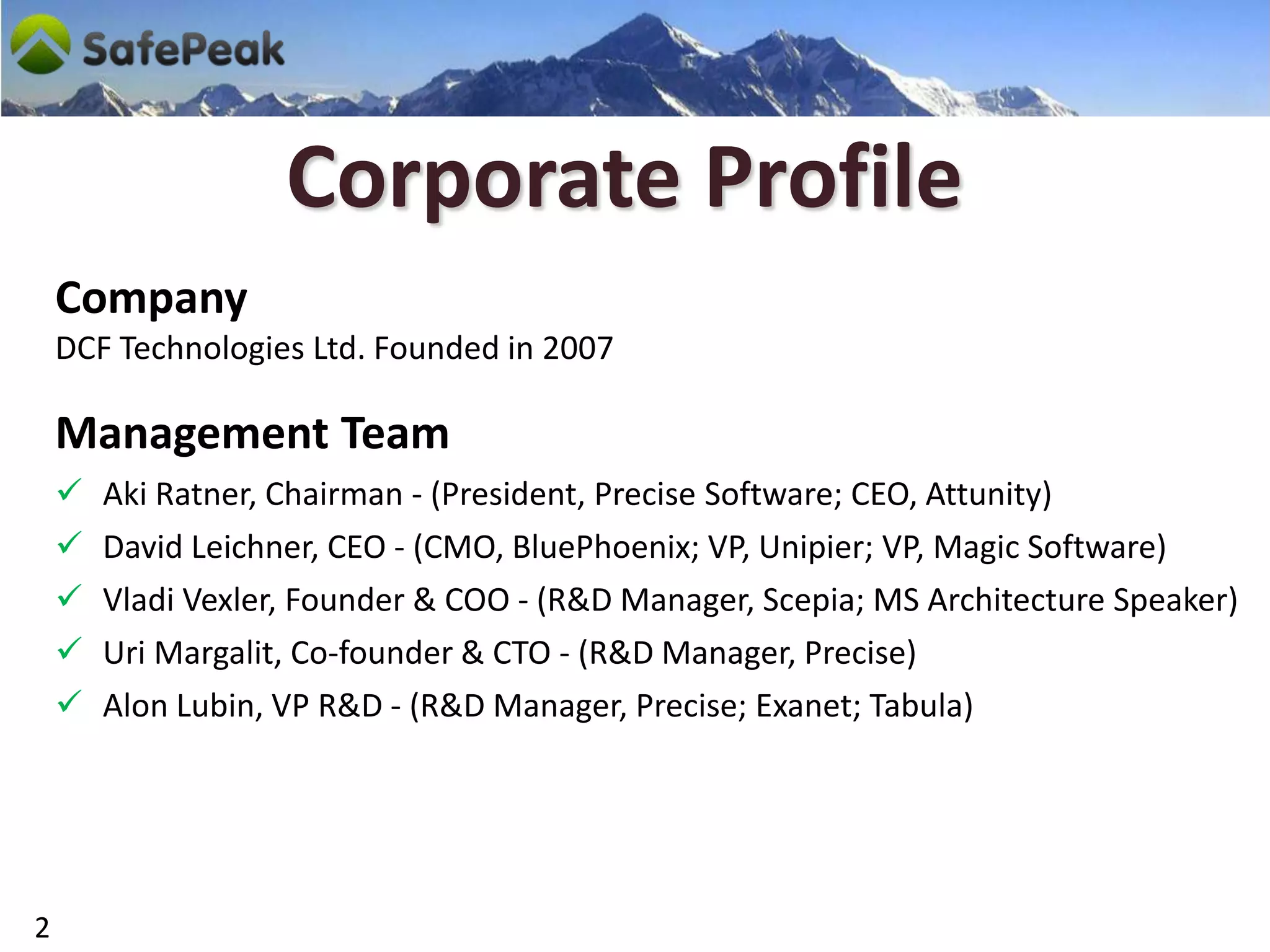
Corporate Profile
    Company
    DCF Technologies Ltd. Founded in 2007

    Management Team
       Aki Ratner, Chairman - (President, Precise Software; CEO, Attunity)
       David Leichner, CEO - (CMO, BluePhoenix; VP, Unipier; VP, Magic Software)
       Vladi Vexler, Founder & COO - (R&D Manager, Scepia; MS Architecture Speaker)
       Uri Margalit, Co-founder & CTO - (R&D Manager, Precise)
       Alon Lubin, VP R&D - (R&D Manager, Precise; Exanet; Tabula)


2
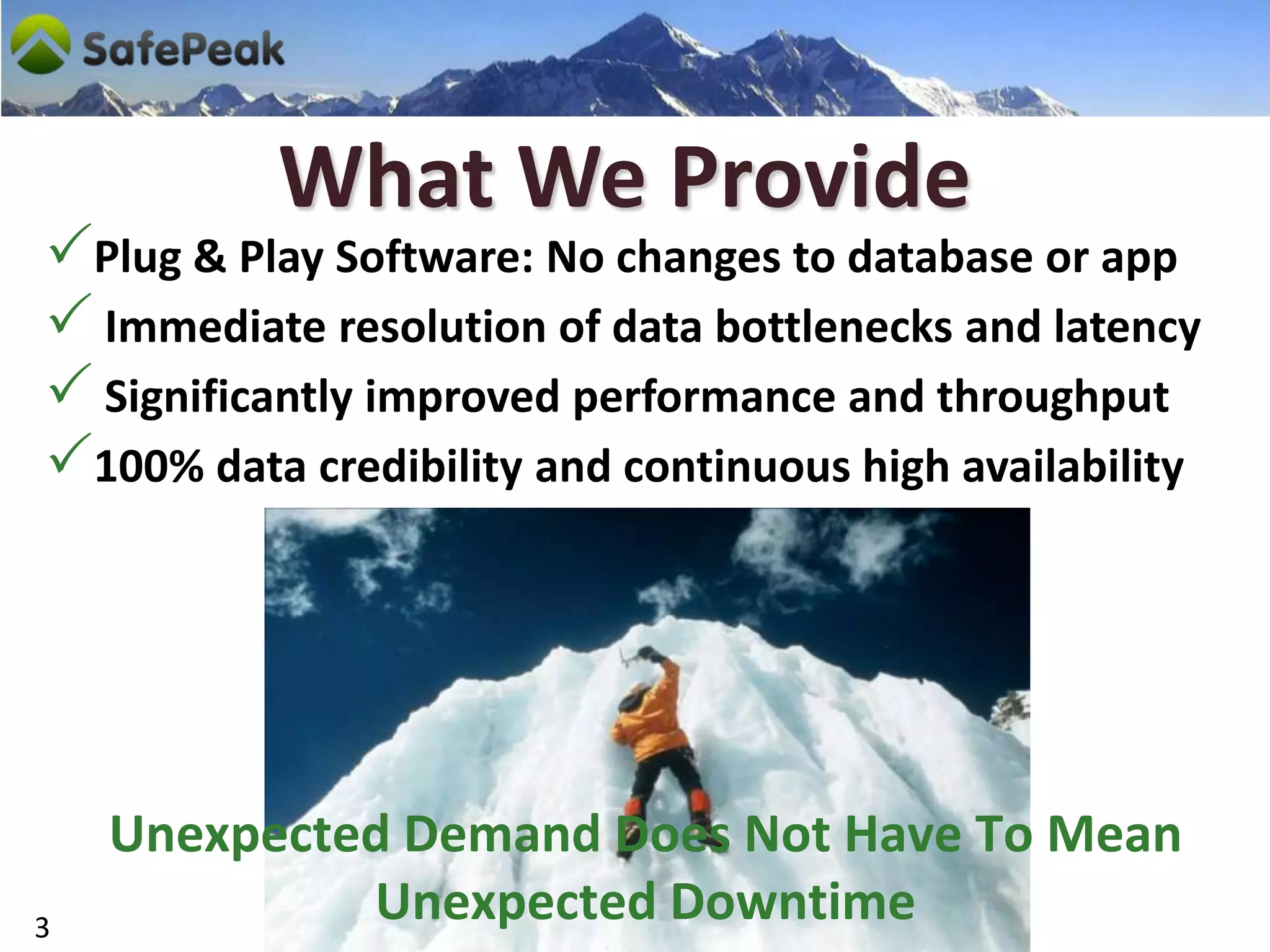
What We Provide
Plug & Play Software: No changes to database or app
 Immediate resolution of data bottlenecks and latency
 Significantly improved performance and throughput
100% data credibility and continuous high availability


    Unexpected Demand Does Not Have To Mean
3
             Unexpected Downtime
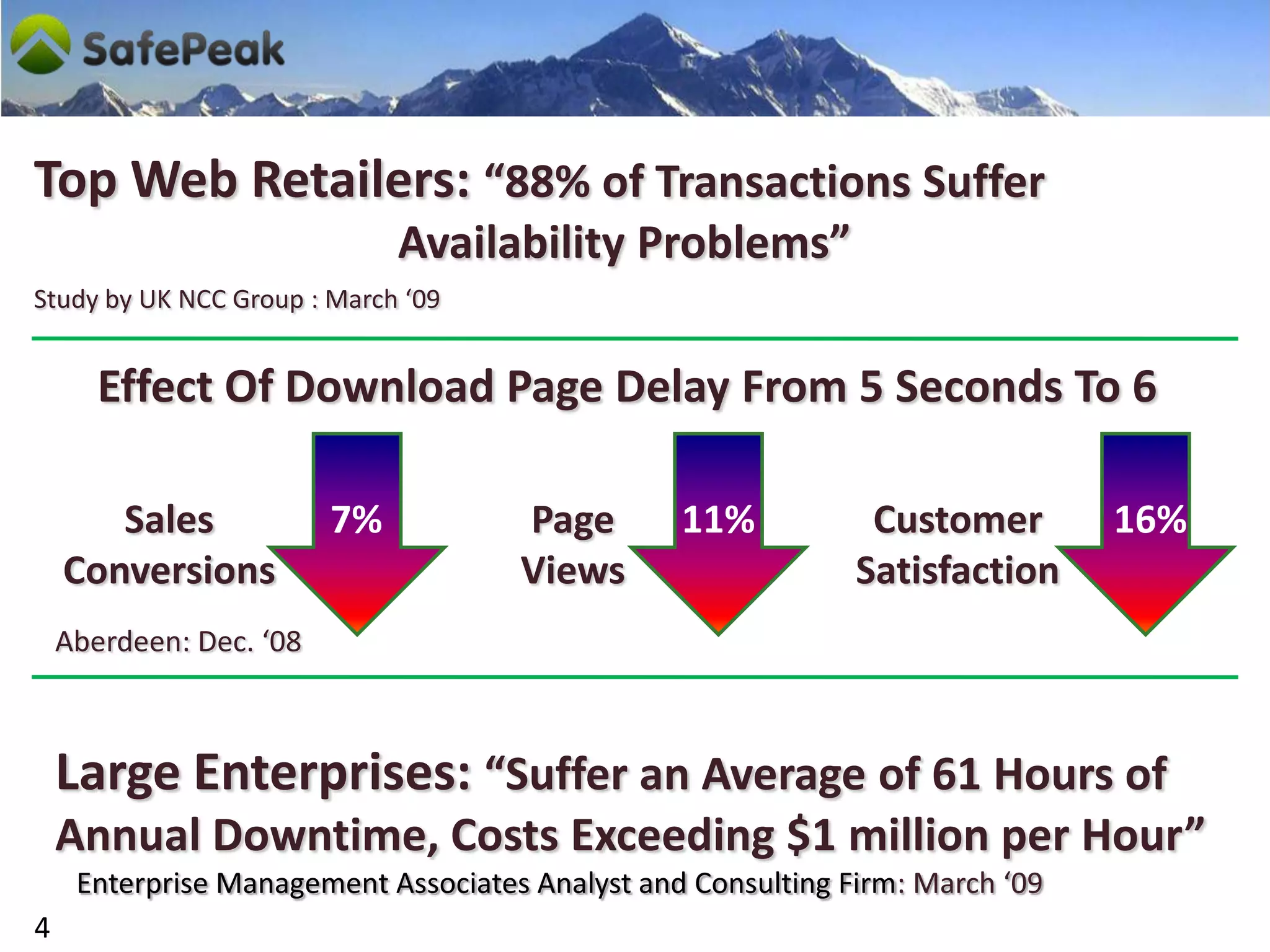
Top Web Retailers: “88% of Transactions Suffer
                              Availability Problems”
Study by UK NCC Group : March ‘09


       Effect Of Download Page Delay From 5 Seconds To 6

       Sales             7%          Page        11%           Customer        16%
    Conversions                      Views                    Satisfaction
    Aberdeen: Dec. ‘08


    Large Enterprises: “Suffer an Average of 61 Hours of
    Annual Downtime, Costs Exceeding $1 million per Hour”
     Enterprise Management Associates Analyst and Consulting Firm: March ‘09
4
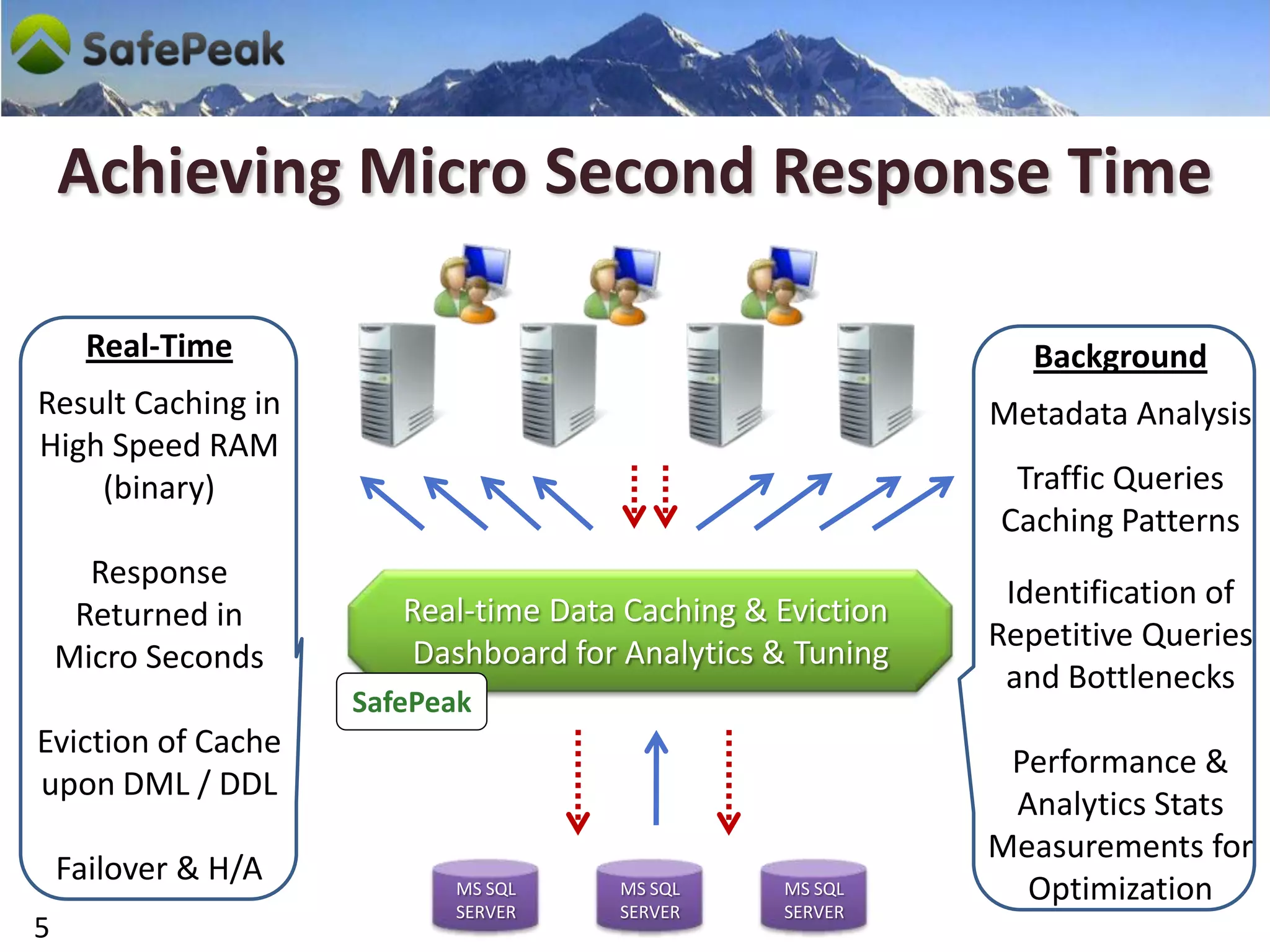
Achieving Micro Second Response Time

      Real-Time                                                Background
Result Caching in                                           Metadata Analysis
High Speed RAM
    (binary)                                                 Traffic Queries
                                                            Caching Patterns
      Response
                                                             Identification of
     Returned in        Real-time Data Caching & Eviction
                                                            Repetitive Queries
    Micro Seconds        Dashboard for Analytics & Tuning
                                                             and Bottlenecks
                     SafePeak
Eviction of Cache
                                                             Performance &
upon DML / DDL
                                                             Analytics Stats
                                                            Measurements for
    Failover & H/A         MS SQL     MS SQL     MS SQL       Optimization
                           SERVER     SERVER     SERVER
5
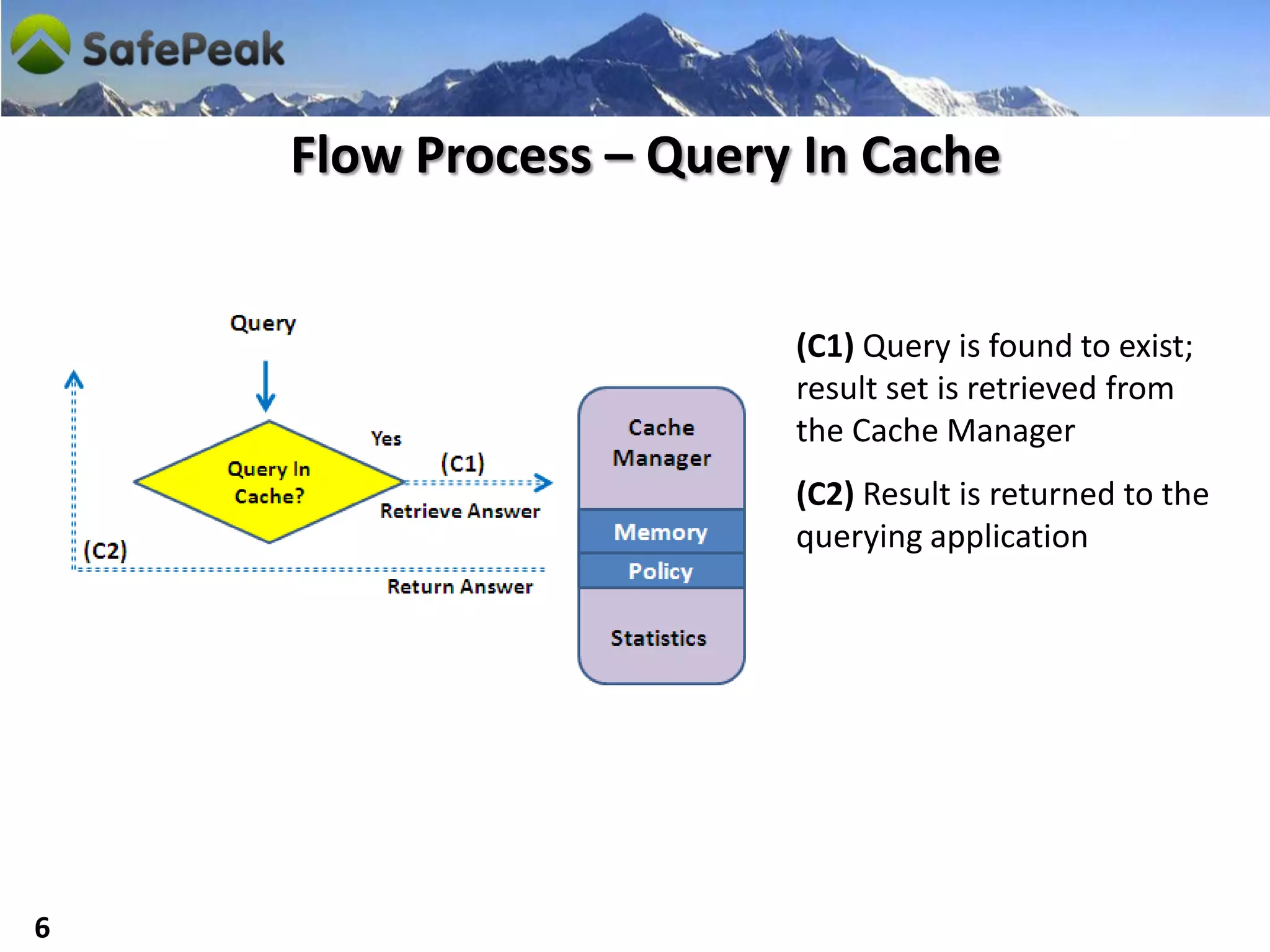
Flow Process – Query In Cache


                        (C1) Query is found to exist;
                        result set is retrieved from
                        the Cache Manager
                        (C2) Result is returned to the
                        querying application


6
Flow Process – Query Not In Cache & Not Update


                                 (Q1) Query is processed on
                                 target database
                                 (Q2) Result set is returned
                                 (Q3) If repetitive query,
                                 result set is saved in RAM
                                 memory of the Cache
                                 Manager to be accessed
                                 upon the next instance of
                                 the identical query


7
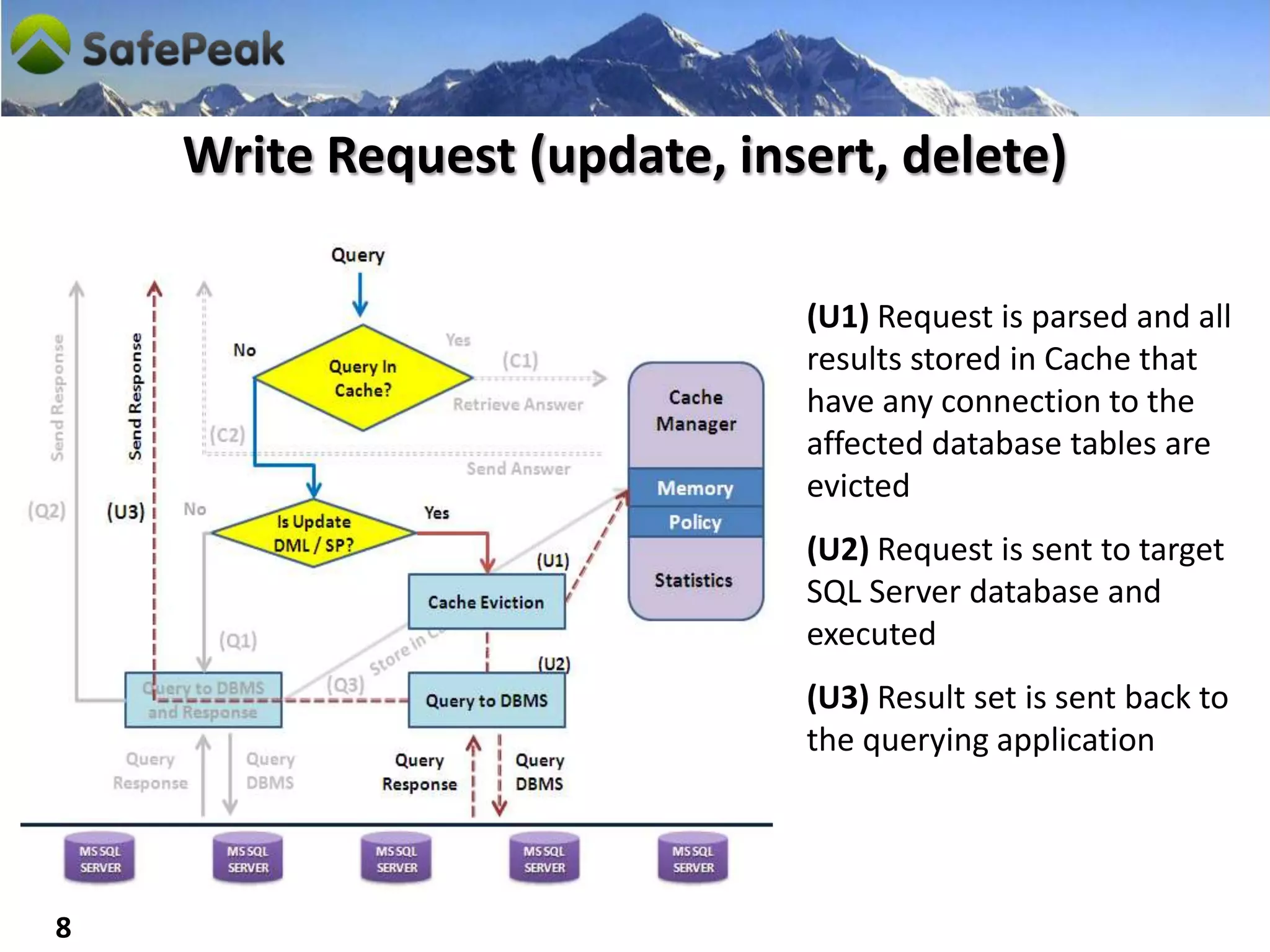
Write Request (update, insert, delete)

                              (U1) Request is parsed and all
                              results stored in Cache that
                              have any connection to the
                              affected database tables are
                              evicted
                              (U2) Request is sent to target
                              SQL Server database and
                              executed
                              (U3) Result set is sent back to
                              the querying application


8
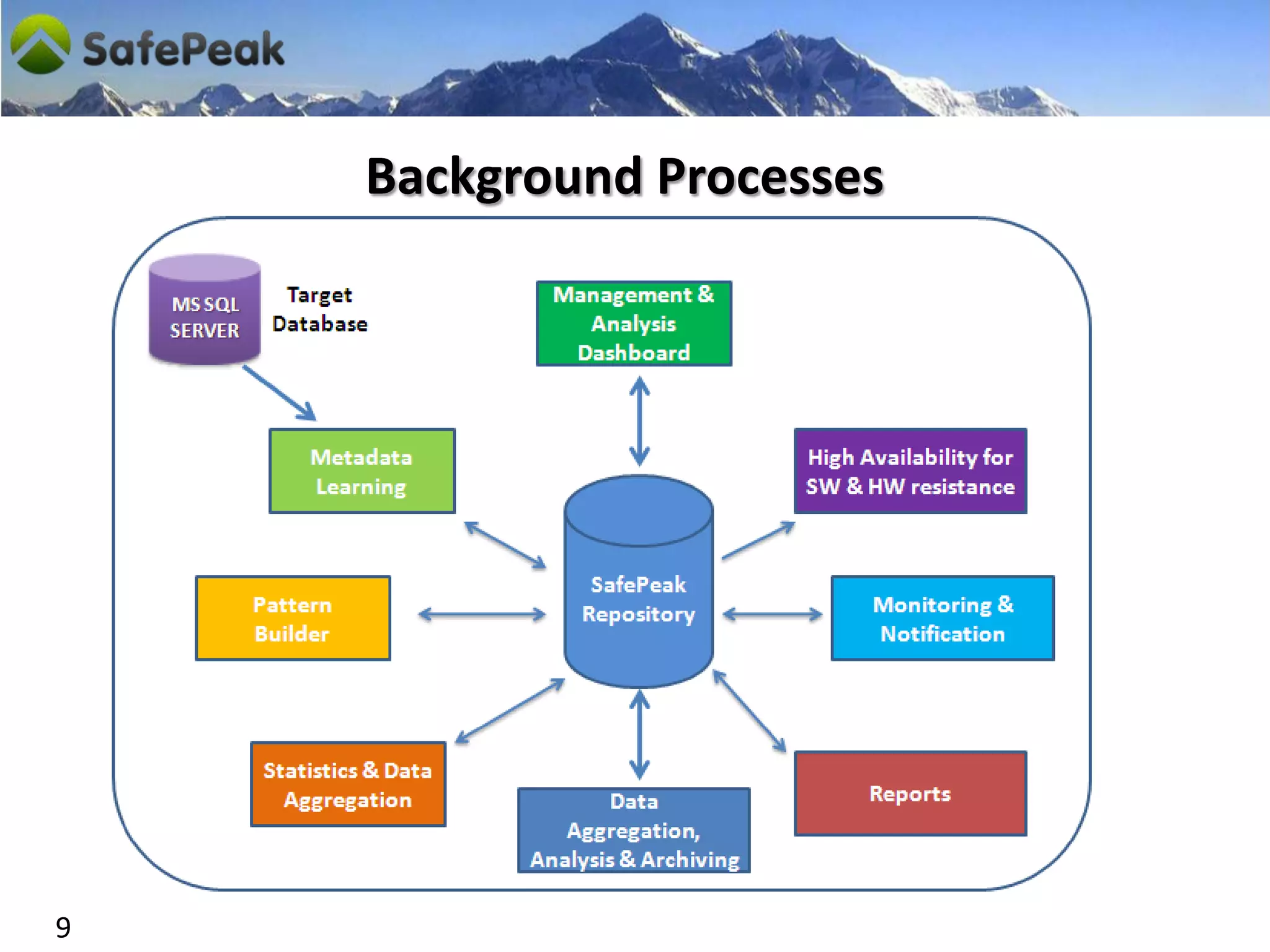
Background Processes


9
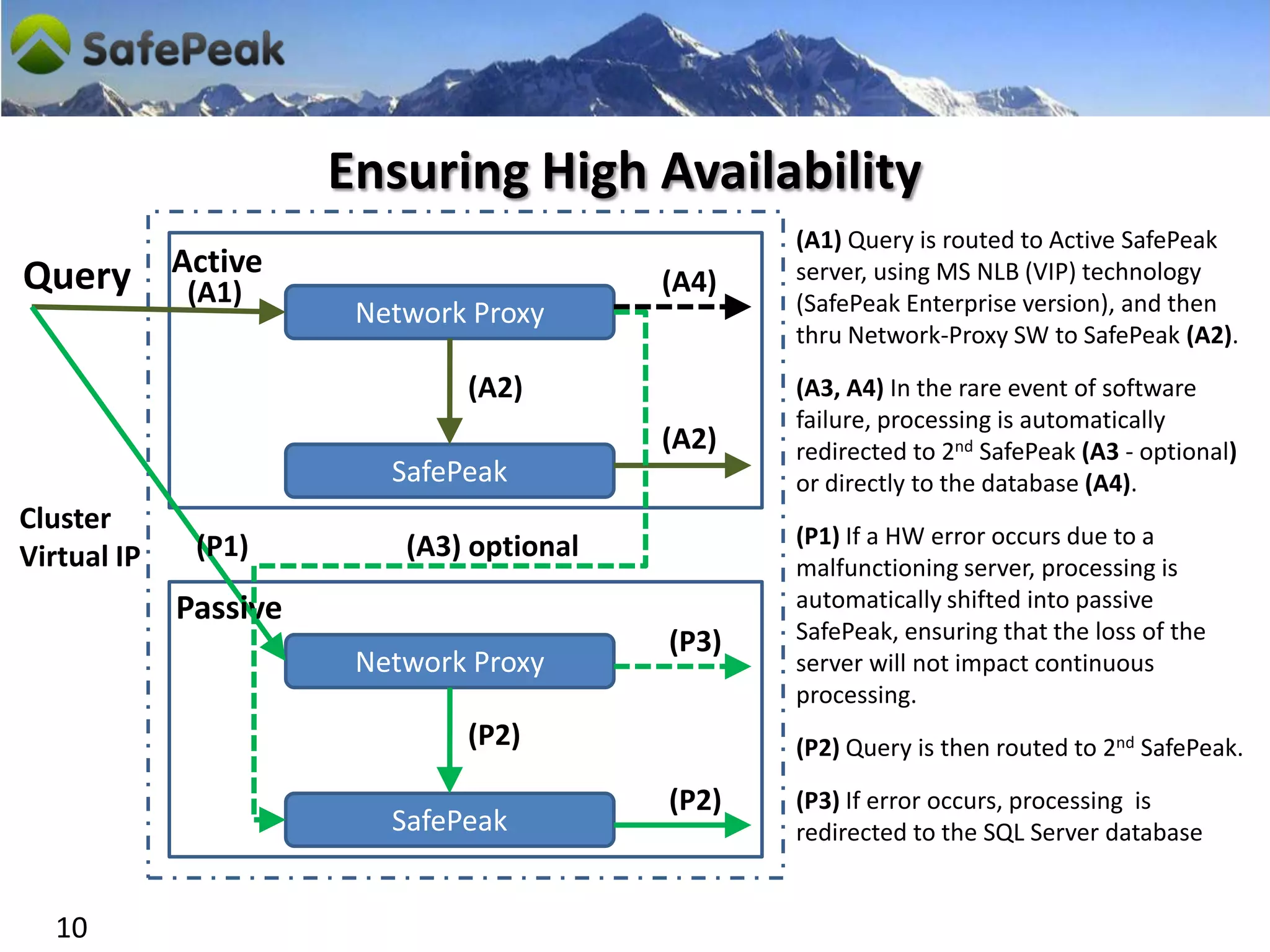
Ensuring High Availability
                                                  (A1) Query is routed to Active SafePeak
Query        Active                               server, using MS NLB (VIP) technology
              (A1)                         (A4)
                        Network Proxy             (SafePeak Enterprise version), and then
                                                  thru Network-Proxy SW to SafePeak (A2).

                               (A2)               (A3, A4) In the rare event of software
                                                  failure, processing is automatically
                                           (A2)   redirected to 2nd SafePeak (A3 - optional)
                          SafePeak                or directly to the database (A4).
Cluster
              (P1)         (A3) optional          (P1) If a HW error occurs due to a
Virtual IP                                        malfunctioning server, processing is
             Passive                              automatically shifted into passive
                                           (P3)   SafePeak, ensuring that the loss of the
                        Network Proxy             server will not impact continuous
                                                  processing.
                               (P2)               (P2) Query is then routed to 2nd SafePeak.

                                           (P2)   (P3) If error occurs, processing is
                          SafePeak                redirected to the SQL Server database


  10
Let’s See SafePeak Live


11
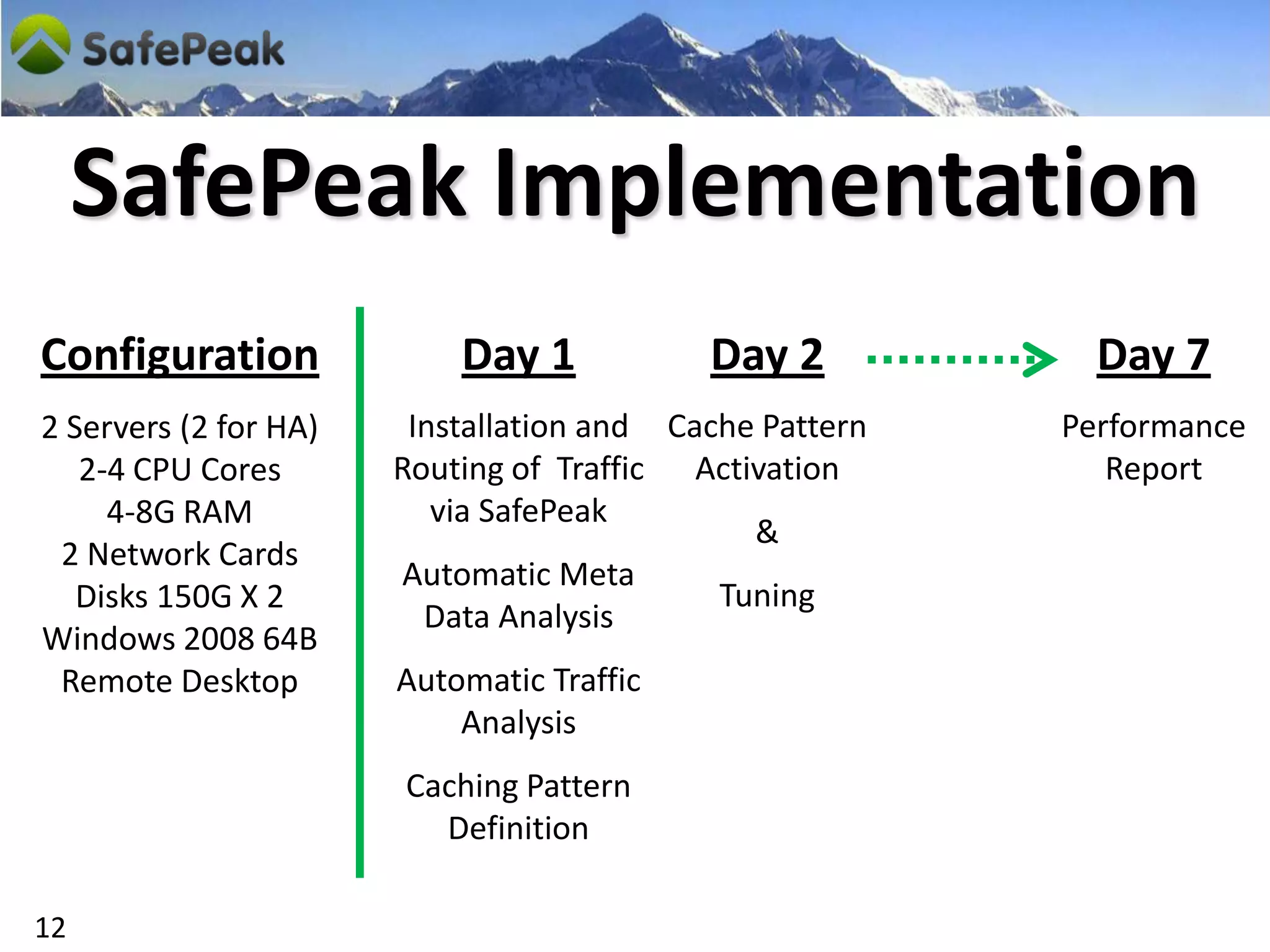
SafePeak Implementation
Configuration              Day 1           Day 2           Day 7
2 Servers (2 for HA)    Installation and Cache Pattern   Performance
   2-4 CPU Cores       Routing of Traffic Activation        Report
     4-8G RAM             via SafePeak
                                              &
 2 Network Cards
                       Automatic Meta
   Disks 150G X 2                           Tuning
                         Data Analysis
Windows 2008 64B
 Remote Desktop        Automatic Traffic
                           Analysis
                       Caching Pattern
                         Definition

12
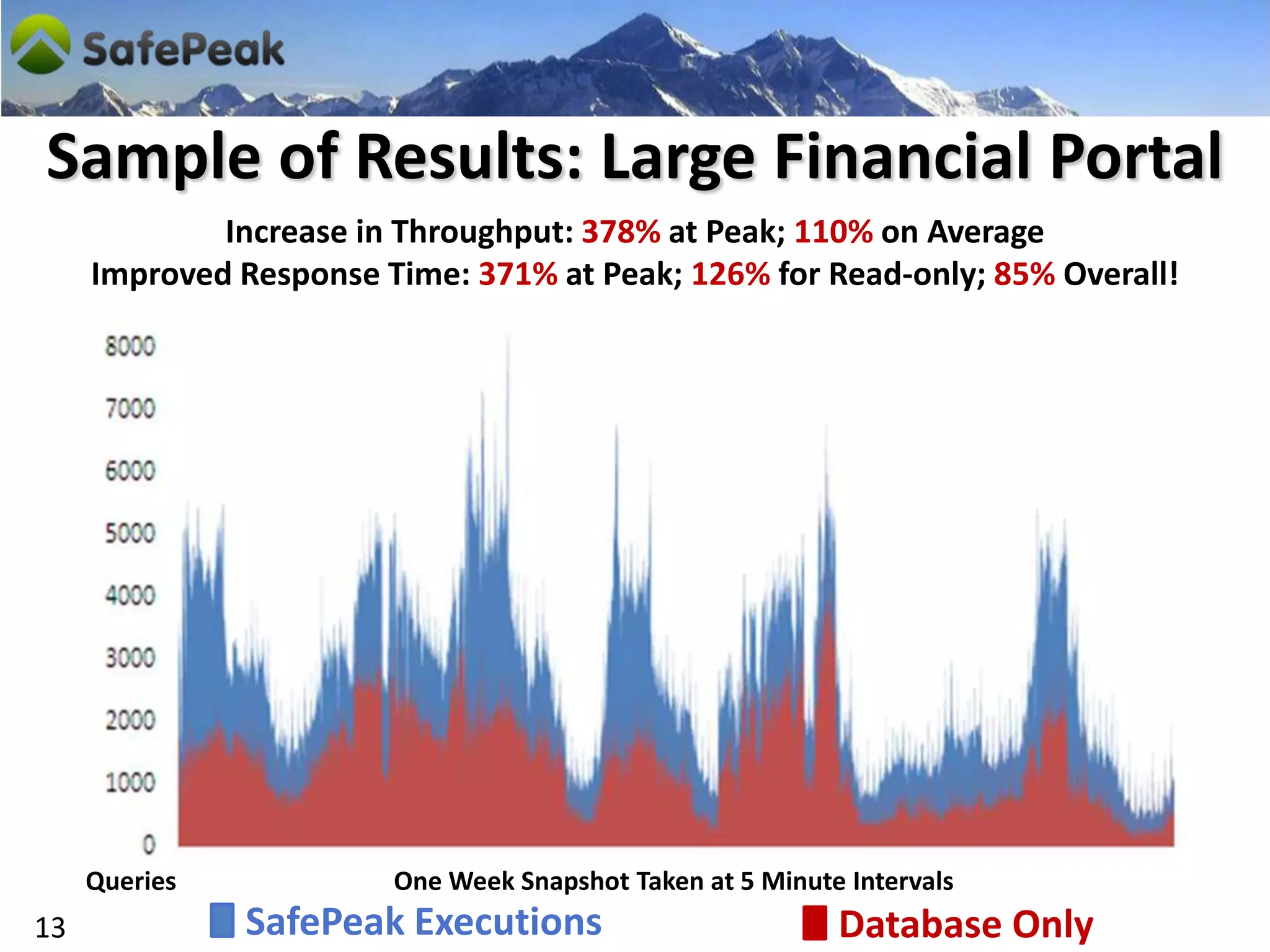
Sample of Results: Large Financial Portal
             Increase in Throughput: 378% at Peak; 110% on Average
     Improved Response Time: 371% at Peak; 126% for Read-only; 85% Overall!


     Queries            One Week Snapshot Taken at 5 Minute Intervals
13             SafePeak Executions                         Database Only
tm


           Next Steps
      Give Us 72 Hours,
     We’ll Give You 100%!
           info@dcftech.com
14

Safe Peak Technical Ppt W Product Publish

  • 1.
    tm SafePeak: Reducing Latency and Bottlenecks to Micro Second Response Time Vladi Vexler Founder & COO vladi@dcftech.com DCF Technologies Ltd. January 5, 2010
  • 2.
    Corporate Profile Company DCF Technologies Ltd. Founded in 2007 Management Team  Aki Ratner, Chairman - (President, Precise Software; CEO, Attunity)  David Leichner, CEO - (CMO, BluePhoenix; VP, Unipier; VP, Magic Software)  Vladi Vexler, Founder & COO - (R&D Manager, Scepia; MS Architecture Speaker)  Uri Margalit, Co-founder & CTO - (R&D Manager, Precise)  Alon Lubin, VP R&D - (R&D Manager, Precise; Exanet; Tabula) 2
  • 3.
    What We Provide Plug& Play Software: No changes to database or app  Immediate resolution of data bottlenecks and latency  Significantly improved performance and throughput 100% data credibility and continuous high availability Unexpected Demand Does Not Have To Mean 3 Unexpected Downtime
  • 4.
    Top Web Retailers:“88% of Transactions Suffer Availability Problems” Study by UK NCC Group : March ‘09 Effect Of Download Page Delay From 5 Seconds To 6 Sales 7% Page 11% Customer 16% Conversions Views Satisfaction Aberdeen: Dec. ‘08 Large Enterprises: “Suffer an Average of 61 Hours of Annual Downtime, Costs Exceeding $1 million per Hour” Enterprise Management Associates Analyst and Consulting Firm: March ‘09 4
  • 5.
    Achieving Micro SecondResponse Time Real-Time Background Result Caching in Metadata Analysis High Speed RAM (binary) Traffic Queries Caching Patterns Response Identification of Returned in Real-time Data Caching & Eviction Repetitive Queries Micro Seconds Dashboard for Analytics & Tuning and Bottlenecks SafePeak Eviction of Cache Performance & upon DML / DDL Analytics Stats Measurements for Failover & H/A MS SQL MS SQL MS SQL Optimization SERVER SERVER SERVER 5
  • 6.
    Flow Process –Query In Cache (C1) Query is found to exist; result set is retrieved from the Cache Manager (C2) Result is returned to the querying application 6
  • 7.
    Flow Process –Query Not In Cache & Not Update (Q1) Query is processed on target database (Q2) Result set is returned (Q3) If repetitive query, result set is saved in RAM memory of the Cache Manager to be accessed upon the next instance of the identical query 7
  • 8.
    Write Request (update,insert, delete) (U1) Request is parsed and all results stored in Cache that have any connection to the affected database tables are evicted (U2) Request is sent to target SQL Server database and executed (U3) Result set is sent back to the querying application 8
  • 9.
  • 10.
    Ensuring High Availability (A1) Query is routed to Active SafePeak Query Active server, using MS NLB (VIP) technology (A1) (A4) Network Proxy (SafePeak Enterprise version), and then thru Network-Proxy SW to SafePeak (A2). (A2) (A3, A4) In the rare event of software failure, processing is automatically (A2) redirected to 2nd SafePeak (A3 - optional) SafePeak or directly to the database (A4). Cluster (P1) (A3) optional (P1) If a HW error occurs due to a Virtual IP malfunctioning server, processing is Passive automatically shifted into passive (P3) SafePeak, ensuring that the loss of the Network Proxy server will not impact continuous processing. (P2) (P2) Query is then routed to 2nd SafePeak. (P2) (P3) If error occurs, processing is SafePeak redirected to the SQL Server database 10
  • 11.
  • 12.
    SafePeak Implementation Configuration Day 1 Day 2 Day 7 2 Servers (2 for HA) Installation and Cache Pattern Performance 2-4 CPU Cores Routing of Traffic Activation Report 4-8G RAM via SafePeak & 2 Network Cards Automatic Meta Disks 150G X 2 Tuning Data Analysis Windows 2008 64B Remote Desktop Automatic Traffic Analysis Caching Pattern Definition 12
  • 13.
    Sample of Results:Large Financial Portal Increase in Throughput: 378% at Peak; 110% on Average Improved Response Time: 371% at Peak; 126% for Read-only; 85% Overall! Queries One Week Snapshot Taken at 5 Minute Intervals 13 SafePeak Executions Database Only
  • 14.
    tm Next Steps Give Us 72 Hours, We’ll Give You 100%! info@dcftech.com 14