Returns and Service
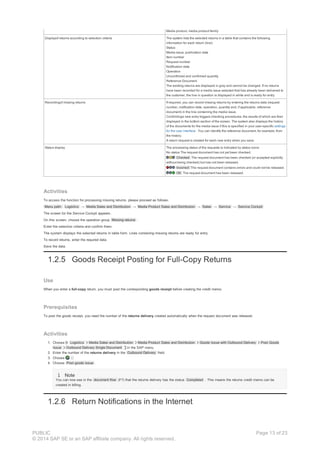
PDF download from SAP Help Portal:
http://help.sap.com/saphelp_erp60_sp/helpdata/en/0a/76ce53118d4308e10000000a174cb4/content.htm
Created on December 24, 2015
The documentation may have changed since you downloaded the PDF. You can always find the latest information on SAP Help
Portal.
Note
This PDF document contains the selected topic and its subtopics (max. 150) in the selected structure. Subtopics from other structures are not included.
© 2015 SAP SE or an SAP affiliate company. All rights reserved. No part of this publication may be reproduced or transmitted in any form or for any purpose
without the express permission of SAP SE. The information contained herein may be changed without prior notice. Some software products marketed by SAP
SE and its distributors contain proprietary software components of other software vendors. National product specifications may vary. These materials are
provided by SAP SE and its affiliated companies ("SAP Group") for informational purposes only, without representation or warranty of any kind, and SAP
Group shall not be liable for errors or omissions with respect to the materials. The only warranties for SAP Group products and services are those that are set
forth in the express warranty statements accompanying such products and services, if any. Nothing herein should be construed as constituting an additional
warranty. SAP and other SAP products and services mentioned herein as well as their respective logos are trademarks or registered trademarks of SAP SE in
Germany and other countries. Please see www.sap.com/corporate-en/legal/copyright/index.epx#trademark for additional trademark information and notices.
Table of content
PUBLIC
© 2014 SAP SE or an SAP affiliate company. All rights reserved.
Page 1 of 23
Table of content
1 Returns and Service
1.1 Service Cockpit
1.1.1 Definition and Grouping of Service Operations
1.1.2 Authorization Management with Service Profiles
1.1.3 User Settings
1.1.4 Updating Quantities Delivered
1.2 Returns, Subsequent Deliveries, Quantity Correction
1.2.1 Entering Requests
1.2.2 Releasing Requests
1.2.3 Correcting Errored Requests
1.2.4 Subsequent Entry of Missing Returns
1.2.5 Goods Receipt Posting for Full-Copy Returns
1.2.6 Return Notifications in the Internet
1.2.7 Entering Collection Quantities in the Internet
1.2.8 Evaluation of Returns and Subsequent Deliveries
1.3 Collection of Unsolds
1.4 Goods Transfer
1.4.1 Entering Requests
1.4.2 Releasing Requests
1.4.3 Correcting Errored Requests
1.5 Mass Credit Memo
1.5.1 Generating Requests
1.5.2 Request Release (Credit Memos)
PUBLIC
© 2014 SAP SE or an SAP affiliate company. All rights reserved.
Page 2 of 23
1 Returns and Service
Purpose
You can use the service functions in Media Product Sales to manage returns, subsequent deliveries, and credit memos.
Example
A customer reports the return quantity for a media issue and receives a corresponding credit memo.
A customer reports the expected return quantity in advance . This return quantity can be transferred directly to quantity planning for the next issue.
The printing works reports that the full delivery quantity for a customer was not produced. The customer receives a credit memo for the correction to the
quantity.
After receiving a delivery, a customer reports additional requirements and is sent a corresponding subsequent delivery .
A customer is granted a quantity-related credit memo for increased handling costs for an unusually large special edition.
Caution
Please note that you must have made the Customizing settings for updating quantities delivered before you can use the service functions.
Implementation Considerations
You can process all the service operations, except mass credit memo generation, in the Service Cockpit . You can configure the Service Cockpit as follows:
Company-specific
You can group, configure, and name the service operations according to your company’s requirements.
User-specific
You can assign each user authorization for certain service operations; for example, so that one user only enters returns while another corrects errors in
return requests.
Features
Service function Description
Enter, check, and correct returns You can enter single issue or summarized returns for the order items supplied. Your
customers can also use the Internet to report return quantities or quantities of media
issues for collection.
The Missing Returns function gives you an overview of the returns recorded in the
system. If requests contain errors, they are listed for correction in the Service
Cockpit.
Enter advance returns You can enter advance returns in the Service Cockpit. Follow-on documents are not
created for these. A BAdI created for this purpose allows you to use the advance
return quantities in quantity planning.
Enter quantity corrections If malfunctions in production or problems during transportation affect the delivery
quantity, you can enter quantity corrections.
Enter subsequent deliveries If a customer reports additional requirements for a delivery, or if the planned
delivery quantity is not delivered in full, you can enter a corresponding subsequent
delivery.
Collection of unsolds You can use this function to plan and process collection of unsold newspapers or
magazines that are being returned by points of sale to your company’s or a
wholesaler’s distribution center. Credit memos are created for the points of sale
based on the returns collected.
Enter, check, and correct goods transfers You can use the functions for goods transfer to record direct transfer deliveries of
media issues between two of a retailer's branches.
If requests contain errors, they are listed for correction in the Service Cockpit.
Create mass credit memos To balance exceptional expenses for your customer, you can create order- or
contract-related mass credit memos. These functions can be accessed outside the
Service Cockpit.
1.1 Service Cockpit
Definition
The Service Cockpit is the uniform user interface for processing service operations in Media Product Sales and Distribution (for example, entering return
notifications, subsequent deliveries, and goods transfers).
PUBLIC
© 2014 SAP SE or an SAP affiliate company. All rights reserved.
Page 3 of 23
Use
Company-Specific Configuration
You can configure the Service Cockpit according to your company’s requirements. You can do this in the following ways:
Definition and grouping of service operations
Authorization management with service profiles
User settings
Selection of Service Operation
The service operations defined for entering returns and subsequent deliveries for operation groups are grouped in Customizing. If you choose an operation
group by clicking on the pushbutton, the system displays the relevant processing screen . You choose the service operation on the processing screen and
enter the data for the request document.
The following diagram illustrates the structure of the Service Cockpit in a simplified form using an example for returns recording.
1.1.1 Definition and Grouping of Service Operations
Use
You can define and group service operations according to your company’s requirements.
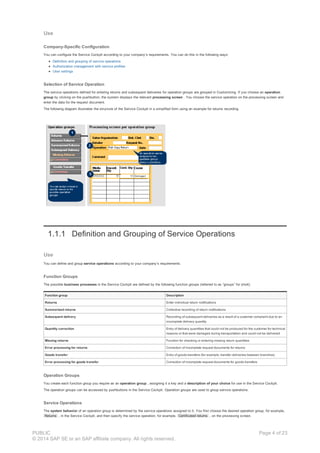
Function Groups
The possible business processes in the Service Cockpit are defined by the following function groups (referred to as “groups” for short).
Function group Description
Returns Enter individual return notifications
Summarized returns Collective recording of return notifications
Subsequent delivery Recording of subsequent deliveries as a result of a customer complaint due to an
incomplete delivery quantity
Quantity correction Entry of delivery quantities that could not be produced for the customer for technical
reasons or that were damaged during transportation and could not be delivered
Missing returns Function for checking or entering missing return quantities
Error processing for returns Correction of incomplete request documents for returns
Goods transfer Entry of goods transfers (for example, transfer deliveries between branches)
Error processing for goods transfer Correction of incomplete request documents for goods transfers
Operation Groups
You create each function group you require as an operation group , assigning it a key and a description of your choice for use in the Service Cockpit.
The operation groups can be accessed by pushbuttons in the Service Cockpit. Operation groups are used to group service operations.
Service Operations
The system behavior of an operation group is determined by the service operations assigned to it. You first choose the desired operation group, for example,
Returns , in the Service Cockpit, and then specify the service operation, for example, Certificated returns , on the processing screen.
PUBLIC
© 2014 SAP SE or an SAP affiliate company. All rights reserved.
Page 4 of 23
Activities
To define and group service operations, choose the following path in the IMG: SAP Media Media Sales and Distribution Media Product Sales and
Distribution Sales Service. You must carry out the following steps:
1. Define the necessary operation groups by specifying the following:
Key and description of operation group
Assignment of a predefined function group
2. Define the service operations by specifying the following:
Key of operation
Follow-on document (for example, credit memo or subsequent delivery order)
Operation description (the system displays the long text to allow you to select the operation in the Service Cockpit)
Assignment of the service operation to operation groups
You can assign a service operation to two operation groups for returns or goods transfer processing: one operation group for data entry and
another for correcting incorrect requests.
Settings to control the system behavior
Determine sales area (from the business partner master, contract or order)
Credit memo with reference to reference billing document
Operation cannot be entered in dialog (for example, for importing returns data)
Explode sub-items in credit memo document (only if credit memo is created without reference billing document)
Messages for checks in dialog processing (error, warning, information, no error)
Messages for checks during credit memo creation (error, no error)
Note
The full settings are only available for operation groups relating to returns.
Caution
You must define and assign the default profile or the service profiles for the individual users in authorization management so that the
operation groups are displayed when you call up the Service Cockpit.
Each user in the Service Cockpit can make their own user settings .
1.1.2 Authorization Management with Service Profiles
Use
To reflect the fact that Service Cockpit users have different areas of responsibility, you must make specific assignments between service operations and
users.
Once you have defined and grouped the service operations , you can use service profiles to manage authorizations as follows:
You can define service profiles by grouping the operation groups for a certain task structure.
You can mark one of the service profiles as the default profile .
You can assign each user the appropriate service profile.
When a user accesses the Service Cockpit, the system only offers them the operation groups that are specified in their profile. The default profile is used for
users who are not assigned a service profile.
Example
For example, you create service profiles for the Service Cockpit and assign them as follows:
Service profile User
Returns recording (default profile) A
Subsequent delivery recording B
Correction of request documents C
The Service Cockpit only displays the operation group entered in the user’s service profile.
If users X and Y, who are not assigned a service profile, access the Service Cockpit, it only offers them the default profile, Returns Recording.
Activities
To define service profiles and assign them to users, choose the following path in Customizing : SAP Media Media Sales and Distribution Media
Product Sales and Distribution Sales Service Edit Service Profiles .
1.1.3 User Settings
Use
Each time you call up the Service Cockpit, the screen is structured according to the current user-specific settings for the user interface. The following applies
here:
PUBLIC
© 2014 SAP SE or an SAP affiliate company. All rights reserved.
Page 5 of 23
When a user who has not made any user settings accesses the Service Cockpit for the first time , the system copies the default settings from
Customizing to the user’s own settings.
Users can access their user settings for the user interface from the menu on the Service Cockpit screen and change them. Changes made take effect
the next time the Service Cockpit is accessed.
Note
Changes to the default settings in Customizing do not affect user settings that have already been created.
Features
The user settings for processing service operations in the Service Cockpit have the following features:
Type of setting Description
General settings System settings
Notification date current date by default When you create a request
(for example, a return request), the system enters the current date as
the notification date.
Do not display step-by-step instructions If this indicator is selected,
the short instructions for the various operation groups are hidden.
Unit of measure The entry in this field (for example, IT) is entered as a
default unit of measure when the user enters a request document in
the system.This setting is required for weekly recording, since it is not
possible to specify a unit of measure in the weekly view.The unit of
measure you specify here is only relevant for future request
documents.
Group control
Display group selection at program start If you select this indicator,
the operation groups specified in the user’s service profile are
displayed in the Service Cockpit (listed vertically to the left of the
processing screen).
Display group selection horizontally when program starts If you
select this indicator, the operation groups specified in the user’s
service profile are displayed horizontally in the Service Cockpit. This
leaves you with more space on the screen.
Group at program start The system activates the operation group
entered here when the Service Cockpit is accessed.
History
Display history when program starts If this indicator is selected, the
system displays the history when the Service Cockpit is accessed.
Display history for roles RM and WE If this indicator is selected, the
history is displayed not only for the returning business partner (RM) but
also for the ship-to party (WE).
Expand history The display structure for the history is expanded
according to this setting (do not expand, expand 1 level, expand 2
levels).
Mode at program start (specified using pushbuttons)
Item recording In this mode, you can enter requests for returns,
summarized returns, and subsequent deliveries for each order item .
Weekly recording In this mode, you can enter requests for returns,
summarized returns, and subsequent deliveries for each weekday .
Settings for weekly recording Visibility of quantity (display unconfirmed quantity, confirmed quantity, or
both quantities)
Data entry in the past (number of weeks back from the current date for
accessing weekly recording)
Media products for processing
All media products
Only media products listed (The list of media products can be
changed.)
Activities
Before you can make use of the user settings in the Service Cockpit, you must carry out the following steps:
1. Define the default settings for all users that apply the first time the Service Cockpit is accessed.You can find these Customizing settings under the
following path in the IMG: SAP Media Media Sales and Distribution Media Product Sales and Distribution Sales Service Define Initial
Settings for Service Cockpit .
2. Call up the Service Cockpit. Menu path:Logistics Media Sales and Distribution Media Product Sales and Distribution Sales Service
Service Cockpit .
3. On the screen for the Service Cockpit, choose User Settings Maintain.
4. Make your own user settings on the General and Weekly Recording tabs and choose OK to exit the dialog.
1.1.4 Updating Quantities Delivered
PUBLIC
© 2014 SAP SE or an SAP affiliate company. All rights reserved.
Page 6 of 23
Use
To ensure that the system can use the data on quantities actually delivered for checks, you must update the quantities delivered from the outbound deliveries
in separate tables. Regular updating of the quantities delivered serves the following purposes:
Status determinationfor delivery quantities in the quantity plan .
If a planned delivery quantity has been delivered fully, the corresponding entry in the quantity plan is assigned the status and the system does not allow
any further changes to the quantity.
Cross-checkingfor service operations
During processing of service operations, such as returns recording, subsequent delivery, and goods transfer, the system performs a check based on the
quantities actually delivered. For example, when you enter returns, the system checks the return quantity against the (updated) quantity actually delivered.
Updating Methods
You can use the following two methods to update the quantities delivered from the outbound deliveries:
Update function
Schedule the function for updating outbound deliveries to run at regular intervals.
Output control
Updates of outbound deliveries that take place soon after the delivery itself are triggered by output control.
Features
Updating method Description Activities
Update by function The updating function for outbound deliveries has the
following features:
Selectionof outbound deliveries according to the
following criteria:
Period
Media issue or interval of media issues
Optional: test run (simulation with log output; no
database updates)
Updateof outbound deliveries (delivery quantities)
according to selection criteria
Display log
Schedule report RJKSDDELIVERYASSIGN to run
periodically (for example, overnight) in SAP
background processing.
To access the function in dialog processing, choose
Logistics → Media Sales and Distribution → Media
Product Sales and Distribution → Sales → Service
→ Periodical Activities → Update Deliveries.
To access the log of the function, choose Logistics →
Media Sales and Distribution → Media Product Sales
and Distribution → Sales → Service → Periodical
Activities → Log Update.
Update by output control When you save after creating, changing or deleting an
outbound delivery, the output control functions trigger
update of the delivery quantity.
Advantage: Timely update of delivery quantities. This is
therefore the method recommended by SAP.
The standard delivery contains the output type JDEL for
updating the quantities delivered.
Output type JDEL is assigned to the standard output
determination procedure V10000 at header level. The
output determination procedure V10000 is assigned to
all delivery types as standard.
Create an output condition record for each delivery
type for which you want to update the quantity
delivered.
1.2 Returns, Subsequent Deliveries, Quantity Correction
Purpose
Once outbound delivery of media issues has taken place according to orders in Media Product Sales and Distribution, you can process the service operations
for the following function groups in a uniform procedure in the Service Cockpit :
Function group Task
Returns Every customer (retailer) who has a valid right of return can return unsold media
issues (full-copy returns) or report them (certificated returns). The customer receives
a credit memo for the quantity returned.
You can enter return notifications from your customers manually. The system
checks whether the return period was adhered to and whether the quantity reported
was actually delivered. The customer is granted a credit memo for the amount.
You can enter advance returns in the Service Cockpit. Follow-on documents are
not created for these. BAdI ISM_QUANTITYPAST allows you to use the return
quantities reported in advance in quantity planning.
Summarized returns You can enter the return quantity for a period of your choice or for a week , based
on the customer’s return notification.
Subsequent delivery If a customer reports additional requirements for a delivery, or if the planned
delivery quantity is not delivered in full , you can enter a request document for the
corresponding subsequent delivery.
Customers can be invoiced for the additional quantity delivered subsequently.
Quantity correction If malfunctions in production or problems during transportation affect the delivery
quantity, you can enter quantity corrections , for example:
For technical reasons, it is not possible to produce the quantity specified in
PUBLIC
© 2014 SAP SE or an SAP affiliate company. All rights reserved.
Page 7 of 23
the order. You enter the missing quantity, so that only the amount actually
produced and delivered is billed in order-related billing.
A shipment is damaged in an accident. You enter the quantity that was not
delivered for the customer in question, so that this quantity is taken into
account in billing and quantity planning.
Process Flow
Processing of returns, summarized returns, subsequent deliveries, and quantity corrections involves the following steps:
1. Create request documents
You can create returns, summarized returns and subsequent deliveries in the system in the following ways:
Manual entry in dialog processing
Import of external request data (interface)
Entry by customer in the Internet
In dialog entry, the system checks the returns data. External returns data that enters the system from the Internet or via a BAPI is not checked
until the requests are released.
In dialog entry, you can choose between the data entry modes Item recording and Weekly recording . You can restrict weekly recording to
certain media issues for each user.
You can display a history of the customer documents for each media issue.
2. Release of request documents
You release the request documents entered for returns or subsequent deliveries so that follow-on documents (such as credit memos and invoices) can
be created. Follow-on documents are created using the functions in the standard SAP Sales and Distribution solution.
3. Correct incomplete request documents
If the system identifies request documents as incorrect and rejects them during the release step, you can correct them or accept the error reported.
You can postedit specific requests using the error descriptions provided by the system.
You can then release the corrected request documents again.
1.4.1 Entering Requests
Use
You can use this function to enter request documents for service operations for the following function groups manually in the service cockpit :
Returns
Summarized returns
Subsequent delivery
Quantity correction
Missing returns
Check on Entries
When returns or subsequent deliveries are entered in dialog, the system checks the entries according to the Customizing settings for the service operation in
question.
Authorization
The operation groups each user processes are specified in authorization management for the Service Cockpit.
User Settings
Each user can define their own user settings . For example, you can define which operation groups are displayed and which one is active when the program
starts. You can display and hide the operation groups from the processing screen ( Extras → Display operation list or Hide operation list ).
Processing Mode
You can use the icon Change Entry Screen to switch between the processing modes item recording and weekly recordingon the processing screen for the
operation in the Service Cockpit.
History
You can access a history of the documents for each media issue when processing returns and subsequent deliveries for a customer (retailer). You can specify
in your user settings whether or not the history is displayed at the start of the program. You can access or hide the history from the processing screen (
Extras → Display history or Hide history ). The history lists the following documents:
Returns made until now, sorted by service operation
Orders, deliveries
Credit memo requests, returns
You can access the documents by double clicking on them in the history.
You can display the history for the returning retailer, as well as for the ship-to party. You specify which history is displayed in your user settings .
Origin
PUBLIC
© 2014 SAP SE or an SAP affiliate company. All rights reserved.
Page 8 of 23
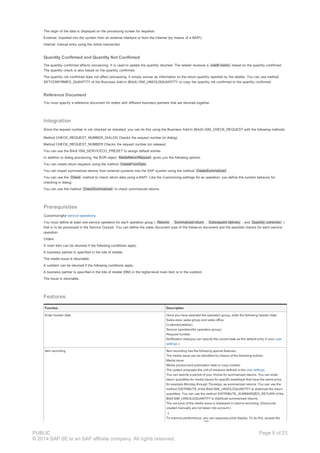
The origin of the data is displayed on the processing screen for requests:
External: imported into the system from an external interface or from the Internet (by means of a BAPI)
Internal: manual entry using the online transaction
Quantity Confirmed and Quantity Not Confirmed
The quantity confirmed affects processing. It is used to update the quantity returned. The retailer receives a credit memo based on the quantity confirmed.
The quantity check is also based on the quantity confirmed.
The quantity not confirmed does not affect processing. It simply serves as information on the return quantity reported by the retailer. You can use method
SETCONFIRMED_QUANTITY of the Business Add-In (BAdI) ISM_UNSOLDQUANTITY to copy the quantity not confirmed to the quantity confirmed.
Reference Document
You must specify a reference document for orders with different business partners that are returned together.
Integration
Since the request number is not checked as standard, you can do this using the Business Add-In (BAdI) ISM_CHECK_REQUEST with the following methods.
Method CHECK_REQUEST_NUMBER_DIALOG Checks the request number (in dialog)
Method CHECK_REQUEST_NUMBER Checks the request number (on release)
You can use the BAdI ISM_SERVICECO_PRESET to assign default entries
In addition to dialog processing, the BOR object MediaReturnRequest gives you the following options:
You can create return requests using the method CreateFromData .
You can import summarized returns from external systems into the SAP system using the method CreateSummarized .
You can use the Check method to check return data using a BAPI. Like the Customizing settings for an operation, you define the system behavior for
checking in dialog.
You can use the method CheckSummarized to check summarized returns.
Prerequisites
Customizingfor service operations
You must define at least one service operation for each operation group ( Returns , Summarized return , Subsequent delivery , and Quantity correction )
that is to be processed in the Service Cockpit. You can define the sales document type of the follow-on document and the possible checks for each service
operation.
Orders
A main item can be returned if the following conditions apply:
A business partner is specified in the role of retailer.
The media issue is returnable.
A subitem can be returned if the following conditions apply:
A business partner is specified in the role of retailer (RM) in the higher-level main item or in the subitem.
The issue is returnable.
Features
Function Description
Enter header data Once you have selected the operation group, enter the following header data:
Sales area, sales group and sales office
Customer(retailer)
Service operation(for operation group)
Request number
Notification date(you can specify the current date as the default entry in your user
settings )
Item recording Item recording has the following special features:
The media issue can be identified by means of the following entries:
Media issue
Media product and publication date or copy number
The system proposes the unit of measure defined in the user settings .
You can specify a period of your choice for summarized returns. You can enter
return quantities for media issues for specific weekdays that have the same price,
for example Monday through Thursday, as summarized returns. You can use the
method DISTRIBUTE of the BAdI ISM_UNSOLDQUANTITY to distribute the return
quantities. You can use the method DISTRIBUTE_SUMMARIZED_RETURN of the
BAdI ISM_UNSOLDQUANTITY to distribute summarized returns.
The net price of the media issue is displayed in returns recording. (Discounts
created manually are not taken into account.)
To improve performance, you can suppress price display. To do this, access the
PUBLIC
© 2014 SAP SE or an SAP affiliate company. All rights reserved.
Page 9 of 23
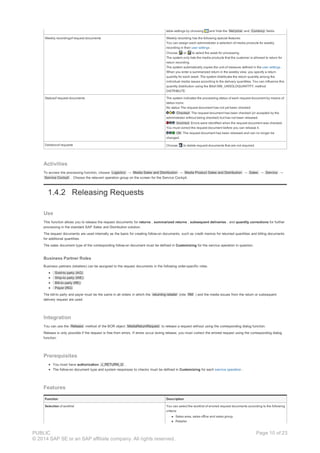
table settings by choosing and hide the Net price and Currency fields.
Weekly recordingof request documents Weekly recording has the following special features:
You can assign each administrator a selection of media products for weekly
recording in their user settings .
Choose or to select the week for processing.
The system only lists the media products that the customer is allowed to return for
return recording
The system automatically copies the unit of measure defined in the user settings .
When you enter a summarized return in the weekly view, you specify a return
quantity for each week. The system distributes the return quantity among the
individual media issues according to the delivery quantities. You can influence this
quantity distribution using the BAdI ISM_UNSOLDQUANTITY, method
DISTRIBUTE.
Statusof request documents The system indicates the processing status of each request document by means of
status icons:
No status The request document has not yet been checked.
Checked The request document has been checked (or accepted by the
administrator without being checked) but has not been released.
Incorrect Errors were identified when the request document was checked.
You must correct the request document before you can release it.
OK The request document has been released and can no longer be
changed.
Deletionof requests Choose to delete request documents that are not required.
Activities
To access the processing function, choose Logistics → Media Sales and Distribution → Media Product Sales and Distribution → Sales → Service →
Service Cockpit . Choose the relevant operation group on the screen for the Service Cockpit.
1.4.2 Releasing Requests
Use
This function allows you to release the request documents for returns , summarized returns , subsequent deliveries , and quantity corrections for further
processing in the standard SAP Sales and Distribution solution.
The request documents are used internally as the basis for creating follow-on documents, such as credit memos for returned quantities and billing documents
for additional quantities.
The sales document type of the corresponding follow-on document must be defined in Customizing for the service operation in question.
Business Partner Roles
Business partners (retailers) can be assigned to the request documents in the following order-specific roles:
Sold-to party (AG)
Ship-to party (WE)
Bill-to party (RE)
Payer (RG)
The bill-to party and payer must be the same in all orders in which the returning retailer (role RM ) and the media issues from the return or subsequent
delivery request are used.
Integration
You can use the Release method of the BOR object MediaReturnRequest to release a request without using the corresponding dialog function.
Release is only possible if the request is free from errors. If errors occur during release, you must correct the errored request using the corresponding dialog
function.
Prerequisites
You must have authorization J_RETURN_G .
The follow-on document type and system responses to checks must be defined in Customizing for each service operation .
Features
Function Description
Selection of worklist You can select the worklist of errored request documents according to the following
criteria:
Sales area, sales office and sales group
Retailer
PUBLIC
© 2014 SAP SE or an SAP affiliate company. All rights reserved.
Page 10 of 23
Operation
Request number
Internal number
To notification date
Credit memo date (used to control request document creation)
Release of request documents If an item in the request document has not been checked or contains errors, the
system checks it. If errors are identified, the item in question is assigned the status
Incorrect. You can correct the error using the function for correction of
incorrect requests and then release the request document again.
Released items in a request document have the status OK .
Log output The system displays a log of the release procedure, listing all the request
documents, all the documents created successfully or all those that are incorrect,
depending on your settings.
Activities
Background Processing
You should schedule the release function at regular intervals in SAP background processing.
Executing the Program in Dialog Processing
To access the function in dialog processing, choose Logistics Media Sales and Distribution Media Product Sales and Distribution Sales Service
Release to SD Release Returns to SD .
To access the log of the function in dialog, choose Logistics Media Sales and Distribution Media Product Sales and Distribution Sales Service
Release to SD Log Return Release.
1.4.3 Correcting Errored Requests
Use
You can use this function to correct requests for returns , summarized returns , subsequent deliveries and quantity corrections for which the system
identified errors when they were being released.
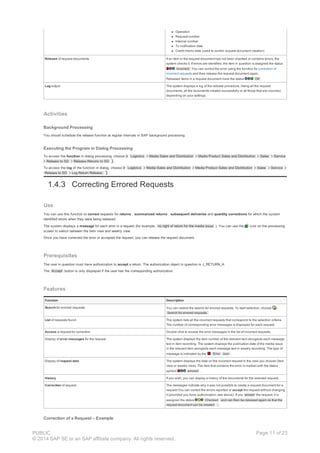
The system displays a message for each error in a request (for example, no right of return for the media issue ). You can use the icon on the processing
screen to switch between the item view and weekly view.
Once you have corrected the error or accepted the request, you can release the request document.
Prerequisites
The user in question must have authorization to accept a return. The authorization object in question is J_RETURN_A.
The Accept button is only displayed if the user has the corresponding authorization.
Features
Function Description
Search for errored requests You can restrict the search for errored requests. To start selection, choose
Search for errored requests.
List of requests found The system lists all the incorrect requests that correspond to the selection criteria.
The number of corresponding error messages is displayed for each request.
Access a request for correction Double click to access the error messages in the list of incorrect requests.
Display of error messages for the request The system displays the item number of the relevant item alongside each message
text in item recording. The system displays the publication date of the media issue
in the relevant item alongside each message text in weekly recording. The type of
message is indicated by the Error icon .
Display of request data The system displays the data on the incorrect request in the view you choose (item
view or weekly view). The item that contains the error is marked with the status
symbol errored .
History If you wish, you can display a history of the documents for the selected request.
Correction of request The messages indicate why it was not possible to create a request document for a
request.You can correct the errors reported or accept the request without changing
it (provided you have authorization; see above). If you accept the request, it is
assigned the status Checked and can then be released again so that the
request document can be created .
Correction of a Request – Example
PUBLIC
© 2014 SAP SE or an SAP affiliate company. All rights reserved.
Page 11 of 23
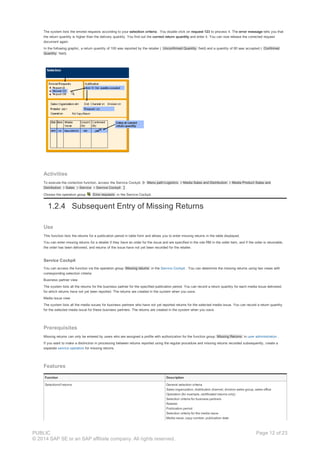
The system lists the errored requests according to your selection criteria . You double click on request 123 to process it. The error message tells you that
the return quantity is higher than the delivery quantity. You find out the correct return quantity and enter it. You can now release the corrected request
document again.
In the following graphic, a return quantity of 100 was reported by the retailer ( Unconfirmed Quantity field) and a quantity of 80 was accepted ( Confirmed
Quantity field).
Activities
To execute the correction function, access the Service Cockpit. Menu path:Logistics Media Sales and Distribution Media Product Sales and
Distribution Sales Service Service Cockpit .
Choose the operation group Error requests in the Service Cockpit.
1.2.4 Subsequent Entry of Missing Returns
Use
This function lists the returns for a publication period in table form and allows you to enter missing returns in the table displayed.
You can enter missing returns for a retailer if they have an order for the issue and are specified in the role RM in the order item, and if the order is returnable,
the order has been delivered, and returns of the issue have not yet been recorded for the retailer.
Service Cockpit
You can access the function via the operation group Missing returns in the Service Cockpit . You can determine the missing returns using two views with
corresponding selection criteria:
Business partner view
The system lists all the returns for the business partner for the specified publication period. You can record a return quantity for each media issue delivered,
for which returns have not yet been reported. The returns are created in the system when you save.
Media issue view
The system lists all the media issues for business partners who have not yet reported returns for the selected media issue. You can record a return quantity
for the selected media issue for these business partners. The returns are created in the system when you save.
Prerequisites
Missing returns can only be entered by users who are assigned a profile with authorization for the function group Missing Returns in user administration .
If you want to make a distinction in processing between returns reported using the regular procedure and missing returns recorded subsequently, create a
separate service operation for missing returns.
Features
Function Description
Selectionof returns General selection criteria
Sales organization, distribution channel, division sales group, sales office
Operation (for example, certificated returns only)
Selection criteria for business partners
Retailer
Publication period
Selection criteria for the media issue
Media issue, copy number, publication date
PUBLIC
© 2014 SAP SE or an SAP affiliate company. All rights reserved.
Page 12 of 23
Media product, media product family
Displayof returns according to selection criteria The system lists the selected returns in a table that contains the following
information for each return (line):
Status
Media issue, publication date
Item number
Request number
Notification date
Operation
Unconfirmed and confirmed quantity
Reference Document
The existing returns are displayed in gray and cannot be changed. If no returns
have been recorded for a media issue selected that has already been delivered to
the customer, the line in question is displayed in white and is ready for entry.
Recordingof missing returns If required, you can record missing returns by entering the returns data (request
number, notification date, operation, quantity and, if applicable, reference
document) in the line containing the media issue.
Confirminga new entry triggers checking procedures, the results of which are then
displayed in the bottom section of the screen. The system also displays the history
of the documents for the media issue if this is specified in your user-specific settings
for the user interface . You can identify the reference document, for example, from
the history.
A return request is created for each new entry when you save.
Status display The processing status of the requests is indicated by status icons:
No status The request document has not yet been checked.
Checked The request document has been checked (or accepted explicitly
without being checked) but has not been released.
Incorrect The request document contains errors and could not be released.
OK The request document has been released.
Activities
To access the function for processing missing returns, please proceed as follows:
Menu path: Logistics → Media Sales and Distribution → Media Product Sales and Distribution → Sales → Service → Service Cockpit
The screen for the Service Cockpit appears.
On this screen, choose the operation group Missing returns .
Enter the selection criteria and confirm them.
The system displays the selected returns in table form. Lines containing missing returns are ready for entry.
To record returns, enter the required data.
Save the data.
1.2.5 Goods Receipt Posting for Full-Copy Returns
Use
When you enter a full-copy return, you must post the corresponding goods receipt before creating the credit memo.
Prerequisites
To post the goods receipt, you need the number of the returns delivery created automatically when the request document was released.
Activities
1. Choose Logistics Media Sales and Distribution Media Product Sales and Distribution Goods Issue with Outbound Delivery Post Goods
Issue Outbound Delivery Single Document in the SAP menu.
2. Enter the number of the returns delivery in the Outbound Delivery field.
3. Choose .
4. Choose Post goods issue .
Note
You can now see in the document flow (F7) that the returns delivery has the status Completed . This means the returns credit memo can be
created in billing.
1.2.6 Return Notifications in the Internet
PUBLIC
© 2014 SAP SE or an SAP affiliate company. All rights reserved.
Page 13 of 23
Use
Your customers (retailers) can report returns online using the Internet if the system is set up accordingly.
You can configure Internet access to your system for retailers so that they can also query the returns recorded previously. This includes displaying open
returns or all returns in a period in the past.
Prerequisites
The settings for recording returns in the Internet must be maintained. The data includes the following:
User name under which the returns reported in the Internet are recorded in the SAP system.
Service operation for which data can be recorded in the Internet, for example, returns
Only one service operation can be specified.
Sales unit used to report returns in the Internet
IMG path: SAP Media Media Sales and Distribution Media Product Sales and Distribution Sales Service Returns Maintain
Settings for Recording Returns via Internet.
The master record of a retailer who reports returns in the Internet must contain the retailer's EDI number. You must also create an Internet user with this
EDI number.
Activities
To report returns in the Internet, you must perform the following activities for a retailer:
Group web transactions like building blocks. The following Internet services are available for this purpose:
JKSDWWW01: Logon
JKSDWWW02: Return Notification
JKSDWWW03: Overview of Possible Returns
JKSDWWW04: Information on Returns Previously Recorded
You can link the other Internet services you want to use to the logon transaction . The individual transactions are linked using an HTML script.
You must modify the script according to your company's requirements. SAP provides a sample script in the standard system, and you must at
least change the URL.
Logon to the SAP system via the Internet using the EDI number and the Internet user's password .
Since the EDI number is entered in the business partner's master record, the system can use the EDI number to determine the retailer in question.
1.2.7 Entering Collection Quantities in the Internet
Use
If your company collects returns for certain media issues from its customers, you can make it possible for these customers (retailers) to enter and edit
quantities of media issues for collection in the Internet .
To do this, you enter a collection date in the master records of the media issues to be collected and assign a collection index to the media issues due for
collection, using a function provided. The BSP application ISM_SD_UNSOLD allows your customers to enter the collection quantities for all the media issues
marked for collection. The BSP application contains the following processing options:
Display delivery quantities (and, if applicable, return quantities already entered) for the media issues in a specified period
Enter return quantities
Correct return quantities by entering a correction quantity
Perform plausibility check on entries (comparing them with the delivery quantity) and display error messages
Exception rule allowing you to force the system to accept an entry that is not plausible (total return quantity higher than delivery quantity)
Prerequisites
Your role must be assigned the authorization object J_COLLECT .
Each media issue for which returns are to be collected must have a collection date in its master record. (This date is entered in the issue template and
then set in relation to the publication date in question when the media issues are generated from the issue sequence.)
You should have executed the function for creating return collection indexes for each collection date. Menu path: Logistics Media Sales and
Distribution Media Product Sales and Distribution Sales Service Return Collection Create Return Index.
Each customer who is to enter returns in the Internet must be created as a user in the system. This includes the following steps:
You should have created a reference user for Internet access and assigned it the role SAP_ISM_INTERNET_CUSTOMER
You should have created a user for each customer and entered the following data in the user master:
Reference to the reference user created for Internet access (see above)
Reference to the customer’s business partner number , specifying the following reference data:
- Object type: KNA1
- Description: Customer
- Key: Business partner number
Alias name that corresponds to the logon name used for the BSP application; for example, e-mail address, customer number
The necessary services and references must be activated (transaction SICF)
Service: ism_sd_unsold
Service: system
Reference: system
Activities
PUBLIC
© 2014 SAP SE or an SAP affiliate company. All rights reserved.
Page 14 of 23
Before returns can be entered and edited in the Internet, you must perform the following activities:
Call up the BSP application ISM_SD_UNSOLD in the Internet Explorer (the address is company-specific)
Log on to the SAP system from the Internet by specifying the following:
User alias (for example, e-mail address or customer number)
Password
Selection period
Display the returns overview using the Display Return Quantities pushbutton (then using the Refresh Return Quantities function to refresh the list)
Process the return quantities using the following functions:
Enter the return quantity up to the delivery quantity displayed
Enter a correction quantity for the quantity already returned (correction quantities preceded by a minus sign are deducted from the quantity
returned)
Optional: Check the entries before saving (with log output)
Save the entries (with an automatic check and log output)
Optional: Forced save of higher quantities that would otherwise be rejected by the system
1.2.8 Evaluation of Returns and Subsequent Deliveries
Use
You can use this evaluation function to display returns and subsequent delivery requests according to selection criteria. The function is always executed with
regard to a notification date, so that the evaluations apply to specific dates .
Features
Selection of requests according to the following criteria:
Notification date
Retailer
Request number
Media issue
Media product
Media product family
Copy number
Publication date
Operation
You can save combinations of selection criteria that you use frequently as selection variants , which you can then access as required with a
mouse click. When you activate a selection variant, the system displays the relevant requests.
Display of evaluation result as a structure with the following hierarchy:
Media product family
Media product
Media issue
Retailer
Request (request number)
The data is displayed in a row for each request.
Activities
To access this function, choose Logistics Media Sales and Distribution Media Product Sales and Distribution Sales Service Evaluation for
Specific Date.
Note
You can use a BAdI to assign default values for returns.
1.3 Collection of Unsolds
Use
You can use this function to plan and process collection of unsold newspapers or magazines that are being returned by points of sale to your company’s or a
wholesaler’s distribution center. Credit memos are created for the points of sale based on the returns collected.
A collection date is determined using a rule (collection index) for issues that are to be collected. The system selects all the issues that must be collected on a
specific day according to this date. The system checks whether each customer has these issues on sale and, if so, whether they are due to be supplied on
the planned collection date (otherwise, collection is postponed to the next possible delivery date).
Example
For example, collection is due on a Monday but the customer is supplied on Wednesdays. The system takes this into account and postpones the
collection date by two days to Wednesday.
A collection is created in the system for the collection date, and the issues that are to be collected on this date are assigned to it.
PUBLIC
© 2014 SAP SE or an SAP affiliate company. All rights reserved.
Page 15 of 23
Prerequisites
You have made the following Customizing settings for Media Product Sales and Distribution under SAP Media Media Sales and Distribution Media
Product Sales and Distribution (Retail) Collection of Unsolds :
Activity in Implementation Guide Description
Define Collection Reasons You define collection reasons that the system can then propose as default values
when creating the collection.
Define Collection Types You define collection types, such as daily collection. You can select the following
indicators:
To define the quantity plan or the history of issues delivered as the basis for a
collection type, select the Qty Plan or Iss Delivd indicator.
Select the Unloading Point , Goods Receiving Hours , or the factory
calendar ( Calendar ), Visit List , and Suspensions indicators so that the
system takes this data into account.
You can also enter a collection reason , which is then used as a default
value in the collection.
Define Rules for Calculating Collection Date You define rules that are used by the system to calculate the planned collection
date for the issues that are to be collected.
Define Item Groups You can group items and use these groups, for example, to assign subsets for
phase delivery.
Define Item Categories You can define a variety of item categories, such as standard item or promotion.
Define Item Categories for Collection Types You define which item categories can be used for a collection type.
Define Item Category Determination You define which item category the system is to assign to issues for collection,
according to material characteristics and usage.
You should also have defined rules for collection . To do this, choose the Sales: Media Issue 1 tab from the Display Media Issue screen in the Media
Issue Generation function (transaction JPMG1). You can specify Rule for Collection Date 1 and Rule for Collection Date 2 under Returns. You should
have defined functions in Customizing for these rules (see also Define Rules for Calculating Collection Date ) so that the system can use them to calculate
the collection date for an issue.
There are two variants of the collection date:
1. Planned collection date for issue (normal case)
2. Subsequent date (if the first date does not suit the customer)
When you generate media issues, the new issues are assigned the rules from the template issue . The collection date is calculated and the collection index
created according to these rules.
Note
If media issues are generated using a template issue that does not contain rules for collection, call up the program Create Collection Index Table
JKSDISSUEDATE (RJKSDISSUEDATECREATE). Enter the media product and the rules, and the system then calculates the collection date and creates
the collection index according to these rules.
Features
Choose the following functions under Logistics Media Sales and Distribution Media Product Sales and Distribution Collection of Unsolds on the
SAP Easy Access screen:
Function Description
Calculate Collection Date for Media Issue You can use this function to calculate the collection date for media issues in each
plant if the system sets up a collection index after media issue generation.
Note
If you use daily collection, you should execute this function before each
collection procedure (for example, schedule it as a background job).
Maintain Collection Date for Media Issue You can overwrite the Coll. Date 1 and Coll. Date 2 calculated by the system in
the Man.Coll.Date 1 and Man.Coll.Date 2 fields in the detailed view.
Create Collection When you create a collection, the system takes account of the customer’s delivery
data (see Use ) and sets the status 01 ( Collection Planned ).
Note
We recommend that you schedule the Create Collection function to be
executed daily (for example, as a background job).
There are two instances of the collection date for each collection:
1. Information on the collection date (the customer is informed that they are to
return the issues in question)
2. “Processing date” of collection (actual date on which the issues are collected
from the customer)
You can specify a collection type in the Return Collection Type field in the
Ctrl Data group box.
If you want to execute the function as a test run without making changes to
PUBLIC
© 2014 SAP SE or an SAP affiliate company. All rights reserved.
Page 16 of 23
the database, select the Test Run indicator.
Create Collection – POS Closure You can use this function to have all products collected from a point of sale when it
closes.
For more information on the Return Collection Type field and Test Run indicator,
see the Create Collection function.
Plan Collection To create a collection, choose Create Collection .
To delete a collection, select it and choose Delete Collection. You can only delete
collections that have the status 01 (Collection Planned).
You can add , delete , move , and copy issues.
To move or copy an issue, select it, choose Move Issue or Copy Issue , and
select a collection in the dialog box that then appears. The system moves or copies
the issue to the selected collection. Alternatively, you can move or copy issues
using drag and drop on the header data.
You can assign default values to the two collection date fields using the
parameters JKSDCOLLECT_FROM and JKSDCOLLECT_TO ( to ).
Function Modules
You can use the following function modules to edit collection records:
You can use function module ISM_SD_COLL_GET_OUTPUT to output the collection records for further processing in an external system.
Function module ISM_SD_API_BAG_SET_STATE allows you to change the status in a collection.
Note
If you have output collection records using function module ISM_SD_COLL_GET_OUTPUT, set the status to 02 (Collection Sent) .
Activities
Collection of Unsolds takes place as follows:
1. After the media issues have been generated, the system creates the collection index .
Choose Calculate Collection Date for Media Issue to have the system calculate the collection date according to the collection index.
Choose Maintain Collection Date for Media Issue to set the collection date in a media issue .
2. Choose Create Collection to create a collection (normally for daily collection ).
3. Choose Plan Collection to plan the collection.
4. If a point of sale closes, choose the Create Collection – POS Closure to create a collection for all the products at this point of sale.
5. Send the collection information to the customer and set the status of the collection to 02 (Collection Sent).
6. Process the issues collected and set the status to 03 (Collection Processed).
1.4 Goods Transfer
Purpose
You can use the functions for goods transfer to record direct transfer deliveries of media issues between two retailers or between two of a retailer's branches.
Goods transfers allow you to map transfer deliveries in the system in one data entry transaction. The system creates the following documents automatically
using the goods transfer entered:
Returnfor the sender of the transfer delivery
Outbound deliveryto the recipient of the transfer delivery
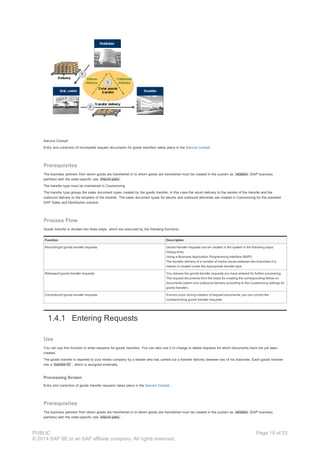
A distribution center performs a transfer delivery of 500 pieces to a retailer and informs you of the goods transfer that has taken place. You enter the request
document for the goods transfer and release it. The system creates a (fictitious) return delivery from the distribution center and a (fictitious) outbounddelivery
to the retailer automatically (see diagram).
PUBLIC
© 2014 SAP SE or an SAP affiliate company. All rights reserved.
Page 17 of 23
Service Cockpit
Entry and correction of incomplete request documents for goods transfers takes place in the Service Cockpit .
Prerequisites
The business partners from whom goods are transferred or to whom goods are transferred must be created in the system as retailers (SAP business
partners) with the order-specific role ship-to party
The transfer type must be maintained in Customizing
The transfer type groups the sales document types created by the goods transfer, in this case the return delivery to the sender of the transfer and the
outbound delivery to the recipient of the transfer. The sales document types for returns and outbound deliveries are created in Customizing for the standard
SAP Sales and Distribution solution.
Process Flow
Goods transfer is divided into three steps, which are executed by the following functions:
Function Description
Recordingof goods transfer requests Goods transfer requests can be created in the system in the following ways:
Dialog entry
Using a Business Application Programming Interface (BAPI)
The transfer delivery of a number of media issues between two branches of a
retailer is created under the appropriate transfer type.
Releaseof goods transfer requests You release the goods transfer requests you have entered for further processing.
The request documents form the basis for creating the corresponding follow-on
documents (return and outbound delivery according to the Customizing settings for
goods transfer).
Correctionof goods transfer requests If errors occur during creation of request documents, you can correct the
corresponding goods transfer requests.
1.4.1 Entering Requests
Use
You can use this function to enter requests for goods transfers. You can also use it to change or delete requests for which documents have not yet been
created.
The goods transfer is reported to your media company by a retailer who has carried out a transfer delivery between two of his branches. Each goods transfer
has a transfer ID , which is assigned externally.
Processing Screen
Entry and correction of goods transfer requests takes place in the Service Cockpit .
Prerequisites
The business partners from whom goods are transferred or to whom goods are transferred must be created in the system as retailers (SAP business
partners) with the order-specific role ship-to party .
PUBLIC
© 2014 SAP SE or an SAP affiliate company. All rights reserved.
Page 18 of 23
The transfer type must be maintained in Customizing
The transfer type groups the SD sales document types that come into being as a result of the goods transfer, in this case the return delivery to the sender of
the transfer and the outbound delivery to the recipient of the transfer. The return and outbound delivery document type must be created as an SD sales
document type in Customizing for Sales and Distribution (SD).
Features
Function Description
Entryof transfer data To enter a transfer request, enter the following data:
Sales area
Transfer ID
Reposting date
Transfer type
Business partner (from whom transfer is made)
Business partner (to whom transfer is made)
Media issue (or alternatively, media product and publication date or copy number)
Transfer quantity and unit of measure
Display of deliveries or orders for the business partners involved Once the transfer data has been entered, the system displays the deliveries and
orders for the relevant business partners on the processing screen for goods
transfer requests.
Activities
To access this function in dialog processing, choose Logistics → Media Sales and Distribution → Media Product Sales and Distribution → Sales →
Service → Service Cockpit
On the screen for the Service Cockpit, choose the operation group Goods transfer .
1.4.2 Releasing Requests
Use
This function allows you to release request documents for goods transfers.
The request documents are used as the basis for creating the corresponding follow-on documents. The transfer type specified for each transfer therefore
determines which document types are created.
Prerequisites
The transfer type groups the sales document types created by the goods transfer, in this case the return delivery to the sender of the transfer and the
outbound delivery to the recipient of the transfer. The sales document types for returns and outbound deliveries are created in Customizing for the standard
SAP Sales and Distribution solution.
Features
Function Description
Selectionof goods transfer requests You can select the goods transfer requests that are to be released so that request
documents can be created by specifying the following criteria:
Sales area
Transfer from business partner
Transfer to business partner
Transfer request number (a number assigned internally by the system)
External transfer ID
To-date for transfer
Releaseof goods transfer requests Released request documents are used by the corresponding functions in the SAP
system to create follow-on documents (returns or outbound deliveries).
Logoutput The system displays a log of the release, listing only successful transfers, only
errored transfers, or all transfers, depending on the settings.
Activities
You should schedule the function for periodic execution in SAP background processing.
To access the function in dialog processing, choose Logistics → Media Sales and Distribution → Media Product Sales and Distribution → Sales →
Service → Release to SD → Release Transfers to SD .
1.4.3 Correcting Errored Requests
PUBLIC
© 2014 SAP SE or an SAP affiliate company. All rights reserved.
Page 19 of 23
Use
You can use this function to correct goods transfer request documents in which the system identifies errors. You can double click on each errored request
document to access a description of the error.
Once you have corrected the error, you can release the request document again.
Integration
If transfer documents could not be created because of the Customizing settings for the standard SAP Sales and Distribution solution, you should check these
settings and change them if necessary.
Features
Search for errored requests
Selection of requests to be corrected from the list of incorrect requests.
Display of error messages for the selected request
Display of request data
Correction of requests
The messages indicate why it was not possible to create a request document for a request. You can correct the error or accept the request as
applicable. If you accept the request, it is assigned the status Checked and you can release it again.
Activities
To access the function in dialog processing, choose Logistics Media Sales and Distribution Media Product Sales and Distribution Sales Service
Service Cockpit .
In the Service Cockpit, choose Transfer error .
1.5 Mass Credit Memo
Purpose
As part of customer service, you can pay your customers for additional services (such as weekend work and paper recycling).
Depending on the type of service, you can create mass credit memos with reference to orders , contracts , or customers . Depending on the reference, the
credit memo amount can be determined as follows:
Flat rate
Amount per quantity
Amount according to order conditions
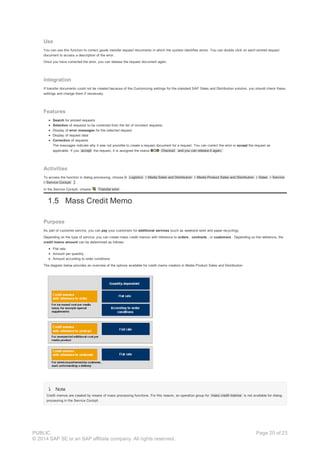
The diagram below provides an overview of the options available for credit memo creation in Media Product Sales and Distribution:
Note
Credit memos are created by means of mass processing functions. For this reason, an operation group for mass credit memos is not available for dialog
processing in the Service Cockpit.
PUBLIC
© 2014 SAP SE or an SAP affiliate company. All rights reserved.
Page 20 of 23
Prerequisites
Operations for Entering Credit Memo Requests
Credit memo requests are entered in relation to operations. For this reason, at least one service operation must be defined for credit memos in the
Customizing settings for Media Product Sales and Distribution. When you define the operation for entering credit memo requests, you must assign it the
standard operation group Mass Credit Memos and enter the sales document type for the follow-on document (credit memo).
Caution
Unlike the service operations in the Service Cockpit, you do not need to create a company-specific operation group for mass credit memo operations.
Process Flow
1. Mass generation of credit memo requests
(with reference to the order, the contract, or the customer)
2. Release of credit memo requests so that follow-on documents can be created
Result
The credit memo documents are created during the billing run (in the standard SAP Sales and Distribution solution) based on the credit memo requests. You
can use invoice lists to group the credit memos in documents together with the corresponding billing items (see also Billing ).
1.5.1 Generating Requests
Use
You can use the functions for mass recording of credit memo requests to map the dataset that is used by the billing function in the standard Sales and
Distribution solution to create credit memo documents.
A variety of functions are available for mass generation of credit memo requests. These functions have the following selection options, depending on the
purpose of the credit memo:
Order selection
Example
An unusually large media issue (= order item) gives rise to increased handling costs for the customer. You recompense the customers in question
for the additional costs according to the delivery quantity.
Contract selection
Example
An issue of a weekly magazine is delivered to the retailers later. They are paid a lump sum for this service.
Customer selection
Example
The customer redirects an incorrect delivery to the correct ship-to party at their own expense. You pay the customer a lump sum for the service
rendered (created in the system as a material ).
Short Description
The above functions work according to the same principle. First, you select a set of documents (for example, orders or contracts) and then schedule the
documents for which credit memos are to be created in the worklist for credit memo creation. The credit memos are generated by program RJKSDCREDIT1 (
Create Credit Memo Requests ).
Integration
The credit memo requests are only available for operative use in the standard SAP Sales and Distribution solution when you explicitly release them.
Prerequisites
General
At least one operation for mass credit memos must be created in the Customizing settings for the service operations . When you define the
operation, it is important that you enter the following:
Assignment to the operation group Mass Credit Memos
You do not need to create this operation group: the system enters it as default.
Sales document type for credit memos
The possible order reasons should be specified in Customizing for the standard SAP Sales and Distribution solution.
PUBLIC
© 2014 SAP SE or an SAP affiliate company. All rights reserved.
Page 21 of 23
For selection with reference to the customer
A material belonging to the material type service must be created in the system. This is required as a default entry on the screen for the function.
Since the credit memo does not refer to media products sold, the service material type is displayed on the credit memo document.
A pricing procedure with a manual condition is required for pricing during billing. The calculation type for this condition type must be based on a
fixed amount.
Features
Function Features
Creation of credit memo requests with order selection Selection of order items (media issues) according to the following criteria,
which you can specify as intervals:
Order
Media issueor media product and publication date
The selection dialog, which you can display in addition to these initial
criteria, contains the following:
Sold-to party (retailer)
Geographical unit
Sales area
Sales document type, sales document
Truck route
You can save combinations of selection criteria as a selection variant
.
You can specify the following options :
Operation (Customizing)
Order reason (Customizing)
Billing date
You can specify the following to determine the credit memo amount :
Lump sum
Amount per quantity
Amount according to order item
Display selected order items
To schedule (selected) order items in the worklist for credit memo requests,
choose .
Display worklist for credit memo requests
To deschedule (selected) order items from the worklist for credit memo
requests, choose .
Create scheduled credit memo requests
Display lo g
Creation of credit memo requests with contract selection Selection of contract items (media products) according to the following
criteria, which you can specify as intervals:
Contract
Contract type
Contract valid on
Media product
The selection dialog, which you can display in addition to these initial
criteria, contains the following:
Sold-to party (retailer)
Geographical unit
Sales area
Truck route
You can save combinations of selection criteria as a selection variant
.
You can specify the following options :
Operation (Customizing)
Order reason (Customizing)
Billing date
Display selected contract items
To schedule (selected) contract items in the worklist for credit memo
requests, choose .
Display worklist for credit memo requests
To deschedule (selected) contract items from the worklist for credit memo
requests, choose .
Create scheduled credit memo requests
Display lo g
Creation of credit memo requests with customer selection Selection of contract items for the customer according to the following
criteria, which you can specify as intervals:
Contract
Contract type
Contract valid on
The selection dialog, which you can display in addition to these initial
criteria, contains the following:
Sold-to party (retailer)
Geographical unit
Sales area
Truck route
You can save combinations of selection criteria as a selection variant
.
PUBLIC
© 2014 SAP SE or an SAP affiliate company. All rights reserved.
Page 22 of 23
You can specify the following options :
Operation (Customizing)
Order reason (Customizing)
Billing date
You can specify the following to determine the credit memo amount :
Lump sum
Material (material type Service )
Display selected contract items
To schedule (selected) contract items in the worklist for credit memo
requests, choose .
Display worklist for credit memo requests
To deschedule (selected) contract items from the worklist for credit memo
requests, choose .
Create scheduled credit memo requests
Display lo g
Activities
To access the functions for assigning credit memo requests, choose Logistics Media Sales and Distribution Media Product Sales and Distribution
Service Credit Memos Mass Processing With Order Selection , With Contract Selection or With Customer Selection.
1.5.2 Request Release (Credit Memos)
Use
This function allows you to release credit memo requests for further processing in the standard SAP Sales and Distribution solution. The system uses the
credit memo requests to create the corresponding credit memo documents during billing.
Prerequisites
See Creation of Credit Memo Requests .
Features
Selection of worklist for creating credit memo requests according to the following criteria:
Sales area (sales organization, distribution channel, product division)
Sold-to party
Order reason
Type of credit memo
Material
Sales document
To-billing date
You can specify whether the function is to be executed as a test run or an update run
Creation of request documents according to your selections
Log output
Activities
To access the function for releasing credit memo requests, choose Logistics Media Sales and Distribution Media Product Sales and Distribution
Sales Service Release to SD Release Credit Memos to SD.
PUBLIC
© 2014 SAP SE or an SAP affiliate company. All rights reserved.
Page 23 of 23

Returns and service

  • 1.
    Returns and Service PDFdownload from SAP Help Portal: http://help.sap.com/saphelp_erp60_sp/helpdata/en/0a/76ce53118d4308e10000000a174cb4/content.htm Created on December 24, 2015 The documentation may have changed since you downloaded the PDF. You can always find the latest information on SAP Help Portal. Note This PDF document contains the selected topic and its subtopics (max. 150) in the selected structure. Subtopics from other structures are not included. © 2015 SAP SE or an SAP affiliate company. All rights reserved. No part of this publication may be reproduced or transmitted in any form or for any purpose without the express permission of SAP SE. The information contained herein may be changed without prior notice. Some software products marketed by SAP SE and its distributors contain proprietary software components of other software vendors. National product specifications may vary. These materials are provided by SAP SE and its affiliated companies ("SAP Group") for informational purposes only, without representation or warranty of any kind, and SAP Group shall not be liable for errors or omissions with respect to the materials. The only warranties for SAP Group products and services are those that are set forth in the express warranty statements accompanying such products and services, if any. Nothing herein should be construed as constituting an additional warranty. SAP and other SAP products and services mentioned herein as well as their respective logos are trademarks or registered trademarks of SAP SE in Germany and other countries. Please see www.sap.com/corporate-en/legal/copyright/index.epx#trademark for additional trademark information and notices. Table of content PUBLIC © 2014 SAP SE or an SAP affiliate company. All rights reserved. Page 1 of 23
  • 2.
    Table of content 1Returns and Service 1.1 Service Cockpit 1.1.1 Definition and Grouping of Service Operations 1.1.2 Authorization Management with Service Profiles 1.1.3 User Settings 1.1.4 Updating Quantities Delivered 1.2 Returns, Subsequent Deliveries, Quantity Correction 1.2.1 Entering Requests 1.2.2 Releasing Requests 1.2.3 Correcting Errored Requests 1.2.4 Subsequent Entry of Missing Returns 1.2.5 Goods Receipt Posting for Full-Copy Returns 1.2.6 Return Notifications in the Internet 1.2.7 Entering Collection Quantities in the Internet 1.2.8 Evaluation of Returns and Subsequent Deliveries 1.3 Collection of Unsolds 1.4 Goods Transfer 1.4.1 Entering Requests 1.4.2 Releasing Requests 1.4.3 Correcting Errored Requests 1.5 Mass Credit Memo 1.5.1 Generating Requests 1.5.2 Request Release (Credit Memos) PUBLIC © 2014 SAP SE or an SAP affiliate company. All rights reserved. Page 2 of 23
  • 3.
    1 Returns andService Purpose You can use the service functions in Media Product Sales to manage returns, subsequent deliveries, and credit memos. Example A customer reports the return quantity for a media issue and receives a corresponding credit memo. A customer reports the expected return quantity in advance . This return quantity can be transferred directly to quantity planning for the next issue. The printing works reports that the full delivery quantity for a customer was not produced. The customer receives a credit memo for the correction to the quantity. After receiving a delivery, a customer reports additional requirements and is sent a corresponding subsequent delivery . A customer is granted a quantity-related credit memo for increased handling costs for an unusually large special edition. Caution Please note that you must have made the Customizing settings for updating quantities delivered before you can use the service functions. Implementation Considerations You can process all the service operations, except mass credit memo generation, in the Service Cockpit . You can configure the Service Cockpit as follows: Company-specific You can group, configure, and name the service operations according to your company’s requirements. User-specific You can assign each user authorization for certain service operations; for example, so that one user only enters returns while another corrects errors in return requests. Features Service function Description Enter, check, and correct returns You can enter single issue or summarized returns for the order items supplied. Your customers can also use the Internet to report return quantities or quantities of media issues for collection. The Missing Returns function gives you an overview of the returns recorded in the system. If requests contain errors, they are listed for correction in the Service Cockpit. Enter advance returns You can enter advance returns in the Service Cockpit. Follow-on documents are not created for these. A BAdI created for this purpose allows you to use the advance return quantities in quantity planning. Enter quantity corrections If malfunctions in production or problems during transportation affect the delivery quantity, you can enter quantity corrections. Enter subsequent deliveries If a customer reports additional requirements for a delivery, or if the planned delivery quantity is not delivered in full, you can enter a corresponding subsequent delivery. Collection of unsolds You can use this function to plan and process collection of unsold newspapers or magazines that are being returned by points of sale to your company’s or a wholesaler’s distribution center. Credit memos are created for the points of sale based on the returns collected. Enter, check, and correct goods transfers You can use the functions for goods transfer to record direct transfer deliveries of media issues between two of a retailer's branches. If requests contain errors, they are listed for correction in the Service Cockpit. Create mass credit memos To balance exceptional expenses for your customer, you can create order- or contract-related mass credit memos. These functions can be accessed outside the Service Cockpit. 1.1 Service Cockpit Definition The Service Cockpit is the uniform user interface for processing service operations in Media Product Sales and Distribution (for example, entering return notifications, subsequent deliveries, and goods transfers). PUBLIC © 2014 SAP SE or an SAP affiliate company. All rights reserved. Page 3 of 23
  • 4.
    Use Company-Specific Configuration You canconfigure the Service Cockpit according to your company’s requirements. You can do this in the following ways: Definition and grouping of service operations Authorization management with service profiles User settings Selection of Service Operation The service operations defined for entering returns and subsequent deliveries for operation groups are grouped in Customizing. If you choose an operation group by clicking on the pushbutton, the system displays the relevant processing screen . You choose the service operation on the processing screen and enter the data for the request document. The following diagram illustrates the structure of the Service Cockpit in a simplified form using an example for returns recording. 1.1.1 Definition and Grouping of Service Operations Use You can define and group service operations according to your company’s requirements. Function Groups The possible business processes in the Service Cockpit are defined by the following function groups (referred to as “groups” for short). Function group Description Returns Enter individual return notifications Summarized returns Collective recording of return notifications Subsequent delivery Recording of subsequent deliveries as a result of a customer complaint due to an incomplete delivery quantity Quantity correction Entry of delivery quantities that could not be produced for the customer for technical reasons or that were damaged during transportation and could not be delivered Missing returns Function for checking or entering missing return quantities Error processing for returns Correction of incomplete request documents for returns Goods transfer Entry of goods transfers (for example, transfer deliveries between branches) Error processing for goods transfer Correction of incomplete request documents for goods transfers Operation Groups You create each function group you require as an operation group , assigning it a key and a description of your choice for use in the Service Cockpit. The operation groups can be accessed by pushbuttons in the Service Cockpit. Operation groups are used to group service operations. Service Operations The system behavior of an operation group is determined by the service operations assigned to it. You first choose the desired operation group, for example, Returns , in the Service Cockpit, and then specify the service operation, for example, Certificated returns , on the processing screen. PUBLIC © 2014 SAP SE or an SAP affiliate company. All rights reserved. Page 4 of 23
  • 5.
    Activities To define andgroup service operations, choose the following path in the IMG: SAP Media Media Sales and Distribution Media Product Sales and Distribution Sales Service. You must carry out the following steps: 1. Define the necessary operation groups by specifying the following: Key and description of operation group Assignment of a predefined function group 2. Define the service operations by specifying the following: Key of operation Follow-on document (for example, credit memo or subsequent delivery order) Operation description (the system displays the long text to allow you to select the operation in the Service Cockpit) Assignment of the service operation to operation groups You can assign a service operation to two operation groups for returns or goods transfer processing: one operation group for data entry and another for correcting incorrect requests. Settings to control the system behavior Determine sales area (from the business partner master, contract or order) Credit memo with reference to reference billing document Operation cannot be entered in dialog (for example, for importing returns data) Explode sub-items in credit memo document (only if credit memo is created without reference billing document) Messages for checks in dialog processing (error, warning, information, no error) Messages for checks during credit memo creation (error, no error) Note The full settings are only available for operation groups relating to returns. Caution You must define and assign the default profile or the service profiles for the individual users in authorization management so that the operation groups are displayed when you call up the Service Cockpit. Each user in the Service Cockpit can make their own user settings . 1.1.2 Authorization Management with Service Profiles Use To reflect the fact that Service Cockpit users have different areas of responsibility, you must make specific assignments between service operations and users. Once you have defined and grouped the service operations , you can use service profiles to manage authorizations as follows: You can define service profiles by grouping the operation groups for a certain task structure. You can mark one of the service profiles as the default profile . You can assign each user the appropriate service profile. When a user accesses the Service Cockpit, the system only offers them the operation groups that are specified in their profile. The default profile is used for users who are not assigned a service profile. Example For example, you create service profiles for the Service Cockpit and assign them as follows: Service profile User Returns recording (default profile) A Subsequent delivery recording B Correction of request documents C The Service Cockpit only displays the operation group entered in the user’s service profile. If users X and Y, who are not assigned a service profile, access the Service Cockpit, it only offers them the default profile, Returns Recording. Activities To define service profiles and assign them to users, choose the following path in Customizing : SAP Media Media Sales and Distribution Media Product Sales and Distribution Sales Service Edit Service Profiles . 1.1.3 User Settings Use Each time you call up the Service Cockpit, the screen is structured according to the current user-specific settings for the user interface. The following applies here: PUBLIC © 2014 SAP SE or an SAP affiliate company. All rights reserved. Page 5 of 23
  • 6.
    When a userwho has not made any user settings accesses the Service Cockpit for the first time , the system copies the default settings from Customizing to the user’s own settings. Users can access their user settings for the user interface from the menu on the Service Cockpit screen and change them. Changes made take effect the next time the Service Cockpit is accessed. Note Changes to the default settings in Customizing do not affect user settings that have already been created. Features The user settings for processing service operations in the Service Cockpit have the following features: Type of setting Description General settings System settings Notification date current date by default When you create a request (for example, a return request), the system enters the current date as the notification date. Do not display step-by-step instructions If this indicator is selected, the short instructions for the various operation groups are hidden. Unit of measure The entry in this field (for example, IT) is entered as a default unit of measure when the user enters a request document in the system.This setting is required for weekly recording, since it is not possible to specify a unit of measure in the weekly view.The unit of measure you specify here is only relevant for future request documents. Group control Display group selection at program start If you select this indicator, the operation groups specified in the user’s service profile are displayed in the Service Cockpit (listed vertically to the left of the processing screen). Display group selection horizontally when program starts If you select this indicator, the operation groups specified in the user’s service profile are displayed horizontally in the Service Cockpit. This leaves you with more space on the screen. Group at program start The system activates the operation group entered here when the Service Cockpit is accessed. History Display history when program starts If this indicator is selected, the system displays the history when the Service Cockpit is accessed. Display history for roles RM and WE If this indicator is selected, the history is displayed not only for the returning business partner (RM) but also for the ship-to party (WE). Expand history The display structure for the history is expanded according to this setting (do not expand, expand 1 level, expand 2 levels). Mode at program start (specified using pushbuttons) Item recording In this mode, you can enter requests for returns, summarized returns, and subsequent deliveries for each order item . Weekly recording In this mode, you can enter requests for returns, summarized returns, and subsequent deliveries for each weekday . Settings for weekly recording Visibility of quantity (display unconfirmed quantity, confirmed quantity, or both quantities) Data entry in the past (number of weeks back from the current date for accessing weekly recording) Media products for processing All media products Only media products listed (The list of media products can be changed.) Activities Before you can make use of the user settings in the Service Cockpit, you must carry out the following steps: 1. Define the default settings for all users that apply the first time the Service Cockpit is accessed.You can find these Customizing settings under the following path in the IMG: SAP Media Media Sales and Distribution Media Product Sales and Distribution Sales Service Define Initial Settings for Service Cockpit . 2. Call up the Service Cockpit. Menu path:Logistics Media Sales and Distribution Media Product Sales and Distribution Sales Service Service Cockpit . 3. On the screen for the Service Cockpit, choose User Settings Maintain. 4. Make your own user settings on the General and Weekly Recording tabs and choose OK to exit the dialog. 1.1.4 Updating Quantities Delivered PUBLIC © 2014 SAP SE or an SAP affiliate company. All rights reserved. Page 6 of 23
  • 7.
    Use To ensure thatthe system can use the data on quantities actually delivered for checks, you must update the quantities delivered from the outbound deliveries in separate tables. Regular updating of the quantities delivered serves the following purposes: Status determinationfor delivery quantities in the quantity plan . If a planned delivery quantity has been delivered fully, the corresponding entry in the quantity plan is assigned the status and the system does not allow any further changes to the quantity. Cross-checkingfor service operations During processing of service operations, such as returns recording, subsequent delivery, and goods transfer, the system performs a check based on the quantities actually delivered. For example, when you enter returns, the system checks the return quantity against the (updated) quantity actually delivered. Updating Methods You can use the following two methods to update the quantities delivered from the outbound deliveries: Update function Schedule the function for updating outbound deliveries to run at regular intervals. Output control Updates of outbound deliveries that take place soon after the delivery itself are triggered by output control. Features Updating method Description Activities Update by function The updating function for outbound deliveries has the following features: Selectionof outbound deliveries according to the following criteria: Period Media issue or interval of media issues Optional: test run (simulation with log output; no database updates) Updateof outbound deliveries (delivery quantities) according to selection criteria Display log Schedule report RJKSDDELIVERYASSIGN to run periodically (for example, overnight) in SAP background processing. To access the function in dialog processing, choose Logistics → Media Sales and Distribution → Media Product Sales and Distribution → Sales → Service → Periodical Activities → Update Deliveries. To access the log of the function, choose Logistics → Media Sales and Distribution → Media Product Sales and Distribution → Sales → Service → Periodical Activities → Log Update. Update by output control When you save after creating, changing or deleting an outbound delivery, the output control functions trigger update of the delivery quantity. Advantage: Timely update of delivery quantities. This is therefore the method recommended by SAP. The standard delivery contains the output type JDEL for updating the quantities delivered. Output type JDEL is assigned to the standard output determination procedure V10000 at header level. The output determination procedure V10000 is assigned to all delivery types as standard. Create an output condition record for each delivery type for which you want to update the quantity delivered. 1.2 Returns, Subsequent Deliveries, Quantity Correction Purpose Once outbound delivery of media issues has taken place according to orders in Media Product Sales and Distribution, you can process the service operations for the following function groups in a uniform procedure in the Service Cockpit : Function group Task Returns Every customer (retailer) who has a valid right of return can return unsold media issues (full-copy returns) or report them (certificated returns). The customer receives a credit memo for the quantity returned. You can enter return notifications from your customers manually. The system checks whether the return period was adhered to and whether the quantity reported was actually delivered. The customer is granted a credit memo for the amount. You can enter advance returns in the Service Cockpit. Follow-on documents are not created for these. BAdI ISM_QUANTITYPAST allows you to use the return quantities reported in advance in quantity planning. Summarized returns You can enter the return quantity for a period of your choice or for a week , based on the customer’s return notification. Subsequent delivery If a customer reports additional requirements for a delivery, or if the planned delivery quantity is not delivered in full , you can enter a request document for the corresponding subsequent delivery. Customers can be invoiced for the additional quantity delivered subsequently. Quantity correction If malfunctions in production or problems during transportation affect the delivery quantity, you can enter quantity corrections , for example: For technical reasons, it is not possible to produce the quantity specified in PUBLIC © 2014 SAP SE or an SAP affiliate company. All rights reserved. Page 7 of 23
  • 8.
    the order. Youenter the missing quantity, so that only the amount actually produced and delivered is billed in order-related billing. A shipment is damaged in an accident. You enter the quantity that was not delivered for the customer in question, so that this quantity is taken into account in billing and quantity planning. Process Flow Processing of returns, summarized returns, subsequent deliveries, and quantity corrections involves the following steps: 1. Create request documents You can create returns, summarized returns and subsequent deliveries in the system in the following ways: Manual entry in dialog processing Import of external request data (interface) Entry by customer in the Internet In dialog entry, the system checks the returns data. External returns data that enters the system from the Internet or via a BAPI is not checked until the requests are released. In dialog entry, you can choose between the data entry modes Item recording and Weekly recording . You can restrict weekly recording to certain media issues for each user. You can display a history of the customer documents for each media issue. 2. Release of request documents You release the request documents entered for returns or subsequent deliveries so that follow-on documents (such as credit memos and invoices) can be created. Follow-on documents are created using the functions in the standard SAP Sales and Distribution solution. 3. Correct incomplete request documents If the system identifies request documents as incorrect and rejects them during the release step, you can correct them or accept the error reported. You can postedit specific requests using the error descriptions provided by the system. You can then release the corrected request documents again. 1.4.1 Entering Requests Use You can use this function to enter request documents for service operations for the following function groups manually in the service cockpit : Returns Summarized returns Subsequent delivery Quantity correction Missing returns Check on Entries When returns or subsequent deliveries are entered in dialog, the system checks the entries according to the Customizing settings for the service operation in question. Authorization The operation groups each user processes are specified in authorization management for the Service Cockpit. User Settings Each user can define their own user settings . For example, you can define which operation groups are displayed and which one is active when the program starts. You can display and hide the operation groups from the processing screen ( Extras → Display operation list or Hide operation list ). Processing Mode You can use the icon Change Entry Screen to switch between the processing modes item recording and weekly recordingon the processing screen for the operation in the Service Cockpit. History You can access a history of the documents for each media issue when processing returns and subsequent deliveries for a customer (retailer). You can specify in your user settings whether or not the history is displayed at the start of the program. You can access or hide the history from the processing screen ( Extras → Display history or Hide history ). The history lists the following documents: Returns made until now, sorted by service operation Orders, deliveries Credit memo requests, returns You can access the documents by double clicking on them in the history. You can display the history for the returning retailer, as well as for the ship-to party. You specify which history is displayed in your user settings . Origin PUBLIC © 2014 SAP SE or an SAP affiliate company. All rights reserved. Page 8 of 23
  • 9.
    The origin ofthe data is displayed on the processing screen for requests: External: imported into the system from an external interface or from the Internet (by means of a BAPI) Internal: manual entry using the online transaction Quantity Confirmed and Quantity Not Confirmed The quantity confirmed affects processing. It is used to update the quantity returned. The retailer receives a credit memo based on the quantity confirmed. The quantity check is also based on the quantity confirmed. The quantity not confirmed does not affect processing. It simply serves as information on the return quantity reported by the retailer. You can use method SETCONFIRMED_QUANTITY of the Business Add-In (BAdI) ISM_UNSOLDQUANTITY to copy the quantity not confirmed to the quantity confirmed. Reference Document You must specify a reference document for orders with different business partners that are returned together. Integration Since the request number is not checked as standard, you can do this using the Business Add-In (BAdI) ISM_CHECK_REQUEST with the following methods. Method CHECK_REQUEST_NUMBER_DIALOG Checks the request number (in dialog) Method CHECK_REQUEST_NUMBER Checks the request number (on release) You can use the BAdI ISM_SERVICECO_PRESET to assign default entries In addition to dialog processing, the BOR object MediaReturnRequest gives you the following options: You can create return requests using the method CreateFromData . You can import summarized returns from external systems into the SAP system using the method CreateSummarized . You can use the Check method to check return data using a BAPI. Like the Customizing settings for an operation, you define the system behavior for checking in dialog. You can use the method CheckSummarized to check summarized returns. Prerequisites Customizingfor service operations You must define at least one service operation for each operation group ( Returns , Summarized return , Subsequent delivery , and Quantity correction ) that is to be processed in the Service Cockpit. You can define the sales document type of the follow-on document and the possible checks for each service operation. Orders A main item can be returned if the following conditions apply: A business partner is specified in the role of retailer. The media issue is returnable. A subitem can be returned if the following conditions apply: A business partner is specified in the role of retailer (RM) in the higher-level main item or in the subitem. The issue is returnable. Features Function Description Enter header data Once you have selected the operation group, enter the following header data: Sales area, sales group and sales office Customer(retailer) Service operation(for operation group) Request number Notification date(you can specify the current date as the default entry in your user settings ) Item recording Item recording has the following special features: The media issue can be identified by means of the following entries: Media issue Media product and publication date or copy number The system proposes the unit of measure defined in the user settings . You can specify a period of your choice for summarized returns. You can enter return quantities for media issues for specific weekdays that have the same price, for example Monday through Thursday, as summarized returns. You can use the method DISTRIBUTE of the BAdI ISM_UNSOLDQUANTITY to distribute the return quantities. You can use the method DISTRIBUTE_SUMMARIZED_RETURN of the BAdI ISM_UNSOLDQUANTITY to distribute summarized returns. The net price of the media issue is displayed in returns recording. (Discounts created manually are not taken into account.) To improve performance, you can suppress price display. To do this, access the PUBLIC © 2014 SAP SE or an SAP affiliate company. All rights reserved. Page 9 of 23
  • 10.
    table settings bychoosing and hide the Net price and Currency fields. Weekly recordingof request documents Weekly recording has the following special features: You can assign each administrator a selection of media products for weekly recording in their user settings . Choose or to select the week for processing. The system only lists the media products that the customer is allowed to return for return recording The system automatically copies the unit of measure defined in the user settings . When you enter a summarized return in the weekly view, you specify a return quantity for each week. The system distributes the return quantity among the individual media issues according to the delivery quantities. You can influence this quantity distribution using the BAdI ISM_UNSOLDQUANTITY, method DISTRIBUTE. Statusof request documents The system indicates the processing status of each request document by means of status icons: No status The request document has not yet been checked. Checked The request document has been checked (or accepted by the administrator without being checked) but has not been released. Incorrect Errors were identified when the request document was checked. You must correct the request document before you can release it. OK The request document has been released and can no longer be changed. Deletionof requests Choose to delete request documents that are not required. Activities To access the processing function, choose Logistics → Media Sales and Distribution → Media Product Sales and Distribution → Sales → Service → Service Cockpit . Choose the relevant operation group on the screen for the Service Cockpit. 1.4.2 Releasing Requests Use This function allows you to release the request documents for returns , summarized returns , subsequent deliveries , and quantity corrections for further processing in the standard SAP Sales and Distribution solution. The request documents are used internally as the basis for creating follow-on documents, such as credit memos for returned quantities and billing documents for additional quantities. The sales document type of the corresponding follow-on document must be defined in Customizing for the service operation in question. Business Partner Roles Business partners (retailers) can be assigned to the request documents in the following order-specific roles: Sold-to party (AG) Ship-to party (WE) Bill-to party (RE) Payer (RG) The bill-to party and payer must be the same in all orders in which the returning retailer (role RM ) and the media issues from the return or subsequent delivery request are used. Integration You can use the Release method of the BOR object MediaReturnRequest to release a request without using the corresponding dialog function. Release is only possible if the request is free from errors. If errors occur during release, you must correct the errored request using the corresponding dialog function. Prerequisites You must have authorization J_RETURN_G . The follow-on document type and system responses to checks must be defined in Customizing for each service operation . Features Function Description Selection of worklist You can select the worklist of errored request documents according to the following criteria: Sales area, sales office and sales group Retailer PUBLIC © 2014 SAP SE or an SAP affiliate company. All rights reserved. Page 10 of 23
  • 11.
    Operation Request number Internal number Tonotification date Credit memo date (used to control request document creation) Release of request documents If an item in the request document has not been checked or contains errors, the system checks it. If errors are identified, the item in question is assigned the status Incorrect. You can correct the error using the function for correction of incorrect requests and then release the request document again. Released items in a request document have the status OK . Log output The system displays a log of the release procedure, listing all the request documents, all the documents created successfully or all those that are incorrect, depending on your settings. Activities Background Processing You should schedule the release function at regular intervals in SAP background processing. Executing the Program in Dialog Processing To access the function in dialog processing, choose Logistics Media Sales and Distribution Media Product Sales and Distribution Sales Service Release to SD Release Returns to SD . To access the log of the function in dialog, choose Logistics Media Sales and Distribution Media Product Sales and Distribution Sales Service Release to SD Log Return Release. 1.4.3 Correcting Errored Requests Use You can use this function to correct requests for returns , summarized returns , subsequent deliveries and quantity corrections for which the system identified errors when they were being released. The system displays a message for each error in a request (for example, no right of return for the media issue ). You can use the icon on the processing screen to switch between the item view and weekly view. Once you have corrected the error or accepted the request, you can release the request document. Prerequisites The user in question must have authorization to accept a return. The authorization object in question is J_RETURN_A. The Accept button is only displayed if the user has the corresponding authorization. Features Function Description Search for errored requests You can restrict the search for errored requests. To start selection, choose Search for errored requests. List of requests found The system lists all the incorrect requests that correspond to the selection criteria. The number of corresponding error messages is displayed for each request. Access a request for correction Double click to access the error messages in the list of incorrect requests. Display of error messages for the request The system displays the item number of the relevant item alongside each message text in item recording. The system displays the publication date of the media issue in the relevant item alongside each message text in weekly recording. The type of message is indicated by the Error icon . Display of request data The system displays the data on the incorrect request in the view you choose (item view or weekly view). The item that contains the error is marked with the status symbol errored . History If you wish, you can display a history of the documents for the selected request. Correction of request The messages indicate why it was not possible to create a request document for a request.You can correct the errors reported or accept the request without changing it (provided you have authorization; see above). If you accept the request, it is assigned the status Checked and can then be released again so that the request document can be created . Correction of a Request – Example PUBLIC © 2014 SAP SE or an SAP affiliate company. All rights reserved. Page 11 of 23
  • 12.
    The system liststhe errored requests according to your selection criteria . You double click on request 123 to process it. The error message tells you that the return quantity is higher than the delivery quantity. You find out the correct return quantity and enter it. You can now release the corrected request document again. In the following graphic, a return quantity of 100 was reported by the retailer ( Unconfirmed Quantity field) and a quantity of 80 was accepted ( Confirmed Quantity field). Activities To execute the correction function, access the Service Cockpit. Menu path:Logistics Media Sales and Distribution Media Product Sales and Distribution Sales Service Service Cockpit . Choose the operation group Error requests in the Service Cockpit. 1.2.4 Subsequent Entry of Missing Returns Use This function lists the returns for a publication period in table form and allows you to enter missing returns in the table displayed. You can enter missing returns for a retailer if they have an order for the issue and are specified in the role RM in the order item, and if the order is returnable, the order has been delivered, and returns of the issue have not yet been recorded for the retailer. Service Cockpit You can access the function via the operation group Missing returns in the Service Cockpit . You can determine the missing returns using two views with corresponding selection criteria: Business partner view The system lists all the returns for the business partner for the specified publication period. You can record a return quantity for each media issue delivered, for which returns have not yet been reported. The returns are created in the system when you save. Media issue view The system lists all the media issues for business partners who have not yet reported returns for the selected media issue. You can record a return quantity for the selected media issue for these business partners. The returns are created in the system when you save. Prerequisites Missing returns can only be entered by users who are assigned a profile with authorization for the function group Missing Returns in user administration . If you want to make a distinction in processing between returns reported using the regular procedure and missing returns recorded subsequently, create a separate service operation for missing returns. Features Function Description Selectionof returns General selection criteria Sales organization, distribution channel, division sales group, sales office Operation (for example, certificated returns only) Selection criteria for business partners Retailer Publication period Selection criteria for the media issue Media issue, copy number, publication date PUBLIC © 2014 SAP SE or an SAP affiliate company. All rights reserved. Page 12 of 23
  • 13.
    Media product, mediaproduct family Displayof returns according to selection criteria The system lists the selected returns in a table that contains the following information for each return (line): Status Media issue, publication date Item number Request number Notification date Operation Unconfirmed and confirmed quantity Reference Document The existing returns are displayed in gray and cannot be changed. If no returns have been recorded for a media issue selected that has already been delivered to the customer, the line in question is displayed in white and is ready for entry. Recordingof missing returns If required, you can record missing returns by entering the returns data (request number, notification date, operation, quantity and, if applicable, reference document) in the line containing the media issue. Confirminga new entry triggers checking procedures, the results of which are then displayed in the bottom section of the screen. The system also displays the history of the documents for the media issue if this is specified in your user-specific settings for the user interface . You can identify the reference document, for example, from the history. A return request is created for each new entry when you save. Status display The processing status of the requests is indicated by status icons: No status The request document has not yet been checked. Checked The request document has been checked (or accepted explicitly without being checked) but has not been released. Incorrect The request document contains errors and could not be released. OK The request document has been released. Activities To access the function for processing missing returns, please proceed as follows: Menu path: Logistics → Media Sales and Distribution → Media Product Sales and Distribution → Sales → Service → Service Cockpit The screen for the Service Cockpit appears. On this screen, choose the operation group Missing returns . Enter the selection criteria and confirm them. The system displays the selected returns in table form. Lines containing missing returns are ready for entry. To record returns, enter the required data. Save the data. 1.2.5 Goods Receipt Posting for Full-Copy Returns Use When you enter a full-copy return, you must post the corresponding goods receipt before creating the credit memo. Prerequisites To post the goods receipt, you need the number of the returns delivery created automatically when the request document was released. Activities 1. Choose Logistics Media Sales and Distribution Media Product Sales and Distribution Goods Issue with Outbound Delivery Post Goods Issue Outbound Delivery Single Document in the SAP menu. 2. Enter the number of the returns delivery in the Outbound Delivery field. 3. Choose . 4. Choose Post goods issue . Note You can now see in the document flow (F7) that the returns delivery has the status Completed . This means the returns credit memo can be created in billing. 1.2.6 Return Notifications in the Internet PUBLIC © 2014 SAP SE or an SAP affiliate company. All rights reserved. Page 13 of 23
  • 14.
    Use Your customers (retailers)can report returns online using the Internet if the system is set up accordingly. You can configure Internet access to your system for retailers so that they can also query the returns recorded previously. This includes displaying open returns or all returns in a period in the past. Prerequisites The settings for recording returns in the Internet must be maintained. The data includes the following: User name under which the returns reported in the Internet are recorded in the SAP system. Service operation for which data can be recorded in the Internet, for example, returns Only one service operation can be specified. Sales unit used to report returns in the Internet IMG path: SAP Media Media Sales and Distribution Media Product Sales and Distribution Sales Service Returns Maintain Settings for Recording Returns via Internet. The master record of a retailer who reports returns in the Internet must contain the retailer's EDI number. You must also create an Internet user with this EDI number. Activities To report returns in the Internet, you must perform the following activities for a retailer: Group web transactions like building blocks. The following Internet services are available for this purpose: JKSDWWW01: Logon JKSDWWW02: Return Notification JKSDWWW03: Overview of Possible Returns JKSDWWW04: Information on Returns Previously Recorded You can link the other Internet services you want to use to the logon transaction . The individual transactions are linked using an HTML script. You must modify the script according to your company's requirements. SAP provides a sample script in the standard system, and you must at least change the URL. Logon to the SAP system via the Internet using the EDI number and the Internet user's password . Since the EDI number is entered in the business partner's master record, the system can use the EDI number to determine the retailer in question. 1.2.7 Entering Collection Quantities in the Internet Use If your company collects returns for certain media issues from its customers, you can make it possible for these customers (retailers) to enter and edit quantities of media issues for collection in the Internet . To do this, you enter a collection date in the master records of the media issues to be collected and assign a collection index to the media issues due for collection, using a function provided. The BSP application ISM_SD_UNSOLD allows your customers to enter the collection quantities for all the media issues marked for collection. The BSP application contains the following processing options: Display delivery quantities (and, if applicable, return quantities already entered) for the media issues in a specified period Enter return quantities Correct return quantities by entering a correction quantity Perform plausibility check on entries (comparing them with the delivery quantity) and display error messages Exception rule allowing you to force the system to accept an entry that is not plausible (total return quantity higher than delivery quantity) Prerequisites Your role must be assigned the authorization object J_COLLECT . Each media issue for which returns are to be collected must have a collection date in its master record. (This date is entered in the issue template and then set in relation to the publication date in question when the media issues are generated from the issue sequence.) You should have executed the function for creating return collection indexes for each collection date. Menu path: Logistics Media Sales and Distribution Media Product Sales and Distribution Sales Service Return Collection Create Return Index. Each customer who is to enter returns in the Internet must be created as a user in the system. This includes the following steps: You should have created a reference user for Internet access and assigned it the role SAP_ISM_INTERNET_CUSTOMER You should have created a user for each customer and entered the following data in the user master: Reference to the reference user created for Internet access (see above) Reference to the customer’s business partner number , specifying the following reference data: - Object type: KNA1 - Description: Customer - Key: Business partner number Alias name that corresponds to the logon name used for the BSP application; for example, e-mail address, customer number The necessary services and references must be activated (transaction SICF) Service: ism_sd_unsold Service: system Reference: system Activities PUBLIC © 2014 SAP SE or an SAP affiliate company. All rights reserved. Page 14 of 23
  • 15.
    Before returns canbe entered and edited in the Internet, you must perform the following activities: Call up the BSP application ISM_SD_UNSOLD in the Internet Explorer (the address is company-specific) Log on to the SAP system from the Internet by specifying the following: User alias (for example, e-mail address or customer number) Password Selection period Display the returns overview using the Display Return Quantities pushbutton (then using the Refresh Return Quantities function to refresh the list) Process the return quantities using the following functions: Enter the return quantity up to the delivery quantity displayed Enter a correction quantity for the quantity already returned (correction quantities preceded by a minus sign are deducted from the quantity returned) Optional: Check the entries before saving (with log output) Save the entries (with an automatic check and log output) Optional: Forced save of higher quantities that would otherwise be rejected by the system 1.2.8 Evaluation of Returns and Subsequent Deliveries Use You can use this evaluation function to display returns and subsequent delivery requests according to selection criteria. The function is always executed with regard to a notification date, so that the evaluations apply to specific dates . Features Selection of requests according to the following criteria: Notification date Retailer Request number Media issue Media product Media product family Copy number Publication date Operation You can save combinations of selection criteria that you use frequently as selection variants , which you can then access as required with a mouse click. When you activate a selection variant, the system displays the relevant requests. Display of evaluation result as a structure with the following hierarchy: Media product family Media product Media issue Retailer Request (request number) The data is displayed in a row for each request. Activities To access this function, choose Logistics Media Sales and Distribution Media Product Sales and Distribution Sales Service Evaluation for Specific Date. Note You can use a BAdI to assign default values for returns. 1.3 Collection of Unsolds Use You can use this function to plan and process collection of unsold newspapers or magazines that are being returned by points of sale to your company’s or a wholesaler’s distribution center. Credit memos are created for the points of sale based on the returns collected. A collection date is determined using a rule (collection index) for issues that are to be collected. The system selects all the issues that must be collected on a specific day according to this date. The system checks whether each customer has these issues on sale and, if so, whether they are due to be supplied on the planned collection date (otherwise, collection is postponed to the next possible delivery date). Example For example, collection is due on a Monday but the customer is supplied on Wednesdays. The system takes this into account and postpones the collection date by two days to Wednesday. A collection is created in the system for the collection date, and the issues that are to be collected on this date are assigned to it. PUBLIC © 2014 SAP SE or an SAP affiliate company. All rights reserved. Page 15 of 23
  • 16.
    Prerequisites You have madethe following Customizing settings for Media Product Sales and Distribution under SAP Media Media Sales and Distribution Media Product Sales and Distribution (Retail) Collection of Unsolds : Activity in Implementation Guide Description Define Collection Reasons You define collection reasons that the system can then propose as default values when creating the collection. Define Collection Types You define collection types, such as daily collection. You can select the following indicators: To define the quantity plan or the history of issues delivered as the basis for a collection type, select the Qty Plan or Iss Delivd indicator. Select the Unloading Point , Goods Receiving Hours , or the factory calendar ( Calendar ), Visit List , and Suspensions indicators so that the system takes this data into account. You can also enter a collection reason , which is then used as a default value in the collection. Define Rules for Calculating Collection Date You define rules that are used by the system to calculate the planned collection date for the issues that are to be collected. Define Item Groups You can group items and use these groups, for example, to assign subsets for phase delivery. Define Item Categories You can define a variety of item categories, such as standard item or promotion. Define Item Categories for Collection Types You define which item categories can be used for a collection type. Define Item Category Determination You define which item category the system is to assign to issues for collection, according to material characteristics and usage. You should also have defined rules for collection . To do this, choose the Sales: Media Issue 1 tab from the Display Media Issue screen in the Media Issue Generation function (transaction JPMG1). You can specify Rule for Collection Date 1 and Rule for Collection Date 2 under Returns. You should have defined functions in Customizing for these rules (see also Define Rules for Calculating Collection Date ) so that the system can use them to calculate the collection date for an issue. There are two variants of the collection date: 1. Planned collection date for issue (normal case) 2. Subsequent date (if the first date does not suit the customer) When you generate media issues, the new issues are assigned the rules from the template issue . The collection date is calculated and the collection index created according to these rules. Note If media issues are generated using a template issue that does not contain rules for collection, call up the program Create Collection Index Table JKSDISSUEDATE (RJKSDISSUEDATECREATE). Enter the media product and the rules, and the system then calculates the collection date and creates the collection index according to these rules. Features Choose the following functions under Logistics Media Sales and Distribution Media Product Sales and Distribution Collection of Unsolds on the SAP Easy Access screen: Function Description Calculate Collection Date for Media Issue You can use this function to calculate the collection date for media issues in each plant if the system sets up a collection index after media issue generation. Note If you use daily collection, you should execute this function before each collection procedure (for example, schedule it as a background job). Maintain Collection Date for Media Issue You can overwrite the Coll. Date 1 and Coll. Date 2 calculated by the system in the Man.Coll.Date 1 and Man.Coll.Date 2 fields in the detailed view. Create Collection When you create a collection, the system takes account of the customer’s delivery data (see Use ) and sets the status 01 ( Collection Planned ). Note We recommend that you schedule the Create Collection function to be executed daily (for example, as a background job). There are two instances of the collection date for each collection: 1. Information on the collection date (the customer is informed that they are to return the issues in question) 2. “Processing date” of collection (actual date on which the issues are collected from the customer) You can specify a collection type in the Return Collection Type field in the Ctrl Data group box. If you want to execute the function as a test run without making changes to PUBLIC © 2014 SAP SE or an SAP affiliate company. All rights reserved. Page 16 of 23
  • 17.
    the database, selectthe Test Run indicator. Create Collection – POS Closure You can use this function to have all products collected from a point of sale when it closes. For more information on the Return Collection Type field and Test Run indicator, see the Create Collection function. Plan Collection To create a collection, choose Create Collection . To delete a collection, select it and choose Delete Collection. You can only delete collections that have the status 01 (Collection Planned). You can add , delete , move , and copy issues. To move or copy an issue, select it, choose Move Issue or Copy Issue , and select a collection in the dialog box that then appears. The system moves or copies the issue to the selected collection. Alternatively, you can move or copy issues using drag and drop on the header data. You can assign default values to the two collection date fields using the parameters JKSDCOLLECT_FROM and JKSDCOLLECT_TO ( to ). Function Modules You can use the following function modules to edit collection records: You can use function module ISM_SD_COLL_GET_OUTPUT to output the collection records for further processing in an external system. Function module ISM_SD_API_BAG_SET_STATE allows you to change the status in a collection. Note If you have output collection records using function module ISM_SD_COLL_GET_OUTPUT, set the status to 02 (Collection Sent) . Activities Collection of Unsolds takes place as follows: 1. After the media issues have been generated, the system creates the collection index . Choose Calculate Collection Date for Media Issue to have the system calculate the collection date according to the collection index. Choose Maintain Collection Date for Media Issue to set the collection date in a media issue . 2. Choose Create Collection to create a collection (normally for daily collection ). 3. Choose Plan Collection to plan the collection. 4. If a point of sale closes, choose the Create Collection – POS Closure to create a collection for all the products at this point of sale. 5. Send the collection information to the customer and set the status of the collection to 02 (Collection Sent). 6. Process the issues collected and set the status to 03 (Collection Processed). 1.4 Goods Transfer Purpose You can use the functions for goods transfer to record direct transfer deliveries of media issues between two retailers or between two of a retailer's branches. Goods transfers allow you to map transfer deliveries in the system in one data entry transaction. The system creates the following documents automatically using the goods transfer entered: Returnfor the sender of the transfer delivery Outbound deliveryto the recipient of the transfer delivery A distribution center performs a transfer delivery of 500 pieces to a retailer and informs you of the goods transfer that has taken place. You enter the request document for the goods transfer and release it. The system creates a (fictitious) return delivery from the distribution center and a (fictitious) outbounddelivery to the retailer automatically (see diagram). PUBLIC © 2014 SAP SE or an SAP affiliate company. All rights reserved. Page 17 of 23
  • 18.
    Service Cockpit Entry andcorrection of incomplete request documents for goods transfers takes place in the Service Cockpit . Prerequisites The business partners from whom goods are transferred or to whom goods are transferred must be created in the system as retailers (SAP business partners) with the order-specific role ship-to party The transfer type must be maintained in Customizing The transfer type groups the sales document types created by the goods transfer, in this case the return delivery to the sender of the transfer and the outbound delivery to the recipient of the transfer. The sales document types for returns and outbound deliveries are created in Customizing for the standard SAP Sales and Distribution solution. Process Flow Goods transfer is divided into three steps, which are executed by the following functions: Function Description Recordingof goods transfer requests Goods transfer requests can be created in the system in the following ways: Dialog entry Using a Business Application Programming Interface (BAPI) The transfer delivery of a number of media issues between two branches of a retailer is created under the appropriate transfer type. Releaseof goods transfer requests You release the goods transfer requests you have entered for further processing. The request documents form the basis for creating the corresponding follow-on documents (return and outbound delivery according to the Customizing settings for goods transfer). Correctionof goods transfer requests If errors occur during creation of request documents, you can correct the corresponding goods transfer requests. 1.4.1 Entering Requests Use You can use this function to enter requests for goods transfers. You can also use it to change or delete requests for which documents have not yet been created. The goods transfer is reported to your media company by a retailer who has carried out a transfer delivery between two of his branches. Each goods transfer has a transfer ID , which is assigned externally. Processing Screen Entry and correction of goods transfer requests takes place in the Service Cockpit . Prerequisites The business partners from whom goods are transferred or to whom goods are transferred must be created in the system as retailers (SAP business partners) with the order-specific role ship-to party . PUBLIC © 2014 SAP SE or an SAP affiliate company. All rights reserved. Page 18 of 23
  • 19.
    The transfer typemust be maintained in Customizing The transfer type groups the SD sales document types that come into being as a result of the goods transfer, in this case the return delivery to the sender of the transfer and the outbound delivery to the recipient of the transfer. The return and outbound delivery document type must be created as an SD sales document type in Customizing for Sales and Distribution (SD). Features Function Description Entryof transfer data To enter a transfer request, enter the following data: Sales area Transfer ID Reposting date Transfer type Business partner (from whom transfer is made) Business partner (to whom transfer is made) Media issue (or alternatively, media product and publication date or copy number) Transfer quantity and unit of measure Display of deliveries or orders for the business partners involved Once the transfer data has been entered, the system displays the deliveries and orders for the relevant business partners on the processing screen for goods transfer requests. Activities To access this function in dialog processing, choose Logistics → Media Sales and Distribution → Media Product Sales and Distribution → Sales → Service → Service Cockpit On the screen for the Service Cockpit, choose the operation group Goods transfer . 1.4.2 Releasing Requests Use This function allows you to release request documents for goods transfers. The request documents are used as the basis for creating the corresponding follow-on documents. The transfer type specified for each transfer therefore determines which document types are created. Prerequisites The transfer type groups the sales document types created by the goods transfer, in this case the return delivery to the sender of the transfer and the outbound delivery to the recipient of the transfer. The sales document types for returns and outbound deliveries are created in Customizing for the standard SAP Sales and Distribution solution. Features Function Description Selectionof goods transfer requests You can select the goods transfer requests that are to be released so that request documents can be created by specifying the following criteria: Sales area Transfer from business partner Transfer to business partner Transfer request number (a number assigned internally by the system) External transfer ID To-date for transfer Releaseof goods transfer requests Released request documents are used by the corresponding functions in the SAP system to create follow-on documents (returns or outbound deliveries). Logoutput The system displays a log of the release, listing only successful transfers, only errored transfers, or all transfers, depending on the settings. Activities You should schedule the function for periodic execution in SAP background processing. To access the function in dialog processing, choose Logistics → Media Sales and Distribution → Media Product Sales and Distribution → Sales → Service → Release to SD → Release Transfers to SD . 1.4.3 Correcting Errored Requests PUBLIC © 2014 SAP SE or an SAP affiliate company. All rights reserved. Page 19 of 23
  • 20.
    Use You can usethis function to correct goods transfer request documents in which the system identifies errors. You can double click on each errored request document to access a description of the error. Once you have corrected the error, you can release the request document again. Integration If transfer documents could not be created because of the Customizing settings for the standard SAP Sales and Distribution solution, you should check these settings and change them if necessary. Features Search for errored requests Selection of requests to be corrected from the list of incorrect requests. Display of error messages for the selected request Display of request data Correction of requests The messages indicate why it was not possible to create a request document for a request. You can correct the error or accept the request as applicable. If you accept the request, it is assigned the status Checked and you can release it again. Activities To access the function in dialog processing, choose Logistics Media Sales and Distribution Media Product Sales and Distribution Sales Service Service Cockpit . In the Service Cockpit, choose Transfer error . 1.5 Mass Credit Memo Purpose As part of customer service, you can pay your customers for additional services (such as weekend work and paper recycling). Depending on the type of service, you can create mass credit memos with reference to orders , contracts , or customers . Depending on the reference, the credit memo amount can be determined as follows: Flat rate Amount per quantity Amount according to order conditions The diagram below provides an overview of the options available for credit memo creation in Media Product Sales and Distribution: Note Credit memos are created by means of mass processing functions. For this reason, an operation group for mass credit memos is not available for dialog processing in the Service Cockpit. PUBLIC © 2014 SAP SE or an SAP affiliate company. All rights reserved. Page 20 of 23
  • 21.
    Prerequisites Operations for EnteringCredit Memo Requests Credit memo requests are entered in relation to operations. For this reason, at least one service operation must be defined for credit memos in the Customizing settings for Media Product Sales and Distribution. When you define the operation for entering credit memo requests, you must assign it the standard operation group Mass Credit Memos and enter the sales document type for the follow-on document (credit memo). Caution Unlike the service operations in the Service Cockpit, you do not need to create a company-specific operation group for mass credit memo operations. Process Flow 1. Mass generation of credit memo requests (with reference to the order, the contract, or the customer) 2. Release of credit memo requests so that follow-on documents can be created Result The credit memo documents are created during the billing run (in the standard SAP Sales and Distribution solution) based on the credit memo requests. You can use invoice lists to group the credit memos in documents together with the corresponding billing items (see also Billing ). 1.5.1 Generating Requests Use You can use the functions for mass recording of credit memo requests to map the dataset that is used by the billing function in the standard Sales and Distribution solution to create credit memo documents. A variety of functions are available for mass generation of credit memo requests. These functions have the following selection options, depending on the purpose of the credit memo: Order selection Example An unusually large media issue (= order item) gives rise to increased handling costs for the customer. You recompense the customers in question for the additional costs according to the delivery quantity. Contract selection Example An issue of a weekly magazine is delivered to the retailers later. They are paid a lump sum for this service. Customer selection Example The customer redirects an incorrect delivery to the correct ship-to party at their own expense. You pay the customer a lump sum for the service rendered (created in the system as a material ). Short Description The above functions work according to the same principle. First, you select a set of documents (for example, orders or contracts) and then schedule the documents for which credit memos are to be created in the worklist for credit memo creation. The credit memos are generated by program RJKSDCREDIT1 ( Create Credit Memo Requests ). Integration The credit memo requests are only available for operative use in the standard SAP Sales and Distribution solution when you explicitly release them. Prerequisites General At least one operation for mass credit memos must be created in the Customizing settings for the service operations . When you define the operation, it is important that you enter the following: Assignment to the operation group Mass Credit Memos You do not need to create this operation group: the system enters it as default. Sales document type for credit memos The possible order reasons should be specified in Customizing for the standard SAP Sales and Distribution solution. PUBLIC © 2014 SAP SE or an SAP affiliate company. All rights reserved. Page 21 of 23
  • 22.
    For selection withreference to the customer A material belonging to the material type service must be created in the system. This is required as a default entry on the screen for the function. Since the credit memo does not refer to media products sold, the service material type is displayed on the credit memo document. A pricing procedure with a manual condition is required for pricing during billing. The calculation type for this condition type must be based on a fixed amount. Features Function Features Creation of credit memo requests with order selection Selection of order items (media issues) according to the following criteria, which you can specify as intervals: Order Media issueor media product and publication date The selection dialog, which you can display in addition to these initial criteria, contains the following: Sold-to party (retailer) Geographical unit Sales area Sales document type, sales document Truck route You can save combinations of selection criteria as a selection variant . You can specify the following options : Operation (Customizing) Order reason (Customizing) Billing date You can specify the following to determine the credit memo amount : Lump sum Amount per quantity Amount according to order item Display selected order items To schedule (selected) order items in the worklist for credit memo requests, choose . Display worklist for credit memo requests To deschedule (selected) order items from the worklist for credit memo requests, choose . Create scheduled credit memo requests Display lo g Creation of credit memo requests with contract selection Selection of contract items (media products) according to the following criteria, which you can specify as intervals: Contract Contract type Contract valid on Media product The selection dialog, which you can display in addition to these initial criteria, contains the following: Sold-to party (retailer) Geographical unit Sales area Truck route You can save combinations of selection criteria as a selection variant . You can specify the following options : Operation (Customizing) Order reason (Customizing) Billing date Display selected contract items To schedule (selected) contract items in the worklist for credit memo requests, choose . Display worklist for credit memo requests To deschedule (selected) contract items from the worklist for credit memo requests, choose . Create scheduled credit memo requests Display lo g Creation of credit memo requests with customer selection Selection of contract items for the customer according to the following criteria, which you can specify as intervals: Contract Contract type Contract valid on The selection dialog, which you can display in addition to these initial criteria, contains the following: Sold-to party (retailer) Geographical unit Sales area Truck route You can save combinations of selection criteria as a selection variant . PUBLIC © 2014 SAP SE or an SAP affiliate company. All rights reserved. Page 22 of 23
  • 23.
    You can specifythe following options : Operation (Customizing) Order reason (Customizing) Billing date You can specify the following to determine the credit memo amount : Lump sum Material (material type Service ) Display selected contract items To schedule (selected) contract items in the worklist for credit memo requests, choose . Display worklist for credit memo requests To deschedule (selected) contract items from the worklist for credit memo requests, choose . Create scheduled credit memo requests Display lo g Activities To access the functions for assigning credit memo requests, choose Logistics Media Sales and Distribution Media Product Sales and Distribution Service Credit Memos Mass Processing With Order Selection , With Contract Selection or With Customer Selection. 1.5.2 Request Release (Credit Memos) Use This function allows you to release credit memo requests for further processing in the standard SAP Sales and Distribution solution. The system uses the credit memo requests to create the corresponding credit memo documents during billing. Prerequisites See Creation of Credit Memo Requests . Features Selection of worklist for creating credit memo requests according to the following criteria: Sales area (sales organization, distribution channel, product division) Sold-to party Order reason Type of credit memo Material Sales document To-billing date You can specify whether the function is to be executed as a test run or an update run Creation of request documents according to your selections Log output Activities To access the function for releasing credit memo requests, choose Logistics Media Sales and Distribution Media Product Sales and Distribution Sales Service Release to SD Release Credit Memos to SD. PUBLIC © 2014 SAP SE or an SAP affiliate company. All rights reserved. Page 23 of 23