Warranty Claim Processing
PDF download from SAP Help Portal:
http://help.sap.com/saphelp_di471/helpdata/en/e3/ef683c2fe8ff6ee10000000a114084/content.htm
Created on August 20, 2015
The documentation may have changed since you downloaded the PDF. You can always find the latest information on SAP Help
Portal.
Note
This PDF document contains the selected topic and its subtopics (max. 150) in the selected structure. Subtopics from other structures are not included.
© 2015 SAP SE or an SAP affiliate company. All rights reserved. No part of this publication may be reproduced or transmitted in any form or for any purpose
without the express permission of SAP SE. The information contained herein may be changed without prior notice. Some software products marketed by SAP
SE and its distributors contain proprietary software components of other software vendors. National product specifications may vary. These materials are
provided by SAP SE and its affiliated companies ("SAP Group") for informational purposes only, without representation or warranty of any kind, and SAP
Group shall not be liable for errors or omissions with respect to the materials. The only warranties for SAP Group products and services are those that are set
forth in the express warranty statements accompanying such products and services, if any. Nothing herein should be construed as constituting an additional
warranty. SAP and other SAP products and services mentioned herein as well as their respective logos are trademarks or registered trademarks of SAP SE in
Germany and other countries. Please see www.sap.com/corporate-en/legal/copyright/index.epx#trademark for additional trademark information and notices.
Table of content
PUBLIC
© 2014 SAP SE or an SAP affiliate company. All rights reserved.
Page 1 of 3
Table of content
1 Warranty Claim Processing
PUBLIC
© 2014 SAP SE or an SAP affiliate company. All rights reserved.
Page 2 of 3
!--a11y-->
1 Warranty Claim Processing
Use
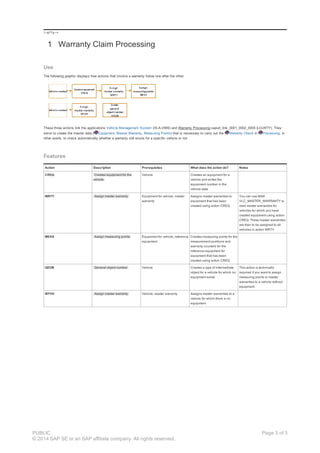
The following graphic displays how actions that involve a warranty follow one after the other.
These three actions link the applications Vehicle Management System (IS-A-VMS) and Warranty Processing sapurl_link_0001_0002_0005 (LO-WTY). They
serve to create the master data ( Equipment, Master Warranty, Measuring Points) that is necessary to carry out the Warranty Check in Processing, in
other words, to check automatically whether a warranty still exists for a specific vehicle or not.
Features
Action Description Prerequisites What does the action do? Notes
CREQ Creates equipment for the
vehicle
Vehicle Creates an equipment for a
vehicle and writes the
equipment number in the
vehicle data
WRTY Assign master warranty Equipment for vehicle, master
warranty
Assigns master warranties to
equipment that has been
created using action CREQ
You can use BAdI
VLC_MASTER_WARRANTY to
read master warranties for
vehicles for which you have
created equipment using action
CREQ. These master warranties
are then to be assigned to all
vehicles in action WRTY.
MEAS Assign measuring points Equipment for vehicle, reference
equipment
Creates measuring points for the
measurement positions and
warranty counters for the
reference equipment for
equipment that has been
created using action CREQ
GEOB General object number Vehicle Creates a type of intermediate
object for a vehicle for which no
equipment exists
This action is technically
required if you want to assign
measuring points or master
warranties to a vehicle without
equipment
WYVH Assign master warranty Vehicle, master warranty Assigns master warranties to a
vehicle for which there is no
equipment
PUBLIC
© 2014 SAP SE or an SAP affiliate company. All rights reserved.
Page 3 of 3

Waranty management 1

  • 1.
    Warranty Claim Processing PDFdownload from SAP Help Portal: http://help.sap.com/saphelp_di471/helpdata/en/e3/ef683c2fe8ff6ee10000000a114084/content.htm Created on August 20, 2015 The documentation may have changed since you downloaded the PDF. You can always find the latest information on SAP Help Portal. Note This PDF document contains the selected topic and its subtopics (max. 150) in the selected structure. Subtopics from other structures are not included. © 2015 SAP SE or an SAP affiliate company. All rights reserved. No part of this publication may be reproduced or transmitted in any form or for any purpose without the express permission of SAP SE. The information contained herein may be changed without prior notice. Some software products marketed by SAP SE and its distributors contain proprietary software components of other software vendors. National product specifications may vary. These materials are provided by SAP SE and its affiliated companies ("SAP Group") for informational purposes only, without representation or warranty of any kind, and SAP Group shall not be liable for errors or omissions with respect to the materials. The only warranties for SAP Group products and services are those that are set forth in the express warranty statements accompanying such products and services, if any. Nothing herein should be construed as constituting an additional warranty. SAP and other SAP products and services mentioned herein as well as their respective logos are trademarks or registered trademarks of SAP SE in Germany and other countries. Please see www.sap.com/corporate-en/legal/copyright/index.epx#trademark for additional trademark information and notices. Table of content PUBLIC © 2014 SAP SE or an SAP affiliate company. All rights reserved. Page 1 of 3
  • 2.
    Table of content 1Warranty Claim Processing PUBLIC © 2014 SAP SE or an SAP affiliate company. All rights reserved. Page 2 of 3
  • 3.
    !--a11y--> 1 Warranty ClaimProcessing Use The following graphic displays how actions that involve a warranty follow one after the other. These three actions link the applications Vehicle Management System (IS-A-VMS) and Warranty Processing sapurl_link_0001_0002_0005 (LO-WTY). They serve to create the master data ( Equipment, Master Warranty, Measuring Points) that is necessary to carry out the Warranty Check in Processing, in other words, to check automatically whether a warranty still exists for a specific vehicle or not. Features Action Description Prerequisites What does the action do? Notes CREQ Creates equipment for the vehicle Vehicle Creates an equipment for a vehicle and writes the equipment number in the vehicle data WRTY Assign master warranty Equipment for vehicle, master warranty Assigns master warranties to equipment that has been created using action CREQ You can use BAdI VLC_MASTER_WARRANTY to read master warranties for vehicles for which you have created equipment using action CREQ. These master warranties are then to be assigned to all vehicles in action WRTY. MEAS Assign measuring points Equipment for vehicle, reference equipment Creates measuring points for the measurement positions and warranty counters for the reference equipment for equipment that has been created using action CREQ GEOB General object number Vehicle Creates a type of intermediate object for a vehicle for which no equipment exists This action is technically required if you want to assign measuring points or master warranties to a vehicle without equipment WYVH Assign master warranty Vehicle, master warranty Assigns master warranties to a vehicle for which there is no equipment PUBLIC © 2014 SAP SE or an SAP affiliate company. All rights reserved. Page 3 of 3