Forward-Looking Statement
Statement under the Private Securities Litigation Reform Act of 1995:
This presentation may contain forward-looking statements that involve risks, uncertainties, and assumptions. If any such uncertainties materialize or if any
of the assumptions proves incorrect, the results of salesforce.com, inc. could differ materially from the results expressed or implied by the forward-looking
statements we make. All statements other than statements of historical fact could be deemed forward-looking, including any projections of product or
service availability, subscriber growth, earnings, revenues, or other financial items and any statements regarding strategies or plans of management for
future operations, statements of belief, any statements concerning new, planned, or upgraded services or technology developments and customer
contracts or use of our services.
The risks and uncertainties referred to above include – but are not limited to – risks associated with developing and delivering new functionality for our
service, new products and services, our new business model, our past operating losses, possible fluctuations in our operating results and rate of growth,
interruptions or delays in our Web hosting, breach of our security measures, the outcome of any litigation, risks associated with completed and any
possible mergers and acquisitions, the immature market in which we operate, our relatively limited operating history, our ability to expand, retain, and
motivate our employees and manage our growth, new releases of our service and successful customer deployment, our limited history reselling non-
salesforce.com products, and utilization and selling to larger enterprise customers. Further information on potential factors that could affect the financial
results of salesforce.com, inc. is included in our annual report on Form 10-K for the most recent fiscal year and in our quarterly report on Form 10-Q for
the most recent fiscal quarter. These documents and others containing important disclosures are available on the SEC Filings section of the Investor
Information section of our Web site.
Any unreleased services or features referenced in this or other presentations, press releases or public statements are not currently available and may not
be delivered on time or at all. Customers who purchase our services should make the purchase decisions based upon features that are currently
available. Salesforce.com, inc. assumes no obligation and does not intend to update these forward-looking statements.
Go Social!
Salesforce Developers
The video will be posted to YouTube & the
webinar recap page (same URL as registration).This webinar is being recorded!
@salesforcedevs
§ Don’t wait until the end to ask your question!
– Technical support will answer questions starting now.
§ Respect Q&A etiquette
– Please don’t repeat questions. The support team will work their way
down the queue.
§ Stick around for live Q&A at the end
– Speakers will tackle questions at the end, time-allowing.
§ Head to Developer Forums
– More questions? Visit developer.salesforce.com/forums
Have Questions?
Base Lightning Components
How can my app
look like this?
Can I use the
CSS in my app?
Can you make
it easier?
Base Lightning Component Goals
 Easy to adopt
• Patterned after HTML standards making it easy to adopt.
 Componentized
• Components are self contained and can be composed to build experience
components
 Minimal CSS
• Styled using the Salesforce Lightning Design System (SLDS), ensuring that your
components match the Lightning Experience and Salesforce1 Mobile seamlessly
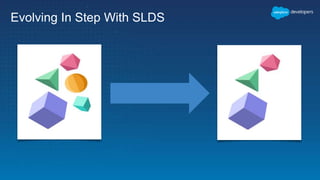
• They evolve with SLDS
 Accessible by design: Supporting WCAG 2.0 and Section 508 standards
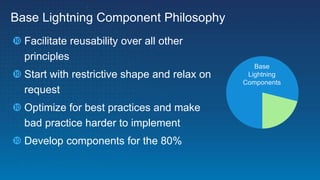
 Facilitate reusability over all other
principles
 Start with restrictive shape and relax on
request
 Optimize for best practices and make
bad practice harder to implement
 Develop components for the 80%
Base Lightning Component Philosophy
Base
Lightning
Components
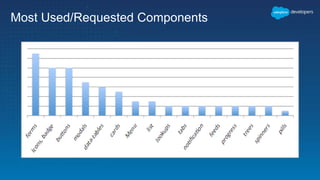
Most Used/Requested Components
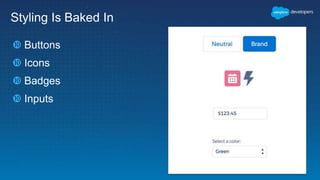
Styling Is Baked In
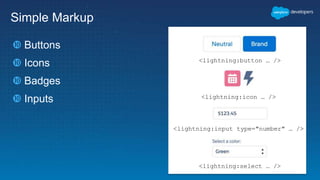
 Buttons
 Icons
 Badges
 Inputs
Simple Markup
 Buttons
 Icons
 Badges
 Inputs
<lightning:button … />
<lightning:icon … />
<lightning:input type="number" … />
<lightning:select … />
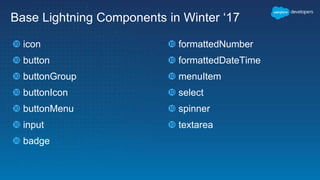
Base Lightning Components in Winter ‘17
 icon
 button
 buttonGroup
 buttonIcon
 buttonMenu
 input
 badge
 formattedNumber
 formattedDateTime
 menuItem
 select
 spinner
 textarea
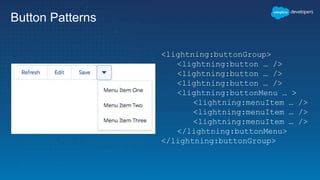
Button Patterns
<lightning:buttonGroup>
<lightning:button … />
<lightning:buttonMenu … >
<lightning:menuItem … />
</lightning:buttonMenu>
</lightning:buttonGroup>
Container and Layout Components
 Tabset & Tab
 Card
 Layout & layoutItem
<lightning:card
footer="Card Footer”
iconName="utility:location"
title=“My Card Header">
<aura:set attribute="actions">
<lightning:button label="New"/>
</aura:set>
Card Body (custom component)
</lightning:card>
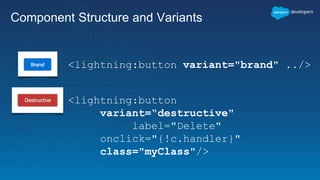
Component Structure and Variants
<lightning:button variant="brand" ../>
<lightning:button
variant=“destructive"
label="Delete"
onclick="{!c.handler}"
class="myClass"/>
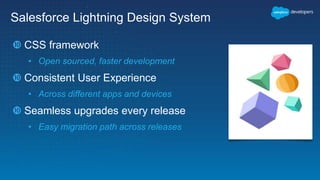
Salesforce Lightning Design System
 CSS framework
• Open sourced, faster development
 Consistent User Experience
• Across different apps and devices
 Seamless upgrades every release
• Easy migration path across releases
Evolving In Step With SLDS
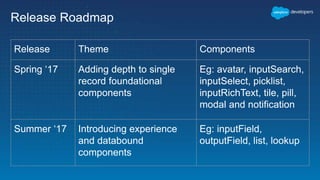
Release Roadmap
Release Theme Components
Spring ‘17 Adding depth to single
record foundational
components
Eg: avatar, inputSearch,
inputSelect, picklist,
inputRichText, tile, pill,
modal and notification
Summer ‘17 Introducing experience
and databound
components
Eg: inputField,
outputField, list, lookup
Demo
Christophe Coenraets
@ccoenraets
Lightning Data Service
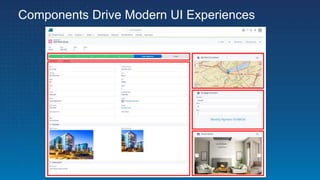
Components Drive Modern UI Experiences
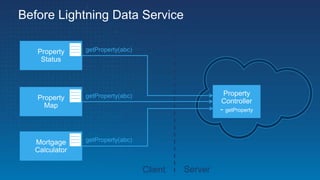
Before Lightning Data Service
Property
Status
Property
Map
Mortgage
Calculator
Property
Controller
- getProperty
getProperty(abc)
getProperty(abc)
getProperty(abc)
Client Server
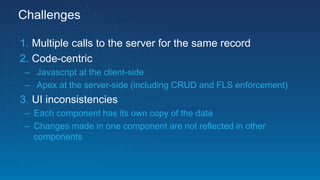
Challenges
1. Multiple calls to the server for the same record
2. Code-centric
– Javascript at the client-side
– Apex at the server-side (including CRUD and FLS enforcement)
3. UI inconsistencies
– Each component has its own copy of the data
– Changes made in one component are not reflected in other
components
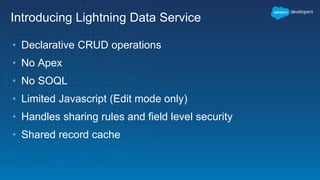
Introducing Lightning Data Service
• Declarative CRUD operations
• No Apex
• No SOQL
• Limited Javascript (Edit mode only)
• Handles sharing rules and field level security
• Shared record cache
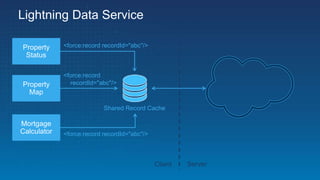
Lightning Data Service
Property
Status
Property
Map
Mortgage
Calculator
Client Server
Shared Record Cache
<force:record recordId="abc"/>
<force:record
recordId="abc"/>
<force:record recordId="abc"/>
Example
<aura:component implements="force:hasRecordId,flexipage:availableForAllPageTypes"
access="global">
<aura:attribute name="recordId" type="Id" />
<aura:attribute name="property" type="Property__c" />
<force:recordPreview recordId="{!v.recordId}"
targetRecord="{!v.property}"
fields="['Id', 'Status__c']" />
{!v.property.Status__c}
</aura:component>
Example 2: EDIT mode
<aura:component implements="force:hasRecordId,flexipage:availableForAllPageTypes"
access="global">
<aura:attribute name="recordId" type="Id" />
<aura:attribute name="property" type="Property__c" />
<force:recordPreview aura:id="propertyService"
recordId="{!v.recordId}"
targetRecord="{!v.property}"
fields="['Id', 'Status__c']"
mode="EDIT"/>
<ui:inputText label="Status:" value="{! v.property.Status__c}"/>
<lightning:button onclick="{!c.onSaveClicked}">Save</lightning:button>
</aura:component>
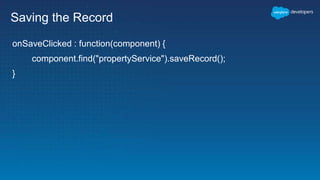
Saving the Record
onSaveClicked : function(component) {
component.find("propertyService").saveRecord();
}
Synching Records in Edit Mode
<aura:component implements="force:hasRecordId,flexipage:availableForAllPageTypes"
access="global">
<aura:attribute name="recordId" type="Id" />
<aura:attribute name="property" type="Property__c" />
<force:recordPreview aura:id="propertyService"
recordId="{!v.recordId}"
targetRecord="{!v.property}"
fields="['Id', 'Status__c']"
mode="EDIT"
recordUpdated="{!c.onRecordUpdated}"/>
<ui:inputText label="Status:" value="{! v.property.Status__c}"/>
<lightning:button onclick="{!c.onSaveClicked}">Save</lightning:button>
</aura:component>
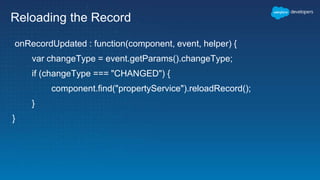
Reloading the Record
onRecordUpdated : function(component, event, helper) {
var changeType = event.getParams().changeType;
if (changeType === "CHANGED") {
component.find("propertyService").reloadRecord();
}
}
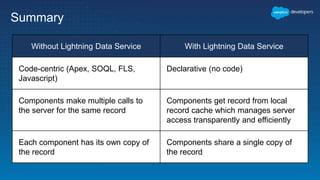
Summary
Without Lightning Data Service With Lightning Data Service
Code-centric (Apex, SOQL, FLS,
Javascript)
Declarative (no code)
Components make multiple calls to
the server for the same record
Components get record from local
record cache which manages server
access transparently and efficiently
Each component has its own copy of
the record
Components share a single copy of
the record
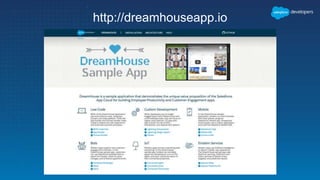
http://dreamhouseapp.io
Survey
Your feedback is crucial to the success
of our webinar programs. Thank you!
http://bit.ly/2fcaY5s
A copy of the webinar and the survey will
be emailed to all who registered.
Q & A
Also try our discussion boards
http://bit.ly/discussionboards
Try Trailhead: trailhead.salesforce.com
Join the conversation: @salesforcedevs
Thank You

Building apps faster with lightning and winter '17

  • 2.
    Forward-Looking Statement Statement underthe Private Securities Litigation Reform Act of 1995: This presentation may contain forward-looking statements that involve risks, uncertainties, and assumptions. If any such uncertainties materialize or if any of the assumptions proves incorrect, the results of salesforce.com, inc. could differ materially from the results expressed or implied by the forward-looking statements we make. All statements other than statements of historical fact could be deemed forward-looking, including any projections of product or service availability, subscriber growth, earnings, revenues, or other financial items and any statements regarding strategies or plans of management for future operations, statements of belief, any statements concerning new, planned, or upgraded services or technology developments and customer contracts or use of our services. The risks and uncertainties referred to above include – but are not limited to – risks associated with developing and delivering new functionality for our service, new products and services, our new business model, our past operating losses, possible fluctuations in our operating results and rate of growth, interruptions or delays in our Web hosting, breach of our security measures, the outcome of any litigation, risks associated with completed and any possible mergers and acquisitions, the immature market in which we operate, our relatively limited operating history, our ability to expand, retain, and motivate our employees and manage our growth, new releases of our service and successful customer deployment, our limited history reselling non- salesforce.com products, and utilization and selling to larger enterprise customers. Further information on potential factors that could affect the financial results of salesforce.com, inc. is included in our annual report on Form 10-K for the most recent fiscal year and in our quarterly report on Form 10-Q for the most recent fiscal quarter. These documents and others containing important disclosures are available on the SEC Filings section of the Investor Information section of our Web site. Any unreleased services or features referenced in this or other presentations, press releases or public statements are not currently available and may not be delivered on time or at all. Customers who purchase our services should make the purchase decisions based upon features that are currently available. Salesforce.com, inc. assumes no obligation and does not intend to update these forward-looking statements.
  • 3.
    Go Social! Salesforce Developers SalesforceDevelopers Salesforce Developers The video will be posted to YouTube & the webinar recap page (same URL as registration).This webinar is being recorded! @salesforcedevs
  • 4.
    § Don’t waituntil the end to ask your question! – Technical support will answer questions starting now. § Respect Q&A etiquette – Please don’t repeat questions. The support team will work their way down the queue. § Stick around for live Q&A at the end – Speakers will tackle questions at the end, time-allowing. § Head to Developer Forums – More questions? Visit developer.salesforce.com/forums Have Questions?
  • 5.
  • 6.
    How can myapp look like this?
  • 7.
    Can I usethe CSS in my app?
  • 8.
  • 9.
    Base Lightning ComponentGoals  Easy to adopt • Patterned after HTML standards making it easy to adopt.  Componentized • Components are self contained and can be composed to build experience components  Minimal CSS • Styled using the Salesforce Lightning Design System (SLDS), ensuring that your components match the Lightning Experience and Salesforce1 Mobile seamlessly • They evolve with SLDS  Accessible by design: Supporting WCAG 2.0 and Section 508 standards
  • 10.
     Facilitate reusabilityover all other principles  Start with restrictive shape and relax on request  Optimize for best practices and make bad practice harder to implement  Develop components for the 80% Base Lightning Component Philosophy Base Lightning Components
  • 11.
  • 12.
    Styling Is BakedIn  Buttons  Icons  Badges  Inputs
  • 13.
    Simple Markup  Buttons Icons  Badges  Inputs <lightning:button … /> <lightning:icon … /> <lightning:input type="number" … /> <lightning:select … />
  • 14.
    Base Lightning Componentsin Winter ‘17  icon  button  buttonGroup  buttonIcon  buttonMenu  input  badge  formattedNumber  formattedDateTime  menuItem  select  spinner  textarea
  • 15.
    Button Patterns <lightning:buttonGroup> <lightning:button …/> <lightning:button … /> <lightning:button … /> <lightning:buttonMenu … > <lightning:menuItem … /> <lightning:menuItem … /> <lightning:menuItem … /> </lightning:buttonMenu> </lightning:buttonGroup>
  • 16.
    Container and LayoutComponents  Tabset & Tab  Card  Layout & layoutItem <lightning:card footer="Card Footer” iconName="utility:location" title=“My Card Header"> <aura:set attribute="actions"> <lightning:button label="New"/> </aura:set> Card Body (custom component) </lightning:card>
  • 17.
    Component Structure andVariants <lightning:button variant="brand" ../> <lightning:button variant=“destructive" label="Delete" onclick="{!c.handler}" class="myClass"/>
  • 18.
    Salesforce Lightning DesignSystem  CSS framework • Open sourced, faster development  Consistent User Experience • Across different apps and devices  Seamless upgrades every release • Easy migration path across releases
  • 19.
  • 20.
    Release Roadmap Release ThemeComponents Spring ‘17 Adding depth to single record foundational components Eg: avatar, inputSearch, inputSelect, picklist, inputRichText, tile, pill, modal and notification Summer ‘17 Introducing experience and databound components Eg: inputField, outputField, list, lookup
  • 21.
  • 22.
  • 23.
  • 24.
    Before Lightning DataService Property Status Property Map Mortgage Calculator Property Controller - getProperty getProperty(abc) getProperty(abc) getProperty(abc) Client Server
  • 25.
    Challenges 1. Multiple callsto the server for the same record 2. Code-centric – Javascript at the client-side – Apex at the server-side (including CRUD and FLS enforcement) 3. UI inconsistencies – Each component has its own copy of the data – Changes made in one component are not reflected in other components
  • 26.
    Introducing Lightning DataService • Declarative CRUD operations • No Apex • No SOQL • Limited Javascript (Edit mode only) • Handles sharing rules and field level security • Shared record cache
  • 27.
    Lightning Data Service Property Status Property Map Mortgage Calculator ClientServer Shared Record Cache <force:record recordId="abc"/> <force:record recordId="abc"/> <force:record recordId="abc"/>
  • 28.
    Example <aura:component implements="force:hasRecordId,flexipage:availableForAllPageTypes" access="global"> <aura:attribute name="recordId"type="Id" /> <aura:attribute name="property" type="Property__c" /> <force:recordPreview recordId="{!v.recordId}" targetRecord="{!v.property}" fields="['Id', 'Status__c']" /> {!v.property.Status__c} </aura:component>
  • 29.
    Example 2: EDITmode <aura:component implements="force:hasRecordId,flexipage:availableForAllPageTypes" access="global"> <aura:attribute name="recordId" type="Id" /> <aura:attribute name="property" type="Property__c" /> <force:recordPreview aura:id="propertyService" recordId="{!v.recordId}" targetRecord="{!v.property}" fields="['Id', 'Status__c']" mode="EDIT"/> <ui:inputText label="Status:" value="{! v.property.Status__c}"/> <lightning:button onclick="{!c.onSaveClicked}">Save</lightning:button> </aura:component>
  • 30.
    Saving the Record onSaveClicked: function(component) { component.find("propertyService").saveRecord(); }
  • 31.
    Synching Records inEdit Mode <aura:component implements="force:hasRecordId,flexipage:availableForAllPageTypes" access="global"> <aura:attribute name="recordId" type="Id" /> <aura:attribute name="property" type="Property__c" /> <force:recordPreview aura:id="propertyService" recordId="{!v.recordId}" targetRecord="{!v.property}" fields="['Id', 'Status__c']" mode="EDIT" recordUpdated="{!c.onRecordUpdated}"/> <ui:inputText label="Status:" value="{! v.property.Status__c}"/> <lightning:button onclick="{!c.onSaveClicked}">Save</lightning:button> </aura:component>
  • 32.
    Reloading the Record onRecordUpdated: function(component, event, helper) { var changeType = event.getParams().changeType; if (changeType === "CHANGED") { component.find("propertyService").reloadRecord(); } }
  • 33.
    Summary Without Lightning DataService With Lightning Data Service Code-centric (Apex, SOQL, FLS, Javascript) Declarative (no code) Components make multiple calls to the server for the same record Components get record from local record cache which manages server access transparently and efficiently Each component has its own copy of the record Components share a single copy of the record
  • 34.
  • 35.
    Survey Your feedback iscrucial to the success of our webinar programs. Thank you! http://bit.ly/2fcaY5s A copy of the webinar and the survey will be emailed to all who registered.
  • 36.
    Q & A Alsotry our discussion boards http://bit.ly/discussionboards Try Trailhead: trailhead.salesforce.com Join the conversation: @salesforcedevs
  • 37.