Mix Planning
PDF download from SAP Help Portal:
http://help.sap.com/saphelp_erp60_sp/helpdata/en/58/72ce53118d4308e10000000a174cb4/content.htm
Created on December 24, 2015
The documentation may have changed since you downloaded the PDF. You can always find the latest information on SAP Help
Portal.
Note
This PDF document contains the selected topic and its subtopics (max. 150) in the selected structure. Subtopics from other structures are not included.
© 2015 SAP SE or an SAP affiliate company. All rights reserved. No part of this publication may be reproduced or transmitted in any form or for any purpose
without the express permission of SAP SE. The information contained herein may be changed without prior notice. Some software products marketed by SAP
SE and its distributors contain proprietary software components of other software vendors. National product specifications may vary. These materials are
provided by SAP SE and its affiliated companies ("SAP Group") for informational purposes only, without representation or warranty of any kind, and SAP
Group shall not be liable for errors or omissions with respect to the materials. The only warranties for SAP Group products and services are those that are set
forth in the express warranty statements accompanying such products and services, if any. Nothing herein should be construed as constituting an additional
warranty. SAP and other SAP products and services mentioned herein as well as their respective logos are trademarks or registered trademarks of SAP SE in
Germany and other countries. Please see www.sap.com/corporate-en/legal/copyright/index.epx#trademark for additional trademark information and notices.
Table of content
PUBLIC
© 2014 SAP SE or an SAP affiliate company. All rights reserved.
Page 1 of 9
Table of content
1 Mix Planning
1.1 Assignment of Inserts to Contracts
1.1.1 Customer Grouping
1.1.2 Insert Planning
1.1.3 Assignment of Inserts from AI Orders
1.1.4 Copying of Insert Booking
1.2 Issue Mix
1.2.1 Issue Mix Creation
PUBLIC
© 2014 SAP SE or an SAP affiliate company. All rights reserved.
Page 2 of 9
1 Mix Planning
Purpose
You can use the mix planning functions to plan and create mixes for media issues.
An issue mix can include the following inserts, which are delivered together with the media issue:
Ad inserts (for example ad pre-prints, CDs or product samples), from Advertising Management ad insert orders, if applicable
Media issues, for example regular inserts or components of a media product
Other materials
Process Flow
Mix planning is a preparatory step to order generation in Media Product Sales and Distribution or Series Sales and Distribution. The procedure for mix planning
is as follows:
1. Assignment of inserts to contracts
You can use the following functions to do this:
Insert planning (dialog function for assigning inserts manually)
Assignment of inserts from ad insert orders in Advertising Management (mass processing function)
2. Creation of issue mixes
This function creates issue mixes (alternative bills of material for the media issue) based on the planned insert assignment and assigns them to the
contracts.
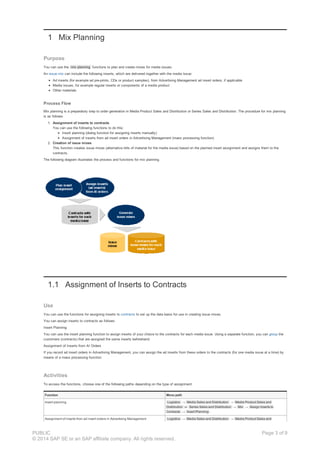
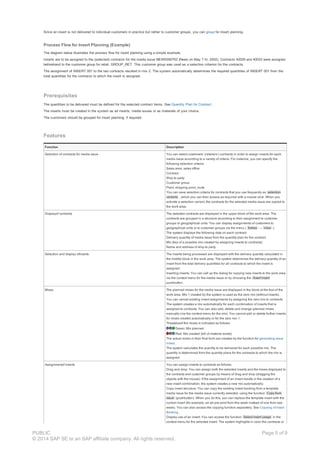
The following diagram illustrates the process and functions for mix planning.
1.1 Assignment of Inserts to Contracts
Use
You can use the functions for assigning inserts to contracts to set up the data basis for use in creating issue mixes.
You can assign inserts to contracts as follows:
Insert Planning
You can use the insert planning function to assign inserts of your choice to the contracts for each media issue. Using a separate function, you can group the
customers (contracts) that are assigned the same inserts beforehand.
Assignment of Inserts from AI Orders
If you record ad insert orders in Advertising Management, you can assign the ad inserts from these orders to the contracts (for one media issue at a time) by
means of a mass processing function.
Activities
To access the functions, choose one of the following paths depending on the type of assignment:
Function Menu path
Insert planning Logistics → Media Sales and Distribution → Media Product Sales and
Distribution or Series Sales and Distribution → Mix → Assign Inserts to
Contracts → Insert Planning .
Assignment of inserts from ad insert orders in Advertising Management Logistics → Media Sales and Distribution → Media Product Sales and
PUBLIC
© 2014 SAP SE or an SAP affiliate company. All rights reserved.
Page 3 of 9
Distribution or Series Sales and Distribution → Mix → Assign Inserts to
Contracts → M/AM Interface → Create Assignment from Ad Insert Orders
1.1.1 Customer Grouping
Use
The insert planning function allows you to assign inserts to customers; that is to say, to your customers’ (retailers’) contracts .
Since in practice an insert is not delivered to individual customers, but rather to customer groups , you can group your customers in customer groups and
customer group hierarchies before executing insert planning.
You define the customer groups and customer group hierarchies in Customizing. In the function for grouping customers, you can assign your customers to
groups by drag and drop (dragging the objects with the mouse).
Integration
You can select contracts by customer groups for insert planning .
Prerequisites
The following settings must be maintained in Customizing :
Customer groups for insert planning
You must create customer groups so that you can group your customers according to certain criteria for insert planning. Possible criteria for grouping
customers include:
Geographical area, for example, all customers in the North of the country
Nielsen area
Non- geographical criteria, for example all hardware stores and garden centers
Customer groups to which inserts are assigned are marked as basic customer groups. Customer groups that are not marked can only be used as
higher level customer groups to build hierarchies.
Customer group hierarchies for insert planning
Customer groups that belong together can be grouped in hierarchies, so that insert assignments can be made for the entire hierarchy.
For example, the customer group hierarchy NORTH covers all the customer groups for cities in the North of the country.
Features
The function for grouping customers for insert planning has the following features:
Selection of customers whose customer group assignment you want to maintain, according to the following criteria:
Sales organization, distribution channel, product division
Customer
(Enter an interval of customers whose assignments to customer groups you want to maintain.)
BP for customer group
In this field, you enter the customer group whose customer assignment you want to maintain.
Display of a structure containing all customer groups or customer group hierarchies
The structure displays the customers according to your selection criteria.
The top node in the structure ( No assignment ) contains all customers that are not yet assigned to a customer group.
Editing of customer-customer group assignment for insert planning
To assign a customer to a customer group for insert planning, drag the customer to the desired target structure by means of drag and drop.
Activities
To access the function for grouping customers for insert planning, choose Logistics Media Sales and Distribution Media Product Sales and
Distribution or Series Sales and Distribution Mix Assign Inserts to Contracts Assign Customers to Insert Groups.
1.1.2 Insert Planning
Use
You can use this function to plan the assignment of inserts (ad inserts, media issues, or other materials) to your customers’ contracts for each media issue.
The insert assignments are only available for operative processing when the issue mixes are created .
Customer Grouping
PUBLIC
© 2014 SAP SE or an SAP affiliate company. All rights reserved.
Page 4 of 9
Since an insert is not delivered to individual customers in practice but rather to customer groups, you can group for insert planning.
Process Flow for Insert Planning (Example)
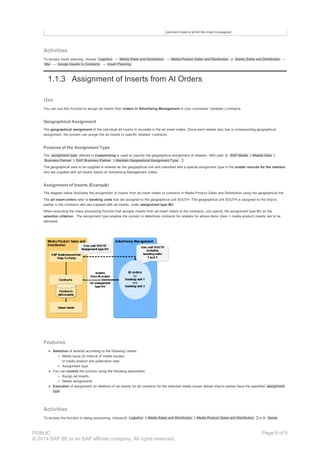
The diagram below illustrates the process flow for insert planning using a simple example.
Inserts are to be assigned to the (selected) contracts for the media issue NEWS050702 (News on May 7 th, 2002). Contracts 40029 and 40033 were assigned
beforehand to the customer group for retail, GROUP_RET. This customer group was used as a selection criterion for the contracts.
The assignment of INSERT 001 to the two contracts resulted in mix 2. The system automatically determines the required quantities of INSERT 001 from the
total quantities for the contracts to which the insert is assigned.
Prerequisites
The quantities to be delivered must be defined for the selected contract items. See Quantity Plan for Contract .
The inserts must be created in the system as ad inserts, media issues or as materials of your choice.
The customers should be grouped for insert planning, if required.
Features
Function Description
Selection of contracts for media issue You can select customers’ (retailers’) contracts in order to assign inserts for each
media issue according to a variety of criteria. For instance, you can specify the
following selection criteria:
Sales area, sales office
Contract
Ship-to party
Customer group
Plant, shipping point, route
You can save selection criteria for contracts that you use frequently as selection
variants , which you can then access as required with a mouse click. When you
activate a selection variant, the contracts for the selected media issue are copied to
the work area.
Displayof contracts The selected contracts are displayed in the upper block of the work area. The
contracts are grouped in a structure according to their assignment to customer
groups or geographical units. You can display assignments of customers to
geographical units or to customer groups via the menu ( Extras → View ).
The system displays the following data on each contract:
Delivery quantity of media issue from the quantity plan for the contract
Mix (key of a possible mix created by assigning inserts to contracts)
Name and address of ship-to party
Selection and display ofinserts The inserts being processed are displayed with the delivery quantity calculated in
the middle block in the work area. The system determines the delivery quantity of an
insert from the total delivery quantities for all contracts to which the insert is
assigned.
Inserting inserts: You can call up the dialog for copying new inserts to the work area
via the context menu for the media issue or by choosing the Insert insert
pushbutton.
Mixes The planned mixes for the media issue are displayed in the block at the foot of the
work area. Mix 1 created by the system is used as the zero mix (without inserts).
You can cancel existing insert assignments by assigning the zero mix to contracts.
The system creates a mix automatically for each combination of inserts that is
assigned to contracts. You can also add, delete and change planned mixes
manually (via the context menu for the mix). You cannot add or delete further inserts
for mixes created automatically or for the zero mix 1.
Thestatusof the mixes is indicated as follows:
Green: Mix planned
Red: Mix created (bill of material exists)
The actual mixes in their final form are created by the function for generating issue
mixes .
The system calculates the quantity to be delivered for each possible mix. The
quantity is determined from the quantity plans for the contracts to which the mix is
assigned.
Assignmentof inserts You can assign inserts to contracts as follows:
Drag and drop: You can assign both the selected inserts and the mixes displayed to
the contracts and customer groups by means of drag and drop (dragging the
objects with the mouse). If the assignment of an insert results in the creation of a
new insert combination, the system creates a new mix automatically.
Copy insert structure: You can copy the existing insert booking from a template
media issue for the media issue currently selected, using the function Copy from
issue (pushbutton). When you do this, you can replace the template insert with the
current insert (for example, an ad pre-print from this week instead of one from last
week). You can also access the copying function separately. See Copying of Insert
Booking .
Display use of an insert: You can access the function Select insert usage in the
context menu for the selected insert. The system highlights in color the contracts or
PUBLIC
© 2014 SAP SE or an SAP affiliate company. All rights reserved.
Page 5 of 9
planned mixes to which the insert is assigned.
Activities
To access insert planning, choose Logistics → Media Sales and Distribution → Media Product Sales and Distribution or Series Sales and Distribution →
Mix → Assign Inserts to Contracts → Insert Planning.
1.1.3 Assignment of Inserts from AI Orders
Use
You can use this function to assign ad inserts from orders in Advertising Management to your customers’ (retailers’) contracts.
Geographical Assignment
The geographical assignment of the individual ad inserts is recorded in the ad insert orders. Since each retailer also has a corresponding geographical
assignment, the system can assign the ad inserts to specific retailers’ contracts.
Purpose of the Assignment Type
The assignment type defined in Customizing is used to classify the geographical assignment of retailers. IMG path: SAP Media Master Data
Business Partner SAP Business Partner Maintain Geographical Assignment Type.
The geographical area to be supplied is entered as the geographical unit and classified with a special assignment type in the master records for the retailers
who are supplied with ad inserts based on Advertising Management orders.
Assignment of Inserts (Example)
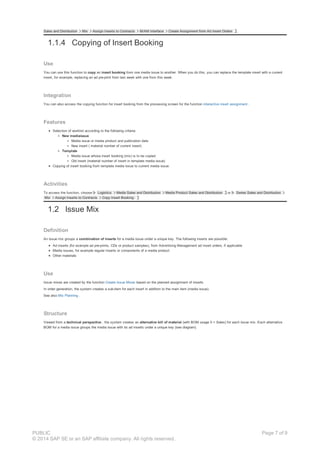
The diagram below illustrates the assignment of inserts from ad insert orders to contracts in Media Product Sales and Distribution using the geographical link.
The ad insert orders refer to booking units that are assigned to the geographical unit SOUTH. The geographical unit SOUTH is assigned to the ship-to
parties in the contracts who are supplied with ad inserts, under assignment type BU .
When executing the mass processing function that assigns inserts from ad insert orders to the contracts, you specify the assignment type BU as the
selection criterion . The assignment type enables the system to determine contracts for retailers for whose items (item = media product) inserts are to be
delivered.
Features
Selection of worklist according to the following criteria:
Media issue (or interval of media issues)
or media product and publication date
Assignment type
You can control the function using the following parameters:
Assign ad inserts
Delete assignments
Execution of assignment (or deletion) of ad inserts for all contracts for the selected media issues whose ship-to parties have the specified assignment
type
Activities
To access the function in dialog processing, choose Logistics Media Sales and Distribution Media Product Sales and Distribution or Series
PUBLIC
© 2014 SAP SE or an SAP affiliate company. All rights reserved.
Page 6 of 9
Sales and Distribution Mix Assign Inserts to Contracts M/AM Interface Create Assignment from Ad Insert Orders .
1.1.4 Copying of Insert Booking
Use
You can use this function to copy an insert booking from one media issue to another. When you do this, you can replace the template insert with a current
insert, for example, replacing an ad pre-print from last week with one from this week.
Integration
You can also access the copying function for insert booking from the processing screen for the function interactive insert assignment .
Features
Selection of worklist according to the following criteria:
New mediaissue
Media issue or media product and publication date
New insert ( material number of current insert)
Template
Media issue whose insert booking (mix) is to be copied
Old insert (material number of insert in template media issue)
Copying of insert booking from template media issue to current media issue.
Activities
To access the function, choose Logistics Media Sales and Distribution Media Product Sales and Distribution or Series Sales and Distribution
Mix Assign Inserts to Contracts Copy Insert Booking.
1.2 Issue Mix
Definition
An issue mix groups a combination of inserts for a media issue under a unique key. The following inserts are possible:
Ad inserts (for example ad pre-prints, CDs or product samples), from Advertising Management ad insert orders, if applicable
Media issues, for example regular inserts or components of a media product
Other materials
Use
Issue mixes are created by the function Create Issue Mixes based on the planned assignment of inserts.
In order generation, the system creates a sub-item for each insert in addition to the main item (media issue).
See also Mix Planning .
Structure
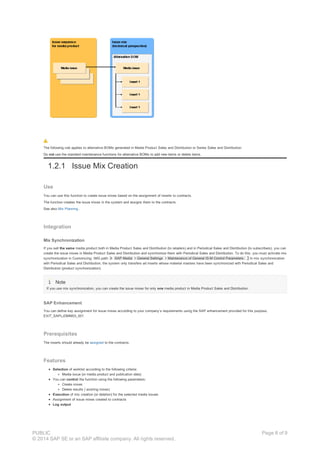
Viewed from a technical perspective , the system creates an alternative bill of material (with BOM usage 5 = Sales) for each issue mix. Each alternative
BOM for a media issue groups the media issue with its ad inserts under a unique key (see diagram).
PUBLIC
© 2014 SAP SE or an SAP affiliate company. All rights reserved.
Page 7 of 9
The following rule applies to alternative BOMs generated in Media Product Sales and Distribution or Series Sales and Distribution:
Do not use the standard maintenance functions for alternative BOMs to add new items or delete items.
1.2.1 Issue Mix Creation
Use
You can use this function to create issue mixes based on the assignment of inserts to contracts.
The function creates the issue mixes in the system and assigns them to the contracts.
See also Mix Planning .
Integration
Mix Synchronization
If you sell the same media product both in Media Product Sales and Distribution (to retailers) and in Periodical Sales and Distribution (to subscribers), you can
create the issue mixes in Media Product Sales and Distribution and synchronize them with Periodical Sales and Distribution. To do this, you must activate mix
synchronization in Customizing. IMG path: SAP Media General Settings Maintenance of General IS-M Control Parameters. In mix synchronization
with Periodical Sales and Distribution, the system only transfers ad inserts whose material masters have been synchronized with Periodical Sales and
Distribution (product synchronization).
Note
If you use mix synchronization, you can create the issue mixes for only one media product in Media Product Sales and Distribution.
SAP Enhancement
You can define key assignment for issue mixes according to your company’s requirements using the SAP enhancement provided for this purpose,
EXIT_SAPLJDMM03_001.
Prerequisites
The inserts should already be assigned to the contracts.
Features
Selection of worklist according to the following criteria:
Media issue (or media product and publication date)
You can control the function using the following parameters:
Create mixes
Delete results ( existing mixes)
Execution of mix creation (or deletion) for the selected media issues
Assignment of issue mixes created to contracts
Log output
PUBLIC
© 2014 SAP SE or an SAP affiliate company. All rights reserved.
Page 8 of 9
Activities
To access the function for generating issue mixes , choose Logistics Media Sales and Distribution Media Product Sales and Distribution or
Series Sales and Distribution Mix Mixes for Media Issues Create Mixes.
To access the logs of mix creation, choose: Logistics Media Sales and Distribution Media Product Sales and Distribution or Series Sales and
Distribution Mix Mixes for Media Issues Logs for Mix Creation .
PUBLIC
© 2014 SAP SE or an SAP affiliate company. All rights reserved.
Page 9 of 9

Mix planning

  • 1.
    Mix Planning PDF downloadfrom SAP Help Portal: http://help.sap.com/saphelp_erp60_sp/helpdata/en/58/72ce53118d4308e10000000a174cb4/content.htm Created on December 24, 2015 The documentation may have changed since you downloaded the PDF. You can always find the latest information on SAP Help Portal. Note This PDF document contains the selected topic and its subtopics (max. 150) in the selected structure. Subtopics from other structures are not included. © 2015 SAP SE or an SAP affiliate company. All rights reserved. No part of this publication may be reproduced or transmitted in any form or for any purpose without the express permission of SAP SE. The information contained herein may be changed without prior notice. Some software products marketed by SAP SE and its distributors contain proprietary software components of other software vendors. National product specifications may vary. These materials are provided by SAP SE and its affiliated companies ("SAP Group") for informational purposes only, without representation or warranty of any kind, and SAP Group shall not be liable for errors or omissions with respect to the materials. The only warranties for SAP Group products and services are those that are set forth in the express warranty statements accompanying such products and services, if any. Nothing herein should be construed as constituting an additional warranty. SAP and other SAP products and services mentioned herein as well as their respective logos are trademarks or registered trademarks of SAP SE in Germany and other countries. Please see www.sap.com/corporate-en/legal/copyright/index.epx#trademark for additional trademark information and notices. Table of content PUBLIC © 2014 SAP SE or an SAP affiliate company. All rights reserved. Page 1 of 9
  • 2.
    Table of content 1Mix Planning 1.1 Assignment of Inserts to Contracts 1.1.1 Customer Grouping 1.1.2 Insert Planning 1.1.3 Assignment of Inserts from AI Orders 1.1.4 Copying of Insert Booking 1.2 Issue Mix 1.2.1 Issue Mix Creation PUBLIC © 2014 SAP SE or an SAP affiliate company. All rights reserved. Page 2 of 9
  • 3.
    1 Mix Planning Purpose Youcan use the mix planning functions to plan and create mixes for media issues. An issue mix can include the following inserts, which are delivered together with the media issue: Ad inserts (for example ad pre-prints, CDs or product samples), from Advertising Management ad insert orders, if applicable Media issues, for example regular inserts or components of a media product Other materials Process Flow Mix planning is a preparatory step to order generation in Media Product Sales and Distribution or Series Sales and Distribution. The procedure for mix planning is as follows: 1. Assignment of inserts to contracts You can use the following functions to do this: Insert planning (dialog function for assigning inserts manually) Assignment of inserts from ad insert orders in Advertising Management (mass processing function) 2. Creation of issue mixes This function creates issue mixes (alternative bills of material for the media issue) based on the planned insert assignment and assigns them to the contracts. The following diagram illustrates the process and functions for mix planning. 1.1 Assignment of Inserts to Contracts Use You can use the functions for assigning inserts to contracts to set up the data basis for use in creating issue mixes. You can assign inserts to contracts as follows: Insert Planning You can use the insert planning function to assign inserts of your choice to the contracts for each media issue. Using a separate function, you can group the customers (contracts) that are assigned the same inserts beforehand. Assignment of Inserts from AI Orders If you record ad insert orders in Advertising Management, you can assign the ad inserts from these orders to the contracts (for one media issue at a time) by means of a mass processing function. Activities To access the functions, choose one of the following paths depending on the type of assignment: Function Menu path Insert planning Logistics → Media Sales and Distribution → Media Product Sales and Distribution or Series Sales and Distribution → Mix → Assign Inserts to Contracts → Insert Planning . Assignment of inserts from ad insert orders in Advertising Management Logistics → Media Sales and Distribution → Media Product Sales and PUBLIC © 2014 SAP SE or an SAP affiliate company. All rights reserved. Page 3 of 9
  • 4.
    Distribution or SeriesSales and Distribution → Mix → Assign Inserts to Contracts → M/AM Interface → Create Assignment from Ad Insert Orders 1.1.1 Customer Grouping Use The insert planning function allows you to assign inserts to customers; that is to say, to your customers’ (retailers’) contracts . Since in practice an insert is not delivered to individual customers, but rather to customer groups , you can group your customers in customer groups and customer group hierarchies before executing insert planning. You define the customer groups and customer group hierarchies in Customizing. In the function for grouping customers, you can assign your customers to groups by drag and drop (dragging the objects with the mouse). Integration You can select contracts by customer groups for insert planning . Prerequisites The following settings must be maintained in Customizing : Customer groups for insert planning You must create customer groups so that you can group your customers according to certain criteria for insert planning. Possible criteria for grouping customers include: Geographical area, for example, all customers in the North of the country Nielsen area Non- geographical criteria, for example all hardware stores and garden centers Customer groups to which inserts are assigned are marked as basic customer groups. Customer groups that are not marked can only be used as higher level customer groups to build hierarchies. Customer group hierarchies for insert planning Customer groups that belong together can be grouped in hierarchies, so that insert assignments can be made for the entire hierarchy. For example, the customer group hierarchy NORTH covers all the customer groups for cities in the North of the country. Features The function for grouping customers for insert planning has the following features: Selection of customers whose customer group assignment you want to maintain, according to the following criteria: Sales organization, distribution channel, product division Customer (Enter an interval of customers whose assignments to customer groups you want to maintain.) BP for customer group In this field, you enter the customer group whose customer assignment you want to maintain. Display of a structure containing all customer groups or customer group hierarchies The structure displays the customers according to your selection criteria. The top node in the structure ( No assignment ) contains all customers that are not yet assigned to a customer group. Editing of customer-customer group assignment for insert planning To assign a customer to a customer group for insert planning, drag the customer to the desired target structure by means of drag and drop. Activities To access the function for grouping customers for insert planning, choose Logistics Media Sales and Distribution Media Product Sales and Distribution or Series Sales and Distribution Mix Assign Inserts to Contracts Assign Customers to Insert Groups. 1.1.2 Insert Planning Use You can use this function to plan the assignment of inserts (ad inserts, media issues, or other materials) to your customers’ contracts for each media issue. The insert assignments are only available for operative processing when the issue mixes are created . Customer Grouping PUBLIC © 2014 SAP SE or an SAP affiliate company. All rights reserved. Page 4 of 9
  • 5.
    Since an insertis not delivered to individual customers in practice but rather to customer groups, you can group for insert planning. Process Flow for Insert Planning (Example) The diagram below illustrates the process flow for insert planning using a simple example. Inserts are to be assigned to the (selected) contracts for the media issue NEWS050702 (News on May 7 th, 2002). Contracts 40029 and 40033 were assigned beforehand to the customer group for retail, GROUP_RET. This customer group was used as a selection criterion for the contracts. The assignment of INSERT 001 to the two contracts resulted in mix 2. The system automatically determines the required quantities of INSERT 001 from the total quantities for the contracts to which the insert is assigned. Prerequisites The quantities to be delivered must be defined for the selected contract items. See Quantity Plan for Contract . The inserts must be created in the system as ad inserts, media issues or as materials of your choice. The customers should be grouped for insert planning, if required. Features Function Description Selection of contracts for media issue You can select customers’ (retailers’) contracts in order to assign inserts for each media issue according to a variety of criteria. For instance, you can specify the following selection criteria: Sales area, sales office Contract Ship-to party Customer group Plant, shipping point, route You can save selection criteria for contracts that you use frequently as selection variants , which you can then access as required with a mouse click. When you activate a selection variant, the contracts for the selected media issue are copied to the work area. Displayof contracts The selected contracts are displayed in the upper block of the work area. The contracts are grouped in a structure according to their assignment to customer groups or geographical units. You can display assignments of customers to geographical units or to customer groups via the menu ( Extras → View ). The system displays the following data on each contract: Delivery quantity of media issue from the quantity plan for the contract Mix (key of a possible mix created by assigning inserts to contracts) Name and address of ship-to party Selection and display ofinserts The inserts being processed are displayed with the delivery quantity calculated in the middle block in the work area. The system determines the delivery quantity of an insert from the total delivery quantities for all contracts to which the insert is assigned. Inserting inserts: You can call up the dialog for copying new inserts to the work area via the context menu for the media issue or by choosing the Insert insert pushbutton. Mixes The planned mixes for the media issue are displayed in the block at the foot of the work area. Mix 1 created by the system is used as the zero mix (without inserts). You can cancel existing insert assignments by assigning the zero mix to contracts. The system creates a mix automatically for each combination of inserts that is assigned to contracts. You can also add, delete and change planned mixes manually (via the context menu for the mix). You cannot add or delete further inserts for mixes created automatically or for the zero mix 1. Thestatusof the mixes is indicated as follows: Green: Mix planned Red: Mix created (bill of material exists) The actual mixes in their final form are created by the function for generating issue mixes . The system calculates the quantity to be delivered for each possible mix. The quantity is determined from the quantity plans for the contracts to which the mix is assigned. Assignmentof inserts You can assign inserts to contracts as follows: Drag and drop: You can assign both the selected inserts and the mixes displayed to the contracts and customer groups by means of drag and drop (dragging the objects with the mouse). If the assignment of an insert results in the creation of a new insert combination, the system creates a new mix automatically. Copy insert structure: You can copy the existing insert booking from a template media issue for the media issue currently selected, using the function Copy from issue (pushbutton). When you do this, you can replace the template insert with the current insert (for example, an ad pre-print from this week instead of one from last week). You can also access the copying function separately. See Copying of Insert Booking . Display use of an insert: You can access the function Select insert usage in the context menu for the selected insert. The system highlights in color the contracts or PUBLIC © 2014 SAP SE or an SAP affiliate company. All rights reserved. Page 5 of 9
  • 6.
    planned mixes towhich the insert is assigned. Activities To access insert planning, choose Logistics → Media Sales and Distribution → Media Product Sales and Distribution or Series Sales and Distribution → Mix → Assign Inserts to Contracts → Insert Planning. 1.1.3 Assignment of Inserts from AI Orders Use You can use this function to assign ad inserts from orders in Advertising Management to your customers’ (retailers’) contracts. Geographical Assignment The geographical assignment of the individual ad inserts is recorded in the ad insert orders. Since each retailer also has a corresponding geographical assignment, the system can assign the ad inserts to specific retailers’ contracts. Purpose of the Assignment Type The assignment type defined in Customizing is used to classify the geographical assignment of retailers. IMG path: SAP Media Master Data Business Partner SAP Business Partner Maintain Geographical Assignment Type. The geographical area to be supplied is entered as the geographical unit and classified with a special assignment type in the master records for the retailers who are supplied with ad inserts based on Advertising Management orders. Assignment of Inserts (Example) The diagram below illustrates the assignment of inserts from ad insert orders to contracts in Media Product Sales and Distribution using the geographical link. The ad insert orders refer to booking units that are assigned to the geographical unit SOUTH. The geographical unit SOUTH is assigned to the ship-to parties in the contracts who are supplied with ad inserts, under assignment type BU . When executing the mass processing function that assigns inserts from ad insert orders to the contracts, you specify the assignment type BU as the selection criterion . The assignment type enables the system to determine contracts for retailers for whose items (item = media product) inserts are to be delivered. Features Selection of worklist according to the following criteria: Media issue (or interval of media issues) or media product and publication date Assignment type You can control the function using the following parameters: Assign ad inserts Delete assignments Execution of assignment (or deletion) of ad inserts for all contracts for the selected media issues whose ship-to parties have the specified assignment type Activities To access the function in dialog processing, choose Logistics Media Sales and Distribution Media Product Sales and Distribution or Series PUBLIC © 2014 SAP SE or an SAP affiliate company. All rights reserved. Page 6 of 9
  • 7.
    Sales and DistributionMix Assign Inserts to Contracts M/AM Interface Create Assignment from Ad Insert Orders . 1.1.4 Copying of Insert Booking Use You can use this function to copy an insert booking from one media issue to another. When you do this, you can replace the template insert with a current insert, for example, replacing an ad pre-print from last week with one from this week. Integration You can also access the copying function for insert booking from the processing screen for the function interactive insert assignment . Features Selection of worklist according to the following criteria: New mediaissue Media issue or media product and publication date New insert ( material number of current insert) Template Media issue whose insert booking (mix) is to be copied Old insert (material number of insert in template media issue) Copying of insert booking from template media issue to current media issue. Activities To access the function, choose Logistics Media Sales and Distribution Media Product Sales and Distribution or Series Sales and Distribution Mix Assign Inserts to Contracts Copy Insert Booking. 1.2 Issue Mix Definition An issue mix groups a combination of inserts for a media issue under a unique key. The following inserts are possible: Ad inserts (for example ad pre-prints, CDs or product samples), from Advertising Management ad insert orders, if applicable Media issues, for example regular inserts or components of a media product Other materials Use Issue mixes are created by the function Create Issue Mixes based on the planned assignment of inserts. In order generation, the system creates a sub-item for each insert in addition to the main item (media issue). See also Mix Planning . Structure Viewed from a technical perspective , the system creates an alternative bill of material (with BOM usage 5 = Sales) for each issue mix. Each alternative BOM for a media issue groups the media issue with its ad inserts under a unique key (see diagram). PUBLIC © 2014 SAP SE or an SAP affiliate company. All rights reserved. Page 7 of 9
  • 8.
    The following ruleapplies to alternative BOMs generated in Media Product Sales and Distribution or Series Sales and Distribution: Do not use the standard maintenance functions for alternative BOMs to add new items or delete items. 1.2.1 Issue Mix Creation Use You can use this function to create issue mixes based on the assignment of inserts to contracts. The function creates the issue mixes in the system and assigns them to the contracts. See also Mix Planning . Integration Mix Synchronization If you sell the same media product both in Media Product Sales and Distribution (to retailers) and in Periodical Sales and Distribution (to subscribers), you can create the issue mixes in Media Product Sales and Distribution and synchronize them with Periodical Sales and Distribution. To do this, you must activate mix synchronization in Customizing. IMG path: SAP Media General Settings Maintenance of General IS-M Control Parameters. In mix synchronization with Periodical Sales and Distribution, the system only transfers ad inserts whose material masters have been synchronized with Periodical Sales and Distribution (product synchronization). Note If you use mix synchronization, you can create the issue mixes for only one media product in Media Product Sales and Distribution. SAP Enhancement You can define key assignment for issue mixes according to your company’s requirements using the SAP enhancement provided for this purpose, EXIT_SAPLJDMM03_001. Prerequisites The inserts should already be assigned to the contracts. Features Selection of worklist according to the following criteria: Media issue (or media product and publication date) You can control the function using the following parameters: Create mixes Delete results ( existing mixes) Execution of mix creation (or deletion) for the selected media issues Assignment of issue mixes created to contracts Log output PUBLIC © 2014 SAP SE or an SAP affiliate company. All rights reserved. Page 8 of 9
  • 9.
    Activities To access thefunction for generating issue mixes , choose Logistics Media Sales and Distribution Media Product Sales and Distribution or Series Sales and Distribution Mix Mixes for Media Issues Create Mixes. To access the logs of mix creation, choose: Logistics Media Sales and Distribution Media Product Sales and Distribution or Series Sales and Distribution Mix Mixes for Media Issues Logs for Mix Creation . PUBLIC © 2014 SAP SE or an SAP affiliate company. All rights reserved. Page 9 of 9