
PUBLIC
Complex Services Made Simple
with Ariba Network
Alex Lente
Vice President, Product Management, SAP Ariba P&I
2© 2017 SAP SE or an SAP affiliate company. All rights reserved |
Public
PUBLIC
Legal Disclaimer
The information in this presentation is confidential and proprietary to SAP and may not be disclosed without the permission of SAP. This
presentation is not subject to your license agreement or any other service or subscription agreement with SAP. SAP has no obligation to
pursue any course of business outlined in this document or any related presentation, or to develop or release any functionality mentioned
therein. This document, or any related presentation and SAP's strategy and possible future developments, products and/or platforms directions
and functionality are all subject to change and may be changed by SAP at any time for any reason without notice. The information on this
document is not a commitment, promise or legal obligation to deliver any material, code or functionality. This document is provided without a
warranty of any kind, either express or implied, including but not limited to, the implied warranties of merchantability, fitness for a particular
purpose, or non-infringement. This document is for informational purposes and may not be incorporated into a contract. SAP assumes no
responsibility for errors or omissions in this document, and shall have no liability for damages of any kind including without limitation direct,
special, indirect, or consequential damages that may result from the use of this document. This limitation shall not apply in cases of intent or
gross negligence.
All forward-looking statements are subject to various risks and uncertainties that could cause actual results to differ materially from
expectations. Readers are cautioned not to place undue reliance on these forward-looking statements, which speak only as of their dates, and
they should not be relied upon in making purchasing decisions.
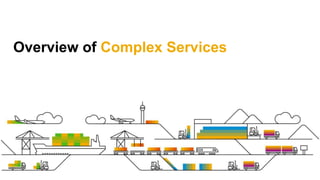
Overview of Complex Services
4© 2017 SAP SE or an SAP affiliate company. All rights reserved |
Public
PUBLIC
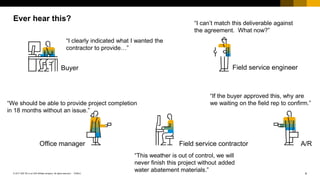
Ever hear this?
Buyer Field service engineer
A/RField service contractorOffice manager
“I clearly indicated what I wanted the
contractor to provide…”
“I can’t match this deliverable against
the agreement. What now?”
“We should be able to provide project completion
in 18 months without an issue.”
“This weather is out of control, we will
never finish this project without added
water abatement materials.”
“If the buyer approved this, why are
we waiting on the field rep to confirm.”
5© 2017 SAP SE or an SAP affiliate company. All rights reserved |
Public
PUBLIC
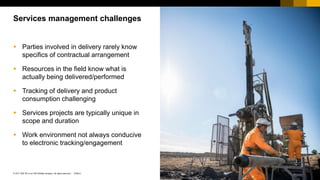
 Parties involved in delivery rarely know
specifics of contractual arrangement
 Resources in the field know what is
actually being delivered/performed
 Tracking of delivery and product
consumption challenging
 Services projects are typically unique in
scope and duration
 Work environment not always conducive
to electronic tracking/engagement
Services management challenges
6© 2017 SAP SE or an SAP affiliate company. All rights reserved |
Public
PUBLIC
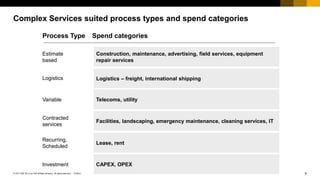
Complex Services suited process types and spend categories
Estimate
based
Logistics
Variable
Contracted
services
Construction, maintenance, advertising, field services, equipment
repair services
Logistics – freight, international shipping
Telecoms, utility
Facilities, landscaping, emergency maintenance, cleaning services, IT
Process Type Spend categories
Recurring,
Scheduled
Lease, rent
Investment CAPEX, OPEX
Use Case Scenarios Complex Services
8© 2017 SAP SE or an SAP affiliate company. All rights reserved |
Public
PUBLIC
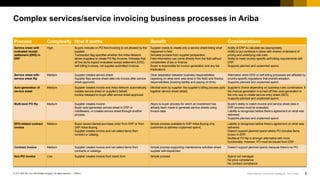
Complex services/service invoicing business processes in Ariba
Process Complexity How it works Benefit Considerations
Service sheet with
evaluated receipt
settlement (ERS) in
ERP
High Buyers indicate on PO that invoicing is not allowed by the
supplier.
Transaction flag specifies whether the Ariba Network
allows suppliers to create PO-flip invoices. Indicates that
all line items expect evaluated receipt settlement (ERS)
self-billing invoices, not supplier-submitted invoices.
Supplier needs to create only a service sheet listing what
happened in field.
Simplest process from supplier perspective.
Field information can come directly from the field without
complexities of tax or finance.
Buyer is responsible for invoice generation and any tax
implications.
Ability of ERP to calculate tax appropriately.
Ability to put contracts in place with shared understand of
pricing and underlying rate card.
Ability to meet country-specific self-billing requirements with
ERP.
Supports planned and unplanned spend.
Service sheet with
service sheet flip
Medium Supplier creates service sheet.
Supplier flips service sheet data into invoice after service
sheet approved.
Clear separation between business responsibilities
(agreeing on what work was done in the field) and finance
responsibilities (booking liability and paying on time).
Alternative when ERS or self-billing processes are affected by
country-specific regulations that prohibit adoption.
Supports planned and unplanned spend.
Auto-generation of
service sheet
Medium Supplier creates invoice and Ariba Network automatically
creates service sheet on supplier’s behalf.
Invoice released to buyer after service sheet approved.
Minimal work by supplier: the supplier’s billing process pulls
together service sheet details.
Supplier's choice depending on business rules combination. If
the manual generation is turned off then auto-generation is
the only way to create service entry sheet (SES).
Supports planned and unplanned spend.
Multi-level PO flip Medium Supplier creates invoice.
Buyer auto-generates service sheet in ERP or
middleware, or creates service sheet through another
process.
Aligns to buyer process for which an investment has
already been made to generate service sheets using
invoice data.
Buyer’s ability to match invoice and service sheet data in
ERP process must be evaluated.
Liability is recognized before there’s agreement on what was
delivered.
Supports planned and unplanned spend.
BPO-related contract
invoice
Medium Buyer issues blanket purchase order from ERP or from
SAP Ariba Buying.
Supplier creates invoice and can select items from
contract or catalog.
Simple process available to SAP Ariba Buying only
customers to address unplanned spend.
Liability is recognized before there’s agreement on what was
delivered.
Doesn’t support planned spend where PO includes items
known in ERP.
Multilevel PO flip is stronger alternative with more
functionality; however, PO must be issued from ERP.
Contract invoice Medium Supplier creates invoice and can select items from
contracts or catalogs.
Simple process supporting maintenance activities where
supplier self-dispatches.
Doesn’t support planned spend, because there’s no PO.
Non-PO invoice Low Supplier creates invoice from blank form Simple process Spend not managed
No price compliance
No contract compliance
Ariba Network Community posting by Chris Chase
9© 2017 SAP SE or an SAP affiliate company. All rights reserved |
Public
PUBLIC
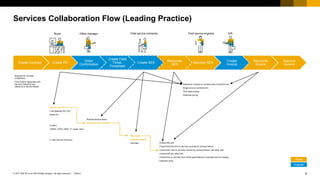
Services Collaboration Flow (Leading Practice)
Create Contract Create PO
Order
Confirmation
Create Field
Ticket,
Timesheet
Create SES
Reconcile
SES
Approve SES
Create
Invoice
Reconcile
Invoice
Approve
Invoice
Required for Contract
Compliance
From Outline Agreement with
Services Hierarchy and
reference to Service Master
Planned Service Items
Unplanned Service Items
Overall limit only
Overall limit and limit on services covered by contract item(s)
Overall limit, limit on services covered by contract item(s), and other limit
Overall limit and other limit
Overall limit on services from model specifications or standard service catalog
Expected value
With limits
Against Contract
Unlimited
Service PO (“D”) (*)
Limit (Blanket) PO (“B”)
Mixed PO
Custom:
CAPEX, OPEX, MRO, IT, Lease, Rent…
(*) with Service Hierarchy
Reference Contract or Contract (plus Contract Line)
Single price by contract term
Term base pricing
Historical pricing
Buyer
Supplier
Buyer Field service engineer A/RField service contractorOffice manager
10© 2017 SAP SE or an SAP affiliate company. All rights reserved |
Public
PUBLIC
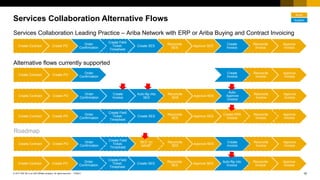
Services Collaboration Alternative Flows
Create Contract Create PO
Order
Confirmation
Create Field
Ticket,
Timesheet
Create SES
Reconcile
SES
Approve SES
Create
Invoice
Reconcile
Invoice
Approve
Invoice
Alternative flows currently supported
Roadmap
Create Contract Create PO
Order
Confirmation
Create Field
Ticket,
Timesheet
Create SES
Reconcile
SES
Approve SES
Auto-flip into
Invoice
Reconcile
Invoice
Approve
Invoice
Create Contract Create PO
Order
Confirmation
Create
Invoice
Auto-flip into
SES
Reconcile
SES
Approve SES
Auto-
Approve
Invoice
Reconcile
Invoice
Approve
Invoice
Create Contract Create PO
Order
Confirmation
Create Field
Ticket,
Timesheet
Create SES
Reconcile
SES
Approve SES
Create ERS
Invoice
Reconcile
Invoice
Approve
Invoice
Services Collaboration Leading Practice – Ariba Network with ERP or Ariba Buying and Contract Invoicing
Create Contract Create PO
Order
Confirmation
Create Field
Ticket,
Timesheet
SES “on
behalf”
Reconcile
SES
Approve SES
Create
Invoice
Reconcile
Invoice
Approve
Invoice
Buyer
Supplier
Create Contract Create PO
Order
Confirmation
Create Field
Ticket
Create SES
Reconcile
SES
Approve SES
Create
Invoice
Reconcile
Invoice
Approve
Invoice
11© 2017 SAP SE or an SAP affiliate company. All rights reserved |
Public
PUBLIC
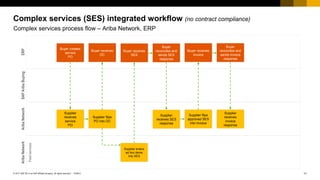
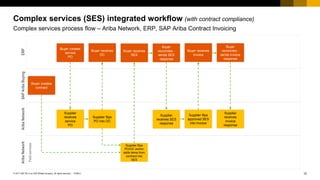
Complex services (SES) integrated workflow (no contract compliance)
Complex services process flow – Ariba Network, ERP
AribaNetworkAribaNetworkSAPAribaBuyingERP
Buyer creates
service
PO
Supplier
receives
service
PO
Supplier flips
PO into OC
Buyer receives
OC
Buyer receives
SES
Supplier
receives SES
response
Buyer
reconciles and
sends SES
response
Supplier flips
approved SES
into invoice
Buyer receives
invoice
Supplier
receives
invoice
response
Buyer
reconciles and
sends invoice
response
Supplier enters
ad hoc items
into SES
Fieldservices
12© 2017 SAP SE or an SAP affiliate company. All rights reserved |
Public
PUBLIC
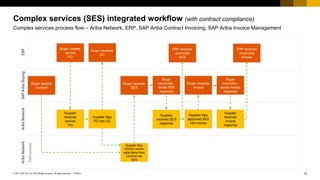
Complex services (SES) integrated workflow (with contract compliance)
Complex services process flow – Ariba Network, ERP, SAP Ariba Contract Invoicing
AribaNetworkAribaNetworkSAPAribaBuyingERP
Buyer creates
service
PO
Supplier
receives
service
PO
Supplier flips
PO into OC
Buyer receives
OC
Buyer receives
SES
Supplier
receives SES
response
Buyer
reconciles -
sends SES
response
Supplier flips
approved SES
into invoice
Buyer receives
invoice
Supplier
receives
invoice
response
Buyer
reconciles -
sends invoice
response
Buyer creates
contract
Supplier flips
PO/OC and/or
adds items from
contract into
SES
Fieldservices
13© 2017 SAP SE or an SAP affiliate company. All rights reserved |
Public
PUBLIC
Complex services (SES) integrated workflow (with contract compliance)
Complex services process flow – Ariba Network, ERP, SAP Ariba Contract Invoicing, SAP Ariba Invoice Management
AribaNetworkAribaNetworkSAPAribaBuyingERP
Buyer creates
service
PO
Supplier
receives
service
PO
Supplier flips
PO into OC
Buyer receives
OC
Supplier flips
PO/OC and/or
adds items from
contract into
SES
Buyer receives
SES
Supplier
receives SES
response
Buyer
reconciles -
sends SES
response
Supplier flips
approved SES
into invoice
Buyer receives
invoice
Supplier
receives
invoice
response
Buyer
reconciles -
sends invoice
response
Buyer creates
contract
ERP receives
reconciled
invoice
ERP receives
reconciled
SES
Fieldservices
14© 2017 SAP SE or an SAP affiliate company. All rights reserved |
Public
PUBLIC
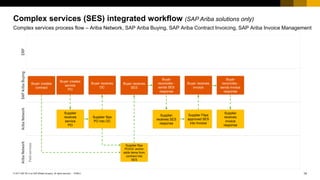
Complex services (SES) integrated workflow (SAP Ariba solutions only)
Complex services process flow – Ariba Network, SAP Ariba Buying, SAP Ariba Contract Invoicing, SAP Ariba Invoice Management
AribaNetworkAribaNetworkSAPAribaBuyingERP
Buyer creates
service
PO
Supplier
receives
service
PO
Supplier flips
PO into OC
Buyer receives
OC
Supplier flips
PO/OC and/or
adds items from
contract into
SES
Buyer receives
SES
Supplier
receives SES
response
Buyer
reconciles -
sends SES
response
Supplier Flips
approved SES
into Invoice
Buyer receives
invoice
Supplier
receives
invoice
response
Buyer
reconciles -
sends invoice
response
Buyer creates
contract
Fieldservices
15© 2017 SAP SE or an SAP affiliate company. All rights reserved |
Public
PUBLIC
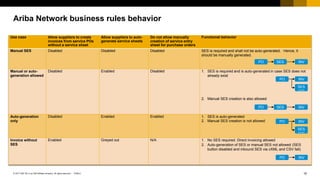
Ariba Network business rules behavior
Use case Allow suppliers to create
invoices from service POs
without a service sheet
Allow suppliers to auto-
generate service sheets
Do not allow manually
creation of service entry
sheet for purchase orders
Functional behavior
Manual SES Disabled Disabled Disabled SES is required and shall not be auto-generated. Hence, it
should be manually generated.
Manual or auto-
generation allowed
Disabled Enabled Disabled 1. SES is required and is auto-generated in case SES does not
already exist
2. Manual SES creation is also allowed
Auto-generation
only
Disabled Enabled Enabled 1. SES is auto-generated
2. Manual SES creation is not allowed
Invoice without
SES
Enabled Greyed out N/A 1. No SES required. Direct invoicing allowed
2. Auto-generation of SES or manual SES not allowed (SES
button disabled and inbound SES via cXML and CSV fail)
PO SES INV
PO INV
SES
auto-gen
PO SES INV
PO INV
SES
auto-gen
PO INV
Services Collaboration Road Map
17© 2017 SAP SE or an SAP affiliate company. All rights reserved |
Public
PUBLIC
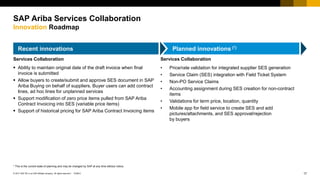
Recent innovations Planned innovations (*)
* This is the current state of planning and may be changed by SAP at any time without notice.
SAP Ariba Services Collaboration
Innovation Roadmap
Services Collaboration
 Ability to maintain original date of the draft invoice when final
invoice is submitted
 Allow buyers to create/submit and approve SES document in SAP
Ariba Buying on behalf of suppliers. Buyer users can add contract
lines, ad hoc lines for unplanned services
 Support modification of zero price items pulled from SAP Ariba
Contract Invoicing into SES (variable price items)
 Support of historical pricing for SAP Ariba Contract Invoicing items
Services Collaboration
• Price/rate validation for integrated supplier SES generation
• Service Claim (SES) integration with Field Ticket System
• Non-PO Service Claims
• Accounting assignment during SES creation for non-contract
items
• Validations for term price, location, quantity
• Mobile app for field service to create SES and add
pictures/attachments, and SES approval/rejection
by buyers
18© 2017 SAP SE or an SAP affiliate company. All rights reserved |
Public
PUBLIC
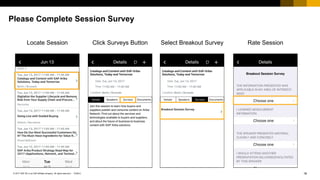
Please Complete Session Survey
Locate Session Click Surveys Button Select Breakout Survey Rate Session
Thank you.
Contact information:
Alex Lente
VP, Product Management, SAP Ariba P&I
E-mail: alexandre.lente@sap.com
Services Collaboration Contract Invoice
Demonstration
21© 2017 SAP SE or an SAP affiliate company. All rights reserved |
Public
PUBLIC
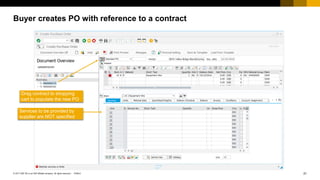
Buyer creates PO with reference to a contract
Drag contract to shopping
cart to populate the new PO
Services to be provided by
supplier are NOT specified
22© 2017 SAP SE or an SAP affiliate company. All rights reserved |
Public
PUBLIC
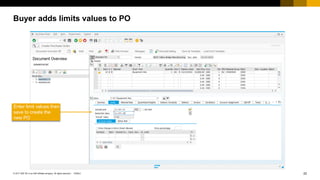
Enter limit values then
save to create the
new PO
Buyer adds limits values to PO
23© 2017 SAP SE or an SAP affiliate company. All rights reserved |
Public
PUBLIC
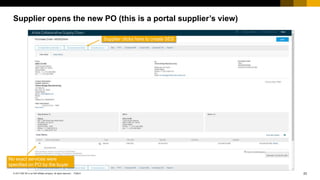
No exact services were
specified on PO by the buyer
Supplier clicks here to create SES
Supplier opens the new PO (this is a portal supplier’s view)
24© 2017 SAP SE or an SAP affiliate company. All rights reserved |
Public
PUBLIC
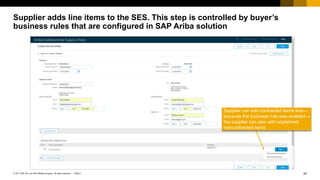
Supplier can add contracted items and—
because the business rule was enabled—
the supplier can also add unplanned,
noncontracted items
Supplier adds line items to the SES. This step is controlled by buyer’s
business rules that are configured in SAP Ariba solution
25© 2017 SAP SE or an SAP affiliate company. All rights reserved |
Public
PUBLIC
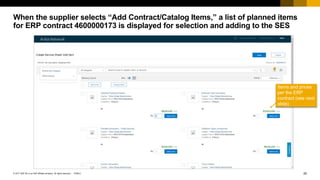
Items and prices
per the ERP
contract (see next
slide)
When the supplier selects “Add Contract/Catalog Items,” a list of planned items
for ERP contract 4600000173 is displayed for selection and adding to the SES
26© 2017 SAP SE or an SAP affiliate company. All rights reserved |
Public
PUBLIC
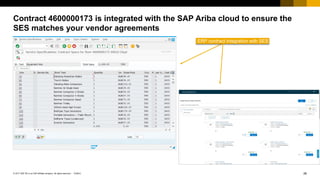
ERP contract integration with SES
Contract 4600000173 is integrated with the SAP Ariba cloud to ensure the
SES matches your vendor agreements
27© 2017 SAP SE or an SAP affiliate company. All rights reserved |
Public
PUBLIC
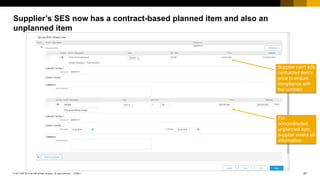
Supplier can’t edit
contracted item’s
price to ensure
compliance with
the contract
For
noncontracted,
unplanned item,
supplier enters all
information
Supplier’s SES now has a contract-based planned item and also an
unplanned item
28© 2017 SAP SE or an SAP affiliate company. All rights reserved |
Public
PUBLIC
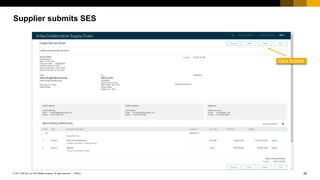
Click Submit
Supplier submits SES
29© 2017 SAP SE or an SAP affiliate company. All rights reserved |
Public
PUBLIC
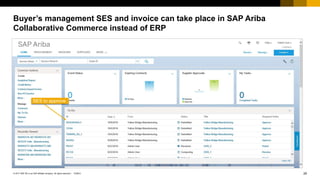
SES to approve
Buyer’s management SES and invoice can take place in SAP Ariba
Collaborative Commerce instead of ERP
30© 2017 SAP SE or an SAP affiliate company. All rights reserved |
Public
PUBLIC
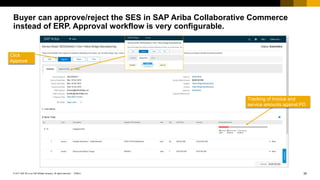
Tracking of invoice and
service amounts against PO
Click
Approve
Buyer can approve/reject the SES in SAP Ariba Collaborative Commerce
instead of ERP. Approval workflow is very configurable.
31© 2017 SAP SE or an SAP affiliate company. All rights reserved |
Public
PUBLIC
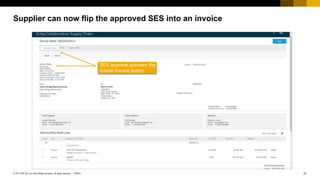
SES approval activates the
Create Invoice button
Supplier can now flip the approved SES into an invoice
32© 2017 SAP SE or an SAP affiliate company. All rights reserved |
Public
PUBLIC
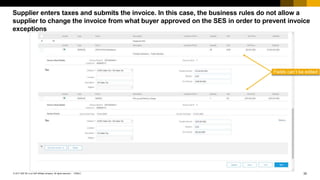
Fields can’t be edited
Supplier enters taxes and submits the invoice. In this case, the business rules do not allow a
supplier to change the invoice from what buyer approved on the SES in order to prevent invoice
exceptions
33© 2017 SAP SE or an SAP affiliate company. All rights reserved |
Public
PUBLIC
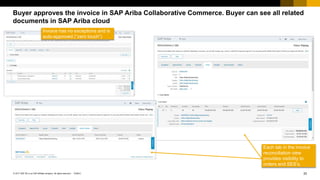
Each tab in the invoice
reconciliation view
provides visibility to
orders and SES’s.
Invoice has no exceptions and is
auto-approved (“zero touch”)
Buyer approves the invoice in SAP Ariba Collaborative Commerce. Buyer can see all related
documents in SAP Ariba cloud
34© 2017 SAP SE or an SAP affiliate company. All rights reserved |
Public
PUBLIC
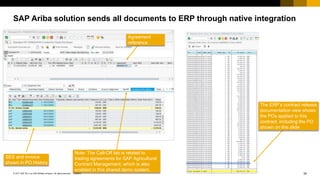
SES and invoice
shown in PO History
Note: The Call-Off tab is related to
trading agreements for SAP Agricultural
Contract Management, which is also
enabled in this shared demo system.
Agreement
reference
The ERP’s contract release
documentation view shows
the POs applied to this
contract, including the PO
shown on this slide
SAP Ariba solution sends all documents to ERP through native integration

Complex Services Simplified with Ariba Network

  • 1.
    PUBLIC Complex Services MadeSimple with Ariba Network Alex Lente Vice President, Product Management, SAP Ariba P&I
  • 2.
    2© 2017 SAPSE or an SAP affiliate company. All rights reserved | Public PUBLIC Legal Disclaimer The information in this presentation is confidential and proprietary to SAP and may not be disclosed without the permission of SAP. This presentation is not subject to your license agreement or any other service or subscription agreement with SAP. SAP has no obligation to pursue any course of business outlined in this document or any related presentation, or to develop or release any functionality mentioned therein. This document, or any related presentation and SAP's strategy and possible future developments, products and/or platforms directions and functionality are all subject to change and may be changed by SAP at any time for any reason without notice. The information on this document is not a commitment, promise or legal obligation to deliver any material, code or functionality. This document is provided without a warranty of any kind, either express or implied, including but not limited to, the implied warranties of merchantability, fitness for a particular purpose, or non-infringement. This document is for informational purposes and may not be incorporated into a contract. SAP assumes no responsibility for errors or omissions in this document, and shall have no liability for damages of any kind including without limitation direct, special, indirect, or consequential damages that may result from the use of this document. This limitation shall not apply in cases of intent or gross negligence. All forward-looking statements are subject to various risks and uncertainties that could cause actual results to differ materially from expectations. Readers are cautioned not to place undue reliance on these forward-looking statements, which speak only as of their dates, and they should not be relied upon in making purchasing decisions.
  • 3.
  • 4.
    4© 2017 SAPSE or an SAP affiliate company. All rights reserved | Public PUBLIC Ever hear this? Buyer Field service engineer A/RField service contractorOffice manager “I clearly indicated what I wanted the contractor to provide…” “I can’t match this deliverable against the agreement. What now?” “We should be able to provide project completion in 18 months without an issue.” “This weather is out of control, we will never finish this project without added water abatement materials.” “If the buyer approved this, why are we waiting on the field rep to confirm.”
  • 5.
    5© 2017 SAPSE or an SAP affiliate company. All rights reserved | Public PUBLIC  Parties involved in delivery rarely know specifics of contractual arrangement  Resources in the field know what is actually being delivered/performed  Tracking of delivery and product consumption challenging  Services projects are typically unique in scope and duration  Work environment not always conducive to electronic tracking/engagement Services management challenges
  • 6.
    6© 2017 SAPSE or an SAP affiliate company. All rights reserved | Public PUBLIC Complex Services suited process types and spend categories Estimate based Logistics Variable Contracted services Construction, maintenance, advertising, field services, equipment repair services Logistics – freight, international shipping Telecoms, utility Facilities, landscaping, emergency maintenance, cleaning services, IT Process Type Spend categories Recurring, Scheduled Lease, rent Investment CAPEX, OPEX
  • 7.
    Use Case ScenariosComplex Services
  • 8.
    8© 2017 SAPSE or an SAP affiliate company. All rights reserved | Public PUBLIC Complex services/service invoicing business processes in Ariba Process Complexity How it works Benefit Considerations Service sheet with evaluated receipt settlement (ERS) in ERP High Buyers indicate on PO that invoicing is not allowed by the supplier. Transaction flag specifies whether the Ariba Network allows suppliers to create PO-flip invoices. Indicates that all line items expect evaluated receipt settlement (ERS) self-billing invoices, not supplier-submitted invoices. Supplier needs to create only a service sheet listing what happened in field. Simplest process from supplier perspective. Field information can come directly from the field without complexities of tax or finance. Buyer is responsible for invoice generation and any tax implications. Ability of ERP to calculate tax appropriately. Ability to put contracts in place with shared understand of pricing and underlying rate card. Ability to meet country-specific self-billing requirements with ERP. Supports planned and unplanned spend. Service sheet with service sheet flip Medium Supplier creates service sheet. Supplier flips service sheet data into invoice after service sheet approved. Clear separation between business responsibilities (agreeing on what work was done in the field) and finance responsibilities (booking liability and paying on time). Alternative when ERS or self-billing processes are affected by country-specific regulations that prohibit adoption. Supports planned and unplanned spend. Auto-generation of service sheet Medium Supplier creates invoice and Ariba Network automatically creates service sheet on supplier’s behalf. Invoice released to buyer after service sheet approved. Minimal work by supplier: the supplier’s billing process pulls together service sheet details. Supplier's choice depending on business rules combination. If the manual generation is turned off then auto-generation is the only way to create service entry sheet (SES). Supports planned and unplanned spend. Multi-level PO flip Medium Supplier creates invoice. Buyer auto-generates service sheet in ERP or middleware, or creates service sheet through another process. Aligns to buyer process for which an investment has already been made to generate service sheets using invoice data. Buyer’s ability to match invoice and service sheet data in ERP process must be evaluated. Liability is recognized before there’s agreement on what was delivered. Supports planned and unplanned spend. BPO-related contract invoice Medium Buyer issues blanket purchase order from ERP or from SAP Ariba Buying. Supplier creates invoice and can select items from contract or catalog. Simple process available to SAP Ariba Buying only customers to address unplanned spend. Liability is recognized before there’s agreement on what was delivered. Doesn’t support planned spend where PO includes items known in ERP. Multilevel PO flip is stronger alternative with more functionality; however, PO must be issued from ERP. Contract invoice Medium Supplier creates invoice and can select items from contracts or catalogs. Simple process supporting maintenance activities where supplier self-dispatches. Doesn’t support planned spend, because there’s no PO. Non-PO invoice Low Supplier creates invoice from blank form Simple process Spend not managed No price compliance No contract compliance Ariba Network Community posting by Chris Chase
  • 9.
    9© 2017 SAPSE or an SAP affiliate company. All rights reserved | Public PUBLIC Services Collaboration Flow (Leading Practice) Create Contract Create PO Order Confirmation Create Field Ticket, Timesheet Create SES Reconcile SES Approve SES Create Invoice Reconcile Invoice Approve Invoice Required for Contract Compliance From Outline Agreement with Services Hierarchy and reference to Service Master Planned Service Items Unplanned Service Items Overall limit only Overall limit and limit on services covered by contract item(s) Overall limit, limit on services covered by contract item(s), and other limit Overall limit and other limit Overall limit on services from model specifications or standard service catalog Expected value With limits Against Contract Unlimited Service PO (“D”) (*) Limit (Blanket) PO (“B”) Mixed PO Custom: CAPEX, OPEX, MRO, IT, Lease, Rent… (*) with Service Hierarchy Reference Contract or Contract (plus Contract Line) Single price by contract term Term base pricing Historical pricing Buyer Supplier Buyer Field service engineer A/RField service contractorOffice manager
  • 10.
    10© 2017 SAPSE or an SAP affiliate company. All rights reserved | Public PUBLIC Services Collaboration Alternative Flows Create Contract Create PO Order Confirmation Create Field Ticket, Timesheet Create SES Reconcile SES Approve SES Create Invoice Reconcile Invoice Approve Invoice Alternative flows currently supported Roadmap Create Contract Create PO Order Confirmation Create Field Ticket, Timesheet Create SES Reconcile SES Approve SES Auto-flip into Invoice Reconcile Invoice Approve Invoice Create Contract Create PO Order Confirmation Create Invoice Auto-flip into SES Reconcile SES Approve SES Auto- Approve Invoice Reconcile Invoice Approve Invoice Create Contract Create PO Order Confirmation Create Field Ticket, Timesheet Create SES Reconcile SES Approve SES Create ERS Invoice Reconcile Invoice Approve Invoice Services Collaboration Leading Practice – Ariba Network with ERP or Ariba Buying and Contract Invoicing Create Contract Create PO Order Confirmation Create Field Ticket, Timesheet SES “on behalf” Reconcile SES Approve SES Create Invoice Reconcile Invoice Approve Invoice Buyer Supplier Create Contract Create PO Order Confirmation Create Field Ticket Create SES Reconcile SES Approve SES Create Invoice Reconcile Invoice Approve Invoice
  • 11.
    11© 2017 SAPSE or an SAP affiliate company. All rights reserved | Public PUBLIC Complex services (SES) integrated workflow (no contract compliance) Complex services process flow – Ariba Network, ERP AribaNetworkAribaNetworkSAPAribaBuyingERP Buyer creates service PO Supplier receives service PO Supplier flips PO into OC Buyer receives OC Buyer receives SES Supplier receives SES response Buyer reconciles and sends SES response Supplier flips approved SES into invoice Buyer receives invoice Supplier receives invoice response Buyer reconciles and sends invoice response Supplier enters ad hoc items into SES Fieldservices
  • 12.
    12© 2017 SAPSE or an SAP affiliate company. All rights reserved | Public PUBLIC Complex services (SES) integrated workflow (with contract compliance) Complex services process flow – Ariba Network, ERP, SAP Ariba Contract Invoicing AribaNetworkAribaNetworkSAPAribaBuyingERP Buyer creates service PO Supplier receives service PO Supplier flips PO into OC Buyer receives OC Buyer receives SES Supplier receives SES response Buyer reconciles - sends SES response Supplier flips approved SES into invoice Buyer receives invoice Supplier receives invoice response Buyer reconciles - sends invoice response Buyer creates contract Supplier flips PO/OC and/or adds items from contract into SES Fieldservices
  • 13.
    13© 2017 SAPSE or an SAP affiliate company. All rights reserved | Public PUBLIC Complex services (SES) integrated workflow (with contract compliance) Complex services process flow – Ariba Network, ERP, SAP Ariba Contract Invoicing, SAP Ariba Invoice Management AribaNetworkAribaNetworkSAPAribaBuyingERP Buyer creates service PO Supplier receives service PO Supplier flips PO into OC Buyer receives OC Supplier flips PO/OC and/or adds items from contract into SES Buyer receives SES Supplier receives SES response Buyer reconciles - sends SES response Supplier flips approved SES into invoice Buyer receives invoice Supplier receives invoice response Buyer reconciles - sends invoice response Buyer creates contract ERP receives reconciled invoice ERP receives reconciled SES Fieldservices
  • 14.
    14© 2017 SAPSE or an SAP affiliate company. All rights reserved | Public PUBLIC Complex services (SES) integrated workflow (SAP Ariba solutions only) Complex services process flow – Ariba Network, SAP Ariba Buying, SAP Ariba Contract Invoicing, SAP Ariba Invoice Management AribaNetworkAribaNetworkSAPAribaBuyingERP Buyer creates service PO Supplier receives service PO Supplier flips PO into OC Buyer receives OC Supplier flips PO/OC and/or adds items from contract into SES Buyer receives SES Supplier receives SES response Buyer reconciles - sends SES response Supplier Flips approved SES into Invoice Buyer receives invoice Supplier receives invoice response Buyer reconciles - sends invoice response Buyer creates contract Fieldservices
  • 15.
    15© 2017 SAPSE or an SAP affiliate company. All rights reserved | Public PUBLIC Ariba Network business rules behavior Use case Allow suppliers to create invoices from service POs without a service sheet Allow suppliers to auto- generate service sheets Do not allow manually creation of service entry sheet for purchase orders Functional behavior Manual SES Disabled Disabled Disabled SES is required and shall not be auto-generated. Hence, it should be manually generated. Manual or auto- generation allowed Disabled Enabled Disabled 1. SES is required and is auto-generated in case SES does not already exist 2. Manual SES creation is also allowed Auto-generation only Disabled Enabled Enabled 1. SES is auto-generated 2. Manual SES creation is not allowed Invoice without SES Enabled Greyed out N/A 1. No SES required. Direct invoicing allowed 2. Auto-generation of SES or manual SES not allowed (SES button disabled and inbound SES via cXML and CSV fail) PO SES INV PO INV SES auto-gen PO SES INV PO INV SES auto-gen PO INV
  • 16.
  • 17.
    17© 2017 SAPSE or an SAP affiliate company. All rights reserved | Public PUBLIC Recent innovations Planned innovations (*) * This is the current state of planning and may be changed by SAP at any time without notice. SAP Ariba Services Collaboration Innovation Roadmap Services Collaboration  Ability to maintain original date of the draft invoice when final invoice is submitted  Allow buyers to create/submit and approve SES document in SAP Ariba Buying on behalf of suppliers. Buyer users can add contract lines, ad hoc lines for unplanned services  Support modification of zero price items pulled from SAP Ariba Contract Invoicing into SES (variable price items)  Support of historical pricing for SAP Ariba Contract Invoicing items Services Collaboration • Price/rate validation for integrated supplier SES generation • Service Claim (SES) integration with Field Ticket System • Non-PO Service Claims • Accounting assignment during SES creation for non-contract items • Validations for term price, location, quantity • Mobile app for field service to create SES and add pictures/attachments, and SES approval/rejection by buyers
  • 18.
    18© 2017 SAPSE or an SAP affiliate company. All rights reserved | Public PUBLIC Please Complete Session Survey Locate Session Click Surveys Button Select Breakout Survey Rate Session
  • 19.
    Thank you. Contact information: AlexLente VP, Product Management, SAP Ariba P&I E-mail: alexandre.lente@sap.com
  • 20.
    Services Collaboration ContractInvoice Demonstration
  • 21.
    21© 2017 SAPSE or an SAP affiliate company. All rights reserved | Public PUBLIC Buyer creates PO with reference to a contract Drag contract to shopping cart to populate the new PO Services to be provided by supplier are NOT specified
  • 22.
    22© 2017 SAPSE or an SAP affiliate company. All rights reserved | Public PUBLIC Enter limit values then save to create the new PO Buyer adds limits values to PO
  • 23.
    23© 2017 SAPSE or an SAP affiliate company. All rights reserved | Public PUBLIC No exact services were specified on PO by the buyer Supplier clicks here to create SES Supplier opens the new PO (this is a portal supplier’s view)
  • 24.
    24© 2017 SAPSE or an SAP affiliate company. All rights reserved | Public PUBLIC Supplier can add contracted items and— because the business rule was enabled— the supplier can also add unplanned, noncontracted items Supplier adds line items to the SES. This step is controlled by buyer’s business rules that are configured in SAP Ariba solution
  • 25.
    25© 2017 SAPSE or an SAP affiliate company. All rights reserved | Public PUBLIC Items and prices per the ERP contract (see next slide) When the supplier selects “Add Contract/Catalog Items,” a list of planned items for ERP contract 4600000173 is displayed for selection and adding to the SES
  • 26.
    26© 2017 SAPSE or an SAP affiliate company. All rights reserved | Public PUBLIC ERP contract integration with SES Contract 4600000173 is integrated with the SAP Ariba cloud to ensure the SES matches your vendor agreements
  • 27.
    27© 2017 SAPSE or an SAP affiliate company. All rights reserved | Public PUBLIC Supplier can’t edit contracted item’s price to ensure compliance with the contract For noncontracted, unplanned item, supplier enters all information Supplier’s SES now has a contract-based planned item and also an unplanned item
  • 28.
    28© 2017 SAPSE or an SAP affiliate company. All rights reserved | Public PUBLIC Click Submit Supplier submits SES
  • 29.
    29© 2017 SAPSE or an SAP affiliate company. All rights reserved | Public PUBLIC SES to approve Buyer’s management SES and invoice can take place in SAP Ariba Collaborative Commerce instead of ERP
  • 30.
    30© 2017 SAPSE or an SAP affiliate company. All rights reserved | Public PUBLIC Tracking of invoice and service amounts against PO Click Approve Buyer can approve/reject the SES in SAP Ariba Collaborative Commerce instead of ERP. Approval workflow is very configurable.
  • 31.
    31© 2017 SAPSE or an SAP affiliate company. All rights reserved | Public PUBLIC SES approval activates the Create Invoice button Supplier can now flip the approved SES into an invoice
  • 32.
    32© 2017 SAPSE or an SAP affiliate company. All rights reserved | Public PUBLIC Fields can’t be edited Supplier enters taxes and submits the invoice. In this case, the business rules do not allow a supplier to change the invoice from what buyer approved on the SES in order to prevent invoice exceptions
  • 33.
    33© 2017 SAPSE or an SAP affiliate company. All rights reserved | Public PUBLIC Each tab in the invoice reconciliation view provides visibility to orders and SES’s. Invoice has no exceptions and is auto-approved (“zero touch”) Buyer approves the invoice in SAP Ariba Collaborative Commerce. Buyer can see all related documents in SAP Ariba cloud
  • 34.
    34© 2017 SAPSE or an SAP affiliate company. All rights reserved | Public PUBLIC SES and invoice shown in PO History Note: The Call-Off tab is related to trading agreements for SAP Agricultural Contract Management, which is also enabled in this shared demo system. Agreement reference The ERP’s contract release documentation view shows the POs applied to this contract, including the PO shown on this slide SAP Ariba solution sends all documents to ERP through native integration