 What is Service Management?
 Important Master Data used in Procurement of external services.
 Basic Procurement process for external services.
 Service Master Records and Service Conditions.
 Structure of Purchase Order item for Services
 Service entry sheet referencing a Purchase Order.
 Add un-planned service during the service entry process.
 Accept a Service Entry Sheet
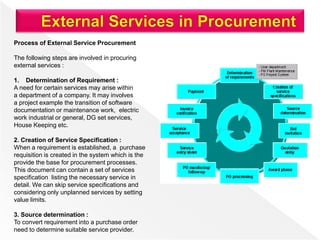
Process of External Service Procurement
The following steps are involved in procuring
external services :
1. Determination of Requirement :
A need for certain services may arise within
a department of a company. It may involves
a project example the transition of software
documentation or maintenance work, electric
work industrial or general, DG set services,
House Keeping etc.
2. Creation of Service Specification :
When a requirement is established, a purchase
requisition is created in the system which is the
provide the base for procurement processes.
This document can contain a set of services
specification listing the necessary service in
detail. We can skip service specifications and
considering only unplanned services by setting
value limits.
3. Source determination :
To convert requirement into a purchase order
need to determine suitable service provider.
The system can help to find out suitable vendor who can provide us that required services. The source
determination function analyzes and evaluates purchasing data that already been entered in the system in
the form of service conditions or contracts. If an entirely new service has been requested, and no sources
currently recorded in the system, a bid invitation process can be carried out. This process is termed as
request of quotation (RFQ) or quotation facility for services.
4. Purchase Order and Purchase Order Monitoring
Manually we can create purchase order with reference to purchase requisition, Request for quotation,
contract. During the phase of actual services performance, the actual values for services performed or
work done continuously updated in underlying purchase order or contract release order. We can view
service procurement work progressed by referring purchase order history . Also can monitor the
confirmation of work done for each individual service line.
5. Service entry and service acceptance :
Once the service is actually performed, the system records it in service entry sheet. One or more persons
responsible then review the service entry sheet and accept it. We can separate service entry sheet and
service acceptance with in the organization, in order to maintain dual control principle.
6. Invoice Verification :
The last step in the procurement process is the verification of the vendor invoice (Service). The system
check the value, as calculated from the accepted service entry sheets, against the vendor’s invoice. The
system checks the taxes, as mentioned in the purchase order, with that mentioned in vendor’s invoice. If
the values tally, the invoice is release to finance department for payment. If values not tally, the system
issues a warning message based on settings in customizing.
Besides procurement of goods an organization may occasionally require some kind of
services. For example services are include small maintenance like, changing of lights,
painting, and house keeping. These services is carried out by the external contractors and
hence the whole process of procurement of services is known as service management. The
main points of Service Management are as under.
 Services are meant for direct consumption, can not keep inventory management services.
 Service Description along with its unit of measure is stored as master data record which is
called as service master record.
 The system stores the services that have been procured as a record in sheet that is known
as the service entry sheet.
 Service Procurement are of following types.
 Planned Service: In planned services at the time of procurement specifications like
quantity and price are not known in advance. It means nature and scope of service is
clear before procurement.
 Un-planed Service: In unplanned services at the time of procurement specifications
like quantity and price are not known in advance. It means the nature and scope of
service is not clear before procurement. These services can be extended as per the
requirement.
Service Management deals with following terms:
 Service Master Record
 Service Purchase Order
 Service Entry Sheet
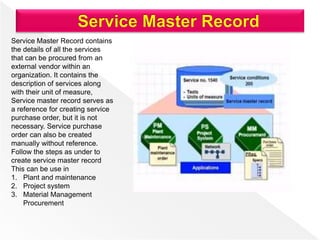
Service Master Record contains
the details of all the services
that can be procured from an
external vendor within an
organization. It contains the
description of services along
with their unit of measure,
Service master record serves as
a reference for creating service
purchase order, but it is not
necessary. Service purchase
order can also be created
manually without reference.
Follow the steps as under to
create service master record
This can be use in
1. Plant and maintenance
2. Project system
3. Material Management
Procurement
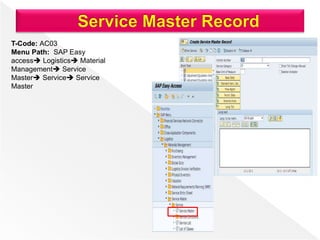
T-Code: AC03
Menu Path: SAP Easy
access Logistics Material
Management Service
Master Service Service
Master
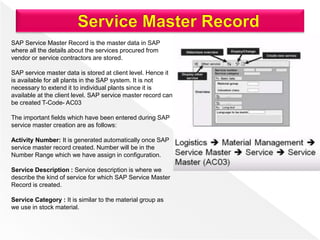
SAP Service Master Record is the master data in SAP
where all the details about the services procured from
vendor or service contractors are stored.
SAP service master data is stored at client level. Hence it
is available for all plants in the SAP system. It is not
necessary to extend it to individual plants since it is
available at the client level. SAP service master record can
be created T-Code- AC03
The important fields which have been entered during SAP
service master creation are as follows:
Activity Number: It is generated automatically once SAP
service master record created. Number will be in the
Number Range which we have assign in configuration.
Service Description : Service description is where we
describe the kind of service for which SAP Service Master
Record is created.
Service Category : It is similar to the material group as
we use in stock material.
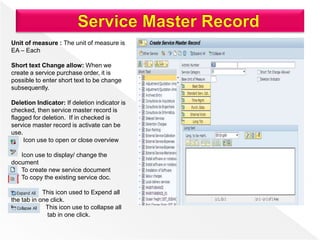
Unit of measure : The unit of measure is
EA – Each
Short text Change allow: When we
create a service purchase order, it is
possible to enter short text to be change
subsequently.
Deletion Indicator: If deletion indicator is
checked, then service master record is
flagged for deletion. If in checked is
service master record is activate can be
use.
Icon use to open or close overview
Icon use to display/ change the
document
To create new service document
To copy the existing service doc.
This icon used to Expend all
the tab in one click.
This icon use to collapse all
tab in one click.
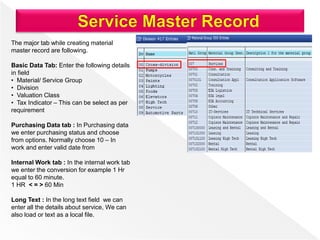
The major tab while creating material
master record are following.
Basic Data Tab: Enter the following details
in field
• Material/ Service Group
• Division
• Valuation Class
• Tax Indicator – This can be select as per
requirement
Purchasing Data tab : In Purchasing data
we enter purchasing status and choose
from options. Normally choose 10 – In
work and enter valid date from
Internal Work tab : In the internal work tab
we enter the conversion for example 1 Hr
equal to 60 minute.
1 HR < = > 60 Min
Long Text : In the long text field we can
enter all the details about service, We can
also load or text as a local file.
Prices for valid external services that extend over a longer period can be recorded in the system in the
form of service conditions. The system applies these service conditions while determining the price in the
purchasing document. You can enter further conditions in the document itself.
You can define service master conditions at several levels in the system as follows
• At the level of service (market price or own estimate)
• At the level of service, vendor, and purchasing organization
• At the level of service, vendor, purchasing organization, and plant.
1. Create Service Master Based on Service Category T-Code-AC03
2. Create Model Service Specification or service catalog T-Code- ML10
3. Create Service Purchase Requisition & Release T-Code- ME51N
4. Create Service RFQ and Release – T-code- ME41
5. Create Purchase Order Reference to Purchase Requisition/ RFQ and
release-ME21N
6. Create Service Entry Sheet from Service Purchase Order –T-code- ME81N
7. Invoice with reference to service Entry sheet – T-code- MIRO
DG Set- DIESEL GENERATOR
• Oil Lubrication of the DG Set -100 HRS
• Filter replacement of DG Set – 500 HRS
• Nozzles cleaning of DG Set – 1000 HRS
• Turbo Charger Oil filling – 3000 HRS
• Crank Shaft inspection – 5000 hrs
• DG set Fuel tank cleaning – 10000 HRS
Org-Service- Category – Machinery/ Equipment Services
Service Category – DG Set Services –DG-DISEL GENERATOR
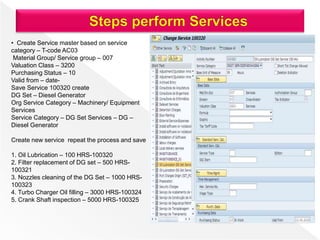
• Create Service master based on service
category – T-code AC03
Material Group/ Service group – 007
Valuation Class – 3200
Purchasing Status – 10
Valid from – date-
Save Service 100320 create
DG Set – Diesel Generator
Org Service Category – Machinery/ Equipment
Services
Service Category – DG Set Services – DG –
Diesel Generator
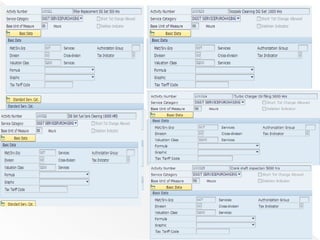
Create new service repeat the process and save
1. Oil Lubrication – 100 HRS-100320
2. Filter replacement of DG set – 500 HRS-
100321
3. Nozzles cleaning of the DG Set – 1000 HRS-
100323
4. Turbo Charger Oil filling – 3000 HRS-100324
5. Crank Shaft inspection – 5000 HRS-100325
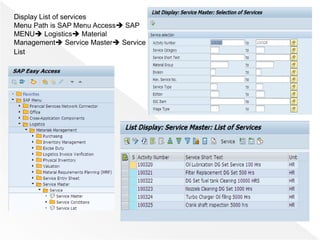
Display List of services
Menu Path is SAP Menu Access SAP
MENU Logistics Material
Management Service Master Service
List
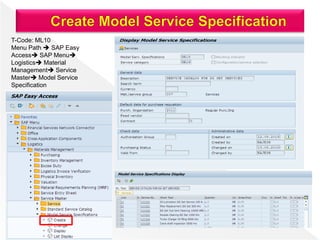
T-Code: ML10
Menu Path  SAP Easy
Access SAP Menu
Logistics Material
Management Service
Master Model Service
Specification
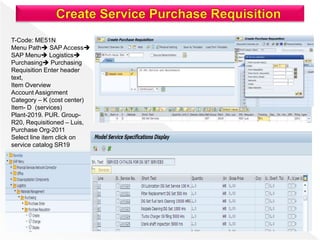
T-Code: ME51N
Menu Path SAP Access
SAP Menu Logistics
Purchasing Purchasing
Requisition Enter header
text,
Item Overview
Account Assignment
Category – K (cost center)
Item- D (services)
Plant-2019. PUR. Group-
R20, Requisitioned – Luis,
Purchase Org-2011
Select line item click on
service catalog SR19
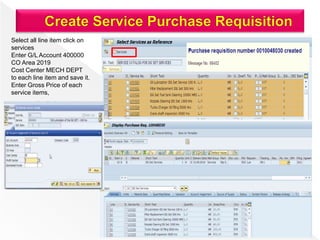
Select all line item click on
services
Enter G/L Account 400000
CO Area 2019
Cost Center MECH DEPT
to each line item and save it.
Enter Gross Price of each
service items,
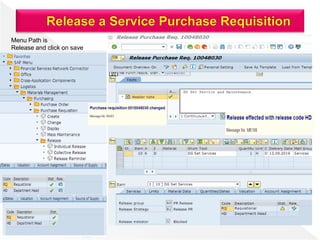
Menu Path is
Release and click on save
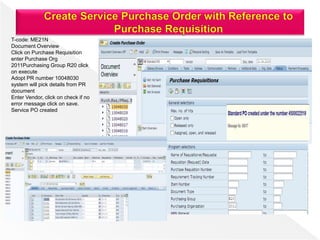
T-code: ME21N
Document Overview
Click on Purchase Requisition
enter Purchase Org
2011Purchasing Group R20 click
on execute
Adopt PR number 10048030
system will pick details from PR
document
Enter Vendor, click on check if no
error message click on save.
Service PO created
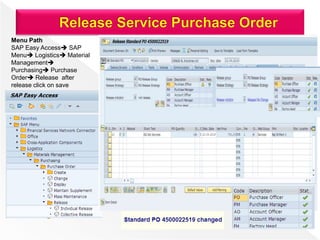
Menu Path
SAP Easy Access SAP
Menu Logistics Material
Management
Purchasing Purchase
Order Release after
release click on save
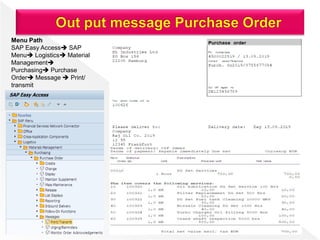
Menu Path
SAP Easy Access SAP
Menu Logistics Material
Management
Purchasing Purchase
Order Message  Print/
transmit
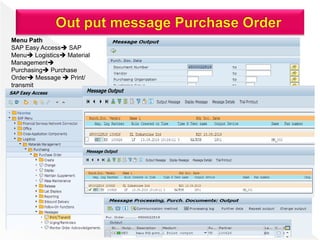
Menu Path
SAP Easy Access SAP
Menu Logistics Material
Management
Purchasing Purchase
Order Message  Print/
transmit
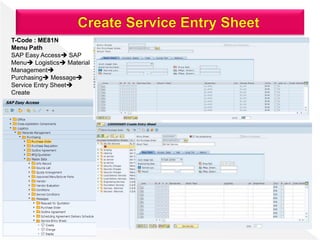
T-Code : ME81N
Menu Path
SAP Easy Access SAP
Menu Logistics Material
Management
Purchasing Message
Service Entry Sheet
Create
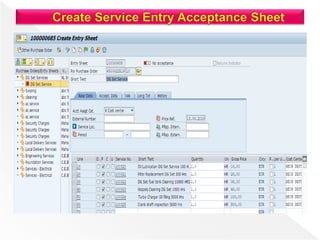
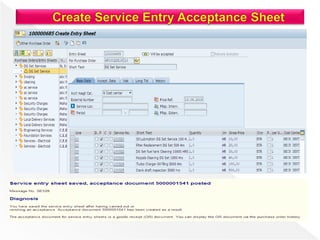
T-Code : ME81N
Menu Path
SAP Easy Access SAP
Menu Logistics Material
Management
Purchasing Message
Service Entry Sheet
Create
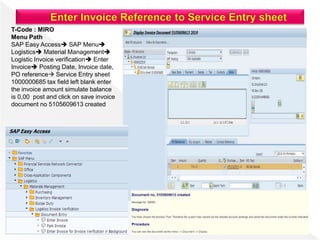
T-Code : MIRO
Menu Path
SAP Easy Access SAP Menu
Logistics Material Management
Logistic Invoice verification Enter
Invoice Posting Date, Invoice date,
PO reference Service Entry sheet
1000000685 tax field left blank enter
the invoice amount simulate balance
is 0,00 post and click on save invoice
document no 5105609613 created
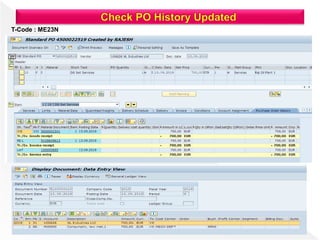
T-Code : ME23N
Whenever we are create a purchase order, contract, or schedule agreement we have maintain certain
conditions. SAP has provided standard condition type.
 PB00 – Gross Price
 RA01 – Discount
 ZA00 – Surcharge
 FRA1 – Freight
When we create purchase order for a particular material or a material group to a vendor or multiple
vendors. The conditions may be same for all the supplier or may be different vendor to vendor.
Thank You………………………………..

Procurement for services

  • 3.
     What isService Management?  Important Master Data used in Procurement of external services.  Basic Procurement process for external services.  Service Master Records and Service Conditions.  Structure of Purchase Order item for Services  Service entry sheet referencing a Purchase Order.  Add un-planned service during the service entry process.  Accept a Service Entry Sheet
  • 4.
    Process of ExternalService Procurement The following steps are involved in procuring external services : 1. Determination of Requirement : A need for certain services may arise within a department of a company. It may involves a project example the transition of software documentation or maintenance work, electric work industrial or general, DG set services, House Keeping etc. 2. Creation of Service Specification : When a requirement is established, a purchase requisition is created in the system which is the provide the base for procurement processes. This document can contain a set of services specification listing the necessary service in detail. We can skip service specifications and considering only unplanned services by setting value limits. 3. Source determination : To convert requirement into a purchase order need to determine suitable service provider.
  • 5.
    The system canhelp to find out suitable vendor who can provide us that required services. The source determination function analyzes and evaluates purchasing data that already been entered in the system in the form of service conditions or contracts. If an entirely new service has been requested, and no sources currently recorded in the system, a bid invitation process can be carried out. This process is termed as request of quotation (RFQ) or quotation facility for services. 4. Purchase Order and Purchase Order Monitoring Manually we can create purchase order with reference to purchase requisition, Request for quotation, contract. During the phase of actual services performance, the actual values for services performed or work done continuously updated in underlying purchase order or contract release order. We can view service procurement work progressed by referring purchase order history . Also can monitor the confirmation of work done for each individual service line. 5. Service entry and service acceptance : Once the service is actually performed, the system records it in service entry sheet. One or more persons responsible then review the service entry sheet and accept it. We can separate service entry sheet and service acceptance with in the organization, in order to maintain dual control principle. 6. Invoice Verification : The last step in the procurement process is the verification of the vendor invoice (Service). The system check the value, as calculated from the accepted service entry sheets, against the vendor’s invoice. The system checks the taxes, as mentioned in the purchase order, with that mentioned in vendor’s invoice. If the values tally, the invoice is release to finance department for payment. If values not tally, the system issues a warning message based on settings in customizing.
  • 6.
    Besides procurement ofgoods an organization may occasionally require some kind of services. For example services are include small maintenance like, changing of lights, painting, and house keeping. These services is carried out by the external contractors and hence the whole process of procurement of services is known as service management. The main points of Service Management are as under.  Services are meant for direct consumption, can not keep inventory management services.  Service Description along with its unit of measure is stored as master data record which is called as service master record.  The system stores the services that have been procured as a record in sheet that is known as the service entry sheet.  Service Procurement are of following types.  Planned Service: In planned services at the time of procurement specifications like quantity and price are not known in advance. It means nature and scope of service is clear before procurement.  Un-planed Service: In unplanned services at the time of procurement specifications like quantity and price are not known in advance. It means the nature and scope of service is not clear before procurement. These services can be extended as per the requirement.
  • 7.
    Service Management dealswith following terms:  Service Master Record  Service Purchase Order  Service Entry Sheet
  • 8.
    Service Master Recordcontains the details of all the services that can be procured from an external vendor within an organization. It contains the description of services along with their unit of measure, Service master record serves as a reference for creating service purchase order, but it is not necessary. Service purchase order can also be created manually without reference. Follow the steps as under to create service master record This can be use in 1. Plant and maintenance 2. Project system 3. Material Management Procurement
  • 9.
    T-Code: AC03 Menu Path:SAP Easy access Logistics Material Management Service Master Service Service Master
  • 10.
    SAP Service MasterRecord is the master data in SAP where all the details about the services procured from vendor or service contractors are stored. SAP service master data is stored at client level. Hence it is available for all plants in the SAP system. It is not necessary to extend it to individual plants since it is available at the client level. SAP service master record can be created T-Code- AC03 The important fields which have been entered during SAP service master creation are as follows: Activity Number: It is generated automatically once SAP service master record created. Number will be in the Number Range which we have assign in configuration. Service Description : Service description is where we describe the kind of service for which SAP Service Master Record is created. Service Category : It is similar to the material group as we use in stock material.
  • 11.
    Unit of measure: The unit of measure is EA – Each Short text Change allow: When we create a service purchase order, it is possible to enter short text to be change subsequently. Deletion Indicator: If deletion indicator is checked, then service master record is flagged for deletion. If in checked is service master record is activate can be use. Icon use to open or close overview Icon use to display/ change the document To create new service document To copy the existing service doc. This icon used to Expend all the tab in one click. This icon use to collapse all tab in one click.
  • 12.
    The major tabwhile creating material master record are following. Basic Data Tab: Enter the following details in field • Material/ Service Group • Division • Valuation Class • Tax Indicator – This can be select as per requirement Purchasing Data tab : In Purchasing data we enter purchasing status and choose from options. Normally choose 10 – In work and enter valid date from Internal Work tab : In the internal work tab we enter the conversion for example 1 Hr equal to 60 minute. 1 HR < = > 60 Min Long Text : In the long text field we can enter all the details about service, We can also load or text as a local file.
  • 13.
    Prices for validexternal services that extend over a longer period can be recorded in the system in the form of service conditions. The system applies these service conditions while determining the price in the purchasing document. You can enter further conditions in the document itself. You can define service master conditions at several levels in the system as follows • At the level of service (market price or own estimate) • At the level of service, vendor, and purchasing organization • At the level of service, vendor, purchasing organization, and plant.
  • 14.
    1. Create ServiceMaster Based on Service Category T-Code-AC03 2. Create Model Service Specification or service catalog T-Code- ML10 3. Create Service Purchase Requisition & Release T-Code- ME51N 4. Create Service RFQ and Release – T-code- ME41 5. Create Purchase Order Reference to Purchase Requisition/ RFQ and release-ME21N 6. Create Service Entry Sheet from Service Purchase Order –T-code- ME81N 7. Invoice with reference to service Entry sheet – T-code- MIRO DG Set- DIESEL GENERATOR • Oil Lubrication of the DG Set -100 HRS • Filter replacement of DG Set – 500 HRS • Nozzles cleaning of DG Set – 1000 HRS • Turbo Charger Oil filling – 3000 HRS • Crank Shaft inspection – 5000 hrs • DG set Fuel tank cleaning – 10000 HRS Org-Service- Category – Machinery/ Equipment Services Service Category – DG Set Services –DG-DISEL GENERATOR
  • 15.
    • Create Servicemaster based on service category – T-code AC03 Material Group/ Service group – 007 Valuation Class – 3200 Purchasing Status – 10 Valid from – date- Save Service 100320 create DG Set – Diesel Generator Org Service Category – Machinery/ Equipment Services Service Category – DG Set Services – DG – Diesel Generator Create new service repeat the process and save 1. Oil Lubrication – 100 HRS-100320 2. Filter replacement of DG set – 500 HRS- 100321 3. Nozzles cleaning of the DG Set – 1000 HRS- 100323 4. Turbo Charger Oil filling – 3000 HRS-100324 5. Crank Shaft inspection – 5000 HRS-100325
  • 17.
    Display List ofservices Menu Path is SAP Menu Access SAP MENU Logistics Material Management Service Master Service List
  • 18.
    T-Code: ML10 Menu Path SAP Easy Access SAP Menu Logistics Material Management Service Master Model Service Specification
  • 19.
    T-Code: ME51N Menu PathSAP Access SAP Menu Logistics Purchasing Purchasing Requisition Enter header text, Item Overview Account Assignment Category – K (cost center) Item- D (services) Plant-2019. PUR. Group- R20, Requisitioned – Luis, Purchase Org-2011 Select line item click on service catalog SR19
  • 20.
    Select all lineitem click on services Enter G/L Account 400000 CO Area 2019 Cost Center MECH DEPT to each line item and save it. Enter Gross Price of each service items,
  • 21.
    Menu Path is Releaseand click on save
  • 22.
    T-code: ME21N Document Overview Clickon Purchase Requisition enter Purchase Org 2011Purchasing Group R20 click on execute Adopt PR number 10048030 system will pick details from PR document Enter Vendor, click on check if no error message click on save. Service PO created
  • 23.
    Menu Path SAP EasyAccess SAP Menu Logistics Material Management Purchasing Purchase Order Release after release click on save
  • 24.
    Menu Path SAP EasyAccess SAP Menu Logistics Material Management Purchasing Purchase Order Message  Print/ transmit
  • 25.
    Menu Path SAP EasyAccess SAP Menu Logistics Material Management Purchasing Purchase Order Message  Print/ transmit
  • 26.
    T-Code : ME81N MenuPath SAP Easy Access SAP Menu Logistics Material Management Purchasing Message Service Entry Sheet Create
  • 27.
    T-Code : ME81N MenuPath SAP Easy Access SAP Menu Logistics Material Management Purchasing Message Service Entry Sheet Create
  • 30.
    T-Code : MIRO MenuPath SAP Easy Access SAP Menu Logistics Material Management Logistic Invoice verification Enter Invoice Posting Date, Invoice date, PO reference Service Entry sheet 1000000685 tax field left blank enter the invoice amount simulate balance is 0,00 post and click on save invoice document no 5105609613 created
  • 31.
  • 32.
    Whenever we arecreate a purchase order, contract, or schedule agreement we have maintain certain conditions. SAP has provided standard condition type.  PB00 – Gross Price  RA01 – Discount  ZA00 – Surcharge  FRA1 – Freight When we create purchase order for a particular material or a material group to a vendor or multiple vendors. The conditions may be same for all the supplier or may be different vendor to vendor.
  • 33.