RELAY INTERFACING WITH
8051
PRATIK PHADTE
COURSE : ELECTRICAL AND ELECTRONICS ENGINEERING
@pratikphadte19@gmail.com
TOPICS
• What`s a relay
• Interfacing relay with 8051
• Assembly code for interfacing
• C code for interfacing
WHAT`S A RELAY
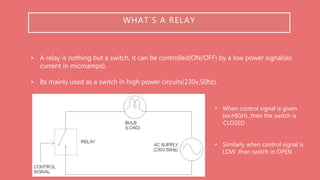
• A relay is nothing but a switch, it can be controlled(ON/OFF) by a low power signal(ex:
current in microamps).
• Its mainly used as a switch in high power circuits(230v,50hz).
• When control signal is given
(ex:HIGH) ,then the switch is
CLOSED
• Similarly when control signal is
LOW ,then switch in OPEN
WHAT`S A RELAY
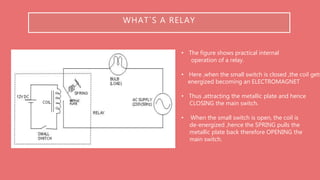
• The figure shows practical internal
operation of a relay.
• Here ,when the small switch is closed ,the coil gets
energized becoming an ELECTROMAGNET
• Thus ,attracting the metallic plate and hence
CLOSING the main switch.
• When the small switch is open, the coil is
de-energized ,hence the SPRING pulls the
metallic plate back therefore OPENING the
main switch.
INTERFACING RELAY WITH 8051
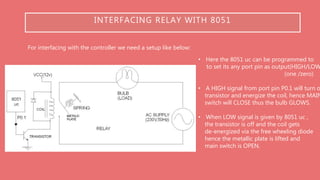
For interfacing with the controller we need a setup like below:
• Here the 8051 uc can be programmed to
to set its any port pin as output(HIGH/LOW
(one /zero)
• A HIGH signal from port pin P0.1 will turn o
transistor and energize the coil, hence MAIN
switch will CLOSE thus the bulb GLOWS.
• When LOW signal is given by 8051 uc ,
the transistor is off and the coil gets
de-energized via the free wheeling diode
hence the metallic plate is lifted and
main switch is OPEN.
ASSEMBLY CODE FOR INTERFACING
For assembly code we need to just send a high signal to the used Port PIN
High signal=LOGIC ONE
CODE:
org 00h
setb P0.2 [output of port zero pin two is set to HIGH(one)]
acall delay
clr P0.2 [output of port zero pin two is set to LOW(zero)]
END
NOTE: delay code is not mentioned here
C CODE FOR INTERFACING
#include<reg52.h>
sbit relay_pin = P0^2; [naming port zero pin two]
Void delay(int); [Define delay function]
Void main( )
{
do
{
relay_pin=0; [relay switched ON]
delay( );
relay_pin=1; [relay switched ON]
delay( );
} while(1);
}
NOTE: delay code is not mentioned here

Relay interfacing with 8051

  • 1.
    RELAY INTERFACING WITH 8051 PRATIKPHADTE COURSE : ELECTRICAL AND ELECTRONICS ENGINEERING @pratikphadte19@gmail.com
  • 2.
    TOPICS • What`s arelay • Interfacing relay with 8051 • Assembly code for interfacing • C code for interfacing
  • 3.
    WHAT`S A RELAY •A relay is nothing but a switch, it can be controlled(ON/OFF) by a low power signal(ex: current in microamps). • Its mainly used as a switch in high power circuits(230v,50hz). • When control signal is given (ex:HIGH) ,then the switch is CLOSED • Similarly when control signal is LOW ,then switch in OPEN
  • 4.
    WHAT`S A RELAY •The figure shows practical internal operation of a relay. • Here ,when the small switch is closed ,the coil gets energized becoming an ELECTROMAGNET • Thus ,attracting the metallic plate and hence CLOSING the main switch. • When the small switch is open, the coil is de-energized ,hence the SPRING pulls the metallic plate back therefore OPENING the main switch.
  • 5.
    INTERFACING RELAY WITH8051 For interfacing with the controller we need a setup like below: • Here the 8051 uc can be programmed to to set its any port pin as output(HIGH/LOW (one /zero) • A HIGH signal from port pin P0.1 will turn o transistor and energize the coil, hence MAIN switch will CLOSE thus the bulb GLOWS. • When LOW signal is given by 8051 uc , the transistor is off and the coil gets de-energized via the free wheeling diode hence the metallic plate is lifted and main switch is OPEN.
  • 6.
    ASSEMBLY CODE FORINTERFACING For assembly code we need to just send a high signal to the used Port PIN High signal=LOGIC ONE CODE: org 00h setb P0.2 [output of port zero pin two is set to HIGH(one)] acall delay clr P0.2 [output of port zero pin two is set to LOW(zero)] END NOTE: delay code is not mentioned here
  • 7.
    C CODE FORINTERFACING #include<reg52.h> sbit relay_pin = P0^2; [naming port zero pin two] Void delay(int); [Define delay function] Void main( ) { do { relay_pin=0; [relay switched ON] delay( ); relay_pin=1; [relay switched ON] delay( ); } while(1); } NOTE: delay code is not mentioned here