LibraryServices
Using the Library
libguides.rhul.ac.uk/MediaArts
4th November 2016
Emma Burnett & Leanne Workman
@RHUL_Library
Department
Aims of this session
2
 Types of information
 Finding books in the Library
 Finding and accessing ebooks and journal articles
 Beyond Library Search
 Evaluating information
 Referencing
Types of information
Department
Locating different types of information
4
Books
- Library – use LibrarySearch ‘Books, Music and Films’
Academic journals
- Library – use LibrarySearch ‘All’ search
- Use the Media Arts Subject Guide to find databases such as
Communications and Mass Media Complete
Department
5
Newspapers
- Library – use LibrarySearch ‘All’ search
- Databases – use the Nexis database to find specific articles
- General web – search for newspaper titles (limited access!)
Websites
-Think about how you evaluate free web resources:
http://prezi.com/q5jglgamre6c
Locating different types of information
Department
6
Locating different types of information
Dictionaries, encyclopaedias, other reference material
- Use the Media Arts Subject guide to find a full list under
‘Reference e-resources’
e.g. Credo, Oxford English Dictionary, Encyclopedia Britannica,
Oxford Reference Online, Oxford Dictionary of National
Biography
Department
7
Locating different types of information
Broadcast – film,TV, radio
- Use LibrarySearch ‘Books, Music and Films’ search to check DVDs
- Use Box of Broadcasts to watch millions of recorded programmes
- Use Kanopy to watch films and documentaries
- Use the Media Arts Subject guide to find a full list under
‘Multimedia e-resources’
Finding Information
Department
Finding books in the Library
9
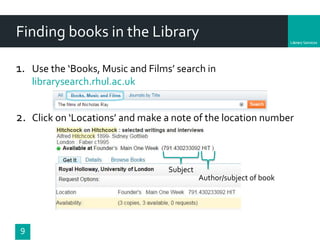
1. Use the ‘Books, Music and Films’ search in
librarysearch.rhul.ac.uk
2. Click on ‘Locations’ and make a note of the location number
Subject
Author/subject of book
Department
10
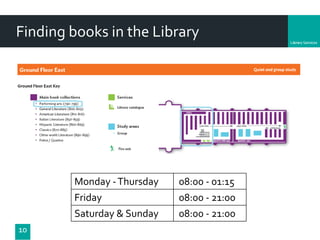
Finding books in the Library
Monday -Thursday 08:00 - 01:15
Friday 08:00 - 21:00
Saturday & Sunday 08:00 - 21:00
Department
E-books and journal articles
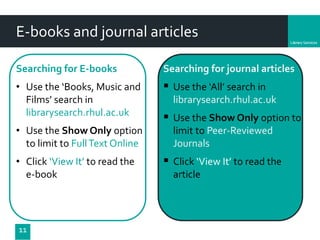
Searching for E-books
• Use the ‘Books, Music and
Films’ search in
librarysearch.rhul.ac.uk
• Use the Show Only option
to limit to FullText Online
• Click ‘View It’ to read the
e-book
11
Searching for journal articles
 Use the ‘All’ search in
librarysearch.rhul.ac.uk
 Use the Show Only option to
limit to Peer-Reviewed
Journals
 Click ‘View It’ to read the
article
Beyond Library Search
Department
Beyond LibrarySearch
http://libguides.rhul.ac.uk/MediaArts
13
Film &Television Literature Index with FullText
A great resource for those researching film and television,
contains numerous journals and resources spanning the entire
spectrum of film and television studies.
Also has access to “Variety Movie Reviews”
Department
Beyond LibrarySearch
http://libguides.rhul.ac.uk/MediaArts
14
FIAF International Index to Film Periodicals Plus
Contains details of over 345 academic and popular film
journals, full text is available for certain titles. Also includes
Treasures from the Film Archives, containing credits and
holdings information for more that 400,000 silent era films.
Department
Beyond LibrarySearch
http://libguides.rhul.ac.uk/MediaArts
15
JSTOR
JSTOR includes journal content, primary sources, images, and
more across the humanities, social sciences, and sciences.
Most journals available online until 5 years previous.
Department
Beyond LibrarySearch
http://libguides.rhul.ac.uk/MediaArts
16
Project MUSE
Over 300 humanities, arts, and social sciences journals
including cinema, cultural studies, drama, history, literature,
mathematics, modern languages, philosophy, politics, religion,
and sociology.
Most journals available online from 1995 or 1996 onwards
Evaluating Information
Department
Evaluating information sources
Authority
• Who is the author? Has the work been peer-reviewed or edited?
Accuracy
• Is there a reference list?
Objectivity
• Is the information biased? What is its purpose?Who is it aimed at?
Date
• When was the information created/updated? Is it well-maintained?
Coverage
• Is the information too basic?Too advanced?
18
Referencing
Department
Why reference?
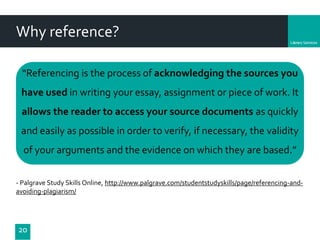
“Referencing is the process of acknowledging the sources you
have used in writing your essay, assignment or piece of work. It
allows the reader to access your source documents as quickly
and easily as possible in order to verify, if necessary, the validity
of your arguments and the evidence on which they are based.”
- Palgrave Study Skills Online, http://www.palgrave.com/studentstudyskills/page/referencing-and-
avoiding-plagiarism/
20
Department
21
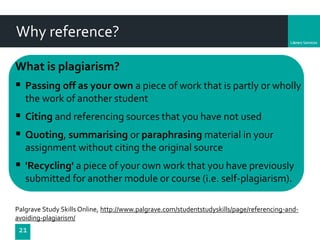
What is plagiarism?
 Passing off as your own a piece of work that is partly or wholly
the work of another student
 Citing and referencing sources that you have not used
 Quoting, summarising or paraphrasing material in your
assignment without citing the original source
 'Recycling' a piece of your own work that you have previously
submitted for another module or course (i.e. self-plagiarism).
Palgrave Study Skills Online, http://www.palgrave.com/studentstudyskills/page/referencing-and-
avoiding-plagiarism/
Why reference?
Department
GAMETIME!
22
‘To Cite or Not to Cite,
That is the Question…’ Game
Time for a quick quiz!
A scenario will be posted on the screen. Discuss briefly with
your neighbours whether you would cite or not cite.
• If you think you should cite in that
scenario, hold up the green card!
• If you think you don’t need to cite, hold
up the red card.
Department
23
Scenario 1:
Copying text, image, graph or data from
another source
https://www.flickr.com/photos/50457344@N00/2124730152/
CC BY: https://www.flickr.com/photos/katerha/5169694908
Department
24
Scenario 2:
Mention a fact which is commonly known
https://www.flickr.com/photos/1eyedz/5149519596
CC BY: https://www.flickr.com/photos/markusspiske/14441758628
Department
25
Scenario 3:
Discuss the ideas or research of another
person in your own words
CC BY: https://www.flickr.com/photos/lastyearsgirl_/7765134416/
Department
26
Scenario 4:
Write about your own opinions on a
topic
CC BY: https://www.flickr.com/photos/oxidiser/2950558429/
Department
27 CC BY: https://www.flickr.com/photos/75862793@N06/6816056519
Scenario 5:
Write about something you know you’ve
read about in several different sources
Department
What referencing style do you use?
Media Arts Style Guide
https://www.royalholloway.ac.uk/mediaarts/informationforcurrentstudents/home.aspx
28
 Harvard Referencing
 Emphasises Author-Date of publication
 Quoting and Paraphrasing
Department
Referencing a Book
29
InText
(AuthorYear: Page number)
e.g. ‘Quote’ (Bould 2005: 77)
Bould states that ‘Quote’ (2005:77)
Structure of the reference for Bibliography:
Book author’s name (Year book was published) Title of book.
Place of publication: Publisher.
Example reference:
Bould, Mark (2005) Film Noir. London:Wallflower Press
Department
Referencing a Book Chapter
30
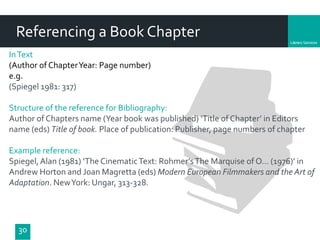
InText
(Author of ChapterYear: Page number)
e.g.
(Spiegel 1981: 317)
Structure of the reference for Bibliography:
Author of Chapters name (Year book was published) ‘Title of Chapter’ in Editors
name (eds) Title of book. Place of publication: Publisher, page numbers of chapter
Example reference:
Spiegel,Alan (1981) ‘The CinematicText: Rohmer’sThe Marquise of O... (1976)’ in
Andrew Horton and Joan Magretta (eds) Modern European Filmmakers and the Art of
Adaptation. NewYork: Ungar, 313-328.
Department
31
Referencing Academic Journals
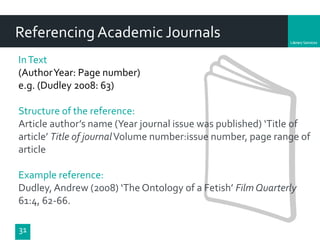
InText
(AuthorYear: Page number)
e.g. (Dudley 2008: 63)
Structure of the reference:
Article author’s name (Year journal issue was published) ‘Title of
article’ Title of journalVolume number:issue number, page range of
article
Example reference:
Dudley, Andrew (2008) ‘The Ontology of a Fetish’ Film Quarterly
61:4, 62-66.
Department
32
ReferencingWebsites
InText
(Author/OrganisationYear: Page number)
e.g. (Wigley 2016)
Structure of the reference: Authorship or Source (Year) Title of web
document or web page. [type of medium] Available at: web site
address [Accessed date].
Example reference:Wigley, Samuel (2016) British Independent Film
Awards 2016: the nominations in full [online] Available at:
http://www.bfi.org.uk/news-opinion/news-bfi/features/british-
independent-film-awards-2016-nominations-full [Accessed 01
November 2016].
Department
33
Referencing Films
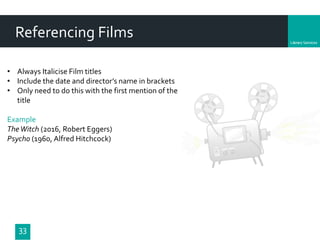
• Always Italicise Film titles
• Include the date and director’s name in brackets
• Only need to do this with the first mention of the
title
Example
TheWitch (2016, Robert Eggers)
Psycho (1960, Alfred Hitchcock)
Department
34
ReferencingTV
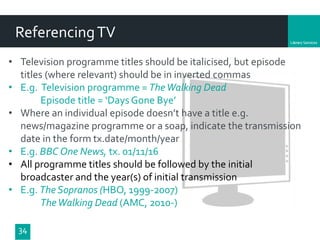
• Television programme titles should be italicised, but episode
titles (where relevant) should be in inverted commas
• E.g. Television programme = TheWalking Dead
Episode title = ‘Days Gone Bye’
• Where an individual episode doesn’t have a title e.g.
news/magazine programme or a soap, indicate the transmission
date in the form tx.date/month/year
• E.g. BBC One News, tx. 01/11/16
• All programme titles should be followed by the initial
broadcaster and the year(s) of initial transmission
• E.g. The Sopranos (HBO, 1999-2007)
TheWalking Dead (AMC, 2010-)
Department
35
Summary of Referencing
• Use the Harvard style as laid out in the Media Arts Style Guide
• Remember the two parts when referencing books, journals and
website
In text citation and full reference at the end in the bibliography
• Just an in text citation for Film andTV
• You need to put an in text citation when you quote directly
from someone else and also when you paraphrase
• Frame/introduce your quote pg 4 of style guide
• Ask for help if you need it
Department
36
Further Help
Leo Reynolds. Flickr. CC-BY-NA
LeanneWorkman & Emma Burnett
Information Consultants
2-07 Bedford Library
Royal Holloway University of London
libguides.rhul.ac.uk/MediaArts
Referencing support weeks beginning
7th & 14th November: sign up at
https://referencingsupportmediaarts.
eventbrite.co.uk

Referencing session November 2016

  • 1.
    LibraryServices Using the Library libguides.rhul.ac.uk/MediaArts 4thNovember 2016 Emma Burnett & Leanne Workman @RHUL_Library
  • 2.
    Department Aims of thissession 2  Types of information  Finding books in the Library  Finding and accessing ebooks and journal articles  Beyond Library Search  Evaluating information  Referencing
  • 3.
  • 4.
    Department Locating different typesof information 4 Books - Library – use LibrarySearch ‘Books, Music and Films’ Academic journals - Library – use LibrarySearch ‘All’ search - Use the Media Arts Subject Guide to find databases such as Communications and Mass Media Complete
  • 5.
    Department 5 Newspapers - Library –use LibrarySearch ‘All’ search - Databases – use the Nexis database to find specific articles - General web – search for newspaper titles (limited access!) Websites -Think about how you evaluate free web resources: http://prezi.com/q5jglgamre6c Locating different types of information
  • 6.
    Department 6 Locating different typesof information Dictionaries, encyclopaedias, other reference material - Use the Media Arts Subject guide to find a full list under ‘Reference e-resources’ e.g. Credo, Oxford English Dictionary, Encyclopedia Britannica, Oxford Reference Online, Oxford Dictionary of National Biography
  • 7.
    Department 7 Locating different typesof information Broadcast – film,TV, radio - Use LibrarySearch ‘Books, Music and Films’ search to check DVDs - Use Box of Broadcasts to watch millions of recorded programmes - Use Kanopy to watch films and documentaries - Use the Media Arts Subject guide to find a full list under ‘Multimedia e-resources’
  • 8.
  • 9.
    Department Finding books inthe Library 9 1. Use the ‘Books, Music and Films’ search in librarysearch.rhul.ac.uk 2. Click on ‘Locations’ and make a note of the location number Subject Author/subject of book
  • 10.
    Department 10 Finding books inthe Library Monday -Thursday 08:00 - 01:15 Friday 08:00 - 21:00 Saturday & Sunday 08:00 - 21:00
  • 11.
    Department E-books and journalarticles Searching for E-books • Use the ‘Books, Music and Films’ search in librarysearch.rhul.ac.uk • Use the Show Only option to limit to FullText Online • Click ‘View It’ to read the e-book 11 Searching for journal articles  Use the ‘All’ search in librarysearch.rhul.ac.uk  Use the Show Only option to limit to Peer-Reviewed Journals  Click ‘View It’ to read the article
  • 12.
  • 13.
    Department Beyond LibrarySearch http://libguides.rhul.ac.uk/MediaArts 13 Film &TelevisionLiterature Index with FullText A great resource for those researching film and television, contains numerous journals and resources spanning the entire spectrum of film and television studies. Also has access to “Variety Movie Reviews”
  • 14.
    Department Beyond LibrarySearch http://libguides.rhul.ac.uk/MediaArts 14 FIAF InternationalIndex to Film Periodicals Plus Contains details of over 345 academic and popular film journals, full text is available for certain titles. Also includes Treasures from the Film Archives, containing credits and holdings information for more that 400,000 silent era films.
  • 15.
    Department Beyond LibrarySearch http://libguides.rhul.ac.uk/MediaArts 15 JSTOR JSTOR includesjournal content, primary sources, images, and more across the humanities, social sciences, and sciences. Most journals available online until 5 years previous.
  • 16.
    Department Beyond LibrarySearch http://libguides.rhul.ac.uk/MediaArts 16 Project MUSE Over300 humanities, arts, and social sciences journals including cinema, cultural studies, drama, history, literature, mathematics, modern languages, philosophy, politics, religion, and sociology. Most journals available online from 1995 or 1996 onwards
  • 17.
  • 18.
    Department Evaluating information sources Authority •Who is the author? Has the work been peer-reviewed or edited? Accuracy • Is there a reference list? Objectivity • Is the information biased? What is its purpose?Who is it aimed at? Date • When was the information created/updated? Is it well-maintained? Coverage • Is the information too basic?Too advanced? 18
  • 19.
  • 20.
    Department Why reference? “Referencing isthe process of acknowledging the sources you have used in writing your essay, assignment or piece of work. It allows the reader to access your source documents as quickly and easily as possible in order to verify, if necessary, the validity of your arguments and the evidence on which they are based.” - Palgrave Study Skills Online, http://www.palgrave.com/studentstudyskills/page/referencing-and- avoiding-plagiarism/ 20
  • 21.
    Department 21 What is plagiarism? Passing off as your own a piece of work that is partly or wholly the work of another student  Citing and referencing sources that you have not used  Quoting, summarising or paraphrasing material in your assignment without citing the original source  'Recycling' a piece of your own work that you have previously submitted for another module or course (i.e. self-plagiarism). Palgrave Study Skills Online, http://www.palgrave.com/studentstudyskills/page/referencing-and- avoiding-plagiarism/ Why reference?
  • 22.
    Department GAMETIME! 22 ‘To Cite orNot to Cite, That is the Question…’ Game Time for a quick quiz! A scenario will be posted on the screen. Discuss briefly with your neighbours whether you would cite or not cite. • If you think you should cite in that scenario, hold up the green card! • If you think you don’t need to cite, hold up the red card.
  • 23.
    Department 23 Scenario 1: Copying text,image, graph or data from another source https://www.flickr.com/photos/50457344@N00/2124730152/ CC BY: https://www.flickr.com/photos/katerha/5169694908
  • 24.
    Department 24 Scenario 2: Mention afact which is commonly known https://www.flickr.com/photos/1eyedz/5149519596 CC BY: https://www.flickr.com/photos/markusspiske/14441758628
  • 25.
    Department 25 Scenario 3: Discuss theideas or research of another person in your own words CC BY: https://www.flickr.com/photos/lastyearsgirl_/7765134416/
  • 26.
    Department 26 Scenario 4: Write aboutyour own opinions on a topic CC BY: https://www.flickr.com/photos/oxidiser/2950558429/
  • 27.
    Department 27 CC BY:https://www.flickr.com/photos/75862793@N06/6816056519 Scenario 5: Write about something you know you’ve read about in several different sources
  • 28.
    Department What referencing styledo you use? Media Arts Style Guide https://www.royalholloway.ac.uk/mediaarts/informationforcurrentstudents/home.aspx 28  Harvard Referencing  Emphasises Author-Date of publication  Quoting and Paraphrasing
  • 29.
    Department Referencing a Book 29 InText (AuthorYear:Page number) e.g. ‘Quote’ (Bould 2005: 77) Bould states that ‘Quote’ (2005:77) Structure of the reference for Bibliography: Book author’s name (Year book was published) Title of book. Place of publication: Publisher. Example reference: Bould, Mark (2005) Film Noir. London:Wallflower Press
  • 30.
    Department Referencing a BookChapter 30 InText (Author of ChapterYear: Page number) e.g. (Spiegel 1981: 317) Structure of the reference for Bibliography: Author of Chapters name (Year book was published) ‘Title of Chapter’ in Editors name (eds) Title of book. Place of publication: Publisher, page numbers of chapter Example reference: Spiegel,Alan (1981) ‘The CinematicText: Rohmer’sThe Marquise of O... (1976)’ in Andrew Horton and Joan Magretta (eds) Modern European Filmmakers and the Art of Adaptation. NewYork: Ungar, 313-328.
  • 31.
    Department 31 Referencing Academic Journals InText (AuthorYear:Page number) e.g. (Dudley 2008: 63) Structure of the reference: Article author’s name (Year journal issue was published) ‘Title of article’ Title of journalVolume number:issue number, page range of article Example reference: Dudley, Andrew (2008) ‘The Ontology of a Fetish’ Film Quarterly 61:4, 62-66.
  • 32.
    Department 32 ReferencingWebsites InText (Author/OrganisationYear: Page number) e.g.(Wigley 2016) Structure of the reference: Authorship or Source (Year) Title of web document or web page. [type of medium] Available at: web site address [Accessed date]. Example reference:Wigley, Samuel (2016) British Independent Film Awards 2016: the nominations in full [online] Available at: http://www.bfi.org.uk/news-opinion/news-bfi/features/british- independent-film-awards-2016-nominations-full [Accessed 01 November 2016].
  • 33.
    Department 33 Referencing Films • AlwaysItalicise Film titles • Include the date and director’s name in brackets • Only need to do this with the first mention of the title Example TheWitch (2016, Robert Eggers) Psycho (1960, Alfred Hitchcock)
  • 34.
    Department 34 ReferencingTV • Television programmetitles should be italicised, but episode titles (where relevant) should be in inverted commas • E.g. Television programme = TheWalking Dead Episode title = ‘Days Gone Bye’ • Where an individual episode doesn’t have a title e.g. news/magazine programme or a soap, indicate the transmission date in the form tx.date/month/year • E.g. BBC One News, tx. 01/11/16 • All programme titles should be followed by the initial broadcaster and the year(s) of initial transmission • E.g. The Sopranos (HBO, 1999-2007) TheWalking Dead (AMC, 2010-)
  • 35.
    Department 35 Summary of Referencing •Use the Harvard style as laid out in the Media Arts Style Guide • Remember the two parts when referencing books, journals and website In text citation and full reference at the end in the bibliography • Just an in text citation for Film andTV • You need to put an in text citation when you quote directly from someone else and also when you paraphrase • Frame/introduce your quote pg 4 of style guide • Ask for help if you need it
  • 36.
    Department 36 Further Help Leo Reynolds.Flickr. CC-BY-NA LeanneWorkman & Emma Burnett Information Consultants 2-07 Bedford Library Royal Holloway University of London libguides.rhul.ac.uk/MediaArts Referencing support weeks beginning 7th & 14th November: sign up at https://referencingsupportmediaarts. eventbrite.co.uk

Editor's Notes

  • #10 Sign in to check details of copies, their availability and due date
  • #11 DVDs are located in the shelves near the help desk as you come in to the Founder’s Library
  • #17 Take a look at the subject guide (link on the slide) and under ‘Finding E-resources’ for a list of online resources relevant to Media Arts. On this and the next slide there are examples of two databases that provide journal articles – LibrarySearch will search these automatically, but sometimes it can be useful to pinpoint a search with a particular database so there are two here to try. Note the availability of the articles that you will find – this can help you to make a decision about which database to use.
  • #21 “[it] helps to demonstrate that you have read widely, and considered and analysed the writings of others. […] Most importantly, good referencing is essential to avoid any possible accusation of plagiarism.”
  • #22 Plagiarism is a term that describes the unacknowledged use of someone's work. This includes material or ideas from any (published or unpublished) sources, whether print, web-based (even if freely available) or audiovisual.”
  • #24 Any verbatim use of a source, no matter how large or small the quotation, must be placed in quotation marks. The quotation must be accompanied, either within the text or in a footnote, by a precise indication of the source.
  • #25 So if you a stating a fact that is common knowledge is or is widely accepted to be FACT e.g. President Obama is the president of the United States of America, a formula etc facts may not need to be cited, whereas ideas must always be cited. Deciding which facts or pieces of information require citation and which are common knowledge, and therefore do not require citation, isn’t easy. For example, finding the same fact or piece of information in multiple sources doesn’t necessarily mean that it counts as common knowledge. Your best course of action in such a case may be to cite the most credible or authoritative of the multiple sources. BUT if you are in doubt, err on the side of caution and cite 
  • #26 So this covers paraphrasing or summarising… either way, YOU DO STILL NEED TO CITE THE SOURCE
  • #28 Excellent – I think we’ve all got to grips with when to cite or not to cite. Plagiarism occurs most commonly by NOT Referencing or citing the course correctly
  • #29 Explain the difference between quoting and paraphrasing, point them to the style guide as this explains more fully
  • #31 Ask them how they would look for this book on library search
  • #32 Go through the structure of the reference and explain things like vol and issues Stress that if they get an online journal via one of our journal databases e.g. JSTOR, project muse, they just reference it like a journal article not a website
  • #34 Mention that you just need to do the in text referencing
  • #35 Mention that you just need to do the in text referencing