Library
Library & Information Skills for CPS,
workshops 1 and 2
https://libguides.rhul.ac.uk/cps
Autumn 2018
Emma Burnett
Library
My essay question / research topic:
What do I want to find out?
Library
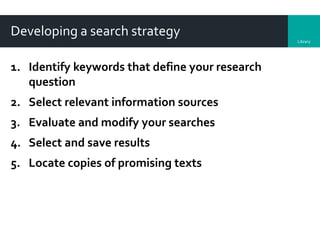
Developing a search strategy
1. Identify keywords that define your research
question
2. Select relevant information sources
3. Evaluate and modify your searches
4. Select and save results
5. Locate copies of promising texts
Library
4
Library
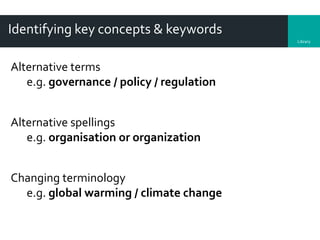
Identifying key concepts & keywords
Alternative terms
e.g. governance / policy / regulation
Alternative spellings
e.g. organisation or organization
Changing terminology
e.g. global warming / climate change
Library
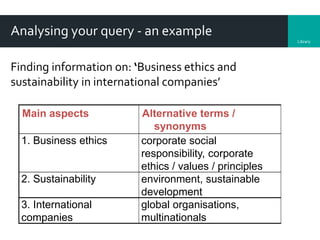
Analysing your query - an example
Finding information on: ‘Business ethics and
sustainability in international companies’
Main aspects Alternative terms /
synonyms
1. Business ethics corporate social
responsibility, corporate
ethics / values / principles
2. Sustainability environment, sustainable
development
3. International
companies
global organisations,
multinationals
Library
Now that I know what I want to find out:
What resources would I use?
Library
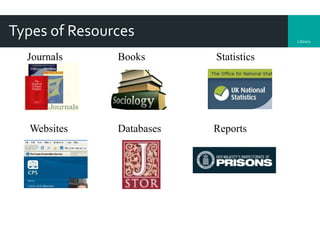
Types of Resources
BooksJournals Statistics
Websites Databases Reports
Library
Selecting information sources
Access via the CPS subject guide:
http://libguides.rhul.ac.uk/CPS/eresources
• Credo Reference, Encyclopedia Britannica (good starting
points)
• LibrarySearch
• General databases (e.g. Jstor,Web of Science)
• Specific resources: e.g. Business Source Complete, Emerald,
IBIS World
• Bloomberg
• Senate House Library (ABI Inform)
Library
Now that I know what I want to find out
& where to find the resources:
How do I search for information
on my topic?
Library
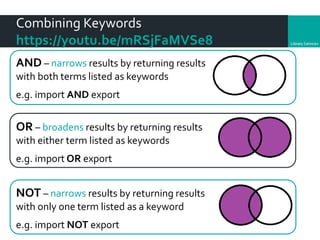
Combining Keywords
https://youtu.be/mRSjFaMVSe8
AND – narrows results by returning results
with both terms listed as keywords
e.g. import AND export
OR – broadens results by returning results
with either term listed as keywords
e.g. import OR export
NOT – narrows results by returning results
with only one term listed as a keyword
e.g. import NOT export
Library
Reviewing your results – hints & tips
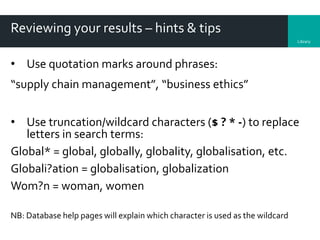
• Use quotation marks around phrases:
“supply chain management”, “business ethics”
• Use truncation/wildcard characters ($ ? * -) to replace
letters in search terms:
Global* = global, globally, globality, globalisation, etc.
Globali?ation = globalisation, globalization
Wom?n = woman, women
NB: Database help pages will explain which character is used as the wildcard
Library
Wildcard searching – hints & tips
Use wildcard characters ($ ? * -) to replace letters in
search terms
Examples
depriv* - finds deprivation, deprive, deprived etc.
wom?n - finds women, woman.
NB: Help pages in online databases will explain
which character is used as the wildcard
Library
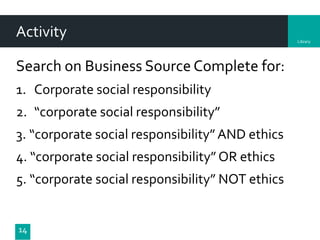
Activity
Search on Business Source Complete for:
1. Corporate social responsibility
2. “corporate social responsibility”
3. “corporate social responsibility”AND ethics
4. “corporate social responsibility” OR ethics
5. “corporate social responsibility” NOT ethics
14
Library
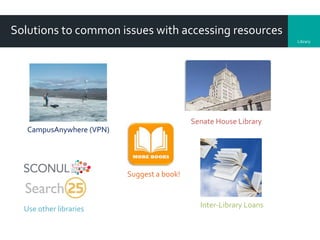
Solutions to common issues with accessing resources
CampusAnywhere (VPN)
Senate House Library
Suggest a book!
Use other libraries Inter-Library Loans
Library
Now that I have found information on
my topic:
How do I know that it is what I
want and good quality
material?
Library
Evaluating Information
Authority
• Who is the author? Has the work been peer-reviewed or edited?
Accuracy
• Is there a reference list?
Objectivity
• Is the information biased? What is its purpose?Who is it aimed at?
Date
• When was the information created/updated? Is it well-maintained?
Coverage
• Is the information too basic or too advanced?
Presentation on evaluating information
Library
Now that I have the information (books,
chapters, journal articles, webpages
etc) that I need:
How do I manage & reference
them?
Library
Selecting & saving results & full text
Most databases allow you to:
Select and save results to a ‘folder’
Save, download or email results to yourself
Save search ‘history’ & re run them
Always make a note of your search queries and which
database you used.
Library
Citation and referencing
Acknowledge the author of the source
Enable the item to be traced
Evidence of scope and depth of your research
Reference style – the layout & format of your
bibliography – see department handbook
Library
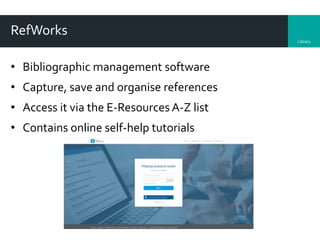
RefWorks
• Bibliographic management software
• Capture, save and organise references
• Access it via the E-Resources A-Z list
• Contains online self-help tutorials
Library
Access online resources off-campus
Royal Holloway ‘Campus Anywhere’ (VPN)
The only way to access all of our electronic resources off
campus is to install theVirtual Private Network (VPN)
service, known as 'CampusAnywhere'.
https://intranet.royalholloway.ac.uk/staff/it-
services/getting-started/get-connected/vpn.aspx
Library
Any questions?
For more help & guidance on any of the topics explored in this course, or for
one to one training sessions, please contact the Library’s Information
Consultant for the Centre for Professional Studies:
Emma Burnett emma.burnett@royalholloway.ac.uk
and see the subject guide https://libguides.rhul.ac.uk/cps

Centre for Professional Studies: library & information skills 2018

  • 1.
    Library Library & InformationSkills for CPS, workshops 1 and 2 https://libguides.rhul.ac.uk/cps Autumn 2018 Emma Burnett
  • 2.
    Library My essay question/ research topic: What do I want to find out?
  • 3.
    Library Developing a searchstrategy 1. Identify keywords that define your research question 2. Select relevant information sources 3. Evaluate and modify your searches 4. Select and save results 5. Locate copies of promising texts
  • 4.
  • 5.
    Library Identifying key concepts& keywords Alternative terms e.g. governance / policy / regulation Alternative spellings e.g. organisation or organization Changing terminology e.g. global warming / climate change
  • 6.
    Library Analysing your query- an example Finding information on: ‘Business ethics and sustainability in international companies’ Main aspects Alternative terms / synonyms 1. Business ethics corporate social responsibility, corporate ethics / values / principles 2. Sustainability environment, sustainable development 3. International companies global organisations, multinationals
  • 7.
    Library Now that Iknow what I want to find out: What resources would I use?
  • 8.
    Library Types of Resources BooksJournalsStatistics Websites Databases Reports
  • 9.
    Library Selecting information sources Accessvia the CPS subject guide: http://libguides.rhul.ac.uk/CPS/eresources • Credo Reference, Encyclopedia Britannica (good starting points) • LibrarySearch • General databases (e.g. Jstor,Web of Science) • Specific resources: e.g. Business Source Complete, Emerald, IBIS World • Bloomberg • Senate House Library (ABI Inform)
  • 10.
    Library Now that Iknow what I want to find out & where to find the resources: How do I search for information on my topic?
  • 11.
    Library Combining Keywords https://youtu.be/mRSjFaMVSe8 AND –narrows results by returning results with both terms listed as keywords e.g. import AND export OR – broadens results by returning results with either term listed as keywords e.g. import OR export NOT – narrows results by returning results with only one term listed as a keyword e.g. import NOT export
  • 12.
    Library Reviewing your results– hints & tips • Use quotation marks around phrases: “supply chain management”, “business ethics” • Use truncation/wildcard characters ($ ? * -) to replace letters in search terms: Global* = global, globally, globality, globalisation, etc. Globali?ation = globalisation, globalization Wom?n = woman, women NB: Database help pages will explain which character is used as the wildcard
  • 13.
    Library Wildcard searching –hints & tips Use wildcard characters ($ ? * -) to replace letters in search terms Examples depriv* - finds deprivation, deprive, deprived etc. wom?n - finds women, woman. NB: Help pages in online databases will explain which character is used as the wildcard
  • 14.
    Library Activity Search on BusinessSource Complete for: 1. Corporate social responsibility 2. “corporate social responsibility” 3. “corporate social responsibility”AND ethics 4. “corporate social responsibility” OR ethics 5. “corporate social responsibility” NOT ethics 14
  • 15.
    Library Solutions to commonissues with accessing resources CampusAnywhere (VPN) Senate House Library Suggest a book! Use other libraries Inter-Library Loans
  • 16.
    Library Now that Ihave found information on my topic: How do I know that it is what I want and good quality material?
  • 17.
    Library Evaluating Information Authority • Whois the author? Has the work been peer-reviewed or edited? Accuracy • Is there a reference list? Objectivity • Is the information biased? What is its purpose?Who is it aimed at? Date • When was the information created/updated? Is it well-maintained? Coverage • Is the information too basic or too advanced? Presentation on evaluating information
  • 18.
    Library Now that Ihave the information (books, chapters, journal articles, webpages etc) that I need: How do I manage & reference them?
  • 19.
    Library Selecting & savingresults & full text Most databases allow you to: Select and save results to a ‘folder’ Save, download or email results to yourself Save search ‘history’ & re run them Always make a note of your search queries and which database you used.
  • 20.
    Library Citation and referencing Acknowledgethe author of the source Enable the item to be traced Evidence of scope and depth of your research Reference style – the layout & format of your bibliography – see department handbook
  • 21.
    Library RefWorks • Bibliographic managementsoftware • Capture, save and organise references • Access it via the E-Resources A-Z list • Contains online self-help tutorials
  • 22.
    Library Access online resourcesoff-campus Royal Holloway ‘Campus Anywhere’ (VPN) The only way to access all of our electronic resources off campus is to install theVirtual Private Network (VPN) service, known as 'CampusAnywhere'. https://intranet.royalholloway.ac.uk/staff/it- services/getting-started/get-connected/vpn.aspx
  • 23.
    Library Any questions? For morehelp & guidance on any of the topics explored in this course, or for one to one training sessions, please contact the Library’s Information Consultant for the Centre for Professional Studies: Emma Burnett emma.burnett@royalholloway.ac.uk and see the subject guide https://libguides.rhul.ac.uk/cps