Library
Library & InformationTraining for
Geographers:
Advanced Research Skills for
Projects and Dissertations
http://libguides.rhul.ac.uk/geography
Autumn 2018
Emma Burnett
Library
Session Outline
• Information LiteracyAward
• Refresher quiz
• Developing a search strategy
• Searching information sources – hints & tips
• Citation and referencing
• Options for accessing resources
Library
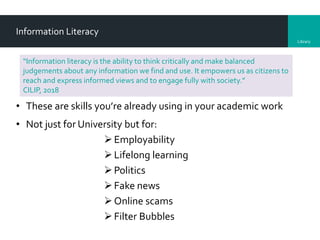
Information Literacy
• These are skills you’re already using in your academic work
• Not just for University but for:
Employability
Lifelong learning
Politics
Fake news
Online scams
Filter Bubbles
“Information literacy is the ability to think critically and make balanced
judgements about any information we find and use. It empowers us as citizens to
reach and express informed views and to engage fully with society.”
CILIP, 2018
Library
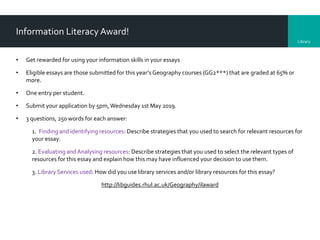
Information Literacy Award!
• Get rewarded for using your information skills in your essays
• Eligible essays are those submitted for this year’s Geography courses (GG2***) that are graded at 65% or
more.
• One entry per student.
• Submit your application by 5pm,Wednesday 1st May 2019.
• 3 questions, 250 words for each answer:
1. Finding and identifying resources: Describe strategies that you used to search for relevant resources for
your essay.
2. Evaluating andAnalysing resources: Describe strategies that you used to select the relevant types of
resources for this essay and explain how this may have influenced your decision to use them.
3. Library Services used: How did you use library services and/or library resources for this essay?
http://libguides.rhul.ac.uk/Geography/ilaward
Library
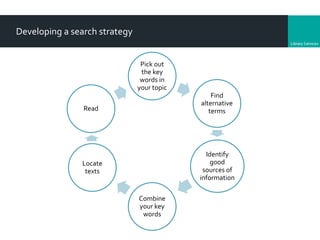
Developing a search strategy
Pick out
the key
words in
your topic
Find
alternative
terms
Identify
good
sources of
information
Combine
your key
words
Locate
texts
Read
Library
My dissertation topic/question:
What do I want to find out?
Information Literacy Award: Finding and identifying resources
Library
Keywords and AlternativeTerms
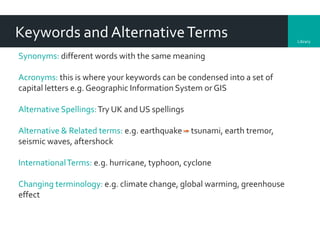
Synonyms: different words with the same meaning
Acronyms: this is where your keywords can be condensed into a set of
capital letters e.g. Geographic Information System or GIS
Alternative Spellings:Try UK and US spellings
Alternative & Related terms: e.g. earthquake tsunami, earth tremor,
seismic waves, aftershock
InternationalTerms: e.g. hurricane, typhoon, cyclone
Changing terminology: e.g. climate change, global warming, greenhouse
effect
Library
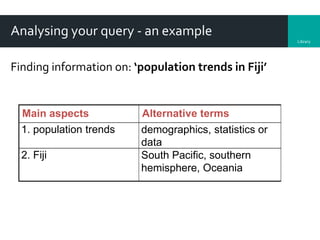
Analysing your query - an example
Finding information on: ‘population trends in Fiji’
Main aspects Alternative terms
1. population trends demographics, statistics or
data
2. Fiji South Pacific, southern
hemisphere, Oceania
Library
Ways you can limit your search
Date: do you only want items published after a certain date?
Language: do you only want references in English?
Geography: Do you want information about a specific place or
published in a particular country
Type of publication: are you looking for journal articles, books,
theses?This might influence your choice of database
Library
Now that I know what I want to find out:
What resources would I use?
Information Literacy Award: Finding and identifying resources
Information Literacy Award: Using Library Services
Library
Selecting information sources
• http://libguides.rhul.ac.uk/Geography
• Reference resources e.g. Credo Reference, Encyclopedia
Britannica, Oxford Bibliographies Online (good starting points)
• Online databases e.g. JSTOR, Project Muse, GeoRef,Web of
Knowledge/Science
• LibrarySearch
• Senate house library catalogue
• Other internet resources
Library
Now that I know what I want to find out
& where to find the resources:
How do I search for information on
my topic?
Information Literacy Award: Finding and identifying resources
Library
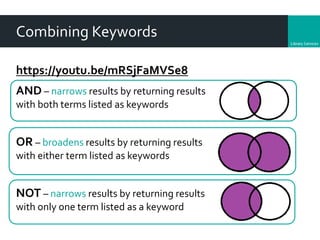
Combining Keywords
https://youtu.be/mRSjFaMVSe8
AND – narrows results by returning results
with both terms listed as keywords
OR – broadens results by returning results
with either term listed as keywords
NOT – narrows results by returning results
with only one term listed as a keyword
Library
Wildcard and phrase searching – hints & tips
Use phrase searching (“”) to search for words that
should appear together e.g. “population trends”
Use wildcard characters ($ ? * -) to replace letters in
search terms
Examples
popul* - finds populous, population, etc.
wom*n - finds women, woman.
organi?ation - finds organisation, organization
NB: Help pages in online databases will explain which character is
used as the wildcard
Library
Now that I’ve searched:
How do I access the material I find?
Information Literacy Award: Using library services
Library
Accessing material via the Library
Books
• Check LibrarySearch to see if we have copies
Journal articles
• LibrarySearch default is full text only
• Some databases will provide some/all articles as full text (some will let you
refine your search to full text only)
• Some services will link you to LibrarySearch via “Find It @RHUL” – you may
find we don’t have full text access. If this is the case, don’t panic and never
pay for an article.
Library
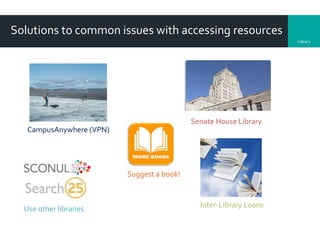
Solutions to common issues with accessing resources
CampusAnywhere (VPN)
Senate House Library
Suggest a book!
Use other libraries Inter-Library Loans
Library
Now that I have found information on
my topic:
How do I know whether to use it for
my dissertation?
Information Literacy Award: Evaluating and Analysing resources
Library
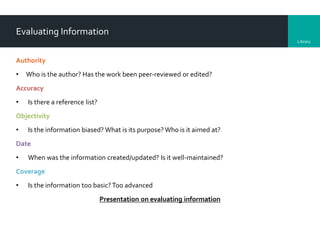
Evaluating Information
Authority
• Who is the author? Has the work been peer-reviewed or edited?
Accuracy
• Is there a reference list?
Objectivity
• Is the information biased? What is its purpose?Who is it aimed at?
Date
• When was the information created/updated? Is it well-maintained?
Coverage
• Is the information too basic? Too advanced
Presentation on evaluating information
Library
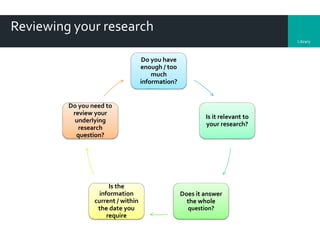
Reviewing your research
Do you have
enough / too
much
information?
Is it relevant to
your research?
Does it answer
the whole
question?
Is the
information
current / within
the date you
require
Do you need to
review your
underlying
research
question?
Library
Now that I have the information (books,
chapters, journal articles, webpages
etc.) that I need:
How do I manage & reference them?
Information Literacy Award: Using library services
Library
Selecting & saving results & full text
Most databases allow you to:
• Select and save results to a folder
• Save, download or email results to yourself
• Save search ‘history’ & re-run them
Always make a note of your search queries and which
database you used.
Library
Citation and referencing
• Acknowledge the author of the source
• Enable the item to be traced
• Evidence of scope and depth of your research
• Reference style – the layout & format of your
bibliography
Library
RefWorks
• Bibliographic management software
• Capture, save and organise references
• Access it via the Databases A-Z list
• Contains online self-help tutorials
Library RefWorks sessions:
http://libguides.rhul.ac.uk/training
Library
Further help & support
Attend a practical session thisThursday: 11am, 12 noon, 2pm, 3pm.
Emma Burnett, Information Consultant for Geography
emma.burnett@royalholloway.ac.uk
and see the subject guide http://libguides.rhul.ac.uk/Geography
Further information can also be found on the Library website
www.royalholloway.ac.uk/library
Information Literacy Award: Using library services

GG2001/2 Advanced Research Skills session

  • 1.
    Library Library & InformationTrainingfor Geographers: Advanced Research Skills for Projects and Dissertations http://libguides.rhul.ac.uk/geography Autumn 2018 Emma Burnett
  • 2.
    Library Session Outline • InformationLiteracyAward • Refresher quiz • Developing a search strategy • Searching information sources – hints & tips • Citation and referencing • Options for accessing resources
  • 3.
    Library Information Literacy • Theseare skills you’re already using in your academic work • Not just for University but for: Employability Lifelong learning Politics Fake news Online scams Filter Bubbles “Information literacy is the ability to think critically and make balanced judgements about any information we find and use. It empowers us as citizens to reach and express informed views and to engage fully with society.” CILIP, 2018
  • 4.
    Library Information Literacy Award! •Get rewarded for using your information skills in your essays • Eligible essays are those submitted for this year’s Geography courses (GG2***) that are graded at 65% or more. • One entry per student. • Submit your application by 5pm,Wednesday 1st May 2019. • 3 questions, 250 words for each answer: 1. Finding and identifying resources: Describe strategies that you used to search for relevant resources for your essay. 2. Evaluating andAnalysing resources: Describe strategies that you used to select the relevant types of resources for this essay and explain how this may have influenced your decision to use them. 3. Library Services used: How did you use library services and/or library resources for this essay? http://libguides.rhul.ac.uk/Geography/ilaward
  • 5.
    Library Developing a searchstrategy Pick out the key words in your topic Find alternative terms Identify good sources of information Combine your key words Locate texts Read
  • 6.
    Library My dissertation topic/question: Whatdo I want to find out? Information Literacy Award: Finding and identifying resources
  • 7.
    Library Keywords and AlternativeTerms Synonyms:different words with the same meaning Acronyms: this is where your keywords can be condensed into a set of capital letters e.g. Geographic Information System or GIS Alternative Spellings:Try UK and US spellings Alternative & Related terms: e.g. earthquake tsunami, earth tremor, seismic waves, aftershock InternationalTerms: e.g. hurricane, typhoon, cyclone Changing terminology: e.g. climate change, global warming, greenhouse effect
  • 8.
    Library Analysing your query- an example Finding information on: ‘population trends in Fiji’ Main aspects Alternative terms 1. population trends demographics, statistics or data 2. Fiji South Pacific, southern hemisphere, Oceania
  • 9.
    Library Ways you canlimit your search Date: do you only want items published after a certain date? Language: do you only want references in English? Geography: Do you want information about a specific place or published in a particular country Type of publication: are you looking for journal articles, books, theses?This might influence your choice of database
  • 10.
    Library Now that Iknow what I want to find out: What resources would I use? Information Literacy Award: Finding and identifying resources Information Literacy Award: Using Library Services
  • 11.
    Library Selecting information sources •http://libguides.rhul.ac.uk/Geography • Reference resources e.g. Credo Reference, Encyclopedia Britannica, Oxford Bibliographies Online (good starting points) • Online databases e.g. JSTOR, Project Muse, GeoRef,Web of Knowledge/Science • LibrarySearch • Senate house library catalogue • Other internet resources
  • 12.
    Library Now that Iknow what I want to find out & where to find the resources: How do I search for information on my topic? Information Literacy Award: Finding and identifying resources
  • 13.
    Library Combining Keywords https://youtu.be/mRSjFaMVSe8 AND –narrows results by returning results with both terms listed as keywords OR – broadens results by returning results with either term listed as keywords NOT – narrows results by returning results with only one term listed as a keyword
  • 14.
    Library Wildcard and phrasesearching – hints & tips Use phrase searching (“”) to search for words that should appear together e.g. “population trends” Use wildcard characters ($ ? * -) to replace letters in search terms Examples popul* - finds populous, population, etc. wom*n - finds women, woman. organi?ation - finds organisation, organization NB: Help pages in online databases will explain which character is used as the wildcard
  • 15.
    Library Now that I’vesearched: How do I access the material I find? Information Literacy Award: Using library services
  • 16.
    Library Accessing material viathe Library Books • Check LibrarySearch to see if we have copies Journal articles • LibrarySearch default is full text only • Some databases will provide some/all articles as full text (some will let you refine your search to full text only) • Some services will link you to LibrarySearch via “Find It @RHUL” – you may find we don’t have full text access. If this is the case, don’t panic and never pay for an article.
  • 17.
    Library Solutions to commonissues with accessing resources CampusAnywhere (VPN) Senate House Library Suggest a book! Use other libraries Inter-Library Loans
  • 18.
    Library Now that Ihave found information on my topic: How do I know whether to use it for my dissertation? Information Literacy Award: Evaluating and Analysing resources
  • 19.
    Library Evaluating Information Authority • Whois the author? Has the work been peer-reviewed or edited? Accuracy • Is there a reference list? Objectivity • Is the information biased? What is its purpose?Who is it aimed at? Date • When was the information created/updated? Is it well-maintained? Coverage • Is the information too basic? Too advanced Presentation on evaluating information
  • 20.
    Library Reviewing your research Doyou have enough / too much information? Is it relevant to your research? Does it answer the whole question? Is the information current / within the date you require Do you need to review your underlying research question?
  • 21.
    Library Now that Ihave the information (books, chapters, journal articles, webpages etc.) that I need: How do I manage & reference them? Information Literacy Award: Using library services
  • 22.
    Library Selecting & savingresults & full text Most databases allow you to: • Select and save results to a folder • Save, download or email results to yourself • Save search ‘history’ & re-run them Always make a note of your search queries and which database you used.
  • 23.
    Library Citation and referencing •Acknowledge the author of the source • Enable the item to be traced • Evidence of scope and depth of your research • Reference style – the layout & format of your bibliography
  • 24.
    Library RefWorks • Bibliographic managementsoftware • Capture, save and organise references • Access it via the Databases A-Z list • Contains online self-help tutorials Library RefWorks sessions: http://libguides.rhul.ac.uk/training
  • 25.
    Library Further help &support Attend a practical session thisThursday: 11am, 12 noon, 2pm, 3pm. Emma Burnett, Information Consultant for Geography emma.burnett@royalholloway.ac.uk and see the subject guide http://libguides.rhul.ac.uk/Geography Further information can also be found on the Library website www.royalholloway.ac.uk/library Information Literacy Award: Using library services