SMLLC Academics Skills:
Information & Research Skills
libguides.rhul.ac.uk/modernlanguages

November 2013
Russell Burke

Library Services
Aims of the session
Library
Services

• Overview of Library Services available to support your essay research
• Step 1 - Plan and conduct a literature search
• Step 2 - Use LibrarySearch and subject specific resources to find information

• Step 3 - Use more advanced search techniques
• Step 4 - Manage references to generate bibliographies using RefWorks
• Access eresources off-campus
• Using other libraries

2
Library
Services

My essay question / research topic:

What do I want to find out?
Library
Services

4
Developing your search strategy
“In the avant-garde films of the 1920s, everything we see,
including the human being, is subservient to rhythm &
movement.”

Main concepts
1. avant-garde films

2. 1920s
3. What we see on film

4. Rhythm & movement
5

Alternative terms
Experimental, art, modernist /
cinema, filmmaking …
Early 20th Century, pre-war,
silent era …
Mise-en-scène, frame(d),
screen, shot, represented …
Pace, flow, repetition, flow,
editing …

Library
Services
Step One: Think about your own research
topic & related concepts and write down the
keywords that you need to search for
Library
Services

Now that I know what I want to find out:

What resources would I use?
Selecting information sources
Library
Services

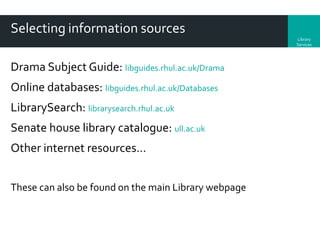
Drama Subject Guide: libguides.rhul.ac.uk/Drama
Online databases: libguides.rhul.ac.uk/Databases

LibrarySearch: librarysearch.rhul.ac.uk
Senate house library catalogue: ull.ac.uk
Other internet resources…
These can also be found on the main Library webpage
Library
Services

Why can’t I just use Google?

9
Step 2: Go to the Modern Languages Subject Guide and note
down which resources or types of resources you think you
would use to carry out your research
Library
Services

Now that I know what I want to find out
& where to find the resources:

How do I search for information
on my topic?
Making the most of synonyms
Library
Services

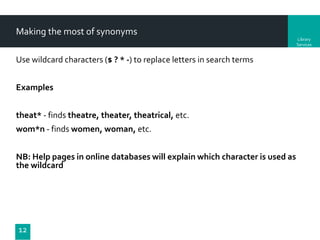
Use wildcard characters ($ ? * -) to replace letters in search terms

Examples
theat* - finds theatre, theater, theatrical, etc.
wom*n - finds women, woman, etc.
NB: Help pages in online databases will explain which character is used as
the wildcard

12
Combining keywords - too many results?
Library
Services

Narrow your search using AND
e.g. avant-garde AND film

Results
Results
containing
containing
BOTH
AVANT-GARDE
TERMS

13

Results
containing
FILM
Combining keywords - too few results?
Library
Services

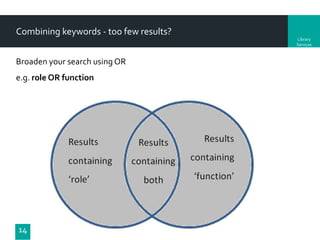
Broaden your search using OR
e.g. role OR function

14
Combining keywords – phrase searching
Library
Services

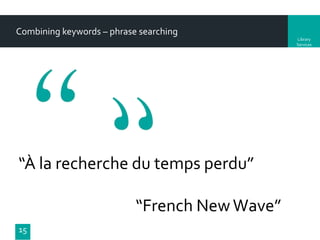
“À la recherche du temps perdu”
“French New Wave”
15
Step three: think about how you will combing keywords
and enter your search queries (adjusting terms as you
need to)
Library
Services

Now that I have found information on
my topic:

How do I know that it is what I
want and good quality
material?
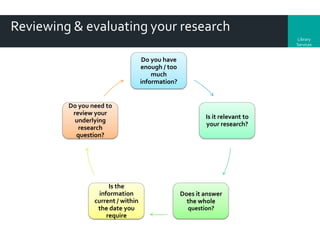
Reviewing & evaluating your research
Library
Services

Do you have
enough / too
much
information?

Do you need to
review your
underlying
research
question?

Is the
information
current / within
the date you
require

Is it relevant to
your research?

Does it answer
the whole
question?
Library
Services

Now that I have the information (books,
chapters, journal articles, webpages
etc) that I need:

How do I manage &
reference them?
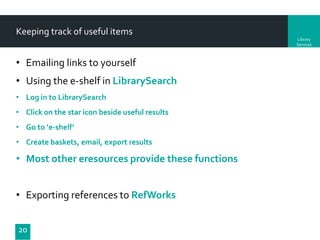
Keeping track of useful items
Library
Services

• Emailing links to yourself
• Using the e-shelf in LibrarySearch
• Log in to LibrarySearch
• Click on the star icon beside useful results
• Go to ‘e-shelf’

• Create baskets, email, export results

• Most other eresources provide these functions

• Exporting references to RefWorks
20
RefWorks

Library
Services

Bibliographic management software
Capture, save and organise references

Access it via the Online Resources A-Z lists
Contains online self-help tutorials
Library RefWorks sessions:
Check the Library Information Skills Training Session on the Subject guide:
http://libguides.rhul.ac.uk/
Step four: save the results that you need (references,
abstracts, URL links, full text) and organise these so that
you can find them when you need them
Access online resources off-campus

Library
Services

Royal Holloway ‘Campus Anywhere’ (VPN)
The only way to access all of our electronic resources off campus is
to install the Virtual Private Network (VPN) service, known as
'CampusAnywhere'.
Using other libraries

You all get free access to Senate House Library (SHL)
Online registration for SHL’s eresources
see the Library subject Guide for Modern Languages

Library
Services
Questions?
Library
Services

Russell Burke
Information Consultant
2-07 Bedford Library
Royal Holloway University of London
Russell.Burke@rhul.ac.uk
01784 414065
SEE THE LIBRARY SUBJECT GUIDE
FOR MODERN LANGUAGES / SMLLC

25

Leo Reynolds. Flickr. CC-BY-NA

SMLLC UG Academic Skills - Information & Research Skills session

  • 1.
    SMLLC Academics Skills: Information& Research Skills libguides.rhul.ac.uk/modernlanguages November 2013 Russell Burke Library Services
  • 2.
    Aims of thesession Library Services • Overview of Library Services available to support your essay research • Step 1 - Plan and conduct a literature search • Step 2 - Use LibrarySearch and subject specific resources to find information • Step 3 - Use more advanced search techniques • Step 4 - Manage references to generate bibliographies using RefWorks • Access eresources off-campus • Using other libraries 2
  • 3.
    Library Services My essay question/ research topic: What do I want to find out?
  • 4.
  • 5.
    Developing your searchstrategy “In the avant-garde films of the 1920s, everything we see, including the human being, is subservient to rhythm & movement.” Main concepts 1. avant-garde films 2. 1920s 3. What we see on film 4. Rhythm & movement 5 Alternative terms Experimental, art, modernist / cinema, filmmaking … Early 20th Century, pre-war, silent era … Mise-en-scène, frame(d), screen, shot, represented … Pace, flow, repetition, flow, editing … Library Services
  • 6.
    Step One: Thinkabout your own research topic & related concepts and write down the keywords that you need to search for
  • 7.
    Library Services Now that Iknow what I want to find out: What resources would I use?
  • 8.
    Selecting information sources Library Services DramaSubject Guide: libguides.rhul.ac.uk/Drama Online databases: libguides.rhul.ac.uk/Databases LibrarySearch: librarysearch.rhul.ac.uk Senate house library catalogue: ull.ac.uk Other internet resources… These can also be found on the main Library webpage
  • 9.
  • 10.
    Step 2: Goto the Modern Languages Subject Guide and note down which resources or types of resources you think you would use to carry out your research
  • 11.
    Library Services Now that Iknow what I want to find out & where to find the resources: How do I search for information on my topic?
  • 12.
    Making the mostof synonyms Library Services Use wildcard characters ($ ? * -) to replace letters in search terms Examples theat* - finds theatre, theater, theatrical, etc. wom*n - finds women, woman, etc. NB: Help pages in online databases will explain which character is used as the wildcard 12
  • 13.
    Combining keywords -too many results? Library Services Narrow your search using AND e.g. avant-garde AND film Results Results containing containing BOTH AVANT-GARDE TERMS 13 Results containing FILM
  • 14.
    Combining keywords -too few results? Library Services Broaden your search using OR e.g. role OR function 14
  • 15.
    Combining keywords –phrase searching Library Services “À la recherche du temps perdu” “French New Wave” 15
  • 16.
    Step three: thinkabout how you will combing keywords and enter your search queries (adjusting terms as you need to)
  • 17.
    Library Services Now that Ihave found information on my topic: How do I know that it is what I want and good quality material?
  • 18.
    Reviewing & evaluatingyour research Library Services Do you have enough / too much information? Do you need to review your underlying research question? Is the information current / within the date you require Is it relevant to your research? Does it answer the whole question?
  • 19.
    Library Services Now that Ihave the information (books, chapters, journal articles, webpages etc) that I need: How do I manage & reference them?
  • 20.
    Keeping track ofuseful items Library Services • Emailing links to yourself • Using the e-shelf in LibrarySearch • Log in to LibrarySearch • Click on the star icon beside useful results • Go to ‘e-shelf’ • Create baskets, email, export results • Most other eresources provide these functions • Exporting references to RefWorks 20
  • 21.
    RefWorks Library Services Bibliographic management software Capture,save and organise references Access it via the Online Resources A-Z lists Contains online self-help tutorials Library RefWorks sessions: Check the Library Information Skills Training Session on the Subject guide: http://libguides.rhul.ac.uk/
  • 22.
    Step four: savethe results that you need (references, abstracts, URL links, full text) and organise these so that you can find them when you need them
  • 23.
    Access online resourcesoff-campus Library Services Royal Holloway ‘Campus Anywhere’ (VPN) The only way to access all of our electronic resources off campus is to install the Virtual Private Network (VPN) service, known as 'CampusAnywhere'.
  • 24.
    Using other libraries Youall get free access to Senate House Library (SHL) Online registration for SHL’s eresources see the Library subject Guide for Modern Languages Library Services
  • 25.
    Questions? Library Services Russell Burke Information Consultant 2-07Bedford Library Royal Holloway University of London Russell.Burke@rhul.ac.uk 01784 414065 SEE THE LIBRARY SUBJECT GUIDE FOR MODERN LANGUAGES / SMLLC 25 Leo Reynolds. Flickr. CC-BY-NA

Editor's Notes

  • #10 Google uses a page ranking system to throw to the top of your hit list those web sites that match your query and have the most web links to them. For further information on this consult  http://www.google.co.uk/about.html What Google can’t find:The deep web – searching inside many library databasesOnly 18% of the information