Accounts Receivable   Version 1.0 Unit 4: Accounts Receivable Function SAP-ERP
Course Agenda Topic 1:  Introduction Topic 2:  Customer Master Topic 3: SAP Documents Topic 4: Accounts Receivable Functions Topic 5: Financial Transactions, EFT and Lockbox
Unit Objectives Set editing options - user defaults and line layouts Perform account and line item management Processing open items Apply payments (Manual) Handle bank rejected payments (NSFs) After completing this unit, you will be able to...
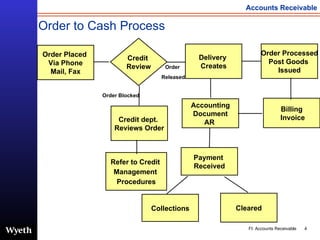
Order to Cash Process Order Placed  Via Phone Mail, Fax Order Processed Post Goods  Issued Accounting Document AR  Credit  Review Delivery  Creates Billing Invoice Payment  Received Collections Cleared Order  Released Order Blocked Credit dept.  Reviews Order Refer to Credit  Management  Procedures
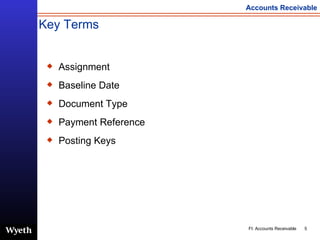
Key Terms Assignment Baseline Date Document Type Payment Reference Posting Keys
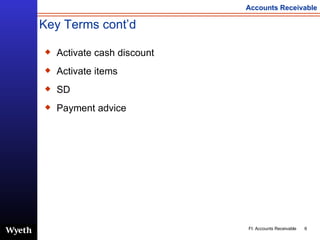
Key Terms cont’d Activate cash discount Activate items SD Payment advice
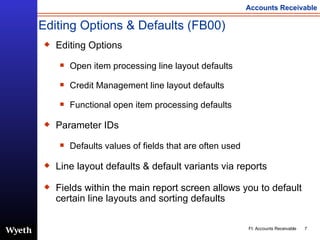
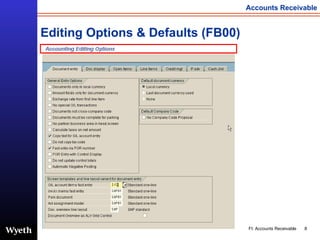
Editing Options & Defaults (FB00) Editing Options Open item processing line layout defaults Credit Management line layout defaults Functional open item processing defaults Parameter IDs Defaults values of fields that are often used Line layout defaults & default variants via reports Fields within the main report screen allows you to default certain line layouts and sorting defaults
Editing Options & Defaults (FB00)
Customer Line Item Management There are multiple transactions that facilitate customer account management These transactions focus on the following: Displaying line item information (using line layouts) Changing customer line items Tagging items w/ reason codes Utilizing text for messages
Open Item Management Multiple line layouts of customer open items Open items of an account can only be cleared with an identical offsetting amount to the account Search capabilities: Partial document search Document type search Due date search Documents by company code Document amount search
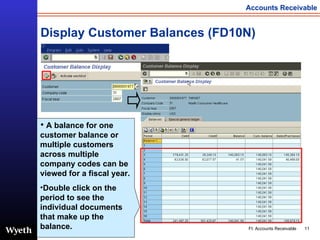
Display Customer Balances (FD10N) A balance for one customer balance or multiple customers across multiple company codes can be viewed for a fiscal year.   Double click on the period to see the individual documents that make up the balance.
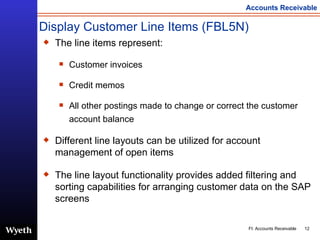
Display Customer Line Items (FBL5N) The line items represent: Customer invoices  Credit memos All other postings made to change or correct the customer account balance Different line layouts can be utilized for account management of open items The line layout functionality provides added filtering and sorting capabilities for arranging customer data on the SAP screens
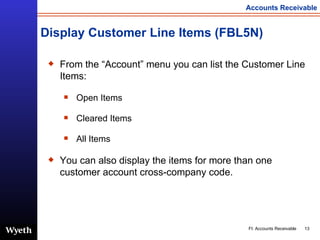
Display Customer Line Items (FBL5N) From the “Account” menu you can list the Customer Line Items: Open Items Cleared Items All Items You can also display the items for more than one customer account cross-company code.
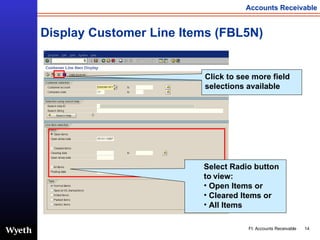
Display Customer Line Items (FBL5N) Select Radio button to   view: Open Items or Cleared Items or All Items Click to see more field selections available
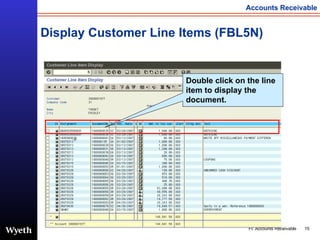
Display Customer Line Items (FBL5N) Double click on the line item to display the document.
Change Customer Line Items (FB02) Line items can be changed within the customer’s open item list Mass changes to reason code, text, assignment, etc, can be done directly from the list by choosing certain items or all Different line layouts can be utilized for account management of open items Only a few fields can be changed
Processing Open Items Processing open items involves selecting the items to be cleared An open item can be processed via: Clear Customer (F-32) Post w.clearing  (F-30) Incoming payment (F-28) EFT  Lockbox
Processing Open Items There are three types of screen layouts for processing open items: Standard Residual Partial payment Difference posting in the payment information section requires a reason code.
Clear Customer Line item (F-32) Cash credit and credit memos can be used to offset deductions and or debit items  Clear customer is utilized to perform manual clearing of accounts receivable items
This process is used to clear open items automatically in Accounts Receivable This method of clearing requires the system to find exact matches   on dollar amounts & assignment fields The open items are cleared when the system locates identical offsetting amounts within the same account with the same assignment & the total of all items with same amount & assignment = 0. A batch job runs nightly for automatic clearing This process clears multiple debits and credits Automatic Clearing
Post with Clearing (F-30) This process can be utilized for : Payment transfers  Open item transfers Bad Debt Write off  Once all line items have been entered into a document, the document may be posted When posted, the system automatically updates the appropriate account balances Clear the items using processing open items
Post Payments Manually (F-28) Payments are processed manually via post incoming payment function: Payment is deposited into bank Payment advice is provided Payment is posted using incoming payment path U.S. notes This process is only used for wire transfers and bank adjustments in Wyeth’s favor The payment advice comes from the bank
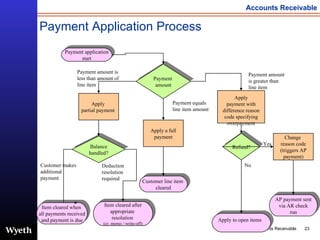
Payment Application Process Apply to open items Apply  partial payment  Balance handled? Apply a full payment Apply payment with difference reason code specifying overpayment Refund? Payment  amount Item cleared after appropriate  resolution  (cr. memo / write-off) Customer line item  cleared Item cleared when  all payments received and payment is due Payment application start Payment amount is greater than line item Payment amount is less than amount of line item No Yes Change  reason code (triggers AP payment) AP payment sent via AR check run Payment equals line item amount Customer makes additional payment Deduction resolution required
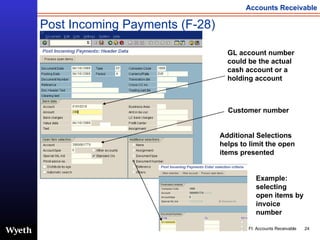
Post Incoming Payments (F-28) Customer number GL account number could be the actual cash account or a holding account Example: selecting open items by invoice number Additional Selections helps to limit the open items presented
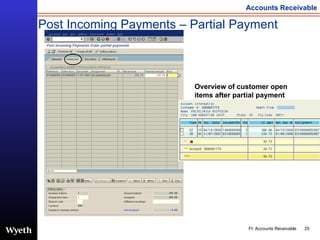
Post Incoming Payments – Partial Payment Overview of customer open items after partial payment
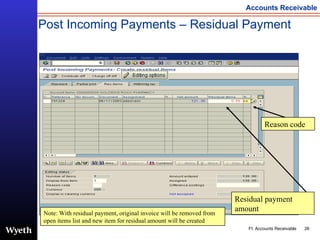
Residual payment amount Post Incoming Payments – Residual Payment Reason code Note: With residual payment, original invoice will be removed from open items list and new item for residual amount will be created
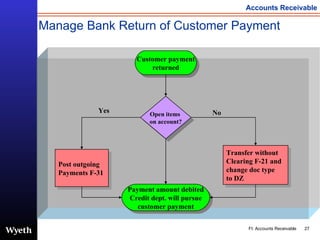
Manage Bank Return of Customer Payment Customer payment returned Open items  on account? Transfer without  Clearing F-21 and  change doc type  to DZ Post outgoing  Payments F-31 Payment amount debited Credit dept. will pursue customer payment No Yes
Reset Cleared Items (FBRA) Resetting cleared line items is required when a payment has been used to clear the wrong line items on an account Resetting the cleared line items re-opens the line items and allows the payment to be applied to the correct line item  Line items can be reset during the period the payment was applied  Reversal and resetting correspondence can be processed while resetting cleared items
Post without Clearing (F-21) This process can be utilized for : Transferring open items Transferring payment items Posting other receivables to an account without any open items Once all line items have been entered into a document, the document may be posted When posted, the system automatically updates the appropriate account balances
Unit Recap You should now be able to: Set editing options - user defaults and line layouts  Understand & research customer open items Apply credits against debits (posting on-account cash) Handle bank rejected payments (NSFs) Apply payments
Questions and Answers

SAP Accounts Reveivable Functions | http://sapdocs.info

  • 1.
    Accounts Receivable Version 1.0 Unit 4: Accounts Receivable Function SAP-ERP
  • 2.
    Course Agenda Topic1: Introduction Topic 2: Customer Master Topic 3: SAP Documents Topic 4: Accounts Receivable Functions Topic 5: Financial Transactions, EFT and Lockbox
  • 3.
    Unit Objectives Setediting options - user defaults and line layouts Perform account and line item management Processing open items Apply payments (Manual) Handle bank rejected payments (NSFs) After completing this unit, you will be able to...
  • 4.
    Order to CashProcess Order Placed Via Phone Mail, Fax Order Processed Post Goods Issued Accounting Document AR Credit Review Delivery Creates Billing Invoice Payment Received Collections Cleared Order Released Order Blocked Credit dept. Reviews Order Refer to Credit Management Procedures
  • 5.
    Key Terms AssignmentBaseline Date Document Type Payment Reference Posting Keys
  • 6.
    Key Terms cont’dActivate cash discount Activate items SD Payment advice
  • 7.
    Editing Options &Defaults (FB00) Editing Options Open item processing line layout defaults Credit Management line layout defaults Functional open item processing defaults Parameter IDs Defaults values of fields that are often used Line layout defaults & default variants via reports Fields within the main report screen allows you to default certain line layouts and sorting defaults
  • 8.
    Editing Options &Defaults (FB00)
  • 9.
    Customer Line ItemManagement There are multiple transactions that facilitate customer account management These transactions focus on the following: Displaying line item information (using line layouts) Changing customer line items Tagging items w/ reason codes Utilizing text for messages
  • 10.
    Open Item ManagementMultiple line layouts of customer open items Open items of an account can only be cleared with an identical offsetting amount to the account Search capabilities: Partial document search Document type search Due date search Documents by company code Document amount search
  • 11.
    Display Customer Balances(FD10N) A balance for one customer balance or multiple customers across multiple company codes can be viewed for a fiscal year. Double click on the period to see the individual documents that make up the balance.
  • 12.
    Display Customer LineItems (FBL5N) The line items represent: Customer invoices Credit memos All other postings made to change or correct the customer account balance Different line layouts can be utilized for account management of open items The line layout functionality provides added filtering and sorting capabilities for arranging customer data on the SAP screens
  • 13.
    Display Customer LineItems (FBL5N) From the “Account” menu you can list the Customer Line Items: Open Items Cleared Items All Items You can also display the items for more than one customer account cross-company code.
  • 14.
    Display Customer LineItems (FBL5N) Select Radio button to view: Open Items or Cleared Items or All Items Click to see more field selections available
  • 15.
    Display Customer LineItems (FBL5N) Double click on the line item to display the document.
  • 16.
    Change Customer LineItems (FB02) Line items can be changed within the customer’s open item list Mass changes to reason code, text, assignment, etc, can be done directly from the list by choosing certain items or all Different line layouts can be utilized for account management of open items Only a few fields can be changed
  • 17.
    Processing Open ItemsProcessing open items involves selecting the items to be cleared An open item can be processed via: Clear Customer (F-32) Post w.clearing (F-30) Incoming payment (F-28) EFT Lockbox
  • 18.
    Processing Open ItemsThere are three types of screen layouts for processing open items: Standard Residual Partial payment Difference posting in the payment information section requires a reason code.
  • 19.
    Clear Customer Lineitem (F-32) Cash credit and credit memos can be used to offset deductions and or debit items Clear customer is utilized to perform manual clearing of accounts receivable items
  • 20.
    This process isused to clear open items automatically in Accounts Receivable This method of clearing requires the system to find exact matches on dollar amounts & assignment fields The open items are cleared when the system locates identical offsetting amounts within the same account with the same assignment & the total of all items with same amount & assignment = 0. A batch job runs nightly for automatic clearing This process clears multiple debits and credits Automatic Clearing
  • 21.
    Post with Clearing(F-30) This process can be utilized for : Payment transfers Open item transfers Bad Debt Write off Once all line items have been entered into a document, the document may be posted When posted, the system automatically updates the appropriate account balances Clear the items using processing open items
  • 22.
    Post Payments Manually(F-28) Payments are processed manually via post incoming payment function: Payment is deposited into bank Payment advice is provided Payment is posted using incoming payment path U.S. notes This process is only used for wire transfers and bank adjustments in Wyeth’s favor The payment advice comes from the bank
  • 23.
    Payment Application ProcessApply to open items Apply partial payment Balance handled? Apply a full payment Apply payment with difference reason code specifying overpayment Refund? Payment amount Item cleared after appropriate resolution (cr. memo / write-off) Customer line item cleared Item cleared when all payments received and payment is due Payment application start Payment amount is greater than line item Payment amount is less than amount of line item No Yes Change reason code (triggers AP payment) AP payment sent via AR check run Payment equals line item amount Customer makes additional payment Deduction resolution required
  • 24.
    Post Incoming Payments(F-28) Customer number GL account number could be the actual cash account or a holding account Example: selecting open items by invoice number Additional Selections helps to limit the open items presented
  • 25.
    Post Incoming Payments– Partial Payment Overview of customer open items after partial payment
  • 26.
    Residual payment amountPost Incoming Payments – Residual Payment Reason code Note: With residual payment, original invoice will be removed from open items list and new item for residual amount will be created
  • 27.
    Manage Bank Returnof Customer Payment Customer payment returned Open items on account? Transfer without Clearing F-21 and change doc type to DZ Post outgoing Payments F-31 Payment amount debited Credit dept. will pursue customer payment No Yes
  • 28.
    Reset Cleared Items(FBRA) Resetting cleared line items is required when a payment has been used to clear the wrong line items on an account Resetting the cleared line items re-opens the line items and allows the payment to be applied to the correct line item Line items can be reset during the period the payment was applied Reversal and resetting correspondence can be processed while resetting cleared items
  • 29.
    Post without Clearing(F-21) This process can be utilized for : Transferring open items Transferring payment items Posting other receivables to an account without any open items Once all line items have been entered into a document, the document may be posted When posted, the system automatically updates the appropriate account balances
  • 30.
    Unit Recap Youshould now be able to: Set editing options - user defaults and line layouts Understand & research customer open items Apply credits against debits (posting on-account cash) Handle bank rejected payments (NSFs) Apply payments
  • 31.

Editor's Notes

  • #2 Trademarks SAP and the SAP logo are registered trademarks of SAP AG. PowerPoint, Word, MS-DOS, and EXCEL are registered trademarks of Microsoft. NOTE: All screen shots in this presentation are representative examples. Screens in the actual environment may have minor differences, such as additional unused fields and colors based on system version. Copyright 2007 Wyeth. All rights reserved. Neither this training manual nor any part thereof may be passed on to others, copied or reproduced in any form or by any means, or translated into another language, for any purpose without the express prior consent in writing of Wyeth. All rights reserved. Updated: May 3, 2007
  • #6 Assignment: The purchase order number from the legacy system and SAP Baseline Date: Date to which the terms of payment apply Document type: Key distinguishing business transactions to be posted. It determines where a document is stored and the account types to be posted Payment reference: The billing document number from SD Posting Keys: Two-digit numeric key that controls the entry of document line items
  • #7 Activate cash discount: Allow the items to be taken at a discount Activate items: Set all items to active. Select all items. SD: Sales and Distribution Payment advice: Remittance information
  • #11 Changing customer line items includes: Due date changes – Not Recommended Credit refunds Texts Resetting cleared items & reversals.
  • #12 On this screen you can list various transactions by choosing the following functions: transaction code: FD10N Account balance : list of debits and credits by month and for each account item Sales/ Purchases: list of sales-relevant transactions Sp. G/L transactions: list of special G/L transactions You can navigate from each total’s display to the list of line items by double-clicking an amount. Another double-click on the line item will take you to a document display screen You can customize the line layout of these lists by including additional fields or choosing a different layout variant
  • #22 Example: new payer and we need to transfer the items
  • #23 Only used by … for wire transfers & Bank adjustments in our favor.
  • #25 Post incoming payment allows you to post a payment to the GL account, process the open items to the customer account, then continue to post again and apply The specifications allow you to keep the same posting to the GL, document type and header information for each payment If using payment advice, you will need the payment and the advice in the detail screen, then apply
  • #26 To change your editing options for the payment amount instead of the residual amount, you will have to click on the change editing options icon. A residual payment is a short payment of a line item and the amount allocated is the actual amount which has not been paid The residual payment is posted to an account and clears the original open item and the amount remaining is created as a new open item The original open item will be cleared and the residual payment will remain open until cleared The payment terms of the residual payment are determined by a customized option. Residual payments are processed by choosing the RESIDUAL PAYMENT tab A reason for the residual payment has to be entered
  • #27 To change your editing options for the payment amount instead of the residual amount, you will have to click on the change editing options icon. A residual payment is a short payment of a line item and the amount allocated is the actual amount which has not been paid The residual payment is posted to an account and clears the original open item and the amount remaining is created as a new open item The original open item will be cleared and the residual payment will remain open until cleared The payment terms of the residual payment are determined by a customized option. Residual payments are processed by choosing the RESIDUAL PAYMENT tab A reason for the residual payment has to be entered