PROCURE TO PAY
Purchase Order (PO)

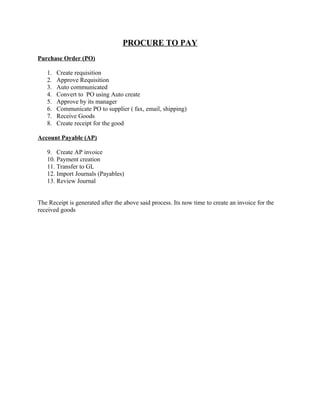
   1.   Create requisition
   2.   Approve Requisition
   3.   Auto communicated
   4.   Convert to PO using Auto create
   5.   Approve by its manager
   6.   Communicate PO to supplier ( fax, email, shipping)
   7.   Receive Goods
   8.   Create receipt for the good

Account Payable (AP)

   9. Create AP invoice
   10. Payment creation
   11. Transfer to GL
   12. Import Journals (Payables)
   13. Review Journal


The Receipt is generated after the above said process. Its now time to create an invoice for the
received goods
CREATE AP INVOICE:

Navigation: Payables>Invoice>Entry>Invoice

Click on the Type column of the invoice and enter the PO number, then the supplier, Supplier
site, Supplier site automatically appears then click tab and the date appears.

Enter the receipt number and the amount as required.

Click on the match button (Here we match the PO) then click the find button after a new form is
opened.
Click on the match check button, and then the fields are highlighted with yellow.

Then click on the Distribute button
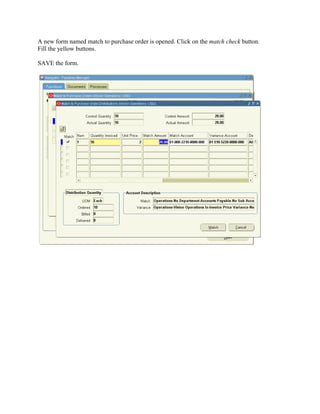
A new form named match to purchase order is opened. Click on the match check button.
Fill the yellow buttons.

SAVE the form.
Close the match forms.

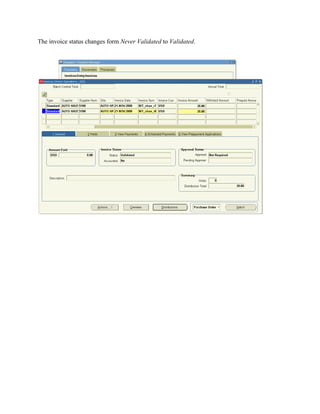
In the main invoice form, click the Actions button. A form opens click on validate and validate
related invoice and click OK.
The invoice status changes form Never Validated to Validated.
Now again click the Action button.

A form opens; now check the Account Creating button and click OK button. After again click the
Action button, a form opens Check the Pay in full button and Click OK.
The payments form opens. Enter the yellow fields and SAVE the form
POST TO GENERAL LEDGER

NAVIGATION: Payables manager>invoice

Click on the invoice> in the tool bar click view> request

Then click on Submit a new request
Click on Single Request

Then a Submit request form opens.
In the NAME field enter Payables Transfer to General Ledger,

Then a parameters form opens. Enter the required field like date, in the Transfer to GL interface
to be In Detail.
Click on OK button after that
Click on Submit button
Click on find button
View the phase and status to be completed and normal.

When you click the view button the output is seen in the new browser window.
IMPORTING TO GENERAL LEDGER

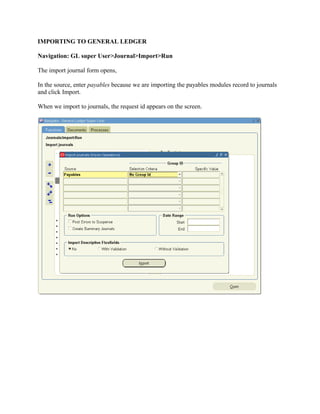
Navigation: GL super User>Journal>Import>Run

The import journal form opens,

In the source, enter payables because we are importing the payables modules record to journals
and click Import.

When we import to journals, the request id appears on the screen.
In the tool bar

Click View>requests

A request form appears. Click find.

Click refresh till the phase and status converted to completed and normal.
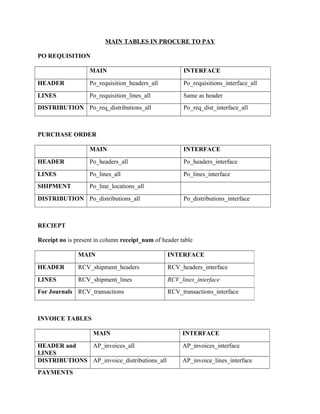
MAIN TABLES IN PROCURE TO PAY

PO REQUISITION

                   MAIN                                INTERFACE
HEADER             Po_requisition_headers_all          Po_requisitions_interface_all
LINES              Po_requisition_lines_all            Same as header
DISTRIBUTION Po_req_distributions_all                  Po_req_dist_interface_all


PURCHASE ORDER

                   MAIN                                INTERFACE
HEADER             Po_headers_all                      Po_headers_interface
LINES              Po_lines_all                        Po_lines_interface
SHIPMENT           Po_line_locations_all
DISTRIBUTION Po_distributions_all                      Po_distributions_interface


RECIEPT

Receipt no is present in column receipt_num of header table

               MAIN                              INTERFACE
HEADER         RCV_shipment_headers              RCV_headers_interface
LINES          RCV_shipment_lines                RCV_lines_interface
For Journals RCV_transactions                    RCV_transactions_interface


INVOICE TABLES

                     MAIN                              INTERFACE
HEADER and    AP_invoices_all                          AP_invoices_interface
LINES
DISTRIBUTIONS AP_invoice_distributions_all             AP_invoice_lines_interface
PAYMENTS
AP_checks_all

AP_invoice_payments_all


1. After Payment the information is stored in tables

AP_AE_headers

AP_AE_lines


2. Run the concurrent request PAYABALES TRANSFER TO GL

Then the information is transferred to

GL_interface


3. After the import journal concurrent program information is transferred to

GL_JE_Batches

GL_JE_headers


GL_JE_lines

GL_import_references


SUPPLIER

                    MAIN                         INTERFACE
SUPPLIER            PO_vendors                   AP_suppliers_int
SUPLIER SITE        PO_vendor_sites_all          AP_supplier_sites_int
SUP-CONTACTS PO_vendor_contacts                  AP_supplier_contacts_int

Procure to pay flow

  • 1.
    PROCURE TO PAY PurchaseOrder (PO) 1. Create requisition 2. Approve Requisition 3. Auto communicated 4. Convert to PO using Auto create 5. Approve by its manager 6. Communicate PO to supplier ( fax, email, shipping) 7. Receive Goods 8. Create receipt for the good Account Payable (AP) 9. Create AP invoice 10. Payment creation 11. Transfer to GL 12. Import Journals (Payables) 13. Review Journal The Receipt is generated after the above said process. Its now time to create an invoice for the received goods
  • 2.
    CREATE AP INVOICE: Navigation:Payables>Invoice>Entry>Invoice Click on the Type column of the invoice and enter the PO number, then the supplier, Supplier site, Supplier site automatically appears then click tab and the date appears. Enter the receipt number and the amount as required. Click on the match button (Here we match the PO) then click the find button after a new form is opened.
  • 3.
    Click on thematch check button, and then the fields are highlighted with yellow. Then click on the Distribute button
  • 4.
    A new formnamed match to purchase order is opened. Click on the match check button. Fill the yellow buttons. SAVE the form.
  • 5.
    Close the matchforms. In the main invoice form, click the Actions button. A form opens click on validate and validate related invoice and click OK.
  • 6.
    The invoice statuschanges form Never Validated to Validated.
  • 7.
    Now again clickthe Action button. A form opens; now check the Account Creating button and click OK button. After again click the Action button, a form opens Check the Pay in full button and Click OK.
  • 8.
    The payments formopens. Enter the yellow fields and SAVE the form
  • 9.
    POST TO GENERALLEDGER NAVIGATION: Payables manager>invoice Click on the invoice> in the tool bar click view> request Then click on Submit a new request Click on Single Request Then a Submit request form opens. In the NAME field enter Payables Transfer to General Ledger, Then a parameters form opens. Enter the required field like date, in the Transfer to GL interface to be In Detail.
  • 10.
    Click on OKbutton after that Click on Submit button Click on find button
  • 11.
    View the phaseand status to be completed and normal. When you click the view button the output is seen in the new browser window.
  • 12.
    IMPORTING TO GENERALLEDGER Navigation: GL super User>Journal>Import>Run The import journal form opens, In the source, enter payables because we are importing the payables modules record to journals and click Import. When we import to journals, the request id appears on the screen.
  • 13.
    In the toolbar Click View>requests A request form appears. Click find. Click refresh till the phase and status converted to completed and normal.
  • 14.
    MAIN TABLES INPROCURE TO PAY PO REQUISITION MAIN INTERFACE HEADER Po_requisition_headers_all Po_requisitions_interface_all LINES Po_requisition_lines_all Same as header DISTRIBUTION Po_req_distributions_all Po_req_dist_interface_all PURCHASE ORDER MAIN INTERFACE HEADER Po_headers_all Po_headers_interface LINES Po_lines_all Po_lines_interface SHIPMENT Po_line_locations_all DISTRIBUTION Po_distributions_all Po_distributions_interface RECIEPT Receipt no is present in column receipt_num of header table MAIN INTERFACE HEADER RCV_shipment_headers RCV_headers_interface LINES RCV_shipment_lines RCV_lines_interface For Journals RCV_transactions RCV_transactions_interface INVOICE TABLES MAIN INTERFACE HEADER and AP_invoices_all AP_invoices_interface LINES DISTRIBUTIONS AP_invoice_distributions_all AP_invoice_lines_interface PAYMENTS
  • 15.
    AP_checks_all AP_invoice_payments_all 1. After Paymentthe information is stored in tables AP_AE_headers AP_AE_lines 2. Run the concurrent request PAYABALES TRANSFER TO GL Then the information is transferred to GL_interface 3. After the import journal concurrent program information is transferred to GL_JE_Batches GL_JE_headers GL_JE_lines GL_import_references SUPPLIER MAIN INTERFACE SUPPLIER PO_vendors AP_suppliers_int SUPLIER SITE PO_vendor_sites_all AP_supplier_sites_int SUP-CONTACTS PO_vendor_contacts AP_supplier_contacts_int