Design & Process FMEA
Module Objectives By end of this module participants will: Review Failure Mode & Effects Analysis to analyze and communicate risk and plans to manage it Understand how to construct a complete FMEA to analyze, communicate, and manage design risk and process risk
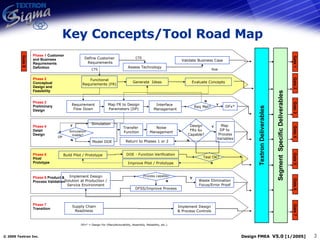
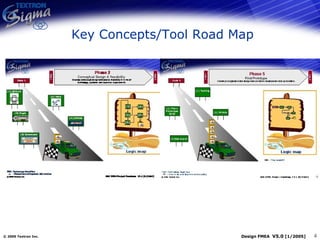
Key Concepts/Tool Road Map Phase 1  Customer and Business Requirements Definition Phase 2  Conceptual  Design and Feasibility Phase 3   Preliminary Design Phase 4   Detail  Design Phase 5   Pilot/ Prototype Phase 6  Product & Process Validation Phase 7   Transition Validate Business Case Define Customer Requirements Assess Technology Evaluate Concepts Functional Requirements (FR) Generate  Ideas Requirement Flow Down Interface  Management Y Model DOE Transfer  Function Simulation Build Pilot / Prototype DOE - Function Verification Y N Implement Design Solution at Production / Service Environment Supply Chain Readiness Y N Implement Design & Process Controls N CTS Risk CTS Map FR to Design Parameters (DP) Simulation Viable? DP Noise  Management  DFx* Return to Phases 1 or 2 Y N N Y DFSS/Improve Process Gate 1 Gate 0 Gate 2 Gate 3 Gate 4 Gate 5 Gate 6 Gate 7 Map  DP to  Process Variables Improve Pilot / Prototype Waste Elimination Focus/Error Proof DFx* = Design For (Manufacturability, Assembly, Reliability, etc.) Textron Deliverables Segment  Specific Deliverables Test OK? Req Met? Process capable? Design FRs 6   Capable?
Key Concepts/Tool Road Map
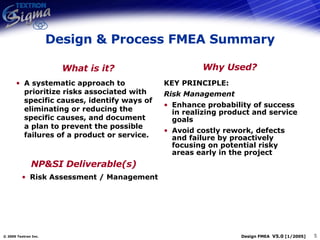
Design & Process FMEA Summary A systematic approach to prioritize risks associated with specific causes, identify ways of eliminating or reducing the specific causes, and document a plan to prevent the possible failures of a product or service. KEY PRINCIPLE: Risk Management Enhance probability of success in realizing product and service goals Avoid costly rework, defects and failure by proactively focusing on potential risky areas early in the project What is it? Why Used? NP&SI Deliverable(s) Risk Assessment / Management
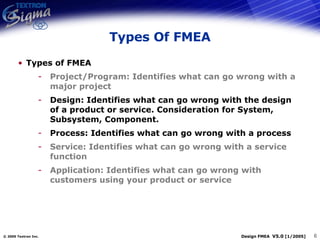
Types Of FMEA Types of FMEA Project/Program: Identifies what can go wrong with a major project Design: Identifies what can go wrong with the design of a product or service. Consideration for System, Subsystem, Component. Process: Identifies what can go wrong with a process Service: Identifies what can go wrong with a service function Application: Identifies what can go wrong with customers using your product or service
FMEA Steps
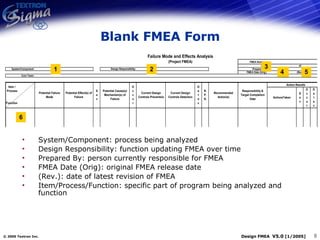
Blank FMEA Form 3 1 2 4 5 System/Component: process being analyzed Design Responsibility: function updating FMEA over time Prepared By: person currently responsible for FMEA FMEA Date (Orig): original FMEA release date (Rev.): date of latest revision of FMEA Item/Process/Function: specific part of program being analyzed and function 6
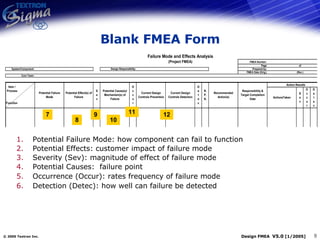
Blank FMEA Form 7 8 9 10 Potential Failure Mode: how component can fail to function Potential Effects: customer impact of failure mode Severity (Sev): magnitude of effect of failure mode Potential Causes:  failure point  Occurrence (Occur): rates frequency of failure mode Detection (Detec): how well can failure be detected 11 12
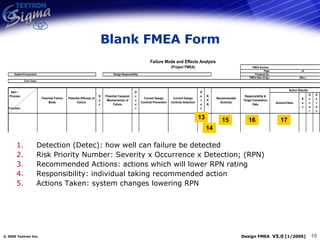
Blank FMEA Form 13 14 15 16 17 Detection (Detec): how well can failure be detected Risk Priority Number: Severity x Occurrence x Detection; (RPN) Recommended Actions: actions which will lower RPN rating Responsibility: individual taking recommended action Actions Taken: system changes lowering RPN
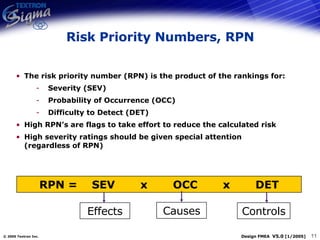
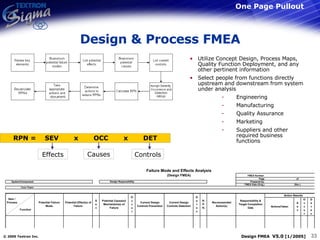
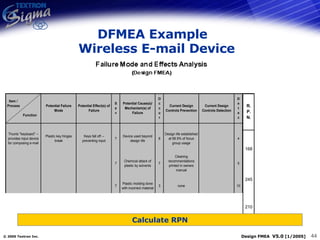
Risk Priority Numbers, RPN The risk priority number (RPN) is the product of the rankings for: Severity (SEV) Probability of Occurrence (OCC) Difficulty to Detect (DET) High RPN’s are flags to take effort to reduce the calculated risk High severity ratings should be given special attention (regardless of RPN) RPN =  SEV  x  OCC  x  DET Effects Causes Controls
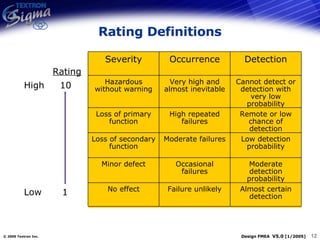
Rating Definitions High 10 Low 1 Rating Almost certain detection Failure unlikely No effect Moderate detection probability Occasional failures Minor defect Low detection probability Moderate failures Loss of secondary function Remote or low chance of detection High repeated failures Loss of primary function Cannot detect or detection with very low probability Very high and almost inevitable Hazardous without warning Detection Occurrence Severity Almost certain detection Failure unlikely No effect Moderate detection probability Occasional failures Minor defect Low detection probability Moderate failures Loss of secondary function Remote or low chance of detection High repeated failures Loss of primary function Cannot detect or detection with very low probability Very high and almost inevitable Hazardous without warning Detection Occurrence Severity
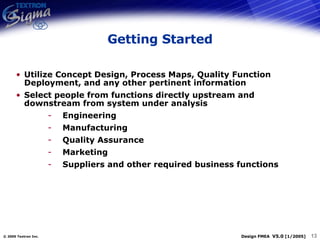
Getting Started Utilize Concept Design, Process Maps, Quality Function Deployment, and any other pertinent information Select people from functions directly upstream and downstream from system under analysis Engineering Manufacturing Quality Assurance Marketing Suppliers and other required business functions
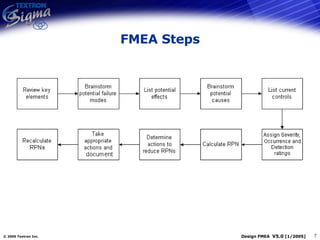
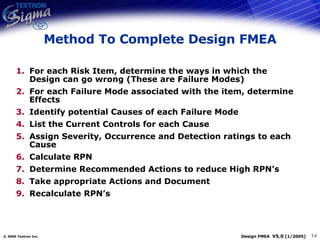
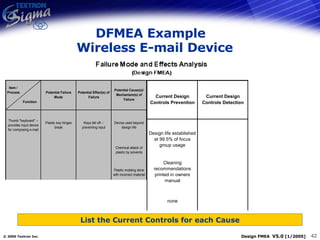
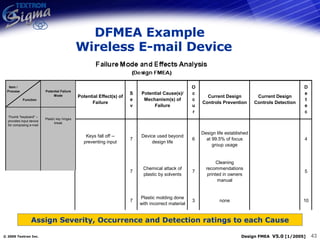
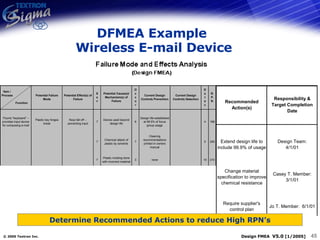
For each Risk Item, determine the ways in which the Design can go wrong (These are Failure Modes) For each Failure Mode associated with the item, determine Effects Identify potential Causes of each Failure Mode List the Current Controls for each Cause Assign Severity, Occurrence and Detection ratings to each Cause Calculate RPN Determine Recommended Actions to reduce High RPN’s Take appropriate Actions and Document Recalculate RPN’s Method To Complete Design FMEA
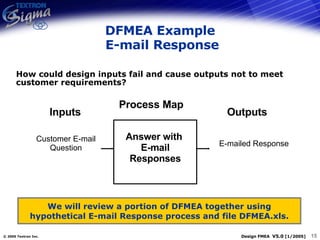
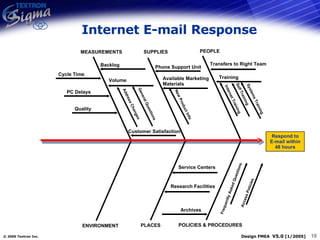
DFMEA Example  E-mail Response How could design inputs fail and cause outputs not to meet customer requirements? Inputs Outputs E-mailed Response Customer E-mail Question Answer with  E-mail Responses Process Map We will review a portion of DFMEA together using hypothetical E-mail Response process and file DFMEA.xls.
Internet E-mail Response Respond to E-mail within 48 hours PEOPLE ENVIRONMENT SUPPLIES POLICIES & PROCEDURES MEASUREMENTS PLACES Frequently Asked Questions Access Policies Service Centers Training Archives Volume Address Changes General Questions Transfers to Right Team Backlog Customer Satisfaction Cycle Time PC Delays Self Training Systems Training Internet Training Available Marketing Materials New Product Info Quality Phone Support Unit Research Facilities
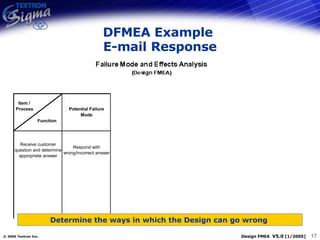
DFMEA Example  E-mail Response Determine the ways in which the Design can go wrong
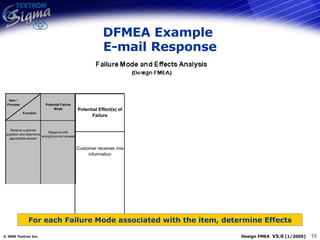
DFMEA Example  E-mail Response For each Failure Mode associated with the item, determine Effects
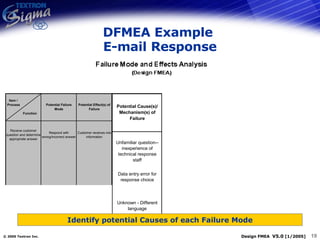
DFMEA Example  E-mail Response Identify potential Causes of each Failure Mode
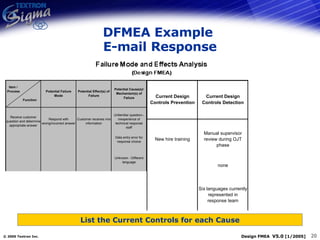
DFMEA Example  E-mail Response List the Current Controls for each Cause
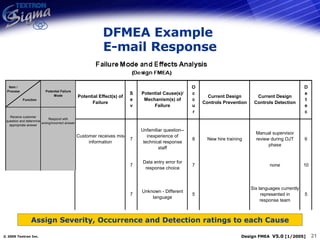
DFMEA Example  E-mail Response Assign Severity, Occurrence and Detection ratings to each Cause
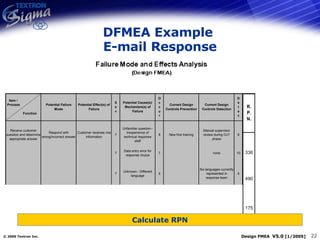
DFMEA Example  E-mail Response Calculate RPN
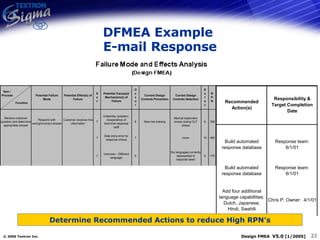
DFMEA Example  E-mail Response Determine Recommended Actions to reduce High RPN’s
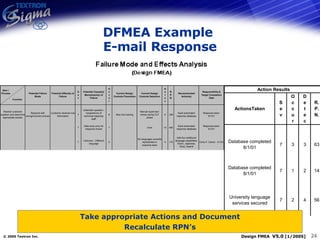
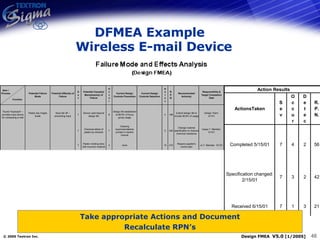
DFMEA Example  E-mail Response Take appropriate Actions and Document Recalculate RPN’s
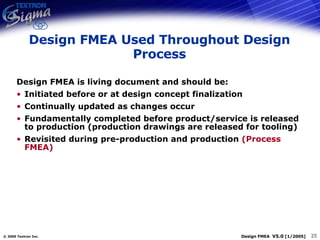
Design FMEA Used Throughout Design Process Design FMEA is living document and should be: Initiated before or at design concept finalization Continually updated as changes occur Fundamentally completed before product/service is released to production (production drawings are released for tooling) Revisited during pre-production and production  (Process FMEA)
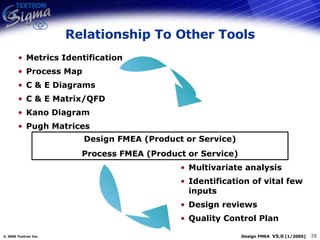
Relationship To Other Tools Metrics Identification Process Map C & E Diagrams C & E Matrix/QFD Kano Diagram Pugh Matrices Multivariate analysis Identification of vital few inputs Design reviews Quality Control Plan Design FMEA (Product or Service) Process FMEA (Product or Service)
Team Exercise Pick an item from your project or an example from every day life and build a simple FMEA around it  Flipchart a Pareto of rpn’s versus PIV’s
Lessons Learned / Pitfalls to Avoid Do not try alone, use a group Time consuming process Activities are required for completion Train team Proper preparation for meetings Summarize often Independent voting Negotiate issues
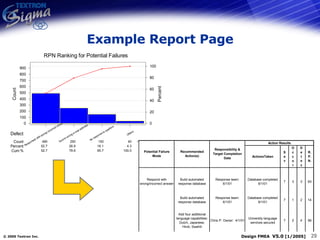
Example Report Page
Key Module Learning Points
Module Objectives Revisited By end of this module participants will: Review Failure Mode & Effects Analysis to analyze and communicate risk and plans to manage it Understand how to construct a complete FMEA to analyze, communicate, and manage design risk and process risk
Appendix
Design & Process FMEA One Page Pullout Utilize Concept Design, Process Maps, Quality Function Deployment, and any other pertinent information Select people from functions directly upstream and downstream from system under analysis Engineering Manufacturing Quality Assurance Marketing Suppliers and other required business functions
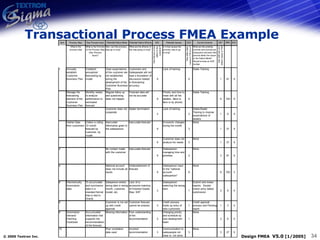
Transactional Process FMEA Example
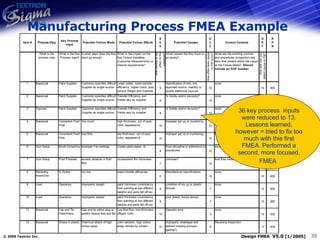
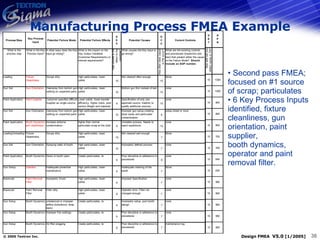
36 key process  inputs were reduced to 13. Lessons learned, however = tried to fix too much with this first FMEA. Performed a second, more focused, FMEA   Manufacturing Process FMEA Example
Second pass FMEA;  focused on #1 source of scrap; particulates 6 Key Process Inputs identified, fixture  cleanliness, gun  orientation, paint supplier, booth dynamics,  operator and paint removal filter. Manufacturing Process FMEA Example
Industrial Example
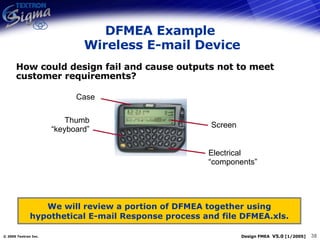
DFMEA Example  Wireless E-mail Device How could design fail and cause outputs not to meet customer requirements? We will review a portion of DFMEA together using hypothetical E-mail Response process and file DFMEA.xls. Screen Thumb “keyboard” Answer with  E-mail Responses Case Electrical “components”
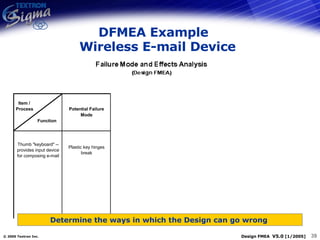
DFMEA Example   Wireless E-mail Device Determine the ways in which the Design can go wrong
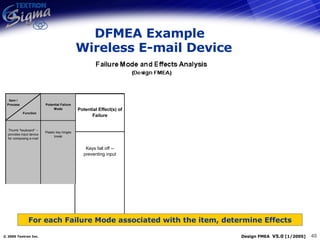
DFMEA Example   Wireless E-mail Device For each Failure Mode associated with the item, determine Effects
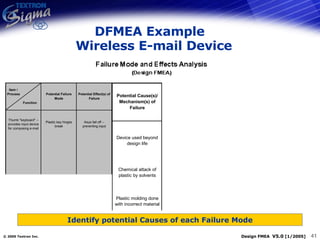
DFMEA Example   Wireless E-mail Device Identify potential Causes of each Failure Mode
DFMEA Example   Wireless E-mail Device List the Current Controls for each Cause
DFMEA Example   Wireless E-mail Device Assign Severity, Occurrence and Detection ratings to each Cause
DFMEA Example   Wireless E-mail Device Calculate RPN
DFMEA Example  Wireless E-mail Device Determine Recommended Actions to reduce High RPN’s
DFMEA Example   Wireless E-mail Device Take appropriate Actions and Document Recalculate RPN’s
General Scoring Designs
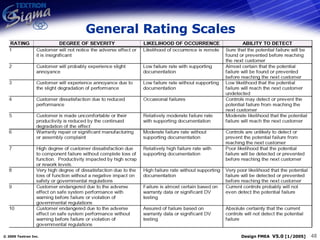
General Rating Scales
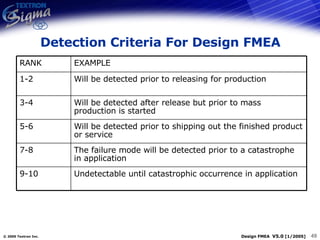
Detection Criteria For Design FMEA Undetectable until catastrophic occurrence in application 9-10 The failure mode will be detected prior to a catastrophe in application 7-8 Will be detected prior to shipping out the finished product or service 5-6 Will be detected after release but prior to mass production is started 3-4 Will be detected prior to releasing for production 1-2 EXAMPLE RANK
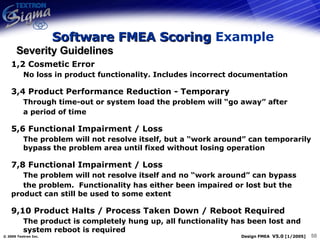
1,2 Cosmetic Error No loss in product functionality. Includes incorrect documentation 3,4 Product Performance Reduction - Temporary Through time-out or system load the problem will “go away” after a period of time 5,6 Functional Impairment / Loss The problem will not resolve itself, but a “work around” can temporarily  bypass the problem area until fixed without losing operation 7,8 Functional Impairment / Loss The problem will not resolve itself and no “work around” can bypass the problem.  Functionality has either been impaired or lost but the  product can still be used to some extent 9,10 Product Halts / Process Taken Down / Reboot Required The product is completely hung up, all functionality has been lost and  system reboot is required Severity Guidelines Software FMEA Scoring  Example
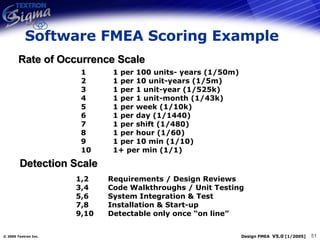
Rate of Occurrence Scale 1 1 per 100 units- years (1/50m) 2 1 per 10 unit-years (1/5m) 3 1 per 1 unit-year (1/525k) 4 1 per 1 unit-month (1/43k) 5 1 per week (1/10k) 6 1 per day (1/1440) 7 1 per shift (1/480) 8 1 per hour (1/60) 9 1 per 10 min (1/10) 10 1+ per min (1/1) Software FMEA Scoring Example 1,2 Requirements / Design Reviews 3,4 Code Walkthroughs / Unit Testing 5,6 System Integration & Test 7,8 Installation & Start-up 9,10 Detectable only once “on line” Detection Scale
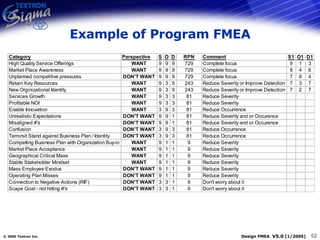
Example of Program FMEA
Automotive Industry Action Group (AIAG) Definitions
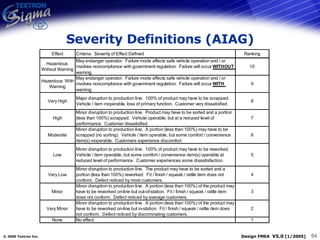
Severity Definitions (AIAG)
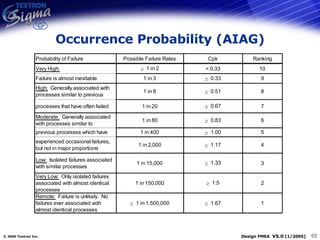
Occurrence Probability (AIAG)
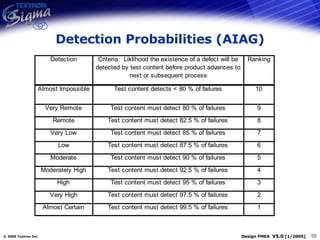
Detection Probabilities (AIAG)
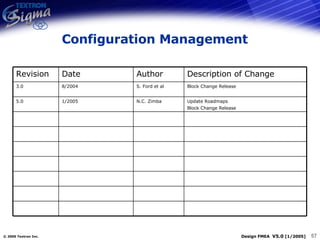
Configuration Management Update Roadmaps Block Change Release N.C. Zimba 1/2005 5.0 Block Change Release S. Ford et al 8/2004 3.0 Description of Change Author Date Revision

QM-011-Design Process FMEA

  • 1.
  • 2.
    Module Objectives Byend of this module participants will: Review Failure Mode & Effects Analysis to analyze and communicate risk and plans to manage it Understand how to construct a complete FMEA to analyze, communicate, and manage design risk and process risk
  • 3.
    Key Concepts/Tool RoadMap Phase 1 Customer and Business Requirements Definition Phase 2 Conceptual Design and Feasibility Phase 3 Preliminary Design Phase 4 Detail Design Phase 5 Pilot/ Prototype Phase 6 Product & Process Validation Phase 7 Transition Validate Business Case Define Customer Requirements Assess Technology Evaluate Concepts Functional Requirements (FR) Generate Ideas Requirement Flow Down Interface Management Y Model DOE Transfer Function Simulation Build Pilot / Prototype DOE - Function Verification Y N Implement Design Solution at Production / Service Environment Supply Chain Readiness Y N Implement Design & Process Controls N CTS Risk CTS Map FR to Design Parameters (DP) Simulation Viable? DP Noise Management DFx* Return to Phases 1 or 2 Y N N Y DFSS/Improve Process Gate 1 Gate 0 Gate 2 Gate 3 Gate 4 Gate 5 Gate 6 Gate 7 Map DP to Process Variables Improve Pilot / Prototype Waste Elimination Focus/Error Proof DFx* = Design For (Manufacturability, Assembly, Reliability, etc.) Textron Deliverables Segment Specific Deliverables Test OK? Req Met? Process capable? Design FRs 6  Capable?
  • 4.
  • 5.
    Design & ProcessFMEA Summary A systematic approach to prioritize risks associated with specific causes, identify ways of eliminating or reducing the specific causes, and document a plan to prevent the possible failures of a product or service. KEY PRINCIPLE: Risk Management Enhance probability of success in realizing product and service goals Avoid costly rework, defects and failure by proactively focusing on potential risky areas early in the project What is it? Why Used? NP&SI Deliverable(s) Risk Assessment / Management
  • 6.
    Types Of FMEATypes of FMEA Project/Program: Identifies what can go wrong with a major project Design: Identifies what can go wrong with the design of a product or service. Consideration for System, Subsystem, Component. Process: Identifies what can go wrong with a process Service: Identifies what can go wrong with a service function Application: Identifies what can go wrong with customers using your product or service
  • 7.
  • 8.
    Blank FMEA Form3 1 2 4 5 System/Component: process being analyzed Design Responsibility: function updating FMEA over time Prepared By: person currently responsible for FMEA FMEA Date (Orig): original FMEA release date (Rev.): date of latest revision of FMEA Item/Process/Function: specific part of program being analyzed and function 6
  • 9.
    Blank FMEA Form7 8 9 10 Potential Failure Mode: how component can fail to function Potential Effects: customer impact of failure mode Severity (Sev): magnitude of effect of failure mode Potential Causes: failure point Occurrence (Occur): rates frequency of failure mode Detection (Detec): how well can failure be detected 11 12
  • 10.
    Blank FMEA Form13 14 15 16 17 Detection (Detec): how well can failure be detected Risk Priority Number: Severity x Occurrence x Detection; (RPN) Recommended Actions: actions which will lower RPN rating Responsibility: individual taking recommended action Actions Taken: system changes lowering RPN
  • 11.
    Risk Priority Numbers,RPN The risk priority number (RPN) is the product of the rankings for: Severity (SEV) Probability of Occurrence (OCC) Difficulty to Detect (DET) High RPN’s are flags to take effort to reduce the calculated risk High severity ratings should be given special attention (regardless of RPN) RPN = SEV x OCC x DET Effects Causes Controls
  • 12.
    Rating Definitions High10 Low 1 Rating Almost certain detection Failure unlikely No effect Moderate detection probability Occasional failures Minor defect Low detection probability Moderate failures Loss of secondary function Remote or low chance of detection High repeated failures Loss of primary function Cannot detect or detection with very low probability Very high and almost inevitable Hazardous without warning Detection Occurrence Severity Almost certain detection Failure unlikely No effect Moderate detection probability Occasional failures Minor defect Low detection probability Moderate failures Loss of secondary function Remote or low chance of detection High repeated failures Loss of primary function Cannot detect or detection with very low probability Very high and almost inevitable Hazardous without warning Detection Occurrence Severity
  • 13.
    Getting Started UtilizeConcept Design, Process Maps, Quality Function Deployment, and any other pertinent information Select people from functions directly upstream and downstream from system under analysis Engineering Manufacturing Quality Assurance Marketing Suppliers and other required business functions
  • 14.
    For each RiskItem, determine the ways in which the Design can go wrong (These are Failure Modes) For each Failure Mode associated with the item, determine Effects Identify potential Causes of each Failure Mode List the Current Controls for each Cause Assign Severity, Occurrence and Detection ratings to each Cause Calculate RPN Determine Recommended Actions to reduce High RPN’s Take appropriate Actions and Document Recalculate RPN’s Method To Complete Design FMEA
  • 15.
    DFMEA Example E-mail Response How could design inputs fail and cause outputs not to meet customer requirements? Inputs Outputs E-mailed Response Customer E-mail Question Answer with E-mail Responses Process Map We will review a portion of DFMEA together using hypothetical E-mail Response process and file DFMEA.xls.
  • 16.
    Internet E-mail ResponseRespond to E-mail within 48 hours PEOPLE ENVIRONMENT SUPPLIES POLICIES & PROCEDURES MEASUREMENTS PLACES Frequently Asked Questions Access Policies Service Centers Training Archives Volume Address Changes General Questions Transfers to Right Team Backlog Customer Satisfaction Cycle Time PC Delays Self Training Systems Training Internet Training Available Marketing Materials New Product Info Quality Phone Support Unit Research Facilities
  • 17.
    DFMEA Example E-mail Response Determine the ways in which the Design can go wrong
  • 18.
    DFMEA Example E-mail Response For each Failure Mode associated with the item, determine Effects
  • 19.
    DFMEA Example E-mail Response Identify potential Causes of each Failure Mode
  • 20.
    DFMEA Example E-mail Response List the Current Controls for each Cause
  • 21.
    DFMEA Example E-mail Response Assign Severity, Occurrence and Detection ratings to each Cause
  • 22.
    DFMEA Example E-mail Response Calculate RPN
  • 23.
    DFMEA Example E-mail Response Determine Recommended Actions to reduce High RPN’s
  • 24.
    DFMEA Example E-mail Response Take appropriate Actions and Document Recalculate RPN’s
  • 25.
    Design FMEA UsedThroughout Design Process Design FMEA is living document and should be: Initiated before or at design concept finalization Continually updated as changes occur Fundamentally completed before product/service is released to production (production drawings are released for tooling) Revisited during pre-production and production (Process FMEA)
  • 26.
    Relationship To OtherTools Metrics Identification Process Map C & E Diagrams C & E Matrix/QFD Kano Diagram Pugh Matrices Multivariate analysis Identification of vital few inputs Design reviews Quality Control Plan Design FMEA (Product or Service) Process FMEA (Product or Service)
  • 27.
    Team Exercise Pickan item from your project or an example from every day life and build a simple FMEA around it Flipchart a Pareto of rpn’s versus PIV’s
  • 28.
    Lessons Learned /Pitfalls to Avoid Do not try alone, use a group Time consuming process Activities are required for completion Train team Proper preparation for meetings Summarize often Independent voting Negotiate issues
  • 29.
  • 30.
  • 31.
    Module Objectives RevisitedBy end of this module participants will: Review Failure Mode & Effects Analysis to analyze and communicate risk and plans to manage it Understand how to construct a complete FMEA to analyze, communicate, and manage design risk and process risk
  • 32.
  • 33.
    Design & ProcessFMEA One Page Pullout Utilize Concept Design, Process Maps, Quality Function Deployment, and any other pertinent information Select people from functions directly upstream and downstream from system under analysis Engineering Manufacturing Quality Assurance Marketing Suppliers and other required business functions
  • 34.
  • 35.
    36 key process inputs were reduced to 13. Lessons learned, however = tried to fix too much with this first FMEA. Performed a second, more focused, FMEA Manufacturing Process FMEA Example
  • 36.
    Second pass FMEA; focused on #1 source of scrap; particulates 6 Key Process Inputs identified, fixture cleanliness, gun orientation, paint supplier, booth dynamics, operator and paint removal filter. Manufacturing Process FMEA Example
  • 37.
  • 38.
    DFMEA Example Wireless E-mail Device How could design fail and cause outputs not to meet customer requirements? We will review a portion of DFMEA together using hypothetical E-mail Response process and file DFMEA.xls. Screen Thumb “keyboard” Answer with E-mail Responses Case Electrical “components”
  • 39.
    DFMEA Example Wireless E-mail Device Determine the ways in which the Design can go wrong
  • 40.
    DFMEA Example Wireless E-mail Device For each Failure Mode associated with the item, determine Effects
  • 41.
    DFMEA Example Wireless E-mail Device Identify potential Causes of each Failure Mode
  • 42.
    DFMEA Example Wireless E-mail Device List the Current Controls for each Cause
  • 43.
    DFMEA Example Wireless E-mail Device Assign Severity, Occurrence and Detection ratings to each Cause
  • 44.
    DFMEA Example Wireless E-mail Device Calculate RPN
  • 45.
    DFMEA Example Wireless E-mail Device Determine Recommended Actions to reduce High RPN’s
  • 46.
    DFMEA Example Wireless E-mail Device Take appropriate Actions and Document Recalculate RPN’s
  • 47.
  • 48.
  • 49.
    Detection Criteria ForDesign FMEA Undetectable until catastrophic occurrence in application 9-10 The failure mode will be detected prior to a catastrophe in application 7-8 Will be detected prior to shipping out the finished product or service 5-6 Will be detected after release but prior to mass production is started 3-4 Will be detected prior to releasing for production 1-2 EXAMPLE RANK
  • 50.
    1,2 Cosmetic ErrorNo loss in product functionality. Includes incorrect documentation 3,4 Product Performance Reduction - Temporary Through time-out or system load the problem will “go away” after a period of time 5,6 Functional Impairment / Loss The problem will not resolve itself, but a “work around” can temporarily bypass the problem area until fixed without losing operation 7,8 Functional Impairment / Loss The problem will not resolve itself and no “work around” can bypass the problem. Functionality has either been impaired or lost but the product can still be used to some extent 9,10 Product Halts / Process Taken Down / Reboot Required The product is completely hung up, all functionality has been lost and system reboot is required Severity Guidelines Software FMEA Scoring Example
  • 51.
    Rate of OccurrenceScale 1 1 per 100 units- years (1/50m) 2 1 per 10 unit-years (1/5m) 3 1 per 1 unit-year (1/525k) 4 1 per 1 unit-month (1/43k) 5 1 per week (1/10k) 6 1 per day (1/1440) 7 1 per shift (1/480) 8 1 per hour (1/60) 9 1 per 10 min (1/10) 10 1+ per min (1/1) Software FMEA Scoring Example 1,2 Requirements / Design Reviews 3,4 Code Walkthroughs / Unit Testing 5,6 System Integration & Test 7,8 Installation & Start-up 9,10 Detectable only once “on line” Detection Scale
  • 52.
  • 53.
    Automotive Industry ActionGroup (AIAG) Definitions
  • 54.
  • 55.
  • 56.
  • 57.
    Configuration Management UpdateRoadmaps Block Change Release N.C. Zimba 1/2005 5.0 Block Change Release S. Ford et al 8/2004 3.0 Description of Change Author Date Revision

Editor's Notes

  • #2 The module currently has a service example from slide 15 to 24. A product example in the appendix (slides 40 – 48) may be substituted.