Pushdown Automata
A NEW FORM OF FA’S
Terms To Know:


Input Tape



Pictorial Representation


Start



Reject



Accept



Read



Example



Stack



Pushdown Automata
Input Tape


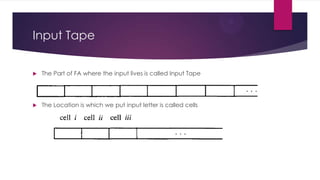
The Part of FA where the input lives is called Input Tape



The Location is which we put input letter is called cells
Example Of Input Tape


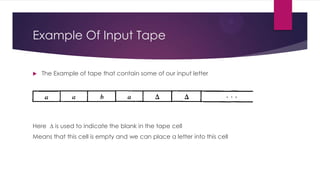
The Example of tape that contain some of our input letter

Here ∆ is used to indicate the blank in the tape cell
Means that this cell is empty and we can place a letter into this cell
Input Tape:


Properties

As we process the tape onto the machine


We read one letter a time



After reading the letter we will eliminate that letter assuming that it is
used



When we will read first blank cell we will stop because we will assume
that after first blank cell all other cells will also be blank



And we read cells from Left To Right
Start / Reject / Accept




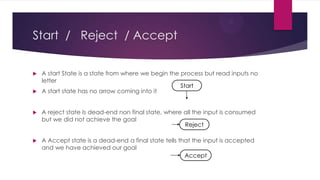
A start State is a state from where we begin the process but read inputs no
letter
Start
A start state has no arrow coming into it



A reject state Is dead-end non final state, where all the input is consumed
but we did not achieve the goal
Reject



A Accept state is a dead-end a final state tells that the input is accepted
and we have achieved our goal
Accept
Read State


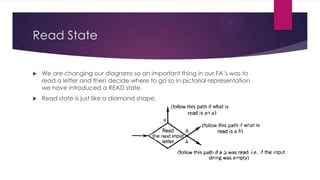
We are changing our diagrams so an important thing in our FA’s was to
read a letter and then decide where to go so in pictorial representation
we have introduced a READ state.



Read state is just like a diamond shape.
Remember


When the character ∆ is read from input tape means that we are out of
input



Then we Finish Processing



The ∆-edge will lead us to accept state if the state have stop into final



Other wise it will lead us to reject state



In old methods we have no idea when we are out of inputs
Example:
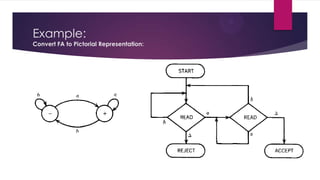
Convert FA to Pictorial Representation:
What is the benefit????


It just like flow chart so what is the reason to use this and



Using Pictorial representation we still representation the FA’s so how can
we give more power to our machine?????



For this purpose we will use the “STACK”



It is easy to use stack with these pictorial representation
Stack:
Push Down Stack/ Push Down Store



A stack is a storage point where we can store our input letter



And then call them back when we will refer it



Stack Pointer: That point the top of the stack



It has two main Operations


Push



POP
PDA:
Push Down Automata



When FA’s have been souped up with the


Stack



Push



Pop

Then we call it the push down automata abbreviated as PDA’s
By adding this data structure the language recognizing capability is increased.
How To Define a PDA


A push down automata is collection of 8 things


An alphabet ∑ (Segma)of input letters



An input Tape



An Alphabet  (Taa) of stack character



A pushdown stack



On start State



Halt States



Push State



Read State



State Read Top of stack

Pushdown autometa

  • 1.
  • 2.
    Terms To Know:  InputTape  Pictorial Representation  Start  Reject  Accept  Read  Example  Stack  Pushdown Automata
  • 3.
    Input Tape  The Partof FA where the input lives is called Input Tape  The Location is which we put input letter is called cells
  • 4.
    Example Of InputTape  The Example of tape that contain some of our input letter Here ∆ is used to indicate the blank in the tape cell Means that this cell is empty and we can place a letter into this cell
  • 5.
    Input Tape:  Properties As weprocess the tape onto the machine  We read one letter a time  After reading the letter we will eliminate that letter assuming that it is used  When we will read first blank cell we will stop because we will assume that after first blank cell all other cells will also be blank  And we read cells from Left To Right
  • 6.
    Start / Reject/ Accept   A start State is a state from where we begin the process but read inputs no letter Start A start state has no arrow coming into it  A reject state Is dead-end non final state, where all the input is consumed but we did not achieve the goal Reject  A Accept state is a dead-end a final state tells that the input is accepted and we have achieved our goal Accept
  • 7.
    Read State  We arechanging our diagrams so an important thing in our FA’s was to read a letter and then decide where to go so in pictorial representation we have introduced a READ state.  Read state is just like a diamond shape.
  • 8.
    Remember  When the character∆ is read from input tape means that we are out of input  Then we Finish Processing  The ∆-edge will lead us to accept state if the state have stop into final  Other wise it will lead us to reject state  In old methods we have no idea when we are out of inputs
  • 9.
    Example: Convert FA toPictorial Representation:
  • 10.
    What is thebenefit????  It just like flow chart so what is the reason to use this and  Using Pictorial representation we still representation the FA’s so how can we give more power to our machine?????  For this purpose we will use the “STACK”  It is easy to use stack with these pictorial representation
  • 11.
    Stack: Push Down Stack/Push Down Store  A stack is a storage point where we can store our input letter  And then call them back when we will refer it  Stack Pointer: That point the top of the stack  It has two main Operations  Push  POP
  • 12.
    PDA: Push Down Automata  WhenFA’s have been souped up with the  Stack  Push  Pop Then we call it the push down automata abbreviated as PDA’s By adding this data structure the language recognizing capability is increased.
  • 13.
    How To Definea PDA  A push down automata is collection of 8 things  An alphabet ∑ (Segma)of input letters  An input Tape  An Alphabet  (Taa) of stack character  A pushdown stack  On start State  Halt States  Push State  Read State  State Read Top of stack