Publishing with Impact
(Including 6+1 practical lessons)
Dr. Katrin Weller
GESIS – Leibniz-Institute for the Social Sciences
Data Archive for the Social Sciences
Unter Sachsenhausen 6 -8, 50667 Köln
katrin.weller@gesis.org @kwelle
Thanks to Prof. Dr. Isabella Peters (ZBW Kiel) for parts of this presentation!
Impact?
Be known in your research field!
• Benefits for
– Job appointments
– Tenure
– Grant proposals
– Invited talks
– Invitations for programme committees, guest
editorials etc.
Lessons from Bibliometrics
Publications & citations
The “currency” of scholarly communication
• Publication as output indicator (activity)
• Citation as indicator of impact (influencing other
researchers)
Databases for bibliometrics
• Web of Science (WoS, also ISI Web of Knowledge)
• Scopus http://www.scopus.com
• (Google Scholar http://scholar.google.de)
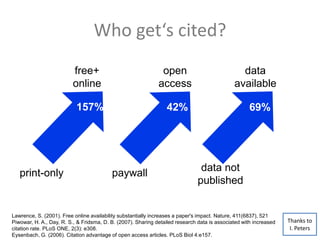
Who get‘s cited?
Lawrence, S. (2001). Free online availability substantially increases a paper's impact. Nature, 411(6837), 521
Piwowar, H. A., Day, R. S., & Fridsma, D. B. (2007). Sharing detailed research data is associated with increased
citation rate. PLoS ONE, 2(3): e308.
Eysenbach, G. (2006). Citation advantage of open access articles. PLoS Biol 4:e157.
157%
free+
online
print-only
69%
data not
published
data
available
157%
open
access
paywall
42%
Thanks to
I. Peters
Key metrics I
Journal Impact Factor
• Indicator for journals (not papers or single
researchers)
• Helps to compare quality of journals
• Measures how many of a journals‘ publication
get cited in a certain time frame
• By ISI (now Thompson Reuters)
Key metrics II
h-Index
• Measures productivity and impact of authors.
• If an author has a h-index of 5 he/she has five
publications with at least five citations each.
Lesson 1
Know your top journals (or conferences)!
Identifying top journals or
conferences
• Ask colleagues
• Look up journal impact factors (Web of
Science)
Identifying top journals or
conferences
For your research topic:
1. Go to a reference database such as Scopus or
Web of Science
2. Select key search terms
3. Rank results by citations and look at the
sources of papers with the highest citation
rates
4. Group by source and look at frequent
journals
Identifying top journals or
conferences
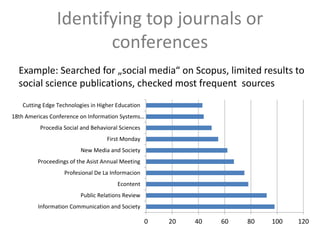
0 20 40 60 80 100 120
Information Communication and Society
Public Relations Review
Econtent
Profesional De La Informacion
Proceedings of the Asist Annual Meeting
New Media and Society
First Monday
Procedia Social and Behavioral Sciences
18th Americas Conference on Information Systems…
Cutting Edge Technologies in Higher Education
Example: Searched for „social media“ on Scopus, limited results to
social science publications, checked most frequent sources
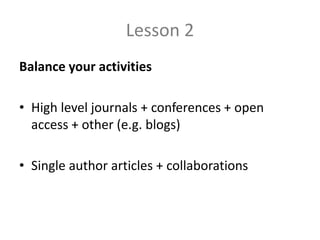
Lesson 2
Balance your activities
• High level journals + conferences + open
access + other (e.g. blogs)
• Single author articles + collaborations
Visibility
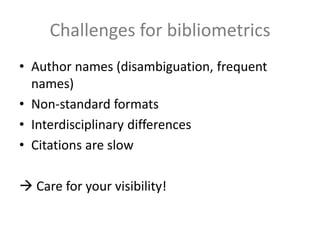
Challenges for bibliometrics
• Author names (disambiguation, frequent
names)
• Non-standard formats
• Interdisciplinary differences
• Citations are slow
 Care for your visibility!
Lesson 3
Make your work accessible!
Make your work accessible
Enable access to papers, presentation and data:
• First step: own website with complete list of publications,
links to online articles. Extras: self-archiving, export BibTex
or other reference formats, buttons for sharing.
• Use existing repositories, e.g.:
• Arxiv.org (http://www.arxiv.org)  multidisciplinary, focus on natural
science, physics, computer science
• SSNR (http://www.ssrn.com)  multidisziplinary, focus on social
sciences and humanities
• Data repositories
• Datorium (https://datorium.gesis.org)  focus social sciences
• DataCite (http://www.datacite.org)  persistent identifiers for data
• Radar (http://www.radar-projekt.org)  beta
• Databib (http://www.databib.org)  overview on existing data
repositories
Thanks to
I. Peters
Lesson 4
Care for your profile pages on important
platforms!
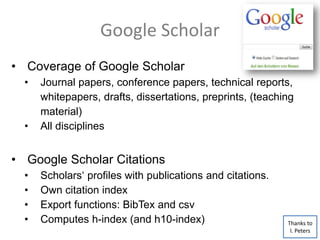
Google Scholar
• Coverage of Google Scholar
• Journal papers, conference papers, technical reports,
whitepapers, drafts, dissertations, preprints, (teaching
material)
• All disciplines
• Google Scholar Citations
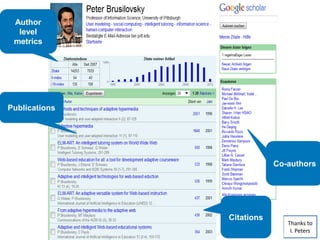
• Scholars‘ profiles with publications and citations.
• Own citation index
• Export functions: BibTex and csv
• Computes h-index (and h10-index) Thanks to
I. Peters
Google Scholar
Google Scholar Citation Profile
• http://scholar.google.com/citations?view_op=new_profile
• Needed: google account plus university‘s email address.
• Profiles may be public or private.
• Google crawls publication and citation information from
websites.
• First step: clean up your profile page, e.g. remove
duplicates, remove mismatches, add publications, check
bibliographic data.
• Track new publications and citations (email alert).
• Missing citations cannot be added manually.
Thanks to
I. Peters
Thanks to
I. Peters
Publications
Citations
Co-authors
Author
level
metrics
Google Scholar
Where are my publications?
• Google can only include publications under these
conditions:
• link from a website to a separate website with abstract or
PDF
• PDF should include titel, authors and references
• Documents must be less than 5 Mb
• Website must allow crawling (no „no-robots.txt“)
• Each publication must have its own website as a pointer
Thanks to
I. Peters
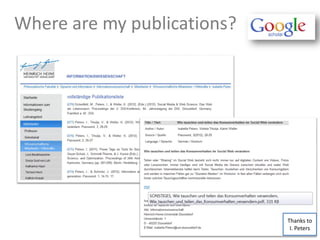
Where are my publications?
Thanks to
I. Peters
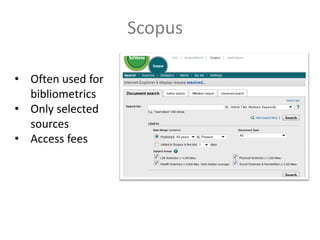
Scopus
• Often used for
bibliometrics
• Only selected
sources
• Access fees
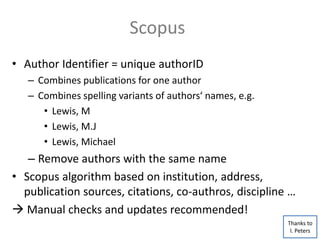
• Author Identifier = unique authorID
– Combines publications for one author
– Combines spelling variants of authors‘ names, e.g.
• Lewis, M
• Lewis, M.J
• Lewis, Michael
– Remove authors with the same name
• Scopus algorithm based on institution, address,
publication sources, citations, co-authros, discipline …
 Manual checks and updates recommended!
Scopus
Thanks to
I. Peters
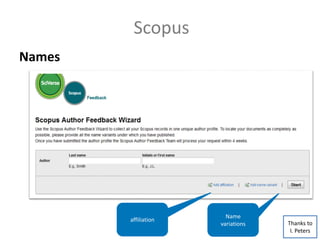
Scopus
affiliation
Name
variations
Names
Thanks to
I. Peters
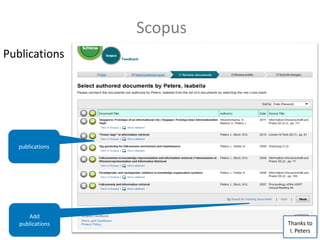
Publications
Scopus
publications
Add
publications Thanks to
I. Peters
Lesson 5
Experiment with alternative plattforms
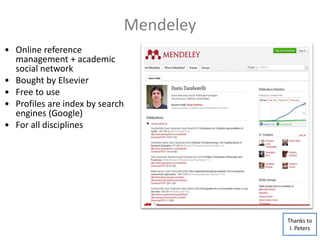
Mendeley
• Online reference
management + academic
social network
• Bought by Elsevier
• Free to use
• Profiles are index by search
engines (Google)
• For all disciplines
Thanks to
I. Peters
Alternatives
• ResearchGate (http://www.researchgate.net)
• Academia.eu (http://www.academia.edu)
• GetCited (www.getcited.org)
 Upload free-to-read articles
• Social Bookmarking Systeme
• BibSonomy (http://www.bibsonomy.org)
• CiteULike (http://www.citeulike.org)
• Delicious (https://delicious.com)
• Netzwerke
• Xing (http://www.xing.com)
• Linked-In (https://de.linkedin.com) Thanks to
I. Peters
Alternatives
• Publish presentation slides online
• http://www.slideshare.net
• http://www.figshare.com
• Have your own blog
• http://de.wordpress.com
• Publish videos
• http://www.youtube.com
• Share your thoughts
• http://www.twitter.com
Thanks to
I. Peters
Summary
• Automatic detection of publications and citations can
include errors.
• It‘s worth checking and cleaning your profiles!
• Also help the crawlers by using a single spelling
variant of your own name.
• Subscribe to auto updates, eg. to see who is citing
your work.
• Enable access to your publications and start with
your own homepage.
Lesson 6
Love what you do!
+ 1 last lesson for professors
It‘s not all about the numbers!
Greetings from Cologne!
Dr. Katrin Weller
katrin.weller@gesis.org
@kwelle
http://katrinweller.net
Slides are available:
http://slideshare.net/katrinweller

Publishing with impact

  • 1.
    Publishing with Impact (Including6+1 practical lessons) Dr. Katrin Weller GESIS – Leibniz-Institute for the Social Sciences Data Archive for the Social Sciences Unter Sachsenhausen 6 -8, 50667 Köln katrin.weller@gesis.org @kwelle Thanks to Prof. Dr. Isabella Peters (ZBW Kiel) for parts of this presentation!
  • 2.
    Impact? Be known inyour research field! • Benefits for – Job appointments – Tenure – Grant proposals – Invited talks – Invitations for programme committees, guest editorials etc.
  • 3.
  • 4.
    Publications & citations The“currency” of scholarly communication • Publication as output indicator (activity) • Citation as indicator of impact (influencing other researchers)
  • 5.
    Databases for bibliometrics •Web of Science (WoS, also ISI Web of Knowledge) • Scopus http://www.scopus.com • (Google Scholar http://scholar.google.de)
  • 6.
    Who get‘s cited? Lawrence,S. (2001). Free online availability substantially increases a paper's impact. Nature, 411(6837), 521 Piwowar, H. A., Day, R. S., & Fridsma, D. B. (2007). Sharing detailed research data is associated with increased citation rate. PLoS ONE, 2(3): e308. Eysenbach, G. (2006). Citation advantage of open access articles. PLoS Biol 4:e157. 157% free+ online print-only 69% data not published data available 157% open access paywall 42% Thanks to I. Peters
  • 7.
    Key metrics I JournalImpact Factor • Indicator for journals (not papers or single researchers) • Helps to compare quality of journals • Measures how many of a journals‘ publication get cited in a certain time frame • By ISI (now Thompson Reuters)
  • 8.
    Key metrics II h-Index •Measures productivity and impact of authors. • If an author has a h-index of 5 he/she has five publications with at least five citations each.
  • 9.
    Lesson 1 Know yourtop journals (or conferences)!
  • 10.
    Identifying top journalsor conferences • Ask colleagues • Look up journal impact factors (Web of Science)
  • 11.
    Identifying top journalsor conferences For your research topic: 1. Go to a reference database such as Scopus or Web of Science 2. Select key search terms 3. Rank results by citations and look at the sources of papers with the highest citation rates 4. Group by source and look at frequent journals
  • 12.
    Identifying top journalsor conferences 0 20 40 60 80 100 120 Information Communication and Society Public Relations Review Econtent Profesional De La Informacion Proceedings of the Asist Annual Meeting New Media and Society First Monday Procedia Social and Behavioral Sciences 18th Americas Conference on Information Systems… Cutting Edge Technologies in Higher Education Example: Searched for „social media“ on Scopus, limited results to social science publications, checked most frequent sources
  • 13.
    Lesson 2 Balance youractivities • High level journals + conferences + open access + other (e.g. blogs) • Single author articles + collaborations
  • 14.
  • 15.
    Challenges for bibliometrics •Author names (disambiguation, frequent names) • Non-standard formats • Interdisciplinary differences • Citations are slow  Care for your visibility!
  • 16.
    Lesson 3 Make yourwork accessible!
  • 17.
    Make your workaccessible Enable access to papers, presentation and data: • First step: own website with complete list of publications, links to online articles. Extras: self-archiving, export BibTex or other reference formats, buttons for sharing. • Use existing repositories, e.g.: • Arxiv.org (http://www.arxiv.org)  multidisciplinary, focus on natural science, physics, computer science • SSNR (http://www.ssrn.com)  multidisziplinary, focus on social sciences and humanities • Data repositories • Datorium (https://datorium.gesis.org)  focus social sciences • DataCite (http://www.datacite.org)  persistent identifiers for data • Radar (http://www.radar-projekt.org)  beta • Databib (http://www.databib.org)  overview on existing data repositories Thanks to I. Peters
  • 18.
    Lesson 4 Care foryour profile pages on important platforms!
  • 19.
    Google Scholar • Coverageof Google Scholar • Journal papers, conference papers, technical reports, whitepapers, drafts, dissertations, preprints, (teaching material) • All disciplines • Google Scholar Citations • Scholars‘ profiles with publications and citations. • Own citation index • Export functions: BibTex and csv • Computes h-index (and h10-index) Thanks to I. Peters
  • 20.
    Google Scholar Google ScholarCitation Profile • http://scholar.google.com/citations?view_op=new_profile • Needed: google account plus university‘s email address. • Profiles may be public or private. • Google crawls publication and citation information from websites. • First step: clean up your profile page, e.g. remove duplicates, remove mismatches, add publications, check bibliographic data. • Track new publications and citations (email alert). • Missing citations cannot be added manually. Thanks to I. Peters
  • 21.
  • 22.
    Google Scholar Where aremy publications? • Google can only include publications under these conditions: • link from a website to a separate website with abstract or PDF • PDF should include titel, authors and references • Documents must be less than 5 Mb • Website must allow crawling (no „no-robots.txt“) • Each publication must have its own website as a pointer Thanks to I. Peters
  • 23.
    Where are mypublications? Thanks to I. Peters
  • 24.
    Scopus • Often usedfor bibliometrics • Only selected sources • Access fees
  • 25.
    • Author Identifier= unique authorID – Combines publications for one author – Combines spelling variants of authors‘ names, e.g. • Lewis, M • Lewis, M.J • Lewis, Michael – Remove authors with the same name • Scopus algorithm based on institution, address, publication sources, citations, co-authros, discipline …  Manual checks and updates recommended! Scopus Thanks to I. Peters
  • 26.
  • 27.
  • 28.
    Lesson 5 Experiment withalternative plattforms
  • 29.
    Mendeley • Online reference management+ academic social network • Bought by Elsevier • Free to use • Profiles are index by search engines (Google) • For all disciplines Thanks to I. Peters
  • 30.
    Alternatives • ResearchGate (http://www.researchgate.net) •Academia.eu (http://www.academia.edu) • GetCited (www.getcited.org)  Upload free-to-read articles • Social Bookmarking Systeme • BibSonomy (http://www.bibsonomy.org) • CiteULike (http://www.citeulike.org) • Delicious (https://delicious.com) • Netzwerke • Xing (http://www.xing.com) • Linked-In (https://de.linkedin.com) Thanks to I. Peters
  • 31.
    Alternatives • Publish presentationslides online • http://www.slideshare.net • http://www.figshare.com • Have your own blog • http://de.wordpress.com • Publish videos • http://www.youtube.com • Share your thoughts • http://www.twitter.com Thanks to I. Peters
  • 32.
    Summary • Automatic detectionof publications and citations can include errors. • It‘s worth checking and cleaning your profiles! • Also help the crawlers by using a single spelling variant of your own name. • Subscribe to auto updates, eg. to see who is citing your work. • Enable access to your publications and start with your own homepage.
  • 33.
  • 34.
    + 1 lastlesson for professors It‘s not all about the numbers!
  • 35.
  • 36.