CST4599 Nov 2021
Resources and information skills for research
https://unihub.mdx.ac.uk/study/library
In this workshop we will look at...
• Search strategy
• Obtaining information
• Evaluating
• Referencing
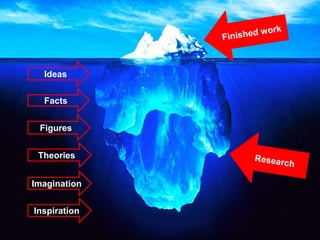
Ideas
Facts
Figures
Theories
Imagination
Inspiration
• Problem area, rationale and objectives 10
• Literature Review 10
• Research investigative method 10
• Results 20
• Interpretation of results 20
• Evaluation and Conclusions 10
• Referencing, bibliography and appendices 10
• Organisation and presentation of report 15
PG Project Marking Scheme
What is a literature review?
Sets the scene:
• Overview
• Survey
• Describe, compare, synthesise
Critical:
• Strengths and weaknesses
• Consensus and disagreement
• Gaps
https://bit.ly/workshopsLET
https://unihub.mdx.ac.uk/study/writing-numeracy/Resources-for-AWL
Getting started: Search Strategy
• Topic
• Main concepts
• Alternative words
• Inclusion/Exclusion
• Sources and resources
• Refine
Improving your search:
https://libguides.mdx.ac.uk/computing/Help
https://padlet.com/HendonMDX/keywords4599
Keywords
Too many search results
• Add more keywords to narrow down your search
results
• Be more specific
• Search for an "exact phrase" e.g. “network security”
• Add limits
Not enough results
• Use alternative keywords
• Be less specific
• Split the question into individual concepts
• Use an asterisk to search for variations of the
same word e.g. comput*
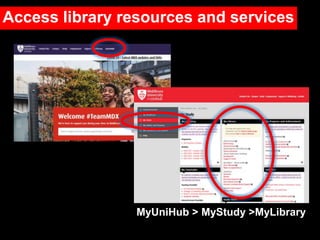
MyUniHub > MyStudy >MyLibrary
Access library resources and services
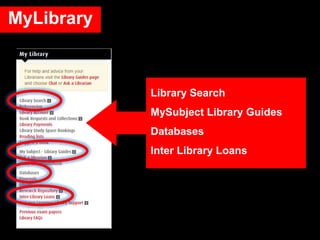
MyLibrary
Library Search
MySubject Library Guides
Databases
Inter Library Loans
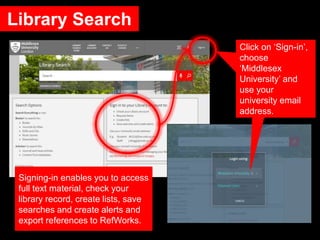
Library Search
Click on ‘Sign-in’,
choose
‘Middlesex
University’ and
use your
university email
address.
Signing-in enables you to access
full text material, check your
library record, create lists, save
searches and create alerts and
export references to RefWorks.
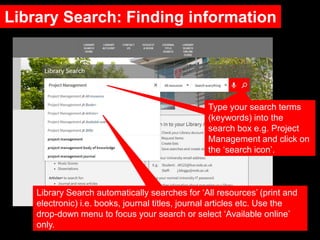
Library Search: Finding information
Type your search terms
(keywords) into the
search box e.g. Project
Management and click on
the ‘search icon’.
Library Search automatically searches for ‘All resources’ (print and
electronic) i.e. books, journal titles, journal articles etc. Use the

drop-down menu to focus your search or select ‘Available online’
only.
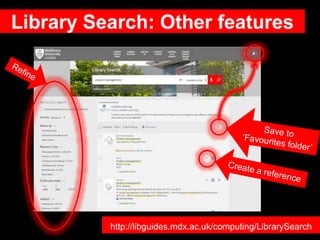
Library Search: Other features
http://libguides.mdx.ac.uk/computing/LibrarySearch
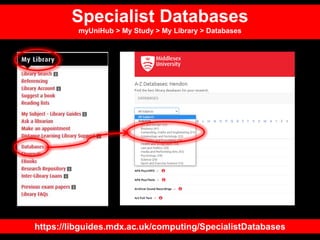
https://libguides.mdx.ac.uk/computing/SpecialistDatabases
Specialist Databases
myUniHub > My Study > My Library > Databases
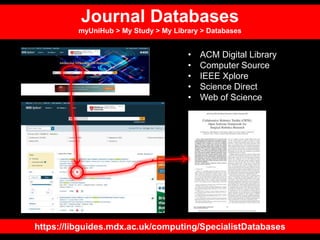
Journal Databases
myUniHub > My Study > My Library > Databases
https://libguides.mdx.ac.uk/computing/SpecialistDatabases
• ACM Digital Library
• Computer Source
• IEEE Xplore
• Science Direct
• Web of Science
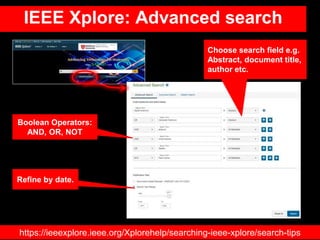
IEEE Xplore: Advanced search
Choose search field e.g.
Abstract, document title,
author etc.
Boolean Operators:
AND, OR, NOT
Refine by date.
https://ieeexplore.ieee.org/Xplorehelp/searching-ieee-xplore/search-tips
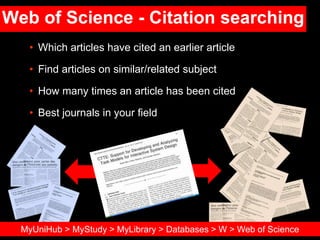
Web of Science - Citation searching
• Which articles have cited an earlier article
• Find articles on similar/related subject
• How many times an article has been cited
• Best journals in your field
MyUniHub > MyStudy > MyLibrary > Databases > W > Web of Science
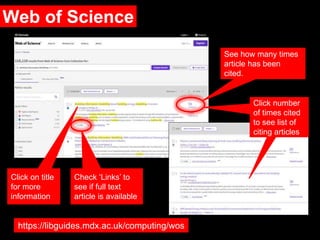
Web of Science
Check ‘Links’ to
see if full text
article is available
See how many times
article has been
cited.
Click on title
for more
information
https://libguides.mdx.ac.uk/computing/wos
Click number
of times cited
to see list of
citing articles
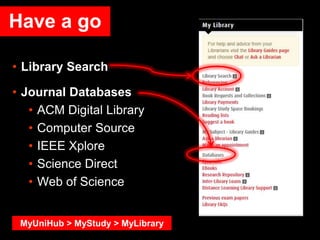
• Library Search
• Journal Databases
• ACM Digital Library
• Computer Source
• IEEE Xplore
• Science Direct
• Web of Science
Have a go
MyUniHub > MyStudy > MyLibrary
Library Search and journal databases provide:
• Access to quality information
• Citation and journal impact information
• Information not available elsewhere
• Up-to-date
• Focussed/specific
• Full-text access
• Access on/off campus
• Personalise
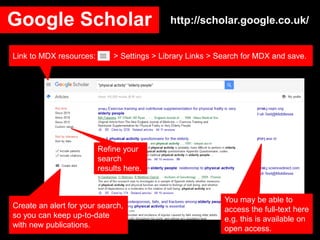
Google Scholar
You may be able to
access the full-text here
e.g. this is available on
open access.
Refine your
search
results here.
Create an alert for your search,
so you can keep up-to-date
with new publications.
Link to MDX resources: > Settings > Library Links > Search for MDX and save.
http://scholar.google.co.uk/
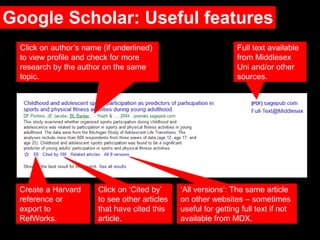
Google Scholar: Useful features
Full text available
from Middlesex
Uni and/or other
sources.
Click on author’s name (if underlined)
to view profile and check for more
research by the author on the same
topic.
Click on ‘Cited by’
to see other articles
that have cited this
article.
‘All versions’: The same article
on other websites – sometimes
useful for getting full text if not
available from MDX.
Create a Harvard
reference or
export to
RefWorks.
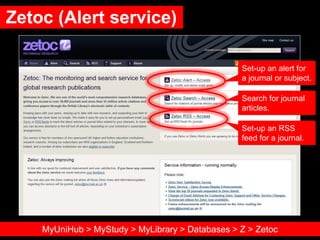
Zetoc (Alert service)
Set-up an alert for
a journal or subject.
Search for journal
articles.
Set-up an RSS
feed for a journal.
MyUniHub > MyStudy > MyLibrary > Databases > Z > Zetoc
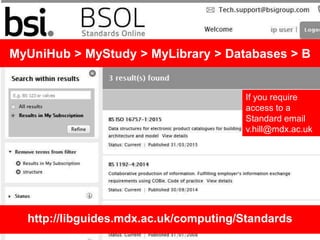
MyUniHub > MyStudy > MyLibrary > Databases > B
http://libguides.mdx.ac.uk/computing/Standards
If you require
access to a
Standard email
v.hill@mdx.ac.uk
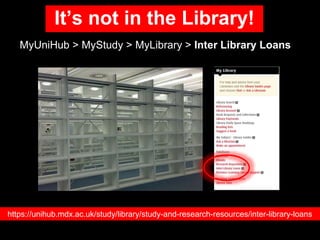
It’s not in the Library!
MyUniHub > MyStudy > MyLibrary > Inter Library Loans
https://unihub.mdx.ac.uk/study/library/study-and-research-resources/inter-library-loans
Why reference?
• Highlight and back-up relevant points and facts
• Demonstrate that you have read widely
• Give credit to the author/creator
• Achieve a better mark or grade
• Reader can locate original source used
• Avoid plagiarism.
Adapted from: https://www.citethemrightonline.com/Basics/what-is-referencing
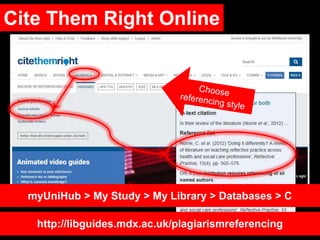
Cite Them Right Online
myUniHub > My Study > My Library > Databases > C
http://libguides.mdx.ac.uk/plagiarismreferencing
Moller, V. and Waddington, I. (2015) Routledge
handbook of computers. 2nd edn. London:
Routledge.
‘Library Search’ reference
‘Cite Then Right’ reference
Moller, Verner. & Waddington, Ivan., 2015
Routledge handbook of computers. 2nd ed.,
London: Routledge
Using Cite Them Right Online: Books
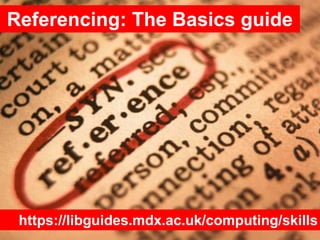
Referencing: The Basics guide
https://libguides.mdx.ac.uk/computing/skills
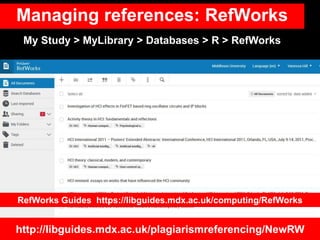
Managing references: RefWorks
http://libguides.mdx.ac.uk/plagiarismreferencing/NewRW
My Study > MyLibrary > Databases > R > RefWorks
RefWorks Guides https://libguides.mdx.ac.uk/computing/RefWorks
Evaluating information
• Imagine you are researching ‘The right to be forgotten’
• Go to https://padlet.com/HendonMDX/Evaluating4599
• Have a look at the 5 items
• Which ones would you use, not use and why?
• Relevance
• Expertise
• Viewpoint
• Intended audience
• Evidence
• When Published
REVIEW your information
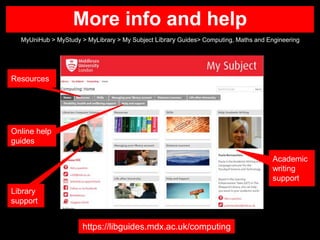
More info and help
MyUniHub > MyStudy > MyLibrary > My Subject Library Guides> Computing, Maths and Engineering
https://libguides.mdx.ac.uk/computing
Online help
guides
Academic
writing
support
Library
support
Resources
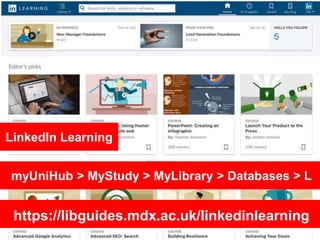
myUniHub > MyStudy > MyLibrary > Databases > L
LinkedIn Learning
https://libguides.mdx.ac.uk/linkedinlearning
http://unihub.mdx.ac.uk/your-support-services/unihelp
UniHelp
Telephone and Chat:
Mon-Fri
8.30am-9.30pm
Sat, Sun and Bank hols
11.00am-6.00pm
Tel. +44 (0)20 8411 6060
Need further help
Your Librarian is:
Vanessa Hill
v.hill@mdx.ac.uk
More info: https://libguides.mdx.ac.uk/computing

CST4599 Nov 2021

  • 1.
    CST4599 Nov 2021 Resourcesand information skills for research https://unihub.mdx.ac.uk/study/library
  • 2.
    In this workshopwe will look at... • Search strategy • Obtaining information • Evaluating • Referencing
  • 3.
  • 4.
    • Problem area,rationale and objectives 10 • Literature Review 10 • Research investigative method 10 • Results 20 • Interpretation of results 20 • Evaluation and Conclusions 10 • Referencing, bibliography and appendices 10 • Organisation and presentation of report 15 PG Project Marking Scheme
  • 5.
    What is aliterature review? Sets the scene: • Overview • Survey • Describe, compare, synthesise Critical: • Strengths and weaknesses • Consensus and disagreement • Gaps https://bit.ly/workshopsLET https://unihub.mdx.ac.uk/study/writing-numeracy/Resources-for-AWL
  • 6.
    Getting started: SearchStrategy • Topic • Main concepts • Alternative words • Inclusion/Exclusion • Sources and resources • Refine Improving your search: https://libguides.mdx.ac.uk/computing/Help
  • 7.
  • 8.
    Too many searchresults • Add more keywords to narrow down your search results • Be more specific • Search for an "exact phrase" e.g. “network security” • Add limits
  • 9.
    Not enough results •Use alternative keywords • Be less specific • Split the question into individual concepts • Use an asterisk to search for variations of the same word e.g. comput*
  • 10.
    MyUniHub > MyStudy>MyLibrary Access library resources and services
  • 11.
    MyLibrary Library Search MySubject LibraryGuides Databases Inter Library Loans
  • 12.
    Library Search Click on‘Sign-in’, choose ‘Middlesex University’ and use your university email address. Signing-in enables you to access full text material, check your library record, create lists, save searches and create alerts and export references to RefWorks.
  • 13.
    Library Search: Findinginformation Type your search terms (keywords) into the search box e.g. Project Management and click on the ‘search icon’. Library Search automatically searches for ‘All resources’ (print and electronic) i.e. books, journal titles, journal articles etc. Use the drop-down menu to focus your search or select ‘Available online’ only.
  • 14.
    Library Search: Otherfeatures http://libguides.mdx.ac.uk/computing/LibrarySearch
  • 15.
  • 16.
    Journal Databases myUniHub >My Study > My Library > Databases https://libguides.mdx.ac.uk/computing/SpecialistDatabases • ACM Digital Library • Computer Source • IEEE Xplore • Science Direct • Web of Science
  • 17.
    IEEE Xplore: Advancedsearch Choose search field e.g. Abstract, document title, author etc. Boolean Operators: AND, OR, NOT Refine by date. https://ieeexplore.ieee.org/Xplorehelp/searching-ieee-xplore/search-tips
  • 18.
    Web of Science- Citation searching • Which articles have cited an earlier article • Find articles on similar/related subject • How many times an article has been cited • Best journals in your field MyUniHub > MyStudy > MyLibrary > Databases > W > Web of Science
  • 19.
    Web of Science Check‘Links’ to see if full text article is available See how many times article has been cited. Click on title for more information https://libguides.mdx.ac.uk/computing/wos Click number of times cited to see list of citing articles
  • 20.
    • Library Search •Journal Databases • ACM Digital Library • Computer Source • IEEE Xplore • Science Direct • Web of Science Have a go MyUniHub > MyStudy > MyLibrary
  • 21.
    Library Search andjournal databases provide: • Access to quality information • Citation and journal impact information • Information not available elsewhere • Up-to-date • Focussed/specific • Full-text access • Access on/off campus • Personalise
  • 22.
    Google Scholar You maybe able to access the full-text here e.g. this is available on open access. Refine your search results here. Create an alert for your search, so you can keep up-to-date with new publications. Link to MDX resources: > Settings > Library Links > Search for MDX and save. http://scholar.google.co.uk/
  • 23.
    Google Scholar: Usefulfeatures Full text available from Middlesex Uni and/or other sources. Click on author’s name (if underlined) to view profile and check for more research by the author on the same topic. Click on ‘Cited by’ to see other articles that have cited this article. ‘All versions’: The same article on other websites – sometimes useful for getting full text if not available from MDX. Create a Harvard reference or export to RefWorks.
  • 24.
    Zetoc (Alert service) Set-upan alert for a journal or subject. Search for journal articles. Set-up an RSS feed for a journal. MyUniHub > MyStudy > MyLibrary > Databases > Z > Zetoc
  • 25.
    MyUniHub > MyStudy> MyLibrary > Databases > B http://libguides.mdx.ac.uk/computing/Standards If you require access to a Standard email v.hill@mdx.ac.uk
  • 26.
    It’s not inthe Library! MyUniHub > MyStudy > MyLibrary > Inter Library Loans https://unihub.mdx.ac.uk/study/library/study-and-research-resources/inter-library-loans
  • 27.
    Why reference? • Highlightand back-up relevant points and facts • Demonstrate that you have read widely • Give credit to the author/creator • Achieve a better mark or grade • Reader can locate original source used • Avoid plagiarism. Adapted from: https://www.citethemrightonline.com/Basics/what-is-referencing
  • 28.
    Cite Them RightOnline myUniHub > My Study > My Library > Databases > C http://libguides.mdx.ac.uk/plagiarismreferencing
  • 29.
    Moller, V. andWaddington, I. (2015) Routledge handbook of computers. 2nd edn. London: Routledge. ‘Library Search’ reference ‘Cite Then Right’ reference Moller, Verner. & Waddington, Ivan., 2015 Routledge handbook of computers. 2nd ed., London: Routledge Using Cite Them Right Online: Books
  • 30.
    Referencing: The Basicsguide https://libguides.mdx.ac.uk/computing/skills
  • 31.
    Managing references: RefWorks http://libguides.mdx.ac.uk/plagiarismreferencing/NewRW MyStudy > MyLibrary > Databases > R > RefWorks RefWorks Guides https://libguides.mdx.ac.uk/computing/RefWorks
  • 32.
    Evaluating information • Imagineyou are researching ‘The right to be forgotten’ • Go to https://padlet.com/HendonMDX/Evaluating4599 • Have a look at the 5 items • Which ones would you use, not use and why?
  • 33.
    • Relevance • Expertise •Viewpoint • Intended audience • Evidence • When Published REVIEW your information
  • 34.
    More info andhelp MyUniHub > MyStudy > MyLibrary > My Subject Library Guides> Computing, Maths and Engineering https://libguides.mdx.ac.uk/computing Online help guides Academic writing support Library support Resources
  • 35.
    myUniHub > MyStudy> MyLibrary > Databases > L LinkedIn Learning https://libguides.mdx.ac.uk/linkedinlearning
  • 36.
  • 37.
    Need further help YourLibrarian is: Vanessa Hill v.hill@mdx.ac.uk More info: https://libguides.mdx.ac.uk/computing