PTC Creo Expert Moldbase Extension
(EMX)
Russell J.H. Hsu
Creo Product Manager – Tooling Solutions
2
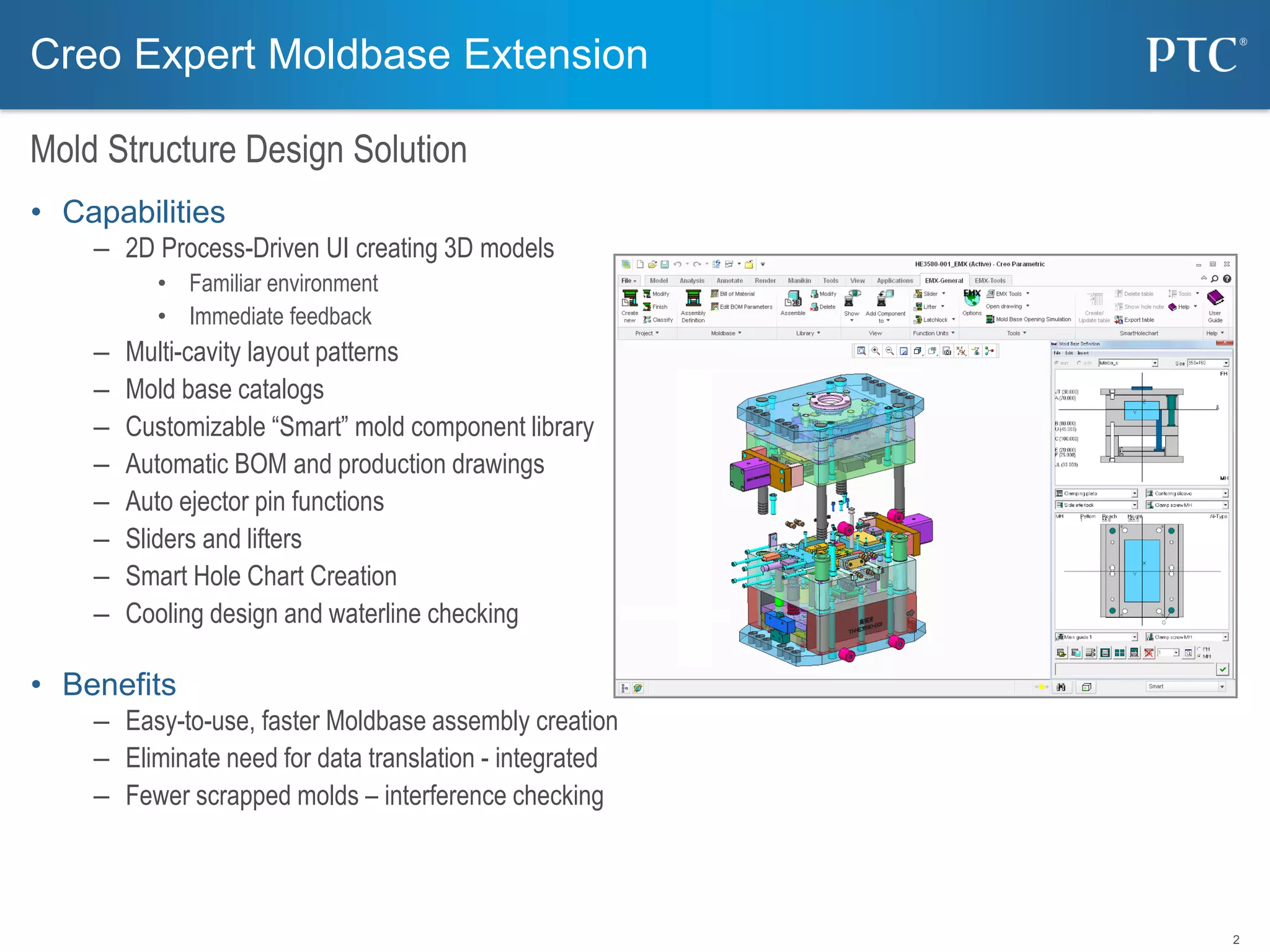
• Capabilities
– 2D Process-Driven UI creating 3D models
• Familiar environment
• Immediate feedback
– Multi-cavity layout patterns
– Mold base catalogs
– Customizable “Smart” mold component library
– Automatic BOM and production drawings
– Auto ejector pin functions
– Sliders and lifters
– Smart Hole Chart Creation
– Cooling design and waterline checking
• Benefits
– Easy-to-use, faster Moldbase assembly creation
– Eliminate need for data translation - integrated
– Fewer scrapped molds – interference checking
Mold Structure Design Solution
Creo Expert Moldbase Extension
3
• Mold Base
– 2D Process-Driven UI creating 3D models
– Multi-cavity layout patterns
– Mold base catalogs
• DME
• DMS
• EOC
• FUTABA
• HASCO
• KLA
• MEUSBURGER
• PEDROTTI
• RABOURDIN
• STRACK
• LKM
• NATIONAL
• PCS
• PROGRESSIVE
• …
Mold Structure Design – Mold Base
Creo Expert Moldbase Extension
4
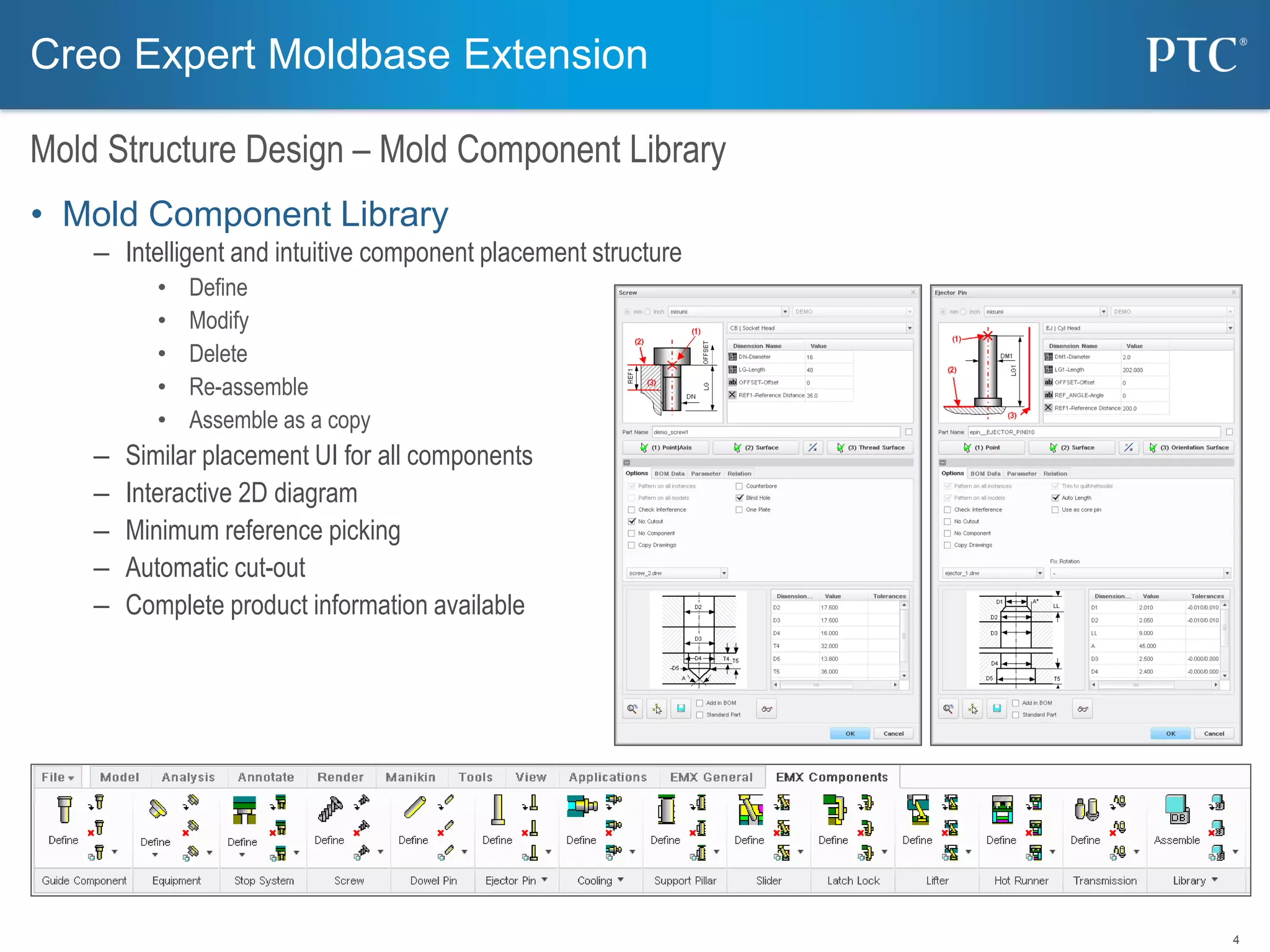
• Mold Component Library
– Intelligent and intuitive component placement structure
• Define
• Modify
• Delete
• Re-assemble
• Assemble as a copy
– Similar placement UI for all components
– Interactive 2D diagram
– Minimum reference picking
– Automatic cut-out
– Complete product information available
Mold Structure Design – Mold Component Library
Creo Expert Moldbase Extension
5
• Slide and Lifter
– Step by step definition of slider elements
– Automatic assembly of dowel pins and screws
– Automatic creation of clearance cut, thread, etc ..
Mold Structure Design – Slide and Lifter
Creo Expert Moldbase Extension
6
• Latch Lock
– Selection of latch lock type
– Control of opening steps
– Automated assembly including screws and pins
– Clearance cuts, holes, threads, etc
Mold Structure Design – Latch Lock
Creo Expert Moldbase Extension
7
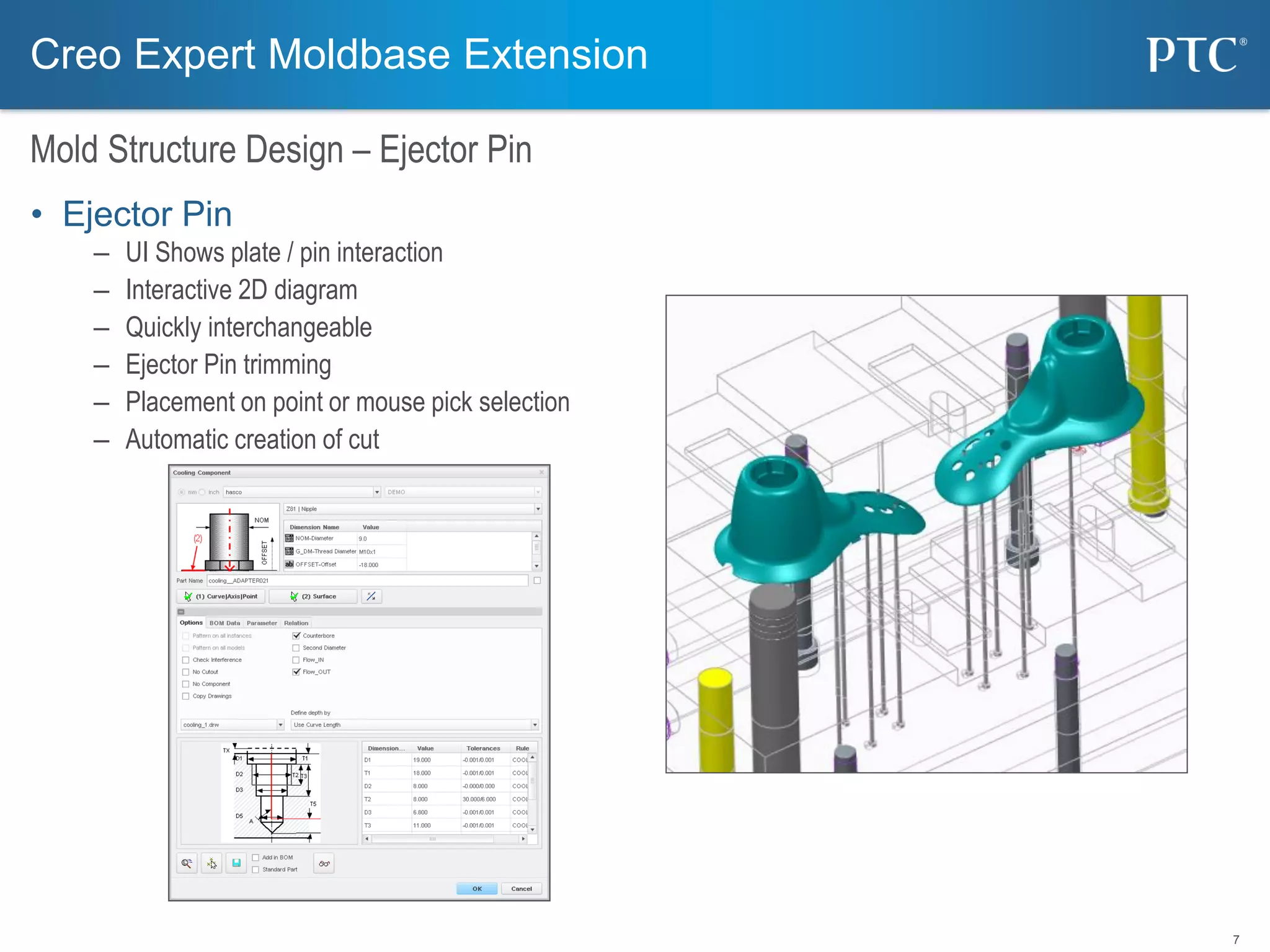
• Ejector Pin
– UI Shows plate / pin interaction
– Interactive 2D diagram
– Quickly interchangeable
– Ejector Pin trimming
– Placement on point or mouse pick selection
– Automatic creation of cut
Mold Structure Design – Ejector Pin
Creo Expert Moldbase Extension
8
• Cooling
– Water Curve templates
– Cooling components
• Nipple
• Connector
• Pipe Plug
• Pipe Plug Shoulder
• Seal Plug
• O Ring
• Extension Plug
• Straight Baffle
• Blind hole
Mold Structure Design – Cooling
Creo Expert Moldbase Extension
9
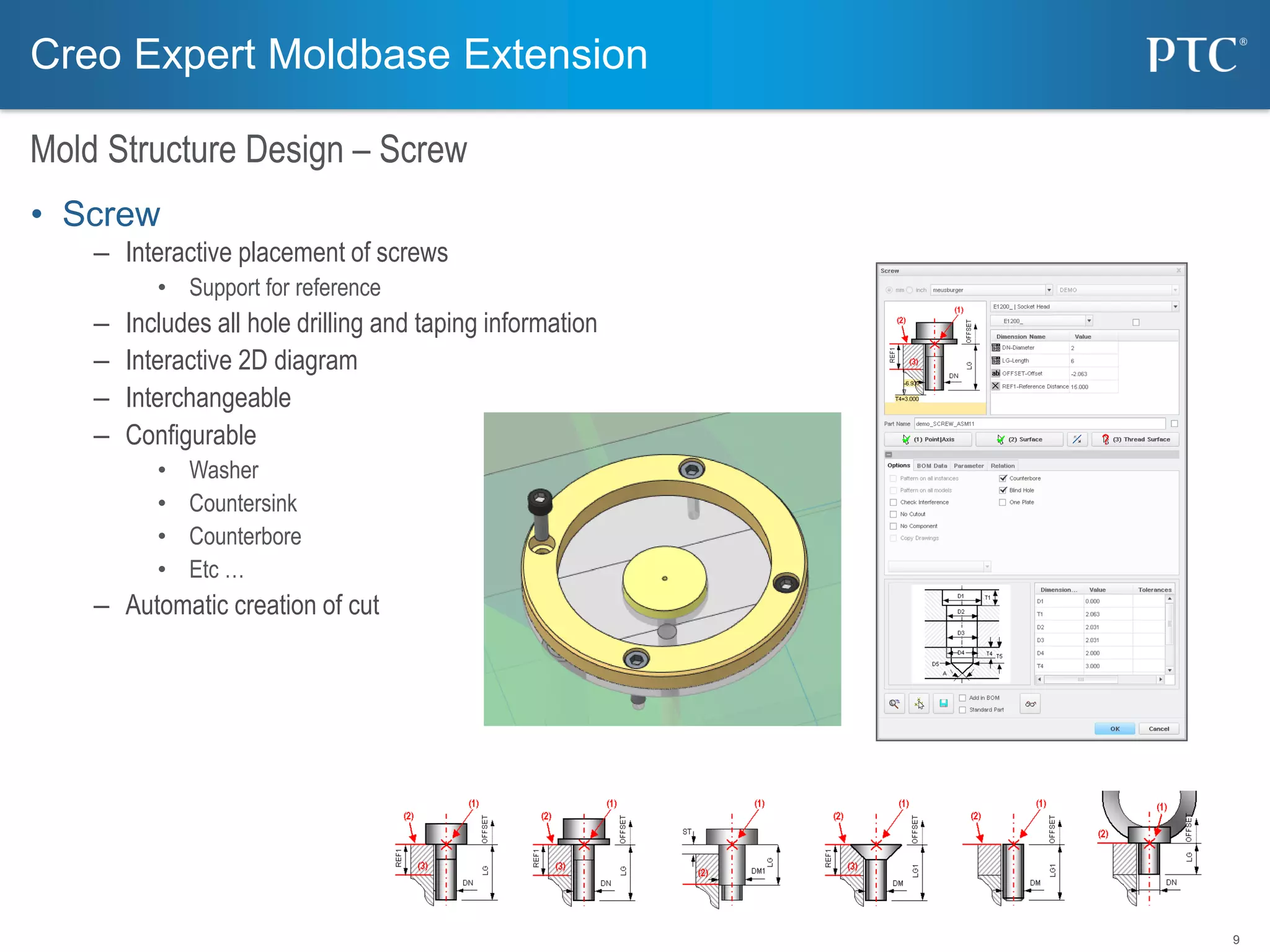
• Screw
– Interactive placement of screws
• Support for reference
– Includes all hole drilling and taping information
– Interactive 2D diagram
– Interchangeable
– Configurable
• Washer
• Countersink
• Counterbore
• Etc …
– Automatic creation of cut
Mold Structure Design – Screw
Creo Expert Moldbase Extension
10
• Opening Simulation
– Using Creo Elements/Pro Mechanism Animation
– Automatic animation of mold opening sequence
– Automatic interference checking
Mold Structure Design – Opening Simulation
Creo Expert Moldbase Extension
11
• Drawing
– Every plate and assembly have pre-defined drawings
• User customizable templates
• Fully associative, update with changes
• Automatic BOM
– User customizable
• part name, ordering numbers ..
• Automatic Hole Charts
Mold Structure Design – Detailing
Creo Expert Moldbase Extension
12
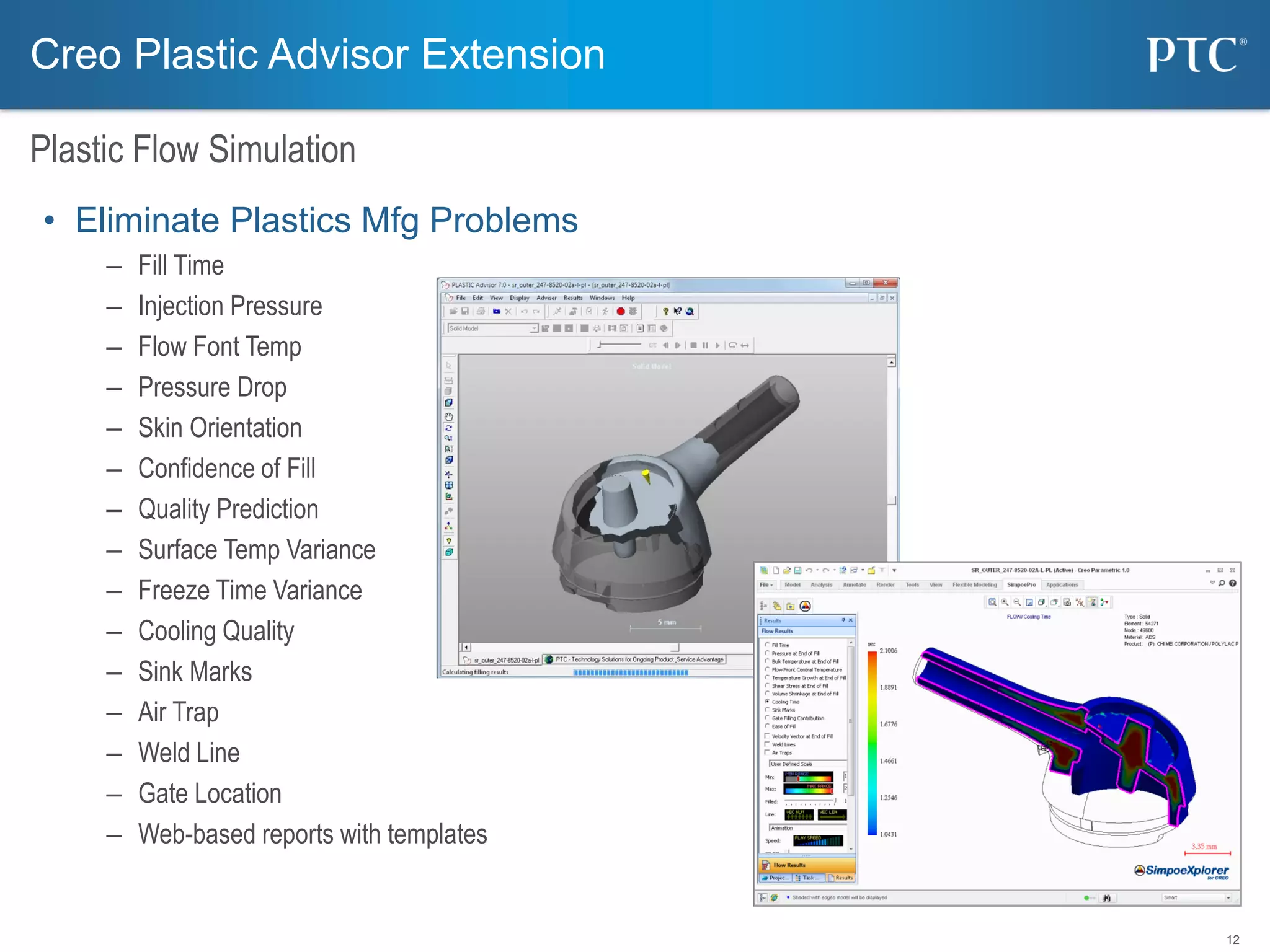
• Eliminate Plastics Mfg Problems
– Fill Time
– Injection Pressure
– Flow Font Temp
– Pressure Drop
– Skin Orientation
– Confidence of Fill
– Quality Prediction
– Surface Temp Variance
– Freeze Time Variance
– Cooling Quality
– Sink Marks
– Air Trap
– Weld Line
– Gate Location
– Web-based reports with templates
Creo Plastic Advisor Extension
Plastic Flow Simulation
13
Smart Electrode
Electrode Design
• Design Electrode Smart, Easy and Fast
– Expert UI for Electrode design development
– Integrated in Creo Elements/Pro
– Holder library
– Automatic extract of burning area
– Automatic drawing
– Simulation
* Smart Electrode is an Electrode Design solution developed by B&W software GmbH
14
• PDMLink - Team Data Management
– Controlled Application
of Associability
– Automated Synchronization
of Version Data
• ProjectLink - Collaboration
– Dynamic team definition
– Milestone and deliverables
– Data submission and retrieval
• MPMLink – Process Management
– Manufacturing BOM
– Routing, resource planning
Product Lifecycle management & Project Management
Op
025
Op
035
Op
025
Op
020
Op
010
Op
030
Sequence Main
Sequence 2 (Alternate)
Sequence 1 (Parallel)
Collaboration & Control
15
LifterSlider
Parting Surface
Insert
Designer 1
Designer 2
Designer 3
Collaboration & Control
• Parallel Mold Design
– Shorten Design Cycle Time with Team Work Methodology
Design Collaboration
16
• Design Review
– 3D Model
– Color Scheme
– Attribute
• Net Meeting
– 3D Viewer
– Cross Sectioning
– Measurement
– Annotation
Design Collaboration
Creo ViewCreo Parametric
Windchill PDMLink
Collaboration & Control
For more information:
Tooling Solution: Russell Hsu, ruhsu@ptc.com

Ptc creo expert moldbase extension (emx) sales presentation

  • 1.
    PTC Creo ExpertMoldbase Extension (EMX) Russell J.H. Hsu Creo Product Manager – Tooling Solutions
  • 2.
    2 • Capabilities – 2DProcess-Driven UI creating 3D models • Familiar environment • Immediate feedback – Multi-cavity layout patterns – Mold base catalogs – Customizable “Smart” mold component library – Automatic BOM and production drawings – Auto ejector pin functions – Sliders and lifters – Smart Hole Chart Creation – Cooling design and waterline checking • Benefits – Easy-to-use, faster Moldbase assembly creation – Eliminate need for data translation - integrated – Fewer scrapped molds – interference checking Mold Structure Design Solution Creo Expert Moldbase Extension
  • 3.
    3 • Mold Base –2D Process-Driven UI creating 3D models – Multi-cavity layout patterns – Mold base catalogs • DME • DMS • EOC • FUTABA • HASCO • KLA • MEUSBURGER • PEDROTTI • RABOURDIN • STRACK • LKM • NATIONAL • PCS • PROGRESSIVE • … Mold Structure Design – Mold Base Creo Expert Moldbase Extension
  • 4.
    4 • Mold ComponentLibrary – Intelligent and intuitive component placement structure • Define • Modify • Delete • Re-assemble • Assemble as a copy – Similar placement UI for all components – Interactive 2D diagram – Minimum reference picking – Automatic cut-out – Complete product information available Mold Structure Design – Mold Component Library Creo Expert Moldbase Extension
  • 5.
    5 • Slide andLifter – Step by step definition of slider elements – Automatic assembly of dowel pins and screws – Automatic creation of clearance cut, thread, etc .. Mold Structure Design – Slide and Lifter Creo Expert Moldbase Extension
  • 6.
    6 • Latch Lock –Selection of latch lock type – Control of opening steps – Automated assembly including screws and pins – Clearance cuts, holes, threads, etc Mold Structure Design – Latch Lock Creo Expert Moldbase Extension
  • 7.
    7 • Ejector Pin –UI Shows plate / pin interaction – Interactive 2D diagram – Quickly interchangeable – Ejector Pin trimming – Placement on point or mouse pick selection – Automatic creation of cut Mold Structure Design – Ejector Pin Creo Expert Moldbase Extension
  • 8.
    8 • Cooling – WaterCurve templates – Cooling components • Nipple • Connector • Pipe Plug • Pipe Plug Shoulder • Seal Plug • O Ring • Extension Plug • Straight Baffle • Blind hole Mold Structure Design – Cooling Creo Expert Moldbase Extension
  • 9.
    9 • Screw – Interactiveplacement of screws • Support for reference – Includes all hole drilling and taping information – Interactive 2D diagram – Interchangeable – Configurable • Washer • Countersink • Counterbore • Etc … – Automatic creation of cut Mold Structure Design – Screw Creo Expert Moldbase Extension
  • 10.
    10 • Opening Simulation –Using Creo Elements/Pro Mechanism Animation – Automatic animation of mold opening sequence – Automatic interference checking Mold Structure Design – Opening Simulation Creo Expert Moldbase Extension
  • 11.
    11 • Drawing – Everyplate and assembly have pre-defined drawings • User customizable templates • Fully associative, update with changes • Automatic BOM – User customizable • part name, ordering numbers .. • Automatic Hole Charts Mold Structure Design – Detailing Creo Expert Moldbase Extension
  • 12.
    12 • Eliminate PlasticsMfg Problems – Fill Time – Injection Pressure – Flow Font Temp – Pressure Drop – Skin Orientation – Confidence of Fill – Quality Prediction – Surface Temp Variance – Freeze Time Variance – Cooling Quality – Sink Marks – Air Trap – Weld Line – Gate Location – Web-based reports with templates Creo Plastic Advisor Extension Plastic Flow Simulation
  • 13.
    13 Smart Electrode Electrode Design •Design Electrode Smart, Easy and Fast – Expert UI for Electrode design development – Integrated in Creo Elements/Pro – Holder library – Automatic extract of burning area – Automatic drawing – Simulation * Smart Electrode is an Electrode Design solution developed by B&W software GmbH
  • 14.
    14 • PDMLink -Team Data Management – Controlled Application of Associability – Automated Synchronization of Version Data • ProjectLink - Collaboration – Dynamic team definition – Milestone and deliverables – Data submission and retrieval • MPMLink – Process Management – Manufacturing BOM – Routing, resource planning Product Lifecycle management & Project Management Op 025 Op 035 Op 025 Op 020 Op 010 Op 030 Sequence Main Sequence 2 (Alternate) Sequence 1 (Parallel) Collaboration & Control
  • 15.
    15 LifterSlider Parting Surface Insert Designer 1 Designer2 Designer 3 Collaboration & Control • Parallel Mold Design – Shorten Design Cycle Time with Team Work Methodology Design Collaboration
  • 16.
    16 • Design Review –3D Model – Color Scheme – Attribute • Net Meeting – 3D Viewer – Cross Sectioning – Measurement – Annotation Design Collaboration Creo ViewCreo Parametric Windchill PDMLink Collaboration & Control
  • 17.
    For more information: ToolingSolution: Russell Hsu, ruhsu@ptc.com