


CREO GD&T
ADVISOR
EXTENSION
22
AGENDA
• Product Introduction
• Solution Capabilities
• Process Opportunities and Value
3
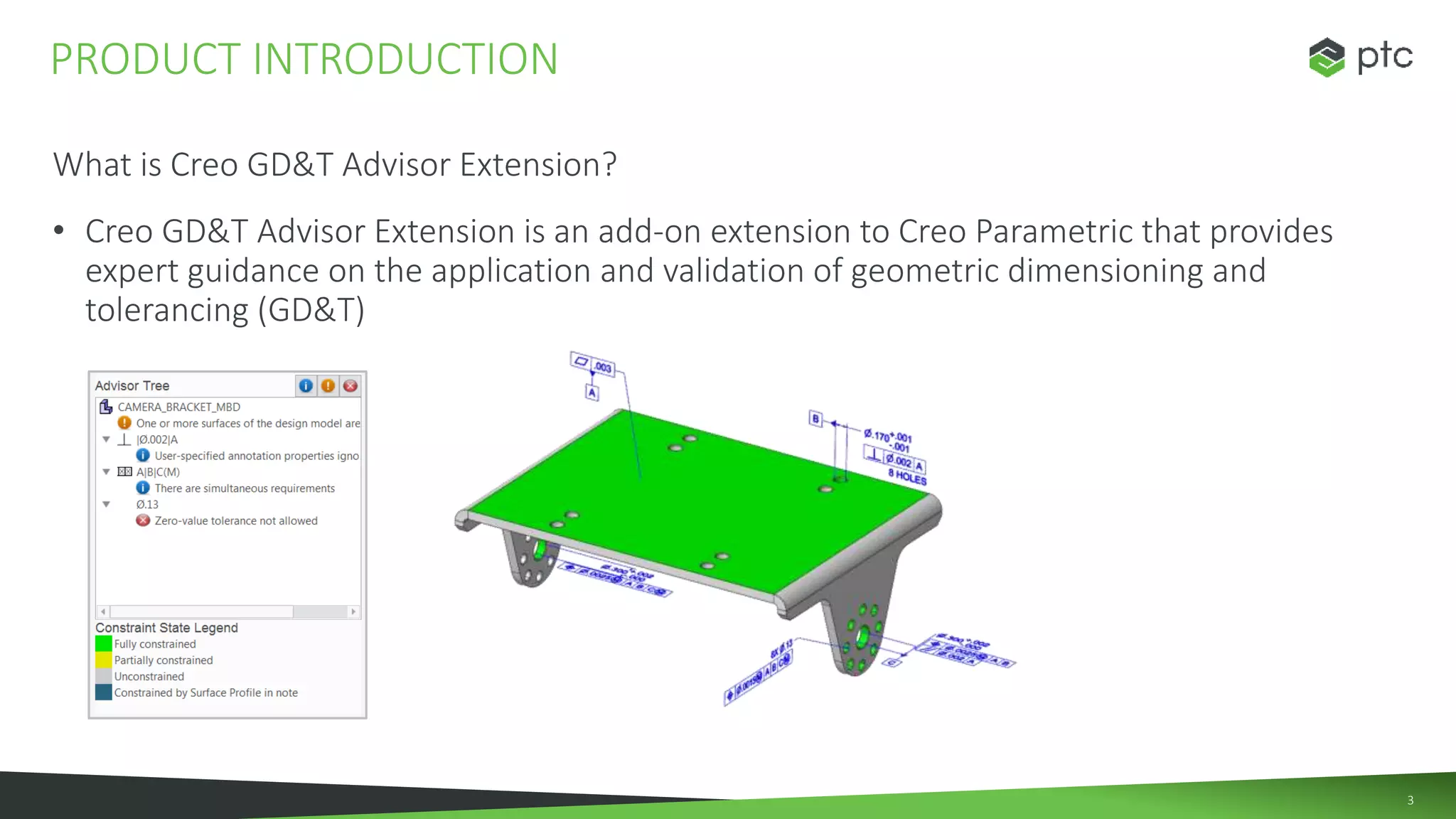
What is Creo GD&T Advisor Extension?
• Creo GD&T Advisor Extension is an add-on extension to Creo Parametric that provides
expert guidance on the application and validation of geometric dimensioning and
tolerancing (GD&T)
PRODUCT INTRODUCTION
4
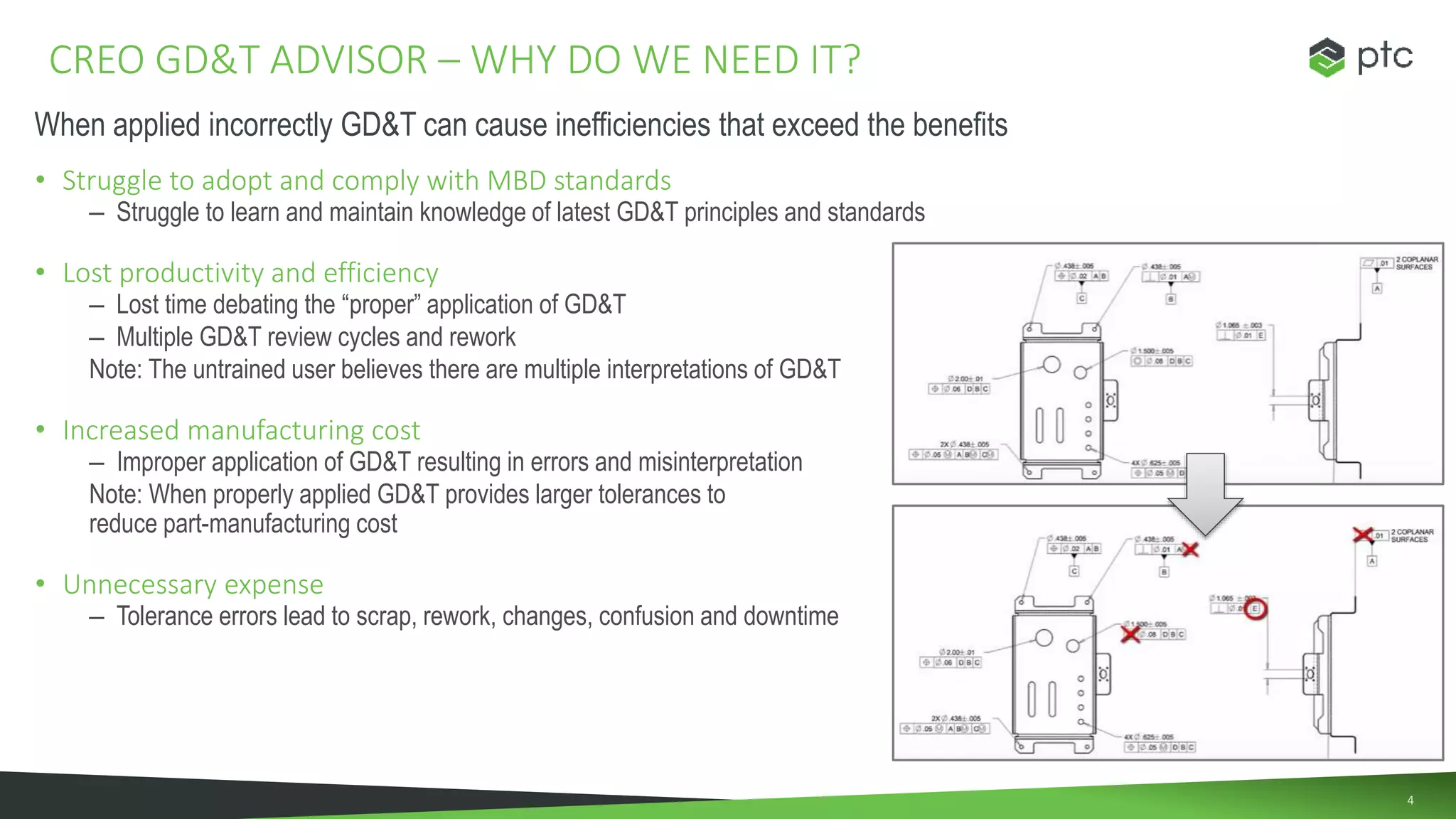
• Struggle to adopt and comply with MBD standards
– Struggle to learn and maintain knowledge of latest GD&T principles and standards
• Lost productivity and efficiency
– Lost time debating the “proper” application of GD&T
– Multiple GD&T review cycles and rework
Note: The untrained user believes there are multiple interpretations of GD&T
• Increased manufacturing cost
– Improper application of GD&T resulting in errors and misinterpretation
Note: When properly applied GD&T provides larger tolerances to
reduce part-manufacturing cost
• Unnecessary expense
– Tolerance errors lead to scrap, rework, changes, confusion and downtime
CREO GD&T ADVISOR – WHY DO WE NEED IT?
When applied incorrectly GD&T can cause inefficiencies that exceed the benefits
5
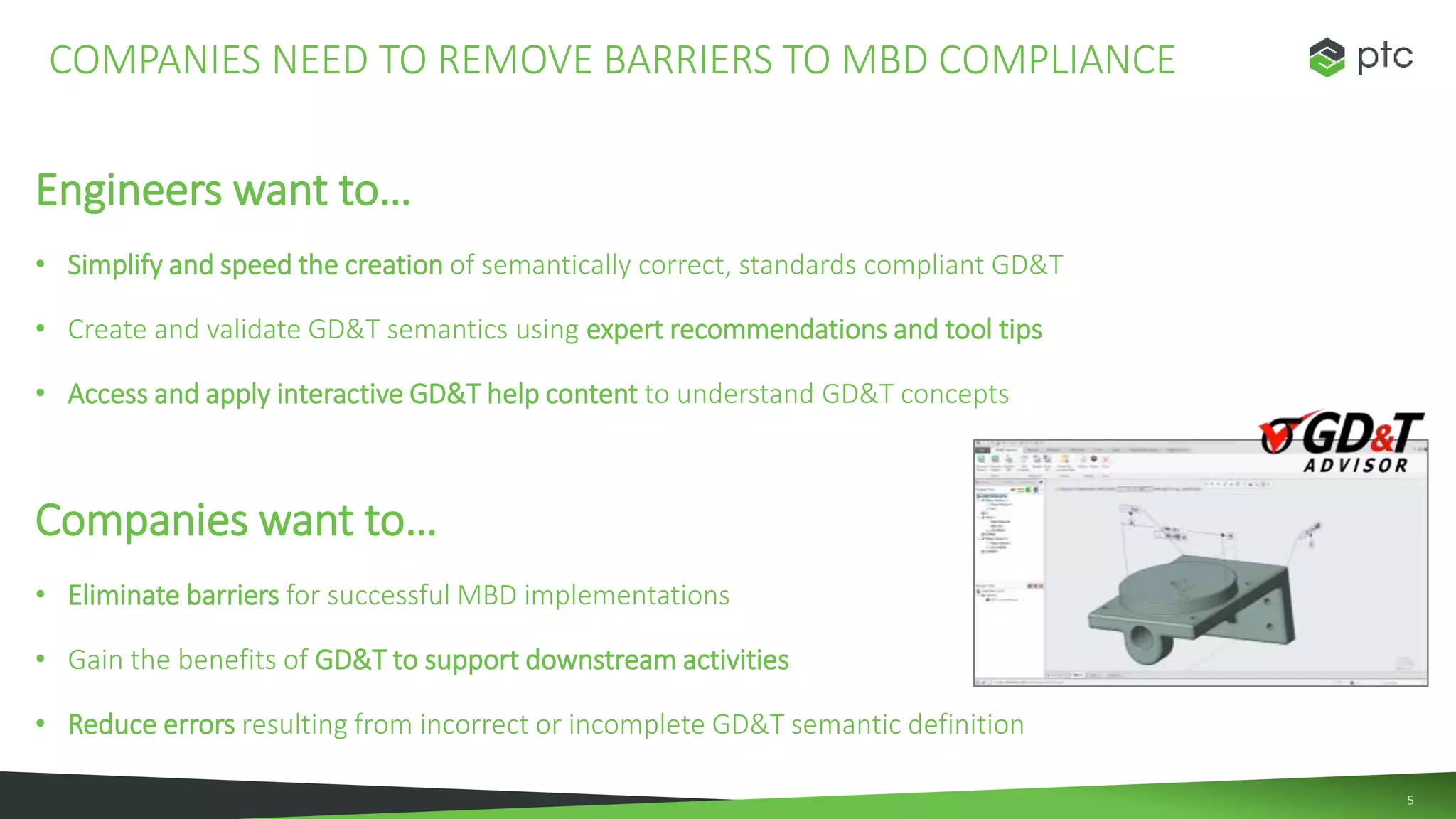
Engineers want to…
• Simplify and speed the creation of semantically correct, standards compliant GD&T
• Create and validate GD&T semantics using expert recommendations and tool tips
• Access and apply interactive GD&T help content to understand GD&T concepts
Companies want to…
• Eliminate barriers for successful MBD implementations
• Gain the benefits of GD&T to support downstream activities
• Reduce errors resulting from incorrect or incomplete GD&T semantic definition
COMPANIES NEED TO REMOVE BARRIERS TO MBD COMPLIANCE
66
AGENDA
• Product Introduction
• Solution Capabilities
• Process Opportunities and Value
AGEND
7
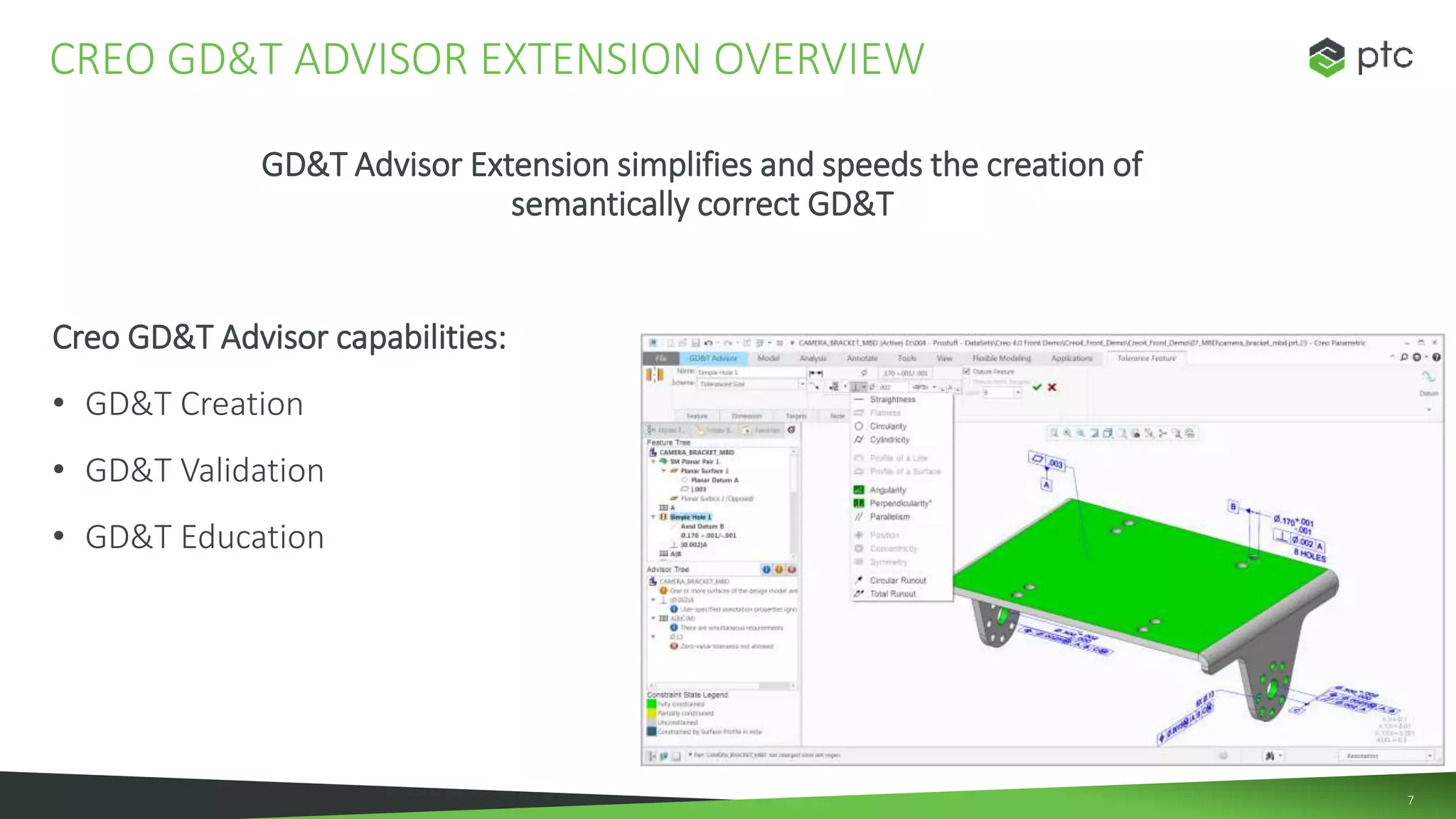
GD&T Advisor Extension simplifies and speeds the creation of
semantically correct GD&T
Creo GD&T Advisor capabilities:
• GD&T Creation
• GD&T Validation
• GD&T Education
CREO GD&T ADVISOR EXTENSION OVERVIEW
8
GD&T Creation
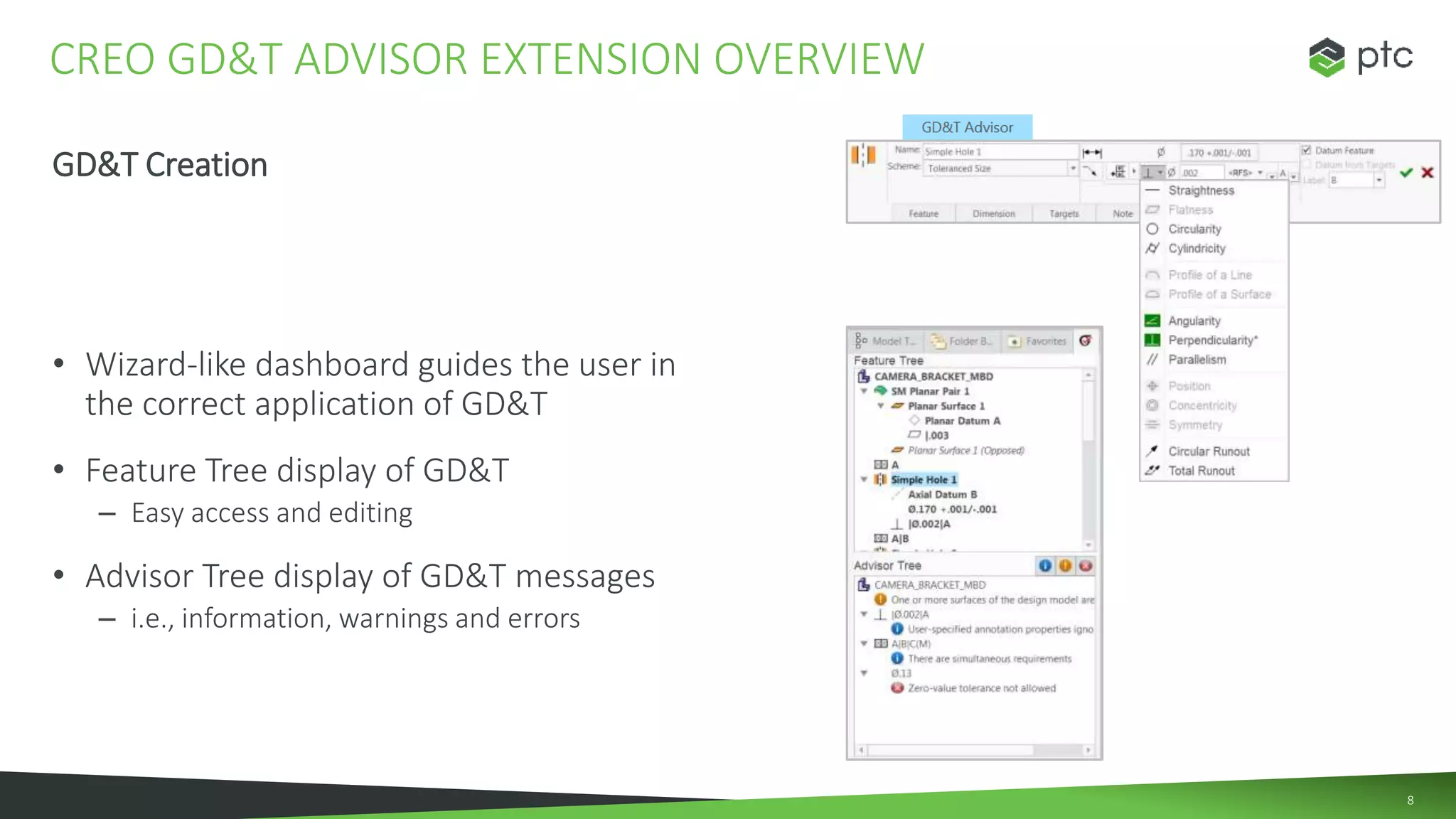
• Wizard-like dashboard guides the user in
the correct application of GD&T
• Feature Tree display of GD&T
– Easy access and editing
• Advisor Tree display of GD&T messages
– i.e., information, warnings and errors
CREO GD&T ADVISOR EXTENSION OVERVIEW
9
GD&T Validation
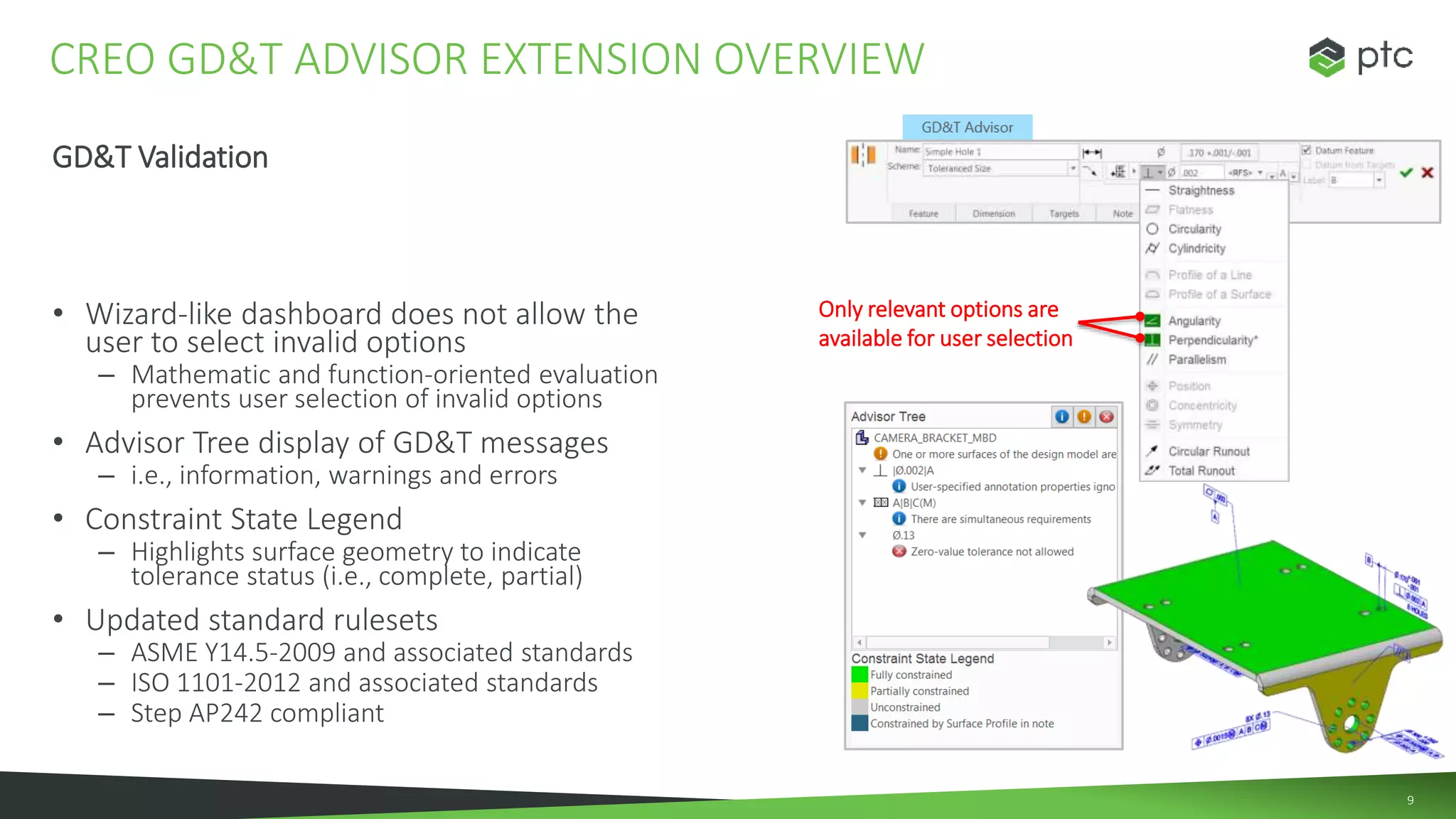
• Wizard-like dashboard does not allow the
user to select invalid options
– Mathematic and function-oriented evaluation
prevents user selection of invalid options
• Advisor Tree display of GD&T messages
– i.e., information, warnings and errors
• Constraint State Legend
– Highlights surface geometry to indicate
tolerance status (i.e., complete, partial)
• Updated standard rulesets
– ASME Y14.5-2009 and associated standards
– ISO 1101-2012 and associated standards
– Step AP242 compliant
CREO GD&T ADVISOR EXTENSION OVERVIEW
Only relevant options are
available for user selection
10
GD&T Education
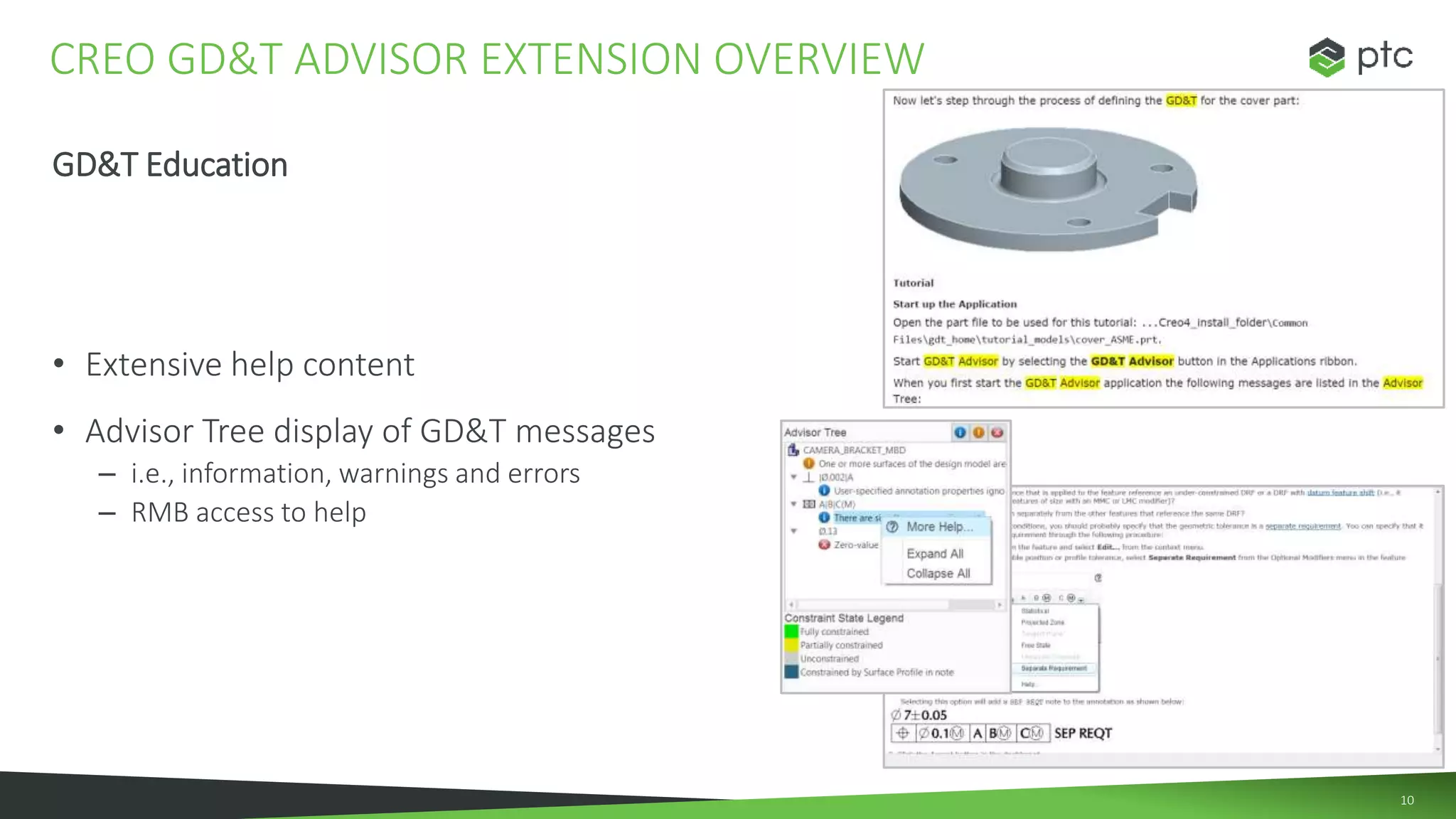
• Extensive help content
• Advisor Tree display of GD&T messages
– i.e., information, warnings and errors
– RMB access to help
CREO GD&T ADVISOR EXTENSION OVERVIEW
1111
AGENDA
• Product Introduction
• Solution Capabilities
• Process Opportunities and Value
12
GD&T Advisor is an interactive software tool that provides expert guidance on the correct
application of GD&T
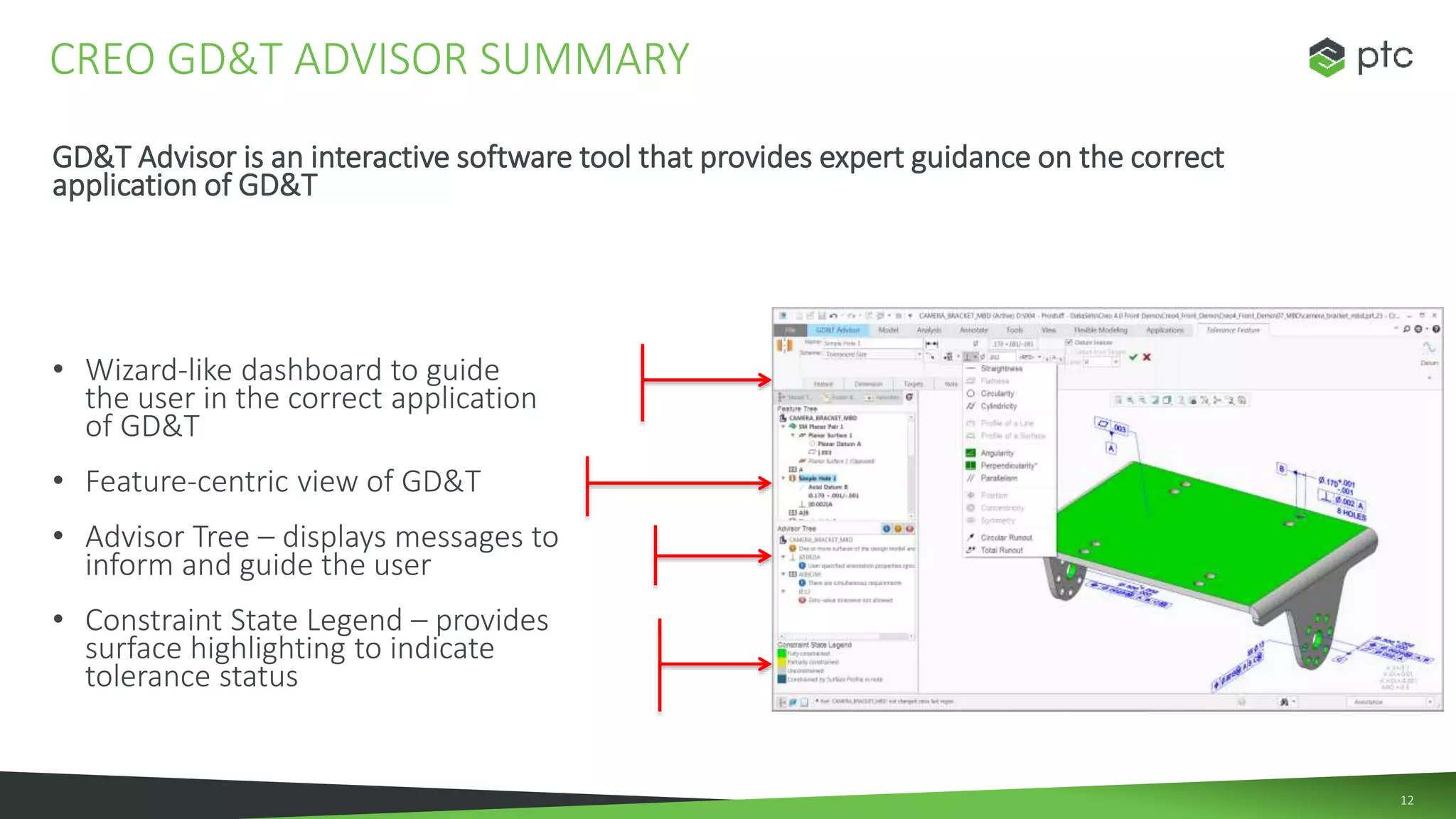
• Wizard-like dashboard to guide
the user in the correct application
of GD&T
• Feature-centric view of GD&T
• Advisor Tree – displays messages to
inform and guide the user
• Constraint State Legend – provides
surface highlighting to indicate
tolerance status
CREO GD&T ADVISOR SUMMARY
13
Background: Creo GD&T Advisor Extension (Creo 4.0 F000 – M030) does not
recognize Creo generated annotations and GD&T
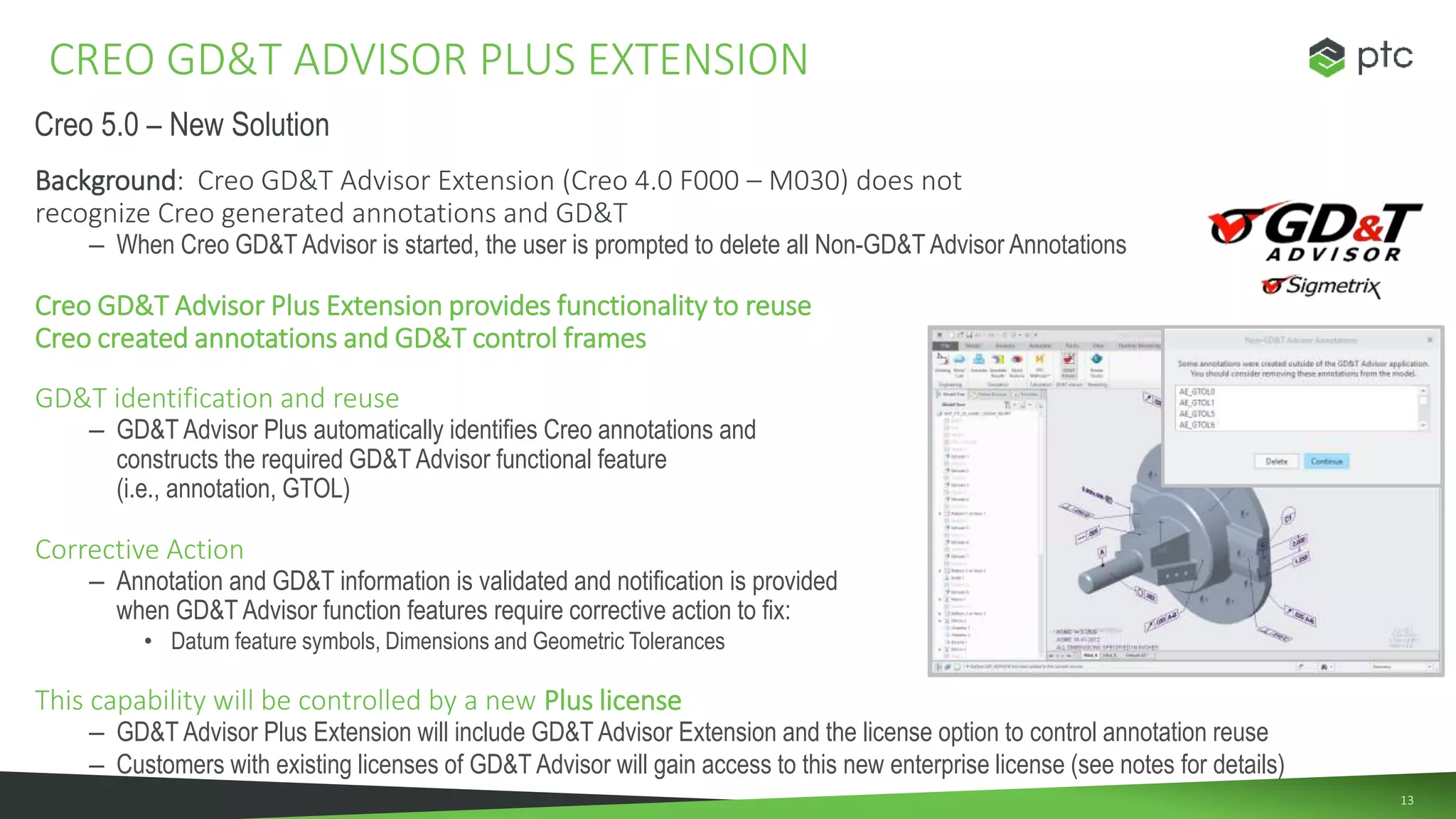
– When Creo GD&T Advisor is started, the user is prompted to delete all Non-GD&T Advisor Annotations
Creo GD&T Advisor Plus Extension provides functionality to reuse
Creo created annotations and GD&T control frames
GD&T identification and reuse
– GD&T Advisor Plus automatically identifies Creo annotations and
constructs the required GD&T Advisor functional feature
(i.e., annotation, GTOL)
Corrective Action
– Annotation and GD&T information is validated and notification is provided
when GD&T Advisor function features require corrective action to fix:
• Datum feature symbols, Dimensions and Geometric Tolerances
This capability will be controlled by a new Plus license
– GD&T Advisor Plus Extension will include GD&T Advisor Extension and the license option to control annotation reuse
– Customers with existing licenses of GD&T Advisor will gain access to this new enterprise license (see notes for details)
CREO GD&T ADVISOR PLUS EXTENSION
Creo 5.0 – New Solution
14
Capability GD&T Advisor Basic
SPN-3391
GD&T Advisor Plus
SPN-3376
Guided creation of GD&T ✔ ✔
Validation against ASME and ISO standards ✔ ✔
Receive info, warnings and error messages in Advisor Tree ✔ ✔
Reuse existing 3D annotation created in Creo ✔
Evaluate annotations and provide guidance to fix them to given standard ✔
GD&T ADVISOR BASIC AND PLUS
15
Creo GD&T Advisor Extension delivers Business Value
• Increase Engineering Productivity
• Reduce Product Development Costs
• Reduce Manufacturing Costs
• Design to Realize Price Premium
CREO GD&T ADVISOR EXTENSION
Creo GD&T 1

Creo GD&T 1

  • 1.
  • 2.
    22 AGENDA • Product Introduction •Solution Capabilities • Process Opportunities and Value
  • 3.
    3 What is CreoGD&T Advisor Extension? • Creo GD&T Advisor Extension is an add-on extension to Creo Parametric that provides expert guidance on the application and validation of geometric dimensioning and tolerancing (GD&T) PRODUCT INTRODUCTION
  • 4.
    4 • Struggle toadopt and comply with MBD standards – Struggle to learn and maintain knowledge of latest GD&T principles and standards • Lost productivity and efficiency – Lost time debating the “proper” application of GD&T – Multiple GD&T review cycles and rework Note: The untrained user believes there are multiple interpretations of GD&T • Increased manufacturing cost – Improper application of GD&T resulting in errors and misinterpretation Note: When properly applied GD&T provides larger tolerances to reduce part-manufacturing cost • Unnecessary expense – Tolerance errors lead to scrap, rework, changes, confusion and downtime CREO GD&T ADVISOR – WHY DO WE NEED IT? When applied incorrectly GD&T can cause inefficiencies that exceed the benefits
  • 5.
    5 Engineers want to… •Simplify and speed the creation of semantically correct, standards compliant GD&T • Create and validate GD&T semantics using expert recommendations and tool tips • Access and apply interactive GD&T help content to understand GD&T concepts Companies want to… • Eliminate barriers for successful MBD implementations • Gain the benefits of GD&T to support downstream activities • Reduce errors resulting from incorrect or incomplete GD&T semantic definition COMPANIES NEED TO REMOVE BARRIERS TO MBD COMPLIANCE
  • 6.
    66 AGENDA • Product Introduction •Solution Capabilities • Process Opportunities and Value AGEND
  • 7.
    7 GD&T Advisor Extensionsimplifies and speeds the creation of semantically correct GD&T Creo GD&T Advisor capabilities: • GD&T Creation • GD&T Validation • GD&T Education CREO GD&T ADVISOR EXTENSION OVERVIEW
  • 8.
    8 GD&T Creation • Wizard-likedashboard guides the user in the correct application of GD&T • Feature Tree display of GD&T – Easy access and editing • Advisor Tree display of GD&T messages – i.e., information, warnings and errors CREO GD&T ADVISOR EXTENSION OVERVIEW
  • 9.
    9 GD&T Validation • Wizard-likedashboard does not allow the user to select invalid options – Mathematic and function-oriented evaluation prevents user selection of invalid options • Advisor Tree display of GD&T messages – i.e., information, warnings and errors • Constraint State Legend – Highlights surface geometry to indicate tolerance status (i.e., complete, partial) • Updated standard rulesets – ASME Y14.5-2009 and associated standards – ISO 1101-2012 and associated standards – Step AP242 compliant CREO GD&T ADVISOR EXTENSION OVERVIEW Only relevant options are available for user selection
  • 10.
    10 GD&T Education • Extensivehelp content • Advisor Tree display of GD&T messages – i.e., information, warnings and errors – RMB access to help CREO GD&T ADVISOR EXTENSION OVERVIEW
  • 11.
    1111 AGENDA • Product Introduction •Solution Capabilities • Process Opportunities and Value
  • 12.
    12 GD&T Advisor isan interactive software tool that provides expert guidance on the correct application of GD&T • Wizard-like dashboard to guide the user in the correct application of GD&T • Feature-centric view of GD&T • Advisor Tree – displays messages to inform and guide the user • Constraint State Legend – provides surface highlighting to indicate tolerance status CREO GD&T ADVISOR SUMMARY
  • 13.
    13 Background: Creo GD&TAdvisor Extension (Creo 4.0 F000 – M030) does not recognize Creo generated annotations and GD&T – When Creo GD&T Advisor is started, the user is prompted to delete all Non-GD&T Advisor Annotations Creo GD&T Advisor Plus Extension provides functionality to reuse Creo created annotations and GD&T control frames GD&T identification and reuse – GD&T Advisor Plus automatically identifies Creo annotations and constructs the required GD&T Advisor functional feature (i.e., annotation, GTOL) Corrective Action – Annotation and GD&T information is validated and notification is provided when GD&T Advisor function features require corrective action to fix: • Datum feature symbols, Dimensions and Geometric Tolerances This capability will be controlled by a new Plus license – GD&T Advisor Plus Extension will include GD&T Advisor Extension and the license option to control annotation reuse – Customers with existing licenses of GD&T Advisor will gain access to this new enterprise license (see notes for details) CREO GD&T ADVISOR PLUS EXTENSION Creo 5.0 – New Solution
  • 14.
    14 Capability GD&T AdvisorBasic SPN-3391 GD&T Advisor Plus SPN-3376 Guided creation of GD&T ✔ ✔ Validation against ASME and ISO standards ✔ ✔ Receive info, warnings and error messages in Advisor Tree ✔ ✔ Reuse existing 3D annotation created in Creo ✔ Evaluate annotations and provide guidance to fix them to given standard ✔ GD&T ADVISOR BASIC AND PLUS
  • 15.
    15 Creo GD&T AdvisorExtension delivers Business Value • Increase Engineering Productivity • Reduce Product Development Costs • Reduce Manufacturing Costs • Design to Realize Price Premium CREO GD&T ADVISOR EXTENSION

Editor's Notes

  • #5 To understand the need for GD&T Advisor Extension it is important to understand that companies struggle to adopt and comply with MBD standards GD&T principles and standards are continually changing requiring users to maintain a constant knowledge of the latest information The reality is that most users are not experts and seem to think there are multiple interpretations of GD&T This results in lost productivity and time debating, reworking and reviewing GD&T When applied correctly, GD&T can lower manufacturing cost by providing larger tolerances to reduce part-manufacturing When applied incorrectly, GD&T can increase manufacturing cost and lead to additional expenses due to scrap, rework , changes and confusion GD&T is used by about one-half of the world's manufacturers because it does have clear rules and is quality-oriented.  http://www.qualitymag.com/articles/84387-training-trends-nine-myths-about-geometric-dimensioning-and-tolerancing 4x faster than using Creo authoring tools
  • #6 Semantic – relating to the meaning (ex. Hole recognition) Discuss what engineers want,.. Confidently define semantically correct, standards compliant GD&T Engineers want to… Rapidly define GD&T Confidently apply GD&T using Mathematics-based recommendations and evaluation prevents unnecessary use Confidently create standards compliant GD&T Reduce errors that result from incorrect or incomplete GD&T Companies want to… Reduce errors that result from incorrect or incomplete GD&T semantic definition Eliminate barriers for successful MBD implementations
  • #8 Creo GD&T Advisor Extension simplifies and speeds the creation of semantically correct GD&T. When discussing the need for Creo GD&T Advisor Extension, it is critical to position the following Minimum Requirements: GD&T Creation GD&T Validation GD&T Education
  • #9 The first minimum requirement is to make it easy for users to create GD&T annotations. The tool provides a wizard-like dashboard that guides the user in the correct application of GD&T. In addition to the dashboard, the tool makes it easy to locate and edit GD&T features by simply selecting from the Feature Tree. The Advisor Tree is located directly below the Feature Tree providing information, warnings and error messages. When the user selects the message, the related annotation is highlighted on the model.
  • #10 The next minimum requirement is to prevent the creation of invalid GD&T annotations. This is done using mathematic and function-oriented evaluations to identify valid constraints and prevent users from creating invalid GD&T. The Advisor Tree provides instant user notification when GD&T information, warnings and errors are identified. To quickly validate the tolerance status of the model, users can select the option to show constraint state and visually assess tolerance status using color coded highlights. All GD&T annotations are ASME and ISO compliant and the export of GD&T information is STEP AP242 compliant.
  • #11 The final minimum requirement is to provide help and educational content. Creo Parametric Help provides extensive GD&T Advisor Extension support content, tutorials and information. In addition to Creo Help, users can directly access help topics by selecting the messages in the Advisor Tree and linking to help using the RMB.
  • #13 To summarize, Creo GD&T Advisor Extension provides tools to create, validate and educate the user on the proper application of GD&T. The tool provides a wizard-like dashboard to simplify and speed the creation of semantically correct GD&T. The UI provides easy access to GD&T annotations from the Feature Tree and displays GD&T notifications in the Advisor Tree in the form of messages, warnings and errors. At any time, the user can select the option to show Constraint State to visualize model geometry and tolerance status.
  • #14 GD&T Advisor This bundle would be the same as we have sold since Creo 4.0 F000 SPN-3391: Creo GD&T Advisor Extension ENG-607: Creo GDT Advisor ENG-608: GDT ASME ENG-609: GDT ISO GD&T Advisor Plus Existing part number will become the Plus package Existing customer will get the new functionality automatically (ENG-623) SPN-3376: Creo GD&T Advisor Extension ENG-607: Creo GD&T Advisor ENG-608: GDT ASME ENG-609: GDT ISO ENG-623: GDT Enterprise (Creo 4.0 M040+)