

Information Technology: The Best Offense is a Good Defense
Agenda Is Your Network at Risk? Security Statistics Types of Attacks Security Strategies Top 5 Security Tips About Acend Corporate Learning Questions?
Is Your Network at Risk? Regularly impacted by viruses and Internet outages? Users keep their password on post it notes? Transferring files and documents? Employees instant messaging through their computers? Don’t regularly audit your security policies?
Security breaches can cause end user  downtime Reactive recovery measures can  impact IT productivity  and ability to deliver essential business services You can  lose  significant amount of  staff hours Your company can suffer devastating  loss of credibility  with customers resulting in loss of Market Opportunities Intellectual Property or Customer  Information  can be  lost Suffer  Legal Liabilities  as a result Why is Information Security Important to Your Business? BOTTOM LINE: Billions of dollars are lost at the affected Web sites, losses in market capitalization, and the amount that will be spent on upgrading security infrastructures as a result of security breaches.
How Does this Happen? Basic Security Breaches Involve Loss of: Confidentiality:   Information is read or copied by someone with unauthorized access Integrity:   Information is modified by someone whether by accident or intentional Availability:   Information is inaccessible to people who are authorized to use it
An insider attack against a large company could cause an average loss of $2.7 million in damages.  (reported by the Computer Security Institute and the FBI) Most common attacks reported by companies were virus attacks (82%) and insider abuse of network access (80%).  (reported by the Computer Security Institute and the FBI) In the 2003 Global Security Survey, 39% of respondents acknowledged that their systems had been compromised in some way within the last year.  (reported in the Deloitte Touche 2003 Global Security Survey) Hackers, worms and other high-tech interference caused $11.1 billion in damages.  (reported by The Orange County Register, “Hacker Trackers” 2003) How Bad is the Problem? January, 2004: MyDoom virus has become the fastest spreading virus to date, causing $22.6 Billion in damages in its first 72 hours, according to the mi2g Intelligence Unit
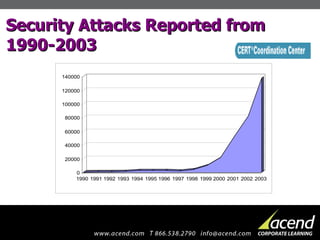
Security Attacks Reported from 1990-2003
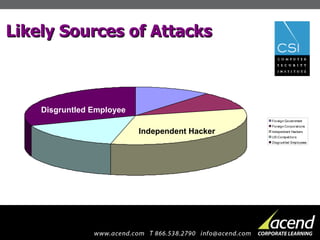
Likely Sources of Attacks Independent Hacker   Disgruntled Employee
Types of Attacks Viruses – #1 type of attack with over 70,000 known viruses Macro Viruses   Worms   File Viruses  Trojan Horses   Backdoor Trojans   Boot Sector Viruses System Entry Floppy disks, CD-ROM, e-mail, Internet, programs and documents. Anti-virus Programs Network and Desktop .
Types of Attacks Denial of Service Insider Abuse of Network  Unauthorized Access Packet Sniffer Probe or Scan
Security Strategies: Personnel Training & Awareness Security Policy Physical Security Dedicated Management
Security Strategies: Technology Viruses Firewalls Intrusion Detection  Authentication & Authorization  Encryption Data & Information Backup
Top 5 Security Tips Passwords Encourage employees to choose passwords that are a minimum of eight characters, a combination of upper & lowercase characters, and mixed with symbols. Require new passwords at least every 90 days. Employees should never share passwords or write them down. Software Anti-Virus: Constantly monitor your anti-virus software to make sure that is kept current. Check for updates and patches offered by the creator of the anti-virus software. Server: Make sure that your server software is the latest version and that all patches and updates are current.  Do not provide any network services to all employees unless necessary. Security Policies Guidelines for organization.  Define acceptable and unacceptable activities. When an employee leaves a company, remove their access.
Top 5 Security Tips Network Administration: Continuously monitor the network and look for new ways to protect it.  If you are using a web host or ISP, make sure that your security goals align with your web host. Deploy encryption where available. Education: Ensure Network Administrators have the latest and greatest security training. Train employees on the use of email attachments and the simple steps they can take to protect their PCs.  Make sure anti-virus software is installed on every machine and that employees know how to use it before opening any attachments. Mandate computer security awareness and training based on company policy that teaches knowledge, attitude and behavior.
How Acend can Help Customized Learning Plan to your personal needs Minimize the difficulty of scheduling your employees to be out of the environment  Lessen the impact of having employees away on training  More effective learning  One-on-one instruction
Thank You for Coming! Your Next Steps Attend an Information Security Class for a hands on experience Readiness meeting with your Solutions Executive to review your Information Security goals
For More Information… Computer Security Institute: http://www.gocsi.com CERT ®  Coordination Center: http://www.cert.org On Acend Corporate Learning: www.acend.com
Any Questions?

Information Security Seminar

  • 1.
    Information Technology: TheBest Offense is a Good Defense
  • 2.
    Agenda Is YourNetwork at Risk? Security Statistics Types of Attacks Security Strategies Top 5 Security Tips About Acend Corporate Learning Questions?
  • 3.
    Is Your Networkat Risk? Regularly impacted by viruses and Internet outages? Users keep their password on post it notes? Transferring files and documents? Employees instant messaging through their computers? Don’t regularly audit your security policies?
  • 4.
    Security breaches cancause end user downtime Reactive recovery measures can impact IT productivity and ability to deliver essential business services You can lose significant amount of staff hours Your company can suffer devastating loss of credibility with customers resulting in loss of Market Opportunities Intellectual Property or Customer Information can be lost Suffer Legal Liabilities as a result Why is Information Security Important to Your Business? BOTTOM LINE: Billions of dollars are lost at the affected Web sites, losses in market capitalization, and the amount that will be spent on upgrading security infrastructures as a result of security breaches.
  • 5.
    How Does thisHappen? Basic Security Breaches Involve Loss of: Confidentiality: Information is read or copied by someone with unauthorized access Integrity: Information is modified by someone whether by accident or intentional Availability: Information is inaccessible to people who are authorized to use it
  • 6.
    An insider attackagainst a large company could cause an average loss of $2.7 million in damages. (reported by the Computer Security Institute and the FBI) Most common attacks reported by companies were virus attacks (82%) and insider abuse of network access (80%). (reported by the Computer Security Institute and the FBI) In the 2003 Global Security Survey, 39% of respondents acknowledged that their systems had been compromised in some way within the last year. (reported in the Deloitte Touche 2003 Global Security Survey) Hackers, worms and other high-tech interference caused $11.1 billion in damages. (reported by The Orange County Register, “Hacker Trackers” 2003) How Bad is the Problem? January, 2004: MyDoom virus has become the fastest spreading virus to date, causing $22.6 Billion in damages in its first 72 hours, according to the mi2g Intelligence Unit
  • 7.
  • 8.
    Likely Sources ofAttacks Independent Hacker Disgruntled Employee
  • 9.
    Types of AttacksViruses – #1 type of attack with over 70,000 known viruses Macro Viruses Worms File Viruses Trojan Horses Backdoor Trojans Boot Sector Viruses System Entry Floppy disks, CD-ROM, e-mail, Internet, programs and documents. Anti-virus Programs Network and Desktop .
  • 10.
    Types of AttacksDenial of Service Insider Abuse of Network Unauthorized Access Packet Sniffer Probe or Scan
  • 11.
    Security Strategies: PersonnelTraining & Awareness Security Policy Physical Security Dedicated Management
  • 12.
    Security Strategies: TechnologyViruses Firewalls Intrusion Detection Authentication & Authorization Encryption Data & Information Backup
  • 13.
    Top 5 SecurityTips Passwords Encourage employees to choose passwords that are a minimum of eight characters, a combination of upper & lowercase characters, and mixed with symbols. Require new passwords at least every 90 days. Employees should never share passwords or write them down. Software Anti-Virus: Constantly monitor your anti-virus software to make sure that is kept current. Check for updates and patches offered by the creator of the anti-virus software. Server: Make sure that your server software is the latest version and that all patches and updates are current. Do not provide any network services to all employees unless necessary. Security Policies Guidelines for organization. Define acceptable and unacceptable activities. When an employee leaves a company, remove their access.
  • 14.
    Top 5 SecurityTips Network Administration: Continuously monitor the network and look for new ways to protect it. If you are using a web host or ISP, make sure that your security goals align with your web host. Deploy encryption where available. Education: Ensure Network Administrators have the latest and greatest security training. Train employees on the use of email attachments and the simple steps they can take to protect their PCs. Make sure anti-virus software is installed on every machine and that employees know how to use it before opening any attachments. Mandate computer security awareness and training based on company policy that teaches knowledge, attitude and behavior.
  • 15.
    How Acend canHelp Customized Learning Plan to your personal needs Minimize the difficulty of scheduling your employees to be out of the environment Lessen the impact of having employees away on training More effective learning One-on-one instruction
  • 16.
    Thank You forComing! Your Next Steps Attend an Information Security Class for a hands on experience Readiness meeting with your Solutions Executive to review your Information Security goals
  • 17.
    For More Information…Computer Security Institute: http://www.gocsi.com CERT ® Coordination Center: http://www.cert.org On Acend Corporate Learning: www.acend.com
  • 18.

Editor's Notes

  • #6 Information Security is the protection of information against unauthorized access, modification, transfer, loss and destruction whether accidental or intentional.
  • #9 1) The Independent Hacker tends to be young and opportunistic. To him, hacking is a sport; he enjoys beating the system undetected. 2) The Disgruntled Employee is an insider. Perhaps he just got fired. Maybe he did not get the pay raise he wanted.
  • #10 Macro Viruses – commands embedded in software infect and spread to other files viewed by that software. Worms – duplicate themselves and use communications such as email to spread. They can look at your email address book and send themselves to users in your address book File Viruses – attach themselves to other software. When the software is run, the virus first loads itself into memory so that in can further infect other files or begin damaging the computer. Trojan Horses – a program that claims to perform a particular function, but does something different. Backdoor Trojans – a program that allow other computer users to remotely control your computer via a local area network or the Internet. Boot Sector Viruses – an older type of virus and not so common. They used to infect a computer's startup program to activate the virus.
  • #11 Denial of Service – attempt by attackers to prevent legitimate users of obtaining access by flooding a network or disrupting connections between two machines and rendering it incapable of responding to requests in a timely manner. Insider Abuse of Network – current and former employees and on-site contractors with authorized access to facilities and networks continue to pose the most significant risk to intellectual property such as research data, customer files and financial information. Unauthorized Access – use of a computer or system without permission. Typically performed by hackers or crackers. Packet Sniffer – a program that captures data from information packets as they travel over the network. Data could include passwords, user names and proprietary information that travels over the network in clear text. Probe or Scan – a probe is an unusual attempt to gain access to a system or to discover information about the system. A scan is simply a large number of probes.
  • #12 Training & Awareness – employees play a critical role by adhering to the security policy and protecting the IT systems. Security Policy – security policies are the foundation of a security strategy and form the guidelines for system administrators and acceptable activities for the users. The security policy should also include a risk analysis and security-related procedures. Physical Security – organizations should define physical security zones to prevent environmental damage and penetration of unauthorized people. Dedicated Management – a dedicated staff provides the framework to initiate, Implement, maintain and manage security. They are also responsible for Auditing & Administration.
  • #13 Viruses – Anti-virus software should be installed on all network servers and desktop computers. Firewalls – primary means of enforcing the security policy by creating a choke point between a private network and the public Internet. Intrusion Detection – complements firewalls to detect if internal assets are being hacked or exploited. There are both Network-based and Host-based intrusion detection services. Authentication & Authorization – determines what someone needs to know (password) , have (entry card), or are (fingerprint) to ensure they only access what they are supposed to. ATM cards use two authentication factors. Encryption – protects data in transit by making it unreadable by using algorithms. Virtual Private Networking, Secure Sockets Layer and S-MIME are popular encryption technologies. Data & Information Backup – this is a must have for disaster recovery and business continuity. Should include daily & periodic backups and stored at an off-site location.
  • #19 Ask participants for questions?? Ask again.