

Woow! Look At This! Its Windows 7!Ranjana JainITPro EvangelistMicrosoft IndiaMCSE, MCT, RHCE, CISSP, CIW Security Analysthttp://ranjanajain.spaces.live.com
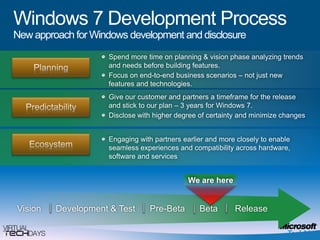
Windows 7 Development ProcessNew approach for Windows development and disclosureSpend more time on planning & vision phase analyzing trends and needs before building features. Focus on end-to-end business scenarios – not just new features and technologies. PlanningGive our customer and partners a timeframe for the release and stick to our plan – 3 years for Windows 7.Disclose with higher degree of certainty and minimize changes PredictabilityEngaging with partners earlier and more closely to enable seamless experiences and compatibility across hardware, software and services EcosystemWe are hereVision     Development &Test     Pre-Beta      Beta      Release
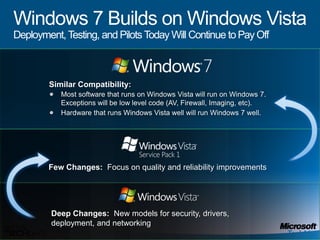
Windows 7 Builds on Windows VistaDeployment, Testing, and Pilots Today Will Continue to Pay OffSimilar Compatibility: Most software that runs on Windows Vista will run on Windows 7. Exceptions will be low level code (AV, Firewall, Imaging, etc).  Hardware that runs Windows Vista well will run Windows 7 well.Few Changes:  Focus on quality and reliability improvementsDeep Changes:  New models for security, drivers, deployment, and networking
What We Heard From Customers“My users are becoming more savvy and have more diverse needs. How do I keep people connected to what they need?”“How can I enable the software and devices my users require and minimize their risk?”“How can I reduce costs and take advantage of new technologies like virtualization?”
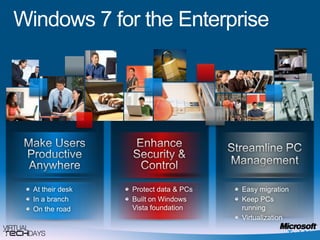
Windows 7 for the EnterpriseEnhance Security & ControlMake Users Productive AnywhereStreamline PC ManagementAt their deskIn a branchOn the roadProtect data & PCsBuilt on Windows Vista foundation Easy migration Keep PCs runningVirtualization
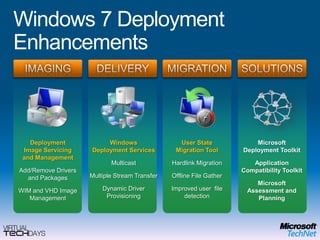
Windows 7 Deployment EnhancementsIMAGINGMIGRATIONSOLUTIONSDELIVERYDeployment Image Servicing and ManagementAdd/Remove Drivers and PackagesWIM and VHD Image ManagementUser State Migration ToolHardlink MigrationOffline File GatherImproved user  file detectionMicrosoft Deployment ToolkitApplication Compatibility ToolkitMicrosoft Assessment and PlanningWindows Deployment ServicesMulticastMultiple Stream TransferDynamic Driver Provisioning
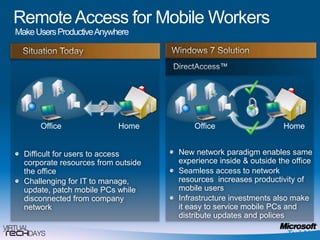
Remote Access for Mobile Workers Make Users Productive Anywhere Situation TodayDirectAccess™HomeOfficeHomeOfficeNew network paradigm enables same experience inside & outside the officeSeamless access to network resources  increases productivity of mobile usersInfrastructure investments also make it easy to service mobile PCs and distribute updates and policesDifficult for users to access corporate resources from outside the officeChallenging for IT to manage, update, patch mobile PCs while disconnected from company networkWindows 7 Solution
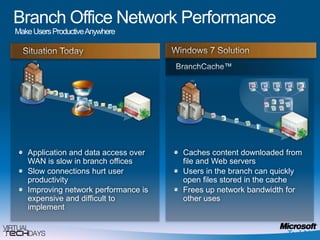
Branch Office Network PerformanceMake Users Productive Anywhere Situation TodayBranchCache™Caches content downloaded from file and Web serversUsers in the branch can quickly open files stored in the cacheFrees up network bandwidth for other usesApplication and data access over WAN is slow in branch officesSlow connections hurt user productivity Improving network performance is expensive and difficult to implement Windows 7 Solution
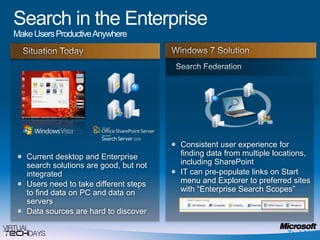
Search in the EnterpriseMake Users Productive Anywhere Situation TodaySearch FederationConsistent user experience for finding data from multiple locations, including SharePointIT can pre-populate links on Start menu and Explorer to preferred sites with “Enterprise Search Scopes” Current desktop and Enterprise search solutions are good, but not integratedUsers need to take different steps to find data on PC and data on serversData sources are hard to discoverWindows 7 Solution
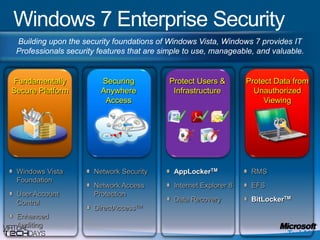
Windows 7 Enterprise SecurityBuilding upon the security foundations of Windows Vista, Windows 7 provides IT Professionals security features that are simple to use, manageable, and valuable.Fundamentally Secure PlatformProtect Users & InfrastructureSecuring Anywhere AccessProtect Data from Unauthorized ViewingWindows Vista FoundationUser Account ControlEnhanced AuditingNetwork SecurityNetwork Access ProtectionDirectAccessTMAppLockerTMInternet Explorer 8Data RecoveryRMSEFSBitLockerTM
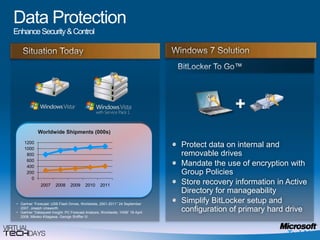
Data ProtectionEnhance Security & ControlSituation TodayBitLocker To Go™+Worldwide Shipments (000s)Protect data on internal and removable drivesMandate the use of encryption with Group PoliciesStore recovery information in Active Directory for manageability Simplify BitLocker setup and configuration of primary hard driveGartner “Forecast: USB Flash Drives, Worldwide, 2001-2011” 24 September 2007, Joseph Unsworth  
Gartner “Dataquest Insight: PC Forecast Analysis, Worldwide, 1H08” 18 April 2008, Mikako Kitagawa, George Shiffler III Windows 7 Solution
BitLocker To Godemo
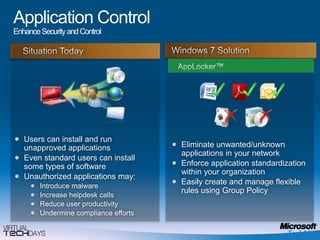
Application Control Enhance Security and Control Situation TodayAppLocker™Eliminate unwanted/unknown applications in your networkEnforce application standardization within your organizationEasily create and manage flexible rules using Group PolicyUsers can install and run unapproved applicationsEven standard users can install some types of softwareUnauthorized applications may:Introduce malwareIncrease helpdesk callsReduce user productivityUndermine compliance effortsWindows 7 Solution
AppLockerdemo
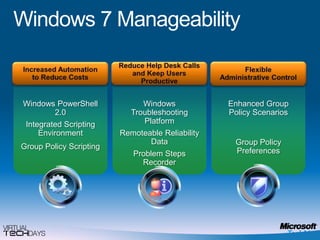
Flexible Administrative ControlIncreased Automation to Reduce CostsReduce Help Desk Calls and Keep UsersProductiveWindows PowerShell 2.0Integrated Scripting EnvironmentWindows Troubleshooting PlatformRemoteable Reliability DataProblem Steps RecorderEnhanced Group Policy ScenariosGroup Policy ScriptingGroup Policy PreferencesWindows 7 Manageability
PowerShelldemo
Windows 7 for End Users
Works the Way you WantFirst Experience With a New Windows 7-based PCUpgrading a PC to Windows 7Windows Easy TransferWindows Anytime Upgrade
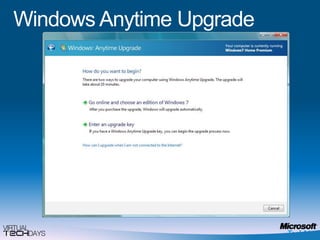
Windows Anytime Upgrade
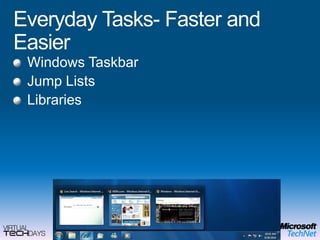
Everyday Tasks- Faster and EasierWindows TaskbarJump ListsLibraries
Home Networking Made SimpleHomegroupExpanded Connection LimitWindows Connect Now (WCN)
આભારধন্যবাদநன்றிधन्यवादధన్యవాదాలుಧನ್ಯವಾದಗಳುଧନ୍ୟବାଦനിങ്ങള്‍‌ക്ക് നന്ദിਧੰਨਵਾਦ

Windows 7 for IT Professionals

  • 1.
    Woow! Look AtThis! Its Windows 7!Ranjana JainITPro EvangelistMicrosoft IndiaMCSE, MCT, RHCE, CISSP, CIW Security Analysthttp://ranjanajain.spaces.live.com
  • 2.
    Windows 7 DevelopmentProcessNew approach for Windows development and disclosureSpend more time on planning & vision phase analyzing trends and needs before building features. Focus on end-to-end business scenarios – not just new features and technologies. PlanningGive our customer and partners a timeframe for the release and stick to our plan – 3 years for Windows 7.Disclose with higher degree of certainty and minimize changes PredictabilityEngaging with partners earlier and more closely to enable seamless experiences and compatibility across hardware, software and services EcosystemWe are hereVision Development &Test Pre-Beta Beta Release
  • 3.
    Windows 7 Buildson Windows VistaDeployment, Testing, and Pilots Today Will Continue to Pay OffSimilar Compatibility: Most software that runs on Windows Vista will run on Windows 7. Exceptions will be low level code (AV, Firewall, Imaging, etc). Hardware that runs Windows Vista well will run Windows 7 well.Few Changes: Focus on quality and reliability improvementsDeep Changes: New models for security, drivers, deployment, and networking
  • 4.
    What We HeardFrom Customers“My users are becoming more savvy and have more diverse needs. How do I keep people connected to what they need?”“How can I enable the software and devices my users require and minimize their risk?”“How can I reduce costs and take advantage of new technologies like virtualization?”
  • 5.
    Windows 7 forthe EnterpriseEnhance Security & ControlMake Users Productive AnywhereStreamline PC ManagementAt their deskIn a branchOn the roadProtect data & PCsBuilt on Windows Vista foundation Easy migration Keep PCs runningVirtualization
  • 6.
    Windows 7 DeploymentEnhancementsIMAGINGMIGRATIONSOLUTIONSDELIVERYDeployment Image Servicing and ManagementAdd/Remove Drivers and PackagesWIM and VHD Image ManagementUser State Migration ToolHardlink MigrationOffline File GatherImproved user file detectionMicrosoft Deployment ToolkitApplication Compatibility ToolkitMicrosoft Assessment and PlanningWindows Deployment ServicesMulticastMultiple Stream TransferDynamic Driver Provisioning
  • 7.
    Remote Access forMobile Workers Make Users Productive Anywhere Situation TodayDirectAccess™HomeOfficeHomeOfficeNew network paradigm enables same experience inside & outside the officeSeamless access to network resources increases productivity of mobile usersInfrastructure investments also make it easy to service mobile PCs and distribute updates and policesDifficult for users to access corporate resources from outside the officeChallenging for IT to manage, update, patch mobile PCs while disconnected from company networkWindows 7 Solution
  • 8.
    Branch Office NetworkPerformanceMake Users Productive Anywhere Situation TodayBranchCache™Caches content downloaded from file and Web serversUsers in the branch can quickly open files stored in the cacheFrees up network bandwidth for other usesApplication and data access over WAN is slow in branch officesSlow connections hurt user productivity Improving network performance is expensive and difficult to implement Windows 7 Solution
  • 9.
    Search in theEnterpriseMake Users Productive Anywhere Situation TodaySearch FederationConsistent user experience for finding data from multiple locations, including SharePointIT can pre-populate links on Start menu and Explorer to preferred sites with “Enterprise Search Scopes” Current desktop and Enterprise search solutions are good, but not integratedUsers need to take different steps to find data on PC and data on serversData sources are hard to discoverWindows 7 Solution
  • 10.
    Windows 7 EnterpriseSecurityBuilding upon the security foundations of Windows Vista, Windows 7 provides IT Professionals security features that are simple to use, manageable, and valuable.Fundamentally Secure PlatformProtect Users & InfrastructureSecuring Anywhere AccessProtect Data from Unauthorized ViewingWindows Vista FoundationUser Account ControlEnhanced AuditingNetwork SecurityNetwork Access ProtectionDirectAccessTMAppLockerTMInternet Explorer 8Data RecoveryRMSEFSBitLockerTM
  • 11.
    Data ProtectionEnhance Security& ControlSituation TodayBitLocker To Go™+Worldwide Shipments (000s)Protect data on internal and removable drivesMandate the use of encryption with Group PoliciesStore recovery information in Active Directory for manageability Simplify BitLocker setup and configuration of primary hard driveGartner “Forecast: USB Flash Drives, Worldwide, 2001-2011” 24 September 2007, Joseph Unsworth  
  • 12.
    Gartner “Dataquest Insight:PC Forecast Analysis, Worldwide, 1H08” 18 April 2008, Mikako Kitagawa, George Shiffler III Windows 7 Solution
  • 13.
  • 14.
    Application Control EnhanceSecurity and Control Situation TodayAppLocker™Eliminate unwanted/unknown applications in your networkEnforce application standardization within your organizationEasily create and manage flexible rules using Group PolicyUsers can install and run unapproved applicationsEven standard users can install some types of softwareUnauthorized applications may:Introduce malwareIncrease helpdesk callsReduce user productivityUndermine compliance effortsWindows 7 Solution
  • 15.
  • 16.
    Flexible Administrative ControlIncreasedAutomation to Reduce CostsReduce Help Desk Calls and Keep UsersProductiveWindows PowerShell 2.0Integrated Scripting EnvironmentWindows Troubleshooting PlatformRemoteable Reliability DataProblem Steps RecorderEnhanced Group Policy ScenariosGroup Policy ScriptingGroup Policy PreferencesWindows 7 Manageability
  • 17.
  • 18.
    Windows 7 forEnd Users
  • 19.
    Works the Wayyou WantFirst Experience With a New Windows 7-based PCUpgrading a PC to Windows 7Windows Easy TransferWindows Anytime Upgrade
  • 20.
  • 21.
    Everyday Tasks- Fasterand EasierWindows TaskbarJump ListsLibraries
  • 22.
    Home Networking MadeSimpleHomegroupExpanded Connection LimitWindows Connect Now (WCN)
  • 23.