Protecting the Desktop with Novell                                        ®


ZENworks Application Virtualization
                         ®


Ross Chevalier                          Ron van Herk
CTO Americas, President Novell Canada   Technical Sales Specialist
Novell, Inc/rchevalier@novell.ca        Novell, Inc/rvanherk@novell.com
Agenda

    •   What is Application Virtualization
    •   How does it compare with Virtual Desktop
    •   Why start with Novell ZENworks Application
                                          ®   ®


        Virtualization (ZAV)
    •   Use Cases
    •   ZAV Features
    •   Demonstration


2   © Novell, Inc. All rights reserved.
Application Virtualization
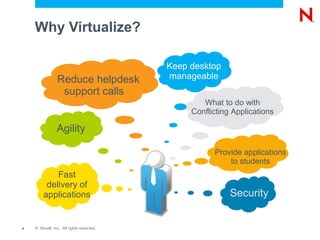
Why Virtualize?

                                          Keep desktop
                Reduce helpdesk           manageable
                 support calls
                                                  What to do with
                                               Conflicting Applications

                Agility

                                                     Provide applications
                                                         to students
            Fast
         delivery of
        applications                                      Security


4   © Novell, Inc. All rights reserved.
Application Virtualization

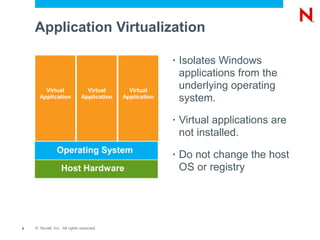
                                                          •   Isolates Windows
                                                              applications from the
        Virtual                 Virtual       Virtual
                                                              underlying operating
      Application             Application   Application       system.
                                                          •   Virtual applications are
                                                              not installed.
                Operating System                          •   Do not change the host
                  Host Hardware                               OS or registry


5   © Novell, Inc. All rights reserved.
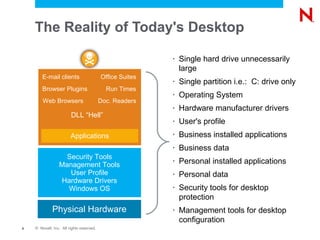
The Reality of Today's Desktop

                                                          •   Single hard drive unnecessarily
                                                              large
        E-mail clients                    Office Suites
                                                          •   Single partition i.e.: C: drive only
        Browser Plugins                     Run Times
                                                          •   Operating System
        Web Browsers                      Doc. Readers
                                                          •   Hardware manufacturer drivers
                        DLL “Hell”
                                                          •   User's profile
                        Applications                      •   Business installed applications
                                                          •   Business data
                   Security Tools
                 Management Tools
                                                          •   Personal installed applications
                    User Profile                          •   Personal data
                 Hardware Drivers
                   Windows OS                             •   Security tools for desktop
                                                              protection
             Physical Hardware                            •   Management tools for desktop
                                                              configuration
6   © Novell, Inc. All rights reserved.
Application Virtualization
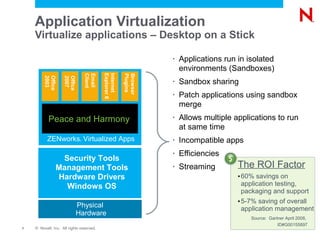
    Virtualize applications – Desktop on a Stick

                                                                 •   Applications run in isolated
                                                                     environments (Sandboxes)


                                          Explorer 6
                                          Internet
                                 Client
                                 Email


                                                       Plugins
                                                       Browser
         2003
         Office

                    2007
                    Office

                                                                 •   Sandbox sharing
                                                                 •   Patch applications using sandbox
                                                                     merge
           Peace and Harmony                                     •   Allows multiple applications to run
                                                                     at same time
          ZENworks Virtualized Apps
                             ®                                   •   Incompatible apps
                                                                 •   Efficiencies
                Security Tools
               Management Tools                                  •   Streaming        The ROI Factor
               Hardware Drivers                                                       • 60% savings on
                 Windows OS                                                             application testing,
                                                                                        packaging and support
                                                                                      • 5-7% saving of overall
                           Physical                                                     application management
                           Hardware
                                                                                          Source: Gartner April 2008,
                                                                                                      ID#G00155897
7   © Novell, Inc. All rights reserved.
ZENworks Application Virtualization   ®


    •   Quickly creates a new, easy to deploy application
    •   Zero setup on the host PC
    •   No user training or user experience change
    •   Launch applications on locked-down desktops
    •   Applications run isolated from host OS and registry
    •   Run conflicting applications
    •   Custom templates and 70+ certified applications
    •   Embed file system, registry, services and components
        like .Net, Java Runtime and Adobe Reader
8   © Novell, Inc. All rights reserved.
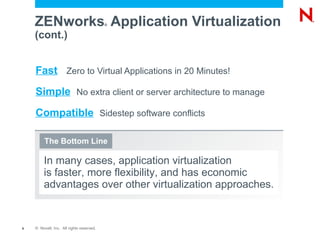
ZENworks Application Virtualization   ®


    (cont.)


    Fast Zero to Virtual Applications in 20 Minutes!
    Simple No extra client or server architecture to manage
    Compatible Sidestep software conflicts

         The Bottom Line

         In many cases, application virtualization
         is faster, more flexibility, and has economic
         advantages over other virtualization approaches.


9   © Novell, Inc. All rights reserved.
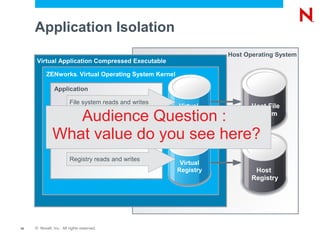
Application Isolation
                                                                         Host Operating System
      Virtual Application Compressed Executable

           ZENworks Virtual Operating System Kernel
                             ®


               Application

                        File system reads and writes
                                                              Virtual           Host File
                 Audience Question :                       File System          System


              What value do you see here?
                        Process and threading operations


                        Registry reads and writes
                                                             Virtual
                                                            Registry             Host
                                                                                Registry


10   © Novell, Inc. All rights reserved.
How Is Application Virtualization
     Different from Software Packaging?

     •   Traditional software packaging allows you to re-
         package software installers into MSI format so that the
         software can be installed via MSI on the local machine
     •   Application virtualization packages the software in a
         format that can be natively executed on a Windows
         workstation, without any installation taking place
     •   This means that no changes occur to the Window's
         registry or to the normal file system
          –   Changes are written to a sandbox that the administrator controls


11   © Novell, Inc. All rights reserved.
Virtual Desktop

     •   Virtual Desktop is the process by which a complete
         desktop instance including OS, applications, device
         connectivity is delivered either by stream or preinstall
     •   Uses a very different licensing model
     •   Requires significant bandwidth on deployment and
         consistently if streaming
     •   Can exist as a runtime or network only service
     •   A very large project with multiple constituencies


12   © Novell, Inc. All rights reserved.
Protecting the Desktop Case 1
     Incompatible Applications

     •   You need to deploy multiple versions of the same application
     •   You cannot install multiple versions of the same application
         because it will break the registry and the desktop
         environment
     •   Eg 1. Internet Explorer
          –   Windows XP SP3 or Windows 7 have IE 8
          –   You require IE6 for a specific web application
     •   Eg 2. Microsoft Access
          –   App built in Access 2000, but Office Professional 2007 is
              the default OA application suite
     •   Solution – Build EXE or MSI installs for packaged apps

13   © Novell, Inc. All rights reserved.
Protecting the Desktop Case 2
     Version Upgrade Testing

     •   You are standardized on Office 2007 but will receive via
         Software Assurance Office 2010 in June
     •   The two do not peacefully coexist
     •   You need to test Office 2010 without removing Office
         2007
     •   You need to do this testing on multiple versions of
         Windows both 32 bit and 64 bit
     •   Solution – Build a 32 Bit and a 64 Bit version of Office
         2010 and test as EXEs – no modification to the existing
         installations


14   © Novell, Inc. All rights reserved.
Protecting the Desktop Case 3

     •   A Line of Business decision forces demand for
         immediate deployment of a new application suite that
         has to integrate with existing associations
     •   You don't have the time or the resources to do full
         stress and recursion testing before you have to roll out
     •   All the money for testing went to user training
     •   Solution – Runtime EXE App using Xreg to do local
         association


15   © Novell, Inc. All rights reserved.
What's In ZAV Today and Tomorrow
     •   Windows 7 support
     •   Internet Explorer 6 emulation mode and coexistence with Internet Explorer 7/8
     •   Application expiration
          –   Application can be configured to run for a specific number of days, or to expire
              on a specific date
          –   Expiration dialog can be configured
     •   New Functions
          –   This option may be used to prevent interaction between virtualized and non-
              virtualized versions of the same application
          –   The startup executable optimization option attempts to launch the startup
              executable within the initial virtual machine
     •   Improved included Runtimes
          –   Added SQL Server 2005 Express
          –   Improved .Net 3.5 Client Profile process.


16
16   © Novell, Inc. All rights reserved.
What's In ZAV Today and Tomorrow
     (cont.)

     •   Publish to USB
          –   Registers applications automatically on attachment
          –   Unregisters applications upon removal
          –   Converts Sandbox to USB drive
     •   XREG
          –   Tool that allows you to easily “register” a virtual application with the host
          –   Automatically configures the file associations and shortcuts on the host
          –   Can be used to “register” multiple virtual applications with a shared
              sandbox
          –   Can also be used to unregister applications and clear the sandbox


17   © Novell, Inc. All rights reserved.
What's In ZAV Today and Tomorrow
     (cont.)

     •   64 Bit Support
          –   Exactly what it sounds like
     •   Streaming
          –   Instead of pushing the package out to the desktop, you want to
              stream the V-App from a central location
          –   Bandwidth is available to support this


18   © Novell, Inc. All rights reserved.
Demonstration
What You'll See

     •   Internet Explorer 6 and Internet Explorer 8 Co-existing
     •   Two independent Office suites that would normally kill
         each other, running at the same time
     •   How to build Firefox as a Virtual Application including
         custom home page
     •   And... MAYBE a streamed app, if the code is ready in
         time for us to build one (or more accurately if the code
         is ready in time for RON to build one)


20   © Novell, Inc. All rights reserved.
Questions and Answers
             Discussion
Unpublished Work of Novell, Inc. All Rights Reserved.
This work is an unpublished work and contains confidential, proprietary, and trade secret information of Novell, Inc.
Access to this work is restricted to Novell employees who have a need to know to perform tasks within the scope
of their assignments. No part of this work may be practiced, performed, copied, distributed, revised, modified,
translated, abridged, condensed, expanded, collected, or adapted without the prior written consent of Novell, Inc.
Any use or exploitation of this work without authorization could subject the perpetrator to criminal and civil liability.


General Disclaimer
This document is not to be construed as a promise by any participating company to develop, deliver, or market a
product. It is not a commitment to deliver any material, code, or functionality, and should not be relied upon in
making purchasing decisions. Novell, Inc. makes no representations or warranties with respect to the contents
of this document, and specifically disclaims any express or implied warranties of merchantability or fitness for any
particular purpose. The development, release, and timing of features or functionality described for Novell products
remains at the sole discretion of Novell. Further, Novell, Inc. reserves the right to revise this document and to
make changes to its content, at any time, without obligation to notify any person or entity of such revisions or
changes. All Novell marks referenced in this presentation are trademarks or registered trademarks of Novell, Inc.
in the United States and other countries. All third-party trademarks are the property of their respective owners.

Protecting the Desktop with Novell ZENworks Application Virtualization

  • 1.
    Protecting the Desktopwith Novell ® ZENworks Application Virtualization ® Ross Chevalier Ron van Herk CTO Americas, President Novell Canada Technical Sales Specialist Novell, Inc/rchevalier@novell.ca Novell, Inc/rvanherk@novell.com
  • 2.
    Agenda • What is Application Virtualization • How does it compare with Virtual Desktop • Why start with Novell ZENworks Application ® ® Virtualization (ZAV) • Use Cases • ZAV Features • Demonstration 2 © Novell, Inc. All rights reserved.
  • 3.
  • 4.
    Why Virtualize? Keep desktop Reduce helpdesk manageable support calls What to do with Conflicting Applications Agility Provide applications to students Fast delivery of applications Security 4 © Novell, Inc. All rights reserved.
  • 5.
    Application Virtualization • Isolates Windows applications from the Virtual Virtual Virtual underlying operating Application Application Application system. • Virtual applications are not installed. Operating System • Do not change the host Host Hardware OS or registry 5 © Novell, Inc. All rights reserved.
  • 6.
    The Reality ofToday's Desktop • Single hard drive unnecessarily large E-mail clients Office Suites • Single partition i.e.: C: drive only Browser Plugins Run Times • Operating System Web Browsers Doc. Readers • Hardware manufacturer drivers DLL “Hell” • User's profile Applications • Business installed applications • Business data Security Tools Management Tools • Personal installed applications User Profile • Personal data Hardware Drivers Windows OS • Security tools for desktop protection Physical Hardware • Management tools for desktop configuration 6 © Novell, Inc. All rights reserved.
  • 7.
    Application Virtualization Virtualize applications – Desktop on a Stick • Applications run in isolated environments (Sandboxes) Explorer 6 Internet Client Email Plugins Browser 2003 Office 2007 Office • Sandbox sharing • Patch applications using sandbox merge Peace and Harmony • Allows multiple applications to run at same time ZENworks Virtualized Apps ® • Incompatible apps • Efficiencies Security Tools Management Tools • Streaming The ROI Factor Hardware Drivers • 60% savings on Windows OS application testing, packaging and support • 5-7% saving of overall Physical application management Hardware Source: Gartner April 2008, ID#G00155897 7 © Novell, Inc. All rights reserved.
  • 8.
    ZENworks Application Virtualization ® • Quickly creates a new, easy to deploy application • Zero setup on the host PC • No user training or user experience change • Launch applications on locked-down desktops • Applications run isolated from host OS and registry • Run conflicting applications • Custom templates and 70+ certified applications • Embed file system, registry, services and components like .Net, Java Runtime and Adobe Reader 8 © Novell, Inc. All rights reserved.
  • 9.
    ZENworks Application Virtualization ® (cont.) Fast Zero to Virtual Applications in 20 Minutes! Simple No extra client or server architecture to manage Compatible Sidestep software conflicts The Bottom Line In many cases, application virtualization is faster, more flexibility, and has economic advantages over other virtualization approaches. 9 © Novell, Inc. All rights reserved.
  • 10.
    Application Isolation Host Operating System Virtual Application Compressed Executable ZENworks Virtual Operating System Kernel ® Application File system reads and writes Virtual Host File Audience Question : File System System What value do you see here? Process and threading operations Registry reads and writes Virtual Registry Host Registry 10 © Novell, Inc. All rights reserved.
  • 11.
    How Is ApplicationVirtualization Different from Software Packaging? • Traditional software packaging allows you to re- package software installers into MSI format so that the software can be installed via MSI on the local machine • Application virtualization packages the software in a format that can be natively executed on a Windows workstation, without any installation taking place • This means that no changes occur to the Window's registry or to the normal file system – Changes are written to a sandbox that the administrator controls 11 © Novell, Inc. All rights reserved.
  • 12.
    Virtual Desktop • Virtual Desktop is the process by which a complete desktop instance including OS, applications, device connectivity is delivered either by stream or preinstall • Uses a very different licensing model • Requires significant bandwidth on deployment and consistently if streaming • Can exist as a runtime or network only service • A very large project with multiple constituencies 12 © Novell, Inc. All rights reserved.
  • 13.
    Protecting the DesktopCase 1 Incompatible Applications • You need to deploy multiple versions of the same application • You cannot install multiple versions of the same application because it will break the registry and the desktop environment • Eg 1. Internet Explorer – Windows XP SP3 or Windows 7 have IE 8 – You require IE6 for a specific web application • Eg 2. Microsoft Access – App built in Access 2000, but Office Professional 2007 is the default OA application suite • Solution – Build EXE or MSI installs for packaged apps 13 © Novell, Inc. All rights reserved.
  • 14.
    Protecting the DesktopCase 2 Version Upgrade Testing • You are standardized on Office 2007 but will receive via Software Assurance Office 2010 in June • The two do not peacefully coexist • You need to test Office 2010 without removing Office 2007 • You need to do this testing on multiple versions of Windows both 32 bit and 64 bit • Solution – Build a 32 Bit and a 64 Bit version of Office 2010 and test as EXEs – no modification to the existing installations 14 © Novell, Inc. All rights reserved.
  • 15.
    Protecting the DesktopCase 3 • A Line of Business decision forces demand for immediate deployment of a new application suite that has to integrate with existing associations • You don't have the time or the resources to do full stress and recursion testing before you have to roll out • All the money for testing went to user training • Solution – Runtime EXE App using Xreg to do local association 15 © Novell, Inc. All rights reserved.
  • 16.
    What's In ZAVToday and Tomorrow • Windows 7 support • Internet Explorer 6 emulation mode and coexistence with Internet Explorer 7/8 • Application expiration – Application can be configured to run for a specific number of days, or to expire on a specific date – Expiration dialog can be configured • New Functions – This option may be used to prevent interaction between virtualized and non- virtualized versions of the same application – The startup executable optimization option attempts to launch the startup executable within the initial virtual machine • Improved included Runtimes – Added SQL Server 2005 Express – Improved .Net 3.5 Client Profile process. 16 16 © Novell, Inc. All rights reserved.
  • 17.
    What's In ZAVToday and Tomorrow (cont.) • Publish to USB – Registers applications automatically on attachment – Unregisters applications upon removal – Converts Sandbox to USB drive • XREG – Tool that allows you to easily “register” a virtual application with the host – Automatically configures the file associations and shortcuts on the host – Can be used to “register” multiple virtual applications with a shared sandbox – Can also be used to unregister applications and clear the sandbox 17 © Novell, Inc. All rights reserved.
  • 18.
    What's In ZAVToday and Tomorrow (cont.) • 64 Bit Support – Exactly what it sounds like • Streaming – Instead of pushing the package out to the desktop, you want to stream the V-App from a central location – Bandwidth is available to support this 18 © Novell, Inc. All rights reserved.
  • 19.
  • 20.
    What You'll See • Internet Explorer 6 and Internet Explorer 8 Co-existing • Two independent Office suites that would normally kill each other, running at the same time • How to build Firefox as a Virtual Application including custom home page • And... MAYBE a streamed app, if the code is ready in time for us to build one (or more accurately if the code is ready in time for RON to build one) 20 © Novell, Inc. All rights reserved.
  • 21.
  • 23.
    Unpublished Work ofNovell, Inc. All Rights Reserved. This work is an unpublished work and contains confidential, proprietary, and trade secret information of Novell, Inc. Access to this work is restricted to Novell employees who have a need to know to perform tasks within the scope of their assignments. No part of this work may be practiced, performed, copied, distributed, revised, modified, translated, abridged, condensed, expanded, collected, or adapted without the prior written consent of Novell, Inc. Any use or exploitation of this work without authorization could subject the perpetrator to criminal and civil liability. General Disclaimer This document is not to be construed as a promise by any participating company to develop, deliver, or market a product. It is not a commitment to deliver any material, code, or functionality, and should not be relied upon in making purchasing decisions. Novell, Inc. makes no representations or warranties with respect to the contents of this document, and specifically disclaims any express or implied warranties of merchantability or fitness for any particular purpose. The development, release, and timing of features or functionality described for Novell products remains at the sole discretion of Novell. Further, Novell, Inc. reserves the right to revise this document and to make changes to its content, at any time, without obligation to notify any person or entity of such revisions or changes. All Novell marks referenced in this presentation are trademarks or registered trademarks of Novell, Inc. in the United States and other countries. All third-party trademarks are the property of their respective owners.