Novell ZENworks Advanced
                   ®                                 ®


Application Management

Allen McCurdy                      Pat Nurre
Technical Sales Specialist         Consultant, identity Automation
Novell Inc.,/amccurdy@novell.com   Novell Inc.,/pnurre@idauto.net
Agenda


                                   Basics of Bundles

                                   Creating and Managing Bundles

                                   Actions with Bundles


2   © Novell, Inc. All rights reserved.
Bundle Basics
Types of Bundles

    •   Directive Bundle: Performs one or more actions on a
        device.
    •   File Bundle: Copies or installs files or directories to
        a device.
    •   Imaging Bundle: Performs operations before the
        operating system boots.
    •   Windows Bundle: Distributes a Microsoft Windows
        Installer (MSI) package, Microsoft Windows Software
        Patch (MSP) package, thin-client application, or other
        Windows-based applications to a Windows device.


4   © Novell, Inc. All rights reserved.
Windows Bundle Categories

    •   Empty Bundle: A bundle with no initial tasks.

    •   MSI Application: An application that is packaged as a .msi file (Microsoft
        Windows Installer)

    •   MSP Application: An application patch that is packaged as a .msp file

    •   Simple Application: An application that is not packaged as a .msi or
        .msp file

    •   Thin-Client Application: An application that is accessed through a
        terminal server client session (either RDP or ICA)

    •   Web Application: An application that is launched by using a URL in a
        Web browser


5   © Novell, Inc. All rights reserved.
Other Concepts

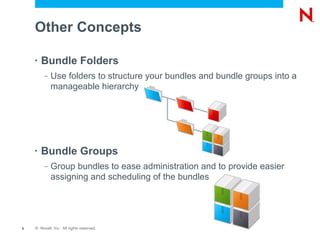
    •   Bundle Folders
         –   Use folders to structure your bundles and bundle groups into a
             manageable hierarchy


    •   Bundle Groups
         –   Group bundles to ease administration and to provide easier
             assigning and scheduling of the bundles


6   © Novell, Inc. All rights reserved.
Creating and Managing Bundles
Creating a Bundle

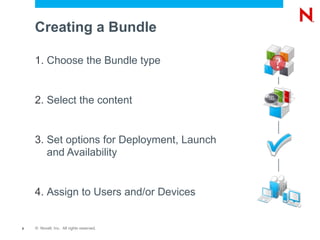
    1. Choose the Bundle type


    2. Select the content


    3. Set options for Deployment, Launch
       and Availability


    4. Assign to Users and/or Devices


8   © Novell, Inc. All rights reserved.
Content Repository

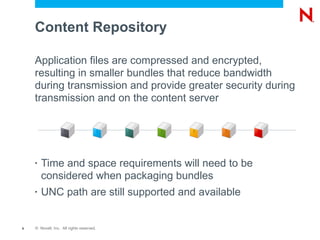
    Application files are compressed and encrypted,
    resulting in smaller bundles that reduce bandwidth
    during transmission and provide greater security during
    transmission and on the content server


    •   Time and space requirements will need to be
        considered when packaging bundles
    •   UNC path are still supported and available


9   © Novell, Inc. All rights reserved.
Content Delivery

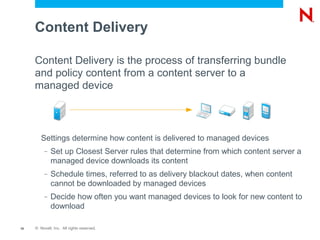
     Content Delivery is the process of transferring bundle
     and policy content from a content server to a
     managed device


        Settings determine how content is delivered to managed devices
          –   Set up Closest Server rules that determine from which content server a
              managed device downloads its content
          –   Schedule times, referred to as delivery blackout dates, when content
              cannot be downloaded by managed devices
          –   Decide how often you want managed devices to look for new content to
              download

10   © Novell, Inc. All rights reserved.
Bundles Schedules

     •   Distribution Schedule: Defines the dates and times
         when the bundle is distributed

     •   Launch Schedule: Defines the dates and times when
         the ZENworks Adaptive Agent automatically launches
                                           ®


         the bundle

     •   Availability Schedule: Defines the dates and times
         when the bundle is available to the device or user


11   © Novell, Inc. All rights reserved.
Bundle Events

     •   Date Specific
          –   Specify one or more dates on which to run the event
     •   Event
          –   Specify the event you want to trigger the scheduled action
     •   Now
          –   This option runs the event immediately. Only applicable to
              workstation assignments
     •   Recurring
          –   Repeat the event at a specified interval


12   © Novell, Inc. All rights reserved.
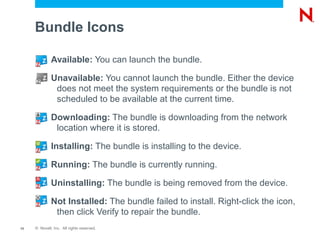
Bundle Icons

              Available: You can launch the bundle.

              Unavailable: You cannot launch the bundle. Either the device
               does not meet the system requirements or the bundle is not
               scheduled to be available at the current time.

              Downloading: The bundle is downloading from the network
               location where it is stored.

              Installing: The bundle is installing to the device.

              Running: The bundle is currently running.

              Uninstalling: The bundle is being removed from the device.

              Not Installed: The bundle failed to install. Right-click the icon,
               then click Verify to repair the bundle.
13   © Novell, Inc. All rights reserved.
Actions with Bundles
Demo Scenarios


                       Demo Adobe 9.2, install/uninstall

                       Demo Office Office 2003, Office 2007

                       Demo OpenOffice, Visio, Project

                       Remove ZENworks Patch Management and
                                           ®


                       ZENworks Asset Management


15   © Novell, Inc. All rights reserved.
Unpublished Work of Novell, Inc. All Rights Reserved.
This work is an unpublished work and contains confidential, proprietary, and trade secret information of Novell, Inc.
Access to this work is restricted to Novell employees who have a need to know to perform tasks within the scope
of their assignments. No part of this work may be practiced, performed, copied, distributed, revised, modified,
translated, abridged, condensed, expanded, collected, or adapted without the prior written consent of Novell, Inc.
Any use or exploitation of this work without authorization could subject the perpetrator to criminal and civil liability.


General Disclaimer
This document is not to be construed as a promise by any participating company to develop, deliver, or market a
product. It is not a commitment to deliver any material, code, or functionality, and should not be relied upon in
making purchasing decisions. Novell, Inc. makes no representations or warranties with respect to the contents
of this document, and specifically disclaims any express or implied warranties of merchantability or fitness for any
particular purpose. The development, release, and timing of features or functionality described for Novell products
remains at the sole discretion of Novell. Further, Novell, Inc. reserves the right to revise this document and to
make changes to its content, at any time, without obligation to notify any person or entity of such revisions or
changes. All Novell marks referenced in this presentation are trademarks or registered trademarks of Novell, Inc.
in the United States and other countries. All third-party trademarks are the property of their respective owners.

Novell ZENworks Advanced Application Management

  • 1.
    Novell ZENworks Advanced ® ® Application Management Allen McCurdy Pat Nurre Technical Sales Specialist Consultant, identity Automation Novell Inc.,/amccurdy@novell.com Novell Inc.,/pnurre@idauto.net
  • 2.
    Agenda Basics of Bundles Creating and Managing Bundles Actions with Bundles 2 © Novell, Inc. All rights reserved.
  • 3.
  • 4.
    Types of Bundles • Directive Bundle: Performs one or more actions on a device. • File Bundle: Copies or installs files or directories to a device. • Imaging Bundle: Performs operations before the operating system boots. • Windows Bundle: Distributes a Microsoft Windows Installer (MSI) package, Microsoft Windows Software Patch (MSP) package, thin-client application, or other Windows-based applications to a Windows device. 4 © Novell, Inc. All rights reserved.
  • 5.
    Windows Bundle Categories • Empty Bundle: A bundle with no initial tasks. • MSI Application: An application that is packaged as a .msi file (Microsoft Windows Installer) • MSP Application: An application patch that is packaged as a .msp file • Simple Application: An application that is not packaged as a .msi or .msp file • Thin-Client Application: An application that is accessed through a terminal server client session (either RDP or ICA) • Web Application: An application that is launched by using a URL in a Web browser 5 © Novell, Inc. All rights reserved.
  • 6.
    Other Concepts • Bundle Folders – Use folders to structure your bundles and bundle groups into a manageable hierarchy • Bundle Groups – Group bundles to ease administration and to provide easier assigning and scheduling of the bundles 6 © Novell, Inc. All rights reserved.
  • 7.
  • 8.
    Creating a Bundle 1. Choose the Bundle type 2. Select the content 3. Set options for Deployment, Launch and Availability 4. Assign to Users and/or Devices 8 © Novell, Inc. All rights reserved.
  • 9.
    Content Repository Application files are compressed and encrypted, resulting in smaller bundles that reduce bandwidth during transmission and provide greater security during transmission and on the content server • Time and space requirements will need to be considered when packaging bundles • UNC path are still supported and available 9 © Novell, Inc. All rights reserved.
  • 10.
    Content Delivery Content Delivery is the process of transferring bundle and policy content from a content server to a managed device Settings determine how content is delivered to managed devices – Set up Closest Server rules that determine from which content server a managed device downloads its content – Schedule times, referred to as delivery blackout dates, when content cannot be downloaded by managed devices – Decide how often you want managed devices to look for new content to download 10 © Novell, Inc. All rights reserved.
  • 11.
    Bundles Schedules • Distribution Schedule: Defines the dates and times when the bundle is distributed • Launch Schedule: Defines the dates and times when the ZENworks Adaptive Agent automatically launches ® the bundle • Availability Schedule: Defines the dates and times when the bundle is available to the device or user 11 © Novell, Inc. All rights reserved.
  • 12.
    Bundle Events • Date Specific – Specify one or more dates on which to run the event • Event – Specify the event you want to trigger the scheduled action • Now – This option runs the event immediately. Only applicable to workstation assignments • Recurring – Repeat the event at a specified interval 12 © Novell, Inc. All rights reserved.
  • 13.
    Bundle Icons Available: You can launch the bundle. Unavailable: You cannot launch the bundle. Either the device does not meet the system requirements or the bundle is not scheduled to be available at the current time. Downloading: The bundle is downloading from the network location where it is stored. Installing: The bundle is installing to the device. Running: The bundle is currently running. Uninstalling: The bundle is being removed from the device. Not Installed: The bundle failed to install. Right-click the icon, then click Verify to repair the bundle. 13 © Novell, Inc. All rights reserved.
  • 14.
  • 15.
    Demo Scenarios Demo Adobe 9.2, install/uninstall Demo Office Office 2003, Office 2007 Demo OpenOffice, Visio, Project Remove ZENworks Patch Management and ® ZENworks Asset Management 15 © Novell, Inc. All rights reserved.
  • 17.
    Unpublished Work ofNovell, Inc. All Rights Reserved. This work is an unpublished work and contains confidential, proprietary, and trade secret information of Novell, Inc. Access to this work is restricted to Novell employees who have a need to know to perform tasks within the scope of their assignments. No part of this work may be practiced, performed, copied, distributed, revised, modified, translated, abridged, condensed, expanded, collected, or adapted without the prior written consent of Novell, Inc. Any use or exploitation of this work without authorization could subject the perpetrator to criminal and civil liability. General Disclaimer This document is not to be construed as a promise by any participating company to develop, deliver, or market a product. It is not a commitment to deliver any material, code, or functionality, and should not be relied upon in making purchasing decisions. Novell, Inc. makes no representations or warranties with respect to the contents of this document, and specifically disclaims any express or implied warranties of merchantability or fitness for any particular purpose. The development, release, and timing of features or functionality described for Novell products remains at the sole discretion of Novell. Further, Novell, Inc. reserves the right to revise this document and to make changes to its content, at any time, without obligation to notify any person or entity of such revisions or changes. All Novell marks referenced in this presentation are trademarks or registered trademarks of Novell, Inc. in the United States and other countries. All third-party trademarks are the property of their respective owners.