VMware ThinApp
Product Overview and Technical Discussion


                                            © 2009 VMware Inc. All rights reserved
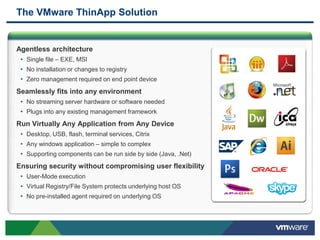
The VMware ThinApp Solution


Agentless architecture
 • Single file – EXE, MSI
 • No installation or changes to registry
 • Zero management required on end point device
Seamlessly fits into any environment
 • No streaming server hardware or software needed
 • Plugs into any existing management framework
Run Virtually Any Application from Any Device
 • Desktop, USB, flash, terminal services, Citrix
 • Any windows application – simple to complex
 • Supporting components can be run side by side (Java, .Net)
Ensuring security without compromising user flexibility
 • User-Mode execution
 • Virtual Registry/File System protects underlying host OS
 • No pre-installed agent required on underlying OS
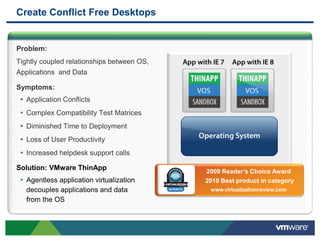
Create Conflict Free Desktops


Problem:
Tightly coupled relationships between OS,
Applications and Data

Symptoms:
 • Application Conflicts
 • Complex Compatibility Test Matrices
 • Diminished Time to Deployment
 • Loss of User Productivity
 • Increased helpdesk support calls
Solution: VMware ThinApp                    2009 Reader’s Choice Award
 • Agentless application virtualization     2010 Best product in category
   decouples applications and data           www.virtualizationreview.com
   from the OS
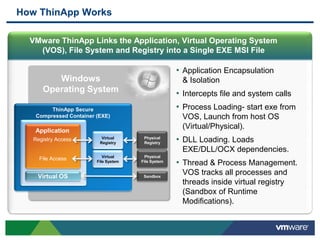
How ThinApp Works

  VMware ThinApp Links the Application, Virtual Operating System
    (VOS), File System and Registry into a Single EXE MSI File

                                                    • Application Encapsulation
        Windows                                      & Isolation
     Operating System                               • Intercepts file and system calls
        ThinApp Secure                              • Process Loading- start exe from
   Compressed Container (EXE)                        VOS, Launch from host OS
   Application
                                                     (Virtual/Physical).
  Registry Access         Virtual
                         Registry
                                       Physical
                                       Registry     • DLL Loading. Loads
                                                     EXE/DLL/OCX dependencies.
                           Virtual     Physical
    File Access         File System   File System
                                                    • Thread & Process Management.
    Virtual OS                         Sandbox
                                                     VOS tracks all processes and
                                                     threads inside virtual registry
                                                     (Sandbox of Runtime
                                                     Modifications).
ThinApp 4.5


              What’s new
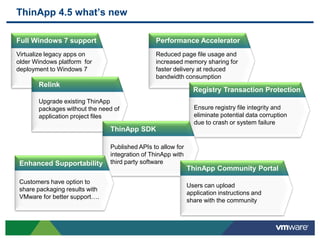
ThinApp 4.5 what’s new

Full Windows 7 support                          Performance Accelerator
Virtualize legacy apps on                       Reduced page file usage and
older Windows platform for                      increased memory sharing for
deployment to Windows 7                         faster delivery at reduced
                                                bandwidth consumption
       Relink
                                                                Registry Transaction Protection
       Upgrade existing ThinApp
       packages without the need of                             Ensure registry file integrity and
       application project files                                eliminate potential data corruption
                                                                due to crash or system failure
                                ThinApp SDK

                                Published APIs to allow for
                                integration of ThinApp with
 Enhanced Supportability        third party software
                                                              ThinApp Community Portal
 Customers have option to
                                                              Users can upload
 share packaging results with
                                                              application instructions and
 VMware for better support….
                                                              share with the community
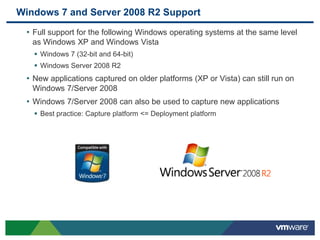
Windows 7 and Server 2008 R2 Support
 • Full support for the following Windows operating systems at the same level
   as Windows XP and Windows Vista
    Windows 7 (32-bit and 64-bit)
    Windows Server 2008 R2
 • New applications captured on older platforms (XP or Vista) can still run on
   Windows 7/Server 2008
 • Windows 7/Server 2008 can also be used to capture new applications
    Best practice: Capture platform <= Deployment platform
Seamless Package Upgrades with Relink Tool

• Upgrades ThinApp runtime within existing
 packages.
   Makes older ThinApp packages Win 7
    compatible.
• Does NOT require original project rebuild.
• Preserves original ThinApp packages as
 .BAK files.
   Ensure disk space is available!
• Supports wildcards and recursion.
• Easy command line & scripting potential.

 Syntax:
 relink [-Recursive] <path_to_package> *.exe *.dat *.msi
       Examples: relink -recursive c:Thinapps*.exe
                     relink AdobeReader.exe
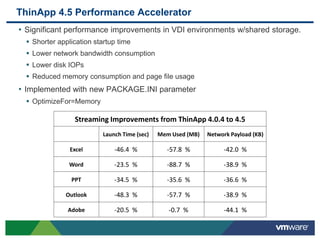
ThinApp 4.5 Performance Accelerator
• Significant performance improvements in VDI environments w/shared storage.
   Shorter application startup time
   Lower network bandwidth consumption
   Lower disk IOPs
   Reduced memory consumption and page file usage
• Implemented with new PACKAGE.INI parameter
   OptimizeFor=Memory

                 Streaming Improvements from ThinApp 4.0.4 to 4.5
                           Launch Time (sec)   Mem Used (MB)   Network Payload (KB)

                Excel          -46.4 %           -57.8 %            -42.0 %

                Word           -23.5 %           -88.7 %            -38.9 %

                PPT            -34.5 %           -35.6 %            -36.6 %

              Outlook          -48.3 %           -57.7 %            -38.9 %

               Adobe           -20.5 %            -0.7 %            -44.1 %
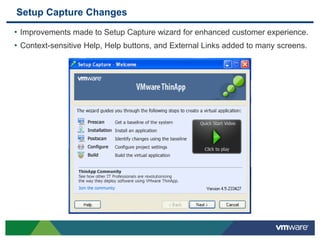
Setup Capture Changes
• Improvements made to Setup Capture wizard for enhanced customer experience.
• Context-sensitive Help, Help buttons, and External Links added to many screens.
Technical Discussion


           Architecture
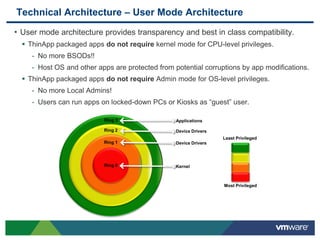
Technical Architecture – User Mode Architecture
• User mode architecture provides transparency and best in class compatibility.
   ThinApp packaged apps do not require kernel mode for CPU-level privileges.
     - No more BSODs!!
     - Host OS and other apps are protected from potential corruptions by app modifications.
   ThinApp packaged apps do not require Admin mode for OS-level privileges.
     - No more Local Admins!
     - Users can run apps on locked-down PCs or Kiosks as “guest” user.

                           Ring 3                 Applications

                           Ring 2                 Device Drivers
                                                                   Least Privileged
                           Ring 1                 Device Drivers


                           Ring 0                 Kernel


                                                                   Most Privileged
Technical Architecture – Sandbox & Isolation
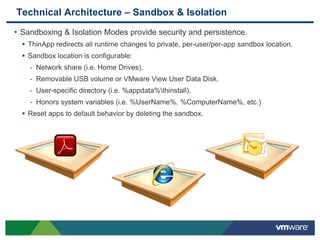
• Sandboxing & Isolation Modes provide security and persistence.
   ThinApp redirects all runtime changes to private, per-user/per-app sandbox location.
   Sandbox location is configurable:
    - Network share (i.e. Home Drives).
    - Removable USB volume or VMware View User Data Disk.
    - User-specific directory (i.e. %appdata%thinstall).
    - Honors system variables (i.e. %UserName%, %ComputerName%, etc.)
   Reset apps to default behavior by deleting the sandbox.
Technical Discussion


     Deployment Options
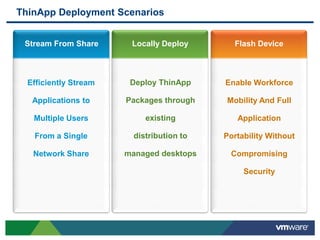
ThinApp Deployment Scenarios


 Stream From Share      Locally Deploy       Flash Device


  Efficiently Stream    Deploy ThinApp     Enable Workforce

   Applications to     Packages through    Mobility And Full

   Multiple Users           existing          Application

   From a Single         distribution to   Portability Without

   Network Share       managed desktops     Compromising

                                                Security
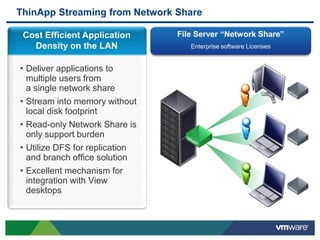
ThinApp Streaming from Network Share

 Cost Efficient Application     File Server “Network Share”
   Density on the LAN              Enterprise software Licenses


• Deliver applications to
  multiple users from
  a single network share
• Stream into memory without
  local disk footprint
• Read-only Network Share is
  only support burden
• Utilize DFS for replication
  and branch office solution
• Excellent mechanism for
  integration with View
  desktops
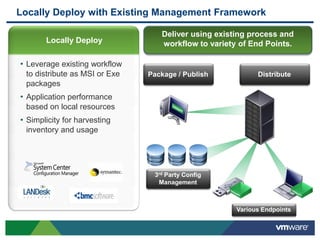
Locally Deploy with Existing Management Framework

                                  Deliver using existing process and
       Locally Deploy             workflow to variety of End Points.

• Leverage existing workflow
 to distribute as MSI or Exe   Package / Publish           Distribute
 packages
• Application performance
 based on local resources
• Simplicity for harvesting
 inventory and usage


                                3rd Party Config
                                 Management


                                                     Various Endpoints
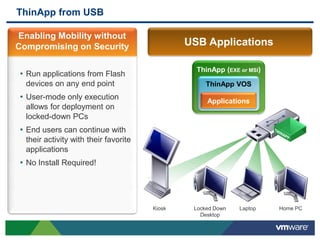
ThinApp from USB

Enabling Mobility without
Compromising on Security                       USB Applications

                                                 ThinApp (EXE or MSI)
• Run applications from Flash
  devices on any end point                          ThinApp VOS
• User-mode only execution                          Applications
  allows for deployment on
  locked-down PCs
• End users can continue with
  their activity with their favorite
  applications
• No Install Required!


                                       Kiosk    Locked Down   Laptop    Home PC
                                                  Desktop
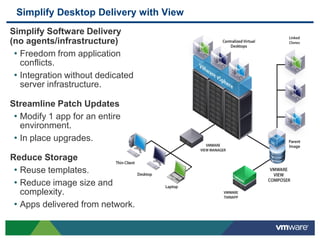
Simplify Desktop Delivery with View
Simplify Software Delivery
(no agents/infrastructure)
 • Freedom from application
   conflicts.
 • Integration without dedicated
   server infrastructure.

Streamline Patch Updates
 • Modify 1 app for an entire
   environment.
 • In place upgrades.
Reduce Storage
 • Reuse templates.
 • Reduce image size and
   complexity.
 • Apps delivered from network.
Technical Discussion


      Features & Process
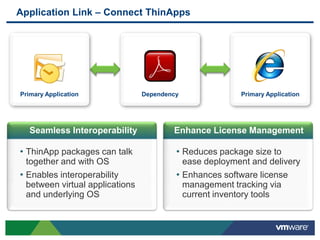
Application Link – Connect ThinApps


Primary Application              Dependency              Primary Application


   Seamless Interoperability             Enhance License Management

• ThinApp packages can talk               • Reduces package size to
  together and with OS                      ease deployment and delivery
• Enables interoperability                • Enhances software license
  between virtual applications              management tracking via
  and underlying OS                         current inventory tools
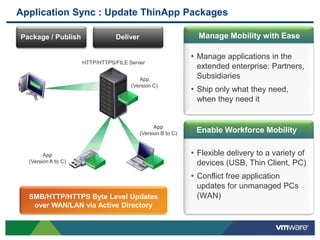
Application Sync : Update ThinApp Packages

Package / Publish               Deliver                        Manage Mobility with Ease

                                                             • Manage applications in the
                     HTTP/HTTPS/FILE Server
                                                              extended enterprise: Partners,
                                         App                  Subsidiaries
                                      (Version C)
                                                             • Ship only what they need,
                                                              when they need it


                                                App
                                          (Version B to C)    Enable Workforce Mobility


        App                                                  • Flexible delivery to a variety of
  (Version A to C)                                            devices (USB, Thin Client, PC)
                                                             • Conflict free application
                                                              updates for unmanaged PCs
  SMB/HTTP/HTTPS Byte Level Updates                           (WAN)
   over WAN/LAN via Active Directory
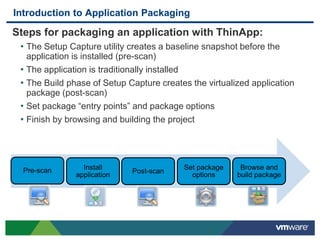
Introduction to Application Packaging

Steps for packaging an application with ThinApp:
 • The Setup Capture utility creates a baseline snapshot before the
   application is installed (pre-scan)
 • The application is traditionally installed
 • The Build phase of Setup Capture creates the virtualized application
   package (post-scan)
 • Set package “entry points” and package options
 • Finish by browsing and building the project


  Pre-scan       Install                  Set package    Browse and
                             Post-scan
               application                  options     build package
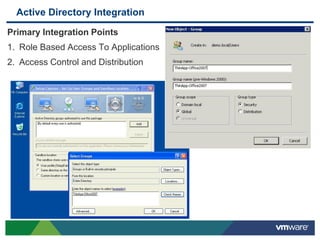
Active Directory Integration

Primary Integration Points
1. Role Based Access To Applications
2. Access Control and Distribution
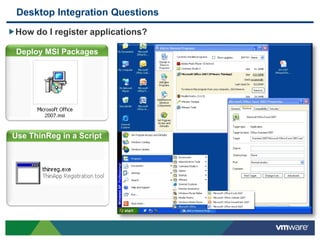
Desktop Integration Questions
How do I register applications?

  Deploy MSI Packages


 Use ThinReg in a Script
Answer: Application
Registration
Application Virtualization “Grey Areas”

              Every appvirt product has these four issues!
                    Competitors have additional issues!

 •Drivers – Drivers cannot be virtualized as they are Windows OS Level controlled
 components which must interface with a logical or physical device.

 •COM Plus – COM Plus objects cannot be virtualized as they are Windows OS Level
 controlled components (ThinApp can virtualize COM objects).

 •Network DCOM – Network DCOM objects cannot be virtualized (DCOM – a.k.a.
 Local DCOM – objects can be virtualized by ThinApp) as there are two sides to
 Network DCOM objects – a local and a remote side.

 •Windows Components – ThinApp does not support virtualizing some OS Level
 Windows components such as DNS (client/server), DHCP (client/server),
 WINS (client/server), IIS, etc.
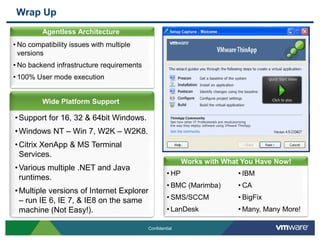
Wrap Up
         Agentless Architecture
         Agentless Architecture
• No compatibility issues with multiple
  versions
• No backend infrastructure requirements
• 100% User mode execution


         Wide Platform Support

• Support for 16, 32 & 64bit Windows.
• Windows NT – Win 7, W2K – W2K8.
• Citrix XenApp & MS Terminal
  Services.
                                                              Agentless Architecture
                                                           Works with What You Have Now!
• Various multiple .NET and Java
                                                    • HP                  • IBM
  runtimes.
                                                    • BMC (Marimba)       • CA
• Multiple versions of Internet Explorer
  – run IE 6, IE 7, & IE8 on the same               • SMS/SCCM            • BigFix
  machine (Not Easy!).                              • LanDesk             • Many, Many More!

                                           Confidential
Q&A


      Thank You!

VMware ThinApp 4.5

  • 1.
    VMware ThinApp Product Overviewand Technical Discussion © 2009 VMware Inc. All rights reserved
  • 2.
    The VMware ThinAppSolution Agentless architecture • Single file – EXE, MSI • No installation or changes to registry • Zero management required on end point device Seamlessly fits into any environment • No streaming server hardware or software needed • Plugs into any existing management framework Run Virtually Any Application from Any Device • Desktop, USB, flash, terminal services, Citrix • Any windows application – simple to complex • Supporting components can be run side by side (Java, .Net) Ensuring security without compromising user flexibility • User-Mode execution • Virtual Registry/File System protects underlying host OS • No pre-installed agent required on underlying OS
  • 3.
    Create Conflict FreeDesktops Problem: Tightly coupled relationships between OS, Applications and Data Symptoms: • Application Conflicts • Complex Compatibility Test Matrices • Diminished Time to Deployment • Loss of User Productivity • Increased helpdesk support calls Solution: VMware ThinApp 2009 Reader’s Choice Award • Agentless application virtualization 2010 Best product in category decouples applications and data www.virtualizationreview.com from the OS
  • 4.
    How ThinApp Works VMware ThinApp Links the Application, Virtual Operating System (VOS), File System and Registry into a Single EXE MSI File • Application Encapsulation Windows & Isolation Operating System • Intercepts file and system calls ThinApp Secure • Process Loading- start exe from Compressed Container (EXE) VOS, Launch from host OS Application (Virtual/Physical). Registry Access Virtual Registry Physical Registry • DLL Loading. Loads EXE/DLL/OCX dependencies. Virtual Physical File Access File System File System • Thread & Process Management. Virtual OS Sandbox VOS tracks all processes and threads inside virtual registry (Sandbox of Runtime Modifications).
  • 5.
    ThinApp 4.5 What’s new
  • 6.
    ThinApp 4.5 what’snew Full Windows 7 support Performance Accelerator Virtualize legacy apps on Reduced page file usage and older Windows platform for increased memory sharing for deployment to Windows 7 faster delivery at reduced bandwidth consumption Relink Registry Transaction Protection Upgrade existing ThinApp packages without the need of Ensure registry file integrity and application project files eliminate potential data corruption due to crash or system failure ThinApp SDK Published APIs to allow for integration of ThinApp with Enhanced Supportability third party software ThinApp Community Portal Customers have option to Users can upload share packaging results with application instructions and VMware for better support…. share with the community
  • 7.
    Windows 7 andServer 2008 R2 Support • Full support for the following Windows operating systems at the same level as Windows XP and Windows Vista  Windows 7 (32-bit and 64-bit)  Windows Server 2008 R2 • New applications captured on older platforms (XP or Vista) can still run on Windows 7/Server 2008 • Windows 7/Server 2008 can also be used to capture new applications  Best practice: Capture platform <= Deployment platform
  • 8.
    Seamless Package Upgradeswith Relink Tool • Upgrades ThinApp runtime within existing packages.  Makes older ThinApp packages Win 7 compatible. • Does NOT require original project rebuild. • Preserves original ThinApp packages as .BAK files.  Ensure disk space is available! • Supports wildcards and recursion. • Easy command line & scripting potential. Syntax: relink [-Recursive] <path_to_package> *.exe *.dat *.msi Examples: relink -recursive c:Thinapps*.exe relink AdobeReader.exe
  • 9.
    ThinApp 4.5 PerformanceAccelerator • Significant performance improvements in VDI environments w/shared storage.  Shorter application startup time  Lower network bandwidth consumption  Lower disk IOPs  Reduced memory consumption and page file usage • Implemented with new PACKAGE.INI parameter  OptimizeFor=Memory Streaming Improvements from ThinApp 4.0.4 to 4.5 Launch Time (sec) Mem Used (MB) Network Payload (KB) Excel -46.4 % -57.8 % -42.0 % Word -23.5 % -88.7 % -38.9 % PPT -34.5 % -35.6 % -36.6 % Outlook -48.3 % -57.7 % -38.9 % Adobe -20.5 % -0.7 % -44.1 %
  • 10.
    Setup Capture Changes •Improvements made to Setup Capture wizard for enhanced customer experience. • Context-sensitive Help, Help buttons, and External Links added to many screens.
  • 11.
  • 12.
    Technical Architecture –User Mode Architecture • User mode architecture provides transparency and best in class compatibility.  ThinApp packaged apps do not require kernel mode for CPU-level privileges. - No more BSODs!! - Host OS and other apps are protected from potential corruptions by app modifications.  ThinApp packaged apps do not require Admin mode for OS-level privileges. - No more Local Admins! - Users can run apps on locked-down PCs or Kiosks as “guest” user. Ring 3 Applications Ring 2 Device Drivers Least Privileged Ring 1 Device Drivers Ring 0 Kernel Most Privileged
  • 13.
    Technical Architecture –Sandbox & Isolation • Sandboxing & Isolation Modes provide security and persistence.  ThinApp redirects all runtime changes to private, per-user/per-app sandbox location.  Sandbox location is configurable: - Network share (i.e. Home Drives). - Removable USB volume or VMware View User Data Disk. - User-specific directory (i.e. %appdata%thinstall). - Honors system variables (i.e. %UserName%, %ComputerName%, etc.)  Reset apps to default behavior by deleting the sandbox.
  • 14.
    Technical Discussion Deployment Options
  • 15.
    ThinApp Deployment Scenarios Stream From Share Locally Deploy Flash Device Efficiently Stream Deploy ThinApp Enable Workforce Applications to Packages through Mobility And Full Multiple Users existing Application From a Single distribution to Portability Without Network Share managed desktops Compromising Security
  • 16.
    ThinApp Streaming fromNetwork Share Cost Efficient Application File Server “Network Share” Density on the LAN Enterprise software Licenses • Deliver applications to multiple users from a single network share • Stream into memory without local disk footprint • Read-only Network Share is only support burden • Utilize DFS for replication and branch office solution • Excellent mechanism for integration with View desktops
  • 17.
    Locally Deploy withExisting Management Framework Deliver using existing process and Locally Deploy workflow to variety of End Points. • Leverage existing workflow to distribute as MSI or Exe Package / Publish Distribute packages • Application performance based on local resources • Simplicity for harvesting inventory and usage 3rd Party Config Management Various Endpoints
  • 18.
    ThinApp from USB EnablingMobility without Compromising on Security USB Applications ThinApp (EXE or MSI) • Run applications from Flash devices on any end point ThinApp VOS • User-mode only execution Applications allows for deployment on locked-down PCs • End users can continue with their activity with their favorite applications • No Install Required! Kiosk Locked Down Laptop Home PC Desktop
  • 19.
    Simplify Desktop Deliverywith View Simplify Software Delivery (no agents/infrastructure) • Freedom from application conflicts. • Integration without dedicated server infrastructure. Streamline Patch Updates • Modify 1 app for an entire environment. • In place upgrades. Reduce Storage • Reuse templates. • Reduce image size and complexity. • Apps delivered from network.
  • 20.
    Technical Discussion Features & Process
  • 21.
    Application Link –Connect ThinApps Primary Application Dependency Primary Application Seamless Interoperability Enhance License Management • ThinApp packages can talk • Reduces package size to together and with OS ease deployment and delivery • Enables interoperability • Enhances software license between virtual applications management tracking via and underlying OS current inventory tools
  • 22.
    Application Sync :Update ThinApp Packages Package / Publish Deliver Manage Mobility with Ease • Manage applications in the HTTP/HTTPS/FILE Server extended enterprise: Partners, App Subsidiaries (Version C) • Ship only what they need, when they need it App (Version B to C) Enable Workforce Mobility App • Flexible delivery to a variety of (Version A to C) devices (USB, Thin Client, PC) • Conflict free application updates for unmanaged PCs SMB/HTTP/HTTPS Byte Level Updates (WAN) over WAN/LAN via Active Directory
  • 23.
    Introduction to ApplicationPackaging Steps for packaging an application with ThinApp: • The Setup Capture utility creates a baseline snapshot before the application is installed (pre-scan) • The application is traditionally installed • The Build phase of Setup Capture creates the virtualized application package (post-scan) • Set package “entry points” and package options • Finish by browsing and building the project Pre-scan Install Set package Browse and Post-scan application options build package
  • 24.
    Active Directory Integration PrimaryIntegration Points 1. Role Based Access To Applications 2. Access Control and Distribution
  • 25.
    Desktop Integration Questions Howdo I register applications? Deploy MSI Packages Use ThinReg in a Script Answer: Application Registration
  • 26.
    Application Virtualization “GreyAreas” Every appvirt product has these four issues! Competitors have additional issues! •Drivers – Drivers cannot be virtualized as they are Windows OS Level controlled components which must interface with a logical or physical device. •COM Plus – COM Plus objects cannot be virtualized as they are Windows OS Level controlled components (ThinApp can virtualize COM objects). •Network DCOM – Network DCOM objects cannot be virtualized (DCOM – a.k.a. Local DCOM – objects can be virtualized by ThinApp) as there are two sides to Network DCOM objects – a local and a remote side. •Windows Components – ThinApp does not support virtualizing some OS Level Windows components such as DNS (client/server), DHCP (client/server), WINS (client/server), IIS, etc.
  • 27.
    Wrap Up Agentless Architecture Agentless Architecture • No compatibility issues with multiple versions • No backend infrastructure requirements • 100% User mode execution Wide Platform Support • Support for 16, 32 & 64bit Windows. • Windows NT – Win 7, W2K – W2K8. • Citrix XenApp & MS Terminal Services. Agentless Architecture Works with What You Have Now! • Various multiple .NET and Java • HP • IBM runtimes. • BMC (Marimba) • CA • Multiple versions of Internet Explorer – run IE 6, IE 7, & IE8 on the same • SMS/SCCM • BigFix machine (Not Easy!). • LanDesk • Many, Many More! Confidential
  • 28.
    Q&A Thank You!