Prometheus 101
NextGen Open Source Monitoring
/* Paul Podolny */
Monitoring
“Carefully” examining nagios emails
http://devopsreactions.tumblr.com/post/39118334785/carefully-examining-nagios-emails
Time-series alerting
vs.
“Traditional” alerting
Origins
● Started in 2012 @ SoundCloud
● Inspired by Google’s internal tools
● Built for Microservices
● Motivation:
○ Needed to monitor dynamic cloud env
○ Unsatisfying data models, querying, and efficiency
in existing approaches.
Industry Adoption
What is Prometheus ?
Prometheus is
A monitoring and alerting system for distributed systems
and infrastructures.
Prometheus is not
A long-term archival system, a BI reporting system, DWH
Key concepts
● Operational simplicity
● Scalable data collection
● Powerful query language
● Multidimensional data model
Operational simplicity
- Written in Go, statically compiled
- No clustering
- No external dependencies (Hbase/Cassandra)
- Expose metrics and pull
- One server > 1 Million unique series
Collection of exported data
Prometheus
Server
http://server1:9010/metrics
http://server2:9010/metrics http GET
http://server3:9010/metrics
Service
Discovery
Yay, metrics ...
Who should I scrap?
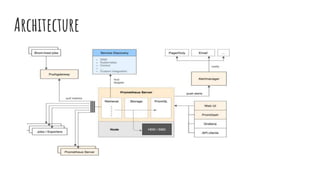
Architecture
Time series storage
0 0 2 0 0
0 0 3 0 0
0 0 2 0 0
1 0 4 0 1
http_requests_errors
server1 server2 server3 server4 server5
now
now-t
now-2t
t
Multidimensional data model
<metric name>{<label name>=<label value>, ...} value
http_requests_errors{instance=server1,service=web,zone=us-west} 1
http_requests_errors{instance=server2,service=web,zone=us-west} 0
http_requests_errors{instance=server3,service=web,zone=us-west} 4
Multidimensional data model
Promql example
sum(irate(kafka_server_BrokerTopicMetrics_TotalProduceRequest
sPerSec{servicename="X",environment=”prod”} [5m])) by (zone)
<- us-east-1
<- us-west-2
<- eu-central-1
Alerting
● Handled by AlertManager
● Alerts based entirely on time series data.
● Supports alert hooks: PagerDuty, Slack, Email etc
● All alerts are defined as code
Alerting
Alerting
predict_linear(node_filesystem_free[1h], 4*3600)
Alerting (Example)
Pro-tips
- Shard your data (by systems/groups)
- Drop “metrics” that provide little value
- Plan for redundancy (no built-in HA)
- Size well (RAM, IOPS hungry)
- Version & audit your alerts
- Watch the watcher ;)
Questions?

Prometheus 101

Editor's Notes

  • #3  Monitoring is fundamental to running a stable service. Monitoring enables us, the service owners make decisions based on the impact of changes to the service - by applying an appropriate method of incident response. Monitoring enables measuring the service’s alignment with the organisation’s business goals.
  • #4 In the OpenSource domain - Up until not so long time ago solutions like: Nagios & Sensu were (and still are) used by lot’s of companies for monitoring & alerting. Nagios & Sensu used custom scripts that performed checks triggering alerts based on the responses and predefined thresholds (OK, WARN, CRIT). You ended up with lots of script based checks - running on hundreds or thousands of servers (that potentially belonged to the same service). Q - can anyone see a problem with this approach?
  • #5 Solutions such as Nagios were usually more focused on specific machines/instances rather than ‘services’ as a whole. Often, these solutions did not include any graphs and when they did - it was more of an add-on rather than core functionality of the system. So Alerting and Graphing were decoupled. Also, usually alerting was not pro-active and when an alert was already triggered - usually some component was already “on fire”. On top of that - a storm of alerts was causing a storm of alerts. One hypervisor = 50 VM’s x 30 checks = 1500 alerts. These sorts of Alerting solutions would cause a symptom called Alert Fatigue… which ultimately led to ignoring alerts.
  • #6 Wouldn’t it make much more sense to alert in a more meaningful way? Time series alerting shifts that old paradigm. This new model made the collection of time-series a first-class role of the monitoring system. It has replaced check scripts with a rich language for manipulating time-series into charts and setting up meaningful alerts based on data aggregations and predictions relevant for the defined service level agreements. With time series alerting we can base our alerts on data aggregations such as percentiles, rate of change - we can still get the server granularity or we can get the service granularity. So it’s not a “Webserver machine” it’s one machine that happens to run a Webserver as part of a service.
  • #7 The developers (who were previously working both at Google as SRE’s ) were inspired by Google’s internal monitoring system called ‘Borgmon’. Borgmon was and still is being used in Google for it’s internal containers scheduling infrastructure called ‘Borg’ ( which was later open-sourced under the name Kubernetes…) You can say that these two systems is a “match made in heaven” since one was built on top the other - that’s why Prometheus is usually the de-facto standard today when it comes to monitoring containerised infrastructures. The decision to develop a tool from scratch was due to a fact that back in 2012 - none of the existing Open Source tools were satisfying for monitoring and alerting of a dynamic cloud environment. As I’ve mentioned, the solutions at that time were largely focused on static servers rather than services (running lots of ephemeral components under the hood) and none of them was capable of alerting based on data aggregates.
  • #8 When Prometheus was finally released somewhere in the beginning of 2015 - it’s adoption rate was quite phenomenal. Today Prometheus is widely used in production by some massive players like: Digital Ocean, Ericsson, SoundCloud and many others. It’s usually the de-facto choice for a monitoring tool for a large container based infrastructure (it is natively supported by K8s). From the developer's perspective, Prometheus community is very much active and supportive, there are numerous plugins, dashboards, metrics exporters etc. Tools such as Prometheus Operator (alpha) were developed to ease the deployment of Prometheus on top of Kubernetes.
  • #9 Prometheus is a monitoring and alerting system written in Go. It relies entirely on time series data that it gathers to trigger alerts (we will talk in a moment how it does that). It’s important to remember that Prometheus stores all the data in-memory database, regularly checkpointed to disk. The idea is to keep queries blazing fast and skip disk access (when possible). By no mean Prometheus is an analytical DWH backend. This means that usually your oldest data will be a X days old - if you require a longer window - you will typically require to store your metrics in a separate archive TSDB. TSDB such as InfluxDB is cheaper and much larger than Prometheus in-memory store.
  • #10 There are couple of important concepts when talking about Prometheus which we will cover. and these concept IMHO make the system
  • #11 Prometheus developers believed in keeping things simple, so Prometheus comes as a single statically compiled Go binary. There is no clustering - which always complicates things, but that means that there is no real out of the box HA HA and sharding are up to the operator and there are couple of techniques to achieve that - for example having 2 servers in 2 different DC’s scrapping the same targets - this is not exactly a real HA since the timestamps will drift and the data will be slightly different but this is usually fine for a monitoring node. There are no external dependencies, some TSDB solutions (like OpenTSDB) require Hbase as its storage engine - this is obviously a huge overhead - not only you need to maintain a TSDB but also a very complex platform beneath it - this is not the case with Prometheus which uses it’s own storage engine and just used LevelDB for its indexes. In order to monitor a node 2 things have to happen - a node will register itself in a discovery service and will expose metrics over HTTP endpoint, Prometheus will periodically collect these metrics by a process called ‘Scraping’. One server can support a sheer amount of unique series , but of course that at some point you will have to shard.
  • #12 In order to find its targets a Prometheus instance is configured with a list of targets using one of many name resolution methods. The target list is typically dynamic - so using service discovery (such as Consul or ETCD) reduces the cost of maintaining a list and allows the monitoring system to scale. In our example each server is running a process that is called exporter, the exporter gathers the monitored instance metrics and exposes the values periodically via HTTP endpoint - port 9010 in this example. The /metrics HTTP handler simply lists all the exported variables in plain text, as space-separated keys and values, one per line. At predefined intervals Prometheus will scrape the exporter HTTP URI (/metrics) ,decode and store this data as time series.
  • #13 A metrics endpoint exposes a metric key/value as well as HELP and metric TYPE (counter, gauge)
  • #14 Prometheus server integrated with a service discovery (above) such as ETCD or Consul to determine where to scrap the data from All data is stored in memory first and periodically flushed to disk. This data is then available for queries (typically via Grafana or other frontend UI) to enable a visualisation of the aggregated series. Alerting is managed via a component called “AlertManager” which is responsible for defining the alerts and sending the alert notification. A wide variety of notifications are supported: Email, Slack, PagerDuty. Sometimes we still need scripts executions and producing metrics based on scripts - a best case for that would be a client node “talking to our service”. A component that is called “PushGateway” enables custom scripts executions on the nodes and then pushing them into the exporter that ultimately will be scraped by the Prometheus collector server.
  • #15 A monitored web service is typically made up of sheer amount of binaries running as many tasks, on many machines, in many clusters, possible in few different collocations. Prometheus needs to keep all that data organized while allowing flexible querying and slicing of that data. Prometheus stores all of the gathered data in an in-memory DB, regularly checkpointed to disk. The data points have the form of of (timestamp, value) and are stored in chronological lists called time series. Each time series is named by a unique set of labels of the form key=value. A time-series is conceptually a one-dimensional matrix of numbers, progressing through time. As you add more permutations of labels to this time-series, the matrix becomes multidimensional - so in this example we can see a time-series for requests errors ,labeled by the original host each was collected from. Prometheus has a sophisticated local storage subsystem. For indexes, it uses LevelDB. (a fast K/V storage) and for the data itself it uses a custom storage layer.
  • #16 Multidimensional data model is basically a fancy way to call labeled time series data. Let’s take a look at the data structure of the series - Each time series is identified by a metric name (left), as well as a set of key-value pairs called labels & a metric value (right). The reason for labeling our time series data is simple, we want to be able to apply filters or groupings based on these labels.
  • #17 So how does the actual data looks like in Prometheus ? If we query for a metric from our previous example the result set will be a list of all the latest time series containing the metric name. This is the simplest query form, no filtering, no grouping. As you can see, a query for a time-series does not require specification of all these labels, and a search for a labelset returns all the matching time-series.
  • #18 To demonstrate how powerful PromQL is , let’s take a look at a practical example. In our example we have several kafka clusters in our prod environment ,all of these clusters belong to a certain service called ‘X’ and are running in 3 different data centers (3 separate geo locations), now we want to know what is the rate of all of our Kafka’s grouped by AZ, easy - no problem at all. So let’s try and dissect the above query - The irate() function takes the enclosed expression (Produce REQUESTS/sec counter) and is looking up to 5 minutes back for the two most recent data points ,calculating the per-second instant rate of increase The reason that we are using an irate function is that the Kafka metrics are exposed as counters.
  • #20 AlertManager can control multiple Prometheus servers and is not bundled within the server. It’s completely decoupled and can control several Prometheus collectors. HA for AM is still in active development and is achieved via Mesh of AM’s , where the instances need to be configured to communicate with each other. (not stable).
  • #21 predict if the hosts disks will fill within four hours, based upon the last hour of sampled data
  • #23 Some personal stories from the trenches …