Pre-Production
Your Name
Style sheet
I will use greys and other muted
colours for backgrounds and
environments so that characters,
enemies and elemental effects are
clearly visible and easy to
differentiate. For the elements I
am using orange for fire, blue for
water and green for poison.
Style sheet
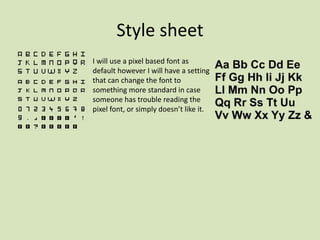
I will use a pixel based font as
default however I will have a setting
that can change the font to
something more standard in case
someone has trouble reading the
pixel font, or simply doesn’t like it.
Style sheet
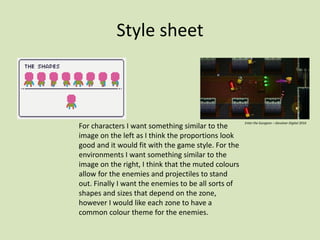
For characters I want something similar to the
image on the left as I think the proportions look
good and it would fit with the game style. For the
environments I want something similar to the
image on the right, I think that the muted colours
allow for the enemies and projectiles to stand
out. Finally I want the enemies to be all sorts of
shapes and sizes that depend on the zone,
however I would like each zone to have a
common colour theme for the enemies.
Enter the Gungeon – Devolver Digital 2016
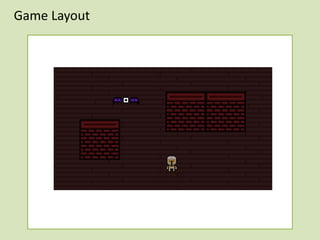
Game Layout
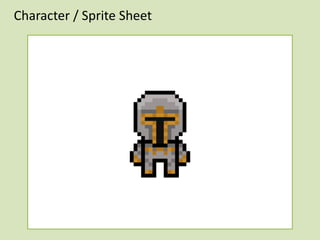
Character / Sprite Sheet
App Logo Design
Storyboard / Timeline
Level is
generated
Player
explores
Player finds
boss room
Player
defeats boss
Player moves
on to next level
Player Dies at any point
World Deleted
Repeat 4-6
times
depending on
choices
Player wins
Resources & Software
Resources Needed Software Needed
Computer Adobe Photoshop
Mouse Bandlab
Keyboard Microsoft Teams
Monitor Microsoft Word
Chair Microsoft PowerPoint
Desk
Audio
Sound URL / Location
Fire blast sound https://mixkit.co/free-sound-effects/fire/
Music BandLab
Coin sound effect https://www.fesliyanstudios.com/royalty-free-sound-effects-
download/coin-272
Explosion sound effect https://mixkit.co/free-sound-effects/fire/
Contingency Planning
Potential Issue Solution
I could mess up the size of my sprites and
other assets
I will ensure that all assets are made on the
same scale
I could lose files due to corruption I will ensure that I back my work up in at least
two places preferably three
My computer could break I will try my best to solve problems regarding
my computer as they arise and have files
backed up either on a memory stick or in the
cloud so they can be accessed from other
devices.
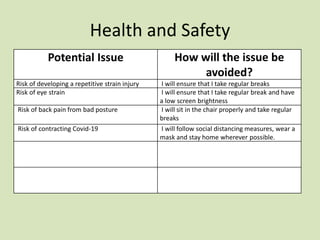
Health and Safety
Potential Issue How will the issue be
avoided?
Risk of developing a repetitive strain injury I will ensure that I take regular breaks
Risk of eye strain I will ensure that I take regular break and have
a low screen brightness
Risk of back pain from bad posture I will sit in the chair properly and take regular
breaks
Risk of contracting Covid-19 I will follow social distancing measures, wear a
mask and stay home wherever possible.
Production Schedule
Day Plan of Action Resources Required
Day 1  work on the player character  Adobe Photoshop
Day 2  work on enemies  Adobe Photoshop
Day 3  finish off any unfinished work from the
previous two days
 Adobe Photoshop
Day 4  work on the stage  Adobe Photoshop
Day 5  Work on the effects  Adobe Photoshop
Day 6  Make the music  Bandlab
Day 7  Animate  Adobe Photoshop
Day 8  Finish  Adobe Photoshop

Project 4 Pre-Production

  • 1.
  • 2.
    Style sheet I willuse greys and other muted colours for backgrounds and environments so that characters, enemies and elemental effects are clearly visible and easy to differentiate. For the elements I am using orange for fire, blue for water and green for poison.
  • 3.
    Style sheet I willuse a pixel based font as default however I will have a setting that can change the font to something more standard in case someone has trouble reading the pixel font, or simply doesn’t like it.
  • 4.
    Style sheet For charactersI want something similar to the image on the left as I think the proportions look good and it would fit with the game style. For the environments I want something similar to the image on the right, I think that the muted colours allow for the enemies and projectiles to stand out. Finally I want the enemies to be all sorts of shapes and sizes that depend on the zone, however I would like each zone to have a common colour theme for the enemies. Enter the Gungeon – Devolver Digital 2016
  • 5.
  • 6.
  • 7.
  • 8.
    Storyboard / Timeline Levelis generated Player explores Player finds boss room Player defeats boss Player moves on to next level Player Dies at any point World Deleted Repeat 4-6 times depending on choices Player wins
  • 9.
    Resources & Software ResourcesNeeded Software Needed Computer Adobe Photoshop Mouse Bandlab Keyboard Microsoft Teams Monitor Microsoft Word Chair Microsoft PowerPoint Desk
  • 10.
    Audio Sound URL /Location Fire blast sound https://mixkit.co/free-sound-effects/fire/ Music BandLab Coin sound effect https://www.fesliyanstudios.com/royalty-free-sound-effects- download/coin-272 Explosion sound effect https://mixkit.co/free-sound-effects/fire/
  • 11.
    Contingency Planning Potential IssueSolution I could mess up the size of my sprites and other assets I will ensure that all assets are made on the same scale I could lose files due to corruption I will ensure that I back my work up in at least two places preferably three My computer could break I will try my best to solve problems regarding my computer as they arise and have files backed up either on a memory stick or in the cloud so they can be accessed from other devices.
  • 12.
    Health and Safety PotentialIssue How will the issue be avoided? Risk of developing a repetitive strain injury I will ensure that I take regular breaks Risk of eye strain I will ensure that I take regular break and have a low screen brightness Risk of back pain from bad posture I will sit in the chair properly and take regular breaks Risk of contracting Covid-19 I will follow social distancing measures, wear a mask and stay home wherever possible.
  • 13.
    Production Schedule Day Planof Action Resources Required Day 1  work on the player character  Adobe Photoshop Day 2  work on enemies  Adobe Photoshop Day 3  finish off any unfinished work from the previous two days  Adobe Photoshop Day 4  work on the stage  Adobe Photoshop Day 5  Work on the effects  Adobe Photoshop Day 6  Make the music  Bandlab Day 7  Animate  Adobe Photoshop Day 8  Finish  Adobe Photoshop

Editor's Notes

  • #3 Explore colours, fonts and image styles similar to what you want to produce. Discuss all three elements in relation to why you chose them and where you may use them in your project. Go over as many pages as you need to
  • #4 Explore colours, fonts and image styles similar to what you want to produce. Discuss all three elements in relation to why you chose them and where you may use them in your project. Go over as many pages as you need to
  • #5 Explore colours, fonts and image styles similar to what you want to produce. Discuss all three elements in relation to why you chose them and where you may use them in your project. Go over as many pages as you need to
  • #6 Mock up of a potential design using the colours and fonts established in your style sheet and sourced images
  • #7 Mock up of a potential design using the colours and fonts established in your style sheet and sourced images
  • #8 Mock up of a potential design using the colours and fonts established in your style sheet and sourced images
  • #9 From beginning to end show what happens in your game and when
  • #10 List all the kit, equipment, resources, people and hardware needed to make the practical part of your project
  • #11 What audio will you use and how will you get it? List the internet URL links or describe ho you will record the sound.
  • #12 What could possibly go wrong during your production? How could you prevent it from happening?
  • #13 What hazards might be around you during production and how could we avoid them?
  • #14 Break down a detailed schedule of tasks to do each day (this is for production only, no written work)