Pre-Production
Thea Jennings
Style sheet
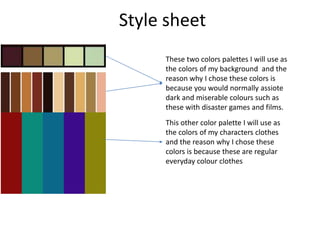
These two colors palettes I will use as
the colors of my background and the
reason why I chose these colors is
because you would normally assiote
dark and miserable colours such as
these with disaster games and films.
This other color palette I will use as
the colors of my characters clothes
and the reason why I chose these
colors is because these are regular
everyday colour clothes
Style sheet
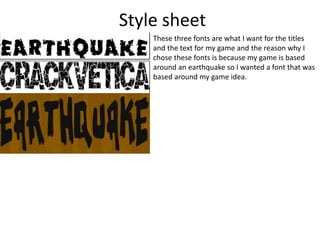
These three fonts are what I want for the titles
and the text for my game and the reason why I
chose these fonts is because my game is based
around an earthquake so I wanted a font that was
based around my game idea.
Layout 1
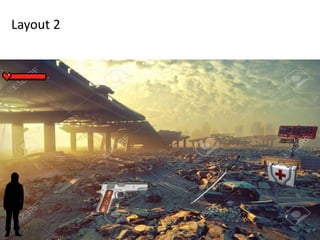
Layout 2
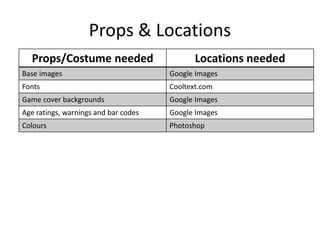
Props & Locations
Props/Costume needed Locations needed
Base images Google Images
Fonts Cooltext.com
Game cover backgrounds Google Images
Age ratings, warnings and bar codes Google Images
Colours Photoshop
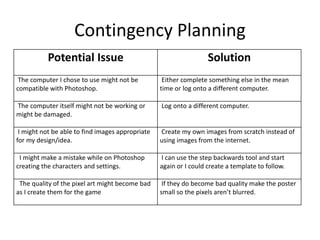
Contingency Planning
Potential Issue Solution
The computer I chose to use might not be
compatible with Photoshop.
Either complete something else in the mean
time or log onto a different computer.
The computer itself might not be working or
might be damaged.
Log onto a different computer.
I might not be able to find images appropriate
for my design/idea.
Create my own images from scratch instead of
using images from the internet.
I might make a mistake while on Photoshop
creating the characters and settings.
I can use the step backwards tool and start
again or I could create a template to follow.
The quality of the pixel art might become bad
as I create them for the game
If they do become bad quality make the poster
small so the pixels aren’t blurred.
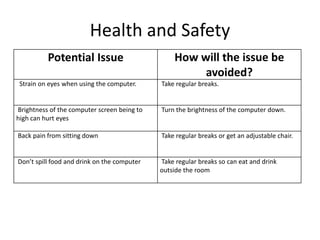
Health and Safety
Potential Issue How will the issue be
avoided?
Strain on eyes when using the computer. Take regular breaks.
Brightness of the computer screen being to
high can hurt eyes
Turn the brightness of the computer down.
Back pain from sitting down Take regular breaks or get an adjustable chair.
Don’t spill food and drink on the computer Take regular breaks so can eat and drink
outside the room
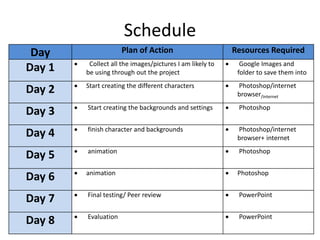
Schedule
Day Plan of Action Resources Required
Day 1  Collect all the images/pictures I am likely to
be using through out the project
 Google Images and
folder to save them into
Day 2  Start creating the different characters  Photoshop/internet
browser/internet
Day 3  Start creating the backgrounds and settings  Photoshop
Day 4  finish character and backgrounds  Photoshop/internet
browser+ internet
Day 5  animation  Photoshop
Day 6  animation  Photoshop
Day 7  Final testing/ Peer review  PowerPoint
Day 8  Evaluation  PowerPoint

5. pre production(2)

  • 1.
  • 2.
    Style sheet These twocolors palettes I will use as the colors of my background and the reason why I chose these colors is because you would normally assiote dark and miserable colours such as these with disaster games and films. This other color palette I will use as the colors of my characters clothes and the reason why I chose these colors is because these are regular everyday colour clothes
  • 3.
    Style sheet These threefonts are what I want for the titles and the text for my game and the reason why I chose these fonts is because my game is based around an earthquake so I wanted a font that was based around my game idea.
  • 4.
  • 5.
  • 6.
    Props & Locations Props/Costumeneeded Locations needed Base images Google Images Fonts Cooltext.com Game cover backgrounds Google Images Age ratings, warnings and bar codes Google Images Colours Photoshop
  • 7.
    Contingency Planning Potential IssueSolution The computer I chose to use might not be compatible with Photoshop. Either complete something else in the mean time or log onto a different computer. The computer itself might not be working or might be damaged. Log onto a different computer. I might not be able to find images appropriate for my design/idea. Create my own images from scratch instead of using images from the internet. I might make a mistake while on Photoshop creating the characters and settings. I can use the step backwards tool and start again or I could create a template to follow. The quality of the pixel art might become bad as I create them for the game If they do become bad quality make the poster small so the pixels aren’t blurred.
  • 8.
    Health and Safety PotentialIssue How will the issue be avoided? Strain on eyes when using the computer. Take regular breaks. Brightness of the computer screen being to high can hurt eyes Turn the brightness of the computer down. Back pain from sitting down Take regular breaks or get an adjustable chair. Don’t spill food and drink on the computer Take regular breaks so can eat and drink outside the room
  • 9.
    Schedule Day Plan ofAction Resources Required Day 1  Collect all the images/pictures I am likely to be using through out the project  Google Images and folder to save them into Day 2  Start creating the different characters  Photoshop/internet browser/internet Day 3  Start creating the backgrounds and settings  Photoshop Day 4  finish character and backgrounds  Photoshop/internet browser+ internet Day 5  animation  Photoshop Day 6  animation  Photoshop Day 7  Final testing/ Peer review  PowerPoint Day 8  Evaluation  PowerPoint

Editor's Notes

  • #3 Explore colours, fonts and image styles similar to what you want to produce. Discuss all three elements in relation to why you chose them and where you may use them in your project. Go over as many pages as you need to
  • #4 Explore colours, fonts and image styles similar to what you want to produce. Discuss all three elements in relation to why you chose them and where you may use them in your project. Go over as many pages as you need to
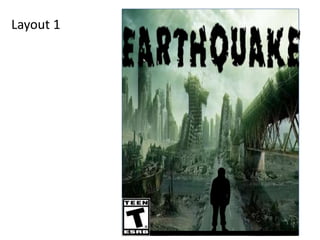
  • #5 Mock up of a potential design using the colours and fonts established in your style sheet and sourced images
  • #6 Mock up of a potential design using the colours and fonts established in your style sheet and sourced images