Hello!
Myself Archana R
Assistant Professor In
Dept Of CS
SACWC.
I am here because I love
to give presentations.
PROGRAMMING WITH R
INTRODUCTION TO R
• R is an open source programming language and software
environment for statistical computing and graphics.
• The R language is widely used among statisticians and data
miners for developing statistical software and data analytics
tools
History of R
• Modelled after S & S-plus, developed at AT&T labs in late
1980s.
• R project was started by Robert Gentleman and Ross Ihaka
Department of Statistics, University of Auckland (1995).
• Currently maintained by R core development team – an
international team of volunteer developers (since 1997).
A test run with R in Windows
• Double click the R icon on the Desktop and the R Console will open.
• Wait while the program loads. You observe something like this.
• You can type your own program at the prompt line >.
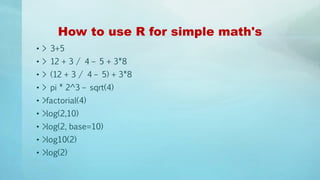
How to use R for simple math's
• > 3+5
• > 12 + 3 / 4 – 5 + 3*8
• > (12 + 3 / 4 – 5) + 3*8
• > pi * 2^3 – sqrt(4)
• >factorial(4)
• >log(2,10)
• >log(2, base=10)
• >log10(2)
• >log(2)
How to store results of calculations
for future use
• > x = 3+5
• > x
• > y = 12 + 3 / 4 – 5 + 3*8
• > y
• > z = (12 + 3 / 4 – 5) + 3*8
• > z
• > A <- 6 + 8 ## no space should be between < & -
• > a ## Note: R is case sensitive
• >A
Identifiers naming
• Don't use underscores ( _ ) or hyphens ( - ) in identifiers.
• The preferred form for variable names is all lower case letters and words
separated with dots (variable.name) but variableName is also accepted.
• Examples:
avg.clicks GOOD
avgClicks OK
avg_Clicks BAD
• Function names have initial capital letters and no dots (e.g.,
FunctionName).
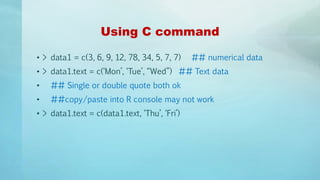
Using C command
• > data1 = c(3, 6, 9, 12, 78, 34, 5, 7, 7) ## numerical data
• > data1.text = c(‘Mon’, ‘Tue’, “Wed”) ## Text data
• ## Single or double quote both ok
• ##copy/paste into R console may not work
• > data1.text = c(data1.text, ‘Thu’, ‘Fri’)
Scan command for making data
• > data3 = scan() ## data separated by Space / Press
## Press Enter key twice to
exit
• 1: 4 5 7 8
• 5: 2 9 4
• 8: 3
• 9:
• > data3
• [1] 4 5 7 8 2 9 4 3
Concept of working directory
• >getwd()
• [1] "C:UsersDSamantaRDatabase"
•
• > setwd('D:Data AnalyticsProjectDatabase)
•
• > dir() ## working directory listing
•
• >ls() ## Workspace listing of objects
•
• >rm(‘object’) ## Remove an element “object”, if exist
•
• > rm(list = ls()) ## Cleaning
Different data items in R
• Vector
• Matrix
• Data Frame
• List
Vectors in R
• >x=c(1,2,3,4,56)
• >x
• > x[2]
• > x = c(3, 4, NA, 5)
• >mean(x)
• [1] NA
• >mean(x, rm.NA=T)
• [1] 4
• > x = c(3, 4, NULL, 5)
• >mean(x)
• [1] 4
More on Vectors in R
• >y = c( x, c(-1,5),x)
• >length(x)
• >length(y)
• There are useful methods to create long vectors whose elements are in
arithmetic progression:
• > x=1:20
• > x
• If the common difference is not 1 or -1 then we can use the seq function
• > y= seq(2,5,0.3)
• > y
• [1] 2.0 2.3 2.6 2.9 3.2 3.5 3.8 4.1 4.4 4.7 5.0
• > length(y)
• [1] 11
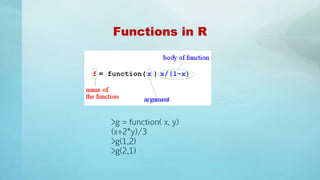
Functions in R
>g = function( x, y)
(x+2*y)/3
>g(1,2)
>g(2,1)
THANK YOU !

Programming with R in Big Data Analytics

  • 1.
    Hello! Myself Archana R AssistantProfessor In Dept Of CS SACWC. I am here because I love to give presentations.
  • 2.
  • 3.
    INTRODUCTION TO R •R is an open source programming language and software environment for statistical computing and graphics. • The R language is widely used among statisticians and data miners for developing statistical software and data analytics tools
  • 4.
    History of R •Modelled after S & S-plus, developed at AT&T labs in late 1980s. • R project was started by Robert Gentleman and Ross Ihaka Department of Statistics, University of Auckland (1995). • Currently maintained by R core development team – an international team of volunteer developers (since 1997).
  • 5.
    A test runwith R in Windows • Double click the R icon on the Desktop and the R Console will open. • Wait while the program loads. You observe something like this. • You can type your own program at the prompt line >.
  • 6.
    How to useR for simple math's • > 3+5 • > 12 + 3 / 4 – 5 + 3*8 • > (12 + 3 / 4 – 5) + 3*8 • > pi * 2^3 – sqrt(4) • >factorial(4) • >log(2,10) • >log(2, base=10) • >log10(2) • >log(2)
  • 7.
    How to storeresults of calculations for future use • > x = 3+5 • > x • > y = 12 + 3 / 4 – 5 + 3*8 • > y • > z = (12 + 3 / 4 – 5) + 3*8 • > z • > A <- 6 + 8 ## no space should be between < & - • > a ## Note: R is case sensitive • >A
  • 8.
    Identifiers naming • Don'tuse underscores ( _ ) or hyphens ( - ) in identifiers. • The preferred form for variable names is all lower case letters and words separated with dots (variable.name) but variableName is also accepted. • Examples: avg.clicks GOOD avgClicks OK avg_Clicks BAD • Function names have initial capital letters and no dots (e.g., FunctionName).
  • 9.
    Using C command •> data1 = c(3, 6, 9, 12, 78, 34, 5, 7, 7) ## numerical data • > data1.text = c(‘Mon’, ‘Tue’, “Wed”) ## Text data • ## Single or double quote both ok • ##copy/paste into R console may not work • > data1.text = c(data1.text, ‘Thu’, ‘Fri’)
  • 10.
    Scan command formaking data • > data3 = scan() ## data separated by Space / Press ## Press Enter key twice to exit • 1: 4 5 7 8 • 5: 2 9 4 • 8: 3 • 9: • > data3 • [1] 4 5 7 8 2 9 4 3
  • 11.
    Concept of workingdirectory • >getwd() • [1] "C:UsersDSamantaRDatabase" • • > setwd('D:Data AnalyticsProjectDatabase) • • > dir() ## working directory listing • • >ls() ## Workspace listing of objects • • >rm(‘object’) ## Remove an element “object”, if exist • • > rm(list = ls()) ## Cleaning
  • 12.
    Different data itemsin R • Vector • Matrix • Data Frame • List
  • 13.
    Vectors in R •>x=c(1,2,3,4,56) • >x • > x[2] • > x = c(3, 4, NA, 5) • >mean(x) • [1] NA • >mean(x, rm.NA=T) • [1] 4 • > x = c(3, 4, NULL, 5) • >mean(x) • [1] 4
  • 14.
    More on Vectorsin R • >y = c( x, c(-1,5),x) • >length(x) • >length(y) • There are useful methods to create long vectors whose elements are in arithmetic progression: • > x=1:20 • > x • If the common difference is not 1 or -1 then we can use the seq function • > y= seq(2,5,0.3) • > y • [1] 2.0 2.3 2.6 2.9 3.2 3.5 3.8 4.1 4.4 4.7 5.0 • > length(y) • [1] 11
  • 15.
    Functions in R >g= function( x, y) (x+2*y)/3 >g(1,2) >g(2,1)
  • 16.