Production
Reflection
Your Name
Process
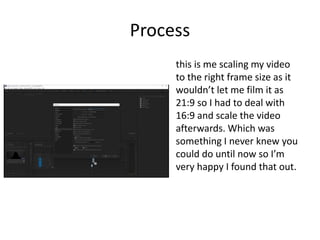
this is me scaling my video
to the right frame size as it
wouldn’t let me film it as
21:9 so I had to deal with
16:9 and scale the video
afterwards. Which was
something I never knew you
could do until now so I’m
very happy I found that out.
Process
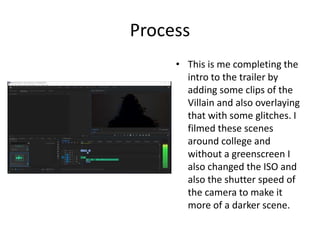
• This is me completing the
intro to the trailer by
adding some clips of the
Villain and also overlaying
that with some glitches. I
filmed these scenes
around college and
without a greenscreen I
also changed the ISO and
also the shutter speed of
the camera to make it
more of a darker scene.
Process
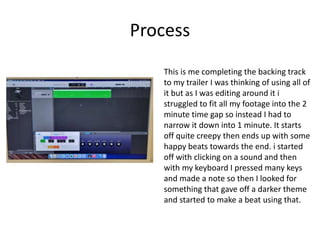
This is me completing the backing track
to my trailer I was thinking of using all of
it but as I was editing around it i
struggled to fit all my footage into the 2
minute time gap so instead I had to
narrow it down into 1 minute. It starts
off quite creepy then ends up with some
happy beats towards the end. i started
off with clicking on a sound and then
with my keyboard I pressed many keys
and made a note so then I looked for
something that gave off a darker theme
and started to make a beat using that.
Process
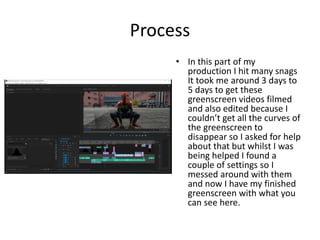
• In this part of my
production I hit many snags
It took me around 3 days to
5 days to get these
greenscreen videos filmed
and also edited because I
couldn’t get all the curves of
the greenscreen to
disappear so I asked for help
about that but whilst I was
being helped I found a
couple of settings so I
messed around with them
and now I have my finished
greenscreen with what you
can see here.
Process
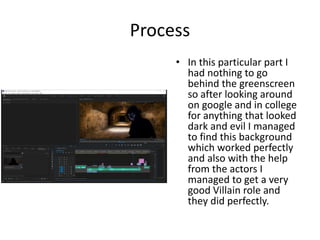
• In this particular part I
had nothing to go
behind the greenscreen
so after looking around
on google and in college
for anything that looked
dark and evil I managed
to find this background
which worked perfectly
and also with the help
from the actors I
managed to get a very
good Villain role and
they did perfectly.
process
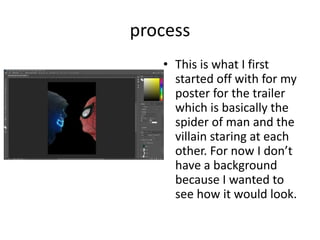
• This is what I first
started off with for my
poster for the trailer
which is basically the
spider of man and the
villain staring at each
other. For now I don’t
have a background
because I wanted to
see how it would look.
process
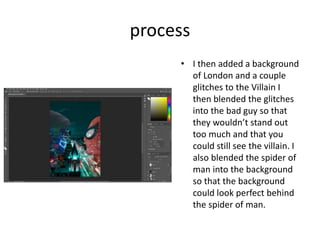
• I then added a background
of London and a couple
glitches to the Villain I
then blended the glitches
into the bad guy so that
they wouldn’t stand out
too much and that you
could still see the villain. I
also blended the spider of
man into the background
so that the background
could look perfect behind
the spider of man.
process
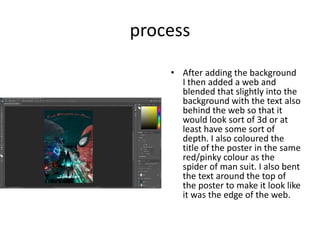
• After adding the background
I then added a web and
blended that slightly into the
background with the text also
behind the web so that it
would look sort of 3d or at
least have some sort of
depth. I also coloured the
title of the poster in the same
red/pinky colour as the
spider of man suit. I also bent
the text around the top of
the poster to make it look like
it was the edge of the web.

6. Production Reflection (FMP).pptx

  • 1.
  • 2.
    Process this is mescaling my video to the right frame size as it wouldn’t let me film it as 21:9 so I had to deal with 16:9 and scale the video afterwards. Which was something I never knew you could do until now so I’m very happy I found that out.
  • 3.
    Process • This isme completing the intro to the trailer by adding some clips of the Villain and also overlaying that with some glitches. I filmed these scenes around college and without a greenscreen I also changed the ISO and also the shutter speed of the camera to make it more of a darker scene.
  • 4.
    Process This is mecompleting the backing track to my trailer I was thinking of using all of it but as I was editing around it i struggled to fit all my footage into the 2 minute time gap so instead I had to narrow it down into 1 minute. It starts off quite creepy then ends up with some happy beats towards the end. i started off with clicking on a sound and then with my keyboard I pressed many keys and made a note so then I looked for something that gave off a darker theme and started to make a beat using that.
  • 5.
    Process • In thispart of my production I hit many snags It took me around 3 days to 5 days to get these greenscreen videos filmed and also edited because I couldn’t get all the curves of the greenscreen to disappear so I asked for help about that but whilst I was being helped I found a couple of settings so I messed around with them and now I have my finished greenscreen with what you can see here.
  • 6.
    Process • In thisparticular part I had nothing to go behind the greenscreen so after looking around on google and in college for anything that looked dark and evil I managed to find this background which worked perfectly and also with the help from the actors I managed to get a very good Villain role and they did perfectly.
  • 7.
    process • This iswhat I first started off with for my poster for the trailer which is basically the spider of man and the villain staring at each other. For now I don’t have a background because I wanted to see how it would look.
  • 8.
    process • I thenadded a background of London and a couple glitches to the Villain I then blended the glitches into the bad guy so that they wouldn’t stand out too much and that you could still see the villain. I also blended the spider of man into the background so that the background could look perfect behind the spider of man.
  • 9.
    process • After addingthe background I then added a web and blended that slightly into the background with the text also behind the web so that it would look sort of 3d or at least have some sort of depth. I also coloured the title of the poster in the same red/pinky colour as the spider of man suit. I also bent the text around the top of the poster to make it look like it was the edge of the web.

Editor's Notes

  • #3 Discuss the tools and processes used in your production. Log your thoughts and feelings about your work.
  • #4 Discuss the tools and processes used in your production. Log your thoughts and feelings about your work.
  • #5 Discuss the tools and processes used in your production. Log your thoughts and feelings about your work.
  • #6 Discuss the tools and processes used in your production. Log your thoughts and feelings about your work.
  • #7 Discuss the tools and processes used in your production. Log your thoughts and feelings about your work.