Computer
Organization and
Architecture
MODULE 1- PART 1
SUBJECT CODE: 18EC35
SAVITA M
ASSISTANT PROFESSOR
DEPT. OF ECE
JIT,DVG
Computer Organization and Architecture consists
of –
•Computer hardware to store and process the
information has electronic circuits, displays,
magnetic and optical storage media,
electro-mechanical equipment and communication
facilities.
•Computer Architecture instructions encompasses
specification of an instruction set along with
hardware units to implement the instructions.
Computer Types:
•A contemporary computer is a fast electronic calculating machine that accepts
digitized input information, processes it according to a list of internally stored
instructions, and produces the resulting output information.
•The list of instructions is called a computer program, and the internal storage
is called computer memory.
Types of Computers:
Many types of computers exist that differ widely in size, cost, computational
power, and intended use.
1.Desktop Computers
2. Workstations
3. Enterprise Systems
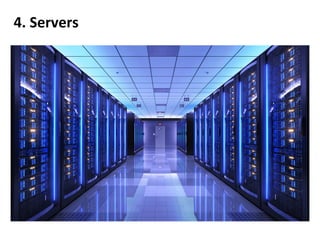
4. Servers
5. Supercomputers
1.Desktop Computers
2. Workstations
3. Enterprise Systems
4. Servers
5. Supercomputers
Functional Units:
•The information handled by a computer is categorized as either instruction or data.
•Instructions or machine instructions are commands that
•Govern the transfer of information within a computer as well as between the
computer and its I/O devices.
•Specify the arithmetic and logic operations to be performed.
•A list of instructions that performs a task is called a program.
•Data are numbers and encoded characters that are used as operands by the
instructions.
•Data can also be any digital information.
•Even the entire program can be called as data, if it is used by another program.
• For example, compiler converts source program
(HLL) to object program (MLL).
• The source program is the input data to the
compiler program which translates source
program into a machine language program.
• Information handled by the computer must be
encoded in suitable format.
• Each number, character or instruction is
encoded as a string of binary digits called bits
having two possible values 0 or 1.
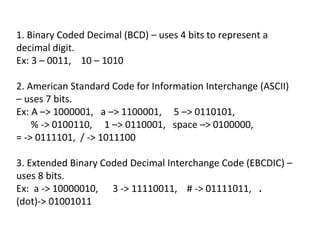
Formats used to represent the bits
1. Binary Coded Decimal (BCD) – uses 4 bits to represent a
decimal digit.
Ex: 3 – 0011, 10 – 1010
2. American Standard Code for Information Interchange (ASCII)
– uses 7 bits.
Ex: A –> 1000001, a –> 1100001, 5 –> 0110101,
% -> 0100110, 1 –> 0110001, space –> 0100000,
= -> 0111101, / -> 1011100
3. Extended Binary Coded Decimal Interchange Code (EBCDIC) –
uses 8 bits.
Ex: a -> 10000010, 3 -> 11110011, # -> 01111011, .
(dot)-> 01001011
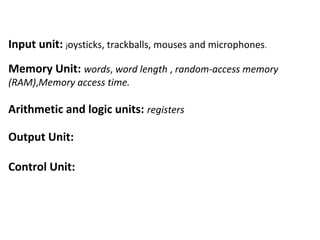
Input unit: joysticks, trackballs, mouses and microphones.
Memory Unit: words, word length , random-access memory
(RAM),Memory access time.
Arithmetic and logic units: registers
Output Unit:
Control Unit:
Basic Operational Concepts
• To perform a given task, an appropriate program consisting of
a list of instructions is stored in the memory.
• Individual instructions are brought from the memory into the
processor, which executes the specified operations.
• Data to be used as instruction operands are also stored in the
memory.
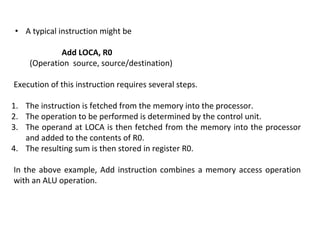
• A typical instruction might be
Add LOCA, R0
(Operation source, source/destination)
Execution of this instruction requires several steps.
1. The instruction is fetched from the memory into the processor.
2. The operation to be performed is determined by the control unit.
3. The operand at LOCA is then fetched from the memory into the processor
and added to the contents of R0.
4. The resulting sum is then stored in register R0.
In the above example, Add instruction combines a memory access operation
with an ALU operation.
Let us consider one more example.
Load LOCA,R1
Add R1,R0
Execution of the above instructions requires several steps.
1. In the first instruction, the content of memory location LOCA is transferred
(copied) to the processor register R1.
2. In the second instruction, the contents of registers R1 and R0 are added.
3. The sum is placed in the register R0.
Note: The original contents of R1 and R0 are destroyed in the process whereas
the original content of LOCA memory location is preserved.
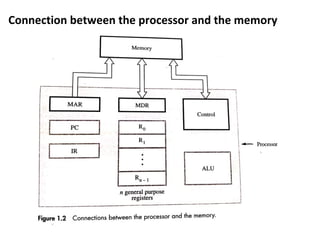
Connection between the processor and the memory
• Instruction register (IR): holds the instruction that is currently
being executed.
• Program Counter (PC): contains the memory address of the next
instruction to be fetched and executed.
• Memory Address Register (MAR): holds the address of the
location to be accessed.
• Memory Data Register (MDR): contains data to be written into or
read out of the addressed location.
• General Purpose Registers (R0, R1, ….., Rn-1): They are also called
processor registers. They serve a variety of functions, including
holding operands that have been loaded from the memory for
processing.
Consider some typical operating steps for the execution of a program:
1. PC is set to point to the first instruction of a program.
2. The contents of PC are transferred to the MAR and a read control signal is sent to the
memory.
3. The addressed word is read out of memory and loaded into the MDR.
4. The contents of MDR are now transferred to the IR. At this point, the instruction is
ready to be decoded and executed.
5. If the instruction involves an operation to be performed by the ALU and that operand
resides in the memory, it has to be fetched by sending its address to the MAR and
initiating a read cycle.
6. When the operand has been read from the memory into MDR, it is transferred from
the MDR to ALU.
7. If the result of this operation is to be stored in the memory, then the result is sent to
MDR.
8. The address of the location where the result is to be stored is sent to the MAR and a
write cycle is initiated.
9. At some point during the execution of the current instruction, the contents of the PC
are incremented so that PC points to the next instruction to be executed. Thus as soon
as the execution of the current instruction is completed, a new instruction fetch may
be started.
•Interrupt signal
•Interrupt service routine
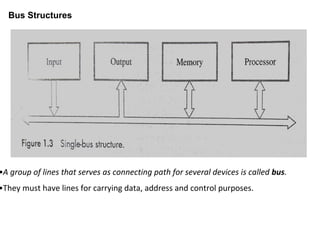
Bus Structures
•A group of lines that serves as connecting path for several devices is called bus.
•They must have lines for carrying data, address and control purposes.
•To interconnect functional units a single bus can be used and bus can be used for
only one transfer at a time and hence only two units can actively use the bus at any
time.
•The main intension of using a single bus is its low cost and its flexibility for attaching
peripheral devices.
•Systems can use multiple buses for more concurrency that is two or more transfers
at a time that leads to better performance but at the increased cost.
•An efficient transfer mechanism has to be used for communication between all
devices that is not constrained by slow devices and that can be used to smooth out
the differences in timing among processors, memories and external devices.
•Buffer registers are included in the devices to hold the information during
transfers.
•For example, consider the transfer of an encoded character from a processor to a
character printer.
Software
System software is a collection of programs that are executed as needed to
perform the following functions-
•Receiving and interpreting user commands.
•Entering and editing application programs and storing them as files in secondary
memory storage devices.
•Managing the storage and retrieval of the files in secondary storage devices.
•Running standard application programs such as word processors, spread sheets,
or games, with data supplied by the user.
•Controlling I/O units to receive input information and produce output results.
•Translating programs from the source form prepared by the user in to object
form consisting of machine instructions.
•Linking and running user written application programs with existing standard
library routines, such as numerical computation packages.
Operating system (OS)
•Key system software component is Operating system (OS).
•OS is a large program, a collection of routines that is used to control the
sharing of and interaction among various computer units as they execute
application program.
•The OS routines perform the tasks required to assign computer resources
to individual application programs.
•The tasks include assigning memory and magnetic disk space to program
and data files, moving data between memory and disk units and handling
I/O operations.
Basics understanding of OS
To understand the basics of OS with one processor, one disk and one printer
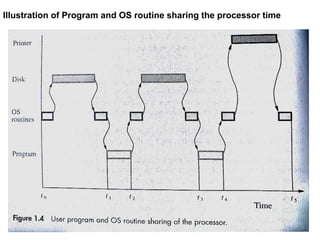
Illustration of Program and OS routine sharing the processor time
Performance
Measure of the performance of computer is how quickly it can execute programs.
•For best performance, it is necessary to design a compiler, the machine
instruction set and the hardware in a coordinated way.
•Elapsed Time: It is the total time required to execute the program. It is a measure
of the performance of the entire computer system.
•In figure 1.4, t5-t0 is the elapsed time.
•It is affected by the speed of the processor, the disk and the printer.
•Processor Time: The sum of the periods during which the processor is active.
•For example, in fig. 1.4, processor time = (t1 to t2)+(t3 to t4).
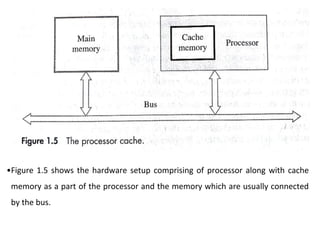
•Figure 1.5 shows the hardware setup comprising of processor along with cache
memory as a part of the processor and the memory which are usually connected
by the bus.
Processor clock
•Processor circuits are controlled by timing signal called clock. Clock defines
regular time intervals, called clock cycles.
•To execute a machine instruction, the processor divides the action to be
performed into the sequence of basic steps and such each step can be
completed in one clock cycle.
• P - length of one clock cycle is an important parameter.
•Its inverse is clock rate, R=1/P, measured in cycles per second called hertz (Hz).
•Processors clock rates range from a few hundred million to over a billion cycles
per second (Hz).
•Million is denoted by Mega (M) and billion by Giga (G).
•Hence 500 million cycles per second => 500 Megahertz (MHz) and
1250 million cycles per second =>1.25 Gigahertz (GHz).
Basic Performance Equation
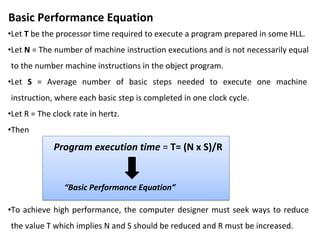
•Let T be the processor time required to execute a program prepared in some HLL.
•Let N = The number of machine instruction executions and is not necessarily equal
to the number machine instructions in the object program.
•Let S = Average number of basic steps needed to execute one machine
instruction, where each basic step is completed in one clock cycle.
•Let R = The clock rate in hertz.
•Then
•To achieve high performance, the computer designer must seek ways to reduce
the value T which implies N and S should be reduced and R must be increased.
Program execution time = T= (N x S)/R
“Basic Performance Equation”

computer organization and architecturebec306c

  • 1.
    Computer Organization and Architecture MODULE 1-PART 1 SUBJECT CODE: 18EC35 SAVITA M ASSISTANT PROFESSOR DEPT. OF ECE JIT,DVG
  • 2.
    Computer Organization andArchitecture consists of – •Computer hardware to store and process the information has electronic circuits, displays, magnetic and optical storage media, electro-mechanical equipment and communication facilities. •Computer Architecture instructions encompasses specification of an instruction set along with hardware units to implement the instructions.
  • 3.
    Computer Types: •A contemporarycomputer is a fast electronic calculating machine that accepts digitized input information, processes it according to a list of internally stored instructions, and produces the resulting output information. •The list of instructions is called a computer program, and the internal storage is called computer memory. Types of Computers: Many types of computers exist that differ widely in size, cost, computational power, and intended use. 1.Desktop Computers 2. Workstations 3. Enterprise Systems 4. Servers 5. Supercomputers
  • 4.
  • 6.
  • 7.
  • 8.
  • 9.
  • 11.
  • 12.
    •The information handledby a computer is categorized as either instruction or data. •Instructions or machine instructions are commands that •Govern the transfer of information within a computer as well as between the computer and its I/O devices. •Specify the arithmetic and logic operations to be performed. •A list of instructions that performs a task is called a program. •Data are numbers and encoded characters that are used as operands by the instructions. •Data can also be any digital information. •Even the entire program can be called as data, if it is used by another program.
  • 13.
    • For example,compiler converts source program (HLL) to object program (MLL). • The source program is the input data to the compiler program which translates source program into a machine language program. • Information handled by the computer must be encoded in suitable format. • Each number, character or instruction is encoded as a string of binary digits called bits having two possible values 0 or 1. Formats used to represent the bits
  • 14.
    1. Binary CodedDecimal (BCD) – uses 4 bits to represent a decimal digit. Ex: 3 – 0011, 10 – 1010 2. American Standard Code for Information Interchange (ASCII) – uses 7 bits. Ex: A –> 1000001, a –> 1100001, 5 –> 0110101, % -> 0100110, 1 –> 0110001, space –> 0100000, = -> 0111101, / -> 1011100 3. Extended Binary Coded Decimal Interchange Code (EBCDIC) – uses 8 bits. Ex: a -> 10000010, 3 -> 11110011, # -> 01111011, . (dot)-> 01001011
  • 15.
    Input unit: joysticks,trackballs, mouses and microphones. Memory Unit: words, word length , random-access memory (RAM),Memory access time. Arithmetic and logic units: registers Output Unit: Control Unit:
  • 16.
    Basic Operational Concepts •To perform a given task, an appropriate program consisting of a list of instructions is stored in the memory. • Individual instructions are brought from the memory into the processor, which executes the specified operations. • Data to be used as instruction operands are also stored in the memory.
  • 17.
    • A typicalinstruction might be Add LOCA, R0 (Operation source, source/destination) Execution of this instruction requires several steps. 1. The instruction is fetched from the memory into the processor. 2. The operation to be performed is determined by the control unit. 3. The operand at LOCA is then fetched from the memory into the processor and added to the contents of R0. 4. The resulting sum is then stored in register R0. In the above example, Add instruction combines a memory access operation with an ALU operation.
  • 18.
    Let us considerone more example. Load LOCA,R1 Add R1,R0 Execution of the above instructions requires several steps. 1. In the first instruction, the content of memory location LOCA is transferred (copied) to the processor register R1. 2. In the second instruction, the contents of registers R1 and R0 are added. 3. The sum is placed in the register R0. Note: The original contents of R1 and R0 are destroyed in the process whereas the original content of LOCA memory location is preserved.
  • 19.
    Connection between theprocessor and the memory
  • 20.
    • Instruction register(IR): holds the instruction that is currently being executed. • Program Counter (PC): contains the memory address of the next instruction to be fetched and executed. • Memory Address Register (MAR): holds the address of the location to be accessed. • Memory Data Register (MDR): contains data to be written into or read out of the addressed location. • General Purpose Registers (R0, R1, ….., Rn-1): They are also called processor registers. They serve a variety of functions, including holding operands that have been loaded from the memory for processing.
  • 21.
    Consider some typicaloperating steps for the execution of a program: 1. PC is set to point to the first instruction of a program. 2. The contents of PC are transferred to the MAR and a read control signal is sent to the memory. 3. The addressed word is read out of memory and loaded into the MDR. 4. The contents of MDR are now transferred to the IR. At this point, the instruction is ready to be decoded and executed. 5. If the instruction involves an operation to be performed by the ALU and that operand resides in the memory, it has to be fetched by sending its address to the MAR and initiating a read cycle. 6. When the operand has been read from the memory into MDR, it is transferred from the MDR to ALU. 7. If the result of this operation is to be stored in the memory, then the result is sent to MDR. 8. The address of the location where the result is to be stored is sent to the MAR and a write cycle is initiated. 9. At some point during the execution of the current instruction, the contents of the PC are incremented so that PC points to the next instruction to be executed. Thus as soon as the execution of the current instruction is completed, a new instruction fetch may be started.
  • 22.
  • 23.
    Bus Structures •A groupof lines that serves as connecting path for several devices is called bus. •They must have lines for carrying data, address and control purposes.
  • 24.
    •To interconnect functionalunits a single bus can be used and bus can be used for only one transfer at a time and hence only two units can actively use the bus at any time. •The main intension of using a single bus is its low cost and its flexibility for attaching peripheral devices. •Systems can use multiple buses for more concurrency that is two or more transfers at a time that leads to better performance but at the increased cost. •An efficient transfer mechanism has to be used for communication between all devices that is not constrained by slow devices and that can be used to smooth out the differences in timing among processors, memories and external devices. •Buffer registers are included in the devices to hold the information during transfers. •For example, consider the transfer of an encoded character from a processor to a character printer.
  • 25.
    Software System software isa collection of programs that are executed as needed to perform the following functions- •Receiving and interpreting user commands. •Entering and editing application programs and storing them as files in secondary memory storage devices. •Managing the storage and retrieval of the files in secondary storage devices. •Running standard application programs such as word processors, spread sheets, or games, with data supplied by the user. •Controlling I/O units to receive input information and produce output results. •Translating programs from the source form prepared by the user in to object form consisting of machine instructions. •Linking and running user written application programs with existing standard library routines, such as numerical computation packages.
  • 26.
    Operating system (OS) •Keysystem software component is Operating system (OS). •OS is a large program, a collection of routines that is used to control the sharing of and interaction among various computer units as they execute application program. •The OS routines perform the tasks required to assign computer resources to individual application programs. •The tasks include assigning memory and magnetic disk space to program and data files, moving data between memory and disk units and handling I/O operations. Basics understanding of OS To understand the basics of OS with one processor, one disk and one printer
  • 27.
    Illustration of Programand OS routine sharing the processor time
  • 28.
    Performance Measure of theperformance of computer is how quickly it can execute programs. •For best performance, it is necessary to design a compiler, the machine instruction set and the hardware in a coordinated way. •Elapsed Time: It is the total time required to execute the program. It is a measure of the performance of the entire computer system. •In figure 1.4, t5-t0 is the elapsed time. •It is affected by the speed of the processor, the disk and the printer. •Processor Time: The sum of the periods during which the processor is active. •For example, in fig. 1.4, processor time = (t1 to t2)+(t3 to t4).
  • 29.
    •Figure 1.5 showsthe hardware setup comprising of processor along with cache memory as a part of the processor and the memory which are usually connected by the bus.
  • 30.
    Processor clock •Processor circuitsare controlled by timing signal called clock. Clock defines regular time intervals, called clock cycles. •To execute a machine instruction, the processor divides the action to be performed into the sequence of basic steps and such each step can be completed in one clock cycle. • P - length of one clock cycle is an important parameter. •Its inverse is clock rate, R=1/P, measured in cycles per second called hertz (Hz). •Processors clock rates range from a few hundred million to over a billion cycles per second (Hz). •Million is denoted by Mega (M) and billion by Giga (G). •Hence 500 million cycles per second => 500 Megahertz (MHz) and 1250 million cycles per second =>1.25 Gigahertz (GHz).
  • 31.
    Basic Performance Equation •LetT be the processor time required to execute a program prepared in some HLL. •Let N = The number of machine instruction executions and is not necessarily equal to the number machine instructions in the object program. •Let S = Average number of basic steps needed to execute one machine instruction, where each basic step is completed in one clock cycle. •Let R = The clock rate in hertz. •Then •To achieve high performance, the computer designer must seek ways to reduce the value T which implies N and S should be reduced and R must be increased. Program execution time = T= (N x S)/R “Basic Performance Equation”