Embedded Systems Overview
- Sameer Rapate
AGENDA OF DISCUSSION
• What is an Embedded System
• Embedded Systems Market (Current/Futuristic &
Career wise)
• Types of Embedded Systems
• Embedded Hardware
• Embedded Software
• Embedded OS and Related Topic
• RTOS Brief
• Embedded Software Development Brief
• If possible a demo with actual Hardware
WHAT IS AN EMBEDDED SYSTEM?
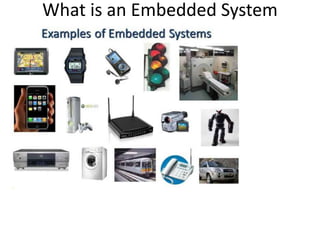
What is an Embedded System
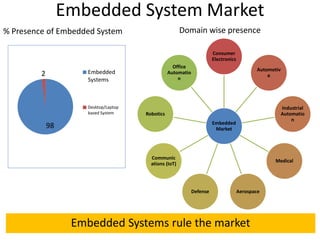
Embedded System Market
Embedded
Market
Consumer
Electronics
Automotiv
e
Industrial
Automatio
n
Medical
AerospaceDefense
Communic
ations (IoT)
Robotics
Office
Automatio
n
98
2 Embedded
Systems
Desktop/Laptop
based System
Embedded Systems rule the market
% Presence of Embedded System Domain wise presence
What is an Embedded System
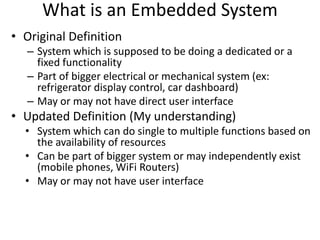
• Original Definition
– System which is supposed to be doing a dedicated or a
fixed functionality
– Part of bigger electrical or mechanical system (ex:
refrigerator display control, car dashboard)
– May or may not have direct user interface
• Updated Definition (My understanding)
• System which can do single to multiple functions based on
the availability of resources
• Can be part of bigger system or may independently exist
(mobile phones, WiFi Routers)
• May or may not have user interface
Perceived Constraints of Embedded
System
• Memory Footprint
• Real time behavior
– Hard requirement
• Example: Car Breaking System
– Soft requirement
• Example: Audio System
• Power
• Cost
– Reducing the bill of materials on System design
• Time to Market
– For the success of the product
TYPES OF EMBEDDED SYSTEM
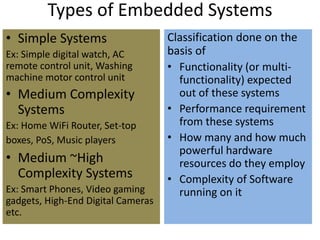
Types of Embedded Systems
• Simple Systems
Ex: Simple digital watch, AC
remote control unit, Washing
machine motor control unit
• Medium Complexity
Systems
Ex: Home WiFi Router, Set-top
boxes, PoS, Music players
• Medium ~High
Complexity Systems
Ex: Smart Phones, Video gaming
gadgets, High-End Digital Cameras
etc.
Classification done on the
basis of
• Functionality (or multi-
functionality) expected
out of these systems
• Performance requirement
from these systems
• How many and how much
powerful hardware
resources do they employ
• Complexity of Software
running on it
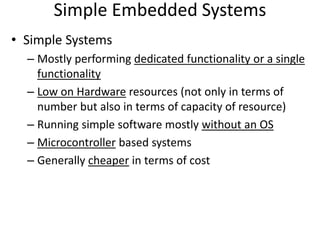
Simple Embedded Systems
• Simple Systems
– Mostly performing dedicated functionality or a single
functionality
– Low on Hardware resources (not only in terms of
number but also in terms of capacity of resource)
– Running simple software mostly without an OS
– Microcontroller based systems
– Generally cheaper in terms of cost
Medium Complex Embedded Systems
• Medium Complexity Systems
– Performing more than one functionality
– Computing hardware resources employed are medium
– Running software with minimal OS or no OS. May
employ an RTOS
– Microcontroller/Microprocessor based system
– May employ an SoC based architecture
Medium-to-High Complex Embedded
Systems
• Medium-to-High Complexity Systems
– Performing a large number of functionalities
– Employs high number of computing hardware
resources. Also the resource configuration is on the
higher side
– Running complex software by employing GPOS or
RTOS, Software Stacks (ex: TCP/IP) and library
framework
– Usually Microprocessor based system or may employ
SoC based architecture
EMBEDDED SYSTEM HARDWARE
Embedded Systems Hardware
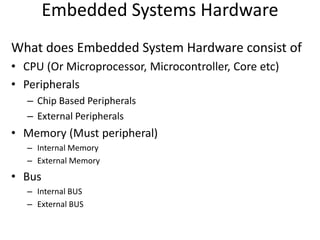
What does Embedded System Hardware consist of
• CPU (Or Microprocessor, Microcontroller, Core etc)
• Peripherals
– Chip Based Peripherals
– External Peripherals
• Memory (Must peripheral)
– Internal Memory
– External Memory
• Bus
– Internal BUS
– External BUS
Embedded Systems Hardware
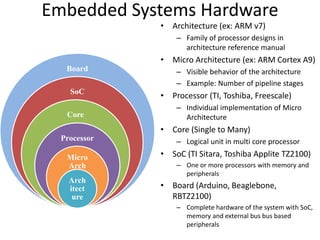
• Architecture (ex: ARM v7)
– Family of processor designs in
architecture reference manual
• Micro Architecture (ex: ARM Cortex A9)
– Visible behavior of the architecture
– Example: Number of pipeline stages
• Processor (TI, Toshiba, Freescale)
– Individual implementation of Micro
Architecture
• Core (Single to Many)
– Logical unit in multi core processor
• SoC (TI Sitara, Toshiba Applite TZ2100)
– One or more processors with memory and
peripherals
• Board (Arduino, Beaglebone,
RBTZ2100)
– Complete hardware of the system with SoC,
memory and external bus bus based
peripherals
Board
SoC
Core
Processor
Micro
Arch
Arch
itect
ure
Schematic of ARM based
Popular HW Board for Prototyping
Arduino Board
Beaglebone
Black Board
Actual Product Board -Hardware
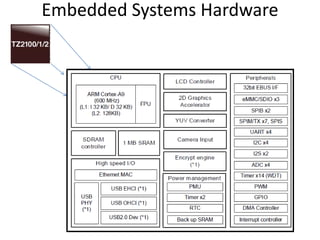
Toshiba ApP-Lite TZ2100 - https://toshiba.semicon-storage.com/ap-en/product/assp/applite/tz2100.html
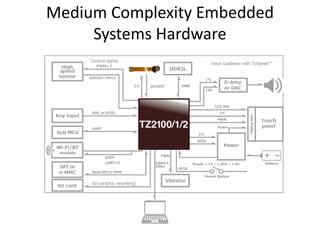
Medium Complexity Embedded
Systems Hardware
Embedded Systems Hardware
EMBEDDED SYSTEM SOFTWARE
Embedded Systems Software
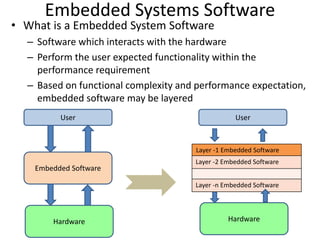
• What is a Embedded System Software
– Software which interacts with the hardware
– Perform the user expected functionality within the
performance requirement
– Based on functional complexity and performance expectation,
embedded software may be layered
Hardware
Embedded Software
User
Hardware
User
LaLayer -1 Embedded Software
aLayer -2 Embedded Software
aLayer -n Embedded Software
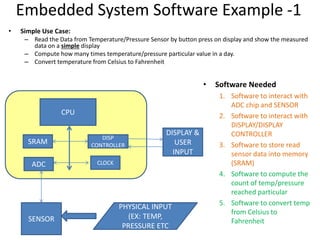
Embedded System Software Example -1
• Software Needed
1. Software to interact with
ADC chip and SENSOR
2. Software to interact with
DISPLAY/DISPLAY
CONTROLLER
3. Software to store read
sensor data into memory
(SRAM)
4. Software to compute the
count of temp/pressure
reached particular
5. Software to convert temp
from Celsius to
Fahrenheit
• Simple Use Case:
– Read the Data from Temperature/Pressure Sensor by button press on display and show the measured
data on a simple display
– Compute how many times temperature/pressure particular value in a day.
– Convert temperature from Celsius to Fahrenheit
CPU
ADC
SRAM
DISP
CONTROLLER
CLOCK
SENSOR
DISPLAY &
USER
INPUT
PHYSICAL INPUT
(EX: TEMP,
PRESSURE ETC
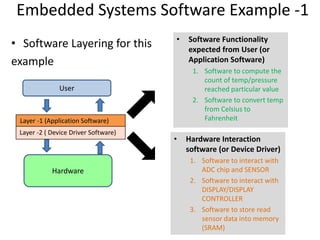
Embedded Systems Software Example -1
• Software Layering for this
example
Hardware
User
LaLayer -1 (Application Software)
aLayer -2 ( Device Driver Software)
• Hardware Interaction
software (or Device Driver)
1. Software to interact with
ADC chip and SENSOR
2. Software to interact with
DISPLAY/DISPLAY
CONTROLLER
3. Software to store read
sensor data into memory
(SRAM)
• Software Functionality
expected from User (or
Application Software)
1. Software to compute the
count of temp/pressure
reached particular value
2. Software to convert temp
from Celsius to
Fahrenheit
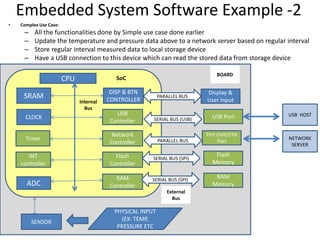
Embedded System Software Example -2
• Complex Use Case:
– All the functionalities done by Simple use case done earlier
– Update the temperature and pressure data above to a network server based on regular interval
– Store regular interval measured data to local storage device
– Have a USB connection to this device which can read the stored data from storage device
CPU
ADC
SRAM
DISP & BTN
CONTROLLER
SENSOR
Display &
User Input
PHYSICAL INPUT
(EX: TEMP,
PRESSURE ETC
USB
Controller
Network
Controller
Flash
Controller
USB Port
PHY CHIP/ETH
Port
Flash
Memory
CLOCK
Timer
RAM
Controller
RAM
Memory
INT
controller
Internal
Bus
External
Bus
PARALLEL BUS
SERIAL BUS (USB)
PARALLEL BUS
SERIAL BUS (SPI)
SERIAL BUS (SPI)
SoC
BOARD
NETWORK
SERVER
USB HOST
Embedded System Software Example -2
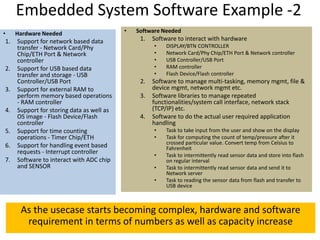
• Hardware Needed
1. Support for network based data
transfer - Network Card/Phy
Chip/ETH Port & Network
controller
2. Support for USB based data
transfer and storage - USB
Controller/USB Port
3. Support for external RAM to
perform memory based operations
- RAM controller
4. Support for storing data as well as
OS image - Flash Device/Flash
controller
5. Support for time counting
operations - Timer Chip/ETH
6. Support for handling event based
requests - Interrupt controller
7. Software to interact with ADC chip
and SENSOR
• Software Needed
1. Software to interact with hardware
• DISPLAY/BTN CONTROLLER
• Network Card/Phy Chip/ETH Port & Network controller
• USB Controller/USB Port
• RAM controller
• Flash Device/Flash controller
2. Software to manage multi-tasking, memory mgmt, file &
device mgmt, network mgmt etc.
3. Software libraries to manage repeated
functionalities/system call interface, network stack
(TCP/IP) etc.
4. Software to do the actual user required application
handling
• Task to take input from the user and show on the display
• Task for computing the count of temp/pressure after it
crossed particular value. Convert temp from Celsius to
Fahrenheit
• Task to intermittently read sensor data and store into flash
on regular interval
• Task to intermittently read sensor data and send it to
Network server
• Task to reading the sensor data from flash and transfer to
USB device
As the usecase starts becoming complex, hardware and software
requirement in terms of numbers as well as capacity increase
Embedded Systems Software Example -2
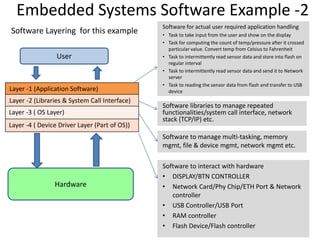
Software Layering for this example
Hardware
User
LaLayer -1 (Application Software)
LaLayer -2 (Libraries & System Call Interface)
aLayer -3 ( OS Layer)
aLayer -4 ( Device Driver Layer (Part of OS))
Software libraries to manage repeated
functionalities/system call interface, network
stack (TCP/IP) etc.
Software for actual user required application handling
• Task to take input from the user and show on the display
• Task for computing the count of temp/pressure after it crossed
particular value. Convert temp from Celsius to Fahrenheit
• Task to intermittently read sensor data and store into flash on
regular interval
• Task to intermittently read sensor data and send it to Network
server
• Task to reading the sensor data from flash and transfer to USB
device
Software to manage multi-tasking, memory
mgmt, file & device mgmt, network mgmt etc.
Software to interact with hardware
• DISPLAY/BTN CONTROLLER
• Network Card/Phy Chip/ETH Port & Network
controller
• USB Controller/USB Port
• RAM controller
• Flash Device/Flash controller
OS (OPERATING SYSTEM) AND
RELATED TOPICS
OS / Device Driver Layer
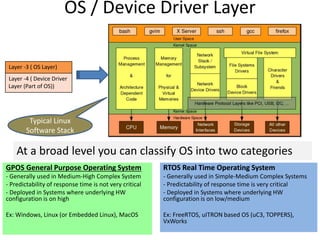
aLayer -3 ( OS Layer)
aLayer -4 ( Device Driver
Layer (Part of OS))
At a broad level you can classify OS into two categories
GPOS General Purpose Operating System
- Generally used in Medium-High Complex System
- Predictability of response time is not very critical
- Deployed in Systems where underlying HW
configuration is on high
Ex: Windows, Linux (or Embedded Linux), MacOS
RTOS Real Time Operating System
- Generally used in Simple-Medium Complex Systems
- Predictability of response time is very critical
- Deployed in Systems where underlying HW
configuration is on low/medium
Ex: FreeRTOS, uITRON based OS (uC3, TOPPERS),
VxWorks
Typical Linux
Software Stack
OS Jargon
OS
Process
es
Threads
IPC
Task
States
Device
Drivers
Any
Many
More…
Latency
Semaph
ores/M
utexes
Signal
IO
Handlin
g
Devices
/Files
Interrup
ts/ISR
OS Jargon
OS
Process
es
Threads
IPC
Task
States
Device
Drivers
Any
Many
More…
Latency
Semaph
ores/M
utexes
Signal
IO
Handlin
g
Devices
/Files
Interrup
ts/ISR
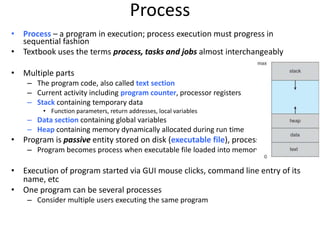
Process
• Process – a program in execution; process execution must progress in
sequential fashion
• Textbook uses the terms process, tasks and jobs almost interchangeably
• Multiple parts
– The program code, also called text section
– Current activity including program counter, processor registers
– Stack containing temporary data
• Function parameters, return addresses, local variables
– Data section containing global variables
– Heap containing memory dynamically allocated during run time
• Program is passive entity stored on disk (executable file), process is active
– Program becomes process when executable file loaded into memory
• Execution of program started via GUI mouse clicks, command line entry of its
name, etc
• One program can be several processes
– Consider multiple users executing the same program
Process States
• As a process executes, it changes state
– new: The process is being created
– running: Instructions are being executed
– waiting: The process is waiting for some event
to occur
– ready: The process is waiting to be assigned to
a processor
– terminated: The process has finished execution
IPC
• Processes within a system may be independent or
cooperating
• Cooperating process can affect or be affected by other
processes, including sharing data
• Reasons for cooperating processes:
– Information sharing
– Computation speedup
– Modularity
– Convenience
• Cooperating processes need interprocess communication
(IPC)
• Two models of IPC
– Shared memory
– Message passing
IPC
(a) Message passing. (b) shared memory.
RTOS BRIEF
RTOS and Types of RTOS
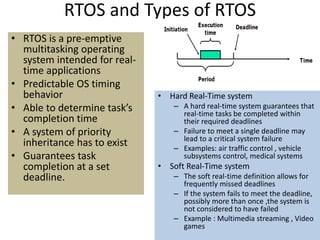
• RTOS is a pre-emptive
multitasking operating
system intended for real-
time applications
• Predictable OS timing
behavior
• Able to determine task’s
completion time
• A system of priority
inheritance has to exist
• Guarantees task
completion at a set
deadline.
• Hard Real-Time system
– A hard real-time system guarantees that
real-time tasks be completed within
their required deadlines
– Failure to meet a single deadline may
lead to a critical system failure
– Examples: air traffic control , vehicle
subsystems control, medical systems
• Soft Real-Time system
– The soft real-time definition allows for
frequently missed deadlines
– If the system fails to meet the deadline,
possibly more than once ,the system is
not considered to have failed
– Example : Multimedia streaming , Video
games
Task Management in RTOS
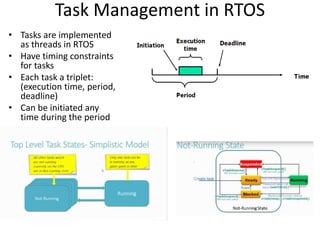
• Tasks are implemented
as threads in RTOS
• Have timing constraints
for tasks
• Each task a triplet:
(execution time, period,
deadline)
• Can be initiated any
time during the period
What are interrupts?
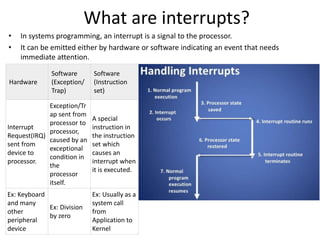
• In systems programming, an interrupt is a signal to the processor.
• It can be emitted either by hardware or software indicating an event that needs
immediate attention.
Hardware
Software
(Exception/
Trap)
Software
(Instruction
set)
Interrupt
Request(IRQ)
sent from
device to
processor.
Exception/Tr
ap sent from
processor to
processor,
caused by an
exceptional
condition in
the
processor
itself.
A special
instruction in
the instruction
set which
causes an
interrupt when
it is executed.
Ex: Keyboard
and many
other
peripheral
device
Ex: Division
by zero
Ex: Usually as a
system call
from
Application to
Kernel
Interrupt Latency and Why it is
Important for RTOS
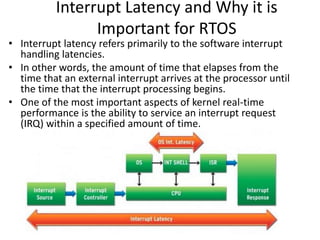
• Interrupt latency refers primarily to the software interrupt
handling latencies.
• In other words, the amount of time that elapses from the
time that an external interrupt arrives at the processor until
the time that the interrupt processing begins.
• One of the most important aspects of kernel real-time
performance is the ability to service an interrupt request
(IRQ) within a specified amount of time.
EMBEDDED SOFTWARE
DEVELOPMENT
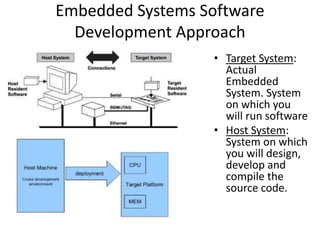
Embedded Systems Software
Development Approach
• Target System:
Actual
Embedded
System. System
on which you
will run software
• Host System:
System on which
you will design,
develop and
compile the
source code.
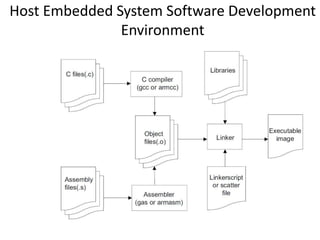
Host Embedded System Software Development
Environment
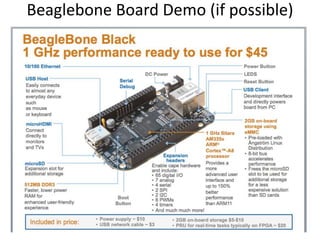
Beaglebone Board Demo (if possible)
Useful Resources
• Embedded Linux
https://bootlin.com/docs/
• Online Training Courses
– Udemy (https://www.udemy.com)
– Coursera (https://www.coursera.org)

Embedded Systems Overview

  • 1.
  • 2.
    AGENDA OF DISCUSSION •What is an Embedded System • Embedded Systems Market (Current/Futuristic & Career wise) • Types of Embedded Systems • Embedded Hardware • Embedded Software • Embedded OS and Related Topic • RTOS Brief • Embedded Software Development Brief • If possible a demo with actual Hardware
  • 3.
    WHAT IS ANEMBEDDED SYSTEM?
  • 4.
    What is anEmbedded System
  • 5.
    Embedded System Market Embedded Market Consumer Electronics Automotiv e Industrial Automatio n Medical AerospaceDefense Communic ations(IoT) Robotics Office Automatio n 98 2 Embedded Systems Desktop/Laptop based System Embedded Systems rule the market % Presence of Embedded System Domain wise presence
  • 6.
    What is anEmbedded System • Original Definition – System which is supposed to be doing a dedicated or a fixed functionality – Part of bigger electrical or mechanical system (ex: refrigerator display control, car dashboard) – May or may not have direct user interface • Updated Definition (My understanding) • System which can do single to multiple functions based on the availability of resources • Can be part of bigger system or may independently exist (mobile phones, WiFi Routers) • May or may not have user interface
  • 7.
    Perceived Constraints ofEmbedded System • Memory Footprint • Real time behavior – Hard requirement • Example: Car Breaking System – Soft requirement • Example: Audio System • Power • Cost – Reducing the bill of materials on System design • Time to Market – For the success of the product
  • 8.
  • 9.
    Types of EmbeddedSystems • Simple Systems Ex: Simple digital watch, AC remote control unit, Washing machine motor control unit • Medium Complexity Systems Ex: Home WiFi Router, Set-top boxes, PoS, Music players • Medium ~High Complexity Systems Ex: Smart Phones, Video gaming gadgets, High-End Digital Cameras etc. Classification done on the basis of • Functionality (or multi- functionality) expected out of these systems • Performance requirement from these systems • How many and how much powerful hardware resources do they employ • Complexity of Software running on it
  • 10.
    Simple Embedded Systems •Simple Systems – Mostly performing dedicated functionality or a single functionality – Low on Hardware resources (not only in terms of number but also in terms of capacity of resource) – Running simple software mostly without an OS – Microcontroller based systems – Generally cheaper in terms of cost
  • 11.
    Medium Complex EmbeddedSystems • Medium Complexity Systems – Performing more than one functionality – Computing hardware resources employed are medium – Running software with minimal OS or no OS. May employ an RTOS – Microcontroller/Microprocessor based system – May employ an SoC based architecture
  • 12.
    Medium-to-High Complex Embedded Systems •Medium-to-High Complexity Systems – Performing a large number of functionalities – Employs high number of computing hardware resources. Also the resource configuration is on the higher side – Running complex software by employing GPOS or RTOS, Software Stacks (ex: TCP/IP) and library framework – Usually Microprocessor based system or may employ SoC based architecture
  • 13.
  • 14.
    Embedded Systems Hardware Whatdoes Embedded System Hardware consist of • CPU (Or Microprocessor, Microcontroller, Core etc) • Peripherals – Chip Based Peripherals – External Peripherals • Memory (Must peripheral) – Internal Memory – External Memory • Bus – Internal BUS – External BUS
  • 15.
    Embedded Systems Hardware •Architecture (ex: ARM v7) – Family of processor designs in architecture reference manual • Micro Architecture (ex: ARM Cortex A9) – Visible behavior of the architecture – Example: Number of pipeline stages • Processor (TI, Toshiba, Freescale) – Individual implementation of Micro Architecture • Core (Single to Many) – Logical unit in multi core processor • SoC (TI Sitara, Toshiba Applite TZ2100) – One or more processors with memory and peripherals • Board (Arduino, Beaglebone, RBTZ2100) – Complete hardware of the system with SoC, memory and external bus bus based peripherals Board SoC Core Processor Micro Arch Arch itect ure
  • 16.
  • 17.
    Popular HW Boardfor Prototyping Arduino Board Beaglebone Black Board
  • 18.
    Actual Product Board-Hardware Toshiba ApP-Lite TZ2100 - https://toshiba.semicon-storage.com/ap-en/product/assp/applite/tz2100.html
  • 19.
  • 20.
  • 21.
  • 22.
    Embedded Systems Software •What is a Embedded System Software – Software which interacts with the hardware – Perform the user expected functionality within the performance requirement – Based on functional complexity and performance expectation, embedded software may be layered Hardware Embedded Software User Hardware User LaLayer -1 Embedded Software aLayer -2 Embedded Software aLayer -n Embedded Software
  • 23.
    Embedded System SoftwareExample -1 • Software Needed 1. Software to interact with ADC chip and SENSOR 2. Software to interact with DISPLAY/DISPLAY CONTROLLER 3. Software to store read sensor data into memory (SRAM) 4. Software to compute the count of temp/pressure reached particular 5. Software to convert temp from Celsius to Fahrenheit • Simple Use Case: – Read the Data from Temperature/Pressure Sensor by button press on display and show the measured data on a simple display – Compute how many times temperature/pressure particular value in a day. – Convert temperature from Celsius to Fahrenheit CPU ADC SRAM DISP CONTROLLER CLOCK SENSOR DISPLAY & USER INPUT PHYSICAL INPUT (EX: TEMP, PRESSURE ETC
  • 24.
    Embedded Systems SoftwareExample -1 • Software Layering for this example Hardware User LaLayer -1 (Application Software) aLayer -2 ( Device Driver Software) • Hardware Interaction software (or Device Driver) 1. Software to interact with ADC chip and SENSOR 2. Software to interact with DISPLAY/DISPLAY CONTROLLER 3. Software to store read sensor data into memory (SRAM) • Software Functionality expected from User (or Application Software) 1. Software to compute the count of temp/pressure reached particular value 2. Software to convert temp from Celsius to Fahrenheit
  • 25.
    Embedded System SoftwareExample -2 • Complex Use Case: – All the functionalities done by Simple use case done earlier – Update the temperature and pressure data above to a network server based on regular interval – Store regular interval measured data to local storage device – Have a USB connection to this device which can read the stored data from storage device CPU ADC SRAM DISP & BTN CONTROLLER SENSOR Display & User Input PHYSICAL INPUT (EX: TEMP, PRESSURE ETC USB Controller Network Controller Flash Controller USB Port PHY CHIP/ETH Port Flash Memory CLOCK Timer RAM Controller RAM Memory INT controller Internal Bus External Bus PARALLEL BUS SERIAL BUS (USB) PARALLEL BUS SERIAL BUS (SPI) SERIAL BUS (SPI) SoC BOARD NETWORK SERVER USB HOST
  • 26.
    Embedded System SoftwareExample -2 • Hardware Needed 1. Support for network based data transfer - Network Card/Phy Chip/ETH Port & Network controller 2. Support for USB based data transfer and storage - USB Controller/USB Port 3. Support for external RAM to perform memory based operations - RAM controller 4. Support for storing data as well as OS image - Flash Device/Flash controller 5. Support for time counting operations - Timer Chip/ETH 6. Support for handling event based requests - Interrupt controller 7. Software to interact with ADC chip and SENSOR • Software Needed 1. Software to interact with hardware • DISPLAY/BTN CONTROLLER • Network Card/Phy Chip/ETH Port & Network controller • USB Controller/USB Port • RAM controller • Flash Device/Flash controller 2. Software to manage multi-tasking, memory mgmt, file & device mgmt, network mgmt etc. 3. Software libraries to manage repeated functionalities/system call interface, network stack (TCP/IP) etc. 4. Software to do the actual user required application handling • Task to take input from the user and show on the display • Task for computing the count of temp/pressure after it crossed particular value. Convert temp from Celsius to Fahrenheit • Task to intermittently read sensor data and store into flash on regular interval • Task to intermittently read sensor data and send it to Network server • Task to reading the sensor data from flash and transfer to USB device As the usecase starts becoming complex, hardware and software requirement in terms of numbers as well as capacity increase
  • 27.
    Embedded Systems SoftwareExample -2 Software Layering for this example Hardware User LaLayer -1 (Application Software) LaLayer -2 (Libraries & System Call Interface) aLayer -3 ( OS Layer) aLayer -4 ( Device Driver Layer (Part of OS)) Software libraries to manage repeated functionalities/system call interface, network stack (TCP/IP) etc. Software for actual user required application handling • Task to take input from the user and show on the display • Task for computing the count of temp/pressure after it crossed particular value. Convert temp from Celsius to Fahrenheit • Task to intermittently read sensor data and store into flash on regular interval • Task to intermittently read sensor data and send it to Network server • Task to reading the sensor data from flash and transfer to USB device Software to manage multi-tasking, memory mgmt, file & device mgmt, network mgmt etc. Software to interact with hardware • DISPLAY/BTN CONTROLLER • Network Card/Phy Chip/ETH Port & Network controller • USB Controller/USB Port • RAM controller • Flash Device/Flash controller
  • 28.
    OS (OPERATING SYSTEM)AND RELATED TOPICS
  • 29.
    OS / DeviceDriver Layer aLayer -3 ( OS Layer) aLayer -4 ( Device Driver Layer (Part of OS)) At a broad level you can classify OS into two categories GPOS General Purpose Operating System - Generally used in Medium-High Complex System - Predictability of response time is not very critical - Deployed in Systems where underlying HW configuration is on high Ex: Windows, Linux (or Embedded Linux), MacOS RTOS Real Time Operating System - Generally used in Simple-Medium Complex Systems - Predictability of response time is very critical - Deployed in Systems where underlying HW configuration is on low/medium Ex: FreeRTOS, uITRON based OS (uC3, TOPPERS), VxWorks Typical Linux Software Stack
  • 30.
  • 31.
  • 32.
    Process • Process –a program in execution; process execution must progress in sequential fashion • Textbook uses the terms process, tasks and jobs almost interchangeably • Multiple parts – The program code, also called text section – Current activity including program counter, processor registers – Stack containing temporary data • Function parameters, return addresses, local variables – Data section containing global variables – Heap containing memory dynamically allocated during run time • Program is passive entity stored on disk (executable file), process is active – Program becomes process when executable file loaded into memory • Execution of program started via GUI mouse clicks, command line entry of its name, etc • One program can be several processes – Consider multiple users executing the same program
  • 33.
    Process States • Asa process executes, it changes state – new: The process is being created – running: Instructions are being executed – waiting: The process is waiting for some event to occur – ready: The process is waiting to be assigned to a processor – terminated: The process has finished execution
  • 34.
    IPC • Processes withina system may be independent or cooperating • Cooperating process can affect or be affected by other processes, including sharing data • Reasons for cooperating processes: – Information sharing – Computation speedup – Modularity – Convenience • Cooperating processes need interprocess communication (IPC) • Two models of IPC – Shared memory – Message passing
  • 35.
    IPC (a) Message passing.(b) shared memory.
  • 36.
  • 37.
    RTOS and Typesof RTOS • RTOS is a pre-emptive multitasking operating system intended for real- time applications • Predictable OS timing behavior • Able to determine task’s completion time • A system of priority inheritance has to exist • Guarantees task completion at a set deadline. • Hard Real-Time system – A hard real-time system guarantees that real-time tasks be completed within their required deadlines – Failure to meet a single deadline may lead to a critical system failure – Examples: air traffic control , vehicle subsystems control, medical systems • Soft Real-Time system – The soft real-time definition allows for frequently missed deadlines – If the system fails to meet the deadline, possibly more than once ,the system is not considered to have failed – Example : Multimedia streaming , Video games
  • 38.
    Task Management inRTOS • Tasks are implemented as threads in RTOS • Have timing constraints for tasks • Each task a triplet: (execution time, period, deadline) • Can be initiated any time during the period
  • 39.
    What are interrupts? •In systems programming, an interrupt is a signal to the processor. • It can be emitted either by hardware or software indicating an event that needs immediate attention. Hardware Software (Exception/ Trap) Software (Instruction set) Interrupt Request(IRQ) sent from device to processor. Exception/Tr ap sent from processor to processor, caused by an exceptional condition in the processor itself. A special instruction in the instruction set which causes an interrupt when it is executed. Ex: Keyboard and many other peripheral device Ex: Division by zero Ex: Usually as a system call from Application to Kernel
  • 40.
    Interrupt Latency andWhy it is Important for RTOS • Interrupt latency refers primarily to the software interrupt handling latencies. • In other words, the amount of time that elapses from the time that an external interrupt arrives at the processor until the time that the interrupt processing begins. • One of the most important aspects of kernel real-time performance is the ability to service an interrupt request (IRQ) within a specified amount of time.
  • 41.
  • 42.
    Embedded Systems Software DevelopmentApproach • Target System: Actual Embedded System. System on which you will run software • Host System: System on which you will design, develop and compile the source code.
  • 43.
    Host Embedded SystemSoftware Development Environment
  • 44.
    Beaglebone Board Demo(if possible)
  • 45.
    Useful Resources • EmbeddedLinux https://bootlin.com/docs/ • Online Training Courses – Udemy (https://www.udemy.com) – Coursera (https://www.coursera.org)