Working of CPU
The CPU
CPU
The CPU
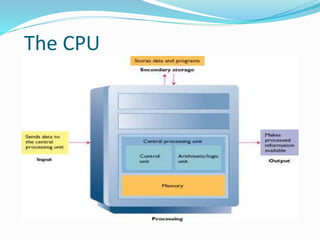
 CPU stands for central processing unit. it is brain of computer
 It is most important component of the computer. it is also
called processor.
 Converts data into information
 It continually receives instructions to execute. Each instruction
tells CPU to process data.
 CPU performs all operations on data according to the given
instructions.
It executes instructions and tells other parts of computers what
to do.
Most of the work consists of calculations and data transfer.
Two parts
Control Unit (CU)
Arithmetic and Logic Unit (ALU)
Control Unit
CU
 Control Unit is an important component of CPU. It
acts Like a supervisor of the computer.
 It controls all activities of the computer system
 All the computers resources are managed from the
control unit.
 Think of the control unit as a traffic signal directing
the flow of data through the CPU.
 The CPU´s instruction for carrying out
commands are built into the control unit.
 The instruction or instruction set, list all the
operations that the CPU can perform.
 Each instruction in the instruction set is
expressed in microcode– a series of basic
directions that tell the CPU how to execute more
complex operations.
Control Unit
CU
 It performs the following operations:
1. It fetches(makes) or retrieve instruction from main
memory.
2. It interprets9understands) the instruction to find what
operation is to be performed.
3. It controls the execution of instruction. The control unit
determines the sequence in which computer programs
and instructions are executed
Arithmetic / Logic Unit
ALU
ALU is a part of CPU. Actual Execution of instructions takes place in
this part. All Arithmetic and Logical operations are performed in ALU.
It consists of two units
 Arithmetic Unit
Performs arithmetic operations
 Logic Unit
Performs logical operations
Arithmetic Operations
Addition
Subtraction
Multiplication
Division
Logical Operations
 Evaluates conditions
 Makes comparisons
 Can compare
 Numbers
 Letters
 Special characters
ALU
 Many instructions carried out by the control unit involve
simply moving data from one place to another.
 From memory to storage, from memory to the printer, and so
on.
 When the control unit encounters an instruction that involves
arithmetic or logic , however, it passes that instruction to the
second component of the CPU, the ALU.
ALU
 The ALU performs these operations.
 ALU includes a group of registers--- high speed memory
locations built directly into the CPU that are used to hold the
data currently being processed.
 ALU will use the register to hold the data currently being used
for calculation.
For example
 CU might load two numbers from memory into the registers in
the ALU.
 Then it might tell the ALU divide the two numbers (an
arithmetic operation) or to see whether the numbers are equal
(a logical operation).
 The answer to this calculation will be stored in another register
before being sent out of the CPU.
What is the Information Processing
Cycle?
 These are the steps that are taken to convert raw facts,
which is data, into information. It starts with data
collection.
 The 4 basic operations of the information processing
cycle are input, processing, output, storage and/or
distribution.
 A computer is the machine that performs the cycle.
16
IP Cycle:
17
Machine cycles
 Each time the CPU executes an instruction, it takes a series
of steps.
 The completed series of steps is called machine cycles.
 A machine cycle itself can be broken down into two smaller
cycles-
1. Instruction cycle
2. Execution cycle
Machine cycle - fetch► decode► execute► store
Instruction Execution Cycle
 The CPU continuously transfer data to and from memory
 Data transfer is done in units called instruction or words
 When computer is switched on, the CPU continuously
goes through a process called Fetch-Decode-Execute-Store.
Example
 What happens when you load up a game from disk into
your computer? The program is stored as data, for example
on a disc. You have to read that data, and store it in the
memory of your computer. When you have done that, you
can treat it as a program, (i.e. as a set of instructions) and
run (execute) it.
Instruction Execution Cycle
At the beginning of machine cycle (that is during the
instruction cycle), The CPU takes two steps:
INSTRUCTION CYCLE
1. FETCHING:
 Before CPU can execute an instruction ,the control unit must
retrieve a command or data from the computer’s memory.
2. DECODING:
 Before a command can be executed ,the control unit must break
down (or decode) the command into instruction that
correspond to those in the CPU’ s instruction set
Execution Cycle
At this point, the CPU is ready to begin the execution cycle:
Execution Cycle
1. Executing:
 When the command is executed, the CPU carries out the
instructions in order by converting them into microcode.
2. Storing:
 The CPU may be required to store the results of an instruction in
memory (but this condition is not always required).
Multiplication of two numbers:
Steps of Machine Cycle
Computer Buses
 BUS - Physically a set of wires. The components of the
Computer are connected to these buses.
 Buses are electrical paths or lines inside computers.
 Buses are used to carry electrical signals between
components of computer.
 One line of wire can carry one bit at a time.
 The capacity of computer bus depends on the number of
data lines it contains.
 An 8-bit bus can carry 8 bits of data from one component
to other at a time.
Types of buses
There are two types of buses
 System Buses
 Expansion Buses
System Buses
System bus is a type of computer bus that is used
to connect the main components of a computer
such as CPU and main memory.
Computers normally have system bus of 70-100
lines.
Different types of system buses are as follows:
 Address Bus
 Data Bus
 Control Bus
Data Bus
 The electrical path through which data is
transferred between components of a computer.
 The data bus consists of 8,16,32 or 64 separate lines.
 The data bus lines are bi-directional
1. Read data from memory using these lines
2. Write data to memory locations using these lines
Basic block diagram of a typical computer system including common peripherals.
The computer itself is shown within the gray block.
Address Bus
 Many components are connected to one another through buses.
 Each component is assigned a unique ID.This Id is called address of
that component.
 Each I/O devices has a unique address. (monitor, mouse, CD-ROM)
 If a component wants to communicate with another component, it uses
address of that component.
 The address bus is uni-directional.
 It can carry information only in one direction.
 It carries address of memory location from microprocessor to the main
memory
Control Bus
 Collection of individual control signals.
 Whether the CPU will read or write data.
 CPU is accessing memory or an I/O device.
 Memory or I/O is ready to transfer data.
 For example, If CPU wants to read data from main
memory ,it uses control bus to send the memory read
command to the main memory of the computer.
Expansion Buses
Expansion bus is a type of computer that is used to
connect CPU with peripheral devices such as mouse,
Keyboard , Scanners, Printers etc

Comp App Lect 2 System Unit.pptx

  • 1.
  • 2.
  • 3.
  • 4.
    The CPU  CPUstands for central processing unit. it is brain of computer  It is most important component of the computer. it is also called processor.  Converts data into information  It continually receives instructions to execute. Each instruction tells CPU to process data.  CPU performs all operations on data according to the given instructions.
  • 5.
    It executes instructionsand tells other parts of computers what to do. Most of the work consists of calculations and data transfer. Two parts Control Unit (CU) Arithmetic and Logic Unit (ALU)
  • 6.
    Control Unit CU  ControlUnit is an important component of CPU. It acts Like a supervisor of the computer.  It controls all activities of the computer system  All the computers resources are managed from the control unit.  Think of the control unit as a traffic signal directing the flow of data through the CPU.
  • 7.
     The CPU´sinstruction for carrying out commands are built into the control unit.  The instruction or instruction set, list all the operations that the CPU can perform.  Each instruction in the instruction set is expressed in microcode– a series of basic directions that tell the CPU how to execute more complex operations.
  • 8.
    Control Unit CU  Itperforms the following operations: 1. It fetches(makes) or retrieve instruction from main memory. 2. It interprets9understands) the instruction to find what operation is to be performed. 3. It controls the execution of instruction. The control unit determines the sequence in which computer programs and instructions are executed
  • 9.
    Arithmetic / LogicUnit ALU ALU is a part of CPU. Actual Execution of instructions takes place in this part. All Arithmetic and Logical operations are performed in ALU. It consists of two units  Arithmetic Unit Performs arithmetic operations  Logic Unit Performs logical operations
  • 10.
  • 11.
    Logical Operations  Evaluatesconditions  Makes comparisons  Can compare  Numbers  Letters  Special characters
  • 12.
    ALU  Many instructionscarried out by the control unit involve simply moving data from one place to another.  From memory to storage, from memory to the printer, and so on.  When the control unit encounters an instruction that involves arithmetic or logic , however, it passes that instruction to the second component of the CPU, the ALU.
  • 13.
    ALU  The ALUperforms these operations.  ALU includes a group of registers--- high speed memory locations built directly into the CPU that are used to hold the data currently being processed.  ALU will use the register to hold the data currently being used for calculation.
  • 14.
    For example  CUmight load two numbers from memory into the registers in the ALU.  Then it might tell the ALU divide the two numbers (an arithmetic operation) or to see whether the numbers are equal (a logical operation).  The answer to this calculation will be stored in another register before being sent out of the CPU.
  • 16.
    What is theInformation Processing Cycle?  These are the steps that are taken to convert raw facts, which is data, into information. It starts with data collection.  The 4 basic operations of the information processing cycle are input, processing, output, storage and/or distribution.  A computer is the machine that performs the cycle. 16
  • 17.
  • 18.
    Machine cycles  Eachtime the CPU executes an instruction, it takes a series of steps.  The completed series of steps is called machine cycles.  A machine cycle itself can be broken down into two smaller cycles- 1. Instruction cycle 2. Execution cycle Machine cycle - fetch► decode► execute► store
  • 19.
    Instruction Execution Cycle The CPU continuously transfer data to and from memory  Data transfer is done in units called instruction or words  When computer is switched on, the CPU continuously goes through a process called Fetch-Decode-Execute-Store.
  • 20.
    Example  What happenswhen you load up a game from disk into your computer? The program is stored as data, for example on a disc. You have to read that data, and store it in the memory of your computer. When you have done that, you can treat it as a program, (i.e. as a set of instructions) and run (execute) it.
  • 21.
    Instruction Execution Cycle Atthe beginning of machine cycle (that is during the instruction cycle), The CPU takes two steps: INSTRUCTION CYCLE 1. FETCHING:  Before CPU can execute an instruction ,the control unit must retrieve a command or data from the computer’s memory. 2. DECODING:  Before a command can be executed ,the control unit must break down (or decode) the command into instruction that correspond to those in the CPU’ s instruction set
  • 22.
    Execution Cycle At thispoint, the CPU is ready to begin the execution cycle: Execution Cycle 1. Executing:  When the command is executed, the CPU carries out the instructions in order by converting them into microcode. 2. Storing:  The CPU may be required to store the results of an instruction in memory (but this condition is not always required).
  • 23.
    Multiplication of twonumbers: Steps of Machine Cycle
  • 24.
    Computer Buses  BUS- Physically a set of wires. The components of the Computer are connected to these buses.  Buses are electrical paths or lines inside computers.  Buses are used to carry electrical signals between components of computer.  One line of wire can carry one bit at a time.  The capacity of computer bus depends on the number of data lines it contains.  An 8-bit bus can carry 8 bits of data from one component to other at a time.
  • 25.
    Types of buses Thereare two types of buses  System Buses  Expansion Buses
  • 26.
    System Buses System busis a type of computer bus that is used to connect the main components of a computer such as CPU and main memory. Computers normally have system bus of 70-100 lines. Different types of system buses are as follows:  Address Bus  Data Bus  Control Bus
  • 27.
    Data Bus  Theelectrical path through which data is transferred between components of a computer.  The data bus consists of 8,16,32 or 64 separate lines.  The data bus lines are bi-directional 1. Read data from memory using these lines 2. Write data to memory locations using these lines
  • 28.
    Basic block diagramof a typical computer system including common peripherals. The computer itself is shown within the gray block.
  • 29.
    Address Bus  Manycomponents are connected to one another through buses.  Each component is assigned a unique ID.This Id is called address of that component.  Each I/O devices has a unique address. (monitor, mouse, CD-ROM)  If a component wants to communicate with another component, it uses address of that component.  The address bus is uni-directional.  It can carry information only in one direction.  It carries address of memory location from microprocessor to the main memory
  • 30.
    Control Bus  Collectionof individual control signals.  Whether the CPU will read or write data.  CPU is accessing memory or an I/O device.  Memory or I/O is ready to transfer data.  For example, If CPU wants to read data from main memory ,it uses control bus to send the memory read command to the main memory of the computer.
  • 31.
    Expansion Buses Expansion busis a type of computer that is used to connect CPU with peripheral devices such as mouse, Keyboard , Scanners, Printers etc